-
vuex---$store案例
目录
借助mapGetters生成计算属性,从getters中读取数据
vuex流程图

State理解为数据源,像极了我们之前学的data
Actions似java中的业务逻辑层,对逻辑操作,然后向Mutations发送数据,在这个业务逻辑中也可以互相调用,如下图所示(连环处理)

Mutations类似java中的数据层,只对数据进行操作,不对业务操作(比如数据加减乘除)
安装vuex


搭建vuex环境
创建文件src/store/index.js
- // 该文件用于创建Vuex中最为核心的store
- import Vue from 'vue'
- // 引入Vuex
- import Vuex from 'vuex'
- // 使用vuex插件
- Vue.use(Vuex)
- // 准备actions——用于响应组件中的动作
- const actions={}
- //准备mutations——用于操作数据(state)
- const mutations={}
- //准备state——用于存储数据
- const state = {}
- // 创建store并暴露
- export default new Vuex.Store({
- // actions:actions,
- // mutations:mutations,
- // state:state
- // 当key和value重名的时候,可以简写
- actions,
- mutations,
- state
- })
在main.js中创建vm时传入store配置项
- // 该文件是整个项目的入口文件
- // 引入vue,这个vue不能解析template配置项
- import Vue from 'vue'
- // 下面这个是引入完整版的vue。这个vue能解析template配置项
- // import Vue from 'vue/dis/vue'
- // 引入APP组件,它是所有组件的父组件
- import App from './App.vue'
- // 引入store
- import store from './store/index'
- // 关闭vue的生产提示
- Vue.config.productionTip = false
- // 创建vue实例对象---vm
- new Vue({
- el:'#app',
- render: h => h(App),
- store,
- // 全局事件总线
- beforeCreate(){
- Vue.prototype.$bus = this
- }
- })
一、使用vuex编写求和案例

main.js
- // 该文件是整个项目的入口文件
- // 引入vue,这个vue不能解析template配置项
- import Vue from 'vue'
- // 下面这个是引入完整版的vue。这个vue能解析template配置项
- // import Vue from 'vue/dis/vue'
- // 引入APP组件,它是所有组件的父组件
- import App from './App.vue'
- // 引入store
- import store from './store/index'
- // 关闭vue的生产提示
- Vue.config.productionTip = false
- // 创建vue实例对象---vm
- new Vue({
- el:'#app',
- render: h => h(App),
- store,
- // 全局事件总线
- beforeCreate(){
- Vue.prototype.$bus = this
- }
- })
src/store/index.js
- // 该文件用于创建Vuex中最为核心的store
- import Vue from 'vue'
- // 引入Vuex
- import Vuex from 'vuex'
- // 使用vuex插件
- Vue.use(Vuex)
- // 准备actions——用于响应组件中的动作
- const actions={
- // // value是传入过来的参数
- // jia(context,value){
- // console.log('actions中的jia被调用了',context,value)
- // // 下面这个地方用大写的做个区分
- // context.commit('JIA',value)
- // },
- // jian(context,value){
- // console.log('actions中的jian被调用了',context,value)
- // // 下面这个地方用大写的做个区分
- // context.commit('JIAN',value)
- // },
- jiaOdd(context,value){
- console.log('actions中的jian被调用了',context,value)
- if(context.state.sum%2){
- context.commit('JIA',value)
- }
- },
- jiaWait(context,value){
- console.log('actions中的jiaWait被调用了',context,value)
- setTimeout(()=>{
- context.commit('JIA',value)
- },500)
- }
- }
- //准备mutations——用于操作数据(state)
- // 在这个地方不要写业务逻辑 就写数据
- const mutations={
- // 直接的帮我们操作sum
- JIA(state,value){
- console.log('mutations中的JIA被调用了',state,value)
- state.sum +=value
- },
- JIAN(state,value){
- console.log('mutations中的JIAN被调用了',state,value)
- state.sum -=value
- },
- }
- //准备state——用于存储数据
- const state = {
- sum:0 //当前的和
- }
- // 创建store并暴露
- export default new Vuex.Store({
- // actions:actions,
- // mutations:mutations,
- // state:state
- // 当key和value重名的时候,可以简写
- actions,
- mutations,
- state
- })
Count.vue
- <template>
- <div>
- <h1>当前求和为:{{$store.state.sum}}h1>
- <select v-model="n">
- <option :value="1">1 option>
- <option :value="2">2option>
- <option :value="3">3 option>
- select>
- <button @click="increment">+button>
- <button @click="decrement">-button>
- <button @click="incrementOdd">当前求和为奇数再加button>
- <button @click="incrementWait">等一等再加button>
- div>
- template>
- <script>
- export default {
- name:'Count',
- data(){
- return{
- n:1, //用户选择的数字
- }
- },
- methods:{
- increment(){
- // $store在vc身上,所以要用this
- // this.$store.dispatch('jia',this.n) 如果没有逻辑我们直接commit和Mutations对话
- this.$store.commit('JIA',this.n)
- },
- decrement(){
- // this.$store.dispatch('jian',this.n)
- // 如果没有逻辑我们直接commit和Mutations对话
- this.$store.commit('JIAN',this.n)
- },
- incrementOdd(){
- this.$store.dispatch('jiaOdd',this.n)
- },
- incrementWait(){
- this.$store.dispatch('jiaWait',this.n)
- }
- }
- }
- script>
- <style scoped>
- button{
- margin-left:5px
- }
- style>
效果图

二、getters配置项
这个地方像极了我们之前学的computed计算属性,其实这个地方用计算属性也可以实现,但是我们为什么不用计算属性呢?
因为我们用计算属性的话只能在单一组件中使用,我们使用getters配置项,只要是此项目中的组件都可以调用

- // 准备将getters——用于将state中的数据进行加工
- const getters ={
- bigSum(state){
- return state.sum*10
- }
- }
- // 创建store并暴露
- export default new Vuex.Store({
- // actions:actions,
- // mutations:mutations,
- // state:state
- // 当key和value重名的时候,可以简写
- actions,
- mutations,
- state,
- getters,
- })
其他组件调用
<h3>当前求和放大十倍:{{$store.getters.bigSum}}h3>三、引入mapState、mapGettes
依然是类似key:value的形式,key是在本组件中我们要使用的名字,value是index.js组件中我们定义的名字
借助mapState生成计算属性,从state中读取数据
我们发现在最上面的案例的时候,获取state中数据有点麻烦,需要打好几段代码,下面我们可以直接读取
方式一:对象写法
- <h1>当前求和为:{{he}}h1>
- <h3>当前求和放大十倍:{{bigSum}}h3>
- <h3>我在{{xuexiao}}学习{{xueke}}h3>
import {mapState} from 'vuex'- // 靠程序员亲自写计算属性也能实现
- computed:{
- // ES6语法 下面这一堆是一个对象 这句话的含义:把下面中的每一组key:value依次取出放到下面,就相当于我们写了注释中的那三个方法
- ...mapState({'he':'sum','xuexiao':'school','xueke':'subject'}),
- // 下面三个从state中取数据
- // he(){
- // return yhis$store.state.sum
- // },
- // xuexiao(){
- // return this.$store.state.school
- // },
- // xueke(){
- // return this.$store.state.subject
- // },
- // 下面这个从getters中取数据
- bigSum(){
- return this.$store.getters.bigSum
- }
- },

方式二:数组写法
- // 这个时候不能简写! 一定不要简写成sum,school,subject
- //...mapState({'sum':'sum','school':'school','subject':'subject'}),
- ...mapState(['sum','school','subject']),
借助mapGetters生成计算属性,从getters中读取数据
import {mapGetters} from 'vuex'方式一:对象写法
- <h1>当前求和为:{{sum}}h1>
- <h3>当前求和放大十倍:{{bigSum}}h3>
- <h3>我在{{school}}学习{{subject}}h3>
- // 下面这个从getters中取数据
- // bigSum(){
- // return this.$store.getters.bigSum
- // }
- ...mapGetters({bigSum:'bigSum'}),
方式二:
...mapGetters(['bigSum'])四、mapActions与mapMutations

备注:mapActions与mapMutations使用时,若需要传递参数,在模板中绑定事件时传递好参数,否则参数是事件对象
借助mapMutations生成对应方法,
方法中会调用commit去联系Mutations
import {mapMutations} from 'vuex'- <button @click="increment(n)">+button>
- <button @click="decrement(n)">-button>
- methods:{
- // increment(){
- // // $store在vc身上,所以要用this
- // // this.$store.dispatch('jia',this.n) 如果没有逻辑我们直接commit和Mutations对话
- // this.$store.commit('JIA',this.n)
- // },
- // decrement(){
- // // this.$store.dispatch('jian',this.n)
- // // 如果没有逻辑我们直接commit和Mutations对话
- // this.$store.commit('JIAN',this.n)
- // },
- ...mapMutations({increment:'JIA',decrement:'JIAN'}),
- }
借助mapActions生成对应方法,
生成的方法会调用dispatch去联系mutations
- <button @click="incrementOdd(n)">当前求和为奇数再加button>
- <button @click="incrementWait(n)">等一等再加button>
- // incrementOdd(){
- // this.$store.dispatch('jiaOdd',this.n)
- // },
- // incrementWait(){
- // this.$store.dispatch('jiaWait',this.n)
- // },
- ...mapActions({incrementOdd:'jiaOdd',incrementWait:'jiaWait'}),
五、vuex模块化管理+namespace
总结

count.js
- // 求和功能相关的配置
- export default{
- // 命名空间 加上这个之后,我们下面的a才能够被map...识别
- namespaced:true,
- actions:{
- jiaOdd(context,value){
- console.log('actions中的jian被调用了',context,value)
- if(context.state.sum%2){
- context.commit('JIA',value)
- }
- },
- jiaWait(context,value){
- console.log('actions中的jiaWait被调用了',context,value)
- setTimeout(()=>{
- context.commit('JIA',value)
- },500)
- }
- },
- mutations:{
- // 直接的帮我们操作sum
- JIA(state,value){
- console.log('mutations中的JIA被调用了',state,value)
- state.sum +=value
- },
- JIAN(state,value){
- console.log('mutations中的JIAN被调用了',state,value)
- state.sum -=value
- },
- },
- state:{
- sum:0, //当前的和
- school:'尚硅谷',
- subject:'前端',
- },
- getters:{
- // 准备将getters——用于将state中的数据进行加工
- bigSum(state){
- return state.sum*10
- }
- },
- }
person.js
- // 人员管理相关配置
- export default {
- namespaced:true,
- actions:{},
- mutations:{
- // 在这个地方value就是我们要加的那个对象
- ADD_PERSON(state,value){
- state.personList.unshift(value)
- }
- },
- state:{
- personList:[
- {id:'001',name:'张三'},
- ]
- },
- getters:{},
- }
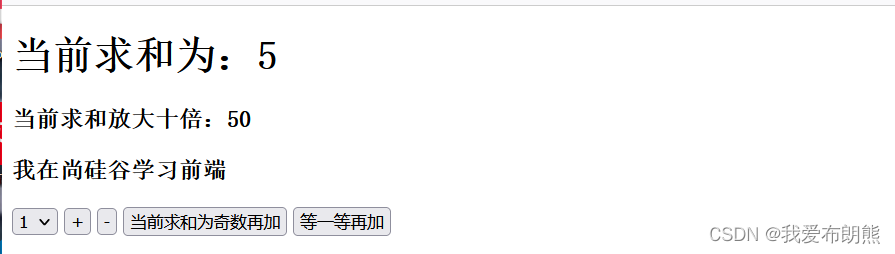
count.vue
- <div>
- <h1>当前求和为:{{sum}}h1>
- <h3>当前求和放大十倍:{{bigSum}}h3>
- <h3>我在{{school}}学习{{subject}}h3>
- <select v-model="n">
- <option :value="1">1 option>
- <option :value="2">2option>
- <option :value="3">3 option>
- select>
- <button @click="increment(n)">+button>
- <button @click="decrement(n)">-button>
- <button @click="incrementOdd(n)">当前求和为奇数再加button>
- <button @click="incrementWait(n)">等一等再加button>
- div>
- <script>
- import {mapGetters, mapState,mapMutations,mapActions} from 'vuex'
- export default {
- name:'Count',
- data(){
- return{
- n:1, //用户选择的数字
- }
- },
- methods:{
- ...mapMutations('a',{increment:'JIA',decrement:'JIAN'}),
- ...mapActions('a',{incrementOdd:'jiaOdd',incrementWait:'jiaWait'}),
- },
- // 靠程序员亲自写计算属性也能实现
- computed:{
- // ...mapState(['sum','school','subject']),
- // ...mapState(['a','b']),如若这样写 我们编写页面需要不断的进行 .调用
- ...mapState('a',['sum','school','subject']),
- ...mapState('b',['personList']),
- ...mapGetters('a',['bigSum'])
- },
- }
- script>
- <style scoped>
- button{
- margin-left:5px
- }
- style>
-
相关阅读:
C语言-基础
使用 Python 创建您自己的NFT集合(二)NFT存储
神仙级别Kafka架构笔记,阿里架构师看到都感慨怎么没早看到
MySQL的replace into 与insert into on duplicate key update
超声波清洗机哪个品牌清洁力强、清洁力强超声波清洗机推荐
安全多方计算框架最全合集(持续更新)
普冉PY32系列(十三) SPI驱动WS2812全彩LED
猫罐头哪个牌子好吃?精选5款好评率高的猫罐头推荐!
WEB安全技能树-安全漏洞类型-命令执行漏洞
【css】iconfont的使用
- 原文地址:https://blog.csdn.net/weixin_51351637/article/details/126915799
- 最新文章
-
.NET如何实现向量语义分析
AI 相关概念之(基础层级):机器学习、神经网络、深度学习
Cursor 里开发一个“一个后端 + 多个前端”项目的时候,推荐的项目目录结构组织方式
从零学习Kafka:消费者组重平衡
GitHub Actions 在小型网站的最佳实践
PyTorch KernelAgent 源码解读 ---(4)--- ExtractorAgent
18. LangChain输出解析器实战:从大模型输出到结构化数据的转化
Rollup 官方插件 @rollup/plugin-inject 详解
用 FFT 和 NTT 解决多项式乘法
Midscene 实战:告别 XPath,用自然语言实现 UI 自动化测试