-
使用python生成大量数据写入es数据库并查询操作2
模拟学生个人信息写入es数据库,包括姓名、性别、年龄、特点、科目、成绩,创建时间。
方案一:
在写入数据时未提前创建索引mapping,而是每插入一条数据都包含了索引的信息。
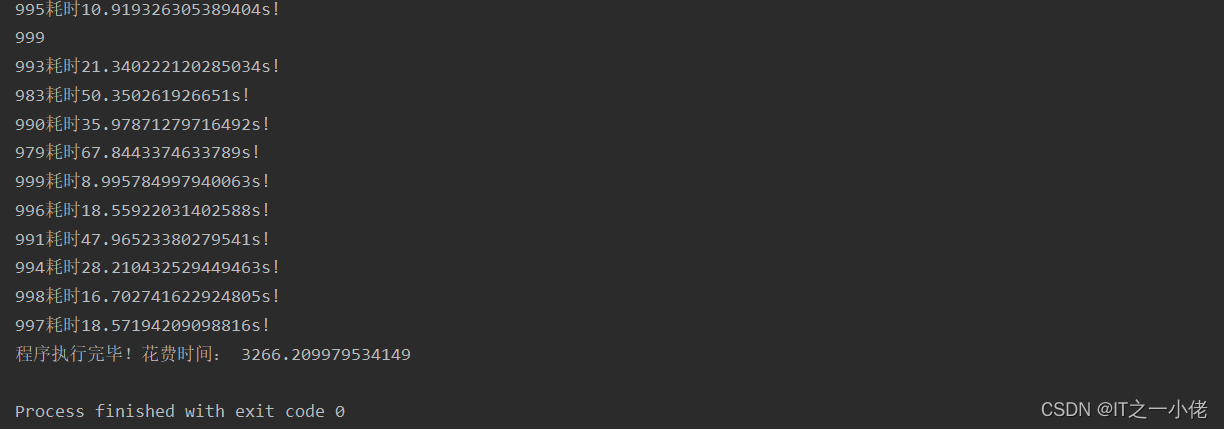
示例代码:【多线程写入数据】【一次性写入10000*1000条数据】 【本人亲测耗时3266秒】
- from elasticsearch import Elasticsearch
- from elasticsearch import helpers
- from datetime import datetime
- from queue import Queue
- import random
- import time
- import threading
- es = Elasticsearch(hosts='http://127.0.0.1:9200')
- # print(es)
- names = ['刘一', '陈二', '张三', '李四', '王五', '赵六', '孙七', '周八', '吴九', '郑十']
- sexs = ['男', '女']
- age = [25, 28, 29, 32, 31, 26, 27, 30]
- character = ['自信但不自负,不以自我为中心',
- '努力、积极、乐观、拼搏是我的人生信条',
- '抗压能力强,能够快速适应周围环境',
- '敢做敢拼,脚踏实地;做事认真负责,责任心强',
- '爱好所学专业,乐于学习新知识;对工作有责任心;踏实,热情,对生活充满激情',
- '主动性强,自学能力强,具有团队合作意识,有一定组织能力',
- '忠实诚信,讲原则,说到做到,决不推卸责任',
- '有自制力,做事情始终坚持有始有终,从不半途而废',
- '肯学习,有问题不逃避,愿意虚心向他人学习',
- '愿意以谦虚态度赞扬接纳优越者,权威者',
- '会用100%的热情和精力投入到工作中;平易近人',
- '为人诚恳,性格开朗,积极进取,适应力强、勤奋好学、脚踏实地',
- '有较强的团队精神,工作积极进取,态度认真']
- subjects = ['语文', '数学', '英语', '生物', '地理']
- grades = [85, 77, 96, 74, 85, 69, 84, 59, 67, 69, 86, 96, 77, 78, 79, 80, 81, 82, 83, 84, 85, 86]
- create_time = datetime.now().strftime('%Y-%m-%d %H:%M:%S')
- def save_to_es(num):
- """
- 批量写入数据到es数据库
- :param num:
- :return:
- """
- start = time.time()
- action = [
- {
- "_index": "personal_info_10000000",
- "_type": "doc",
- "_id": i,
- "_source": {
- "id": i,
- "name": random.choice(names),
- "sex": random.choice(sexs),
- "age": random.choice(age),
- "character": random.choice(character),
- "subject": random.choice(subjects),
- "grade": random.choice(grades),
- "create_time": create_time
- }
- } for i in range(10000 * num, 10000 * num + 10000)
- ]
- helpers.bulk(es, action)
- end = time.time()
- print(f"{num}耗时{end - start}s!")
- def run():
- global queue
- while queue.qsize() > 0:
- num = queue.get()
- print(num)
- save_to_es(num)
- if __name__ == '__main__':
- start = time.time()
- queue = Queue()
- # 序号数据进队列
- for num in range(1000):
- queue.put(num)
- # 多线程执行程序
- consumer_lst = []
- for _ in range(10):
- thread = threading.Thread(target=run)
- thread.start()
- consumer_lst.append(thread)
- for consumer in consumer_lst:
- consumer.join()
- end = time.time()
- print('程序执行完毕!花费时间:', end - start)
运行结果:


自动创建的索引mapping:
- GET personal_info_10000000/_mapping
- {
- "personal_info_10000000" : {
- "mappings" : {
- "properties" : {
- "age" : {
- "type" : "long"
- },
- "character" : {
- "type" : "text",
- "fields" : {
- "keyword" : {
- "type" : "keyword",
- "ignore_above" : 256
- }
- }
- },
- "create_time" : {
- "type" : "text",
- "fields" : {
- "keyword" : {
- "type" : "keyword",
- "ignore_above" : 256
- }
- }
- },
- "grade" : {
- "type" : "long"
- },
- "id" : {
- "type" : "long"
- },
- "name" : {
- "type" : "text",
- "fields" : {
- "keyword" : {
- "type" : "keyword",
- "ignore_above" : 256
- }
- }
- },
- "sex" : {
- "type" : "text",
- "fields" : {
- "keyword" : {
- "type" : "keyword",
- "ignore_above" : 256
- }
- }
- },
- "subject" : {
- "type" : "text",
- "fields" : {
- "keyword" : {
- "type" : "keyword",
- "ignore_above" : 256
- }
- }
- }
- }
- }
- }
- }
方案二:
1.顺序插入5000000条数据
先创建索引personal_info_5000000,确定好mapping后,再插入数据。
新建索引并设置mapping信息:
- PUT personal_info_5000000
- {
- "settings": {
- "number_of_shards": 3,
- "number_of_replicas": 1
- },
- "mappings": {
- "properties": {
- "id": {
- "type": "long"
- },
- "name": {
- "type": "text",
- "fields": {
- "keyword": {
- "type": "keyword",
- "ignore_above": 32
- }
- }
- },
- "sex": {
- "type": "text",
- "fields": {
- "keyword": {
- "type": "keyword",
- "ignore_above": 8
- }
- }
- },
- "age": {
- "type": "long"
- },
- "character": {
- "type": "text",
- "analyzer": "ik_smart",
- "fields": {
- "keyword": {
- "type": "keyword",
- "ignore_above": 256
- }
- }
- },
- "subject": {
- "type": "text",
- "fields": {
- "keyword": {
- "type": "keyword",
- "ignore_above": 256
- }
- }
- },
- "grade": {
- "type": "long"
- },
- "create_time": {
- "type": "date",
- "format": "yyyy-MM-dd HH:mm:ss||yyyy-MM-dd||epoch_millis"
- }
- }
- }
- }
查看新建索引信息:
- GET personal_info_5000000
- {
- "personal_info_5000000" : {
- "aliases" : { },
- "mappings" : {
- "properties" : {
- "age" : {
- "type" : "long"
- },
- "character" : {
- "type" : "text",
- "fields" : {
- "keyword" : {
- "type" : "keyword",
- "ignore_above" : 256
- }
- },
- "analyzer" : "ik_smart"
- },
- "create_time" : {
- "type" : "date",
- "format" : "yyyy-MM-dd HH:mm:ss||yyyy-MM-dd||epoch_millis"
- },
- "grade" : {
- "type" : "long"
- },
- "id" : {
- "type" : "long"
- },
- "name" : {
- "type" : "text",
- "fields" : {
- "keyword" : {
- "type" : "keyword",
- "ignore_above" : 32
- }
- }
- },
- "sex" : {
- "type" : "text",
- "fields" : {
- "keyword" : {
- "type" : "keyword",
- "ignore_above" : 8
- }
- }
- },
- "subject" : {
- "type" : "text",
- "fields" : {
- "keyword" : {
- "type" : "keyword",
- "ignore_above" : 256
- }
- }
- }
- }
- },
- "settings" : {
- "index" : {
- "routing" : {
- "allocation" : {
- "include" : {
- "_tier_preference" : "data_content"
- }
- }
- },
- "number_of_shards" : "3",
- "provided_name" : "personal_info_50000000",
- "creation_date" : "1663471072176",
- "number_of_replicas" : "1",
- "uuid" : "5DfmfUhUTJeGk1k4XnN-lQ",
- "version" : {
- "created" : "7170699"
- }
- }
- }
- }
- }
开始插入数据:
示例代码: 【单线程写入数据】【一次性写入10000*500条数据】 【本人亲测耗时7916秒】
- from elasticsearch import Elasticsearch
- from datetime import datetime
- from queue import Queue
- import random
- import time
- import threading
- es = Elasticsearch(hosts='http://127.0.0.1:9200')
- # print(es)
- names = ['刘一', '陈二', '张三', '李四', '王五', '赵六', '孙七', '周八', '吴九', '郑十']
- sexs = ['男', '女']
- age = [25, 28, 29, 32, 31, 26, 27, 30]
- character = ['自信但不自负,不以自我为中心',
- '努力、积极、乐观、拼搏是我的人生信条',
- '抗压能力强,能够快速适应周围环境',
- '敢做敢拼,脚踏实地;做事认真负责,责任心强',
- '爱好所学专业,乐于学习新知识;对工作有责任心;踏实,热情,对生活充满激情',
- '主动性强,自学能力强,具有团队合作意识,有一定组织能力',
- '忠实诚信,讲原则,说到做到,决不推卸责任',
- '有自制力,做事情始终坚持有始有终,从不半途而废',
- '肯学习,有问题不逃避,愿意虚心向他人学习',
- '愿意以谦虚态度赞扬接纳优越者,权威者',
- '会用100%的热情和精力投入到工作中;平易近人',
- '为人诚恳,性格开朗,积极进取,适应力强、勤奋好学、脚踏实地',
- '有较强的团队精神,工作积极进取,态度认真']
- subjects = ['语文', '数学', '英语', '生物', '地理']
- grades = [85, 77, 96, 74, 85, 69, 84, 59, 67, 69, 86, 96, 77, 78, 79, 80, 81, 82, 83, 84, 85, 86]
- create_time = datetime.now().strftime('%Y-%m-%d %H:%M:%S')
- # 添加程序耗时的功能
- def timer(func):
- def wrapper(*args, **kwargs):
- start = time.time()
- res = func(*args, **kwargs)
- end = time.time()
- print('id{}共耗时约 {:.2f} 秒'.format(*args, end - start))
- return res
- return wrapper
- @timer
- def save_to_es(num):
- """
- 顺序写入数据到es数据库
- :param num:
- :return:
- """
- body = {
- "id": num,
- "name": random.choice(names),
- "sex": random.choice(sexs),
- "age": random.choice(age),
- "character": random.choice(character),
- "subject": random.choice(subjects),
- "grade": random.choice(grades),
- "create_time": create_time
- }
- # 此时若索引不存在时会新建
- es.index(index="personal_info_5000000", id=num, doc_type="_doc", document=body)
- def run():
- global queue
- while queue.qsize() > 0:
- num = queue.get()
- print(num)
- save_to_es(num)
- if __name__ == '__main__':
- start = time.time()
- queue = Queue()
- # 序号数据进队列
- for num in range(5000000):
- queue.put(num)
- # 多线程执行程序
- consumer_lst = []
- for _ in range(10):
- thread = threading.Thread(target=run)
- thread.start()
- consumer_lst.append(thread)
- for consumer in consumer_lst:
- consumer.join()
- end = time.time()
- print('程序执行完毕!花费时间:', end - start)
运行结果:

2.批量插入5000000条数据
先创建索引personal_info_5000000_v2,确定好mapping后,再插入数据。
新建索引并设置mapping信息:
- PUT personal_info_5000000_v2
- {
- "settings": {
- "number_of_shards": 3,
- "number_of_replicas": 1
- },
- "mappings": {
- "properties": {
- "id": {
- "type": "long"
- },
- "name": {
- "type": "text",
- "fields": {
- "keyword": {
- "type": "keyword",
- "ignore_above": 32
- }
- }
- },
- "sex": {
- "type": "text",
- "fields": {
- "keyword": {
- "type": "keyword",
- "ignore_above": 8
- }
- }
- },
- "age": {
- "type": "long"
- },
- "character": {
- "type": "text",
- "analyzer": "ik_smart",
- "fields": {
- "keyword": {
- "type": "keyword",
- "ignore_above": 256
- }
- }
- },
- "subject": {
- "type": "text",
- "fields": {
- "keyword": {
- "type": "keyword",
- "ignore_above": 256
- }
- }
- },
- "grade": {
- "type": "long"
- },
- "create_time": {
- "type": "date",
- "format": "yyyy-MM-dd HH:mm:ss||yyyy-MM-dd||epoch_millis"
- }
- }
- }
- }
查看新建索引信息:
- GET personal_info_5000000_v2
- {
- "personal_info_5000000_v2" : {
- "aliases" : { },
- "mappings" : {
- "properties" : {
- "age" : {
- "type" : "long"
- },
- "character" : {
- "type" : "text",
- "fields" : {
- "keyword" : {
- "type" : "keyword",
- "ignore_above" : 256
- }
- },
- "analyzer" : "ik_smart"
- },
- "create_time" : {
- "type" : "date",
- "format" : "yyyy-MM-dd HH:mm:ss||yyyy-MM-dd||epoch_millis"
- },
- "grade" : {
- "type" : "long"
- },
- "id" : {
- "type" : "long"
- },
- "name" : {
- "type" : "text",
- "fields" : {
- "keyword" : {
- "type" : "keyword",
- "ignore_above" : 32
- }
- }
- },
- "sex" : {
- "type" : "text",
- "fields" : {
- "keyword" : {
- "type" : "keyword",
- "ignore_above" : 8
- }
- }
- },
- "subject" : {
- "type" : "text",
- "fields" : {
- "keyword" : {
- "type" : "keyword",
- "ignore_above" : 256
- }
- }
- }
- }
- },
- "settings" : {
- "index" : {
- "routing" : {
- "allocation" : {
- "include" : {
- "_tier_preference" : "data_content"
- }
- }
- },
- "number_of_shards" : "3",
- "provided_name" : "personal_info_5000000_v2",
- "creation_date" : "1663485323617",
- "number_of_replicas" : "1",
- "uuid" : "XBPaDn_gREmAoJmdRyBMAA",
- "version" : {
- "created" : "7170699"
- }
- }
- }
- }
- }
批量插入数据:
通过elasticsearch模块导入helper,通过helper.bulk来批量处理大量的数据。首先将所有的数据定义成字典形式,各字段含义如下:
- _index对应索引名称,并且该索引必须存在。
- _type对应类型名称。
- _source对应的字典内,每一篇文档的字段和值,可有有多个字段。
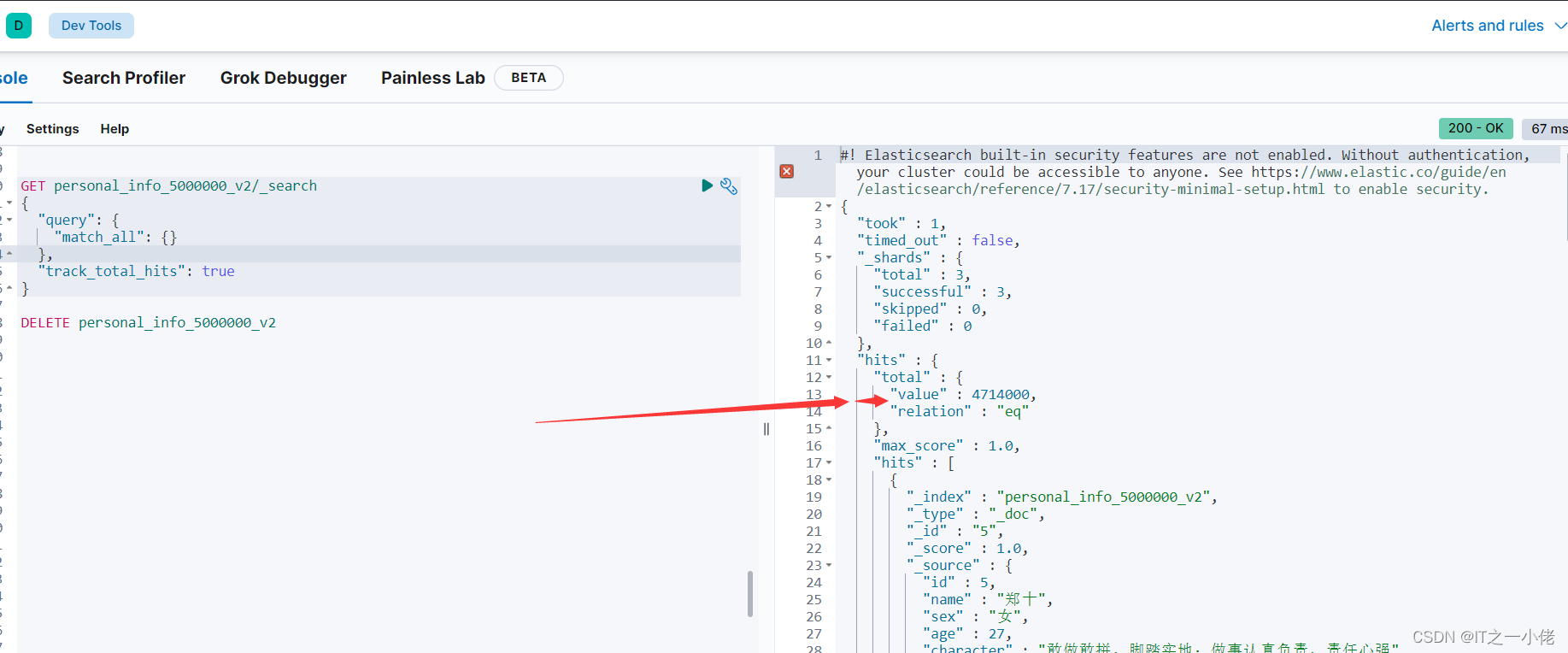
示例代码: 【程序中途异常,写入4714000条数据】
- from elasticsearch import Elasticsearch
- from elasticsearch import helpers
- from datetime import datetime
- from queue import Queue
- import random
- import time
- import threading
- es = Elasticsearch(hosts='http://127.0.0.1:9200')
- # print(es)
- names = ['刘一', '陈二', '张三', '李四', '王五', '赵六', '孙七', '周八', '吴九', '郑十']
- sexs = ['男', '女']
- age = [25, 28, 29, 32, 31, 26, 27, 30]
- character = ['自信但不自负,不以自我为中心',
- '努力、积极、乐观、拼搏是我的人生信条',
- '抗压能力强,能够快速适应周围环境',
- '敢做敢拼,脚踏实地;做事认真负责,责任心强',
- '爱好所学专业,乐于学习新知识;对工作有责任心;踏实,热情,对生活充满激情',
- '主动性强,自学能力强,具有团队合作意识,有一定组织能力',
- '忠实诚信,讲原则,说到做到,决不推卸责任',
- '有自制力,做事情始终坚持有始有终,从不半途而废',
- '肯学习,有问题不逃避,愿意虚心向他人学习',
- '愿意以谦虚态度赞扬接纳优越者,权威者',
- '会用100%的热情和精力投入到工作中;平易近人',
- '为人诚恳,性格开朗,积极进取,适应力强、勤奋好学、脚踏实地',
- '有较强的团队精神,工作积极进取,态度认真']
- subjects = ['语文', '数学', '英语', '生物', '地理']
- grades = [85, 77, 96, 74, 85, 69, 84, 59, 67, 69, 86, 96, 77, 78, 79, 80, 81, 82, 83, 84, 85, 86]
- create_time = datetime.now().strftime('%Y-%m-%d %H:%M:%S')
- # 添加程序耗时的功能
- def timer(func):
- def wrapper(*args, **kwargs):
- start = time.time()
- res = func(*args, **kwargs)
- end = time.time()
- print('id{}共耗时约 {:.2f} 秒'.format(*args, end - start))
- return res
- return wrapper
- @timer
- def save_to_es(num):
- """
- 批量写入数据到es数据库
- :param num:
- :return:
- """
- action = [
- {
- "_index": "personal_info_5000000_v2",
- "_type": "_doc",
- "_id": i,
- "_source": {
- "id": i,
- "name": random.choice(names),
- "sex": random.choice(sexs),
- "age": random.choice(age),
- "character": random.choice(character),
- "subject": random.choice(subjects),
- "grade": random.choice(grades),
- "create_time": create_time
- }
- } for i in range(10000 * num, 10000 * num + 10000)
- ]
- helpers.bulk(es, action)
- def run():
- global queue
- while queue.qsize() > 0:
- num = queue.get()
- print(num)
- save_to_es(num)
- if __name__ == '__main__':
- start = time.time()
- queue = Queue()
- # 序号数据进队列
- for num in range(500):
- queue.put(num)
- # 多线程执行程序
- consumer_lst = []
- for _ in range(10):
- thread = threading.Thread(target=run)
- thread.start()
- consumer_lst.append(thread)
- for consumer in consumer_lst:
- consumer.join()
- end = time.time()
- print('程序执行完毕!花费时间:', end - start)
运行结果:

3.批量插入50000000条数据
先创建索引personal_info_5000000_v2,确定好mapping后,再插入数据。
此过程是在上面批量插入的前提下进行优化,采用python生成器。
建立索引和mapping同上,直接上代码:
示例代码: 【程序中途异常,写入3688000条数据】
- from elasticsearch import Elasticsearch
- from elasticsearch import helpers
- from datetime import datetime
- from queue import Queue
- import random
- import time
- import threading
- es = Elasticsearch(hosts='http://127.0.0.1:9200')
- # print(es)
- names = ['刘一', '陈二', '张三', '李四', '王五', '赵六', '孙七', '周八', '吴九', '郑十']
- sexs = ['男', '女']
- age = [25, 28, 29, 32, 31, 26, 27, 30]
- character = ['自信但不自负,不以自我为中心',
- '努力、积极、乐观、拼搏是我的人生信条',
- '抗压能力强,能够快速适应周围环境',
- '敢做敢拼,脚踏实地;做事认真负责,责任心强',
- '爱好所学专业,乐于学习新知识;对工作有责任心;踏实,热情,对生活充满激情',
- '主动性强,自学能力强,具有团队合作意识,有一定组织能力',
- '忠实诚信,讲原则,说到做到,决不推卸责任',
- '有自制力,做事情始终坚持有始有终,从不半途而废',
- '肯学习,有问题不逃避,愿意虚心向他人学习',
- '愿意以谦虚态度赞扬接纳优越者,权威者',
- '会用100%的热情和精力投入到工作中;平易近人',
- '为人诚恳,性格开朗,积极进取,适应力强、勤奋好学、脚踏实地',
- '有较强的团队精神,工作积极进取,态度认真']
- subjects = ['语文', '数学', '英语', '生物', '地理']
- grades = [85, 77, 96, 74, 85, 69, 84, 59, 67, 69, 86, 96, 77, 78, 79, 80, 81, 82, 83, 84, 85, 86]
- create_time = datetime.now().strftime('%Y-%m-%d %H:%M:%S')
- # 添加程序耗时的功能
- def timer(func):
- def wrapper(*args, **kwargs):
- start = time.time()
- res = func(*args, **kwargs)
- end = time.time()
- print('id{}共耗时约 {:.2f} 秒'.format(*args, end - start))
- return res
- return wrapper
- @timer
- def save_to_es(num):
- """
- 使用生成器批量写入数据到es数据库
- :param num:
- :return:
- """
- action = (
- {
- "_index": "personal_info_5000000_v3",
- "_type": "_doc",
- "_id": i,
- "_source": {
- "id": i,
- "name": random.choice(names),
- "sex": random.choice(sexs),
- "age": random.choice(age),
- "character": random.choice(character),
- "subject": random.choice(subjects),
- "grade": random.choice(grades),
- "create_time": create_time
- }
- } for i in range(10000 * num, 10000 * num + 10000)
- )
- helpers.bulk(es, action)
- def run():
- global queue
- while queue.qsize() > 0:
- num = queue.get()
- print(num)
- save_to_es(num)
- if __name__ == '__main__':
- start = time.time()
- queue = Queue()
- # 序号数据进队列
- for num in range(500):
- queue.put(num)
- # 多线程执行程序
- consumer_lst = []
- for _ in range(10):
- thread = threading.Thread(target=run)
- thread.start()
- consumer_lst.append(thread)
- for consumer in consumer_lst:
- consumer.join()
- end = time.time()
- print('程序执行完毕!花费时间:', end - start)
运行结果:


-
相关阅读:
基于SSM(非maven)框架的二手商城平台(系统)
类与对象:C++编程知识回顾与拓展 第一篇
【CSS】深入了解圆角属性border-radius
Pandas之datetime数据基础详解。
Flink架构&重要概念解析-超详理解
Kubernetes2
官宣!不藏了~AnyCase 4.0 真“箱”
秋招每日一题------剑指offer41(数据流中的中位数)
stm32-定时器输入捕获
单链表相关面试题--2.反转一个单链表
- 原文地址:https://blog.csdn.net/weixin_44799217/article/details/126911481

- 最新文章
-
沪漂五周年了:我越来越迷茫了
Agentic Skill Routing 实战:别再把所有 Skill 塞进 AI Agent 上下文
MySQL-Seconds_behind_master的精度误差
[MAF预定义ChatClient中间件-03]CachingChatClient——利用缓存省钱省时间
AI的至暗历史:从万众期待到被政府撤资,AI的两次死亡徘徊
Agent OS :五种驯服不确定性的范式
PortSwigger SQL注入LAB11
数据库即时编译JIT
[Begin]AI Learn Data Day 0
深度学习进阶(二十七)现代 LLM 的核心架构设计其二:SwiGLU