-
Linux下IIC子系统和触摸屏驱动
Linux下IIC子系统和触摸屏驱动
1.IIC简介
I2C( Inter-Integrated Circuit)总线是由 PHILIPS 公司开发的两线式串行总线,用于连接微控制器及其外围设备。是微电子通信控制领域广泛采用的一种总线标准。具有接口线少,控制方式简单,器件封装形式小,通信速率较高等优点。
- I2C特性
(1)只要求两条总线线路一条串行数据线SDA,一条串行时钟线SCL;
(2)每个连接到总线的器件都可以通过唯一的地址和一直存在的简单的主机/从机关系软件设定地址,主机可以作为主机发送器或主机接收器;
(3)它是一个真正的多主机总线,如果两个或更多主机同时初始化数据传输可以通过冲突检测和仲裁防止数据被破坏;
(4)串行的 8 位双向数据传输位速率在标准模式下可达100kbit/s,快速模式下可达400kbit/s,高速模式下可达 3.4Mbit/s;
(5)片上的滤波器可以滤去总线数据线上的毛刺波保证数据完整;
(6)连接到相同总线的IC数量只受到总线的最大电容400pF;
IIC是属串行通讯总线,同步传输、半双工。
I2C 总线上的每一个设备都可以作为主设备或者从设备,而且每一个设备都会对应一个唯一的地址(可以从I2C 器件的数据手册得知),主从设备之间就通过这个地址来确定与哪个器件进行通信,在通常的应用中,我们把 CPU 带 I2C 总线接口的模块作为主设备,把挂接在总线上的其他设备都作为从设备。
IIC时序介绍参考:STM32CubeMx之硬件IIC驱动EEPROM
2.Linux下IIC驱动
Linux下编写IIC驱动有两种方式:
1. 将IIC驱动当做普通字符类设备来实现驱动注册;
2. 利用Linux下IIC驱动框架(IIC子系统)完成注册;
第一种方式操作简单,只需要会基本的字符设备驱动框架即可完成对IIC驱动注册;但可移植性较差;第二种方式则操作比较复杂,需要掌握IIC子系统框架注册流程,但可移植性强。2.1 IIC子系统驱动模型

从上图可以看出,IIC框架注意分为三层:适配器层、设备层和驱动层。三层之间关系可以简化如下关系:

适配器层主要实现IIC硬件接口配置、产生IIC实现,该代码一般由芯片厂商提供。
设备层主要是通过调用获取适配器的函数获取IIC硬件资源(得到IIC时序的相关接口函数),根据IIC模块手册和硬件原理图确定模块的设备地址,完成IIC设备层注册。
驱动层通过设备名字完成和设备层匹配,获取设备资源,注册设备驱动,实现应用层相关接口函数。2.2 IIC子系统相关接口函数
2.2.1 设备层接口函数
- IIC设备层注册步骤:
- 调用获取适配器函数i2c_get_adapter根据IIC总线编号获取IIC适配器资源;
- 填充struct i2c_board_info 结构体,调用i2c_new_device注册IIC设备;
- 注销设备时调用IIC设备注销函数i2c_unregister_device;
- 获取适配器资源i2c_get_adapter
struct i2c_adapter *i2c_get_adapter(int nr)
函数功能: 获取适配器资源
形参: nr --IIC总线编号
返回值: 成功返回适配器资源结构体指针- struct i2c_board_info结构体
在struct i2c_board_info结构体中,需要关系的参数是 设备名字type 和 设备地址addr,若有中断资源,则可填入 中断号irqr。
struct i2c_board_info { char type[I2C_NAME_SIZE];//名字,驱动层和设备层匹配参数 unsigned short flags;//设备地址位数,一般不填或填0表示7位地址 unsigned short addr;//IIC设备地址 void *platform_data;//私有数据 struct dev_archdata *archdata; struct device_node *of_node; int irq;//中断号 };- 1
- 2
- 3
- 4
- 5
- 6
- 7
- 8
- 9
- 注册设备i2c_new_device
struct i2c_client *i2c_new_device(struct i2c_adapter *adap, struct i2c_board_info const *info)
函数功能: 注册IIC设备层
形参: adap–IIC适配器资源
info --IIC设备板级资源信息
返回值: 注册成功返回IIC信息结构体指针- 注销设备 i2c_unregister_device
void i2c_unregister_device(struct i2c_client *client)
函数功能: 注销IIC设备层
形参: client–IIC信息结构体指针,IIC注册函数返回值;2.2.2 驱动层接口函数
- IIC驱动层注册步骤:
- 填充驱动层结构体struct i2c_driver ,调用驱动注册函数i2c_add_driver ;
- 注销驱动时调用注销函数i2c_del_driver ;
- 驱动层结构体struct i2c_driver
在struct i2c_driver结构体中我们必须实现的有资源匹配函数probe、资源释放函数remove、结构体struct device_driver中的设备名name、资源匹配结构体id_table。
truct i2c_driver { int (*probe)(struct i2c_client *, const struct i2c_device_id *);//资源匹配函数 int (*remove)(struct i2c_client *);//资源释放函数 struct device_driver driver;//驱动相关结构体信息 const struct i2c_device_id *id_table;//资源匹配结构体 };- 1
- 2
- 3
- 4
- 5
- 6
- 驱动注册和注销函数
//驱动注册函数
#define i2c_add_driver(driver)
//驱动注销函数
void i2c_del_driver(struct i2c_driver *);2.2.3 IIC读写字符串函数
//读取多个数据函数,成功返回读取到的字节数,注意,改函数最大多32字节 s32 i2c_smbus_read_i2c_block_data(const struct i2c_client *client,u8 command, u8 length, u8 *values); //写入多个数据函数,成功返回0,注意,改函数最大多32字节 s32 i2c_smbus_write_i2c_block_data(const struct i2c_client *client,u8 command, u8 length,const u8 *values);- 1
- 2
- 3
- 4
3.电容屏ft5x06驱动注册
FT5x06系列集成电路单片机电容式触控面板控制器集成电路与一个内置的8位微控制器单元(MCU)他们采用互电容的方法,支持多点触控功能。结合共同电容触摸面板,FT5x06友好的输入功能,可应用于许多便携式设备,如手机,MIDs,上网本和笔记本个人电脑。
- FT5X06内核架构

FT5X06支持I2C、SPI、UART三种接口。本次我们采用IIC协议完成驱动注册。
FT5X06的I2C接口时序:

3.1 FT5X06驱动注册
硬件平台:tiny4412
开发平台:ubuntu18.04
交叉编译器:arm-linux-gcc
内核:linux3.53.1.1 根据原理图要到IIC硬件资源信息
要实现IIC子系统的设备和驱动层注册,必要参数为:IIC总线编号、设备名字、设备地址。
根据Tiny4412的开发板原理图,可知触摸屏接口采用的是I2C1总线,中断检测脚为GPX1_6。
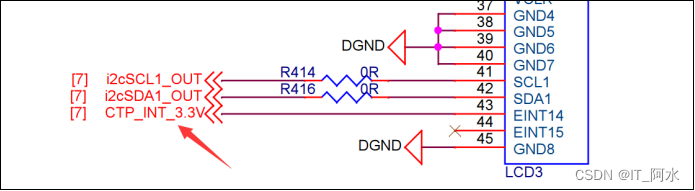

由于本身tiny4412的内核中已自带触摸屏驱动,所以FT5X06的设备地址可根据mach-tiny4412.c的板级注册中找到:


3.1.2 裁剪内核,卸载自带的触摸屏驱动
由于本身tiny4412的内核中已自带触摸屏驱动,所以若想自己编写该驱动则需要先卸载内核中的触摸屏驱动,才能实现自己的驱动文件注册。即需要完成内核裁剪,卸载自带的触摸屏驱动。
打开linux3.5内核的配置界面,找到ft5x06的驱动位置,将其卸载。[wbyq@wbyq linux-3.5]$ make menuconfig Device Drivers ---> Input device support ---> Touchscreens ---> FocalTech ft5x0x TouchScreen driver- 1
- 2
- 3
- 4
- 5

最后重新编译内核,烧写内核,重新启动开发板。3.1.3 注册IIC设备层
#include#include #include #include #include #include #include #include #include #include static struct i2c_board_info ft5x06_info= { I2C_BOARD_INFO("ft5x06",0x38), //.irq= }; static struct i2c_client *client; static int __init wbyq_ft5x06_dev_init(void) { ft5x06_info.irq=gpio_to_irq(EXYNOS4_GPX1(6));//中断号 struct i2c_adapter *adap=i2c_get_adapter(1);//获取适配器编号 client=i2c_new_device(adap,&ft5x06_info); i2c_put_adapter(adap); if(client==NULL)return -ENODEV; printk("ft5x06设备层注册成功\n"); return 0; } static void __exit wbyq_ft5x06_dev_cleanup(void) { /*注销设备层*/ i2c_unregister_device(client); printk("ft5x06设备层注销成功\n"); } module_init(wbyq_ft5x06_dev_init);//驱动入口函数 module_exit(wbyq_ft5x06_dev_cleanup);//驱动出口函数 MODULE_LICENSE("GPL");//驱动注册协议 MODULE_AUTHOR("it_ashui"); MODULE_DESCRIPTION("Exynos4 eeprom_dev Driver"); - 1
- 2
- 3
- 4
- 5
- 6
- 7
- 8
- 9
- 10
- 11
- 12
- 13
- 14
- 15
- 16
- 17
- 18
- 19
- 20
- 21
- 22
- 23
- 24
- 25
- 26
- 27
- 28
- 29
- 30
- 31
- 32
- 33
- 34
- 35
- 36
- 37
- 38
- 39
- 40
- 41
- 42
3.1.4 注册IIC驱动层
注册IIC驱动层,完成FT5X06中断注册。初始化工作,初始化等待队列头,注册杂项设备。实现ioctl函数接口和poll函数接口。
#include#include #include #include #include #include #include #include #include #include #include #include #include #include #include #define TOUCH_GETXY 0X80 static struct work_struct ft5x06_work; static struct i2c_client *i2c_client; struct Touch_xy { int x; int y; int stat; }; static struct Touch_xy touchxy; DECLARE_WAIT_QUEUE_HEAD(ft5x06_q);//等待队列头 static void ft5x06_work_func(struct work_struct *work) { u8 val_data[8]; u32 x,y; u32 stat; i2c_smbus_read_i2c_block_data(i2c_client,0,8,val_data); x=(val_data[3]&0Xf)<<8|val_data[4]; y=(val_data[5]&0Xf)<<8|val_data[6]; stat=val_data[2]&0xf; if(stat) { touchxy.x=x; touchxy.y=y; touchxy.stat=1; } else { touchxy.stat=0; } wake_up(&ft5x06_q);//唤醒进程 //printk("(x,y):%d,%d\n",x,y); } static irqreturn_t ft5x06_irq_work(int irq, void *dev) { schedule_work(&ft5x06_work); return IRQ_HANDLED; } static int ft5x06_open(struct inode *inode, struct file *fp) { printk("open函数调用成功"); return 0; } static long ft5x06_ioctl(struct file *fp, unsigned int cmd, unsigned long data) { int ret; switch(cmd) { case TOUCH_GETXY: ret=copy_to_user((void *)data,&touchxy,sizeof(touchxy)); if(ret)return -1; default: return -1; } return 0; } static unsigned int ft5x06_poll(struct file *filp, struct poll_table_struct *p) { int mask=0; poll_wait(filp,&ft5x06_q, p); if(touchxy.stat)mask|=POLLIN; return mask; } static int ft5x06_release(struct inode *inode, struct file *fp) { printk("release函数调用成功"); return 0; } static struct file_operations ft5x06_fops= { .open =ft5x06_open, .unlocked_ioctl =ft5x06_ioctl, .poll =ft5x06_poll, .release =ft5x06_release }; static struct miscdevice ft5x06_misc= { .minor=MISC_DYNAMIC_MINOR, .name="ft5x06", .fops=&ft5x06_fops }; static int ft5x06_probe(struct i2c_client *client, const struct i2c_device_id *id) { int ret; i2c_client=client; printk("资源匹配成功addr=%#x,irq=%d\n",client->addr,client->irq); /*初始化工作*/ INIT_WORK(&ft5x06_work, ft5x06_work_func); /*注册中断*/ ret=request_irq(client->irq,ft5x06_irq_work,IRQF_TRIGGER_RISING|IRQF_TRIGGER_FALLING,"ft5x06",NULL); if(ret) { printk("中断注册失败\n"); return ret; } /*注册杂项设备*/ misc_register(&ft5x06_misc); return 0; } static int eeprom_remove(struct i2c_client *client) { printk("eeprom 驱动层资源释放成功\n"); misc_deregister(&ft5x06_misc); free_irq(client->irq,NULL); return 0; } static struct i2c_device_id id_table[]= { {"ft5x06",0}, {} }; static struct i2c_driver ft5x06_driver= { .probe=ft5x06_probe, .remove=eeprom_remove, .driver= { .name="ft5x06_drv", }, .id_table=id_table, }; static int __init wbyq_eeprom_drv_init(void) { int ret; ret=i2c_add_driver(&ft5x06_driver); if(ret)return ret; printk("ft5x06驱动层注册成功\n"); return 0; } /*驱动释放*/ static void __exit wbyq_eeprom_drv_cleanup(void) { /*注销设备层*/ i2c_del_driver(&ft5x06_driver); printk("ft5x06驱动层注销成功\n"); } module_init(wbyq_eeprom_drv_init);//驱动入口函数 module_exit(wbyq_eeprom_drv_cleanup);//驱动出口函数 MODULE_LICENSE("GPL");//驱动注册协议 MODULE_AUTHOR("it_ashui"); MODULE_DESCRIPTION("Exynos4 platform_drv Driver"); - 1
- 2
- 3
- 4
- 5
- 6
- 7
- 8
- 9
- 10
- 11
- 12
- 13
- 14
- 15
- 16
- 17
- 18
- 19
- 20
- 21
- 22
- 23
- 24
- 25
- 26
- 27
- 28
- 29
- 30
- 31
- 32
- 33
- 34
- 35
- 36
- 37
- 38
- 39
- 40
- 41
- 42
- 43
- 44
- 45
- 46
- 47
- 48
- 49
- 50
- 51
- 52
- 53
- 54
- 55
- 56
- 57
- 58
- 59
- 60
- 61
- 62
- 63
- 64
- 65
- 66
- 67
- 68
- 69
- 70
- 71
- 72
- 73
- 74
- 75
- 76
- 77
- 78
- 79
- 80
- 81
- 82
- 83
- 84
- 85
- 86
- 87
- 88
- 89
- 90
- 91
- 92
- 93
- 94
- 95
- 96
- 97
- 98
- 99
- 100
- 101
- 102
- 103
- 104
- 105
- 106
- 107
- 108
- 109
- 110
- 111
- 112
- 113
- 114
- 115
- 116
- 117
- 118
- 119
- 120
- 121
- 122
- 123
- 124
- 125
- 126
- 127
- 128
- 129
- 130
- 131
- 132
- 133
- 134
- 135
- 136
- 137
- 138
- 139
- 140
- 141
- 142
- 143
- 144
- 145
- 146
- 147
- 148
- 149
- 150
- 151
- 152
- 153
- 154
- 155
- 156
- 157
- 158
- 159
- 160
- 161
- 162
3.1.5 编写应用层函数
通过帧缓冲框架完成LCD应用编程,实现画点函数。打开触摸屏驱动,获取触摸屏坐标,调用画点函数,绘制实时坐标位置。
#include#include #include #include #include #include #include #include #include #include #include #define TOUCH_GETXY 0X80 struct Touch_xy { int x; int y; int stat; }; typedef unsigned char u8; typedef unsigned short u16; typedef unsigned int u32; /*LCD画点函数*/ static unsigned char *lcd_p=NULL;//屏幕缓存地址 static struct fb_fix_screeninfo fb_fix;//固定参数结构体 static struct fb_var_screeninfo fb_var;//可变参数结构体 void LCD_DrawLine(u16 x1, u16 y1, u16 x2, u16 y2,u32 c); static inline void LCD_DrawPoint(int x,int y,int c) { //获取要绘制的点的地址 unsigned int *p= (unsigned int *)(lcd_p+y*fb_fix.line_length+x*fb_var.bits_per_pixel/8); *p=c;//写入颜色值 } int main() { /*1.打开设备*/ int fd=open("/dev/fb0", 2); if(fd<0) { printf("打开设备失败\n"); } /*2.获取固定参数*/ memset(&fb_fix,0, sizeof(fb_fix)); ioctl(fd,FBIOGET_FSCREENINFO,&fb_fix); printf("屏幕缓存大小:%d\n",fb_fix.smem_len); printf("一行的字节数:%d\n",fb_fix.line_length); /*3.获取屏幕可变参数*/ memset(&fb_var,0, sizeof(fb_var)); ioctl(fd,FBIOGET_VSCREENINFO,&fb_var); printf("屏幕尺寸:%d*%d\n",fb_var.xres,fb_var.yres); printf("颜色位数:%d\n",fb_var.bits_per_pixel); /*4.将屏幕缓冲区映射到进程空间*/ lcd_p=mmap(NULL,fb_fix.smem_len,PROT_READ|PROT_WRITE,MAP_SHARED,fd,0); close(fd); if(lcd_p==(void *)-1) { printf("内存映射失败\n"); return 0; } memset(lcd_p,0xff,fb_fix.smem_len);//将屏幕清空为白色 fd=open("/dev/ft5x06",2); if(fd<0) { printf("设备打开失败\n"); return 0; } struct pollfd fds= { .fd=fd, .events=POLLIN, }; int ret; struct Touch_xy touchxy; int x1,y1; while(1) { ret=poll(&fds,1,-1); ioctl(fd,TOUCH_GETXY,&touchxy); if((x1-touchxy.x >=25|| touchxy.x-x1>=25) || (y1-touchxy.y >=25|| touchxy.y-y1>=25)) { x1=touchxy.x; y1=touchxy.y; } if(x1!=touchxy.x || touchxy.y!=y1) { LCD_DrawLine(touchxy.x, touchxy.y, x1, y1,0); x1=touchxy.x; y1=touchxy.y; } } AA: //取消映射 munmap(lcd_p,fb_fix.smem_len); return 0; } /* 函数功能:画直线 参 数: x1,y1:起点坐标 x2,y2:终点坐标 */ void LCD_DrawLine(u16 x1, u16 y1, u16 x2, u16 y2,u32 c) { u16 t; int xerr=0,yerr=0,delta_x,delta_y,distance; int incx,incy,uRow,uCol; delta_x=x2-x1; //计算坐标增量 delta_y=y2-y1; uRow=x1; uCol=y1; if(delta_x>0)incx=1; //设置单步方向 else if(delta_x==0)incx=0;//垂直线 else {incx=-1;delta_x=-delta_x;} if(delta_y>0)incy=1; else if(delta_y==0)incy=0;//水平线 else{incy=-1;delta_y=-delta_y;} if( delta_x>delta_y)distance=delta_x; //选取基本增量坐标轴 else distance=delta_y; for(t=0;t<=distance+1;t++ )//画线输出 { LCD_DrawPoint (uRow,uCol,c);//画点 xerr+=delta_x ; yerr+=delta_y ; if(xerr>distance) { xerr-=distance; uRow+=incx; } if(yerr>distance) { yerr-=distance; uCol+=incy; } } } - 1
- 2
- 3
- 4
- 5
- 6
- 7
- 8
- 9
- 10
- 11
- 12
- 13
- 14
- 15
- 16
- 17
- 18
- 19
- 20
- 21
- 22
- 23
- 24
- 25
- 26
- 27
- 28
- 29
- 30
- 31
- 32
- 33
- 34
- 35
- 36
- 37
- 38
- 39
- 40
- 41
- 42
- 43
- 44
- 45
- 46
- 47
- 48
- 49
- 50
- 51
- 52
- 53
- 54
- 55
- 56
- 57
- 58
- 59
- 60
- 61
- 62
- 63
- 64
- 65
- 66
- 67
- 68
- 69
- 70
- 71
- 72
- 73
- 74
- 75
- 76
- 77
- 78
- 79
- 80
- 81
- 82
- 83
- 84
- 85
- 86
- 87
- 88
- 89
- 90
- 91
- 92
- 93
- 94
- 95
- 96
- 97
- 98
- 99
- 100
- 101
- 102
- 103
- 104
- 105
- 106
- 107
- 108
- 109
- 110
- 111
- 112
- 113
- 114
- 115
- 116
- 117
- 118
- 119
- 120
- 121
- 122
- 123
- 124
- 125
- 126
- 127
- 128
- 129
- 130
- 131
- 132
- 133
- 134
- 135
- 136
- 137
- 138
- 139

- I2C特性
-
相关阅读:
leetcode 150.逆波兰表达式求值
git merge 和 git rebese的区别
C语言C位出道心法(三):共用体|枚举
【软件工程_设计模式Designer Method】三类?23种常用设计模式?-简介-作业一
Python错题集-8:AttributeError(找不到对应的对象的属性)
Kafka基于Kraft下的权限控制
MySQL基础篇【第四篇】| 连接查询、子查询(嵌套)
java高校自习室座位预订系统springboot+vue
selenium自动化测试-获取网页截图
你不知道的JavaScript---对象
- 原文地址:https://blog.csdn.net/weixin_44453694/article/details/126883226
