-
IO流文件相关部分
1. 文件
1.1 什么是文件
文件,并不陌生,他是保存数据的地方,比如大家经常使用的word文档,txt文档,excel文件…都是文件。
1.2 文件流
文件在程序中是以流的形式来操作的

流:数据在数据源(文件)和程序(内存)之间经历的路径。
输入流:数据从数据源(文件)到程序(内存)的路径。
输出流:数据从程序(内存)到数据源(文件)的路径。
1.3 常用的文件操作
1.3.1 创建文件对象相关构造器和方法
new File(String pathName)//根据路径构建一个File对象 new File(File parent,String child)//根据父目录文件+子路径构建 new File(String parent,String child)//根据父目录+子路径构建- 1
- 2
- 3
1.3.2 案例演示
public void create01() { String filePath = "e:\\news1.txt"; File file = new File(filePath); try { file.createNewFile(); System.out.println("文件创建成功"); } catch (IOException e) { e.printStackTrace(); } }- 1
- 2
- 3
- 4
- 5
- 6
- 7
- 8
- 9
- 10
public void create02() { File parentFile = new File("e:\\"); String fileName = "news2.txt"; //这里的 file 对象,在 java 程序中,只是一个对象 //只有执行了 createNewFile 方法,才会真正的,在磁盘创建该文件 File file = new File(parentFile, fileName); try { file.createNewFile(); System.out.println("创建成功~"); } catch (IOException e) { e.printStackTrace(); } }- 1
- 2
- 3
- 4
- 5
- 6
- 7
- 8
- 9
- 10
- 11
- 12
- 13
public void create03() { String parentPath = "e:\\"; String fileName = "news4.txt"; File file = new File(parentPath, fileName); try { file.createNewFile(); System.out.println("创建成功~"); } catch (IOException e) { e.printStackTrace(); } }- 1
- 2
- 3
- 4
- 5
- 6
- 7
- 8
- 9
- 10
- 11
1.3.4 获取文件的相关信息

2. IO流原理及流的分类
2.1 Java IO流原理
- I/O是Input/Output的缩写,I/O技术是非常实用的技术,用于处理数据传输。如读写文件,网络通讯等。
- Java程序中,对于数据的输入/输出操作以“流(stream)”的方式进行。
- java.io包下提供了各种“流”类和接口,用以获取不同种类的数据,并通过方法输入或输出数据。
- 输入input:读取外部数据(磁盘,光盘等存储设备的数据)到程序(内存)中。
- 输出output:将程序(内存)数据输出到磁盘,光盘等存储设备中。
2.2 流的分类
- 按操作数据单位不同分为:字节流二进制文件,字符流文本文件。
- 按数据的流向不同分为:输入流,输出流。
- 按流的角色的不同分为:节点流,处理六/包装流。
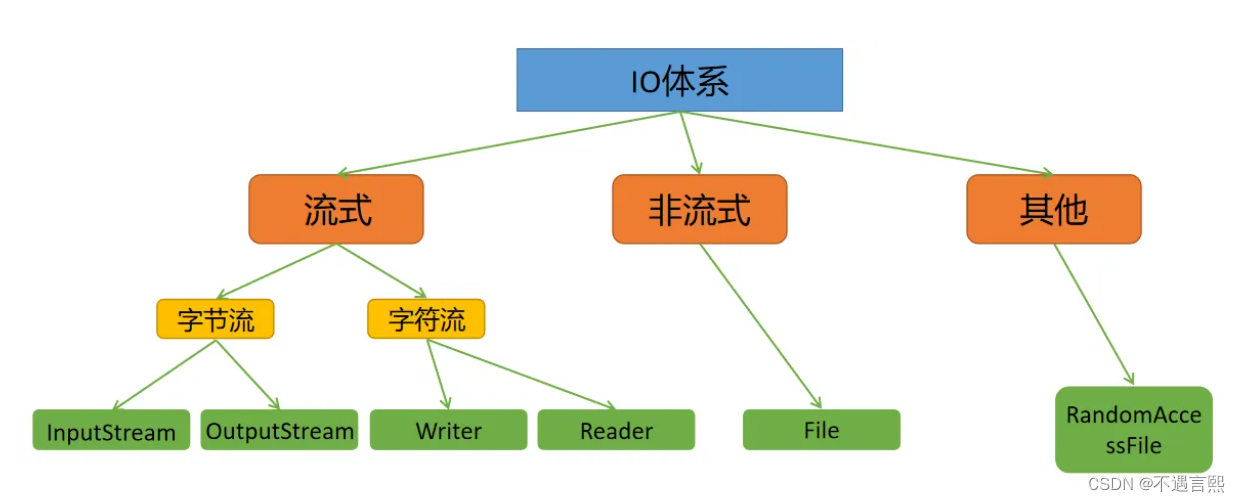

3. IO流中常用类
3.1 FileInputStream
使用 FileInputStream 读取 hello.txt 文件,并将文件内容显示到控制台
正常读取
public void readFile01() { String filePath = "e:\\hello.txt"; int readData = 0; FileInputStream fileInputStream = null; try { //创建 FileInputStream 对象,用于读取 文件 fileInputStream = new FileInputStream(filePath); //从该输入流读取一个字节的数据。 如果没有输入可用,此方法将阻止。 //如果返回-1 , 表示读取完毕 while ((readData = fileInputStream.read()) != -1) { System.out.print((char)readData);//转成 char 显示 } } catch (IOException e) { e.printStackTrace(); } finally { //关闭文件流,释放资源. try { fileInputStream.close(); } catch (IOException e) { e.printStackTrace(); } } }- 1
- 2
- 3
- 4
- 5
- 6
- 7
- 8
- 9
- 10
- 11
- 12
- 13
- 14
- 15
- 16
- 17
- 18
- 19
- 20
- 21
- 22
- 23
使用字节数组
public void readFile02() { String filePath = "e:\\hello.txt"; //字节数组 byte[] buf = new byte[8]; //一次读取 8 个字节. int readLen = 0; FileInputStream fileInputStream = null; try { //创建 FileInputStream 对象,用于读取 文件 fileInputStream = new FileInputStream(filePath); //从该输入流读取最多 b.length 字节的数据到字节数组。 此方法将阻塞,直到某些输入可用。 //如果返回-1 , 表示读取完毕 //如果读取正常, 返回实际读取的字节数 while ((readLen = fileInputStream.read(buf)) != -1) { System.out.print(new String(buf, 0, readLen));//显示 } } catch (IOException e) { e.printStackTrace(); } finally { //关闭文件流,释放资源. try { fileInputStream.close(); } catch (IOException e) { e.printStackTrace(); } }- 1
- 2
- 3
- 4
- 5
- 6
- 7
- 8
- 9
- 10
- 11
- 12
- 13
- 14
- 15
- 16
- 17
- 18
- 19
- 20
- 21
- 22
- 23
- 24
3.2 FileOutputStream
public void writeFile() { //创建 FileOutputStream 对象 String filePath = "e:\\a.txt"; FileOutputStream fileOutputStream = null; try { //得到 FileOutputStream 对象 //1. new FileOutputStream(filePath) 创建方式,当写入内容是,会覆盖原来的内容 //2. new FileOutputStream(filePath, true) 创建方式,当写入内容是,是追加到文件后面 fileOutputStream = new FileOutputStream(filePath, true); //写入一个字节 //fileOutputStream.write('B');// //写入字符串 String str = "hello,world!"; //str.getBytes() 可以把 字符串-> 字节数组 //fileOutputStream.write(str.getBytes()); /* write(byte[] b, int off, int len) 将 len 字节从位于偏移量 off 的指定字节数组写入此文件输出流 */ fileOutputStream.write(str.getBytes(), 0, 3); } catch (IOException e) { e.printStackTrace(); } finally { try { fileOutputStream.close(); } catch (IOException e) { e.printStackTrace(); } } }- 1
- 2
- 3
- 4
- 5
- 6
- 7
- 8
- 9
- 10
- 11
- 12
- 13
- 14
- 15
- 16
- 17
- 18
- 19
- 20
- 21
- 22
- 23
- 24
- 25
- 26
- 27
- 28
- 29
3.3 FileReader 和 FileWriter
3.3.1 FileReader 相关方法:
- new FileReader(File/String)
- read: 每次读取单个字符,返回该字符,如果到文件末尾返回-1
- read(char[]):批量读取多个字符到数组,返回读取到的字符串,如果到文件末尾返回-1
3.3.2 FileWriter 常用方法
- new FileWriter(File/String):覆盖模式,相当于流的指针在首段
- new FileWriter(File/String,true):追加模式,相当于流的指针在尾端
- write(int):写入单个数值
- write(char[]):写入指定数组
- write(char,off,len):写入指定字符串的指定部分
- write(String str):写入整个字符串
- write(String,off,len):写入字符串的指定部分
注意,FileWriter使用后,必须呀关闭(close)或刷新(flush),否则写不到指定的文件!
3.3.3 FileReader 应用实例
String filePath = "e:\\story.txt"; FileReader fileReader = null; int data = 0; //1. 创建 FileReader 对象 fileReader = new FileReader(filePath); //循环读取 使用 read, 单个字符读取 while ((data = fileReader.read()) != -1) { System.out.print((char) data); }- 1
- 2
- 3
- 4
- 5
- 6
- 7
- 8
- 9
3.3.4 FileWriter 应用实例
String filePath = "d:\\note.txt"; //创建 FileWriter 对象 FileWriter fileWriter = null; char[] chars = {'a', 'b', 'c'}; fileWriter = new FileWriter(filePath);//默认是覆盖写入 // 3) write(int):写入单个字符 fileWriter.write('B'); // 4) write(char[]):写入指定数组 fileWriter.write(chars); // 5) write(char[],off,len):写入指定数组的指定部分 fileWriter.write("IO流原理".toCharArray(), 0, 3); // 6) write(string):写入整个字符串 fileWriter.write(" 你好北京~"); fileWriter.write("风雨之后,定见彩虹"); // 7) write(string,off,len):写入字符串的指定部分 fileWriter.write("上海天津", 0, 2);- 1
- 2
- 3
- 4
- 5
- 6
- 7
- 8
- 9
- 10
- 11
- 12
- 13
- 14
- 15
- 16
4. 结语
io流中文件相关部分就到这里,自己试着写一下就可以掌握,利用Java程序实现文件还是很有意思的。
-
相关阅读:
电子行业云MES解决方案
C# NModbus TCP 主从站通信样例
MySQL的多表查询(4):SQL99下的多表查询
vue之表单输入绑定
TD联合Modelsim进行功能仿真
【youcans动手学模型】目标检测之 SPPNet 模型
RJ45水晶头网线顺序出错排查
高数和数据结构的小例子
软件测试之Web项目实战解析
Xilinx ISE系列教程(3):关联第三方编辑器Notepad++/VS Code/UltraEdit/Sublime Text/Emacs/Vim
- 原文地址:https://blog.csdn.net/m0_64102491/article/details/126883244
