-
actuator--基础--03--端点配置
actuator–基础–03–端点配置
1、默认暴露
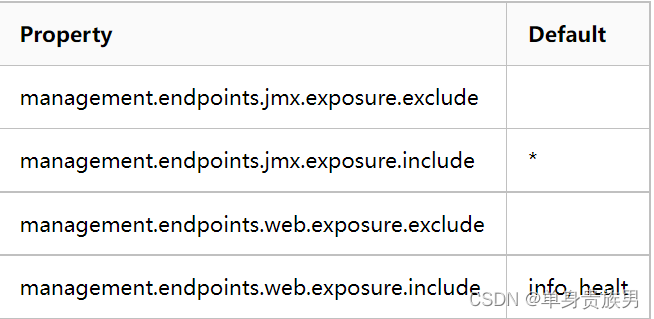
- 上图配置JMX和HTTP的暴露端点。
- Actuator 默认只会开放 /actuator/health 和 /actuator/info这两个端点,如果要开放其他 endpoint,需要额外在 application.properties 中做设置。
2、暴露配置(application.properties)
# 暴露所有 HTTP的endpoints(不包含shutdown) #management.endpoints.web.exposure.include=* # 只暴露指定 HTTP的endpoint # 这里只暴露 /actuator/beans和/actuator/mappings 端点 #management.endpoints.web.exposure.include=beans,mappings ## exclude 用来关闭某些endpoints ## exclude 通常会跟include一起用,先include全部endpoints,然后再exclude某些endpoints # 这里暴露所有的端点中,排除/actuator/beans这个端点 management.endpoints.web.exposure.exclude=beans management.endpoints.web.exposure.include=* # 如果要开启/actuator/shutdown,要额外再加这一行 management.endpoint.shutdown.enabled=true- 1
- 2
- 3
- 4
- 5
- 6
- 7
- 8
- 9
- 10
- 11
- 12
- 13
- 14
- 15
- 16
3、路径映射(application.properties)
3.1、公共路径
- 默认情况下所有端点都暴露在"/actuator"路径下
- 通过修改application.properties来自定义路径映射
# 原本內建的/actuator/xxx路径,都会变成/manage/xxx,可以用來防止被其他人猜到 management.endpoints.web.base-path=/manage- 1
- 2
- 3
- 4
3.2、特定路径
- 这里以/actuator/health作为案例
- 默认情况,健康检查暴露在"/actuator/health"路径下
- 通过修改application.properties来自定义路径映射
# 原本內建的/actuator/health路径, 会变成/actuator/healthcheck,可以用來防止被其他人猜到 management.endpoints.web.path-mapping.health=healthcheck- 1
- 2
- 3
- 4
4、管理端口调整(application.properties)
# 指定端口,默认跟server.port一样,可以防止被其他人猜到 management.server.port=10111- 1
- 2
5、端点响应缓存(application.properties)
对于一些不带参数的端点请求会自动进行缓存,我们可以通过如下方式配置缓存时间
# 下面配置表示 beans 端点的缓存时间为 100s management.endpoint.beans.cache.time-to-live=100s- 1
- 2
- 3
6、设置访问的IP(application.properties)
# 设置为本地ip,防止远程访问该连接进行关闭服务 # 不允许远程管理连接,安全性考虑 management.server.address=127.0.0.1- 1
- 2
- 3
-
相关阅读:
gitee生成公钥和远程仓库与本地仓库使用验证
JSON文件读写
四六级听力考试高频词汇分类记忆-职场工作类
STM32读写RTC内部时钟外设,设置和显示时钟
使用HTML CSS制作静态网站【中秋节】
Git如何上传代码至GitHub
(附源码)springboot家庭装修管理系统 毕业设计 613205
git的基本使用
C语言基础小操作
Python自动化测试selenium指定截图文件名方法
- 原文地址:https://blog.csdn.net/zhou920786312/article/details/126860966
