-
JDBC笔记
1、JDBC概述
- JDBC:Java DataBase Connectivity:Java数据库连接
- JDBC是一种用于执行SQL语句的Java 的API。可以为多种关系型数据库提供统一的访问。它是由一组使用Java 语言编写的类或接口组成.
- 使用Java语言连接到数据库
由于市面上存在许多不同的数据库,使得使用不同数据库的程序员就需要学习多种Java和数据库连接的方法,于是SUN公司提供一套统一的规范。由各个数据库的生产商提供这套规范的实现。SUN公司提供了一组接口。各个数据库生产商提供了这套接口的实现。这组规范就是JDBC规范。
2、JDBC入门案例
- 引入驱动
- 加载驱动
- 获取连接
- 获取执行sql对象
- 编写sql语句并执行
- 释放资源
引入驱动


代码:
public class Demo1 { public static void main(String[] args) throws SQLException { // 注册驱动 DriverManager.registerDriver(new Driver()); // 获取数据库连接 Connection connection = DriverManager.getConnection("jdbc:mysql://localhost:3306/mydb1?serverTimezone=UTC" , "root" , "root"); // 获取执行sql语句的对象 Statement statement = connection.createStatement(); // 编写sql语句 String sql = "insert into t_user values(null , '张三丰' , 98)" ; // 执行sql语句 int update = statement.executeUpdate(sql); // 关闭资源 statement.close(); connection.close(); System.out.println(update); } }- 1
- 2
- 3
- 4
- 5
- 6
- 7
- 8
- 9
- 10
- 11
- 12
- 13
- 14
- 15
- 16
- 17
- 18
- 19
- 20
3、常用类和接口
3.1、DriverManager类
DriverManger是驱动管理类,它的作用在于加载驱动和获取连接
- 加载驱动
CLass.forName("com.mysql.jdbc.Driver"); // mysql5.0的写法 Class.forName("com.mysql.cj.jdbc.Driver"); // mysql8.0版本的写法- 1
- 2
- 获取连接
Connection connection = DriverManager.getConnection("jdbc:mysql://localhost:3306/mydb1?serverTimezone=UTC" , "root" , "root");- 1
- 2
三个参数分别为:连接数据库的路径、数据库账号、密码
3.2、Connection接口
-
Connection是由DriverManager创建的,代表是一个连接对象
-
它的作用是创建执行sql语句的对象;进行事务管理
-
Statement createStatement():获取普通执行SQL对象 -
PreparedStatement prepareStatement(String sql):获取预编译执行SQL对象,可以解决SQL注入漏洞 -
void setAutoCommit(boolean autoCommit):设置事务提交方式,相当于开启事务 -
void commit():提交事务 -
void rollback():回滚事务
3.3、Statement接口
-
Statement对象调用方法执行SQL语句
-
可执行DML、DQL、DDL/DCL语句
-
int executeUpdate(String sql):执行DML操作,返回操作所影响的行数 -
ResultSet executeQuery(String sql):执行DQL操作,返回结果集对象,永远不为null -
boolean execute(String sql):执行DQL/DML/DDL/DCL操作,执行DQL返回true,执行DML/DDL/DCL返回false
3.4、ResultSet接口
ResultSet是select语句执行后的结果集
在ResultSet内部维护了一个指向表格数据行的游标Cursor,初始化时候, 游标在第一行之前的位置-
boolean next():如果有下一条记录,返回true,否则返回false -
int getInt(int columnIndex):根据字段索引获取int字段的值 ,the first column is 1 -
int getInt(String columnLabel):根据columnlable获取int字段的值,如果有定义别名,那么别名=columnlable;如果没有定义别名,字段名称=columnlable -
String getString(int columnIndex) -
String getString(String columnLabel)
4、资源释放
- Connection对象并不是无限的,它代表的是数据库连接对象。安装MYSQL数据库时,是有最大连接数量的。如果达到MYSQL的最大连接数量,而且Connection都没有被释放。其他人会连接不到数据库。
- 在进行DML语句,即增删改语句资源的释放时,会涉及到Connection和Statement资源的释放
- 在进行DQL语句,即查询语句资源的释放时,会涉及到Connection、Statement和ResultSet资源的释放
JDBC实现DML语句对数据库的访问,及资源的释放
public class Demo4 { public static void main(String[] args) { // 数据库连接资源 Connection conn = null ; // 执行SQL语句的资源 Statement stat = null ; try { // 加载驱动 Class.forName("com.mysql.cj.jdbc.Driver") ; // 获取数据库连接 String url = "jdbc:mysql://127.0.0.1:3306/mydb1" ; String username = "root" ; String password = "root" ; conn = DriverManager.getConnection(url , username , password) ; // 获取执行SQL语句的对象 Statement statement = conn.createStatement(); String sql = "insert into t_user values(10 , '欧阳锋' , 25);" ; // 返回值为影响行数 int update = statement.executeUpdate(sql); System.out.println("影响行数:" + update); } catch (Exception e) { e.printStackTrace(); } finally { // 关闭资源 if (stat != null) { try { stat.close(); } catch (SQLException e) { e.printStackTrace(); } } // 当把stat置为null后,它本来所指向的对象就不再有引用指向, // 这类匿名对象是容易被垃圾回收机制回收的 stat = null ; if (conn != null) { try { conn.close(); } catch (SQLException e) { e.printStackTrace(); } } conn = null ; } } }- 1
- 2
- 3
- 4
- 5
- 6
- 7
- 8
- 9
- 10
- 11
- 12
- 13
- 14
- 15
- 16
- 17
- 18
- 19
- 20
- 21
- 22
- 23
- 24
- 25
- 26
- 27
- 28
- 29
- 30
- 31
- 32
- 33
- 34
- 35
- 36
- 37
- 38
- 39
- 40
- 41
- 42
- 43
- 44
- 45
- 46
- 47
- 48
- 49
- 50
- 51
- 52
JDBC实现DQL语句对数据库的访问,及资源的释放
public class Demo5 { public static void main(String[] args) { Connection conn = null ; Statement stat = null ; ResultSet rs = null ; try { // 加载驱动 Class.forName("com.mysql.cj.jdbc.Driver") ; // 获取数据库连接 String url = "jdbc:mysql://127.0.0.1:3306/mydb1" ; String username = "root" ; String password = "root" ; conn = DriverManager.getConnection(url , username , password) ; stat = conn.createStatement() ; String sql = "select id , name , age from t_user;" ; // 接收sql查询语句的结果集 rs = stat.executeQuery(sql); while (rs.next()) { int id = rs.getInt("id"); String name = rs.getString("name"); int age = rs.getInt("age"); System.out.println("id :" + id + " name :" + name + " age :" + age); } } catch (Exception e) { e.printStackTrace(); } finally { // 释放资源的顺序与创建顺序相反 if (rs != null) { try { rs.close(); } catch (SQLException e) { e.printStackTrace(); } } rs = null ; if (stat != null) { try { stat.close(); } catch (SQLException e) { e.printStackTrace(); } } stat = null ; if (conn != null) { try { conn.close(); } catch (SQLException e) { e.printStackTrace(); } } conn = null ; } } }- 1
- 2
- 3
- 4
- 5
- 6
- 7
- 8
- 9
- 10
- 11
- 12
- 13
- 14
- 15
- 16
- 17
- 18
- 19
- 20
- 21
- 22
- 23
- 24
- 25
- 26
- 27
- 28
- 29
- 30
- 31
- 32
- 33
- 34
- 35
- 36
- 37
- 38
- 39
- 40
- 41
- 42
- 43
- 44
- 45
- 46
- 47
- 48
- 49
- 50
- 51
- 52
- 53
- 54
- 55
- 56
- 57
- 58
- 59
- 60
- 61
- 62
- 之所以在释放资源后将其设置为null,是为了让它本来所指向的对象不再有引用,从而成为匿名对象,而匿名对象是容易被垃圾回收机制回收的
5、JDBC的增删改查
public class Demo6 { public static void main(String[] args) { // add() ; // delete() ; // update() ; // selectOne() ; selectAll() ; } /** * 查全部 */ private static void selectAll() { Connection conn = null ; Statement stat = null ; ResultSet rs = null ; try { Class.forName("com.mysql.cj.jdbc.Driver") ; String url = "jdbc:mysql://127.0.0.1:3306/mydb1" ; String username = "root" ; String password = "root" ; conn = DriverManager.getConnection(url , username , password) ; stat = conn.createStatement() ; String sql = "select id , name , age from t_user ;" ; rs = stat.executeQuery(sql) ; while (rs.next()) { System.out.println("id :" + rs.getInt("id") + " name :" + rs.getString("name") + " age :" + rs.getInt("age")); } } catch (Exception e) { e.printStackTrace(); } finally { if (rs != null) { try { rs.close(); } catch (SQLException e) { e.printStackTrace(); } } rs = null ; if (stat != null) { try { stat.close(); } catch (SQLException e) { e.printStackTrace(); } } stat = null ; if (conn != null) { try { conn.close(); } catch (SQLException e) { e.printStackTrace(); } } conn = null ; } } /** * 查单条 */ private static void selectOne() { Connection conn = null ; Statement stat = null ; ResultSet rs = null ; try { Class.forName("com.mysql.cj.jdbc.Driver") ; String url = "jdbc:mysql://127.0.0.1:3306/mydb1" ; String username = "root" ; String password = "root" ; conn = DriverManager.getConnection(url , username , password) ; stat = conn.createStatement() ; String sql = "select id , name , age from t_user where id = 10 ;" ; rs = stat.executeQuery(sql) ; rs.next() ; System.out.println("id :" + rs.getInt("id") + " name :" + rs.getString("name") + " age :" + rs.getInt("age")); } catch (Exception e) { e.printStackTrace(); } finally { if (rs != null) { try { rs.close(); } catch (SQLException e) { e.printStackTrace(); } } rs = null ; if (stat != null) { try { stat.close(); } catch (SQLException e) { e.printStackTrace(); } } stat = null ; if (conn != null) { try { conn.close(); } catch (SQLException e) { e.printStackTrace(); } } conn = null ; } } private static void update() { Connection conn = null ; Statement stat = null ; try { Class.forName("com.mysql.cj.jdbc.Driver") ; String url = "jdbc:mysql://127.0.0.1:3306/mydb1" ; String username = "root" ; String password = "root" ; conn = DriverManager.getConnection(url , username , password) ; stat = conn.createStatement() ; String sql = "update t_user set name = '秦始皇' , age = 2000 where id = 10;" ; // 执行sql语句 int update = stat.executeUpdate(sql); System.out.println("影响行数:" + update); } catch (Exception e) { e.printStackTrace(); } finally { if (stat != null) { try { stat.close(); } catch (SQLException e) { e.printStackTrace(); } } stat = null ; if (conn != null) { try { conn.close(); } catch (SQLException e) { e.printStackTrace(); } } conn = null ; } } private static void delete() { Connection conn = null ; Statement stat = null ; try { Class.forName("com.mysql.cj.jdbc.Driver") ; String url = "jdbc:mysql://127.0.0.1:3306/mydb1" ; String username = "root" ; String password = "root" ; conn = DriverManager.getConnection(url , username , password) ; stat = conn.createStatement() ; String sql = "delete from t_user where id = 6;" ; // 执行sql语句 int delete = stat.executeUpdate(sql); System.out.println("影响行数:" + delete); } catch (Exception e) { e.printStackTrace(); } finally { if (stat != null) { try { stat.close(); } catch (SQLException e) { e.printStackTrace(); } } stat = null ; if (conn != null) { try { conn.close(); } catch (SQLException e) { e.printStackTrace(); } } conn = null ; } } /** * 向数据库中添加一条数据 */ private static void add() { Connection conn = null ; Statement stat = null ; try { Class.forName("com.mysql.cj.jdbc.Driver") ; String url = "jdbc:mysql://127.0.0.1:3306/mydb1" ; String username = "root" ; String password = "root" ; conn = DriverManager.getConnection(url , username , password) ; stat = conn.createStatement() ; String sql = "insert into t_user(id , name , age) values(null , '张无忌' , 22) ;" ; // 执行sql语句 int update = stat.executeUpdate(sql); System.out.println("影响行数:" + update); } catch (Exception e) { e.printStackTrace(); } finally { if (stat != null) { try { stat.close(); } catch (SQLException e) { e.printStackTrace(); } } stat = null ; if (conn != null) { try { conn.close(); } catch (SQLException e) { e.printStackTrace(); } } conn = null ; } } }- 1
- 2
- 3
- 4
- 5
- 6
- 7
- 8
- 9
- 10
- 11
- 12
- 13
- 14
- 15
- 16
- 17
- 18
- 19
- 20
- 21
- 22
- 23
- 24
- 25
- 26
- 27
- 28
- 29
- 30
- 31
- 32
- 33
- 34
- 35
- 36
- 37
- 38
- 39
- 40
- 41
- 42
- 43
- 44
- 45
- 46
- 47
- 48
- 49
- 50
- 51
- 52
- 53
- 54
- 55
- 56
- 57
- 58
- 59
- 60
- 61
- 62
- 63
- 64
- 65
- 66
- 67
- 68
- 69
- 70
- 71
- 72
- 73
- 74
- 75
- 76
- 77
- 78
- 79
- 80
- 81
- 82
- 83
- 84
- 85
- 86
- 87
- 88
- 89
- 90
- 91
- 92
- 93
- 94
- 95
- 96
- 97
- 98
- 99
- 100
- 101
- 102
- 103
- 104
- 105
- 106
- 107
- 108
- 109
- 110
- 111
- 112
- 113
- 114
- 115
- 116
- 117
- 118
- 119
- 120
- 121
- 122
- 123
- 124
- 125
- 126
- 127
- 128
- 129
- 130
- 131
- 132
- 133
- 134
- 135
- 136
- 137
- 138
- 139
- 140
- 141
- 142
- 143
- 144
- 145
- 146
- 147
- 148
- 149
- 150
- 151
- 152
- 153
- 154
- 155
- 156
- 157
- 158
- 159
- 160
- 161
- 162
- 163
- 164
- 165
- 166
- 167
- 168
- 169
- 170
- 171
- 172
- 173
- 174
- 175
- 176
- 177
- 178
- 179
- 180
- 181
- 182
- 183
- 184
- 185
- 186
- 187
- 188
- 189
- 190
- 191
- 192
- 193
- 194
- 195
- 196
- 197
- 198
- 199
- 200
- 201
- 202
- 203
- 204
- 205
- 206
- 207
- 208
- 209
- 210
- 211
- 212
- 213
- 214
- 215
- 216
- 217
- 218
- 219
- 220
- 221
- 222
- 223
- 224
- 225
- 226
- 227
- 228
- 229
- 230
- 231
- 232
- 233
- 234
- 235
- 236
- 237
- 238
- 239
- 240
- 241
- 242
- 243
- 244
- 245
- 246
- 247
- 248
- 249
- 250
- 251
- 252
- 253
- 254
- 255
6、JDBCUtil工具类的定义
- 四个变量:driverClassName、url、username、password
- 两个方法:获取连接、释放资源(方法重载)
public class JDBCUtils { private static String driverClassName = "com.mysql.cj.jdbc.Driver" ; private static String url = "jdbc:mysql://localhost:3306/mydb1" ; private static String username = "root" ; private static String password = "root" ; // 静态代码块,随着类的加载而加载,将加载驱动的步骤写在里面 static { try { Class.forName(driverClassName) ; } catch (ClassNotFoundException e) { e.printStackTrace(); } } /** * 获取连接 * @return * @throws SQLException */ public static Connection getConnection() throws SQLException { return DriverManager.getConnection(url , username , password) ; } /** * 释放资源 * @param conn * @param stat * @param rs */ public static void close(Connection conn , Statement stat , ResultSet rs) { if (rs != null) { try { rs.close(); } catch (SQLException e) { e.printStackTrace(); } } rs = null ; if (stat != null) { try { stat.close(); } catch (SQLException e) { e.printStackTrace(); } } stat = null ; if (conn != null) { try { conn.close(); } catch (SQLException e) { e.printStackTrace(); } } conn = null ; } /** * 释放资源 * @param conn * @param stat */ public static void close(Connection conn , Statement stat) { if (stat != null) { try { stat.close(); } catch (SQLException e) { e.printStackTrace(); } } stat = null ; if (conn != null) { try { conn.close(); } catch (SQLException e) { e.printStackTrace(); } } conn = null ; } }- 1
- 2
- 3
- 4
- 5
- 6
- 7
- 8
- 9
- 10
- 11
- 12
- 13
- 14
- 15
- 16
- 17
- 18
- 19
- 20
- 21
- 22
- 23
- 24
- 25
- 26
- 27
- 28
- 29
- 30
- 31
- 32
- 33
- 34
- 35
- 36
- 37
- 38
- 39
- 40
- 41
- 42
- 43
- 44
- 45
- 46
- 47
- 48
- 49
- 50
- 51
- 52
- 53
- 54
- 55
- 56
- 57
- 58
- 59
- 60
- 61
- 62
- 63
- 64
- 65
- 66
- 67
- 68
- 69
- 70
- 71
- 72
- 73
- 74
- 75
- 76
- 77
- 78
- 79
- 80
- 81
- 82
- 83
- 84
- 85
- 86
测试
public class Demo7 { public static void main(String[] args) { Connection conn = null ; Statement stat = null ; ResultSet rs = null ; try { // 调用JDBCUtils类中的getConnection()方法获取数据库的连接 conn = JDBCUtils.getConnection(); stat = conn.createStatement() ; String sql = "select * from t_user" ; rs = stat.executeQuery(sql) ; System.out.println("id " + "name " + "age"); while (rs.next()) { int id = rs.getInt("id") ; String name = rs.getString("name") ; int age = rs.getInt("age") ; System.out.println(id + " " + name + " " + age); } } catch (SQLException e) { e.printStackTrace(); } finally { // 关闭资源 JDBCUtils.close(conn , stat , rs); } } }- 1
- 2
- 3
- 4
- 5
- 6
- 7
- 8
- 9
- 10
- 11
- 12
- 13
- 14
- 15
- 16
- 17
- 18
- 19
- 20
- 21
- 22
- 23
- 24
- 25
- 26
- 27
- 28
- 29
- 30
7、properties配置文件
-
上面的JDBCUtils工具类存在字符串硬编码的问题,每次切换数据库的连接都需要去修改Java文件,这会导致整个项目重新编译,重新部署。
-
解决方案:将字符串参数配置到对应的文件中
-
新建jdbc.properties配置文件
driverClassName=com.mysql.cj.jdbc.Driver url=jdbc:mysql://localhost:3306/mydb1 username=root password=root- 1
- 2
- 3
- 4

- 修改JDBCUtils工具类
public class JDBCUtils2 { private static String driverClassName = "com.mysql.cj.jdbc.Driver" ; private static String url = "jdbc:mysql://localhost:3306/mydb1" ; private static String username = "root" ; private static String password = "root" ; // 静态代码块,随着类的加载而加载,将加载驱动的步骤写在里面 static { // 将文件读取进内存 InputStream is = JDBCUtils2.class.getClassLoader().getResourceAsStream("jdbc.properties"); // 创建Properties集合对象 Properties properties = new Properties(); try { // 加载指定流的资源 properties.load(is); // 读取jdbc.properties文件中的内容并赋值给变量 driverClassName = properties.getProperty("driverClassName") ; url = properties.getProperty("url") ; username = properties.getProperty("username") ; password = properties.getProperty("password") ; Class.forName(driverClassName) ; } catch (Exception e) { e.printStackTrace(); } } // ...... }- 1
- 2
- 3
- 4
- 5
- 6
- 7
- 8
- 9
- 10
- 11
- 12
- 13
- 14
- 15
- 16
- 17
- 18
- 19
- 20
- 21
- 22
- 23
- 24
- 25
- 26
- 27
- 28
- 29
- 30
- 31
- 32
8、登录功能
public class Demo1 { public static void main(String[] args) { Scanner sc = new Scanner(System.in); while (true) { System.out.println("请输入数字:1、登录 2、注册 0、退出"); int i = sc.nextInt(); switch (i) { case 1: System.out.println("----------------登录------------"); login() ; break; case 2: System.out.println("----------------注册------------"); register() ; break; case 0: exit() ; break; default: System.err.println("输入有误!"); break; } } } /** * 退出功能 */ private static void exit() { System.out.println("退出系统"); System.exit(0); } /** * 注册功能 */ private static void register() { Scanner sc = new Scanner(System.in); System.out.print("请输入用户名:"); String username = sc.nextLine(); System.out.print("请输入密码:"); String password = sc.nextLine(); System.out.print("确认密码:"); String rePassword = sc.nextLine(); if (!password.equals(rePassword)) { System.out.println("两次密码不一致"); return; } Connection conn = null ; Statement stat = null ; try { conn = JDBCUtils2.getConnection(); stat = conn.createStatement(); String sql = "insert into user(username , password) values('" + username + "','" + password + "');"; int update = stat.executeUpdate(sql); if (update > 0) { System.out.println("用户 " + username + " 注册成功"); } else { System.out.println("注册失败"); } } catch (SQLException e) { e.printStackTrace(); } finally { JDBCUtils2.close(conn , stat); } } /** * 登录功能 */ private static void login() { Scanner sc = new Scanner(System.in); System.out.print("请输入用户名:"); String username = sc.nextLine(); System.out.print("请输入密码:"); String password = sc.nextLine(); Connection conn = null ; Statement stat = null ; ResultSet rs = null ; try { conn = JDBCUtils2.getConnection(); stat = conn.createStatement(); String sql = "select username , password from user where username = '" + username + "' and password = '" + password + "' ;"; rs = stat.executeQuery(sql) ; if (rs.next()) { System.out.println("用户 " + username + " 登陆成功"); } else { System.out.println("登陆失败"); } } catch (SQLException e) { e.printStackTrace(); } finally { JDBCUtils2.close(conn , stat , rs); } } }- 1
- 2
- 3
- 4
- 5
- 6
- 7
- 8
- 9
- 10
- 11
- 12
- 13
- 14
- 15
- 16
- 17
- 18
- 19
- 20
- 21
- 22
- 23
- 24
- 25
- 26
- 27
- 28
- 29
- 30
- 31
- 32
- 33
- 34
- 35
- 36
- 37
- 38
- 39
- 40
- 41
- 42
- 43
- 44
- 45
- 46
- 47
- 48
- 49
- 50
- 51
- 52
- 53
- 54
- 55
- 56
- 57
- 58
- 59
- 60
- 61
- 62
- 63
- 64
- 65
- 66
- 67
- 68
- 69
- 70
- 71
- 72
- 73
- 74
- 75
- 76
- 77
- 78
- 79
- 80
- 81
- 82
- 83
- 84
- 85
- 86
- 87
- 88
- 89
- 90
- 91
- 92
- 93
- 94
- 95
- 96
- 97
- 98
- 99
- 100
- 101
- 102
- 103
- 104
- 105
- 106
- 107
- 108
- 109
- 110
- 111
- 112
- 113
- 114
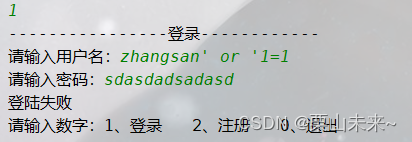
9、SQL注入

解决这种问题的方式就是就是使用
PreparedStaterment类替换StatermentPreparedStatement的使用方式:
在编写sql语句时,首先使用'?'作为占位符,将要填充数据的位置占住,再使用setXxx()方法设置占位符位置的内容public class Demo2 { public static void main(String[] args) { Scanner sc = new Scanner(System.in); while (true) { System.out.println("请输入数字:1、登录 2、注册 0、退出"); int i = sc.nextInt(); switch (i) { case 1: System.out.println("----------------登录------------"); login() ; break; case 2: System.out.println("----------------注册------------"); register() ; break; case 0: exit() ; break; default: System.err.println("输入有误!"); break; } } } /** * 退出功能 */ private static void exit() { System.out.println("退出系统"); System.exit(0); } /** * 注册功能 */ private static void register() { Scanner sc = new Scanner(System.in); System.out.print("请输入用户名:"); String username = sc.nextLine(); System.out.print("请输入密码:"); String password = sc.nextLine(); System.out.print("确认密码:"); String rePassword = sc.nextLine(); if (!password.equals(rePassword)) { System.out.println("两次密码不一致"); return; } Connection conn = null ; PreparedStatement ps = null ; try { conn = JDBCUtils2.getConnection(); String sql = "insert into user(username , password) values(? , ?);"; ps = conn.prepareStatement(sql) ; ps.setString(1 , username); ps.setString(2 , password); int update = ps.executeUpdate(); if (update > 0) { System.out.println("用户 " + username + " 注册成功"); } else { System.out.println("注册失败"); } } catch (SQLException e) { e.printStackTrace(); } finally { JDBCUtils2.close(conn , ps); } } /** * 登录功能 */ private static void login() { Scanner sc = new Scanner(System.in); System.out.print("请输入用户名:"); String username = sc.nextLine(); System.out.print("请输入密码:"); String password = sc.nextLine(); Connection conn = null ; PreparedStatement ps = null ; ResultSet rs = null ; try { conn = JDBCUtils2.getConnection(); String sql = "select * from user where username = ? and password = ?"; ps = conn.prepareStatement(sql); ps.setString(1 , username); ps.setString(2 , password); rs = ps.executeQuery() ; if (rs.next()) { System.out.println("用户 " + username + " 登陆成功"); } else { System.out.println("登陆失败"); } } catch (SQLException e) { e.printStackTrace(); } finally { JDBCUtils2.close(conn , ps , rs); } } }- 1
- 2
- 3
- 4
- 5
- 6
- 7
- 8
- 9
- 10
- 11
- 12
- 13
- 14
- 15
- 16
- 17
- 18
- 19
- 20
- 21
- 22
- 23
- 24
- 25
- 26
- 27
- 28
- 29
- 30
- 31
- 32
- 33
- 34
- 35
- 36
- 37
- 38
- 39
- 40
- 41
- 42
- 43
- 44
- 45
- 46
- 47
- 48
- 49
- 50
- 51
- 52
- 53
- 54
- 55
- 56
- 57
- 58
- 59
- 60
- 61
- 62
- 63
- 64
- 65
- 66
- 67
- 68
- 69
- 70
- 71
- 72
- 73
- 74
- 75
- 76
- 77
- 78
- 79
- 80
- 81
- 82
- 83
- 84
- 85
- 86
- 87
- 88
- 89
- 90
- 91
- 92
- 93
- 94
- 95
- 96
- 97
- 98
- 99
- 100
- 101
- 102
- 103
- 104
- 105
- 106
- 107
- 108
- 109
- 110
- 111
- 112
- 113
- 114
- 115
- 116
- 117
- 118
- 119
- 120
- 121
- 122
- 123
10、添加记录时获取自增主键
Statement类中的
getGeneratedKeys()方法,可以再添加数据时获取其自增的主键值,返回一个ResultSet结果集public class Demo3 { public static void main(String[] args) { Connection conn = null ; PreparedStatement ps = null ; ResultSet rs = null ; try { conn = JDBCUtils2.getConnection(); String sql = "insert into t_user values(null , ? ,?) ;"; ps = conn.prepareStatement(sql , Statement.RETURN_GENERATED_KEYS) ; ps.setString(1 , "李白"); ps.setInt(2 , 20); int i = ps.executeUpdate(); if (i > 0) { rs = ps.getGeneratedKeys(); rs.next() ; System.out.println("添加的记录的主键值为:" + rs.getInt(1)); } } catch (SQLException e) { e.printStackTrace(); } finally { JDBCUtils2.close(conn , ps , rs); } } }- 1
- 2
- 3
- 4
- 5
- 6
- 7
- 8
- 9
- 10
- 11
- 12
- 13
- 14
- 15
- 16
- 17
- 18
- 19
- 20
- 21
- 22
- 23
- 24
- 25
- 26
- 27
- 28
- 29
11、Druid数据库连接池
之前操作一次数据库,就会创建一次连接对象, 销毁一次连接对象,这比较浪费资源。而数据库连接池是一个装有多个连接的容器。如果要使用连接的话,直接从容器中获取,用完后归还给连接池即可。
- 使用Druid
public class Demo1 { public static void main(String[] args) { // 获取数据库连接池对象 DruidDataSource dds = new DruidDataSource() ; // 配置连接信息 dds.setDriverClassName("com.mysql.cj.jdbc.Driver"); dds.setUrl("jdbc:mysql://localhost:3306/mydb1"); dds.setUsername("root"); dds.setPassword("root"); // 创建连接对象 DruidPooledConnection conn = null ; PreparedStatement ps = null ; ResultSet rs = null ; try { //从数据库连接池中获取连接 conn = dds.getConnection() ; ps = conn.prepareStatement("select * from t_user") ; rs = ps.executeQuery() ; while (rs.next()) { System.out.println(rs.getInt("id") + "\t" + rs.getString("name") + "\t" + rs.getInt("age")); } } catch (SQLException e) { e.printStackTrace(); } finally { JDBCUtils2.close(conn , ps , rs); } } }- 1
- 2
- 3
- 4
- 5
- 6
- 7
- 8
- 9
- 10
- 11
- 12
- 13
- 14
- 15
- 16
- 17
- 18
- 19
- 20
- 21
- 22
- 23
- 24
- 25
- 26
- 27
- 28
- 29
- 30
- 31
- 32
- 33
- 34
12、连接池的配置文件
driverClassName=com.mysql.cj.jdbc.Driver url=jdbc:mysql://localhost:3306/mydb1 username=root password=root # 初始连接数 initialSize=10 # 最大连接数 maxActive=100 # 最小连接数 minIdle=10 # 提交方式,true为自动提交,false为手动提交 defaultAutoCommit=true- 1
- 2
- 3
- 4
- 5
- 6
- 7
- 8
- 9
- 10
- 11
- 12
- 13
public class Demo2 { public static void main(String[] args) { DataSource ds = null ; Connection conn = null ; PreparedStatement ps = null ; ResultSet rs = null ; InputStream is = Demo2.class.getClassLoader().getResourceAsStream("druid.properties"); Properties properties = new Properties() ; try { properties.load(is); ds = DruidDataSourceFactory.createDataSource(properties); conn = ds.getConnection() ; ps = conn.prepareStatement("select * from t_user") ; rs = ps.executeQuery() ; while (rs.next()) { System.out.println(rs.getInt("id") + "\t" + rs.getString("name") + "\t" + rs.getInt("age")); } } catch (Exception e) { e.printStackTrace(); } finally { JDBCUtils2.close(conn , ps , rs); } } }- 1
- 2
- 3
- 4
- 5
- 6
- 7
- 8
- 9
- 10
- 11
- 12
- 13
- 14
- 15
- 16
- 17
- 18
- 19
- 20
- 21
- 22
- 23
- 24
- 25
- 26
- 27
- 28
- 29
13、druid结合Utils工具类
public class JDBCUtils3 { static DataSource ds = null ; // 静态代码块,随着类的加载而加载,将加载驱动的步骤写在里面 static { // 将文件读取进内存 InputStream is = JDBCUtils3.class.getClassLoader().getResourceAsStream("jdbc.properties"); // 创建Properties集合对象 Properties properties = new Properties(); try { properties.load(is); // 获取连接池对象 ds = DruidDataSourceFactory.createDataSource(properties) ; } catch (Exception e) { e.printStackTrace(); } } /** * 获取连接 * @return * @throws SQLException */ public static Connection getConnection() throws SQLException { return ds.getConnection() ; } /** * 释放资源 * @param conn * @param stat * @param rs */ public static void close(Connection conn , Statement stat , ResultSet rs) { // ...... } /** * 释放资源 * @param conn * @param stat */ public static void close(Connection conn , Statement stat) { // ...... } }- 1
- 2
- 3
- 4
- 5
- 6
- 7
- 8
- 9
- 10
- 11
- 12
- 13
- 14
- 15
- 16
- 17
- 18
- 19
- 20
- 21
- 22
- 23
- 24
- 25
- 26
- 27
- 28
- 29
- 30
- 31
- 32
- 33
- 34
- 35
- 36
- 37
- 38
- 39
- 40
- 41
- 42
- 43
- 44
- 45
- 46
- 47
- 48
- 49
14、JDBC事务管理
使用
Connection对象对事务进行管理public class Demo1 { public static void main(String[] args) { Connection conn = null ; PreparedStatement ps1 = null ; PreparedStatement ps2 = null ; try { conn = JDBCUtils3.getConnection() ; // 手动提交,开启事务 conn.setAutoCommit(false); // 张三向李四转账 ps1 = conn.prepareStatement("update account set money = money - 1000 where name = '张三' ;") ; ps1.executeUpdate() ; System.out.println(1 / 0); ps2 = conn.prepareStatement("update account set money = money + 1000 where name = '李四' ;") ; ps2.executeUpdate() ; // 没有异常,提交事务 conn.commit(); } catch (Exception e) { try { // 有异常,事务回滚 conn.rollback(); } catch (SQLException ex) { ex.printStackTrace(); } e.printStackTrace(); } finally { JDBCUtils.close(conn , ps1); JDBCUtils.close(conn , ps2); } } }- 1
- 2
- 3
- 4
- 5
- 6
- 7
- 8
- 9
- 10
- 11
- 12
- 13
- 14
- 15
- 16
- 17
- 18
- 19
- 20
- 21
- 22
- 23
- 24
- 25
- 26
- 27
- 28
- 29
- 30
- 31
- 32
- 33
- 34
- 35
- 36
- 注意:必须保证事务中只存在一个Connection对象,才能进行有效的事务管理
15、DbUtils框架
-
Commons DbUtils是Apache组织提供的一个对JDBC进行简单封装的开源工具类库,使用它能够简化JDBC应用程序的开发,同时也不会影响程序的性能。
-
使用
无参构造创建QueryRunner对象,执行方法时需要传入Connection对象,且该Connection对象需要手动释放
new QueryRunner().update( conn, ... );- 1
- 2
- 3
- 4
- 使用
有参构造创建QueryRunner对象,执行方法时,不需要传入Connection对象 , QueryRunner对象内部会自动释放Connection
new QueryRunner(dataSource).update( ... );- 1
- 2
- 3
- 常用方法
update():执行增删改的dml语句query():执行查询的dql语句
public class Demo1 { public static void main(String[] args) { // add() ; // delete() ; // update() ; // queryOne() ; // queryOne1() ; // queryAll() ; queryAll1() ; } private static void queryAll1() { Connection conn = null ; try { conn = JDBCUtils3.getConnection() ; List<User> list = new QueryRunner().query( conn, "select * from t_user", new BeanListHandler<User>(User.class) ) ; System.out.println(list); } catch (SQLException e) { e.printStackTrace(); } finally { JDBCUtils.close(conn , null); } } private static void queryAll() { Connection conn = null ; try { conn = JDBCUtils3.getConnection() ; List<User> list = new QueryRunner().query( conn, "select * from t_user", new ResultSetHandler<List<User>>() { @Override public List<User> handle(ResultSet resultSet) throws SQLException { ArrayList<User> users = new ArrayList<>(); while (resultSet.next()) { User user = new User(resultSet.getInt("id") , resultSet.getString("name") , resultSet.getInt("age")); users.add(user) ; } return users; } } ) ; System.out.println(list); } catch (SQLException e) { e.printStackTrace(); } finally { JDBCUtils.close(conn , null); } } private static void queryOne1() { Connection conn = null ; try { conn = JDBCUtils3.getConnection() ; User user = new QueryRunner().query( conn, "select * from t_user where name = ?", new BeanHandler<User>(User.class), "张三" ); System.out.println(user); } catch (SQLException e) { e.printStackTrace(); } finally { JDBCUtils.close(conn , null); } } private static void queryOne() { Connection conn = null ; try { conn = JDBCUtils3.getConnection() ; User user = new QueryRunner().query( conn, "select * from t_user where name = ?", new ResultSetHandler<User>() { @Override public User handle(ResultSet resultSet) throws SQLException { User user = new User(); if (resultSet.next()) { user.setId(resultSet.getInt(1)); user.setName(resultSet.getString(2)); user.setAge(resultSet.getInt(3)); } return user; } } , "张三" ); System.out.println(user); } catch (SQLException e) { e.printStackTrace(); } } private static void update() { try { new QueryRunner(JDBCUtils3.getDataSource()).update( "update t_user set name = ? where name = ?" , "晁盖", "宋江" ); } catch (SQLException e) { e.printStackTrace(); } } private static void delete() { Connection conn = null ; try { conn = JDBCUtils3.getConnection() ; new QueryRunner().update( conn , "delete from t_user where name= ?" , "李白" ); } catch (SQLException e) { e.printStackTrace(); } finally { JDBCUtils.close(conn , null); } } private static void add() { Connection conn = null ; try { conn = JDBCUtils3.getConnection() ; new QueryRunner().update( conn , // 连接 "insert into t_user values(null , ? , ?) ;" , // sql语句 "宋江" , 30 ) ; } catch (SQLException e) { e.printStackTrace(); } finally { JDBCUtils.close(conn , null); } } }- 1
- 2
- 3
- 4
- 5
- 6
- 7
- 8
- 9
- 10
- 11
- 12
- 13
- 14
- 15
- 16
- 17
- 18
- 19
- 20
- 21
- 22
- 23
- 24
- 25
- 26
- 27
- 28
- 29
- 30
- 31
- 32
- 33
- 34
- 35
- 36
- 37
- 38
- 39
- 40
- 41
- 42
- 43
- 44
- 45
- 46
- 47
- 48
- 49
- 50
- 51
- 52
- 53
- 54
- 55
- 56
- 57
- 58
- 59
- 60
- 61
- 62
- 63
- 64
- 65
- 66
- 67
- 68
- 69
- 70
- 71
- 72
- 73
- 74
- 75
- 76
- 77
- 78
- 79
- 80
- 81
- 82
- 83
- 84
- 85
- 86
- 87
- 88
- 89
- 90
- 91
- 92
- 93
- 94
- 95
- 96
- 97
- 98
- 99
- 100
- 101
- 102
- 103
- 104
- 105
- 106
- 107
- 108
- 109
- 110
- 111
- 112
- 113
- 114
- 115
- 116
- 117
- 118
- 119
- 120
- 121
- 122
- 123
- 124
- 125
- 126
- 127
- 128
- 129
- 130
- 131
- 132
- 133
- 134
- 135
- 136
- 137
- 138
- 139
- 140
- 141
- 142
- 143
- 144
- 145
- 146
- 147
- 148
- 149
- 150
- 151
- 152
- 153
- 154
- 155
- 156
- 157
- 注意事项:使用
BeanHandler、BeanListHandler保证(查询结果的字段名称)必须和(Java实体类的属性名称)要一样,否则属性赋值失败,为null。可以通过取别名的方式避免这一问题
-
相关阅读:
黑豹程序员-架构师学习路线图-百科:MVC的演变终点SpringMVC
DELL OMSA(SrvAdmin)-监控软件与Promethues结合
每日分享html之两个input搜索框、两个button按钮、一个logo效果
一次搞定N个渠道的引流方式--“引流短链”
uniapp开启微信支付、支付宝支付 + Android Studio离线打包APK文件 (前端部分)
聊聊分布式架构02——Http到Https
NOI2022游记,Au
【C++历险记】面向对象|菱形继承及菱形虚拟继承
Java基础17 java的多线程 Thread类和run方法 Lamda表达式 线程的状态(run、sleep、join、yield))
什么是主机安全,为什么我们需要主机安全。
- 原文地址:https://blog.csdn.net/weixin_45890113/article/details/126843173
