-
taro 兼容支付宝小程序和微信小程序<四> -- 腾讯地图和高德地图api
背景:taro3 + vue3
项目中用到的功能描述:
- 坐标转位置描述(逆地址解析)
- 关键词输入提示
- 路线规划
- 距离计算
方案
微信小程序–>腾讯地图 ----- 腾讯位置服务
支付宝小程序–>高德地图 ----- 高德web服务API一、经纬度获取
let errorInfo = { errMsg: '' } Taro.getLocation({ type, isHighAccuracy: true, success: res => { // do sth. }, fail: error => { // 这里支付宝和微信的error是不一样的 if (isAlipay) { const { message } = error errorInfo.errMsg = message } if (isWeapp) { errorInfo = error } // do sth. }, complete: res => { } })- 1
- 2
- 3
- 4
- 5
- 6
- 7
- 8
- 9
- 10
- 11
- 12
- 13
- 14
- 15
- 16
- 17
- 18
- 19
- 20
- 21
- 22
- 23
二、引入
// map.js let mapInstance = null let secretKey = '' if (isWeapp) { const { key, secretKey: sKey } = TenXunMap const QQMapWX = require('../plugin/qqmap-wx-jssdk.min') secretKey = sKey mapInstance = new QQMapWX({ key }) } else if (isAlipay) { const { key } = GaoDeMap const GdMap = require('../utils/gdMap').GdMap mapInstance = new GdMap({ key }) }- 1
- 2
- 3
- 4
- 5
- 6
- 7
- 8
- 9
- 10
- 11
- 12
- 13
- 14
- 15
- 16
- 17
思路:
- qqmap-wx-jssdk.min.js是腾讯位置服务的sdk, 而高德地图对于支付宝没有sdk, 需要封装下web api, 这里是封在 utils/gdMap.js
- gdMap中封装的方法名与腾讯方法名保持一致,在map.js中就可以直接调用mapInstance .xxx(), 将腾讯和高德的结果以统一的数据格式用回调的方式返回出去,在页面或者别的地方就可以做需要的数据处理
- 统一的数据格式 如下
let outRes = { originalData: {}, // 原数据 modifiedData: {} // 统一的数据 }- 1
- 2
- 3
- 4
三、逆地址解析(坐标位置描述)
1、参数
// 腾讯 let params = { location: `${latitude},${longitude}`, // 也可以是object sig: secretKey, } // 高德 let params = { location: `${longitude},${latitude}` }- 1
- 2
- 3
- 4
- 5
- 6
- 7
- 8
- 9
!!!注意:高德的location只能是string, 并且经度在前,纬度在后,而腾讯的string是lat<纬度>,lng<经度>, 两者相反
2、高德
// gdMaap.js /** * 逆地址解析 * @param location * @param success * @param fail */ reverseGeocoder({location, success = () => {}, fail = () => {}}) { const params = { key: this.key, location } Taro.request({ url: 'https://restapi.amap.com/v3/geocode/regeo', data: params, header: { 'content-type': 'application/json' }, method: 'GET', success: (data) => { const res = data['data'] success(res) }, fail: (error) => { fail(error) } }) }- 1
- 2
- 3
- 4
- 5
- 6
- 7
- 8
- 9
- 10
- 11
- 12
- 13
- 14
- 15
- 16
- 17
- 18
- 19
- 20
- 21
- 22
- 23
- 24
- 25
- 26
- 27
- 28
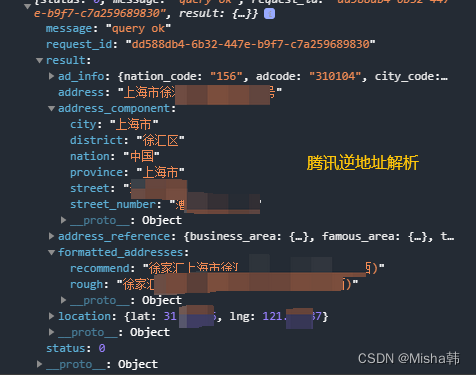
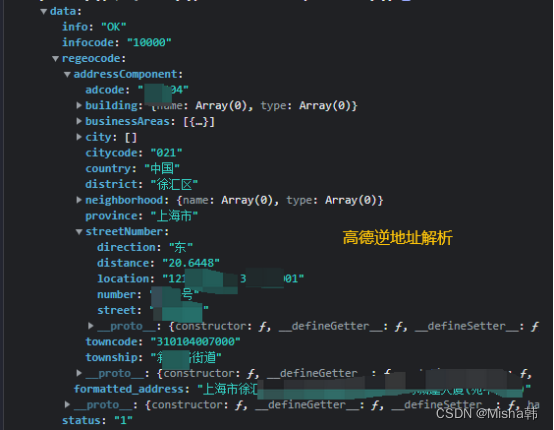
3、统一调用, 结果处理成统一格式
// map.js /** * 逆地址解析(坐标位置描述) * @param param object {location, success, fail} */ reverseCoordinateToTxt(param) { const { location: {latitude, longitude }, success, fail } = param let params = {} let outRes = { originalData: {}, modifiedData: {} } let dealDataFn = () => {} if (isWeapp) { params = { location: `${latitude},${longitude}`, sig: secretKey, } dealDataFn = data => { const { status, message, result } = data if (status !== 0 || !result) { fail(fail(`status: ${status}, errMsg: ${message}`)) return } const { address, address_component, location: { lat, lng } } = result const { district, street_number } = address_component outRes.originalData = data outRes.modifiedData = { district, street_number, address, latitude: lat, longitude: lng } success(outRes) } } else if (isAlipay) { params = { location: `${longitude},${latitude}` } dealDataFn = data => { const { status, infocode, info, regeocode } = data if (status !== '1' || !regeocode) { fail(fail(`status: ${status}, infocode: ${infocode}, errMsg: ${info}`)) return } const { formatted_address, addressComponent } = regeocode const { district, streetNumber: { street, number, location } } = addressComponent const locationList = location.split(',') outRes.originalData = data outRes.modifiedData = { district, street_number: `${street}${number}`, address: formatted_address, latitude: locationList[1], longitude: locationList[0] } success(outRes) } } mapInstance.reverseGeocoder({ ...params, success: (res) => { dealDataFn(res) }, fail: (error) => { fail(error) } }) }- 1
- 2
- 3
- 4
- 5
- 6
- 7
- 8
- 9
- 10
- 11
- 12
- 13
- 14
- 15
- 16
- 17
- 18
- 19
- 20
- 21
- 22
- 23
- 24
- 25
- 26
- 27
- 28
- 29
- 30
- 31
- 32
- 33
- 34
- 35
- 36
- 37
- 38
- 39
- 40
- 41
- 42
- 43
- 44
- 45
- 46
- 47
- 48
- 49
- 50
- 51
- 52
- 53
- 54
- 55
- 56
- 57
- 58
- 59
- 60
- 61
- 62
- 63
- 64
- 65
- 66
- 67
- 68
- 69
- 70
- 71
- 72
四、关键词输入提示
1、参数
// 腾讯 let params = { keyword, sig: secretKey, region: '北京', region_fix: 1, page_size: pageSize, page_index: page, } // 高德 let params = { keywords: keyword, city: '北京', offset: pageSize, page, }- 1
- 2
- 3
- 4
- 5
- 6
- 7
- 8
- 9
- 10
- 11
- 12
- 13
- 14
- 15
- 16
2、高德
// gdMaap.js /** * 关键字搜索poi * @param keywords * @param city * @param page * @param offset * @param success * @param fail */ getSuggestion({keywords, city, page, offset = 20, success = () => {}, fail = () => {}}) { const searchParam = { key: this.key, keywords, types: '', city, citylimit: true, children: 0, offset, page, extensions: 'base', sig: '' } Taro.request({ url: 'https://restapi.amap.com/v3/place/text', data: searchParam, header: { 'content-type': 'application/json' }, method: 'GET', success: (data) => { const res = data['data'] success(res) }, fail: (error) => { fail(error) } }) }- 1
- 2
- 3
- 4
- 5
- 6
- 7
- 8
- 9
- 10
- 11
- 12
- 13
- 14
- 15
- 16
- 17
- 18
- 19
- 20
- 21
- 22
- 23
- 24
- 25
- 26
- 27
- 28
- 29
- 30
- 31
- 32
- 33
- 34
- 35
- 36
- 37
- 38
- 39
- 40

3、统一调用, 结果处理成统一格式
// map.js /** * 关键字输入提示 * @param keyword 关键字 * @param page 当前页 * @param pageSize 每页条目数 * @param success 成功 * @param fail 失败 */ searchKeyWord({ keyword, page, pageSize, success = () => {}, fail = () => {} }) { let params = {} let outRes = { count: 0, originalData: {}, modifiedData: [] } let dealDataFn = () => {} if (isWeapp) { params = { keyword, sig: secretKey, region: '北京', region_fix: 1, page_size: pageSize, page_index: page, } dealDataFn = (res) => { const { status, count, data, message } = res if (status !== 0 || !data) { fail(`status: ${status}, errMsg: ${message}`) return } outRes.count = count outRes.originalData = res outRes.modifiedData = data.map(item => { const { id, type, title, address, location } = item return { id, title, addressStr: type === 1 || type === 2 ? MAP_POI_TYPE[type] : address, location } }) success(outRes) } } else if(isAlipay) { params = { keywords: keyword, city: '北京', offset: pageSize, page, } dealDataFn = (res) => { const { status, info, count, pois } = res if (status !== '1' || !pois) { fail(`status: ${status}, errMsg: ${info}`) return } outRes.count = +count outRes.originalData = res outRes.modifiedData = pois.map(item => { const { id, name, address, location } = item const locationList = location.split(',') return { id, title: name, addressStr: address, location: { lat: locationList[1], lng: locationList[0] } } }) success(outRes) } } mapInstance.getSuggestion({ ...params, success: (res) => { dealDataFn(res) }, fail: (error) => { fail(error) } }) }- 1
- 2
- 3
- 4
- 5
- 6
- 7
- 8
- 9
- 10
- 11
- 12
- 13
- 14
- 15
- 16
- 17
- 18
- 19
- 20
- 21
- 22
- 23
- 24
- 25
- 26
- 27
- 28
- 29
- 30
- 31
- 32
- 33
- 34
- 35
- 36
- 37
- 38
- 39
- 40
- 41
- 42
- 43
- 44
- 45
- 46
- 47
- 48
- 49
- 50
- 51
- 52
- 53
- 54
- 55
- 56
- 57
- 58
- 59
- 60
- 61
- 62
- 63
- 64
- 65
- 66
- 67
- 68
- 69
- 70
- 71
- 72
- 73
- 74
- 75
- 76
- 77
- 78
- 79
- 80
- 81
- 82
- 83
- 84
- 85
- 86
- 87
五、 路线规划
1、参数
// 腾讯 let params = { from: {latitude: xx, longitude: xx}, to: {latitude: xx, longitude: xx}, sig: secretKey } // 高德 let params = { origin: `${longitude},${latitude}`, destination: `${longitude},${latitude}` }- 1
- 2
- 3
- 4
- 5
- 6
- 7
- 8
- 9
- 10
- 11
2、高德
// gdMaap.js /** * 路径规划 * @param origin * @param destination * @param success * @param fail */ direction({origin, destination, success = () => {}, fail = () => {}}) { const params = { key: this.key, origin, destination, } Taro.request({ url: 'https://restapi.amap.com/v3/direction/driving', data: params, header: { 'content-type': 'application/json' }, method: 'GET', success: (data) => { const res = data['data'] success(res) }, fail: (error) => { fail(error) } }) }- 1
- 2
- 3
- 4
- 5
- 6
- 7
- 8
- 9
- 10
- 11
- 12
- 13
- 14
- 15
- 16
- 17
- 18
- 19
- 20
- 21
- 22
- 23
- 24
- 25
- 26
- 27
- 28
- 29
- 30
3、统一调用, 结果处理成统一格式
// map.js /** * 路线规划 * @param from 起点 * @param to 终点 * @param success * @param fail */ direction({ from, to, success, fail }) { let params = {} let outRes = { originalData: {}, modifiedData: {} } let dealDataFn = () => {} if (isWeapp) { params = { from, to, sig: secretKey } dealDataFn = data => { const { status, message, result } = data if (status !== 0 || !result) { fail(fail(`status: ${status}, errMsg: ${message}`)) return } const { routes } = result const { polyline } = routes[0] outRes.originalData = data outRes.modifiedData = { polyline: this._getPolylineListInTx(polyline) } success(outRes) } } else if (isAlipay) { params = { origin: `${from.longitude},${from.latitude}`, destination: `${to.longitude},${to.latitude}` } dealDataFn = data => { const { status, infocode, info, route } = data if (status !== '1' || !route) { fail(fail(`status: ${status}, infocode: ${infocode}, errMsg: ${info}`)) return } const { route: { paths } } = data const { steps } = paths[0] const polyline = this._getPolylineListInGd(steps) outRes.originalData = data outRes.modifiedData = { polyline } success(outRes) } } mapInstance.direction({ ...params, success: (res) => { dealDataFn(res) }, fail: (error) => { fail(error) } }) }- 1
- 2
- 3
- 4
- 5
- 6
- 7
- 8
- 9
- 10
- 11
- 12
- 13
- 14
- 15
- 16
- 17
- 18
- 19
- 20
- 21
- 22
- 23
- 24
- 25
- 26
- 27
- 28
- 29
- 30
- 31
- 32
- 33
- 34
- 35
- 36
- 37
- 38
- 39
- 40
- 41
- 42
- 43
- 44
- 45
- 46
- 47
- 48
- 49
- 50
- 51
- 52
- 53
- 54
- 55
- 56
- 57
- 58
- 59
- 60
- 61
- 62
- 63
- 64
- 65
- 66
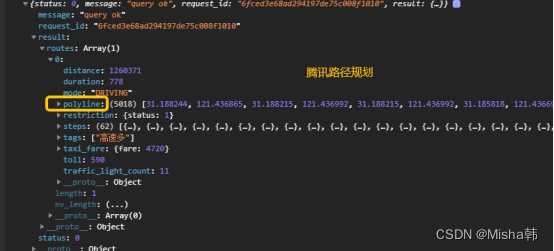
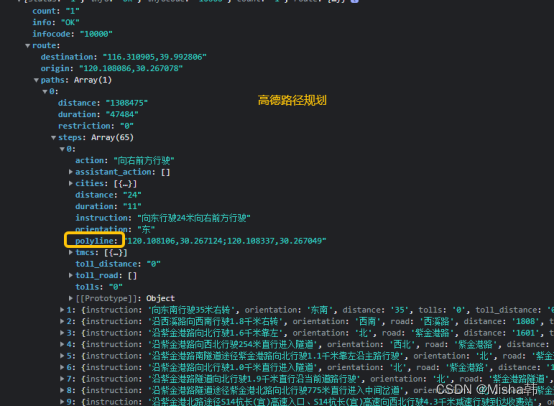
腾讯和高德的路径规划结果的数据格式差别很大:
高德返回的是路段的集合,经纬度在每个路段中,是string形式, 并且每对用分号隔离腾讯的直接是集合[经,纬,经,纬,经,纬…],没有分对
map组件的polyline属性需要的数据结构是:points: [{latitude: 0, longitude: 0}, {...}]- 1
分别对腾讯和支付宝的数据转换
// map.js /** * 获取腾讯的路径 * @param polyline * @returns {*[]} * @private */ _getPolylineListInTx(polyline) { const list = [] // 坐标解压(返回的点串坐标,通过前向差分进行压缩) const kr = 1000000 for (let i = 2; i < polyline.length; i++) { polyline[i] = Number(polyline[i - 2]) + Number(polyline[i]) / kr } // 将解压后的坐标放入点串数组pl中 for (let i = 0; i < polyline.length; i += 2) { list.push({ latitude: polyline[i], longitude: polyline[i + 1] }) } return list } /** * 获取高德的路径 * @param steps * @returns {*[]} * @private */ _getPolylineListInGd(steps) { const list = [] for (let i = 0; i < steps.length; i++) { const { polyline } = steps[i] const arr = polyline.split(';') for (let j = 0; j < arr.length; j++) { let item = arr[j] const idx = item.indexOf(',') const lng = item.substring(0, idx) const lat = item.substring(idx + 1) list.push({ latitude: +lat, longitude: +lng }) } } return list }- 1
- 2
- 3
- 4
- 5
- 6
- 7
- 8
- 9
- 10
- 11
- 12
- 13
- 14
- 15
- 16
- 17
- 18
- 19
- 20
- 21
- 22
- 23
- 24
- 25
- 26
- 27
- 28
- 29
- 30
- 31
- 32
- 33
- 34
- 35
- 36
- 37
- 38
- 39
- 40
- 41
- 42
- 43
- 44
- 45
PS: 支付宝小程序的polyline里面没border属性,而微信是可以设置borderWidth和borderColor
六、距离计算
没有用腾讯和高德的api,这里就不阐述了
/** * 获取两经纬度之间距离,返回米 --- 经纬度是GCJ-02 * @param lat1 * @param lng1 * @param lat2 * @param lng2 * @returns {number} */ export function getLocationDistance(lat1, lng1, lat2, lng2) { const radLat1 = lat1 * Math.PI / 180.0 const radLat2 = lat2 * Math.PI / 180.0 const a = radLat1 - radLat2 const b = lng1 * Math.PI / 180.0 - lng2 * Math.PI / 180.0 let s = 2 * Math.asin(Math.sqrt(Math.pow(Math.sin(a / 2), 2) + Math.cos(radLat1) * Math.cos(radLat2) * Math.pow(Math.sin(b / 2), 2))) s = s * 6378.137 s = Math.round(s * 10000) / 10 return s }- 1
- 2
- 3
- 4
- 5
- 6
- 7
- 8
- 9
- 10
- 11
- 12
- 13
- 14
- 15
- 16
- 17
- 18
-
相关阅读:
[LeetCode周赛复盘] 第 306 场周赛20220814
Java+JSP+MySQL基于SSM的学生宿舍管理系统的设计与实现-计算机毕业设计
docker服务无法关停的原因
day06-Flex布局
学生HTML个人网页作业作品:基于web在线汽车网站的设计与实现 (宝马轿车介绍)
【华为OD题库-030】阿里巴巴找黄金宝箱(V)-java
优测云测试平台 | 有效的单元测试(下)
Git 教程
【数据结构】链表经典oj
[JavaWeb]——JWT令牌技术,如何从获取JWT令牌
- 原文地址:https://blog.csdn.net/hanchengmei/article/details/126778117
