-
qt界面之间传递数据
前言,最近在做qt项目,登录成功后,在新的界面中展示”账号,欢迎你登录!",因此需要进行传递参数,根据本人写的调试成功的写一个随笔,直接把测试代码贴出来,展示!
代码展示
widget.h
- #ifndef WIDGET_H
- #define WIDGET_H
- #include
- #include
- #include
- #include "form.h"
- class Widget : public QWidget
- {
- Q_OBJECT
- public:
- Widget(QWidget *parent = nullptr);
- ~Widget();
- signals:
- //发送数据的信号,不需要实体函数,在头文件定义就可以
- void sendData(QString);
- private:
- QPushButton *Btn;
- Form *f;
- QLineEdit *qle;
- private slots:
- void clicked_button();
- };
- #endif // WIDGET_H
widget.cpp
- #include "widget.h"
- Widget::Widget(QWidget *parent)
- : QWidget(parent)
- {
- this->setWindowTitle("widget发送界面!");
- this->setFixedSize(800,600);
- Btn = new QPushButton(this);
- Btn->setGeometry(300,200,100, 50);
- qle = new QLineEdit(this);
- qle->setGeometry(120,20,200,40);
- Btn->setText("发送");
- f = new Form();
- connect(Btn,SIGNAL(clicked()),this,SLOT(clicked_button()));
- //这里是连接信号和槽函数的重点
- connect(this,SIGNAL(sendData(QString)),f,SLOT(getData(QString)));
- }
- Widget::~Widget()
- {
- }
- void Widget::clicked_button()
- {
- f->show();
- QString strss = qle->text();
- emit sendData(strss);//发送数据,使用emit
- }
form.h
- #ifndef FORM_H
- #define FORM_H
- #include
- #include
- #include
- #include
- namespace Ui {
- class Form;
- }
- class Form : public QWidget
- {
- Q_OBJECT
- public:
- explicit Form(QWidget *parent = nullptr);
- ~Form();
- private:
- QLineEdit *qle1;
- private slots:
- //得到数据的槽函数
- void getData(QString);
- };
- #endif // FORM_H
form.cpp
- #include "form.h"
- //#include "ui_form.h"
- //#include "widget.h"
- Form::Form(QWidget *parent) :
- QWidget(parent)
- {
- this->setWindowTitle("form接收界面!");
- this->setFixedSize(600,300);
- qle1 = new QLineEdit(this);
- qle1->setGeometry(120,20,200,40);
- }
- Form::~Form()
- {
- //delete ui;
- }
- void Form::getData(QString str)
- {
- qle1->setText(str);
- }
main.cpp
- #include "form.h"
- #include"widget.h"
- #include
- int main(int argc, char *argv[])
- {
- QApplication a(argc, argv);
- Widget w;
- w.show();
- return a.exec();
- }
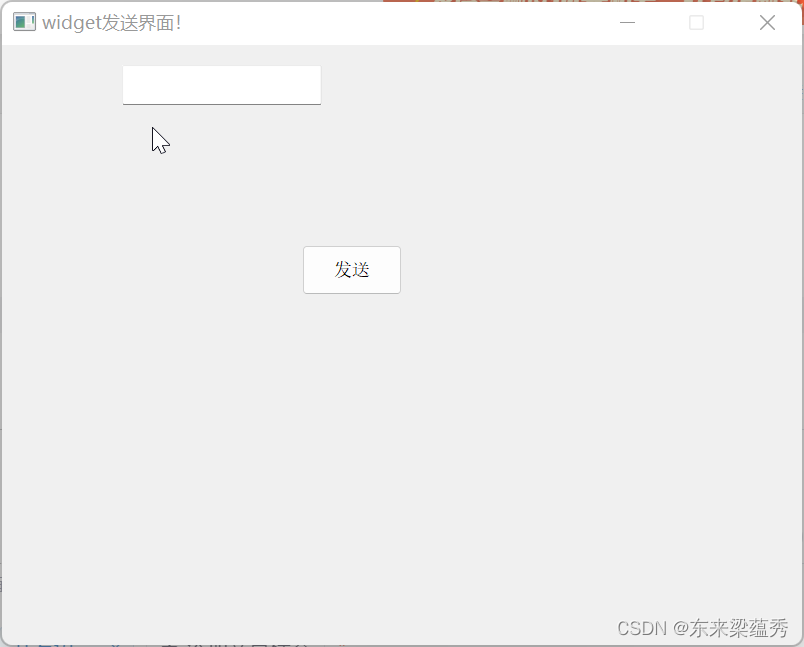
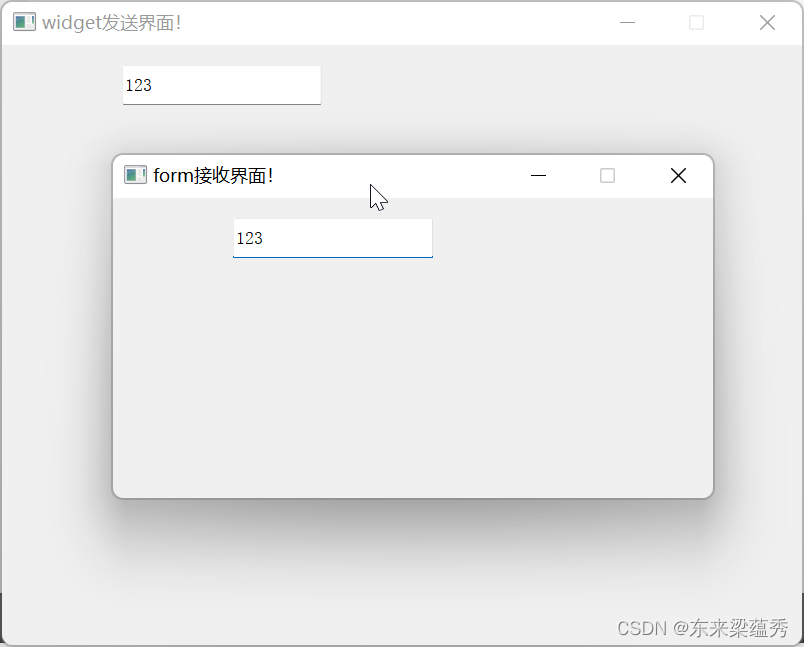
结果展示:
运行展示widget界面,点击发送就可以跳转到form界面,并且成功传递参数。
总结一下:
在widget.h声明一个发送信号,
signals:
 void sendData(QString);//发送数据的信号,不需要实体函数,在头文件定义就可以
然后定义槽函数
private slots:
void clicked_button();//定义的槽函数
在widget.cpp中,实现槽函数
void clicked_button()
{
//函数实现...
    emit sendData(strss);//发送数据,使用emit
}
在widget.cpp合适位置设置connect函数实现,绑定,测试是在构造函数中使用
//连接信号和槽函数的重点,f是指定页面的一个指针 connect(this,SIGNAL(sendData(QString)),f,SLOT(getData(QString)));
在form.h中定义,接收槽函数
private slots:
 void getData(QString);//得到数据的槽函数
在form.cpp中实现
void Form::getData(QString str) { //实现代码 } -
相关阅读:
通过Nacos配置刷新进行RabbitMQ消费者在线启停
Vue源码学习(十二):列队处理(防抖优化,多次调用,只处理一次)
基于ASP.NET+MYSQL的医院信息管理系统
外包干了3个多月,技术退步明显。。。。。
ajax发送json格式与文件数据、django自带的序列化器(了解)
使用弹簧启动和 JPA 测试乐观锁定处理
驱动保护进程 句柄降权 杀软自保 游戏破图标技术原理和实现
Windows环境下的ELK——filebeat+logstash+elasticsearch(4)
《昇思25天学习打卡营第17天|K近邻算法实现红酒聚类》
How to clean up Graylog Default index set log
- 原文地址:https://blog.csdn.net/m0_61973596/article/details/126767740
