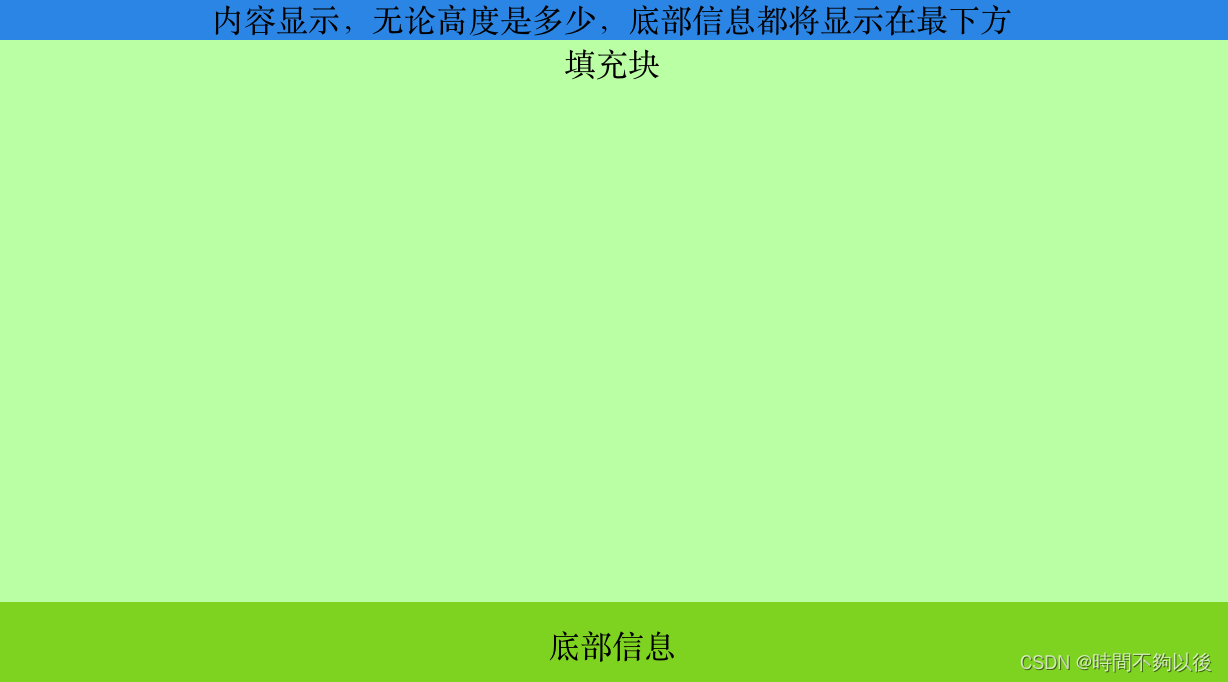
1. 内容显示,无论高度是多少,底部信息都将显示在最下方
DOCTYPE html>
<html lang="en">
	<head>
		<meta charset="UTF-8">
		<title>Titletitle>
		<style>
			html {
				height: 100%;

			}

			body {
				height: 100%;
				margin: 0px;
				overflow: hidden;
			}

			.page {
				display: flex;
				flex-direction: column;
				height: 100%;
				overflow: auto;
			}

			.content {
				display: flex;
				flex-direction: column;
				align-items: center;
				justify-content: center;
				text-align: center;
				flex: 1;
				background-color: #2b85e4;
			}

			.content-sub {
				width: 100%;
				height: 2000px;
				background-color: #baffa4;
			}

			.foot {
				text-align: center;
				padding: 10px;
				background-color: #7ed321;
			}
		style>
	head>
	<body>
		<div class="page">
			<div class="content">
				内容显示,无论高度是多少,底部信息都将显示在最下方
				<div class="content-sub">
					填充块
				div>
			div>
			<div class="foot">底部信息div>
		div>

	body>
html>
- 1
- 2
- 3
- 4
- 5
- 6
- 7
- 8
- 9
- 10
- 11
- 12
- 13
- 14
- 15
- 16
- 17
- 18
- 19
- 20
- 21
- 22
- 23
- 24
- 25
- 26
- 27
- 28
- 29
- 30
- 31
- 32
- 33
- 34
- 35
- 36
- 37
- 38
- 39
- 40
- 41
- 42
- 43
- 44
- 45
- 46
- 47
- 48
- 49
- 50
- 51
- 52
- 53
- 54
- 55
- 56
- 57
- 58
- 59
- 60
- 61
2. 自定义 自动完成组件

doctype html>
<html>
<style>
body {
margin-left: 0px;
margin-top: 0px;
margin-right: 0px;
margin-bottom: 0px;
}
.auto_hidden {
width: 204px;
border-top: 1px solid #333;
border-bottom: 1px solid #333;
border-left: 1px solid #333;
border-right: 1px solid #333;
position: absolute;
display: none;
}
.auto_show {
width: 204px;
border-top: 1px solid #333;
border-bottom: 1px solid #333;
border-left: 1px solid #333;
border-right: 1px solid #333;
position: absolute;
z-index: 9999;
display: block;
}
.auto_onmouseover {
color: #ffffff;
background-color: highlight;
width: 100%;
}
.auto_onmouseout {
color: #000000;
width: 100%;
background-color: #ffffff;
}
style>
<script language="javascript">
<!--
var $ = function(id) {
return "string" == typeof id ? document.getElementById(id) : id;
}
var Bind = function(object, fun) {
return function() {
return fun.apply(object, arguments);
}
}
function AutoComplete(obj, autoObj, arr) {
this.obj = $(obj);
this.autoObj = $(autoObj);
this.value_arr = arr;
this.index = -1;
this.search_value = "";
}
AutoComplete.prototype = {
init: function() {
this.autoObj.style.left = this.obj.offsetLeft + "px";
this.autoObj.style.top = this.obj.offsetTop + this.obj.offsetHeight + "px";
this.autoObj.style.width = this.obj.offsetWidth - 2 + "px";
},
deleteDIV: function() {
while (this.autoObj.hasChildNodes()) {
this.autoObj.removeChild(this.autoObj.firstChild);
}
this.autoObj.className = "auto_hidden";
},
setValue: function(_this) {
return function() {
_this.obj.value = this.seq;
_this.autoObj.className = "auto_hidden";
}
},
autoOnmouseover: function(_this, _div_index) {
return function() {
_this.index = _div_index;
var length = _this.autoObj.children.length;
for (var j = 0; j < length; j++) {
if (j != _this.index) {
_this.autoObj.childNodes[j].className = 'auto_onmouseout';
} else {
_this.autoObj.childNodes[j].className = 'auto_onmouseover';
}
}
}
},
changeClassname: function(length) {
for (var i = 0; i < length; i++) {
if (i != this.index) {
this.autoObj.childNodes[i].className = 'auto_onmouseout';
} else {
this.autoObj.childNodes[i].className = 'auto_onmouseover';
this.obj.value = this.autoObj.childNodes[i].seq;
}
}
},
pressKey: function(event) {
var length = this.autoObj.children.length;
if (event.keyCode == 40) {
++this.index;
if (this.index > length) {
this.index = 0;
} else if (this.index == length) {
this.obj.value = this.search_value;
}
this.changeClassname(length);
}
else if (event.keyCode == 38) {
this.index--;
if (this.index < -1) {
this.index = length - 1;
} else if (this.index == -1) {
this.obj.value = this.search_value;
}
this.changeClassname(length);
}
else if (event.keyCode == 13) {
this.autoObj.className = "auto_hidden";
this.index = -1;
} else {
this.index = -1;
}
},
start: function(event) {
if (event.keyCode != 13 && event.keyCode != 38 && event.keyCode != 40) {
this.init();
this.deleteDIV();
this.search_value = this.obj.value;
var valueArr = this.value_arr;
valueArr.sort();
if (this.obj.value.replace(/(^\s*)|(\s*$)/g, '') == "") {
return;
}
try {
var reg = new RegExp("(" + this.obj.value + ")", "i");
} catch (e) {
return;
}
var div_index = 0;
for (var i = 0; i < valueArr.length; i++) {
if (reg.test(valueArr[i])) {
var div = document.createElement("div");
div.className = "auto_onmouseout";
div.seq = valueArr[i];
div.onclick = this.setValue(this);
div.onmouseover = this.autoOnmouseover(this, div_index);
div.innerHTML = valueArr[i].replace(reg, "$1");
this.autoObj.appendChild(div);
this.autoObj.className = "auto_show";
div_index++;
}
}
}
this.pressKey(event);
window.onresize = Bind(this, function() {
this.init();
});
}
}
-->
SCRIPT>
<body>
<h1 align="center">自动完成函数(Autocomplete Function)h1>
<div align="center"><input type="text" style="width:300px;height:20px;font-size:14pt;" id="o"
onkeyup="autoComplete.start(event)">div>
<div class="auto_hidden" id="auto">
div>
<script>
var autoComplete = new AutoComplete('o', 'auto', ['b0', 'b12', 'b22', 'b3', 'b4', 'b5', 'b6', 'b7', 'b8', 'b2',
'abd', 'ab', 'acd', 'accd', 'b1', 'cd', 'ccd', 'cbcv', 'cxf'
]);
SCRIPT>
body>
html>

- 1
- 2
- 3
- 4
- 5
- 6
- 7
- 8
- 9
- 10
- 11
- 12
- 13
- 14
- 15
- 16
- 17
- 18
- 19
- 20
- 21
- 22
- 23
- 24
- 25
- 26
- 27
- 28
- 29
- 30
- 31
- 32
- 33
- 34
- 35
- 36
- 37
- 38
- 39
- 40
- 41
- 42
- 43
- 44
- 45
- 46
- 47
- 48
- 49
- 50
- 51
- 52
- 53
- 54
- 55
- 56
- 57
- 58
- 59
- 60
- 61
- 62
- 63
- 64
- 65
- 66
- 67
- 68
- 69
- 70
- 71
- 72
- 73
- 74
- 75
- 76
- 77
- 78
- 79
- 80
- 81
- 82
- 83
- 84
- 85
- 86
- 87
- 88
- 89
- 90
- 91
- 92
- 93
- 94
- 95
- 96
- 97
- 98
- 99
- 100
- 101
- 102
- 103
- 104
- 105
- 106
- 107
- 108
- 109
- 110
- 111
- 112
- 113
- 114
- 115
- 116
- 117
- 118
- 119
- 120
- 121
- 122
- 123
- 124
- 125
- 126
- 127
- 128
- 129
- 130
- 131
- 132
- 133
- 134
- 135
- 136
- 137
- 138
- 139
- 140
- 141
- 142
- 143
- 144
- 145
- 146
- 147
- 148
- 149
- 150
- 151
- 152
- 153
- 154
- 155
- 156
- 157
- 158
- 159
- 160
- 161
- 162
- 163
- 164
- 165
- 166
- 167
- 168
- 169
- 170
- 171
- 172
- 173
- 174
- 175
- 176
- 177
- 178
- 179
- 180
- 181
- 182
- 183
- 184
- 185
- 186
- 187
- 188
- 189
- 190
- 191
- 192
- 193
- 194
3. 按钮控制元素展开或者隐藏

DOCTYPE html>
<html>
	<head>
		<meta charset="utf-8">
		<meta name="author" content="http://www.pipipi.net/" />
		<title>title>
		<style type="text/css">
			body {
				text-align: center
			}

			.box {
				width: 200px;
				height: 100px;
				background-color: green;
				margin: 0px auto;
			}
		style>
		<script src="http://libs.baidu.com/jquery/2.1.4/jquery.min.js">script>
		<script type="text/javascript">
			$(document).ready(function() {
				$("#hide").click(function() {
					$(".box").slideUp();
				});
				$("#show").click(function() {
					$(".box").slideDown();
				});
			})
		script>
	head>
	<body>
		<div class="box">div>
		<input type="button" id="hide" value="点击隐藏" />
		<input type="button" id="show" value="点击展开" />
	body>
html>
- 1
- 2
- 3
- 4
- 5
- 6
- 7
- 8
- 9
- 10
- 11
- 12
- 13
- 14
- 15
- 16
- 17
- 18
- 19
- 20
- 21
- 22
- 23
- 24
- 25
- 26
- 27
- 28
- 29
- 30
- 31
- 32
- 33
- 34
- 35
- 36
- 37
4. 回到顶部

DOCTYPE html>
<html>
<head>
<style>
.box {
position: fixed;
right: 10px;
bottom: 10px;
height: 30px;
width: 50px;
text-align: center;
padding-top: 20px;
background-color: lightblue;
border-radius: 20%;
overflow: hidden;
}
.box:hover:before {
top: 50%
}
.box:hover .box-in {
visibility: hidden;
}
.box:before {
position: absolute;
top: -50%;
left: 50%;
transform: translate(-50%, -50%);
content: '回到顶部';
width: 40px;
color: peru;
font-weight: bold;
}
.box-in {
visibility: visible;
display: inline-block;
height: 20px;
width: 20px;
border: 3px solid black;
border-color: white transparent transparent white;
transform: rotate(45deg);
}
.top {
position: fixed;
right: 10px;
top: 10px;
height: 30px;
width: 50px;
text-align: center;
padding-top: 20px;
background-color: lightblue;
border-radius: 20%;
overflow: hidden;
}
.top:hover:before {
top: 50%
}
.top:hover .top-in {
visibility: hidden;
}
.top:before {
position: absolute;
top: -50%;
left: 50%;
transform: translate(-50%, -50%);
content: '查看标签';
width: 40px;
color: peru;
font-weight: bold;
}
.top-in {
visibility: visible;
display: inline-block;
height: 20px;
width: 20px;
border: 3px solid black;
border-color: transparent white white transparent ;
transform: rotate(45deg);
}
style>
head>
<body style="height:2000px;">
<div id="box" class="box">
<div class="box-in">div>
div>
body>
<script>
var timer = null;
box.onclick = function() {
cancelAnimationFrame(timer);
timer = requestAnimationFrame(function fn() {
var oTop = document.body.scrollTop || document.documentElement.scrollTop;
if (oTop > 0) {
document.body.scrollTop = document.documentElement.scrollTop = oTop - 50;
timer = requestAnimationFrame(fn);
} else {
cancelAnimationFrame(timer);
}
});
}
script>
html>
- 1
- 2
- 3
- 4
- 5
- 6
- 7
- 8
- 9
- 10
- 11
- 12
- 13
- 14
- 15
- 16
- 17
- 18
- 19
- 20
- 21
- 22
- 23
- 24
- 25
- 26
- 27
- 28
- 29
- 30
- 31
- 32
- 33
- 34
- 35
- 36
- 37
- 38
- 39
- 40
- 41
- 42
- 43
- 44
- 45
- 46
- 47
- 48
- 49
- 50
- 51
- 52
- 53
- 54
- 55
- 56
- 57
- 58
- 59
- 60
- 61
- 62
- 63
- 64
- 65
- 66
- 67
- 68
- 69
- 70
- 71
- 72
- 73
- 74
- 75
- 76
- 77
- 78
- 79
- 80
- 81
- 82
- 83
- 84
- 85
- 86
- 87
- 88
- 89
- 90
- 91
- 92
- 93
- 94
- 95
- 96
- 97
- 98
- 99
- 100
- 101
- 102
- 103
- 104
- 105
- 106
- 107
- 108
- 109
- 110
- 111
- 112
- 113
- 114
- 115
- 116
- 117
5. 可伸缩input
DOCTYPE html>
<html>
<head>
<meta http-equiv="Content-Type" content="text/html; charset=UTF-8">
<title>可伸缩搜索框demotitle>
head>
<body>
<style type="text/css">
.search-input {
background: #ededed url(http://webdesignerwall.com/demo/expandable-search-form/images/search-icon.png) no-repeat 9px;
padding: 8px 5px 8px 32px;
width: 0%;
border-radius: 18px;
outline: none;
overflow: hidden;
border-radius: 18px;
border: 1px solid #ddd;
-moz-box-shadow: inset 1px 1px 10px rgba(0, 0, 0, 0.1);
-webkit-box-shadow: inset 1px 1px 10px rgba(0, 0, 0, 0.1);
box-shadow: inset 1px 1px 10px rgba(0, 0, 0, 0.1);
-webkit-transition: all .3s;
-moz-transition: all .3s;
-o-transition: all .3s;
}
.search-input:hover,
.search-input:focus {
border-color: #fff;
color: #444;
width: 10%;
}
style>
<div class="search-mb">
<input class="search-input" type="text"/>
div>
body>
html>
- 1
- 2
- 3
- 4
- 5
- 6
- 7
- 8
- 9
- 10
- 11
- 12
- 13
- 14
- 15
- 16
- 17
- 18
- 19
- 20
- 21
- 22
- 23
- 24
- 25
- 26
- 27
- 28
- 29
- 30
- 31
- 32
- 33
- 34
- 35
- 36
- 37
- 38
- 39
- 40
- 41
- 42
- 43