-
Qt5开发从入门到精通——第五篇三节( 文本编辑器 Easy Word 开发 V1.2详解 )
欢迎小伙伴的点评✨✨,相互学习、互关必回、全天在线🍳🍳🍳
博主🧑🧑 本着开源的精神交流Qt开发的经验、将持续更新续章,为社区贡献博主自身的开源精神👩🚀
前言
本章节会给大家带来基于文本编辑器 Easy Word V1.1开发升级到Easy Word V1.2开发的解析。
一、文本编辑器 Easy Word V1.2 槽函数与框架连接解析
1.1、缩放功能
(1)在 “mainwindow.h” 头文件中添加 “private slots:” 变量:
void ShowZoomIn(); //缩放功能放大- 1
(2)在 createActions() 函数的”“放大“动作“最后添加事件关联:
connect(zoomInAction,SIGNAL(triggered()),this,SLOT(ShowZoomIn()));- 1
(3)实现图形放大功能的函数 ShowZoomln()如下:
void MainWindow::ShowZoomIn() //图像放大 { if(img.isNull()) //有效性判断 { return; } QMatrix matrix; //声明一个QMatrix类的实例 matrix.scale(2,2); //(a) img = img.transformed(matrix); showWidget->imageLabel->setPixmap(QPixmap::fromImage(img)); }- 1
- 2
- 3
- 4
- 5
- 6
- 7
- 8
- 9
- 10
- 11
- 12
- 13
- 14
其中, matrix.scale(2,2)、 img = img.transformed(matrix):按照 2 倍比例对水平和垂直方向进行放大,并将当前显示的图形按照该坐标矩阵进行转换。QMatrix & QMatrix::scale(qreal sx,qreal sy)函数返回缩放后的 matrix 对象引用,若要实现 2
倍比例的缩小,则将参数 sx 和 sy 改为 0.5 即可。
(4)在 “mainwindow.h” 头文件中添加 “private slots:” 变量:void ShowZoomOut(); //缩放功能缩小- 1
(5)在 createActionsO 函数的"''缩小“动作“最后添加事件关联:
connect (zoomOutAction, SIGNAL(triggered ()), this, SLOT (ShowZoomOut()));- 1
(6)实现图形缩小功能的函数 ShowZoomOutO如下:
void MainWindow::ShowZoomOut() //图像缩小 { if (img.isNull()) { return; } QMatrix matrix; matrix.scale(0.5,0.5); //(a) img=img.transformed(matrix); showWidget->imageLabel->setPixmap(QPixmap::fromImage(img)); }- 1
- 2
- 3
- 4
- 5
- 6
- 7
- 8
- 9
- 10
- 11
- 12
- 13
其中,
(a)scale(qreal sx,qreal sy): 此函数的参数是 qreal 类型值。 qreal 定义了一种 double 数据类
型,该数据类型适用于所有的平台。需要注意的是,对千 ARM 体系结构的平台, qreal 是一种float 类型 。 在 Qt 5 中还声明了 一 些指定位长度的数据类型,目的是保证程序能够在 Qt 支待的所有平台上正常运行。例如, qint8 表示一个有符号的 8 位字节, qlonglong 表示 long long int 类型,与 qint64 相同。1.2、旋转功能
ShowRotate90()函数实现的是图形的旋转,此函数实现坐标的逆时针旋转 90° 。
(1)在 “mainwindow.h” 头文件中添加 “private slots:” 变量:void ShowRotate90(); //旋转90°- 1
(2)在 createActionsO函数的“旋转 90°" 最后添加事件关联:
connect(rotate90Action, SIGNAL (triggered()), this, SLOT (ShowRotate90()));- 1
(3)ShowRotate90()函数的具体实现代码如下:
void MainWindow::ShowRotate90() //旋转90° { if(img.isNull()) { return; } QMatrix matrix; matrix.rotate(90); img = img.transformed(matrix); showWidget->imageLabel->setPixmap(QPixmap::fromImage(img)); }- 1
- 2
- 3
- 4
- 5
- 6
- 7
- 8
- 9
- 10
- 11
- 12
(4)在 “mainwindow.h” 头文件中添加 "private slots : " 变量:
void ShowRotate180(); //旋转180° void ShowRotate270 (); //旋转270°- 1
- 2
(5)在 createActions() 函数的“旋转 180°" “旋转 270°” 最后分别添加事件关联:
connect(rotate180Action, SIGNAL (triggered()), this, SLOT (ShowRotate180())); connect(rotate270Action, SIGNAL (triggered()), this, SLOT (ShowRotate270()));- 1
- 2
(6)ShowRotate 180() 、 ShowRotate270()函数的具体实现代码如下:
void MainWindow::ShowRotate180() //旋转180° { if(img.isNull()) { return; } QMatrix matrix; matrix.rotate(180); img = img.transformed(matrix); showWidget->imageLabel->setPixmap(QPixmap::fromImage(img)); } void MainWindow::ShowRotate270() //旋转270° { if(img.isNull()) { return; } QMatrix matrix; matrix.rotate(270); img = img.transformed(matrix); showWidget->imageLabel->setPixmap(QPixmap::fromImage(img)); }- 1
- 2
- 3
- 4
- 5
- 6
- 7
- 8
- 9
- 10
- 11
- 12
- 13
- 14
- 15
- 16
- 17
- 18
- 19
- 20
- 21
- 22
- 23
- 24
1.3、镜像功能
ShowMirrorVertical() 函数实现的是图形的纵向镜像, ShowMirrorHorizontal() 函数实现的则是横向镜像。通过 Qlmage::mirrored(bool horizontal,bool vertical) 实现图形的镜像功能,参数horizontal 和 vertical 分别指定了镜像的方向。具体实现步骤如下。
(1)在 “mainwindow.h” 头文件中添加 “private slots:” 变量:void ShowMirrorVertical(); //纵向 void ShowMirrorHorizontal (); //横向- 1
- 2
(2)在 createActionsO 函数的“纵向镜像”“横向镜像“最后分别添加事件关联:
connect (mirrorVerticalAction, SIGNAL (triggered()), this, SLOT (ShowMirrorVertical())); connect (mirrorHorizontalAction, SIGNAL (triggered()), this, SLOT (ShowMirrorHorizontal ()));- 1
- 2
(3)ShowMirrorVertical()、 ShowMirrorHorizontal ()函数的具体实现代码如下:
void MainWindow::ShowMirrorVertical() //纵向镜像 { if(img. isNull ()) return; img=img.mirrored(false,true); showWidget->imageLabel->setPixmap(QPixmap::fromImage(img)); } void MainWindow::ShowMirrorHorizontal() //横向镜像 { if(img. isNull ()) return; img=img.mirrored(true,false); showWidget->imageLabel->setPixmap(QPixmap::fromImage(img)); }- 1
- 2
- 3
- 4
- 5
- 6
- 7
- 8
- 9
- 10
- 11
- 12
- 13
- 14
- 15
二、效果实例
图一

图二
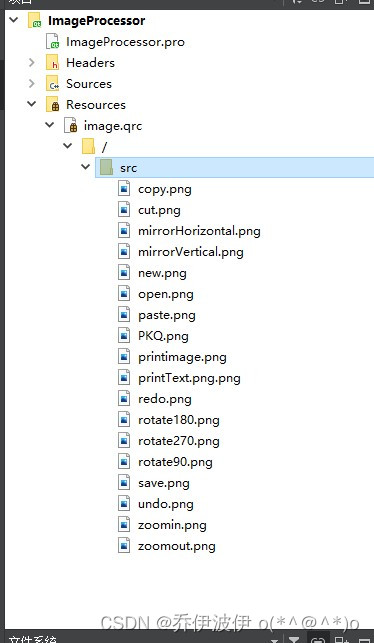
图标和图片放到新建的Resources中
三、原码解析
工程文件(包含图标)已经上传GitHub,通过git直接拉取即可
git clone https://github.com/dhn111/EasyWord.git- 1
mainwindow.h
#ifndef MAINWINDOW_H #define MAINWINDOW_H #include#include #include #include #include #include #include #include #include #include #include #include #include "showwidget.h" #include #include #include #include //读入文本 #include #include #include #include //打印文本 #include #include //打印图片 #include class MainWindow : public QMainWindow { Q_OBJECT public: MainWindow(QWidget *parent = 0); ~MainWindow(); void createActions(); //创建动作 void createMenus(); //创建菜单 void createToolBars (); //创建工具栏 void loadFile(QString filename); void mergeFormat(QTextCharFormat); private: QMenu *fileMenu; //各项菜单栏 QMenu *zoomMenu; QMenu *rotateMenu; QMenu *mirrorMenu; QImage img; QString fileName; ShowWidget *showWidget; QAction *openFileAction; //文件菜单项 QAction *NewFileAction; QAction *PrintTextAction; QAction *PrintImageAction; QAction *exitAction; QAction *copyAction; //编辑菜单项 QAction *cutAction; QAction *pasteAction; QAction *aboutAction; QAction *zoomInAction; QAction *zoomOutAction; QAction *rotate90Action; //旋转菜单项 QAction *rotate180Action; QAction *rotate270Action; QAction *mirrorVerticalAction; //镜像菜单项 QAction *mirrorHorizontalAction; QAction *undoAction; QAction *redoAction; QToolBar *fileTool; //工具栏 QToolBar *zoomTool; QToolBar *rotateTool; QToolBar *mirrorTool; QToolBar *doToolBar; private slots: void ShowNewFile(); //新建文件 void ShowOpenFile(); //打开文件 void ShowPrintText(); //打印文本 void ShowPrintImage(); //打印图像 void ShowZoomIn(); //缩放功能放大 void ShowZoomOut(); //缩放功能缩小 void ShowRotate90(); //旋转90° void ShowRotate180(); //旋转180° void ShowRotate270 (); //旋转270° void ShowMirrorVertical(); //纵向 void ShowMirrorHorizontal (); //横向 }; #endif // MAINWINDOW_H - 1
- 2
- 3
- 4
- 5
- 6
- 7
- 8
- 9
- 10
- 11
- 12
- 13
- 14
- 15
- 16
- 17
- 18
- 19
- 20
- 21
- 22
- 23
- 24
- 25
- 26
- 27
- 28
- 29
- 30
- 31
- 32
- 33
- 34
- 35
- 36
- 37
- 38
- 39
- 40
- 41
- 42
- 43
- 44
- 45
- 46
- 47
- 48
- 49
- 50
- 51
- 52
- 53
- 54
- 55
- 56
- 57
- 58
- 59
- 60
- 61
- 62
- 63
- 64
- 65
- 66
- 67
- 68
- 69
- 70
- 71
- 72
- 73
- 74
- 75
- 76
- 77
- 78
- 79
- 80
- 81
- 82
- 83
- 84
- 85
- 86
- 87
- 88
- 89
showwidget.h
#ifndef SHOWWIDGET_H #define SHOWWIDGET_H #include#include #include #include #include class ShowWidget : public QWidget { Q_OBJECT public: explicit ShowWidget(QWidget *parent = nullptr); QImage img; QLabel *imageLabel; QTextEdit *text; signals: public slots: }; #endif // SHOWWIDGET_H - 1
- 2
- 3
- 4
- 5
- 6
- 7
- 8
- 9
- 10
- 11
- 12
- 13
- 14
- 15
- 16
- 17
- 18
- 19
- 20
- 21
- 22
- 23
- 24
- 25
- 26
main.cpp
#include "mainwindow.h" #includeint main(int argc, char *argv[]) { QApplication a(argc, argv); MainWindow w; w.show(); return a.exec(); } - 1
- 2
- 3
- 4
- 5
- 6
- 7
- 8
- 9
- 10
- 11
- 12
mainwindow.cpp
#include "mainwindow.h" MainWindow::MainWindow(QWidget *parent) : QMainWindow(parent) { //各项菜单栏 fileMenu = new QMenu; zoomMenu = new QMenu; rotateMenu = new QMenu; mirrorMenu = new QMenu; showWidget = new ShowWidget; //文件菜单 openFileAction =new QAction; NewFileAction =new QAction; PrintTextAction =new QAction; PrintImageAction =new QAction; exitAction = new QAction; //缩放菜单 copyAction =new QAction; cutAction =new QAction; pasteAction =new QAction; aboutAction =new QAction; zoomInAction =new QAction; zoomOutAction=new QAction; //旋转菜单项 rotate90Action =new QAction; rotate180Action=new QAction; rotate270Action=new QAction; //镜像菜单项 mirrorVerticalAction =new QAction; mirrorHorizontalAction=new QAction; undoAction =new QAction; redoAction =new QAction; //工具栏 fileTool = new QToolBar; zoomTool = new QToolBar; rotateTool = new QToolBar; mirrorTool = new QToolBar; doToolBar = new QToolBar; setWindowTitle(tr("Easy Word")); //设置窗体标题 showWidget =new ShowWidget(this); //(a) setCentralWidget(showWidget); /*创建动作、菜单、工具栏的函数*/ createActions() ; createMenus(); createToolBars(); if(img.load(":/src/PKQ.png")) { //在 imageLabel 对象中放置图片 showWidget->imageLabel->setPixmap(QPixmap::fromImage(img)); } } MainWindow::~MainWindow() { } void MainWindow::createActions() { //“打开”动作 openFileAction =new QAction(QIcon(":/src/open.png"),tr("打开"),this); //(a) openFileAction->setShortcut (tr ("Ctrl+O")); //(b) openFileAction->setStatusTip(tr("打开一个文件 ")); //(c) connect(openFileAction,SIGNAL(triggered()),this,SLOT(ShowOpenFile())); //"新建“动作 NewFileAction =new QAction(QIcon(":/src/new.png"),tr("新建"),this); NewFileAction->setShortcut(tr("Ctrl+N")); NewFileAction->setStatusTip(tr("新建一个文件")); connect(NewFileAction, SIGNAL (triggered()) , this, SLOT (ShowNewFile())) ; // "退出“动作 exitAction =new QAction(tr("退出"),this); exitAction->setShortcut(tr("Ctrl+Q")); exitAction->setStatusTip(tr("退出程序")) ; connect (exitAction, SIGNAL (triggered()), this, SLOT (close())); // "复制”动作 copyAction =new QAction(QIcon(":/src/copy.png"),tr("复制"),this); copyAction->setShortcut(tr("Ctrl+C")); copyAction->setStatusTip(tr(" 复制文件")) ; connect(copyAction,SIGNAL( triggered ()), showWidget->text, SLOT(copy())); //"剪切“动作 cutAction =new QAction(QIcon(":/src/cut.png"),tr("剪切"),this); cutAction->setShortcut(tr("Ctrl+X")); cutAction->setStatusTip(tr("剪切文件")) ; connect(cutAction,SIGNAL( triggered ()), showWidget->text, SLOT (cut())); //"粘贴“动作 pasteAction =new QAction(QIcon(":/src/paste.png"),tr("粘贴"),this); pasteAction->setShortcut(tr("Ctrl+V")); pasteAction->setStatusTip(tr("粘贴文件")) ; connect(pasteAction,SIGNAL(triggered()),showWidget->text,SLOT (paste())); //"关于“动作 aboutAction =new QAction(tr("关于"),this); connect(aboutAction,SIGNAL(triggered()),this,SLOT(QApplication::aboutQt())); //"打印文本“动作 PrintTextAction =new QAction(QIcon(":/src/printText.png"),tr(" 打印文本"), this); PrintTextAction->setStatusTip(tr("打印一个文本")); connect (PrintTextAction, SIGNAL (triggered()), this, SLOT (ShowPrintText ())); //"打印图片“动作 PrintImageAction =new QAction(QIcon (":/src/printimage.png" ), tr("打印图片"), this); PrintImageAction->setStatusTip(tr("打印一幅图片")); connect(PrintImageAction, SIGNAL (triggered()), this, SLOT (ShowPrintImage())); //"放大“动作 zoomInAction =new QAction (QIcon(":/src/zoomin.png"),tr(" 放大 "),this); zoomInAction->setStatusTip(tr("放大一幅图片")); connect(zoomInAction,SIGNAL(triggered()),this,SLOT(ShowZoomIn())); //"缩小“动作 zoomOutAction =new QAction(QIcon(":/src/zoomout.png"),tr("缩小 "),this); zoomOutAction->setStatusTip(tr("缩小一幅图片 ")); connect (zoomOutAction, SIGNAL(triggered ()), this, SLOT (ShowZoomOut())); //实现图片旋转的动作 (Action) //旋转 90° rotate90Action =new QAction (QIcon (":/src/rotate90.png"), tr("旋转 90°") ,this); rotate90Action->setStatusTip(tr("将一幅图旋转90°")); connect(rotate90Action, SIGNAL (triggered()), this, SLOT (ShowRotate90())); //旋转180° rotate180Action =new QAction (QIcon(":/src/rotate180.png"), tr("旋转 180°"), this); rotate180Action->setStatusTip(tr("将一幅图旋转180°")); connect(rotate180Action, SIGNAL (triggered()), this, SLOT (ShowRotate180())); //旋转270° rotate270Action =new QAction(QIcon (":/src/rotate270.png"), tr("旋转 270°"), this); rotate270Action->setStatusTip(tr("将一幅图旋转 270°")); connect(rotate270Action, SIGNAL (triggered()), this, SLOT (ShowRotate270())); //实现图片镜像的动作(Action) //纵向镜像 mirrorVerticalAction =new QAction(QIcon(":/src/mirrorVertical.png"),tr("纵向镜像"), this); mirrorVerticalAction->setStatusTip(tr("对一幅图做纵向镜像")) ; connect (mirrorVerticalAction, SIGNAL (triggered()), this, SLOT (ShowMirrorVertical())); //横向镜像 mirrorHorizontalAction =new QAction(QIcon(":/src/mirrorHorizontal.png"),tr("横向镜像 "),this); mirrorHorizontalAction->setStatusTip(tr("对一幅图做横向镜像")) ; connect (mirrorHorizontalAction, SIGNAL (triggered()), this, SLOT (ShowMirrorHorizontal ())); //实现撤销和重做的动作(ACtion) //撤销和重做 undoAction =new QAction (QIcon(":/src/undo.png"),"撤销",this); connect(undoAction,SIGNAL(triggered()),showWidget->text,SLOT(undo())); redoAction =new QAction(QIcon(":/src/redo.png"),"重做",this); connect(redoAction, SIGNAL(triggered()),showWidget->text,SLOT(redo())); } void MainWindow::createMenus() { //文件菜单 fileMenu =menuBar()->addMenu(tr("文件")) ; fileMenu->addAction(openFileAction); fileMenu->addAction(NewFileAction); fileMenu->addAction(PrintTextAction); fileMenu->addAction(PrintImageAction); fileMenu->addSeparator(); fileMenu->addAction(exitAction); //缩放菜单 zoomMenu =menuBar()->addMenu(tr("编辑")) ; zoomMenu->addAction(copyAction); zoomMenu->addAction(cutAction); zoomMenu->addAction(pasteAction); zoomMenu->addAction(aboutAction); zoomMenu->addSeparator(); zoomMenu->addAction(zoomInAction); zoomMenu->addAction(zoomOutAction); //旋转菜单 rotateMenu =menuBar ()->addMenu(tr("旋转")) ; rotateMenu->addAction(rotate90Action); rotateMenu->addAction(rotate180Action); rotateMenu->addAction(rotate270Action); //镜像菜单 mirrorMenu =menuBar()->addMenu(tr(" 镜像")) ; mirrorMenu->addAction(mirrorVerticalAction); mirrorMenu->addAction(mirrorHorizontalAction); } void MainWindow::createToolBars() { //文件工具条 fileTool =addToolBar("File"); fileTool->addAction(openFileAction); fileTool->addAction(NewFileAction); fileTool->addAction(PrintTextAction); fileTool->addAction(PrintImageAction); //编辑工具条 zoomTool =addToolBar("Edit"); zoomTool->addAction(copyAction); zoomTool->addAction(cutAction); zoomTool->addAction(pasteAction); zoomTool->addSeparator(); zoomTool->addAction(zoomInAction); zoomTool->addAction(zoomOutAction); //旋转工具条 rotateTool =addToolBar("rotate"); rotateTool->addAction(rotate90Action); rotateTool->addAction(rotate180Action); rotateTool->addAction(rotate270Action); //撤销和重做工具条 doToolBar =addToolBar("doEdit"); doToolBar->addAction(undoAction); doToolBar->addAction(redoAction); } void MainWindow::ShowNewFile() //新建文件的槽 { MainWindow *newMainWindow =new MainWindow; newMainWindow->show(); } void MainWindow::ShowOpenFile() //读取文件的槽 { fileName =QFileDialog::getOpenFileName(this); if(!fileName.isEmpty()) { if(showWidget->text->document()->isEmpty()) { loadFile(fileName); }else { MainWindow *newMainWindows = new MainWindow; newMainWindows->show(); newMainWindows->loadFile(fileName); } } } #if 1 void MainWindow::loadFile(QString filename) { QFile file(filename); if(file.open(QIODevice::ReadOnly|QIODevice::Text)) { QTextStream textStream(&file); while(!textStream.atEnd()) { showWidget->text->append(textStream.readLine()); } } } #endif #if 0 void MainWindow::loadFile(QString filename) { QFile file(filename); QTextCodec *codec = QTextCodec::codecForName("GBK"); if(file.open(QIODevice::ReadOnly|QIODevice::Text)) { while(!file.atEnd()) { QByteArray line = file.readLine(); QString str = codec->toUnicode(line); showWidget->text->append(str); //qDebug()<- 1
- 2
- 3
- 4
- 5
- 6
- 7
- 8
- 9
- 10
- 11
- 12
- 13
- 14
- 15
- 16
- 17
- 18
- 19
- 20
- 21
- 22
- 23
- 24
- 25
- 26
- 27
- 28
- 29
- 30
- 31
- 32
- 33
- 34
- 35
- 36
- 37
- 38
- 39
- 40
- 41
- 42
- 43
- 44
- 45
- 46
- 47
- 48
- 49
- 50
- 51
- 52
- 53
- 54
- 55
- 56
- 57
- 58
- 59
- 60
- 61
- 62
- 63
- 64
- 65
- 66
- 67
- 68
- 69
- 70
- 71
- 72
- 73
- 74
- 75
- 76
- 77
- 78
- 79
- 80
- 81
- 82
- 83
- 84
- 85
- 86
- 87
- 88
- 89
- 90
- 91
- 92
- 93
- 94
- 95
- 96
- 97
- 98
- 99
- 100
- 101
- 102
- 103
- 104
- 105
- 106
- 107
- 108
- 109
- 110
- 111
- 112
- 113
- 114
- 115
- 116
- 117
- 118
- 119
- 120
- 121
- 122
- 123
- 124
- 125
- 126
- 127
- 128
- 129
- 130
- 131
- 132
- 133
- 134
- 135
- 136
- 137
- 138
- 139
- 140
- 141
- 142
- 143
- 144
- 145
- 146
- 147
- 148
- 149
- 150
- 151
- 152
- 153
- 154
- 155
- 156
- 157
- 158
- 159
- 160
- 161
- 162
- 163
- 164
- 165
- 166
- 167
- 168
- 169
- 170
- 171
- 172
- 173
- 174
- 175
- 176
- 177
- 178
- 179
- 180
- 181
- 182
- 183
- 184
- 185
- 186
- 187
- 188
- 189
- 190
- 191
- 192
- 193
- 194
- 195
- 196
- 197
- 198
- 199
- 200
- 201
- 202
- 203
- 204
- 205
- 206
- 207
- 208
- 209
- 210
- 211
- 212
- 213
- 214
- 215
- 216
- 217
- 218
- 219
- 220
- 221
- 222
- 223
- 224
- 225
- 226
- 227
- 228
- 229
- 230
- 231
- 232
- 233
- 234
- 235
- 236
- 237
- 238
- 239
- 240
- 241
- 242
- 243
- 244
- 245
- 246
- 247
- 248
- 249
- 250
- 251
- 252
- 253
- 254
- 255
- 256
- 257
- 258
- 259
- 260
- 261
- 262
- 263
- 264
- 265
- 266
- 267
- 268
- 269
- 270
- 271
- 272
- 273
- 274
- 275
- 276
- 277
- 278
- 279
- 280
- 281
- 282
- 283
- 284
- 285
- 286
- 287
- 288
- 289
- 290
- 291
- 292
- 293
- 294
- 295
- 296
- 297
- 298
- 299
- 300
- 301
- 302
- 303
- 304
- 305
- 306
- 307
- 308
- 309
- 310
- 311
- 312
- 313
- 314
- 315
- 316
- 317
- 318
- 319
- 320
- 321
- 322
- 323
- 324
- 325
- 326
- 327
- 328
- 329
- 330
- 331
- 332
- 333
- 334
- 335
- 336
- 337
- 338
- 339
- 340
- 341
- 342
- 343
- 344
- 345
- 346
- 347
- 348
- 349
- 350
- 351
- 352
- 353
- 354
- 355
- 356
- 357
- 358
- 359
- 360
- 361
- 362
- 363
- 364
- 365
- 366
- 367
- 368
- 369
- 370
- 371
- 372
- 373
- 374
- 375
- 376
- 377
- 378
- 379
- 380
- 381
- 382
- 383
- 384
- 385
- 386
- 387
- 388
- 389
- 390
- 391
- 392
- 393
- 394
- 395
- 396
- 397
- 398
showwidget.cpp
#include "showwidget.h" ShowWidget::ShowWidget(QWidget *parent) : QWidget(parent) { imageLabel =new QLabel; imageLabel->setScaledContents( true); text =new QTextEdit; QHBoxLayout *mainLayout =new QHBoxLayout(this); mainLayout->addWidget(imageLabel); mainLayout->addWidget(text); }- 1
- 2
- 3
- 4
- 5
- 6
- 7
- 8
- 9
- 10
- 11
- 12
四、总结
窗口构成会在应用程序开发中经常用到的
-
相关阅读:
Maven使用之packaging类型
封箱vs拆箱
多测师肖sir_高级金牌讲师__git讲解
【Leetcode刷题Python】5. 最长回文子串
【KELM分类】基于matlab鲸鱼算法优化KELM分类【含Matlab源码 2033期】
笔记本电脑怎么写日记
Docker安装
RedisTemplate出现\xac\xed\x00\x05t\x00\x0f前缀解决
1-6月中国ADAS供应商占比9% 又一家零部件巨头全面布局智驾新赛道
大数据组件之Hbase(待补充)
- 原文地址:https://blog.csdn.net/weixin_44759598/article/details/126703695
- 最新文章
-
沪漂五周年了:我越来越迷茫了
Agentic Skill Routing 实战:别再把所有 Skill 塞进 AI Agent 上下文
MySQL-Seconds_behind_master的精度误差
[MAF预定义ChatClient中间件-03]CachingChatClient——利用缓存省钱省时间
AI的至暗历史:从万众期待到被政府撤资,AI的两次死亡徘徊
Agent OS :五种驯服不确定性的范式
PortSwigger SQL注入LAB11
数据库即时编译JIT
[Begin]AI Learn Data Day 0
深度学习进阶(二十七)现代 LLM 的核心架构设计其二:SwiGLU