-
Android——一个简单的天气APP
效果演示视频
EasyWeather演示效果视频
简述
此天气数据源采用心知天气API(试用版),免费版获取数据有限,只能获取普通的温度、湿度等,例如压力、云量、可见度等均获取不到,试用版相当于正式版,可以获取大部分数据,试用日期是14天。
首页不同城市天气页面之间的滑动采用的是
ViewPager,编辑界面的搜索栏采用的是SearchView+ListView,其中城市数据源是统计到一个xml文件中;通过点击搜索匹配项,插入至SQLite数据库中,然后刷新当前天气子项,然后通过EventBus通知首页更新views页面。处于编辑状态时,删除子项,同样使用EventBus通知首页更新;更新主要是页面数量更新和下方指示器更新。天气JSON数据
实况天气
{ "results":[ { "location":{ "id":"WKZTU85FVNSV", "name":"娄底", "country":"CN", "path":"娄底,娄底,湖南,中国", "timezone":"Asia/Shanghai", "timezone_offset":"+08:00" }, "now":{ "text":"晴", "code":"1", "temperature":"25", "feels_like":"26", "pressure":"984", "humidity":"56", "visibility":"19.0", "wind_direction":"北", "wind_direction_degree":"342", "wind_speed":"6.0", "wind_scale":"2", "clouds":"13", "dew_point":"" }, "last_update":"2022-09-02T22:08:30+08:00" } ] }- 1
- 2
- 3
- 4
- 5
- 6
- 7
- 8
- 9
- 10
- 11
- 12
- 13
- 14
- 15
- 16
- 17
- 18
- 19
- 20
- 21
- 22
- 23
- 24
- 25
- 26
- 27
- 28
- 29
- 30
逐24小时天气预报
{ "results":[ { "location":{ "id":"WWYMRT0VRMUG", "name":"大连", "country":"CN", "path":"大连,大连,辽宁,中国", "timezone":"Asia/Shanghai", "timezone_offset":"+08:00" }, "hourly":[ { "time":"2022-09-02T22:00:00+08:00", "text":"多云", "code":"4", "temperature":"21", "humidity":"81", "wind_direction":"东", "wind_speed":"7.52" }, { "time":"2022-09-02T23:00:00+08:00", "text":"阴", "code":"9", "temperature":"21", "humidity":"82", "wind_direction":"东北", "wind_speed":"7.02" }, { "time":"2022-09-03T00:00:00+08:00", "text":"阴", "code":"9", "temperature":"21", "humidity":"83", "wind_direction":"东北", "wind_speed":"7.81" }, { "time":"2022-09-03T01:00:00+08:00", "text":"阴", "code":"9", "temperature":"21", "humidity":"84", "wind_direction":"东北", "wind_speed":"8.64" }, { "time":"2022-09-03T02:00:00+08:00", "text":"阴", "code":"9", "temperature":"21", "humidity":"85", "wind_direction":"东北", "wind_speed":"9.54" }, { "time":"2022-09-03T03:00:00+08:00", "text":"阴", "code":"9", "temperature":"21", "humidity":"85", "wind_direction":"东北", "wind_speed":"10.15" }, { "time":"2022-09-03T04:00:00+08:00", "text":"阴", "code":"9", "temperature":"21", "humidity":"86", "wind_direction":"东北", "wind_speed":"10.73" }, { "time":"2022-09-03T05:00:00+08:00", "text":"阴", "code":"9", "temperature":"21", "humidity":"86", "wind_direction":"东北", "wind_speed":"11.34" }, { "time":"2022-09-03T06:00:00+08:00", "text":"阴", "code":"9", "temperature":"21", "humidity":"86", "wind_direction":"东北", "wind_speed":"13.68" }, { "time":"2022-09-03T07:00:00+08:00", "text":"阴", "code":"9", "temperature":"22", "humidity":"85", "wind_direction":"东北", "wind_speed":"16.16" }, { "time":"2022-09-03T08:00:00+08:00", "text":"多云", "code":"4", "temperature":"23", "humidity":"83", "wind_direction":"东北", "wind_speed":"18.72" }, { "time":"2022-09-03T09:00:00+08:00", "text":"多云", "code":"4", "temperature":"23", "humidity":"81", "wind_direction":"东", "wind_speed":"18.18" }, { "time":"2022-09-03T10:00:00+08:00", "text":"多云", "code":"4", "temperature":"24", "humidity":"79", "wind_direction":"东", "wind_speed":"18.97" }, { "time":"2022-09-03T11:00:00+08:00", "text":"晴", "code":"0", "temperature":"24", "humidity":"77", "wind_direction":"东", "wind_speed":"20.92" }, { "time":"2022-09-03T12:00:00+08:00", "text":"多云", "code":"4", "temperature":"24", "humidity":"76", "wind_direction":"东", "wind_speed":"19.84" }, { "time":"2022-09-03T13:00:00+08:00", "text":"阴", "code":"9", "temperature":"24", "humidity":"76", "wind_direction":"东", "wind_speed":"19.12" }, { "time":"2022-09-03T14:00:00+08:00", "text":"阴", "code":"9", "temperature":"24", "humidity":"75", "wind_direction":"东", "wind_speed":"18.83" }, { "time":"2022-09-03T15:00:00+08:00", "text":"阴", "code":"9", "temperature":"24", "humidity":"76", "wind_direction":"东", "wind_speed":"19.44" }, { "time":"2022-09-03T16:00:00+08:00", "text":"阴", "code":"9", "temperature":"23", "humidity":"77", "wind_direction":"东", "wind_speed":"20.09" }, { "time":"2022-09-03T17:00:00+08:00", "text":"阴", "code":"9", "temperature":"23", "humidity":"77", "wind_direction":"东", "wind_speed":"20.77" }, { "time":"2022-09-03T18:00:00+08:00", "text":"阴", "code":"9", "temperature":"22", "humidity":"78", "wind_direction":"东", "wind_speed":"19.66" }, { "time":"2022-09-03T19:00:00+08:00", "text":"阴", "code":"9", "temperature":"22", "humidity":"78", "wind_direction":"东", "wind_speed":"18.58" }, { "time":"2022-09-03T20:00:00+08:00", "text":"阴", "code":"9", "temperature":"22", "humidity":"78", "wind_direction":"东", "wind_speed":"17.53" }, { "time":"2022-09-03T21:00:00+08:00", "text":"阴", "code":"9", "temperature":"22", "humidity":"78", "wind_direction":"东", "wind_speed":"15.7" } ] } ] }- 1
- 2
- 3
- 4
- 5
- 6
- 7
- 8
- 9
- 10
- 11
- 12
- 13
- 14
- 15
- 16
- 17
- 18
- 19
- 20
- 21
- 22
- 23
- 24
- 25
- 26
- 27
- 28
- 29
- 30
- 31
- 32
- 33
- 34
- 35
- 36
- 37
- 38
- 39
- 40
- 41
- 42
- 43
- 44
- 45
- 46
- 47
- 48
- 49
- 50
- 51
- 52
- 53
- 54
- 55
- 56
- 57
- 58
- 59
- 60
- 61
- 62
- 63
- 64
- 65
- 66
- 67
- 68
- 69
- 70
- 71
- 72
- 73
- 74
- 75
- 76
- 77
- 78
- 79
- 80
- 81
- 82
- 83
- 84
- 85
- 86
- 87
- 88
- 89
- 90
- 91
- 92
- 93
- 94
- 95
- 96
- 97
- 98
- 99
- 100
- 101
- 102
- 103
- 104
- 105
- 106
- 107
- 108
- 109
- 110
- 111
- 112
- 113
- 114
- 115
- 116
- 117
- 118
- 119
- 120
- 121
- 122
- 123
- 124
- 125
- 126
- 127
- 128
- 129
- 130
- 131
- 132
- 133
- 134
- 135
- 136
- 137
- 138
- 139
- 140
- 141
- 142
- 143
- 144
- 145
- 146
- 147
- 148
- 149
- 150
- 151
- 152
- 153
- 154
- 155
- 156
- 157
- 158
- 159
- 160
- 161
- 162
- 163
- 164
- 165
- 166
- 167
- 168
- 169
- 170
- 171
- 172
- 173
- 174
- 175
- 176
- 177
- 178
- 179
- 180
- 181
- 182
- 183
- 184
- 185
- 186
- 187
- 188
- 189
- 190
- 191
- 192
- 193
- 194
- 195
- 196
- 197
- 198
- 199
- 200
- 201
- 202
- 203
- 204
- 205
- 206
- 207
- 208
- 209
- 210
- 211
- 212
- 213
- 214
- 215
- 216
- 217
- 218
- 219
- 220
- 221
- 222
- 223
- 224
- 225
- 226
- 227
- 228
- 229
- 230
- 231
- 232
未来七天天气预报
{ "results":[ { "location":{ "id":"WWYMRT0VRMUG", "name":"大连", "country":"CN", "path":"大连,大连,辽宁,中国", "timezone":"Asia/Shanghai", "timezone_offset":"+08:00" }, "daily":[ { "date":"2022-09-02", "text_day":"晴", "code_day":"0", "text_night":"阴", "code_night":"9", "high":"23", "low":"17", "rainfall":"0.00", "precip":"0.00", "wind_direction":"东北", "wind_direction_degree":"65", "wind_speed":"6.41", "wind_scale":"2", "humidity":"60" }, { "date":"2022-09-03", "text_day":"阴", "code_day":"9", "text_night":"阴", "code_night":"9", "high":"24", "low":"21", "rainfall":"0.00", "precip":"0.00", "wind_direction":"东", "wind_direction_degree":"86", "wind_speed":"19.44", "wind_scale":"3", "humidity":"83" }, { "date":"2022-09-04", "text_day":"小雨", "code_day":"13", "text_night":"阴", "code_night":"9", "high":"22", "low":"19", "rainfall":"0.69", "precip":"0.91", "wind_direction":"东北", "wind_direction_degree":"51", "wind_speed":"15.19", "wind_scale":"3", "humidity":"85" }, { "date":"2022-09-05", "text_day":"小雨", "code_day":"13", "text_night":"晴", "code_night":"1", "high":"24", "low":"18", "rainfall":"0.14", "precip":"0.56", "wind_direction":"西北", "wind_direction_degree":"321", "wind_speed":"18.54", "wind_scale":"3", "humidity":"86" }, { "date":"2022-09-06", "text_day":"晴", "code_day":"0", "text_night":"晴", "code_night":"1", "high":"23", "low":"20", "rainfall":"0.00", "precip":"0.00", "wind_direction":"西", "wind_direction_degree":"288", "wind_speed":"19.66", "wind_scale":"3", "humidity":"62" }, { "date":"2022-09-07", "text_day":"多云", "code_day":"4", "text_night":"阴", "code_night":"9", "high":"26", "low":"20", "rainfall":"0.00", "precip":"0.00", "wind_direction":"西南", "wind_direction_degree":"229", "wind_speed":"14.04", "wind_scale":"3", "humidity":"73" }, { "date":"2022-09-08", "text_day":"阴", "code_day":"9", "text_night":"阴", "code_night":"9", "high":"25", "low":"22", "rainfall":"0.00", "precip":"0.00", "wind_direction":"东南", "wind_direction_degree":"149", "wind_speed":"6.77", "wind_scale":"2", "humidity":"71" } ], "last_update":"2022-09-02T20:00:00+08:00" } ] }- 1
- 2
- 3
- 4
- 5
- 6
- 7
- 8
- 9
- 10
- 11
- 12
- 13
- 14
- 15
- 16
- 17
- 18
- 19
- 20
- 21
- 22
- 23
- 24
- 25
- 26
- 27
- 28
- 29
- 30
- 31
- 32
- 33
- 34
- 35
- 36
- 37
- 38
- 39
- 40
- 41
- 42
- 43
- 44
- 45
- 46
- 47
- 48
- 49
- 50
- 51
- 52
- 53
- 54
- 55
- 56
- 57
- 58
- 59
- 60
- 61
- 62
- 63
- 64
- 65
- 66
- 67
- 68
- 69
- 70
- 71
- 72
- 73
- 74
- 75
- 76
- 77
- 78
- 79
- 80
- 81
- 82
- 83
- 84
- 85
- 86
- 87
- 88
- 89
- 90
- 91
- 92
- 93
- 94
- 95
- 96
- 97
- 98
- 99
- 100
- 101
- 102
- 103
- 104
- 105
- 106
- 107
- 108
- 109
- 110
- 111
- 112
- 113
- 114
- 115
- 116
- 117
- 118
- 119
- 120
- 121
- 122
- 123
- 124
- 125
- 126
- 127
- 128
- 129
天气详情页
包括实况天气、逐24小时天气预、未来七天天气预报三部分数据
效果图
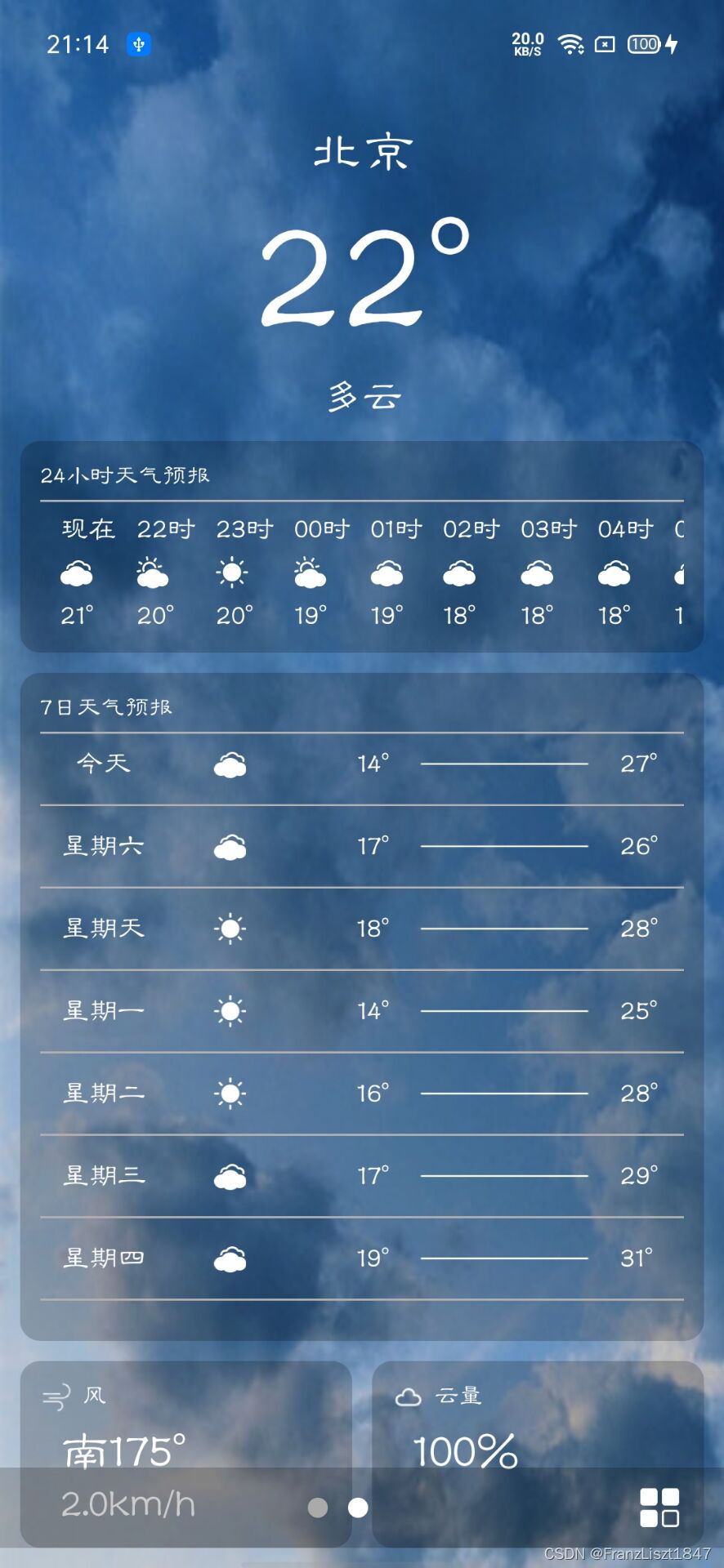
获取JSON数据
首先通过OKHttp使用get方式获取数据,不同的天气数据,传入不同的url,所以把请求作为公共方式,然后通过写一个回调接口,将数据源回调至外部。
public void Post(String url, HttpCallback callback){ OkHttpClient client = new OkHttpClient(); final Request request = new Request.Builder() .url(url) .get() .build(); client.newCall(request).enqueue(new Callback() { @Override public void onFailure(Call call, IOException e) { callback.onFailed(ErrorCodeParam.NetworkError); } @Override public void onResponse(Call call, Response response) throws IOException { int code = response.code(); if (code == 200){ String json = response.body().string(); callback.onResponse(json.toString()); }else { callback.onFailed(ErrorCodeParam.PostError); } } }); }- 1
- 2
- 3
- 4
- 5
- 6
- 7
- 8
- 9
- 10
- 11
- 12
- 13
- 14
- 15
- 16
- 17
- 18
- 19
- 20
- 21
- 22
- 23
- 24
- 25
- 26
URL请求
实况天气URL
具体方法参考官网
官网所展示的请求参数并不是需要所有都添加,例如语言都有默认想,一般不需要提交,在官网也有标注,此处传入key(心知天气API密钥)和城市(你所想获取天气预报的城市,可以是汉字)/** * 获取当前实况天气*/ public String getNowUrl(String location) { HttpUrl.Builder builder = HttpUrl.parse(WeatherParam.NowWeatherURL).newBuilder(); builder.addQueryParameter("key",WeatherParam.weatherToken); builder.addQueryParameter("location",location); return builder.build().toString(); }- 1
- 2
- 3
- 4
- 5
- 6
- 7
- 8
- 9
逐24小时天气预报URL
具体参考官网
前两项参数与实况天气一致,第三个参数是你需要获取多少小时的天气预报数据,以当前时间为第一个小时;例如:你传入5个小时,你当时系统时间是9点,那么返回的第一个数据就是9点,第二个为10…第5个为13点;以此类推/** * 获取24小时天气情况*/ public String getHourly24Url(String location,int hours) { HttpUrl.Builder builder = HttpUrl.parse(WeatherParam.Hourly24WeatherURL).newBuilder(); builder.addQueryParameter("key",WeatherParam.weatherToken); builder.addQueryParameter("location",location); builder.addQueryParameter("hours",hours+""); return builder.build().toString(); }- 1
- 2
- 3
- 4
- 5
- 6
- 7
- 8
- 9
- 10
未来七天天气预报URL
具体参考官网
第三个参数与逐小时天气预报的小时一致,以当前日期为第一天;请求天数好像最大为15天/** * 获取未来七天天气预报情况*/ public String getFuture7Url(String location,int days) { HttpUrl.Builder builder = HttpUrl.parse(WeatherParam.Future7WeatherURL).newBuilder(); builder.addQueryParameter("key",WeatherParam.weatherToken); builder.addQueryParameter("location",location); builder.addQueryParameter("days",days+""); return builder.build().toString(); }- 1
- 2
- 3
- 4
- 5
- 6
- 7
- 8
- 9
- 10
解析JSON数据
解析实况天气数据
JSON数据格式在上文有提及,返回的数据较多,我们只需要关于天气的即可,地点可以不解析;此处将数据源解析成具体实体类,依旧通过回调接口,暴露给外部。
/** * 获取当前天气情况 */ fun getNowWeather(location: String,callback: WeatherCallback_now) { val url = HttpUtils.getInstance().getNowUrl(location) Log.d(TAG, "url = $url") HttpUtils.getInstance().Post(url, object : HttpCallback { override fun onFailed(ErrorCode: Int) { callback.onFailed(ErrorCode) } override fun onResponse(JSONData: String) { if (TextUtils.isEmpty(JSONData)) { callback.onFailed(0) return } Log.d(TAG, "now = $JSONData") try { val jsonObject = JSONObject(JSONData) val jsonArray = jsonObject.getJSONArray("results") val now = jsonArray.getJSONObject(0).getJSONObject("now") val time : String = jsonArray.getJSONObject(0).getString("last_update"); val bean : WRealTimeBean? = HttpUtils.getInstance().fromJson( now.toString(), WRealTimeBean::class.java ) if (bean != null) { bean.last_update = time bean.location = location; } callback.onSuccess(bean) } catch (e: JSONException) { e.printStackTrace() } } }) }- 1
- 2
- 3
- 4
- 5
- 6
- 7
- 8
- 9
- 10
- 11
- 12
- 13
- 14
- 15
- 16
- 17
- 18
- 19
- 20
- 21
- 22
- 23
- 24
- 25
- 26
- 27
- 28
- 29
- 30
- 31
- 32
- 33
- 34
- 35
- 36
- 37
解析逐小时天气预报
步骤与实况天气雷同,区别在于逐小时天气预报返回的数组,所以回调接口,返回也是list数据
/** * 获取24小时天气情况 */ fun getHourly24Weather(location: String,callback: WeatherCallback_24H) { val url = HttpUtils.getInstance().getHourly24Url(location, 24) Log.d(TAG, "url = $url") HttpUtils.getInstance().Post(url, object : HttpCallback { override fun onFailed(ErrorCode: Int) { callback.onFailed(ErrorCode) } override fun onResponse(JSONData: String) { if (TextUtils.isEmpty(JSONData)) { callback.onFailed(0) return } Log.d(TAG, "hourlv24 = $JSONData") try { val jsonObject = JSONObject(JSONData) val jsonArray = jsonObject.getJSONArray("results") val hourly24 = jsonArray.getJSONObject(0).getJSONArray("hourly") val bean: MutableList? = HttpUtils.getInstance().fromListJson( hourly24.toString(), WHourly24Bean::class.java ) callback.onSuccess(bean) } catch (e: JSONException) { e.printStackTrace() } } }) } - 1
- 2
- 3
- 4
- 5
- 6
- 7
- 8
- 9
- 10
- 11
- 12
- 13
- 14
- 15
- 16
- 17
- 18
- 19
- 20
- 21
- 22
- 23
- 24
- 25
- 26
- 27
- 28
- 29
- 30
- 31
解析未来七天天气预报
同样返回的是数组数据,完成数据解析并回调;值得注意的是,如果有存在重复的城市名称,返回的数据也是多份,例如请求的城市名称并不精准,本来想请求张家界的天气数据,但是只输入张家二字,系统后台会返回张家界和张家口的数据,所以我们默认取第一个数据源
/** * 获取未来七天天气情况(包括今天) */ fun getFuture7Weather(location: String,callback: WeatherCallback_7D) { val url = HttpUtils.getInstance().getFuture7Url(location, 7) Log.d(TAG, "url = $url") HttpUtils.getInstance().Post(url, object : HttpCallback { override fun onFailed(ErrorCode: Int) { callback.onFailed(ErrorCode) } override fun onResponse(JSONData: String) { if (TextUtils.isEmpty(JSONData)) { callback.onFailed(0) return } Log.d(TAG, "future7 = $JSONData") try { val jsonObject = JSONObject(JSONData) val jsonArray = jsonObject.getJSONArray("results") val future7 = jsonArray.getJSONObject(0).getJSONArray("daily") val bean: MutableList? = HttpUtils.getInstance().fromListJson( future7.toString(), WFuture7Bean::class.java ) callback.onSuccess(bean) } catch (e: JSONException) { e.printStackTrace() } } }) } - 1
- 2
- 3
- 4
- 5
- 6
- 7
- 8
- 9
- 10
- 11
- 12
- 13
- 14
- 15
- 16
- 17
- 18
- 19
- 20
- 21
- 22
- 23
- 24
- 25
- 26
- 27
- 28
- 29
- 30
- 31
初始化天气详情页
获取当前位置
为了减轻app负重,并未采用高德、百度等API进行位置定位,采用原始的定位方式,使用网络方式进行定位
获取经纬度
获取位置信息需要动态申请位置权限
public String getLocationInfo() { if (ActivityCompat.checkSelfPermission(BaseApplication.context,Group_Location[0]) != PackageManager.PERMISSION_GRANTED && ActivityCompat.checkSelfPermission(BaseApplication.context, Group_Location[1]) != PackageManager.PERMISSION_GRANTED) { Log.d(TAG, "Don't apply for these permission"); return null; } String strLocation = null; try { //获取系统的服务, locationManager = (LocationManager) BaseApplication.context.getSystemService(Context.LOCATION_SERVICE); //创建一个criteria对象 Criteria criteria = new Criteria(); criteria.setAccuracy(Criteria.ACCURACY_COARSE); //设置不需要获取海拔方向数据 criteria.setAltitudeRequired(false); criteria.setBearingRequired(false); //设置允许产生资费 criteria.setCostAllowed(true); //要求低耗电 criteria.setPowerRequirement(Criteria.POWER_LOW); String provider = locationManager.getBestProvider(criteria, true); Location location = locationManager.getLastKnownLocation(provider); if (location == null)return null; //strLocation = location.getLongitude()+","+location.getLatitude(); strLocation = convertAddress(BaseApplication.context, location.getLatitude(), location.getLongitude()); Log.d(TAG, "location is = " + strLocation); } catch (Exception e) { e.printStackTrace(); } return strLocation; }- 1
- 2
- 3
- 4
- 5
- 6
- 7
- 8
- 9
- 10
- 11
- 12
- 13
- 14
- 15
- 16
- 17
- 18
- 19
- 20
- 21
- 22
- 23
- 24
- 25
- 26
- 27
- 28
- 29
- 30
- 31
- 32
- 33
经纬度转为地理信息
将经纬度转为具体地理信息,由于心知天气API需要提供城市级城市数据,所以我们只需要xx市数据即可
private String convertAddress(Context context, double latitude, double longitude) { Geocoder mGeocoder = new Geocoder(context, Locale.getDefault()); try { List mAddresses = mGeocoder.getFromLocation(latitude, longitude, 1); if (mAddresses != null && mAddresses.size() > 0) { Address address = mAddresses.get(0); Log.d(TAG, "国家 is " + address.getCountryName()); Log.d(TAG, "省 is " + address.getAdminArea()); Log.d(TAG, "市 is " + address.getLocality()); Log.d(TAG, "区/县 is " + address.getSubLocality()); Log.d(TAG, "具体 is " + address.getFeatureName()); return address.getLocality(); } } catch (Exception e) { e.printStackTrace(); } return null; }- 1
- 2
- 3
- 4
- 5
- 6
- 7
- 8
- 9
- 10
- 11
- 12
- 13
- 14
- 15
- 16
- 17
- 18
页面初始化
详情页采用的是viewPager添加多个views实现页面滑动;
首先获取数据库内所有存储的城市名称,然后通过get模式获取天气的网络数据,然后填充到adapter中;需要注意的是获取的本地位置在整个app都较为特殊,与其他添加的城市数据存在差距,因为需要改变其显示状态,具体后文会提交,所以并未将此添加到数据库中。private void initViewPager(){ dao = new Dao(this); locationList = dao.QueryAll(); location = LocationUtils.getInstance().getLocationInfo(); if (locationList == null || locationList.size() == 0){ locationList = new ArrayList<>(); locationList.add(location); }else { locationList.add(0,location); } for (int i = 0; i < locationList.size(); i++) { Message message = new Message(); message.what = WEATHER_Start; message.obj = locationList.get(i); handler.sendMessage(message); } adapter.notifyDataSetChanged(); }- 1
- 2
- 3
- 4
- 5
- 6
- 7
- 8
- 9
- 10
- 11
- 12
- 13
- 14
- 15
- 16
- 17
- 18
- 19
- 20
- 21
单个页面初始化,通过遍历,将所有页面进行填充;每个界面背景图片会根据心知天气返回天气状态发生变化,由于素材有限,只适配了较为常见的几种状态,例如:晴、多云、阴、雨、雪、雷
/** * viewPager页面添加,包括实况天气数据、预期24小时、预报7天*/ private void addView(String location){ View view = LayoutInflater.from(this).inflate(R.layout.activity_main,null,false); LinearLayout weatherLayout; TextView weatherLocation,weatherTemp,weatherStatus,weatherWindDirection,weatherWindSpeed,weatherCloud,weatherFellLikes,weatherHum,weatherVisibility,weatherPressure; RecyclerView weather7D,weather24H; weatherLayout = view.findViewById(R.id.mainLinearLayout); weatherLocation = view.findViewById(R.id.normal_city); weatherTemp = view.findViewById(R.id.normal_temp); weatherStatus = view.findViewById(R.id.normal_status); weatherWindDirection = view.findViewById(R.id.windDirection); weatherWindSpeed = view.findViewById(R.id.windSpeed); weatherCloud = view.findViewById(R.id.cloud); weatherFellLikes = view.findViewById(R.id.bodyTmp); weatherHum = view.findViewById(R.id.hum); weatherVisibility = view.findViewById(R.id.visibility); weatherPressure = view.findViewById(R.id.pressure); weather7D = view.findViewById(R.id.Recycler_7D); weather24H = view.findViewById(R.id.Recycler_24H); ListhourlyBeanList = new ArrayList<>(); List dailyBeanList = new ArrayList<>(); weather24H.setLayoutManager(new LinearLayoutManager(this, LinearLayoutManager.HORIZONTAL, false)); Weather24HAdapter adapter24H = new Weather24HAdapter(hourlyBeanList); weather24H.setAdapter(adapter24H); weather7D.setLayoutManager(new LinearLayoutManager(this, LinearLayoutManager.VERTICAL, false)); Weather7DAdapter adapter7D = new Weather7DAdapter(dailyBeanList); weather7D.setAdapter(adapter7D); viewList.add(view); titleList.add(location); adapter.notifyDataSetChanged(); weatherLocation.setText(location); JsonUtils.INSTANCE.getNowWeather(location, new WeatherCallback_now() { @Override public void onFailed(int ErrorCode) { } @Override public void onSuccess(WRealTimeBean bean) { if (bean != null){ runOnUiThread(()->{ weatherTemp.setText(bean.getTemperature() + "°");//温度 weatherStatus.setText(bean.getText());//天气状态 weatherWindSpeed.setText(bean.getWindSpeed() + "km/h");//风速 weatherWindDirection.setText(bean.getWindDirection()+bean.getWindDirectionDegree()+ "°");//风向 weatherCloud.setText(bean.getClouds() + "%");//云量 weatherFellLikes.setText(bean.getFeelsLike() + "°");//体感温度 weatherHum.setText(bean.getHumidity() + "%");//湿度 weatherVisibility.setText(bean.getVisibility() + "km");//可见度 weatherPressure.setText(bean.getPressure() + "mb");//气压 switch (bean.getText()){ case "晴":weatherLayout.setBackground(getDrawable(R.drawable.icon_bg_sunny));break; case "多云":weatherLayout.setBackground(getDrawable(R.drawable.icon_bg_cloudy));break; case "阴":weatherLayout.setBackground(getDrawable(R.drawable.icon_bg_cloudy));break; case "雨":weatherLayout.setBackground(getDrawable(R.drawable.icon_bg_big_rain));break; case "雪":weatherLayout.setBackground(getDrawable(R.drawable.icon_bg_snow));break; case "雷":weatherLayout.setBackground(getDrawable(R.drawable.icon_bg_thunder));break; } }); }else { Log.d(TAG,"bean is empty"); } } }); JsonUtils.INSTANCE.getFuture7Weather(location, new WeatherCallback_7D() { @Override public void onFailed(int ErrorCode) { } @Override public void onSuccess(List beanList) { if (beanList != null && beanList.size() > 0){ if (dailyBeanList != null && dailyBeanList.size() > 0){ dailyBeanList.clear(); } dailyBeanList.addAll(beanList); runOnUiThread(()->{ adapter7D.notifyDataSetChanged(); }); } } }); JsonUtils.INSTANCE.getHourly24Weather(location, new WeatherCallback_24H() { @Override public void onFailed(int ErrorCode) { } @Override public void onSuccess(List beanList) { if (beanList != null && beanList.size() > 0){ if (hourlyBeanList != null && hourlyBeanList.size() > 0){ hourlyBeanList.clear(); } hourlyBeanList.addAll(beanList); runOnUiThread(()->{ adapter24H.notifyDataSetChanged(); }); } } }); } - 1
- 2
- 3
- 4
- 5
- 6
- 7
- 8
- 9
- 10
- 11
- 12
- 13
- 14
- 15
- 16
- 17
- 18
- 19
- 20
- 21
- 22
- 23
- 24
- 25
- 26
- 27
- 28
- 29
- 30
- 31
- 32
- 33
- 34
- 35
- 36
- 37
- 38
- 39
- 40
- 41
- 42
- 43
- 44
- 45
- 46
- 47
- 48
- 49
- 50
- 51
- 52
- 53
- 54
- 55
- 56
- 57
- 58
- 59
- 60
- 61
- 62
- 63
- 64
- 65
- 66
- 67
- 68
- 69
- 70
- 71
- 72
- 73
- 74
- 75
- 76
- 77
- 78
- 79
- 80
- 81
- 82
- 83
- 84
- 85
- 86
- 87
- 88
- 89
- 90
- 91
- 92
- 93
- 94
- 95
- 96
- 97
- 98
- 99
- 100
- 101
- 102
- 103
- 104
- 105
- 106
- 107
- 108
- 109
- 110
- 111
- 112
- 113
- 114
- 115
- 116
- 117
- 118
ViewPager子页面编辑
view添加和删除都是通过EventBus进行监听,然后操作adapter完成操作
/** * 在城市页面进行数据添加或删除,使用EventBus进行监测*/ @Subscribe(threadMode = ThreadMode.MAIN,sticky = true) public void onEvent(LocationBusBean bean){ if (bean != null){ if (bean.getDeletePos() == -1){ addView(bean.getLocation()); updateIndicator(); }else { removeView(bean.getLocation()); } } }- 1
- 2
- 3
- 4
- 5
- 6
- 7
- 8
- 9
- 10
- 11
- 12
- 13
页面添加
此功能就是重复调用单个views初始化方法,然后使用adapter进行notify和更新指示器即可
页面删除
通过从天气编辑页面点击的城市子项,传过来的城市数据,然后与views存在的数据进行匹配,然后删除对应的界面
/** * 删除viewPager子项*/ private void removeView(String location){ int position = titleList.indexOf(location); if (position != -1){ viewList.remove(position); titleList.remove(position); adapter.notifyDataSetChanged(); } updateIndicator(); }- 1
- 2
- 3
- 4
- 5
- 6
- 7
- 8
- 9
- 10
- 11
- 12
指示器
指示器是通过两个xml定义不同的圆,然后通过selector文件进行选择,使用一个
LinearLayout控件作为指示器控件,通过传入的指示器个数,添加多个view,然后设置背景为selector文件,通过设置其enable属性,改变圆形状态private void updateIndicator(){ binding.indicatorLayout.removeAllViews(); Listlist = dao.QueryAll(); /** * 因为有一个本地位置,所以需要+1*/ int size = 1; if (list != null){ size = list.size()+1; } for (int i = 0; i < size; i++) { View view = new View(this); view.setBackgroundResource(R.drawable.selector_indicator); view.setEnabled(false); LinearLayout.LayoutParams params = new LinearLayout.LayoutParams(30,30); params.rightMargin = 15; params.leftMargin = 15; binding.indicatorLayout.addView(view,params); } } - 1
- 2
- 3
- 4
- 5
- 6
- 7
- 8
- 9
- 10
- 11
- 12
- 13
- 14
- 15
- 16
- 17
- 18
- 19
- 20
天气编辑页
此页面功能包括searchView和listView匹配搜索、城市天津、城市天气简单版子项显示、天气子项编辑等功能
效果图

- 1

简版天气数据
此数据与天气详情页数据请求一致,只是数据更为简单,值得注意的是,从天气详情页传过来的城市,并不显示其具体名称,而是以
我的位置代替,因为是子线程加载,获取的数据排列方式不一,所以在展示数据时,需要将本地数据一列移到到最前方。获取数据并初始化
/** * 获取所以数据库中城市的天气*/ private void getWeatherData() { if (dao == null) { dao = new Dao(this); } beanList.clear();//防止数据重复 ListlocationList = dao.QueryAll(); if (locationList == null || locationList.size() == 0) { locationList = new ArrayList<>(); } if (locationList.size() > 0) { String data = locationList.get(0); if (!data.equals(location)) { locationList.add(0, location); } }else { locationList.add(location); } for (int i = 0; i < locationList.size(); i++) { postWeather(locationList.get(i), locationList.size()); } } - 1
- 2
- 3
- 4
- 5
- 6
- 7
- 8
- 9
- 10
- 11
- 12
- 13
- 14
- 15
- 16
- 17
- 18
- 19
- 20
- 21
- 22
- 23
- 24
- 25
- 26
- 27
子项删除
通过
EventBus通知天气详情页进行更新adapter.setDelItemClickListener(new LocationAdapter.OnWeatherItemsClickListener() { @Override public void onClickListener(int pos, String location) { beanList.remove(pos); dao.Delete(location); adapter.notifyDataSetChanged(); EventBus.getDefault().postSticky(new LocationBusBean(location, pos)); } });- 1
- 2
- 3
- 4
- 5
- 6
- 7
- 8
- 9
- 10
搜索
效果图

更改SearchView背景和字体样式
定义一个xml文件,然后在SearchView的background属性引用即可改变其背景
android:background="@drawable/searchview_bg"- 1
- 1
- 2
- 3
- 4
- 5
- 6
更改SearchView字体颜色,需要获取其内置的一个控件id,然后通过EditText进行改变即可,TextView也可以
/** * 更改searchView字体颜色 */ private void initSearchViewStyle() { EditText editText = (EditText) binding.searchView.findViewById(androidx.appcompat.R.id.search_src_text); if (editText != null) { editText.setTextColor(getColor(R.color.white)); editText.setHintTextColor(getColor(R.color.searchHintColor)); editText.setTextSize(14); SearchManager searchManager = (SearchManager) getSystemService(SEARCH_SERVICE); binding.searchView.setSearchableInfo(searchManager.getSearchableInfo(getComponentName())); } else { Log.d("MoreLocationActivity", "empty"); } }- 1
- 2
- 3
- 4
- 5
- 6
- 7
- 8
- 9
- 10
- 11
- 12
- 13
- 14
- 15
- 16
搜索初始化
重点在于xml城市列表文件,然后采用默认的adapter作为适配
private void initListView() { String[] cityArray = getResources().getStringArray(R.array.city); binding.locationList.setAdapter(new ArrayAdapter(this, R.layout.searchview_item, cityArray)); /** * 属性为true表示listview获得当前焦点的时候,与相应用户输入的匹配符进行比对,筛选出匹配的ListView的列表中的项*/ binding.locationList.setTextFilterEnabled(true); binding.searchView.setOnQueryTextListener(this); binding.searchView.setSubmitButtonEnabled(false); binding.locationList.setOnItemClickListener(new AdapterView.OnItemClickListener() { @Override public void onItemClick(AdapterView adapterView, View view, int i, long l) { String str = adapterView.getAdapter().getItem(i).toString(); if (dao == null) { dao = new Dao(MoreLocationActivity.this); } boolean flag = dao.Query(str); if (flag) { Toast.makeText(MoreLocationActivity.this, "该城市已添加到天气列表,请勿重复添加", Toast.LENGTH_SHORT).show(); } else { dao.Insert(str); EventBus.getDefault().postSticky(new LocationBusBean(str, -1)); handler.sendEmptyMessage(1); Toast.makeText(MoreLocationActivity.this, "添加成功", Toast.LENGTH_SHORT).show(); } binding.locationList.clearTextFilter(); binding.locationList.setVisibility(View.GONE); } }); }- 1
- 2
- 3
- 4
- 5
- 6
- 7
- 8
- 9
- 10
- 11
- 12
- 13
- 14
- 15
- 16
- 17
- 18
- 19
- 20
- 21
- 22
- 23
- 24
- 25
- 26
- 27
- 28
- 29
- 30
搜索字符监听
一开始那个提示黑框就比较呆,所以可以通过后面语句进行隐藏,因为搜索列表是覆盖简版天气子项的,所以当搜索列表显示时,天气简版隐藏,反之,亦然;
@Override public boolean onQueryTextSubmit(String query) { return false; } @Override public boolean onQueryTextChange(String newText) { if (TextUtils.isEmpty(newText)) { binding.locationList.clearTextFilter(); binding.locationList.setVisibility(View.GONE); } else { binding.locationList.setVisibility(View.VISIBLE); binding.locationList.setFilterText(newText); //隐藏黑框 binding.locationList.dispatchDisplayHint(View.INVISIBLE); } return true; }- 1
- 2
- 3
- 4
- 5
- 6
- 7
- 8
- 9
- 10
- 11
- 12
- 13
- 14
- 15
- 16
- 17
- 18
下载地址
-
相关阅读:
速锐得解码新款坦克300网关(Gateway)采集CAN总线数据实操过程
MyBatis批量更新SQL
什么原因让Redis气急败坏的回击挑战者?总有奸人想害朕
Jquery插件jqprint-0.3.js实现打印
设计模式-享元模式
鸿鹄工程项目管理系统 Spring Cloud+Spring Boot+前后端分离构建工程项目管理系统
NUMA架构详解
第十四届蓝桥杯(Web应用开发)模拟赛1期-大学组
力扣-404.左叶子之和
Spring Cloud搭建XXL-JOB任务调度平台
- 原文地址:https://blog.csdn.net/News53231323/article/details/126671185

- 最新文章
-
沪漂五周年了:我越来越迷茫了
Agentic Skill Routing 实战:别再把所有 Skill 塞进 AI Agent 上下文
MySQL-Seconds_behind_master的精度误差
[MAF预定义ChatClient中间件-03]CachingChatClient——利用缓存省钱省时间
AI的至暗历史:从万众期待到被政府撤资,AI的两次死亡徘徊
Agent OS :五种驯服不确定性的范式
PortSwigger SQL注入LAB11
数据库即时编译JIT
[Begin]AI Learn Data Day 0
深度学习进阶(二十七)现代 LLM 的核心架构设计其二:SwiGLU