• H5画布绘制渐变


    H5画布绘制渐变

    DOCTYPE html>
    <html>
    	<head>
    		<meta charset="UTF-8">
    		<title>title>
    		<style>
    			#myCanvas{
    				box-shadow: 0 0 5px black;
    			}
    		style>
    	head>
    	<body>
    		<canvas id="myCanvas" width="500" height="500">canvas>
    	body>
    	<script>
    		var canvas = document.getElementById("myCanvas");
    		var ctx = canvas.getContext("2d");
    		//设置填充色,rgba()方法可以指定透明度
    		//ctx.fillStyle = "red";
    		//ctx.fillStyle = "#003300";
    		//ctx.fillStyle = "rgb(255,0,0)";
    		//创建线性渐变,指定渐变的起点和终点,设置渐变颜色值
    		//createLinearGradient(x0, y0, x1, y1)
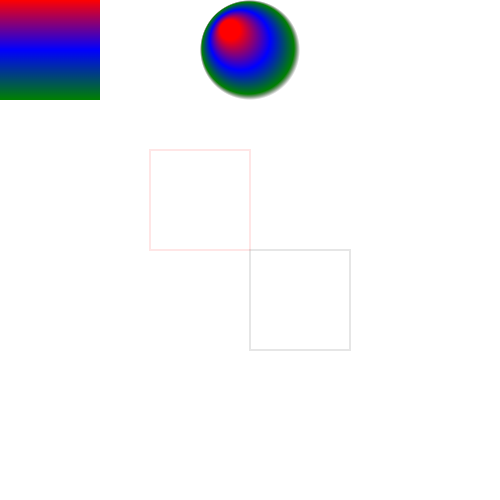
    		var linear = ctx.createLinearGradient(0, 0, 0, 100);
    		linear.addColorStop(0, "red");
    		linear.addColorStop(0.5, "blue");
    		linear.addColorStop(1, "green");
    		ctx.fillStyle = linear;
    		//绘制一个100x100的矩形
    		ctx.fillRect(0,0,100,100);
    		//全局设置透明度		
    		ctx.globalAlpha = "0.2";
    		ctx.strokeStyle = "red";
    		ctx.strokeRect(150,150,100,100);
    		//一旦设置了strokeStyle、fillStyle,那么这个属性变为下面所有绘制的默认属性,需要重新更改值
    		ctx.strokeStyle = "black";
    		ctx.strokeRect(250,250,100,100);
    		//创建径向渐变
    		//createRadialGradient(x0, y0, r0, x1, y1, r1)
    		//(x0, y0)是开始圆的坐标,r0是开始圆的半径, (x1, y1)是结束圆的坐标,r1是结束圆的半径
    		ctx.globalAlpha = "1";
    		var radial = ctx.createRadialGradient(230, 30, 10, 250, 50, 50);
    		radial.addColorStop(0,"red");
    		radial.addColorStop(0.5,"blue");
    		radial.addColorStop(0.9,"green");
    		radial.addColorStop(1,"rgba(0,0,0,0)");
    		ctx.fillStyle = radial;
    		ctx.fillRect(200, 0, 100, 100);
    	script>
    html>
    
    • 1
    • 2
    • 3
    • 4
    • 5
    • 6
    • 7
    • 8
    • 9
    • 10
    • 11
    • 12
    • 13
    • 14
    • 15
    • 16
    • 17
    • 18
    • 19
    • 20
    • 21
    • 22
    • 23
    • 24
    • 25
    • 26
    • 27
    • 28
    • 29
    • 30
    • 31
    • 32
    • 33
    • 34
    • 35
    • 36
    • 37
    • 38
    • 39
    • 40
    • 41
    • 42
    • 43
    • 44
    • 45
    • 46
    • 47
    • 48
    • 49
    • 50

    在这里插入图片描述

  • 相关阅读:
    Java通过System类获取当前系统属性名称列表
    前端---认识HTML
    celery分布式异步任务队列-4.4.7
    SELECT COUNT(*)会不会导致全表扫描引起慢查询
    NumPy创建数组的方法
    设计模式:代理模式详解
    支付宝使用OceanBase的历史库实践分享
    Activiti7审批流
    欧洲专线是什么,欧洲专线物流方式有哪些?
    上周热点回顾(4.18-4.24)
  • 原文地址:https://blog.csdn.net/dolly_baby/article/details/126656183