-
自定义动态组件,剩下的三种周期函数
自定义动态组件,剩下的三种周期函数
周期函数
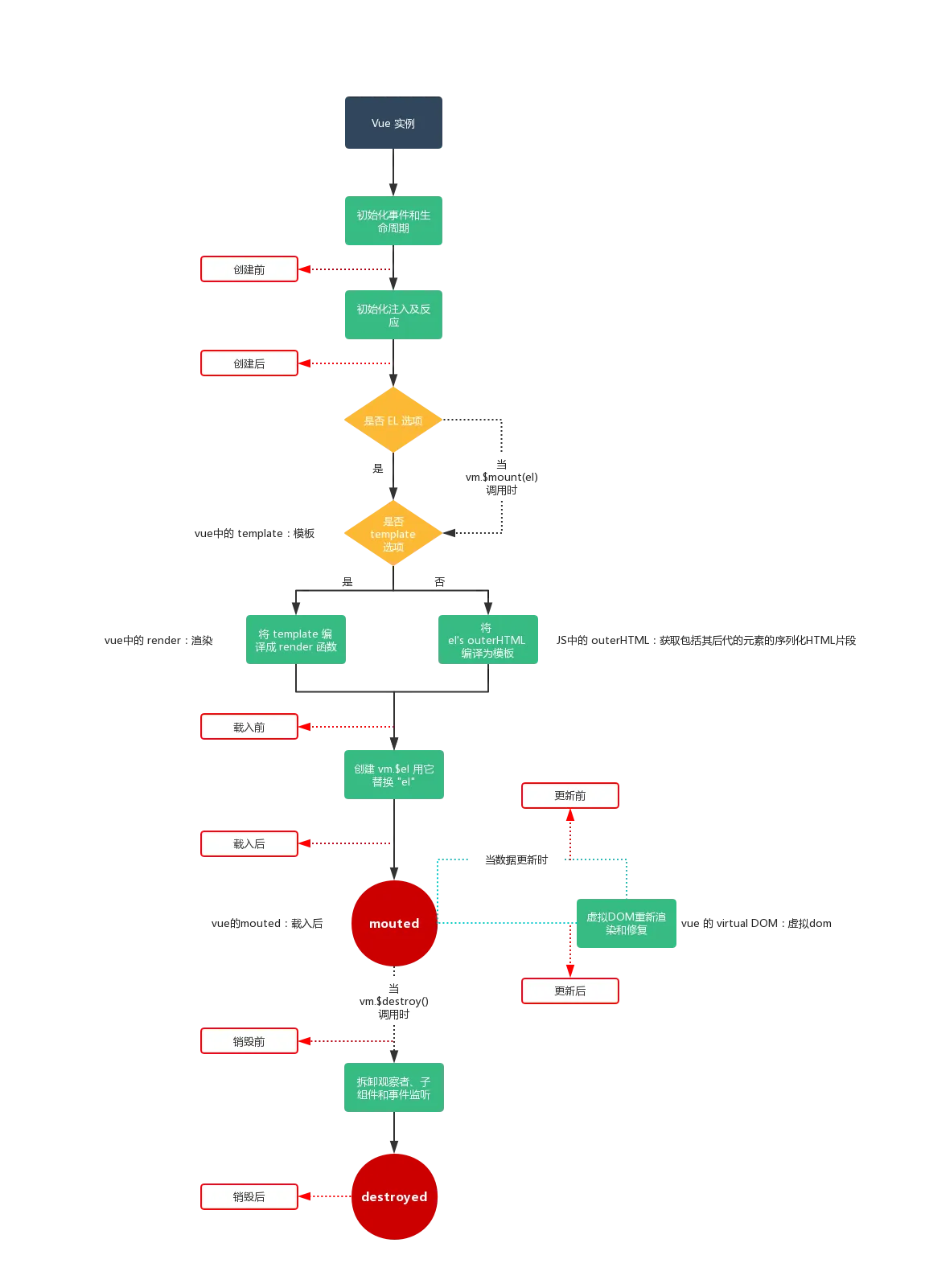
在vue中有一个生命周期,它可以收集子孙组件中的错误信息,进行捕获
- err具体的错误 此信息是最为关键
- vm发生错误的虚拟dom对象
- info 相关提示信息
errorCaptured(err, vm, info) { console.log(err, vm, info) } 子孙组件错误的捕获,它要返回一个布尔类型,如果为false,则不向上传递错误了 errorCaptured(err, vm, info) { this.error = true return false 生产环境中,有时候返回报错信息,可能会有安全隐患(fetch) 得到错误信息,进行网络请求,发给服务器端,让他记录下面,然后我们在统一来处理问题 }- 1
- 2
- 3
- 4
- 5
- 6
- 7
- 8
- 9
- 10
创建局部组件,它就是一个对象
局部组件,创建完成后,如果你要给别人使用,一定要在配置中进行对应的配置
const child2 = { template: `child2`, created() { console.log('child2 --- created') } }- 1
- 2
- 3
- 4
- 5
- 6
注册组件 const vm = new Vue({ el: '#app', data: { title: 'aaaa', }, components: { // key就是在使用时的标签名称 // value就是对应的局部组件对象 // child: child child, child2 } }- 1
- 2
- 3
- 4
- 5
- 6
- 7
- 8
- 9
- 10
- 11
- 12
- 13
- 14
动态组件 component 标签完成对应的切换显示
组件状态的激活/灭活(保留)
动态组件: 动态的根据data中的数据来完成,对应名称的组件的调用显示
<component :is="cmp"></component> 这里的is:它的值只能是components配置中的属性- 1
- 2
- 3
include 它是一个数组,元素中对应的组件的name名称,写在此数组中,要进行缓存
exclude 它是一个数组,元素中对应的组件的name名称,写在此数组中,不进行缓存<keep-alive :include="['login']"> <keep-alive :exclude="['login']"> <component :is="cmp"></component> </keep-alive>- 1
- 2
- 3
- 4
components: { reg, login }, data: { cmp它的值 ,作为动态组件中的is属性所用,所以它的值只能是components配置中的属性 cmp: 'reg' }- 1
- 2
- 3
- 4
- 5
- 6
- 7
<!DOCTYPE html> <html lang="en"> <head> <meta charset="UTF-8"> <meta http-equiv="X-UA-Compatible" content="IE=edge"> <meta name="viewport" content="width=device-width, initial-scale=1.0"> <title>vue学习使用</title> <script src="./js/vue.js"></script> </head> <body> <div id="app"> <!-- 动态组件 component 标签完成对应的切换显示 --> <div> <button @click="cmp='a1'">爱</button> <button @click="cmp='b1'">不爱</button> <h1>{{title}}</h1> </div> <hr> <keep-alive :include="['a1','b1']" > <component :is="cmp"></component> </keep-alive> </div> <script> const a1 = { name: 'a1', template: `我爱你` } const b1 = { name: 'b1', template: `我不爱你` } const vm = new Vue({ el: '#app', components: { a1, b1 }, data: { // cmp它是的值 ,作为动态组件中的is属性所用,所以它的值只能是components配置中的属性 cmp: 'b1', title:"爱" } }) </script> </body> </html>- 1
- 2
- 3
- 4
- 5
- 6
- 7
- 8
- 9
- 10
- 11
- 12
- 13
- 14
- 15
- 16
- 17
- 18
- 19
- 20
- 21
- 22
- 23
- 24
- 25
- 26
- 27
- 28
- 29
- 30
- 31
- 32
- 33
- 34
- 35
- 36
- 37
- 38
- 39
- 40
- 41
- 42
- 43
- 44
- 45
- 46
- 47
- 48
- 49
- 50
- 51
- 52
- 53
- 54
周期钩子函数
activated/deactivated激活和灭活状态activated() { console.log('reg --- activated') }, deactivated() { console.log('reg --- deactivated') }- 1
- 2
- 3
- 4
- 5
- 6
errorCaptured错误捕获- 子孙组件错误的捕获,它要返回一个布尔类型,如果为false,则不向上传递错误了
- err具体的错误 此信息是最为关键
- vm发生错误的虚拟dom对象
- info 相关提示信息
errorCaptured(err, vm, info) { // console.log(err, vm, info) // 得到错误信息,进行网络请求,发给服务器端,让他记录下面,然后我们在统一来处理问题 // fetch // 生产环境中,有时候报错,可能会有安全隐患 this.error = true return false }- 1
- 2
- 3
- 4
- 5
- 6
- 7
- 8
-
相关阅读:
k8s--基础--18.4--存储卷--类型--NFS
【408篇】C语言笔记-第十章(线性表)
小程序开发流程
ubuntu20.04 ROS 环境下使用 Flir Blackfly S 工业相机
淀粉2207空头逼仓,玉米认沽大涨1-6倍,淀粉09-01正套2022.6.30
bp神经网络是什么网络,bp神经网络和神经网络
扔掉你的开发板,跟我玩Mcore-全志h616
【JS】复习和学习几个好用的js小知识
内网渗透神器CobaltStrike之Beacon详解(三)
【大数据采集技术与应用】【第一章】【大数据采集技术与应用概述】
- 原文地址:https://blog.csdn.net/m0_46672781/article/details/126652978

- 最新文章
-
【FHE】我们如何实现同态加密推理(八):SiLU 的密文化——两条路径,和一个 8 字节的开关
SQLcl 中 c/old/new 替换变量为何失效?先定位再替换
不让模型写作文,直接从它脑子里读答案:Jev 决策在 .NET 的两条路线
Halo插件:支持GitHub的图床附件策略
电视投屏界的“一股清流”!SimpleTVCast 6.0.0-beta 抢先体验:无需TV端App,界面大换血!✨
华三VXLAN集中式网关实战指南:Spine多活网关 + 双活接入(M-LAG)
软件更好写之后口碑会更重要
大 O、大 Omega、大 Theta 的区别,O(n) 复杂度是什么意思
Java标签跳转:一个鲜为人知但却很实用的小技巧
多智能体系统论文速读