-
EasyOCR 识别模型训练
0. 开始之前
EasyOCR 中使用的神经网络模型在每个阶段会不同基于开源的项目:数据集整合、数据集训练、模型使用。分别对应三种不同的框架。训练数据生成:训练数据转换:训练和部署模型:使用用户学习模型:1. 创建训练数据
训练数据生成步骤将使用一个名为 TextRecognitionDataGenerator 的开源项目。参考: https://blog.csdn.net/leiwuhen92/article/details/126419244 文本识别数据生成器-TextRecognitionDataGeneratortrdg -c 2000000 -w 5 -f 64 -k 5生成训练数据2000000条: 下一步是进行一个简单的数据转换过程,因为本文中使用TextRecognitionDataGenerator项目生成的学习数据不是deep-text-recognition-benchmark项目学习 所需的数据结构。
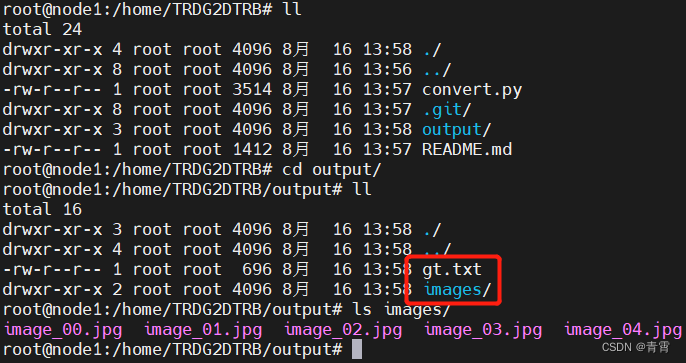
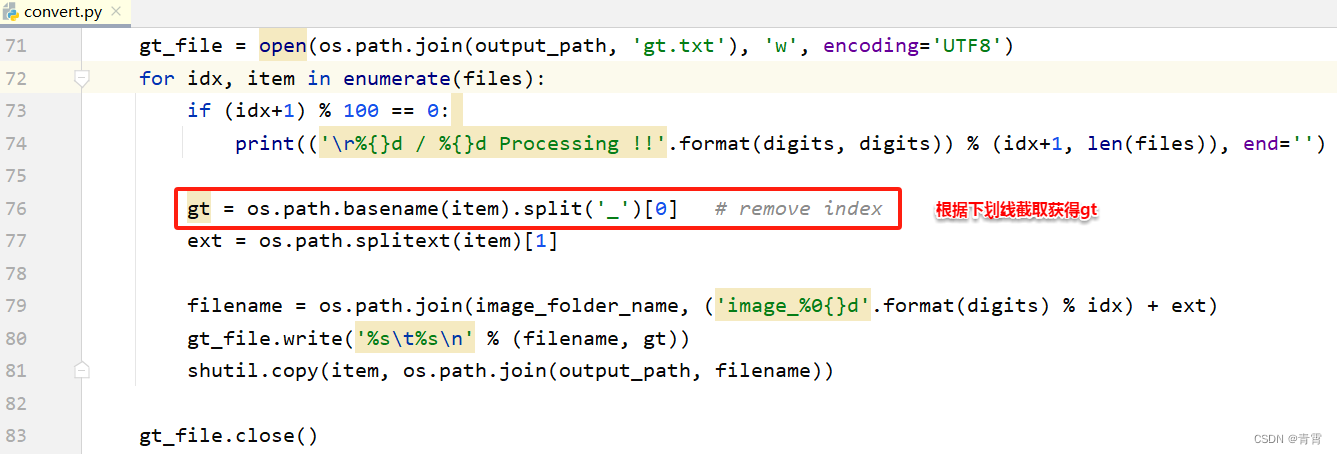
2. 学习数据转换
使用TextRecognitionDataGenerator项目生成的学习数据不是deep-text-recognition-benchmark项目学习 所需的数据结构。需要进行转换3. 训练模型
需要借助deep-text-recognition-benchmark的开源项目。3.1、项目安装
- # 下载源代码
- $ git clone https://github.com/clovaai/deep-text-recognition-benchmark.git
- # 搭建开发环境
- $ pip3 install torch torchvision
- $ pip3 install lmdb pillow nltk natsort
- $ pip3 install fire
3.2、准备阶段
准备用于神经网络训练的训练数据和微调学习所需的预训练模型。3.2.1、训练数据
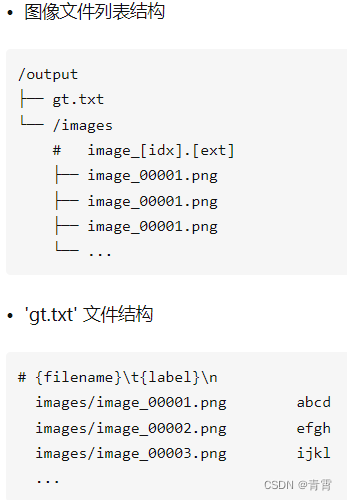
3.2.2、将训练数据转换为lmdb格式
在deep-text-recognition-benchmark项目中使用以下命令语法将其转换为lmdb格式以供实际学习时使用。- # deep-text-recognition-benchmark 从项目根运行
- (venv) $ python3 create_lmdb_dataset.py \
- --inputPath /home/TRDG2DTRB/output/ \
- --gtFile /home/TRDG2DTRB/output/gt.txt \
- --outputPath result/
 至此,准备训练数据的一系列过程就结束了。为了提高学习性能,将训练和验证的训练数据分别分为MJ和ST来构建数据,训练时设置batch_ratio来学习MJ和ST数据以适当的比例。
3.2.3、准备预训练模型
下载学习模型 跳转中... https://link.zhihu.com/?target=https%3A//github.com/clovaai/deep-text-recognition-benchmark%23run-demo-with-pretrained-model
下载与实际 EasyOCR 中使用的基本模型具有相同网络结构(' None-VGG-BiLSTM-CTC ')的预训练模型。
https://link.zhihu.com/?target=https%3A//github.com/clovaai/deep-text-recognition-benchmark%23run-demo-with-pretrained-model
下载与实际 EasyOCR 中使用的基本模型具有相同网络结构(' None-VGG-BiLSTM-CTC ')的预训练模型。

3.2.4、项目和预模型正常运行的确认
让我们使用以下语法测试deep-text-recognition-benchmark项目是否与下载的模型正常工作。# demo.py中可查看参数及其定义
- python3 demo.py \
- --Transformation None \
- --FeatureExtraction VGG \
- --SequenceModeling BiLSTM \
- --Prediction CTC \
- --image_folder demo_image/ \
- --saved_model None-VGG-BiLSTM-CTC.pth
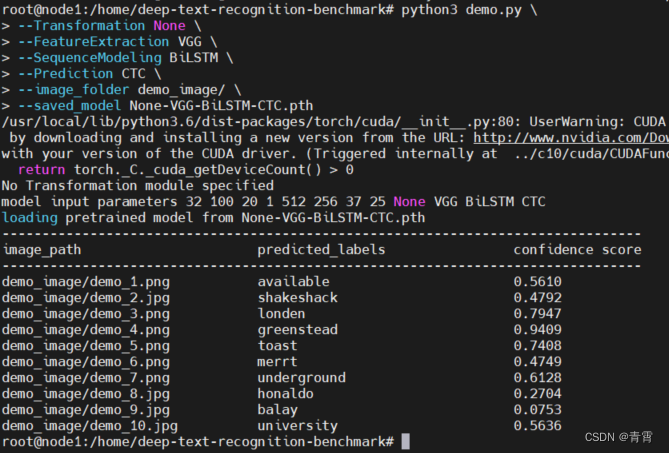
3.3、训练模型
训练数据和学习所需的预训练模型(None-VGG-BiLSTM-CTC.pth )都准备好了,就可以使用deep-text-recognition-benchmark项目提供的以下命令语法开始学习。# train.py中查看参数及其定义
- python3 train.py --train_data lmdb/training \
- --valid_data lmdb/validation \
- --select_data MJ-ST \
- --batch_ratio 0.5-0.5 \
- --Transformation None \
- --FeatureExtraction VGG \
- --SequenceModeling BiLSTM \
- --Prediction CTC \
- --saved_model None-VGG-BiLSTM-CTC.pth \
- --num_iter 2000 \
- --valInterval 20 \
- --FT
上述命令语法的简要说明如下。
-
--train_data : 训练数据中训练的数据路径
-
--valid_data : 训练数据之间验证的数据路径
-
--select_data : 选择训练数据(默认为MJ-ST,即MJ和ST作为训练数据)
-
--batch_ratio:为批次中的每个选定数据分配比率
-
--Transformation:选择要使用的转换模块。['无','TPS']
-
--FeatureExtraction : 选择要使用的 FeatureExtraction 模块,['RCNN'、'ResNet'、'VGG']
-
--SequenceModeling:选择要使用的 SequenceModeling 模块。['无','BiLSTM']
-
--Prediction:选择要使用的预测模块。['Attn', 'CTC']
-
--saved_model : 用于微调学习的预训练模型的存储位置
-
--num_iter: 训练迭代次数,默认300000
-
--valInterval:每次检验之间的时间间隔,默认2000
-
--FT : 是否学习微调
-
--lr:学习率,对于 Adadelta,默认 = 1.0
-
--batch_max_length:最大标签长度,默认值25
-
--imgH:输入图像的高度,默认32 # 后面的识别配置模块nvbc.yaml文件会用到
-
--input_channel:特征提取器的输入通道数,默认1
-
--output_channel:特征提取器的输出通道数,默认512
-
--hidden_size:LSTM 隐藏状态的大小,默认256
报错:提示训练模型需在CUDA设备上运行 但若想在CPU上运行,可根据提示修改为如下:
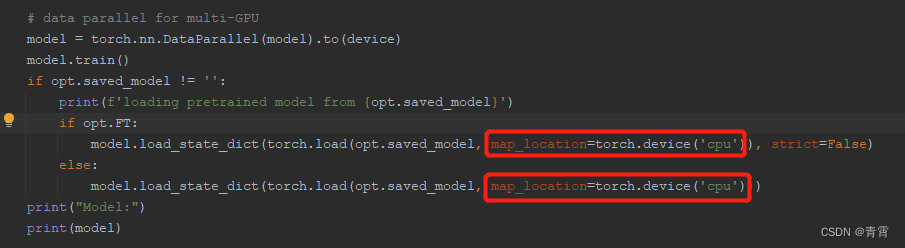 再次运行,得到:
 等待一段时间,直至出现“end the training”字符,训练结束。学习结果保存在当前目录下的/saved_models 文件夹中:
 存储的学习结果信息如下:
-
best_accuracy.pth / best_norm_ED.pth:在经过训练的模型文件中具有特定性能指数的选定模型;
-
log_dataset.txt:用于训练的数据集信息;
-
log_train.txt:训练正在进行时的日志(与上面终端中显示的相同)
-
opt.txt:执行学习命令语法时设置的学习选项信息
3.4、测试模型
让我们使用训练好的模型best_accuracy.pth来检查训练是否正确完成。同样,上面使用的语法按原样使用。但是,要使用的模型被指定为新学习的模型(./saved_models/None-VGG-BiLSTM-CTC-Seed1111/best_accuracy.pth)。- # 测试项目中包含的演示图像
- python3 demo.py \
- --Transformation None \
- --FeatureExtraction VGG \
- --SequenceModeling BiLSTM \
- --Prediction CTC \
- --image_folder demo_image/ \
- --saved_model ./saved_models/None-VGG-BiLSTM-CTC-Seed1111/best_accuracy.pth
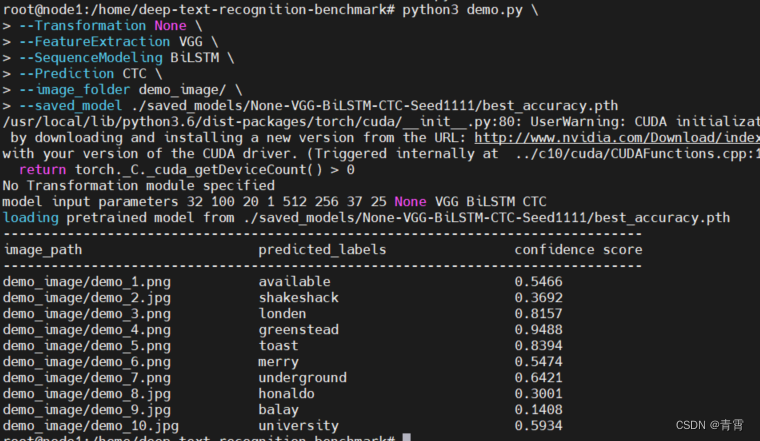
4. 使用模型
前提:环境上已经安装easyocr。4.1、用户模型环境配置
用户学习模型、模块和配置文件的名称必须统一,这里假设用户模型文件的名称设置为“nvbc”。-
复制3.3节生成的用户模型./saved_models/None-VGG-BiLSTM-CTC-Seed1111/best_accuracy.pth到/root/.EasyOCR/model/,改名为nvbc.pth;
-
在/root/.EasyOCR/user_network/下建立用户识别模型网络模块nvbc.py,用户识别配置模块nvbc.yaml。

4.1.1、创建nvbc.yaml
该配置文件包含用于训练学习模型的参数和使用EasyOCR模块所需的参数信息。# 值要与deep-text-recognition-benchmark/train.py中的值保持一致,因为是根据train.py训练出来的模型- network_params:
- input_channel: 1
- output_channel: 512
- hidden_size: 256
- imgH: 32
- lang_list:
- - 'nvbc' # 语言代码 对应与/usr/local/lib/python3.6/dist-packages/easyocr/character/nvbc_char.txt,没有则创建
- character_list: 0123456789abcdefghijklmnopqrstuvwxyz # 学习数据类
4.1.2、创建nvbc.py
定义用户识别模型网络结构的模块文件,由于我们使用了EasyOCR模块中使用的'TPS-ResNet-BiLSTM-Attn'结构,所以可以使用EasyOCR项目提供的文件进行如下配置:- import torch.nn as nn
- class Model(nn.Module):
- def __init__(self, input_channel, output_channel, hidden_size, num_class):
- super(Model, self).__init__()
- """ FeatureExtraction """
- self.FeatureExtraction = VGG_FeatureExtractor(input_channel, output_channel)
- self.FeatureExtraction_output = output_channel
- self.AdaptiveAvgPool = nn.AdaptiveAvgPool2d((None, 1))
- """ Sequence modeling"""
- self.SequenceModeling = nn.Sequential(
- BidirectionalLSTM(self.FeatureExtraction_output, hidden_size, hidden_size),
- BidirectionalLSTM(hidden_size, hidden_size, hidden_size))
- self.SequenceModeling_output = hidden_size
- """ Prediction """
- self.Prediction = nn.Linear(self.SequenceModeling_output, num_class)
- def forward(self, input, text):
- """ Feature extraction stage """
- visual_feature = self.FeatureExtraction(input)
- visual_feature = self.AdaptiveAvgPool(visual_feature.permute(0, 3, 1, 2))
- visual_feature = visual_feature.squeeze(3)
- """ Sequence modeling stage """
- contextual_feature = self.SequenceModeling(visual_feature)
- """ Prediction stage """
- prediction = self.Prediction(contextual_feature.contiguous())
- return prediction
- class BidirectionalLSTM(nn.Module):
- def __init__(self, input_size, hidden_size, output_size):
- super(BidirectionalLSTM, self).__init__()
- self.rnn = nn.LSTM(input_size, hidden_size, bidirectional=True, batch_first=True)
- self.linear = nn.Linear(hidden_size * 2, output_size)
- def forward(self, input):
- """
- input : visual feature [batch_size x T x input_size]
- output : contextual feature [batch_size x T x output_size]
- """
- try: # multi gpu needs this
- self.rnn.flatten_parameters()
- except: # quantization doesn't work with this
- pass
- recurrent, _ = self.rnn(input) # batch_size x T x input_size -> batch_size x T x (2*hidden_size)
- output = self.linear(recurrent) # batch_size x T x output_size
- return output
- class VGG_FeatureExtractor(nn.Module):
- def __init__(self, input_channel, output_channel=256):
- super(VGG_FeatureExtractor, self).__init__()
- self.output_channel = [int(output_channel / 8), int(output_channel / 4),
- int(output_channel / 2), output_channel]
- self.ConvNet = nn.Sequential(
- nn.Conv2d(input_channel, self.output_channel[0], 3, 1, 1), nn.ReLU(True),
- nn.MaxPool2d(2, 2),
- nn.Conv2d(self.output_channel[0], self.output_channel[1], 3, 1, 1), nn.ReLU(True),
- nn.MaxPool2d(2, 2),
- nn.Conv2d(self.output_channel[1], self.output_channel[2], 3, 1, 1), nn.ReLU(True),
- nn.Conv2d(self.output_channel[2], self.output_channel[2], 3, 1, 1), nn.ReLU(True),
- nn.MaxPool2d((2, 1), (2, 1)),
- nn.Conv2d(self.output_channel[2], self.output_channel[3], 3, 1, 1, bias=False),
- nn.BatchNorm2d(self.output_channel[3]), nn.ReLU(True),
- nn.Conv2d(self.output_channel[3], self.output_channel[3], 3, 1, 1, bias=False),
- nn.BatchNorm2d(self.output_channel[3]), nn.ReLU(True),
- nn.MaxPool2d((2, 1), (2, 1)),
- nn.Conv2d(self.output_channel[3], self.output_channel[3], 2, 1, 0), nn.ReLU(True))
- def forward(self, input):
- return self.ConvNet(input)
作为参考,如果你想通过改变模型的网络结构来学习和使用,deep-text-recognition-benchmark项目的'deep-text-recognition-benchmark/model.py'文件和'deep-text -recognition-benchmark/modules/ 你可以参考'.custom.py'中的文件来配置这个'custom.py'文件。4.2、EasyOCR 运行参数
编写如下代码并运行它:testzq.py- from easyocr.easyocr import *
- # # GPU 环境
- # os.environ['CUDA_VISIBLE_DEVICES'] = '0,1'
- def get_files(path):
- files = [f for f in os.listdir(path) if not f.startswith('.')] # skip hidden file
- files.sort()
- abspath = os.path.abspath(path)
- file_list = []
- for file in files:
- file_path = os.path.join(abspath, file)
- file_list.append(file_path)
- return file_list, len(file_list)
- if __name__ == '__main__':
- # Using custom model
- reader = Reader(['nvbc'], gpu=False, # 语言存储在/usr/local/lib/python3.6/dist-packages/easyocr/character/nvbc_char.txt
- model_storage_directory='/root/.EasyOCR/model',
- user_network_directory='/root/.EasyOCR/user_network',
- recog_network='nvbc')
- files, count = get_files(path='/home/deep-text-recognition-benchmark/demo_image/')
- for idx, file in enumerate(files):
- filename = os.path.basename(file)
- result = reader.readtext(file)
- # ./easyocr/utils.py 733 lines
- # result[0]: bbox
- # result[1]: string
- # result[2]: confidence
- for (bbox, string, confidence) in result:
- print("filename: '%s', confidence: %.4f, string: '%s'" % (filename, confidence, string))
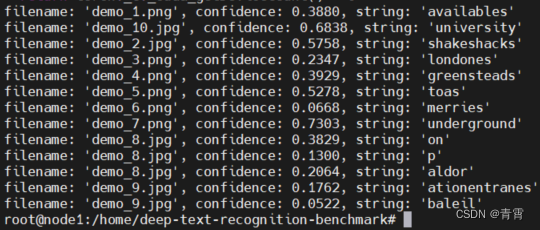
使用用户模型运行: python3 testzq.py,结果如下:
 错误1:训练数据比较大时,训练模型报错:ValueError: num_samples should be a positive integer value, but got num_samples=0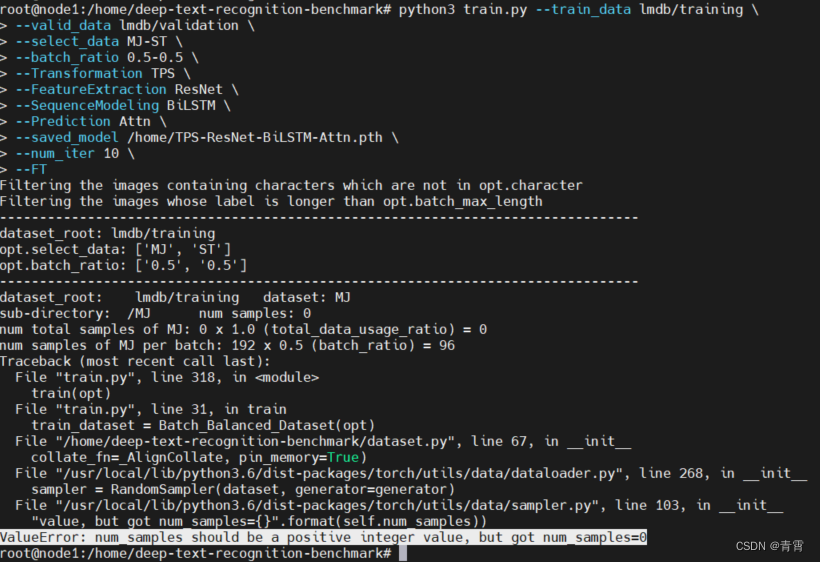
原因是:图片的名称长度大于--batch_max_length的默认值、而且包含的字符不在默认的--character中
原因是:图片的名称长度大于--batch_max_length的默认值、而且包含的字符不在默认的--character中
五、参考
【扫盲】RCNN+CTC字符训练识别_哔哩哔哩_bilibili欢迎关注公众号:小鸡炖技术 ,后台回复:“RCNN+CTC”获取本教程素材~~~, 视频播放量 3161、弹幕量 0、点赞数 38、投硬币枚数 34、收藏人数 103、转发人数 5, 视频作者 小鸡炖技术, 作者简介 公众号:小鸡炖技术,相关视频:【陈巍学基因】视频30:CellSearch检测CTC,见微知著的查癌方法——CTC循环肿瘤细胞检测,字符识别,时间序列LSTM深度学习模型代码讲解,1.1Faster RCNN理论合集,6、字符分割,如何读懂PyTorch深度学习代码-第一个深度学习实例-手写字符识别代码解析,【扫盲】DarkNet下YoloV4训练,阿丘科技深度学习AIDI讲解之字符识别,美国铁路CTC调度集中系统 - BNSF铁路官方科普【搬运】
https://www.bilibili.com/video/BV1JA411t7H9 deep-text-recognition-benchmarkhttps://link.zhihu.com/?target=https%3A//github.com/clovaai/deep-text-recognition-benchmarkPyTorch加载模型出现Error(s) in loading state_dict() for Model问题,Unexpected key(s) in state_dict: “...“_行走的笔记的博客-CSDN博客问题:模型在训练过程中可以正常训练,但是测试的时候出现了错误,如下所示:RuntimeError: Error(s) in loading state_dict for ModuleList:Missing key(s) in state_dict: "0.weight", "1.weight", "1.bias", "1.running_mean", "1.running_var", Unexpected key(s) in state_dict: "conv1.weight", "bn1.we
https://blog.csdn.net/qq_45777045/article/details/109481993 Ubuntu 18.04 安装 NVIDIA 显卡驱动 - 知乎我们今天的目标是在 Ubuntu 18.04 上安装 NVIDIA 显卡驱动,请注意,你的显卡一定要是 NVIDIA 的显卡才能按照这篇文章的方法安装。我将给大家介绍三种安装方法,建议使用第一种方法安装。 先来说说带有 NVIDIA 独…
https://zhuanlan.zhihu.com/p/59618999 -
相关阅读:
JAVA+SpringBoot心灵心理健康平台(心灵治愈交流平台)(含论文)源码
【7-1 CEmployee类的友元函数改名】 武汉理工大学
【深度思考】5年开发经验,不知道git rebase,是否应该被嘲笑?
【尚硅谷】MybatisPlus 学习笔记(下)
LeetCode 0481. 神奇字符串
项目常遇到的问题
linux之perf(3)top实时性能
数据降维——主成分分析
算法第四版 Algorithms Part 1动态联通性
多角度了解ABeam(德硕)技术架构
- 原文地址:https://blog.csdn.net/leiwuhen92/article/details/126419345