-
SwiftUI接入穿山甲开屏广告
研究了一下SwiftUI怎么接入穿山甲。
基于穿山甲sdk版本 4.7.0.8 例子地址
1. 首先要先注册一个账号,穿山甲地址
-
在广告变现->流量->应用中创建一个应用并记录下应用ID。

-
在广告变现->流量->代码位创建一个代码位并记录下代码位ID。注意要把是否应用于GroMore选择成否,要不然就需要用GreMore引擎

-
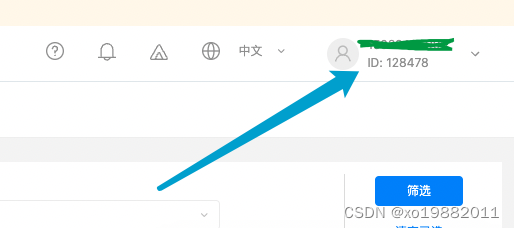
记录账号ID。
2. 安排广告显示位置
import SwiftUI @main struct DemoApp: App { // 控制广告是否显示 @State var showAd: Bool = true var body: some Scene { WindowGroup { if showAd == true { DSplashView(showAd: $showAd) } else { ContentView() } } } } // 获取根rootViewController extension UIApplication { var currentKeyWindow: UIWindow? { UIApplication.shared.connectedScenes .filter { $0.activationState == .foregroundActive } .map { $0 as? UIWindowScene } .compactMap { $0 } .first?.windows .filter { $0.isKeyWindow } .first } var rootViewController: UIViewController? { currentKeyWindow?.rootViewController } }- 1
- 2
- 3
- 4
- 5
- 6
- 7
- 8
- 9
- 10
- 11
- 12
- 13
- 14
- 15
- 16
- 17
- 18
- 19
- 20
- 21
- 22
- 23
- 24
- 25
- 26
- 27
- 28
- 29
- 30
- 31
- 32
- 33
- 34
- 35
2.广告初始化,由于高版本的直接使用switf初始化有点问题,改成包了一个OC
DAdHandler.h
#ifndef DAdHandler_h #define DAdHandler_h #import <Foundation/Foundation.h> @interface DAdHandler : NSObject - (instancetype)init; @end #endif /* Header_h */- 1
- 2
- 3
- 4
- 5
- 6
- 7
- 8
- 9
- 10
- 11
- 12
DAdHandler.m
#import <Foundation/Foundation.h> #import "DAdHandler.h" #import <BUAdSDK/BUAdSDKManager.h> #import <BUAdSDK/BUAdSDKConfiguration.h> @interface DAdHandler() @end @implementation DAdHandler - (instancetype)init { if (self = [super init]) { [self initADSdk]; } return self; } - (void)initADSdk { BUAdSDKConfiguration* config = [BUAdSDKConfiguration alloc]; [config setAppID:@"5328067"]; NSLog(@"DAdHandler init"); [BUAdSDKManager startWithSyncCompletionHandler:^(BOOL success, NSError *error) { if (success) { NSLog(@"初始化成功"); } else { NSLog(@"初始化失败"); } }]; } @end- 1
- 2
- 3
- 4
- 5
- 6
- 7
- 8
- 9
- 10
- 11
- 12
- 13
- 14
- 15
- 16
- 17
- 18
- 19
- 20
- 21
- 22
- 23
- 24
- 25
- 26
- 27
- 28
- 29
- 30
- 31
- 32
- 33
- 34
3. 广告界面
// // DSplashView.swift // Demo // // Created by wangyu on 2022/8/25. // import SwiftUI import BUAdSDK import AdSupport import AppTrackingTransparency class DSplashInstance: NSObject, BUSplashAdDelegate { var delegate: DSplashInstanceProtocol? lazy var splashAdInstance: BUSplashAd? = { let instance = BUSplashAd.init(slotID: "887901739", adSize: .init(width: UIScreen.main.bounds.size.width, height: UIScreen.main.bounds.size.height)) return instance }() override init() { super.init() // 延时一会执行,要不然可能拿不到广告IDFA DispatchQueue.main.asyncAfter(deadline: .now() + 0.1) { [self] in if #available(iOS 14.0, *) { ATTrackingManager.requestTrackingAuthorization { [self] status in print("请求idfa状态 \(status)") if status == .authorized { DAdHandler.init() print("idfa \(ASIdentifierManager.shared().advertisingIdentifier)") if self.splashAdInstance != nil { print("初始化广告位成功") } self.splashAdInstance?.delegate = self self.splashAdInstance?.loadData() } } } else { DAdHandler.init() if self.splashAdInstance != nil { print("初始化广告位成功") } self.splashAdInstance?.delegate = self self.splashAdInstance?.loadData() } } } func splashAdLoadSuccess(_ splashAd: BUSplashAd) { print("广告加载成功") } func splashAdLoadFail(_ splashAd: BUSplashAd, error: BUAdError?) { print("广告加载失败 \(error?.userInfo)") } func splashAdRenderSuccess(_ splashAd: BUSplashAd) { print("广告加载渲染成功") if UIApplication.shared.rootViewController != nil { splashAd.showSplashView(inRootViewController: UIApplication.shared.rootViewController!) } } func splashAdRenderFail(_ splashAd: BUSplashAd, error: BUAdError?) { print("广告加载渲染失败") } func splashAdWillShow(_ splashAd: BUSplashAd) { print("广告将要显示") } func splashAdDidShow(_ splashAd: BUSplashAd) { print("广告已经显示") } func splashAdViewControllerDidClose(_ splashAd: BUSplashAd) { print("广告关闭") delegate?.closeAd() } func splashDidCloseOtherController(_ splashAd: BUSplashAd, interactionType: BUInteractionType) { print("广告关闭其他") } func splashVideoAdDidPlayFinish(_ splashAd: BUSplashAd, didFailWithError error: Error) { print("广告播放完成") } func splashAdDidClick(_ splashAd: BUSplashAd) { print("广告点击") } func splashAdDidClose(_ splashAd: BUSplashAd, closeType: BUSplashAdCloseType) { print("广告关闭") } } protocol DSplashInstanceProtocol { func closeAd() } struct DSplashView: View, DSplashInstanceProtocol { @Binding var showAd: Bool private var adInstanse: DSplashInstance? init(showAd: Binding<Bool>) { self._showAd = showAd adInstanse = DSplashInstance() adInstanse?.delegate = self } func closeAd() { showAd = false } var body: some View { VStack { Color.gray } } } struct DSplashView_Previews: PreviewProvider { @State static var showAd: Bool = true static var previews: some View { DSplashView(showAd: $showAd) } }- 1
- 2
- 3
- 4
- 5
- 6
- 7
- 8
- 9
- 10
- 11
- 12
- 13
- 14
- 15
- 16
- 17
- 18
- 19
- 20
- 21
- 22
- 23
- 24
- 25
- 26
- 27
- 28
- 29
- 30
- 31
- 32
- 33
- 34
- 35
- 36
- 37
- 38
- 39
- 40
- 41
- 42
- 43
- 44
- 45
- 46
- 47
- 48
- 49
- 50
- 51
- 52
- 53
- 54
- 55
- 56
- 57
- 58
- 59
- 60
- 61
- 62
- 63
- 64
- 65
- 66
- 67
- 68
- 69
- 70
- 71
- 72
- 73
- 74
- 75
- 76
- 77
- 78
- 79
- 80
- 81
- 82
- 83
- 84
- 85
- 86
- 87
- 88
- 89
- 90
- 91
- 92
- 93
- 94
- 95
- 96
- 97
- 98
- 99
- 100
- 101
- 102
- 103
- 104
- 105
- 106
- 107
- 108
- 109
- 110
- 111
- 112
- 113
- 114
- 115
- 116
- 117
- 118
- 119
- 120
- 121
- 122
- 123
- 124
- 125
- 126
- 127
- 128
- 129
- 130
- 131
- 132
- 133
- 134
- 135
- 136
- 137
5. 测试的话,需要用到的增加测试工具项
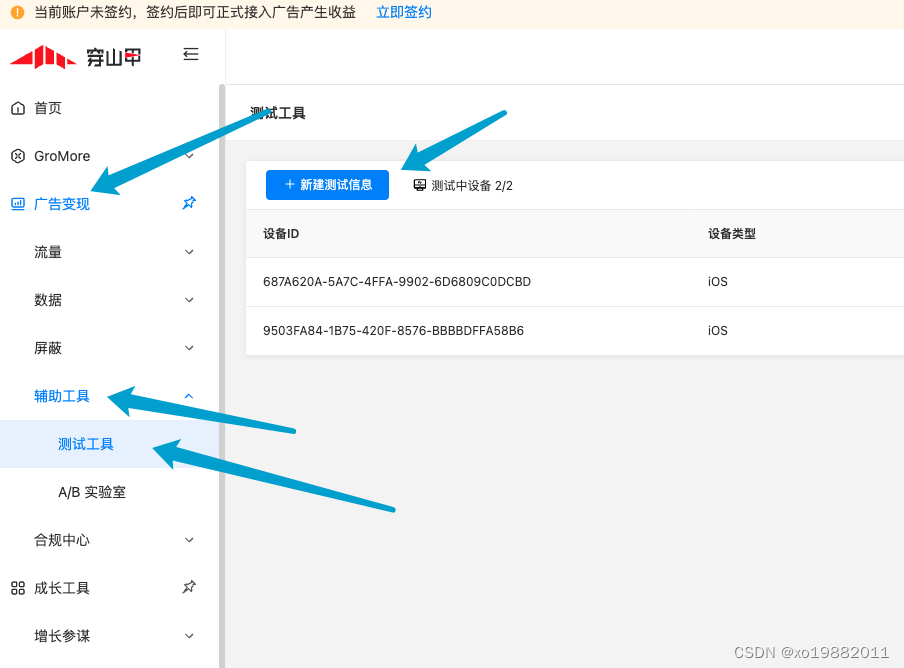
IDFA如果同意的话,在日志中就能看到了。 -
-
相关阅读:
vue3中的isRef toRef toRefs readonly
电子电机行业万界星空科技MES解决方案
分治法,动态规划及贪心算法感悟
java并发编程:LinkedBlockingQueue详解
【刷题之路 | Java & Python】两数之和(暴力枚举&哈希表)
计算机网络原理 谢希仁(第8版)第三章习题答案
一键自动化数据分析!快来看看 2022 年最受欢迎的 Python 宝藏工具库!
07_面向对象高级_内部类
ASP.NET 系列:单元测试
JCR一区级 | Matlab实现TCN-BiGRU-MATT时间卷积双向门控循环单元多特征分类预测
- 原文地址:https://blog.csdn.net/xo19882011/article/details/126580788
