-
Java 第三阶段增强分析需求,代码实现能力【连接池】
Java 第三阶段增强分析需求,代码实现能力【连接池】
代码链接:https://download.csdn.net/download/qq_52354698/86495369?spm=1001.2014.3001.5503
1. 数据库连接池
1. 5k次连接数据库问题
5k 次连接数据库,如果没有及时关闭连接的话,数据库是无法承受住如此至多的;连接的
如果及时的关闭了连接,也会造成大量资源和时间的浪费
因此出现了数据库连接池2. 传统获取 Connection 问题分析
- 传统的JDBC数据库连接使用DriverManager来获取,每次向数据库建立连接的时候都要将Connection加载到内存中,再验证IP地址,用户名和密码(0.05s ~ 1 s时间)。需要数据库连接的时候,就向数据库要求一一个,频繁的进行数据库连接操作将占用很多的系统资源,容易造成服务器崩溃。
- 每次数据库连接,使用完后都得断开,如果程序出现异常而未能关闭,将导致数据库内存泄漏,最终将导致重启数据库。
- 传统获取连接的方式,不能控制创建的连接数量,如连接过多,也可能导致内存泄漏,MySQL崩溃。
- 解决传统开发中的数据库连接问题,可以采用数据库连接池技术(connection pool)。
3. 数据库连接池基本介绍
- 预先在缓冲池中放入一定数量的连接,当需要建立数据库连接时,只需从 “缓冲池” 中取出一个,使用完毕之后再放回去。
- 数据库连接池负责分配、管理和释放数据库连接,它允许应用程序重复使用一个现有的数据库连接,而不是重新建立一个。
- 当应用程序想连接池请求的;连接数超过最大连接数量时,这些请求将被加入等待队列中。

4. 数据库连接池种类
- JDBC 的数据库连接池使用javax.sql.DataSource来表示,DataSource 只是一个接口,该接口通常由第三方提供实现[提供jar]
- C3P0数据库连接池,速度相对较慢,稳定性不错(hibernate, spring)
- DBCP数据库连接池, 速度相对c3p0较快,但不稳定
- Proxool数据库连接池, 有监控连接池状态的功能,稳定性较c3p0差一点
- BoneCP数据库连接池,速度快
- **Druid(德鲁伊)**是阿里提供的数据库连接池,集DBCP、C3PO、Proxool 优点于一身的数据库连接池
5. C3P0应用实例
首先要导入C3P0的jar包,导入方式和,mysql.jar一样
第一种方式:相关参数,在程序中指定user、url、password
@Test public void testC3P0_01() throws IOException, PropertyVetoException, SQLException { //创建一个数据对象 ComboPooledDataSource comboPooledDataSource = new ComboPooledDataSource(); //通过配置文件mysql.properties获取相关的连接信息 Properties properties = new Properties(); properties.load(new FileInputStream("src\\mysql.properties")); String user = properties.getProperty("user"); String password = properties.getProperty("password"); String url = properties.getProperty("url"); String driver = properties.getProperty("driver"); //给数据源comboPooledDataSource设置相关的参数 //连接管理是有comboPooledDataSource来管理 comboPooledDataSource.setDriverClass(driver); comboPooledDataSource.setJdbcUrl(url); comboPooledDataSource.setUser(user); comboPooledDataSource.setPassword(password); //设置初始化连接数 comboPooledDataSource.setInitialPoolSize(10); //设置最大连接数 comboPooledDataSource.setMaxPoolSize(50); //测试连接效率 long start = System.currentTimeMillis(); for (int i = 0; i < 5000; i++) { Connection connection = comboPooledDataSource.getConnection(); connection.close(); } long end = System.currentTimeMillis(); System.out.println(end - start); }- 1
- 2
- 3
- 4
- 5
- 6
- 7
- 8
- 9
- 10
- 11
- 12
- 13
- 14
- 15
- 16
- 17
- 18
- 19
- 20
- 21
- 22
- 23
- 24
- 25
- 26
- 27
- 28
- 29
- 30
- 31
- 32
第二种:使用配置文件模板来完成
将C3P0提供的c3p0.config.xml拷贝到src目录下<c3p0-config> <named-config name="qdu"> <property name="driverClass">com.mysql.jdbc.Driverproperty> <property name="jdbcUrl">jdbc:mysql://localhost:3306/qdu_01?useUnicode=true&characterEncoding=utf8&serverTimezone=UTC&useSSL=false&rewriteBatchedStatements=trueproperty> <property name="user">rootproperty> <property name="password">rootproperty> <property name="acquireIncrement">5property> <property name="initialPoolSize">10property> <property name="minPoolSize">5property> <property name="maxPoolSize">50property> <property name="maxStatements">5property> <property name="maxStatementsPerConnection">2property> named-config> c3p0-config>- 1
- 2
- 3
- 4
- 5
- 6
- 7
- 8
- 9
- 10
- 11
- 12
- 13
- 14
- 15
- 16
- 17
- 18
- 19
- 20
- 21
- 22
- 23
- 24
- 25
- 26
- 27
注意:这个地方的url同样需要根据自己mysql版本的不同而修改,与mysql配置文件不同的是,在xml文件中 “&” 要用 “& amp;” (没有空格)来代替
@Test public void testC3P0_02() throws SQLException { ComboPooledDataSource comboPooledDataSource = new ComboPooledDataSource("qdu"); long start = System.currentTimeMillis(); System.out.println("开始执行"); for (int i = 0; i < 5000; i++) { Connection connection = comboPooledDataSource.getConnection(); connection.close(); } long end = System.currentTimeMillis(); System.out.println(end - start); }- 1
- 2
- 3
- 4
- 5
- 6
- 7
- 8
- 9
- 10
- 11
- 12
- 13
- 14
6. Druid(德鲁伊)应用实例
同样也需要加入 Druid(德鲁伊)的 jar 包,放入 libs 文件夹下,然后引入
Druid 配置文件(与mysql的配置文件类似的配置文件)
#key=value driverClassName=com.mysql.jdbc.Driver url=jdbc:mysql://localhost:3306/qdu_01?useUnicode=true&characterEncoding=utf8&serverTimezone=UTC&useSSL=false&rewriteBatchedStatements=true username=root password=root #initial connection Size initialSize=10 #min idle connecton size minIdle=5 #max active connection size maxActive=50 #max wait time (5000 mil seconds) maxWait=5000- 1
- 2
- 3
- 4
- 5
- 6
- 7
- 8
- 9
- 10
- 11
- 12
- 13
package com.qdu.jdbc.datasource; import com.alibaba.druid.pool.DruidDataSourceFactory; import org.junit.jupiter.api.Test; import javax.sql.DataSource; import java.io.FileInputStream; import java.io.FileNotFoundException; import java.io.IOException; import java.sql.Connection; import java.util.Properties; /** * @author dell * @version 1.0 */ public class Druid_ { @Test public void testDruid() throws Exception { //创建Properties对象,用来读入Druid配置文件 Properties properties = new Properties(); properties.load(new FileInputStream("src\\druid.properties")); //创建一个指定参数的数据库连接池 DataSource dataSource = DruidDataSourceFactory.createDataSource(properties); Connection connection = dataSource.getConnection(); System.out.println("连接成功"); connection.close(); } }- 1
- 2
- 3
- 4
- 5
- 6
- 7
- 8
- 9
- 10
- 11
- 12
- 13
- 14
- 15
- 16
- 17
- 18
- 19
- 20
- 21
- 22
- 23
- 24
- 25
- 26
- 27
- 28
- 29
- 30
- 31
- 32
- 33
- 34
7. 将 JDBCUtils 工具类改成 Druid(德鲁伊)实现
package com.qdu.jdbc.datasource; import com.alibaba.druid.pool.DruidDataSourceFactory; import javax.sql.DataSource; import java.io.FileInputStream; import java.io.IOException; import java.sql.Connection; import java.sql.ResultSet; import java.sql.SQLException; import java.sql.Statement; import java.util.Properties; /** * @author dell * @version 1.0 * 基于druid数据库连接池的工具类 */ public class JDBCUtilsByDruid { private static DataSource dataSource; //静态代码块加载时只会执行一次 static { Properties properties = new Properties(); try { properties.load(new FileInputStream("src\\druid.properties")); dataSource = DruidDataSourceFactory.createDataSource(properties); } catch (Exception e) { throw new RuntimeException(e); } } //得到连接 public static Connection getConnection() throws SQLException { return dataSource.getConnection(); } //关闭连接,在数据库连接池中,close 不是真的断掉连接,而是将使用的 connection对象重新放回连接池 public static void close(ResultSet resultSet, Statement statement, Connection connection) { try { if (resultSet != null) { resultSet.close(); } if (statement != null) { statement.close(); } if (connection != null) { connection.close(); } } catch (SQLException e) { throw new RuntimeException(e); } } }- 1
- 2
- 3
- 4
- 5
- 6
- 7
- 8
- 9
- 10
- 11
- 12
- 13
- 14
- 15
- 16
- 17
- 18
- 19
- 20
- 21
- 22
- 23
- 24
- 25
- 26
- 27
- 28
- 29
- 30
- 31
- 32
- 33
- 34
- 35
- 36
- 37
- 38
- 39
- 40
- 41
- 42
- 43
- 44
- 45
- 46
- 47
- 48
- 49
- 50
- 51
- 52
- 53
- 54
- 55
- 56
- 57
- 58
- 59
- 60
- 61
- 62
- 63
- 64
- 65
2. Apache----DBUtils
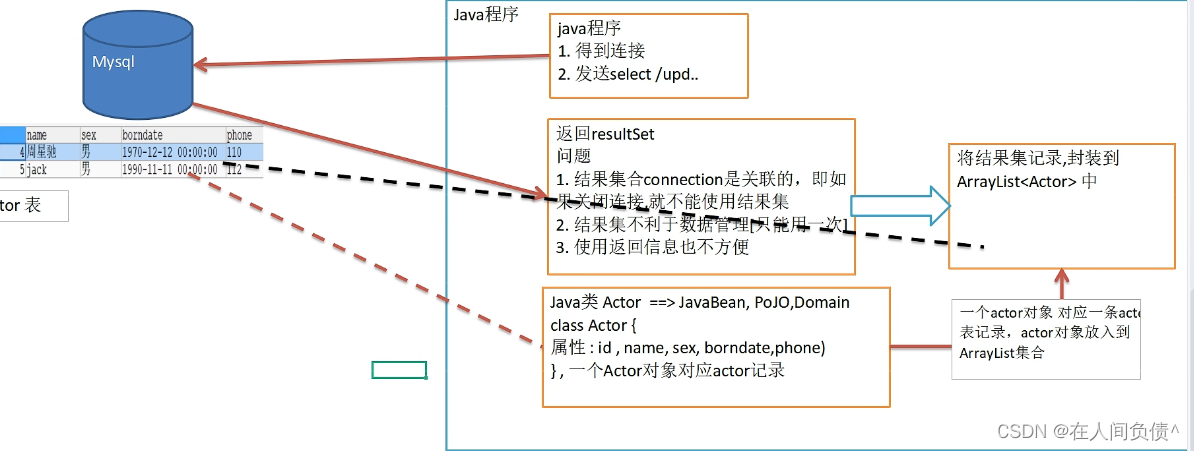
1. 基本介绍
commons-dbutils 是 Apache 组织提供的一个开源 JDBC 工具类库,它是对 JDBC 的封装,使用 dbutils 能极大简化 jdbc 编码的工足量。
2. DbUtils类
- QueryRunner类:该类封装了 SQL 的执行,是线程安全的。可以实现增、删、改、查、批处理。
- 使用 QueryRunner 类实现查询。
- ResultHandler 接口:该接口用于处理 java.sql.ResultSet ,将数据按要求转换为另一种形式。
ArrayHandler:把结果集中的第一行数据转成对象数组。
ArrayListHandler:把结果集中的每一行数据都转成一 个数组, 再存放到List中。
BeanHandler:将结果集中的第一行数据封装到一个对应的JavaBean实例中。
BeanListHandler:将结果集中的每一行数据都封装到一 个对应的JavaBean实例中,存放到List里。
ColumnListHandler:将结果集中某一列的数据存放到List中。
KeyedHandler(name):将结果集中的每行数据都封装到Map里,再把这些map再存到一个map里,其key为指定的key.
MapHandler:将结果集中的第一行数据封装到一 个Map里,key是列名, value就是对应的值。
MapListHandler:将结果集中的每一行数据都封装到一 个Map里,然后再存放到List3. 应用实例
使用 DBUtils + 数据连接池(德鲁伊)方式,完成 actor 的 crud
先引入 DBUtils 相关的 jar
package com.qdu.jdbc.datasource; import org.apache.commons.dbutils.QueryRunner; import org.apache.commons.dbutils.handlers.BeanListHandler; import org.junit.jupiter.api.Test; import java.sql.Connection; import java.sql.SQLException; import java.util.List; /** * @author dell * @version 1.0 */ public class DBUtils_USE { @Test public void testQueryMany() throws SQLException { //得到连接 Connection connection = JDBCUtilsByDruid.getConnection(); //使用DBUtils类和接口,引入 DBUtils 相关的 jar //创建 QueryRunner QueryRunner queryRunner = new QueryRunner(); //执行相关的方法,返回 ArrayList 结果集 String sql = "select * from actor where id >= ?"; //query 方法就是执行 sql 语句,得到 resultset -- 封装到 -- ArrayList 集合中 //connection:连接 //sql:执行的sql语句 //new BeanListHandler<>(Actor.class):在将result -> Actor 对象 -> 封装到 ArrayList //1:给sql语句中的?赋值,可以有多个值 //底层得到的resulttest,会在query关闭,关闭PreparedStatment List<Actor> list = queryRunner.query(connection, sql, new BeanListHandler<>(Actor.class), 1); System.out.println("输出集合的信息"); for (Actor actor : list) { System.out.println(actor); } //释放资源 JDBCUtilsByDruid.close(null, null, connection); } }- 1
- 2
- 3
- 4
- 5
- 6
- 7
- 8
- 9
- 10
- 11
- 12
- 13
- 14
- 15
- 16
- 17
- 18
- 19
- 20
- 21
- 22
- 23
- 24
- 25
- 26
- 27
- 28
- 29
- 30
- 31
- 32
- 33
- 34
- 35
- 36
- 37
- 38
- 39
- 40
- 41
- 42
- 43
- 44
4. 表和JavaBean的类型映射关系

3. DAO和增删改查通用方法-BasicDao
apache- dbutils+ Druid简化了JDBC开发,但还有不足:
- SQL语句是固定,不能通过参数传入,通用性不好,需要进行改进,更方便执行增删改查
- 对于select操作,如果有返回值返回类型不能固定,需要使用泛型
- 将来的表很多,业务需求复杂,不可能只靠一个Java类完成
- 引出=》BasicDAO

1. 基本说明
- DAO:data access object 数据访问对象
- 这样的通用类,称为 BasicDao,是专门和数据库交互的,即完成对数据库(表)的crud操作。
- 在 BaiscDao 的基础上,实现一张表对应一个 Dao,更好的完成功能,比如 Customer 表-Customer.java 类(javabean)-CustomerDao.java
2. BasicDAO应用实例
完成一个简单设计
com.qdu.dao_- com.qdu.dao_.utils // 工具类
- com.qdu.dao_.domain // javabean
- com.qdu.dao_.dao // 存放XxxDAO 和 BasicDAO
- com.qdu.dao_.test // 写测试类
JDBCUtilsByDruid 类
package com.qdu.dao_.utils; import com.alibaba.druid.pool.DruidDataSourceFactory; import javax.sql.DataSource; import java.io.FileInputStream; import java.sql.Connection; import java.sql.ResultSet; import java.sql.SQLException; import java.sql.Statement; import java.util.Properties; /** * @author dell * @version 1.0 * 基于druid数据库连接池的工具类 */ public class JDBCUtilsByDruid { private static DataSource dataSource; //静态代码块加载时只会执行一次 static { Properties properties = new Properties(); try { properties.load(new FileInputStream("src\\druid.properties")); dataSource = DruidDataSourceFactory.createDataSource(properties); } catch (Exception e) { throw new RuntimeException(e); } } //得到连接 public static Connection getConnection() throws SQLException { return dataSource.getConnection(); } //关闭连接,在数据库连接池中,close 不是真的断掉连接,而是将使用的 connection对象重新放回连接池 public static void close(ResultSet resultSet, Statement statement, Connection connection) { try { if (resultSet != null) { resultSet.close(); } if (statement != null) { statement.close(); } if (connection != null) { connection.close(); } } catch (SQLException e) { throw new RuntimeException(e); } } }- 1
- 2
- 3
- 4
- 5
- 6
- 7
- 8
- 9
- 10
- 11
- 12
- 13
- 14
- 15
- 16
- 17
- 18
- 19
- 20
- 21
- 22
- 23
- 24
- 25
- 26
- 27
- 28
- 29
- 30
- 31
- 32
- 33
- 34
- 35
- 36
- 37
- 38
- 39
- 40
- 41
- 42
- 43
- 44
- 45
- 46
- 47
- 48
- 49
- 50
- 51
- 52
- 53
- 54
- 55
- 56
- 57
- 58
- 59
- 60
- 61
- 62
- 63
- 64
Actor 类
package com.qdu.dao_.domain; import java.util.Date; /** * @author dell * @version 1.0 */ public class Actor { private Integer id; private String name; private String sex; private Date borndate; private String phone; public Actor() { //一定要给一个无参构造器[反射需要] } public Actor(Integer id, String name, String sex, Date borndate, String phone) { this.id = id; this.name = name; this.sex = sex; this.borndate = borndate; this.phone = phone; } public Integer getId() { return id; } public void setId(Integer id) { this.id = id; } public String getName() { return name; } public void setName(String name) { this.name = name; } public String getSex() { return sex; } public void setSex(String sex) { this.sex = sex; } public Date getBorndate() { return borndate; } public void setBorndate(Date borndate) { this.borndate = borndate; } public String getPhone() { return phone; } public void setPhone(String phone) { this.phone = phone; } @Override public String toString() { return "\nActor{" + "id=" + id + ", name='" + name + '\'' + ", sex='" + sex + '\'' + ", borndate=" + borndate + ", phone='" + phone + '\'' + '}'; } }- 1
- 2
- 3
- 4
- 5
- 6
- 7
- 8
- 9
- 10
- 11
- 12
- 13
- 14
- 15
- 16
- 17
- 18
- 19
- 20
- 21
- 22
- 23
- 24
- 25
- 26
- 27
- 28
- 29
- 30
- 31
- 32
- 33
- 34
- 35
- 36
- 37
- 38
- 39
- 40
- 41
- 42
- 43
- 44
- 45
- 46
- 47
- 48
- 49
- 50
- 51
- 52
- 53
- 54
- 55
- 56
- 57
- 58
- 59
- 60
- 61
- 62
- 63
- 64
- 65
- 66
- 67
- 68
- 69
- 70
- 71
- 72
- 73
- 74
- 75
- 76
- 77
- 78
- 79
- 80
BasicDAO 类
package com.qdu.dao_.dao; import com.qdu.dao_.utils.JDBCUtilsByDruid; import org.apache.commons.dbutils.QueryRunner; import org.apache.commons.dbutils.handlers.BeanHandler; import org.apache.commons.dbutils.handlers.BeanListHandler; import org.apache.commons.dbutils.handlers.ScalarHandler; import java.sql.Connection; import java.util.List; /** * @author dell * @version 1.0 * 开发BasicDAO,是其他DAO的父类 */ public class BasicDAO<T> {//泛型指定具体的类型 private QueryRunner queryRunner = new QueryRunner(); //开发通用的dml方法,针对任意的表 public int update(String sql, Object... parameters) { Connection connection = null; try { connection = JDBCUtilsByDruid.getConnection(); int update = queryRunner.update(connection, sql,parameters); return update; } catch (Exception e) { throw new RuntimeException(e); } finally { JDBCUtilsByDruid.close(null, null, connection); } } /** * * @param sql sql语句,可以有 ? * @param clazz 传入一个类的Class对象 比如 Actor.class * @param parameters 传入 ? 的具体的值,可以是多个 * @return 根据 Actor.class 返回对应的 ArrayList 集合 */ //返回多个对象(即查询的结果是多行),针对任意表 public List<T> queryMulti(String sql, Class<T> clazz, Object... parameters){ Connection connection = null; try { connection = JDBCUtilsByDruid.getConnection(); return queryRunner.query(connection, sql, new BeanListHandler<T>(clazz), parameters); } catch (Exception e) { throw new RuntimeException(e); } finally { JDBCUtilsByDruid.close(null, null, connection); } } //查询单行结果的通用方法 public T querySingle(String sql, Class<T> clazz, Object... parameters){ Connection connection = null; try { connection = JDBCUtilsByDruid.getConnection(); return queryRunner.query(connection, sql, new BeanHandler<T>(clazz), parameters); } catch (Exception e) { throw new RuntimeException(e); } finally { JDBCUtilsByDruid.close(null, null, connection); } } //查询单行单列的方法,即返回单值的方法 public Object queryScalar(String sql, Object... parameters){ Connection connection = null; try { connection = JDBCUtilsByDruid.getConnection(); return queryRunner.query(connection, sql, new ScalarHandler(), parameters); } catch (Exception e) { throw new RuntimeException(e); } finally { JDBCUtilsByDruid.close(null, null, connection); } } }- 1
- 2
- 3
- 4
- 5
- 6
- 7
- 8
- 9
- 10
- 11
- 12
- 13
- 14
- 15
- 16
- 17
- 18
- 19
- 20
- 21
- 22
- 23
- 24
- 25
- 26
- 27
- 28
- 29
- 30
- 31
- 32
- 33
- 34
- 35
- 36
- 37
- 38
- 39
- 40
- 41
- 42
- 43
- 44
- 45
- 46
- 47
- 48
- 49
- 50
- 51
- 52
- 53
- 54
- 55
- 56
- 57
- 58
- 59
- 60
- 61
- 62
- 63
- 64
- 65
- 66
- 67
- 68
- 69
- 70
- 71
- 72
- 73
- 74
- 75
- 76
- 77
- 78
- 79
- 80
- 81
- 82
- 83
- 84
- 85
- 86
- 87
- 88
- 89
- 90
ActorDAO 类
package com.qdu.dao_.dao; import com.qdu.dao_.domain.Actor; /** * @author dell * @version 1.0 */ public class ActorDAO extends BasicDAO<Actor>{ }- 1
- 2
- 3
- 4
- 5
- 6
- 7
- 8
- 9
- 10
- 11
- 12
- 13
- 14
TestDAO 类
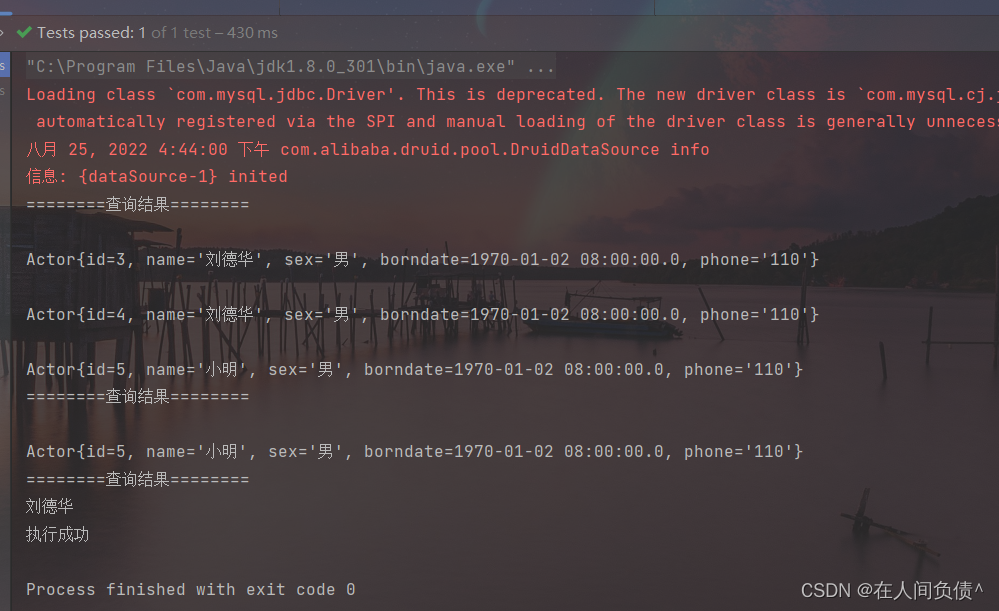
package com.qdu.dao_.test; import com.qdu.dao_.dao.ActorDAO; import com.qdu.dao_.domain.Actor; import org.junit.jupiter.api.Test; import java.util.List; /** * @author dell * @version 1.0 */ public class TestDAO { @Test public void testActorDAO(){ ActorDAO actorDAO = new ActorDAO(); //查询 List<Actor> actors = actorDAO.queryMulti("select * from actor where id >= ?", Actor.class, 1); System.out.println("========查询结果========"); for (Actor actor : actors) { System.out.println(actor); } //查询单行记录 Actor actor = actorDAO.querySingle("select * from actor where id = ?", Actor.class, 5); System.out.println("========查询结果========"); System.out.println(actor); //查询单行单列 Object o = actorDAO.queryScalar("select name from actor where id = ?", 4); System.out.println("========查询结果========"); System.out.println(o); //dml操作 int update = actorDAO.update("insert into actor values(null, ?, ?, ?, ?)", "张无忌", "男", "2022-8-25", "999"); System.out.println(update > 0 ? "执行成功" : "执行没有影响表"); } }- 1
- 2
- 3
- 4
- 5
- 6
- 7
- 8
- 9
- 10
- 11
- 12
- 13
- 14
- 15
- 16
- 17
- 18
- 19
- 20
- 21
- 22
- 23
- 24
- 25
- 26
- 27
- 28
- 29
- 30
- 31
- 32
- 33
- 34
- 35
- 36
- 37
- 38
- 39
- 40
-
相关阅读:
【软件工程】山东大学软件工程复习提纲
valarray数值库学习
深度学习知识点:循环神经网络(RNN)、长短期记忆网络(LSTM)、门控循环单元(GRU)
Java:Java虚拟机中垃圾收集器的类型
MongoDB-在windows电脑本地安装一个mongodb的数据库
JS的装箱和拆箱
Linux启动过程详解
独立站内容营销策略,加入情景营销提升转化率
kubernetes学习笔记
scale自适应分辨率 实现缩放自适应(vue3)
- 原文地址:https://blog.csdn.net/qq_52354698/article/details/126520551

- 最新文章
-
沪漂五周年了:我越来越迷茫了
Agentic Skill Routing 实战:别再把所有 Skill 塞进 AI Agent 上下文
MySQL-Seconds_behind_master的精度误差
[MAF预定义ChatClient中间件-03]CachingChatClient——利用缓存省钱省时间
AI的至暗历史:从万众期待到被政府撤资,AI的两次死亡徘徊
Agent OS :五种驯服不确定性的范式
PortSwigger SQL注入LAB11
数据库即时编译JIT
[Begin]AI Learn Data Day 0
深度学习进阶(二十七)现代 LLM 的核心架构设计其二:SwiGLU