-
JavaScript数据结构与算法
算法和数据结构导论
面试问题:1.栈
栈是一种后进先出(LIFO)的数据结构
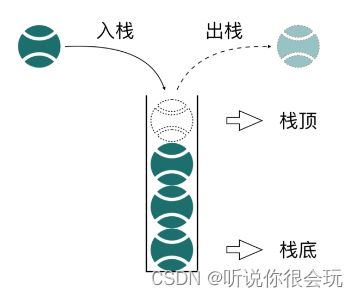
栈结构操作

js实现栈结构-----数组

使用类封装栈操作方法实现:
方法名 操作 push 栈顶添加元素 pop 栈顶移除元素 peek 查看栈顶 isEmpty 检查栈是否为空 clear 移除全部元素 size 获取栈长度 //es5 //函数:函数,构造器 //this指向要创建的对象 var Stack = function(){ var items = []; //私有 //push栈顶添加元素 this.push = function(element){ items.push(element); } //pop移除栈顶元素 this.pop = function(){ return items.pop(); } this.push = function(element){ items.push(element); } //peek 检查栈顶 this.peek = function(){ return items[items.length - 1]; } //检查栈是否为空 this.isEmpty = function(){ return items.length == 0; } //清除栈 this.clear = function(){ items = []; } //获取栈的大小 this.size = function(){ return items.length; } //检查items this.getItems = function(){ return items; } }- 1
- 2
- 3
- 4
- 5
- 6
- 7
- 8
- 9
- 10
- 11
- 12
- 13
- 14
- 15
- 16
- 17
- 18
- 19
- 20
- 21
- 22
- 23
- 24
- 25
- 26
- 27
- 28
- 29
- 30
- 31
- 32
- 33
- 34
- 35
- 36
- 37
- 38
- 39
- 40
- 41
- 42
- 43
- 44
栈实例:十进制到二进制转换


//10转2 var divBy2 = function(number){ var stack = new Stack(); var yushu var string2 = ''; while(number > 0){ yushu = number % 2; stack.push(yushu); number = Math.floor(number/2); } while(!stack.isEmpty()){ string2 += stack.pop(); } return string2; } //1.先完成fn2,再完成fn1 //2.先完成fn1,再完成fn2 var fn1 = function(){ return console.log("fn1 finish"); } var fn2 = function(){ fn1(); return console.log("fn2 finish"); } var app = function(){ app(); }- 1
- 2
- 3
- 4
- 5
- 6
- 7
- 8
- 9
- 10
- 11
- 12
- 13
- 14
- 15
- 16
- 17
- 18
- 19
- 20
- 21
- 22
- 23
- 24
- 25
- 26
- 27
- 28
- 29
- 30
- 31
- 32
2.队列

队列操作

使用数组实现队列结构

方法实现方法名 操作 enqueue 入队 dequeue 出队 front 查看队列头 isEmpty 检查队列头是否为空 size 获取队列长度 类封装队列操作
var Queue = function(){ var items = []; //私有 //入队 this.enqueue = function(element){ items.push(element); } //出队 this.dequeue = function(){ return items.shift(); } //查看队列头 this.front = function(){ return items[0]; } //检查队列是否为空 this.isEmpty = function(){ return items.length === 0; } //检查队列的长度 this.size = function(){ return items.length; } } var chuanhua = function(){ var q = new Queue(); for(var i = 0;i < names.length;i++){ q.enqueue(names[i]); } //重要部分 var taotai; while(q.size() > 1){ //i ==3 for(var i = 0;i < number - 1;i++){ q.enqueue(q.dequeue()); } taotai = q.dequeue(); console.log("淘汰的玩家是" + taotai); } } //玩家列表 var name = ['a','b','c','d','e','f'];//一直传---直到剩下最后一名玩家 //游戏规则 var number = 3; //队列 =》优先队列 //飞机 高级会员 优先登机 //优先级 priorityQueue //"小黑" 3 /** Object{ name:"小黑", priority:3 } */ //"小明" 5 var priorityQueue = function(){ var items = []; //辅助类 var QueueItem =function(element,priority){ this.element = element; this.priority = priority; } this.enqueue = function(element.priority){ var queueItem = new QueueItem(element.priority); var added = false; for(var i = 0;i < items.length;i++){ if(queueItem.priority > items[i].priority){ items.splice(i,0,queueItem); added = true; break; } } if(!added){ items.push(queueItem); } } this.getItems = function(){ return items; } } var pq = new PriorityQueue(); pq.enqueue("小黑",10); pq.enqueue("小明",12);- 1
- 2
- 3
- 4
- 5
- 6
- 7
- 8
- 9
- 10
- 11
- 12
- 13
- 14
- 15
- 16
- 17
- 18
- 19
- 20
- 21
- 22
- 23
- 24
- 25
- 26
- 27
- 28
- 29
- 30
- 31
- 32
- 33
- 34
- 35
- 36
- 37
- 38
- 39
- 40
- 41
- 42
- 43
- 44
- 45
- 46
- 47
- 48
- 49
- 50
- 51
- 52
- 53
- 54
- 55
- 56
- 57
- 58
- 59
- 60
- 61
- 62
- 63
- 64
- 65
- 66
- 67
- 68
- 69
- 70
- 71
- 72
- 73
- 74
- 75
- 76
- 77
- 78
- 79
- 80
- 81
- 82
- 83
- 84
- 85
- 86
- 87
3.链表

var LinkdList = function(){ //链表头 var head = null; //链表长度 var length = 0; //辅助类:节点 var Node = function(element){ this.element = element; this.next = null; } //链表尾添加元素 this.append = function(element){ var node = new Node(element); if(head == null){ head = node; }else{ var current = head; while(current.next){ current = current.next; } //while循环执行完之后,current已经是链表最后一项了 current.next = node; } length ++; } //链表某一个位置添加元素 this.insert = function(position,element){ //越界 if(position > -1 && position < length){ var node = new Node(element); if(position == 0){ var current = head; head = node; head.next = current; }else{ var index = 0; var current = head; var previous = null; while(index < position){ previous = current; current = current.next; index++; } previous.next = node; node.next = current; } length++; } } this.getHead = function(){ return head; } } var l = new LikedList l.append(1); l.append(2); l.append(3); l.insert(1,10);- 1
- 2
- 3
- 4
- 5
- 6
- 7
- 8
- 9
- 10
- 11
- 12
- 13
- 14
- 15
- 16
- 17
- 18
- 19
- 20
- 21
- 22
- 23
- 24
- 25
- 26
- 27
- 28
- 29
- 30
- 31
- 32
- 33
- 34
- 35
- 36
- 37
- 38
- 39
- 40
- 41
- 42
- 43
- 44
- 45
- 46
- 47
- 48
- 49
- 50
- 51
- 52
- 53
- 54
- 55
- 56
- 57
- 58
- 59
- 60
- 61
- 62
- 63
- 64
链表操作


//与splice 功能类似 //没有移除 拿出来用 this.removeAt = function(position){ if(position > -1 && position < length){ if(position == 0){ var current = head; head = current.next; }else{ var current =head; var previous = null; var index = 0; while(index < position){ previous = current; current = current.next; index++; } //跳出循环的时候,index == position previous.next = current.next; } length--; return current; } return null; }- 1
- 2
- 3
- 4
- 5
- 6
- 7
- 8
- 9
- 10
- 11
- 12
- 13
- 14
- 15
- 16
- 17
- 18
- 19
- 20
- 21
- 22
- 23
- 24

this.indexOf = function(element){ var current = head; var index = 0; while(current){ if(current.element == element){ return index; } current = current.next; index++; } return -1; } //remove(position) 删除某个位置的元素 //indexOf(element) 获取某个元素的位置 this.remove = function(element){ return this.removeAt(this.indexOf(element)); } this.isEmpty = function(){ return length == 0; } this.size = function(){ return length; }- 1
- 2
- 3
- 4
- 5
- 6
- 7
- 8
- 9
- 10
- 11
- 12
- 13
- 14
- 15
- 16
- 17
- 18
- 19
- 20
- 21
- 22
- 23
- 24
- 25


4.集合
集合是一种数字中的概念
A = {1,2,3} B = {7,2,9}集合的特性
- 无重复性
- 空集
- 子集
Map set WeakMap WeakSet filter- 1
- 2
- 3
- 4
- 5
集合操作方法

集合中查询元素存在:has(value)this.has = function(value){ return items.hasOwnProperty(value); }- 1
- 2
- 3
集合中添加元素:add(value)
this.add = function(value){ if(!this.has(value)){ items[value] = value; return value; } return false; }- 1
- 2
- 3
- 4
- 5
- 6
- 7
集合中移除元素:remove(value)
this.add = function(value){ if(this.has(value)){ delete items[value]; return true; } return false; }- 1
- 2
- 3
- 4
- 5
- 6
- 7
//ES6 Set var Set2 = function(){ var items = {}; //检查元素是否存在 return boolean this.has = function(value){ return items.hasOwnProperty(value); } //清空集合 this.clear = function(){ items = {}; } //size 集合的大小 ???? this.size = function(){ //遍历集合 var count = 0; for(var i in items){ if(items.hasOwnProperty(i)){ count++; } count++; console.log(i) } return count; } this.value = function(){ var values = []; for(var i in items){ if(items.hasOwnProperty){ values.push(items[i]); } } return values; } //并集 this.union = function(otherSet){ var resultSet = new Set2(); //1.把自己的值提取出来 var arr = this.value(); for(var i = 0;i < arr.length;i++){ resultSet.add(arr[i]); } //2.把另一个集合的值提取出来 arr = otherSet.value(); for(var i = 0;i < arr.length;i++){ resultSet.add(arr[i]); } return resultSet; } //交集 this.intersection = function(otherSet){ var resultSet = new Set2(); var arr = this.value(); for(var i = 0;i < arr.length;i++){ if(otherSet.has(arr[i])){ resultSet.add(arr[i]); } resultSet.add(arr[i]); } return resultSet; } this.difference = function(otherSet){ var resultSet = new Set2(); var arr = this.value(); for(){ } } } var A = new Set2(); A.add(1) A.add(2) A.add(3) this.getItems = function(){ return items; } } //都是函数,函数允许有属性和方法 》 函数(构造器)的方法称之为静态方法 //var object = function(){} //Object.prototype = .....- 1
- 2
- 3
- 4
- 5
- 6
- 7
- 8
- 9
- 10
- 11
- 12
- 13
- 14
- 15
- 16
- 17
- 18
- 19
- 20
- 21
- 22
- 23
- 24
- 25
- 26
- 27
- 28
- 29
- 30
- 31
- 32
- 33
- 34
- 35
- 36
- 37
- 38
- 39
- 40
- 41
- 42
- 43
- 44
- 45
- 46
- 47
- 48
- 49
- 50
- 51
- 52
- 53
- 54
- 55
- 56
- 57
- 58
- 59
- 60
- 61
- 62
- 63
- 64
- 65
- 66
- 67
- 68
- 69
- 70
- 71
- 72
- 73
- 74
- 75
- 76
- 77
- 78
- 79
- 80
- 81
- 82
- 83
- 84
Set方法 add 添加元素 clear 清除全部元素 delete 删除 entire 获取迭代器 forEach 遍历方法 has 检查元素是否存在 size 获取元素长度 values 获取全部值 WeakSet方法 add 添加元素 delete 删除 has 检查元素是否存在 
5.字典 散列表(hash表)
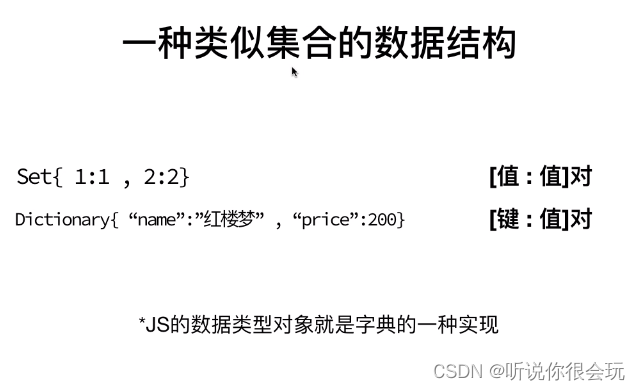
字典主要操作
添加键值对:set(key,value)
通过键值移除元素:delete(key)
检查键:has(key)
由键获取值:get(key)//字典 dictionary //散列表 : 哈希表 HashTable var Dictionary = function(){ var items = {}; //检查键是否存在 this.has = function(key){ return items.hasOwnProperty(key); } this.set = function(key,value){ //items.key = value; items[key] = value; } this.delete = function(key){ if(this.has(key)){ delete items[key]; return true; } return false; } this.get = function(key){ if(this.has(key)){ return items[key]; } return undefined; } this.getItems = function(){ return items; } var books = [ { name:"红楼梦", price:200 } { name:"水浒传", price:198 } { name:"金瓶梅", price:199 } { name:"西游记", price:132 } ] //哈希表 var HashTable = function(){ var items = []; //散列函数 //key > number > items[number] //ascII a => 97 //J74 o111 b98 s115 //key => 散列值 var loseloseHashCode = function(key){//Jobs var hash = 0; for(var i = 0;i < key.length;i++){ hash += key[i].charCodeAt(); } return hash % 37; } //不实现 var djb2HashCode = function(){} this.put = function(key,value){ //key = Jobs value = jobs@qq.com var position = loseloseHashCode(key); console.log(position + '-' + value); items[position] = value; } this.remove = function(key){ items[loseloseHashCode(key)] = underfined; } this.get = function(key){ return items[loseloseHashCode(key)]; } this.getTtems = function(){ return items; } } var ht = new HashTable; ht.put('Jobs','Jobs@qq.com'); ht.put('Bob','Bob@qq.com'); } var HashTable_L = function(){ var items = []; //散列函数 key 》散列值》重复率太高 var loseloseHashCode = function(key){//Jobs var hash = 0; for(var i = 0;i < key.length;i++){ hash += key[i].charCodeAt(); } return hash % 37; } this.put = function(key,value){ var position = loseloseHashCode(key); if(table[position]){ table[position].append(new Node(key,value)); }else{ var l = new LinkList; table[position] = l; table[position].append(new Node(key,value)); } } this.get = function(key){ var position = loseloseHashCode(key) if(table[position]){ //链表线性查找 var current = table[position].getHead(); while(current){ if(current.element.key == key){ return current.element.value; } current = current.next; } }else{ return undefined; } } this.remove = function(key){ var position = loseloseHashCode(key); if(table[position]){ //删除 //remove(element) var current = table[position].getHead(); while(current){ if(current.element.key == key){ // 查找到对应的key了 table[position].remove(current.element/*Node*/); if(table[position].isEmpty()){ table[position] = undefined; } return true; } current = current.next; } }else{ return false; } } this.getTable = function(){ return table; } } //线性探查法 var HashTable_x = function(){ var table = []; var loseloseHashCode = function(key){ var hash = 0; for(var i = 0;i < key.length;i++){ hash += key[i].charCodeAt(); } return hash % 37; } var Node = function(key,value){ this.key = key; this.value = value; } //不实现 var djb2HashCode = function(key){ var hash = 5381; for(var i = 0;i < key.length;i++){ hash = hash * 33 + key[i].charCodeAt(); } return hash % 1013; } this.put = function(key,value){ var position = loseloseHashCode(key); if(table[position] == undefined){ table[position] = new Node(key,value); }else{ //说明这个位置被占据了 var index = position+1; while(table[index] !== undefined){ index++; } table[index] = new Node(key,value); } } this.get = function(key){ } this.remove = function(key){ } } var hl = new HashTable_L; hl.put('Donnie','Donie@qq.com'); hl.put('Ana','Ana@qq.com');- 1
- 2
- 3
- 4
- 5
- 6
- 7
- 8
- 9
- 10
- 11
- 12
- 13
- 14
- 15
- 16
- 17
- 18
- 19
- 20
- 21
- 22
- 23
- 24
- 25
- 26
- 27
- 28
- 29
- 30
- 31
- 32
- 33
- 34
- 35
- 36
- 37
- 38
- 39
- 40
- 41
- 42
- 43
- 44
- 45
- 46
- 47
- 48
- 49
- 50
- 51
- 52
- 53
- 54
- 55
- 56
- 57
- 58
- 59
- 60
- 61
- 62
- 63
- 64
- 65
- 66
- 67
- 68
- 69
- 70
- 71
- 72
- 73
- 74
- 75
- 76
- 77
- 78
- 79
- 80
- 81
- 82
- 83
- 84
- 85
- 86
- 87
- 88
- 89
- 90
- 91
- 92
- 93
- 94
- 95
- 96
- 97
- 98
- 99
- 100
- 101
- 102
- 103
- 104
- 105
- 106
- 107
- 108
- 109
- 110
- 111
- 112
- 113
- 114
- 115
- 116
- 117
- 118
- 119
- 120
- 121
- 122
- 123
- 124
- 125
- 126
- 127
- 128
- 129
- 130
- 131
- 132
- 133
- 134
- 135
- 136
- 137
- 138
- 139
- 140
- 141
- 142
- 143
- 144
- 145
- 146
- 147
- 148
- 149
- 150
- 151
- 152
- 153
- 154
- 155
- 156
- 157
- 158
- 159
- 160
- 161
- 162
- 163
- 164
- 165
- 166
- 167
- 168
- 169
- 170
- 171
- 172
- 173
- 174
- 175
- 176
- 177
- 178
- 179
- 180
- 181
- 182
- 183
- 184
- 185
- 186
- 187
- 188
- 189
- 190
- 191
- 192
- 193
- 194
- 195
- 196
- 197
- 198

6.树

树结构的主要操作:
增加子节点 appendChild()
删除子节点 removeChild()
查找子节点 getElementBy**()var Tree = function(){ var Node = function(value){ this.value = value; this.left = null; this.right = null; } var root = null; //插入节点 var insertNode = function(node,newNode){ if(newNode.value > node.value){ //往右走 if(node.right == null){ node.right = newNode; }else{ insertNode(node.right,newNode); } }else if(newNode.value < node.value){ //往左走 if(node.left == null){ node.left = newNode; }else{ insertNode(node.left,newNode); } } } this.insert = function(value){ var newNode = new Node(value);//新的节点 if(root == null){ //空树 root = newNode; }else{ insertNode(root,newNode); } } //搜索节点 this.search = function(value){ } //遍历节点 var traverse = function(node,callback){ //node =>null if(node == null){return;} traverse(node.left); traverse(node.right); traverse(node.value); } this.traverse = function(callback){ traverse(root,callback); } //1.树还是空的 //2.树不是空的 var min = function(node){ if(node == null){return null;} while(node && node.left){ node = node.left; } return node.value; } this.min = function(){ return min(root); } var max = function(node){ if(node == null){return null;} while(node && node.right){ node = node.right; } return node.value; } this.max = function(){ return max(root); } //删除节点 root根节点 var finMinNode = function(node){ if(node == null){return null} while(node && node.left){ node = node.left; } return node } var removeNode = function(root,value){ if(node == null){return null;} if(value > node.value){ // 继续向右查找 node.right = removeNode(node.right,value); return node; }else if(value < node.value){ //向左查找 node.left = removeNode(node.left,value); return node; }else{ //value == node.value //执行删除过程 if(node.left == null && node.right == null){ // 叶节点条件 node = null; return node; } //只有一个子节点条件 if(node.left == null && node.right){ node = null; return node.right; }else if(node.right == null && node.left){ node = null; return node.left; } //有两个子节点的条件 var aux = findMinNode(node.right)//查找到的最小的子节点 node.value = aux.value; node.right = removeNode(node.right,aux.key); return node; } } this.remove = function(value){ root = removeNode(root,value); } //获取根节点 this.getRoot = function(value){ return root; } } var t = new Tree; t.insert(8) t.insert(2) t.insert(3) t.insert(9) var print = function(value){ console.log("value - ",value); } t.traverse(print); //递归 //var count = 0; //var fn = function(){ // if(count > 5) return // count++; // fn(); //} //fn();- 1
- 2
- 3
- 4
- 5
- 6
- 7
- 8
- 9
- 10
- 11
- 12
- 13
- 14
- 15
- 16
- 17
- 18
- 19
- 20
- 21
- 22
- 23
- 24
- 25
- 26
- 27
- 28
- 29
- 30
- 31
- 32
- 33
- 34
- 35
- 36
- 37
- 38
- 39
- 40
- 41
- 42
- 43
- 44
- 45
- 46
- 47
- 48
- 49
- 50
- 51
- 52
- 53
- 54
- 55
- 56
- 57
- 58
- 59
- 60
- 61
- 62
- 63
- 64
- 65
- 66
- 67
- 68
- 69
- 70
- 71
- 72
- 73
- 74
- 75
- 76
- 77
- 78
- 79
- 80
- 81
- 82
- 83
- 84
- 85
- 86
- 87
- 88
- 89
- 90
- 91
- 92
- 93
- 94
- 95
- 96
- 97
- 98
- 99
- 100
- 101
- 102
- 103
- 104
- 105
- 106
- 107
- 108
- 109
- 110
- 111
- 112
- 113
- 114
- 115
- 116
- 117
- 118
- 119
- 120
- 121
- 122
- 123
- 124
- 125
- 126
- 127
- 128
- 129
- 130
- 131
- 132
- 133
- 134
- 135
- 136
- 137
- 138
- 139
- 140
- 141
- 142
- 143
7.图
图结构应用例子:


图的一些基本概念:

图的表示方式
邻接矩阵
A B C D E F A 0 1 1 1 0 0 B 1 0 0 0 1 1 C 1 0 0 1 0 0 D 1 0 1 0 0 0 E 0 1 0 0 0 0 F 0 1 0 0 0 0 缺点:
- 非常浪费计算机内存
- 添加和删除点很麻烦
邻接表

A B C D B A E F C A D D A C E B F B var Graph = function(){ //存储顶点 var vertices = []; //边 var adjList = {}; //1.添加顶点 this.addVertex = function(v){ vertices.push(v); adjList[v] = []; } //2.添加边 this.addEdge = function(a,b){ adjList[a].push(b); adjList[b].push(a); } this.print = function(){ var s = '\n'; for(var i = 0;i < vertices.length;i++){ var dingdian = vertices[i]; s += dingdian + ' => '; var bian = adjList[dingdian]; for(var j = 0;j < bian.length;j++){ s += bian[j]; } s += "\n"; } console.log(s); } //white 未发现 //grey 已发现未探索 //black 已探索 var initColor = function(){ var color = {}; for(var i = 0;i < vertices.length;i++){ color[vertices[i]] = 'white'; } return color; } this.bfs = function(v,callvack){ var color = initColor(); /* color = { A:'white', B:'white', } */ var queue = new Queue; queue.enqueue(v); while(!queue.isEmpty()){ var now = queue.dequeue(); var bian = adjList[now]; for(var i = 0;i < bian.length;i++){ var w = bian[i]; if(color[w] === 'white'){ //未发现的全部入列,并且标识为已发现 color[w] = 'grey'; //设置回溯点 pred[w] = now d[w] = d[now] + 1; queue.enqueue(w); } } color[now] = 'black'; if(callback){ callback(now) } } return { pred:pred, d:d, } } var color = var dfsVisite = function(v,color,callback){ color[u] = 'grey'; var n = adjList[u]; for(var i = 0;i < n.length;i++){ var w = n[i]; if(color[w] == 'white'){ dfsVisite(w,color,callback); } } color[u] = 'black'; if(callback){ callback(u); } dfsVisite(n); } this.dfs = function(v,callback){ var color = initColor(); dfsVisite(v,color,callback); } } var g = new Graph g.addVertex('A'); g.addVertex('B'); g.addEdge('A','B'); //添加新的路径 g.addEdge('D','F'); //广度优先算法 能解决 能保证每个点的回溯点是 最近的 var s = g.BFS('A'); //最短路径 var zuiduan = function(from,to){ var v = to;//设置当前点 var path = new Stack(); while(v !== from){ console.log(v); path.push(v); v = s.pred[v]; } path.push(v); } var str = ''; while(!path.isEmpty()){ str += path.pop() + '-'; } str = str.slice(0,str.length-1); zuiduan('A','F');- 1
- 2
- 3
- 4
- 5
- 6
- 7
- 8
- 9
- 10
- 11
- 12
- 13
- 14
- 15
- 16
- 17
- 18
- 19
- 20
- 21
- 22
- 23
- 24
- 25
- 26
- 27
- 28
- 29
- 30
- 31
- 32
- 33
- 34
- 35
- 36
- 37
- 38
- 39
- 40
- 41
- 42
- 43
- 44
- 45
- 46
- 47
- 48
- 49
- 50
- 51
- 52
- 53
- 54
- 55
- 56
- 57
- 58
- 59
- 60
- 61
- 62
- 63
- 64
- 65
- 66
- 67
- 68
- 69
- 70
- 71
- 72
- 73
- 74
- 75
- 76
- 77
- 78
- 79
- 80
- 81
- 82
- 83
- 84
- 85
- 86
- 87
- 88
- 89
- 90
- 91
- 92
- 93
- 94
- 95
- 96
- 97
- 98
- 99
- 100
- 101
- 102
- 103
- 104
- 105
- 106
- 107
- 108
- 109
- 110
- 111
- 112
- 113
- 114
- 115
- 116
- 117
- 118
- 119
- 120
- 121
- 122
- 123
- 124
- 125
- 126
- 127
- 128
- 129
- 130
- 131
每一个节点有三种状态
- 未发现 尚未发现此节点
- 已经发现 (发现其他节点连接到此,但未查找此节点全部连接的节点)
- 已经探索 (已经发现此节点连接的全部节点)
广度优先遍历流程如下
- 发现未发现节点后放在队列中,等待查找,并且标志为已发现
- 在队列中拿出已发现节点开始探索全部节点,并且跳过已发现节点
- 遍历完此节点后,将此节点标志为已探索
- 开始在队列中探索下一节点
如果您正好遇到这个问题,看了我的文章之后您的问题解决了,那就点赞留言关注一下撒!!!
欢迎三连!!!😀😀😀
CSDN:听说你很会玩
Github:zhongzhimao
杰灵软件:杰灵软件官网
微信公众号:杰灵软件 -
相关阅读:
驱动开发6 IO多路复用——epoll
MySQL - InnoDB记录结构
JVM支持的可配置参数查看和分类
IB经济与商业可以一起选吗?
Java + Selenium + Appium自动化测试
ArcGIS基础实战:面数据拓扑创建和错误修改全流程
问题:react函数中的state是上一次的值
内存管理下及模板初阶
NETRCA: AN EFFECTIVE NETWORK FAULT CAUSE LOCALIZATION之论文阅读
安卓BLE蓝牙通讯
- 原文地址:https://blog.csdn.net/qq_44224698/article/details/126400178
