-
spring5.3.x源码构建
spring 5.3.x源码构建
一、fork spring仓库
把spring的仓库导入到自己的gitee仓库中,拉去速度更快。下面是我自己的仓库地址
拉取出5.3.x版本的spring源码
git clone -b 5.3.x https://gitee.com/haijun1998/spring-framework.git
二、安装gralde
根据编译spring版本来决定使用什么版本的gradle。查看源码下 gradlewrappergradle-wrapper.properties 中需要什么版本

下载好gradle-7.2版本,配置环境变量

防止spring每次编译都去下载gradle安装包,将distributionUrl改成本地文件路径

在设置里面设置成自己的gradle位置,不然idea每次都会使用gradle-wrapper路径下面的文件进行构建,也就是每次都会去下载包,然后在gradle_user_home下面创建一个wrapper文件,并且安装一个额外的gradle


三、编译spring
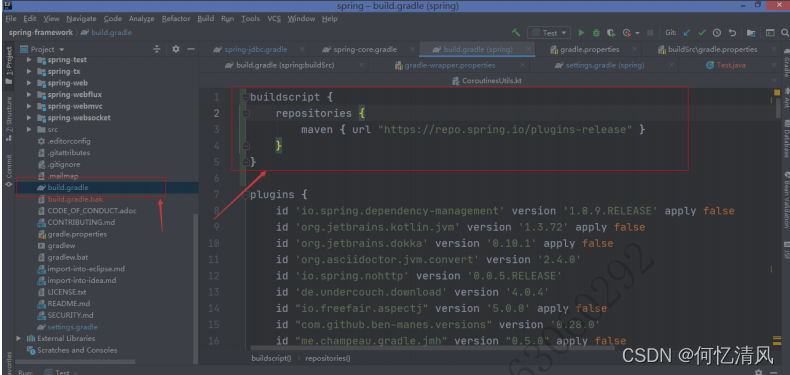
导入spring源码到idea中,加入依赖
buildscript { repositories { maven { url "https://repo.spring.io/plugins-release" } } }- 1
- 2
- 3
- 4
- 5

repositories { //新增以下2个阿里云镜像 maven { url 'https://maven.aliyun.com/nexus/content/groups/public/' } maven { url 'https://maven.aliyun.com/nexus/content/repositories/jcenter' } mavenCentral() maven { url "https://repo.spring.io/libs-spring-framework-build" } maven { url "https://repo.spring.io/milestone" } //新增spring插件库 maven { url "https://repo.spring.io/plugins-release" } }- 1
- 2
- 3
- 4
- 5
- 6
- 7
- 8
- 9
设置项目sdk版本

找到spring-oxm以及spring-core下的compileTestjava进行编译
编译成功后,编译整个工程,spring>build>build

四、创建新的子模块

引入依赖

注意如果使用compiler() 进行引入模块可能会失败,改为api() 进行引入再次编译spring项目,成功后运行测试代码
@Configuration public class ApplicationTestDemo { public static void main(String[] args) { System.out.println("hello"); AnnotationConfigApplicationContext configApplicationContext = new AnnotationConfigApplicationContext(ApplicationTestDemo.class); A a = configApplicationContext.getBean(A.class); System.out.println(a.name); } @Bean public A a(){ return new A(); } public static class A { public String name = "我是张三啊"; } }- 1
- 2
- 3
- 4
- 5
- 6
- 7
- 8
- 9
- 10
- 11
- 12
- 13
- 14
- 15
- 16
- 17
- 18
- 19
- 20
最后可以去掉spring模块下面的 src/checkstyle/checkstyle.xml,内容注释掉,风格检查

五、异常问题
下面是搜寻到会出现的问题


六、模块说明

-
相关阅读:
Seata 1.5.2 源码学习(Client端)
Python 合并两张图片
C++保留小数点后两位(floor&ceil&round)详解
1.6-02:陶陶摘苹果
java毕业设计垂钓分享交流网的设计与实现mybatis+源码+调试部署+系统+数据库+lw
R语言批量处理nc数据/R语言MK趋势检验/NCL绘图(nc可视化)
吴恩达《机器学习》6-4->6-7:代价函数、简化代价函数与梯度下降、高级优化、多元分类:一对多
【Python简明教程二十八】PIP
HMS Core打造影音娱乐行业解决方案,助推视听新浪潮
Vue 2使用element ui 表格不显示
- 原文地址:https://blog.csdn.net/m0_67394360/article/details/126506353
- 最新文章
-
沪漂五周年了:我越来越迷茫了
Agentic Skill Routing 实战:别再把所有 Skill 塞进 AI Agent 上下文
MySQL-Seconds_behind_master的精度误差
[MAF预定义ChatClient中间件-03]CachingChatClient——利用缓存省钱省时间
AI的至暗历史:从万众期待到被政府撤资,AI的两次死亡徘徊
Agent OS :五种驯服不确定性的范式
PortSwigger SQL注入LAB11
数据库即时编译JIT
[Begin]AI Learn Data Day 0
深度学习进阶(二十七)现代 LLM 的核心架构设计其二:SwiGLU