-
Android View自定义参数declare-styleable介绍与使用
背景:
我们在开发过程,常常在布局中引入一些定义好的View,这些view需要一些属性值,这些值是怎么来的?我们是否可以自己定义一些自己的属性值,答案是可以的。
这时候我们可以借助declare-styleable来实现,一般这个declare-styleable出现在自定义view比较多。
declare-styleable是什么?
它是一种资源定义,通过xml管理
declare-styleable如何使用?
1.xml资源的新建
declare-styleable是一种资源,所以在项目中应该出现资源文件夹下values,在资源文件夹下新建一个自己的declare-styleable的xml管理文件,attr,
根节点是resources。
declare-styleable节点有一个自己的name,name下方是attr 的数组节点,我们可以定义我们想要的参数和类型。
dimension"/> name=参数名,format=类型
format都有哪些类型?
color:颜色值
dimension:dimen值
integer:整型
boolean:布尔型
string:字符串
enum:枚举
flags:标签数组,value int型,
float:浮点
fraction:百分数
reference:引用类型,需要搭配资源类型
二、小试牛刀
1.自定义数据类型
以上我们定义了一组styleable,name为testAttr
2.在layout进行引用
如果我们需要引用资源自定义,需要引进: xmlns:app="http://schemas.android.com/apk/res-auto"
xmlns:加自定义名称(app)
如果该类型是enum或者flags,该值已定义好了,直接选择就行,且这两个参数的值只能是int类型否则会报错
error: invalid value 'true' for
; must be an integer. error: invalid value 'true' for
; must be an integer. 这个和我们经常用的一些官方的View设置参数很像,
如果我们在declare-styleable 申明了aatr的类型,在使用中,也应该指定类型,否则会报错
这里面特别说明的地方是:fraction
fraction是百分比类型,分为base和pbase,
app:per="80%p"是pbase意思,
app:per="80%"是base
以上两种会在解析的时候进行详细介绍
3.解析
    private void initAttrs(Context context, AttributeSet attrs) {
        TypedArray typed = context.obtainStyledAttributes(attrs, R.styleable.testAttr);

        if (typed == null)
            return;
        int color = typed.getColor(R.styleable.testAttr_colors, 0);
        boolean sex = typed.getBoolean(R.styleable.testAttr_sex, false);
        int age = typed.getInt(R.styleable.testAttr_age, 0);
        float height = typed.getFloat(R.styleable.testAttr_mheights, 0);
        String name = typed.getString(R.styleable.testAttr_name);
//        int flag = typed.getInt(R.styleable.testAttr_flags, 0);
        int enums = typed.getInt(R.styleable.testAttr_enums, -1);
        float size = typed.getDimension(R.styleable.testAttr_size, -1);
        float length = typed.getDimension(R.styleable.testAttr_length, -1);

        float per = typed.getFraction(R.styleable.testAttr_per, 1, 1, 0);


        int type = typed.getType(R.styleable.testAttr_flags);
        String typeMsg = "";
        if (type == TypedValue.TYPE_STRING) {
            typeMsg = "TYPE_STRING";
        } else if (type == TypedValue.TYPE_FLOAT) {
            typeMsg = "TYPE_FLOAT";
        } else if (type == TypedValue.TYPE_INT_HEX) {
            typeMsg = "TYPE_INT_HEX";
        }


        //资源释放
        typed.recycle();


    }
3.1解析一般先获取TypedArray
TypedArray typed = context.obtainStyledAttributes(attrs, R.styleable.testAttr);
然后根据自己的定义类型,获取相应的值。
我们定义的attr索引名称为=styleable_name
比如我们的styleable name=testAttr
所以age的索引key=testAttr_age(R.styleable.testAttr_age)
最后我们获取的值如下
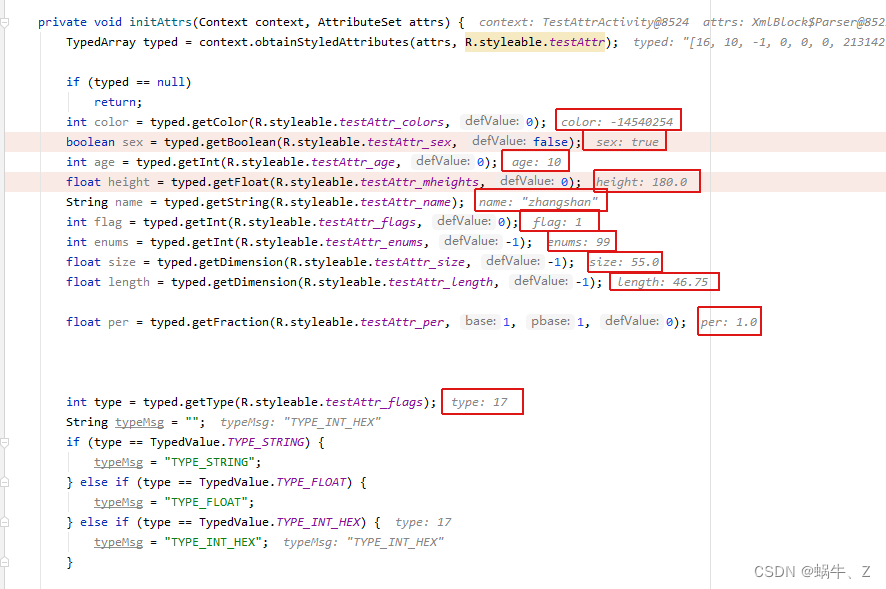
特别说明:
1、这里特别介绍一下,使用完TypedArray一定要释放掉,因为这些都是资源,如果不释放,长时间占用会导致OOM
2、关于 typed.getFraction()的使用
public float getFraction(@StyleableRes int index, int base, int pbase, float defValue)
index:name的索引
base:base倍数
pbase:parent 倍数
defValue:默认值- base,返回的百分比为属性值乘以 base。
- pbase,返回的百分比为属性值乘以 pbase。
- base 和 pbase 同时设置只会有一个生效,因为上面 return 中只能使用一个参数。
- base 表示百分比资源的基值,返回结果为 nn% * base 的结果值。
- pbase 表示 %p 形态百分比资源的基值,返回结果为 nn%p * pbase 的结果值。
测试:
app:per="100%p"

app:per="100%"

3.关于flags和enum的值
这两个child value只能是int,否则会报错
error: invalid value 'true' for
; must be an integer. error: invalid value 'true' for
; must be an integer. 4.精度丢失
typed.getFraction存在精度丢失情况,并不是你设置80%,就返回0.8,目前测试存在精度丢失,返回是0.79999..,如果对精度要求比较准确的,谨慎使用fraction来作为标识。
-
相关阅读:
python学习笔记:引用、浅拷贝和深拷贝(底层原理)
α微管蛋白研究丨SYSY α微管蛋白抗体案例分析
云原生之kubernetes调度约束(scheduler调度器)
ubuntu20.04.3中qt程序界面嵌套另一个qt界面
java游戏制作-拼图游戏
万字解析设计模式之桥接模式、外观模式
小米影像战略升级,开启移动影像新未来
ubutu18.04 使用update-alternatives 对python和python3进行版本管理
Clickhouse数据库部署、Python3压测实践
自定义注解
- 原文地址:https://blog.csdn.net/qq36246172/article/details/126472923