-
ROS 消息订阅 节点发布 通信方式


1、节点(node)
节点是进行运算任务的进程。一个系统可以由很多节点组成,节点也可以称为软件模块。ROS是以节点的形式开发的,节点是根据其目的,可以细分的可执行程序的最小单位。节点使基于ROS的系统在运行时更加形象化,当许多节点同时进行时,
可以将不同节点的通讯绘制成下图。

3、 话题(topic)
话题本质是对套接字的一种封装,一个节点可以向一个给定的话题发布消息,另一个节点可以订阅给定话题中特定消息类型的消息。在实现上,消息是序列化的
消息通过一个GlobalCallbackQueue和一个TopicManager管理
需要注意的是,在ROS中,话题必须是唯一的,否则消息路由就会产生错误。
查看工具 : 可视化工具rqt_graph、命令行工具rostopic。
4、服务(service)
基于主题 发布/订阅 的通信方法是一种异步方法,该 发布/订阅 模型是一种很灵活的通讯模式。但在某些情况下,需要一种同时使用请求和响应的同步消息交换方案,ROS提供了叫做服务的消息同步方法,是一种一对一的机制。一个服务被分成服务服务器和服务客户端,其中服务服务器只在有请求(request)的时候才响应(response),而服务客户端会在发送请求后接收响应。与话题不同,服务是一次性消息通信。
因此,当服务的请求和响应完成时,两个连接的节点将被断开。
服务通常被用作请求机器人执行特定操作时使用的命令,或者用于根据特定条件需要产生事件的节点。
由于它是一次性的通信方式,在网络上的负载很小,所以它也被用作代替 基于主题 发布/订阅 的通信手段。
PS:查看列表topic列表
rostopic常用命令 topic的名字全局唯一
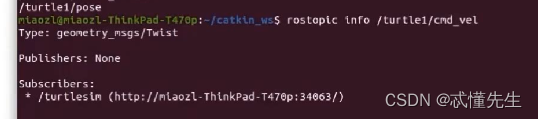
查看话题 rostopic info [话题名]
获得话题列表 rostopic list
获得话题列表 rostopic list -v
发布数据 rostopic pub [话题名] [消息类型] [参数]
三、发布模式:rostopic的发布模式有:
闩锁模式(latch mode)、速率模式(rate mode)、单次模式(once mode)、文件模式(file mode)。
闩锁模式(latch mode) 默认模式,只发布一次,确保收到,选项为-l。
速率模式(rate mode) 以特定速率发布消息,默认10Hz,选项为-r。
单次模式(once mode) 以闩锁模式发布消息,执行3秒,然后结束发布,选项为-1。
文件模式(file mode) 从YAML文件中读取消息,文件模式的发布速度也为10Hz,选项为-f。
- 示例
- rostopic pub /turtle1/cmd_vel geometry_msgs/Twist -r 1 -- '[2.0, 0.0, 0.0]' '[0.0, 0.0, -1.8]'
- “-”短划线代表参数是可选参数, “-- ”代表参数是非可选参数

5、消息(message)
节点之间通过传送消息进行通讯。每一个消息都是一种数据结构。ROS的消息支持标准的数据类型(整型、浮点型、布尔型等),
还包括数组、结构体、自定义的数据类型等等。
四、查看消息:
查看消息类型 rosmsg info [消息类型]
消息列表 rosmsg list
程序包消息 rosmsg package [程序包名] 查看消息常用用法
五、消息的组织:
消息类型的命名方式为:程序包名/消息名
消息类型每行的声明必须包含两部分:域、常量,域定义了消息的数据类型,
常量定义了域的名称。域可以是独立域也可以是复合域。
特别的消息类型Header来提供一些通用信息如时间戳、序列号、帧ID等
std_msgs/Header中的消息头内容如下:
#序列号 uint32 seq #时间戳 time stamp #坐标系ID string frame_id六、常见消息类型:
std_msgs支持字符串、布尔、整型、浮点型、数组等多种数据类型。
标准消息std_msgs/Char char data 几何消息
- geometry_msgs/Twist geometry_msgs/Vector3 linear
- float64 x
- float64 y
- float64 z
- geometry_msgs/Vector3 angular
- float64 x
- float64 y
- float64 z
传感消息senser_msgs/PointCloud(复合域)
- std_msgs/Header header
- uint32 seq
- time stamp
- string frame_id
- geometry_msgs/Point32[] points
- float32 x
- float32 y
- float32 z
- sensor_msgs/ChannelFloat32[] channelsstring name
- float32[] values
示例 查看小海龟的话题、消息。
启动小海龟 启动节点rosrun turtlesim turtlesim_node
启动键盘控制rosrun turtlesim turtle_teleop_key
查看消息 rosrun rqt_console rqt_console
 过滤消息 rosrun rqt_logger_level rqt_logger_level
 查看网络拓扑 rosrun rqt_graph rqt_graph

创建发布订阅
发布消息 //配置话题、队列大小、发布模式
template Publisher advertise(const std::string& topic, uint32_t queue_size, bool latch=false)//发布消息
- template void publish(const boost::shared_ptr& message) const{
- ......
- SerializedMessage m;
- m.type_info = &typeid(M);
- m.message = message;
- publish(boost::bind(serializeMessage, boost::ref(*message)), m);
- }
监听消息回调
spinOnce(监听到后继续往下运行,用于设置发布频率)
spin(监听到后调回调函数执行,继续循环监听)
自定义消息步骤
步骤1:创建自定义消息.msg 文件

- Header header
- string first_name
- string last_name
- uint8 age
- uint32 score
步骤2编写消息发布文件 talker
- #include "ros/ros.h"
- #include "std_msgs/String.h"
- #include "example_3/Info.h"
- #include
- #include
- int main(int argc, char **argv)
- {
- ros::init(argc, argv, "talker"); //talk 节点
- ros::NodeHandle nh;
- rosbag::Bag bag;
- ros::Publisher chatter_pub = nh.advertise
- bag.open("/home/miaozl/catkin_ws/bagfiles/test.bag",rosbag::bagmode::Write);
- bag.setCompression(rosbag::CompressionType::LZ4);
- ros::Rate loop_rate(10);
- while (ros::ok())
- {
- example_3::Info msg;
- msg.header.stamp=ros::Time::now();
- msg.header.frame_id="info_msg";
- msg.first_name = "Fabio";
- msg.last_name = "Miao";
- msg.age =36;
- msg.score = 100;
- chatter_pub.publish(msg); // 发布消息
- ROS_INFO("publish message");
- bag.write("chatter",msg.header.stamp,msg);
- ros::spinOnce(); // 监听回调
- loop_rate.sleep();
- }
- bag.close();
- return 0;
- }
步骤3 编写消息订阅文件 listener
- #include "ros/ros.h"
- #include "std_msgs/String.h"
- #include "example_3/Info.h"
- void chatterCallback(const example_3::Info::ConstPtr& msg)
- {
- //ROS_INFO("I heard: [%s]", msg->data.c_str());
- //ROS_INFO("I heard: %s %s,his age is %d,his score is %d",msg->first_name.c_str(),msg->last_name.c_str(),msg->age,msg->score);
- ROS_INFO("I heard: header frame id is %s, %s %s,his age is %d,his score is %d",msg->header.frame_id.c_str(),
- msg->first_name.c_str(),msg->last_name.c_str(),msg->age,msg->score);
- }
- int main(int argc, char **argv)
- {
- ros::init(argc, argv, "listener");
- ros::NodeHandle nh;
- ros::Subscriber sub = nh.subscribe("chatter", 1000, chatterCallback);
- ros::spin();
- return 0;
- }
步骤3 package.xml、CMakeLists.txt配置
- cmake_minimum_required(VERSION 3.0.2)
- project(example_3)
- ## Compile as C++11, supported in ROS Kinetic and newer
- # add_compile_options(-std=c++11)
- ## Find catkin macros and libraries
- ## if COMPONENTS list like find_package(catkin REQUIRED COMPONENTS xyz)
- ## is used, also find other catkin packages
- find_package(catkin REQUIRED COMPONENTS
- roscpp
- rospy
- rosbag
- std_msgs
- message_generation
- )
- ## System dependencies are found with CMake's conventions
- # find_package(Boost REQUIRED COMPONENTS system)
- ## Uncomment this if the package has a setup.py. This macro ensures
- ## modules and global scripts declared therein get installed
- ## See http://ros.org/doc/api/catkin/html/user_guide/setup_dot_py.html
- # catkin_python_setup()
- ################################################
- ## Declare ROS messages, services and actions ##
- ################################################
- ## To declare and build messages, services or actions from within this
- ## package, follow these steps:
- ## * Let MSG_DEP_SET be the set of packages whose message types you use in
- ## your messages/services/actions (e.g. std_msgs, actionlib_msgs, ...).
- ## * In the file package.xml:
- ## * add a build_depend tag for "message_generation"
- ## * add a build_depend and a exec_depend tag for each package in MSG_DEP_SET
- ## * If MSG_DEP_SET isn't empty the following dependency has been pulled in
- ## but can be declared for certainty nonetheless:
- ## * add a exec_depend tag for "message_runtime"
- ## * In this file (CMakeLists.txt):
- ## * add "message_generation" and every package in MSG_DEP_SET to
- ## find_package(catkin REQUIRED COMPONENTS ...)
- ## * add "message_runtime" and every package in MSG_DEP_SET to
- ## catkin_package(CATKIN_DEPENDS ...)
- ## * uncomment the add_*_files sections below as needed
- ## and list every .msg/.srv/.action file to be processed
- ## * uncomment the generate_messages entry below
- ## * add every package in MSG_DEP_SET to generate_messages(DEPENDENCIES ...)
- ## Generate messages in the 'msg' folder
- add_message_files(
- FILES
- Info.msg
- )
- ## Generate services in the 'srv' folder
- # add_service_files(
- # FILES
- # Service1.srv
- # Service2.srv
- # )
- ## Generate actions in the 'action' folder
- # add_action_files(
- # FILES
- # Action1.action
- # Action2.action
- # )
- ## Generate added messages and services with any dependencies listed here
- generate_messages(
- DEPENDENCIES
- std_msgs
- )
- ################################################
- ## Declare ROS dynamic reconfigure parameters ##
- ################################################
- ## To declare and build dynamic reconfigure parameters within this
- ## package, follow these steps:
- ## * In the file package.xml:
- ## * add a build_depend and a exec_depend tag for "dynamic_reconfigure"
- ## * In this file (CMakeLists.txt):
- ## * add "dynamic_reconfigure" to
- ## find_package(catkin REQUIRED COMPONENTS ...)
- ## * uncomment the "generate_dynamic_reconfigure_options" section below
- ## and list every .cfg file to be processed
- ## Generate dynamic reconfigure parameters in the 'cfg' folder
- # generate_dynamic_reconfigure_options(
- # cfg/DynReconf1.cfg
- # cfg/DynReconf2.cfg
- # )
- ###################################
- ## catkin specific configuration ##
- ###################################
- ## The catkin_package macro generates cmake config files for your package
- ## Declare things to be passed to dependent projects
- ## INCLUDE_DIRS: uncomment this if your package contains header files
- ## LIBRARIES: libraries you create in this project that dependent projects also need
- ## CATKIN_DEPENDS: catkin_packages dependent projects also need
- ## DEPENDS: system dependencies of this project that dependent projects also need
- catkin_package(
- # INCLUDE_DIRS include
- # LIBRARIES example_3
- CATKIN_DEPENDS roscpp rospy std_msgs message_runtime
- # DEPENDS system_lib
- )
- ###########
- ## Build ##
- ###########
- ## Specify additional locations of header files
- ## Your package locations should be listed before other locations
- include_directories(
- # include
- ${catkin_INCLUDE_DIRS}
- )
- ## Declare a C++ library
- # add_library(${PROJECT_NAME}
- # src/${PROJECT_NAME}/example_3.cpp
- # )
- ## Add cmake target dependencies of the library
- ## as an example, code may need to be generated before libraries
- ## either from message generation or dynamic reconfigure
- # add_dependencies(${PROJECT_NAME} ${${PROJECT_NAME}_EXPORTED_TARGETS} ${catkin_EXPORTED_TARGETS})
- ## Declare a C++ executable
- ## With catkin_make all packages are built within a single CMake context
- ## The recommended prefix ensures that target names across packages don't collide
- ## Rename C++ executable without prefix
- ## The above recommended prefix causes long target names, the following renames the
- ## target back to the shorter version for ease of user use
- ## e.g. "rosrun someones_pkg node" instead of "rosrun someones_pkg someones_pkg_node"
- # set_target_properties(${PROJECT_NAME}_node PROPERTIES OUTPUT_NAME node PREFIX "")
- ## Add cmake target dependencies of the executable
- ## same as for the library above
- # add_dependencies(${PROJECT_NAME}_node ${${PROJECT_NAME}_EXPORTED_TARGETS} ${catkin_EXPORTED_TARGETS})
- ## Specify libraries to link a library or executable target against
- if(CMAKE_BUILD_TYPE STREQUAL DEBUG)
- add_executable(talker src/talker.cpp)
- add_executable(listener src/listener.cpp)
- target_link_libraries(talker
- ${catkin_LIBRARIES}
- )
- target_link_libraries(listener
- ${catkin_LIBRARIES}
- )
- endif()
- #############
- ## Install ##
- #############
- # all install targets should use catkin DESTINATION variables
- # See http://ros.org/doc/api/catkin/html/adv_user_guide/variables.html
- ## Mark executable scripts (Python etc.) for installation
- ## in contrast to setup.py, you can choose the destination
- # catkin_install_python(PROGRAMS
- # scripts/my_python_script
- # DESTINATION ${CATKIN_PACKAGE_BIN_DESTINATION}
- # )
- ## Mark executables for installation
- ## See http://docs.ros.org/melodic/api/catkin/html/howto/format1/building_executables.html
- # install(TARGETS ${PROJECT_NAME}_node
- # RUNTIME DESTINATION ${CATKIN_PACKAGE_BIN_DESTINATION}
- # )
- ## Mark libraries for installation
- ## See http://docs.ros.org/melodic/api/catkin/html/howto/format1/building_libraries.html
- # install(TARGETS ${PROJECT_NAME}
- # ARCHIVE DESTINATION ${CATKIN_PACKAGE_LIB_DESTINATION}
- # LIBRARY DESTINATION ${CATKIN_PACKAGE_LIB_DESTINATION}
- # RUNTIME DESTINATION ${CATKIN_GLOBAL_BIN_DESTINATION}
- # )
- ## Mark cpp header files for installation
- # install(DIRECTORY include/${PROJECT_NAME}/
- # DESTINATION ${CATKIN_PACKAGE_INCLUDE_DESTINATION}
- # FILES_MATCHING PATTERN "*.h"
- # PATTERN ".svn" EXCLUDE
- # )
- ## Mark other files for installation (e.g. launch and bag files, etc.)
- # install(FILES
- # # myfile1
- # # myfile2
- # DESTINATION ${CATKIN_PACKAGE_SHARE_DESTINATION}
- # )
- #############
- ## Testing ##
- #############
- ## Add gtest based cpp test target and link libraries
- # catkin_add_gtest(${PROJECT_NAME}-test test/test_example_3.cpp)
- # if(TARGET ${PROJECT_NAME}-test)
- # target_link_libraries(${PROJECT_NAME}-test ${PROJECT_NAME})
- # endif()
- ## Add folders to be run by python nosetests
- # catkin_add_nosetests(test)
步骤4 生成消息文件 编译执行

-
相关阅读:
优秀的 OKR 案例参考
字符串匹配DP问题合集
Codeforces Round 889 (Div. 2)A~C1题解
Prometheus+Grafana 部署
JavaParse入门
SpringCloudAlibaba【四】Nacos Config 多环境切换与公共配置
Win11启动修复无效怎么办
nodejs+vue音乐网站与分享平台
wav格式如何转mp3?
算法--排序算法效率比较
- 原文地址:https://blog.csdn.net/weixin_44025389/article/details/126469610