-
ant-design国际化扩展新语言
ant-design国际化目前支持66中语言。
如果刚好要用的语言它不存在,我们可以参考node_modules中的语言自己写一套组件的翻译。
下面以缅甸语为例子。
引入vue-i18n:npm install vue-i18n
main.js
- import i18n from './common/lang' //i18n
- createApp(App).use(i18n).mount('#app')
App.vue
- <template>
- <a-config-provider :locale="locale" v-if="isRefresh">
- <router-view />
- </a-config-provider>
- </template>
- <script>
- import ant_lang from "@/common/lang/ant_lang_file";
- export default {
- data() {
- return {
- isRefresh: true,//用于刷新
- locale: "",//ant-design国际化
- };
- },
- provide() {
- return {
- reload: this.reload,
- };
- },
- computed: {},
- created() {
- this.getLocale();
- },
- methods: {
- reload() {
- this.getLocale();
- this.isRefresh = false;
- this.$nextTick(() => {
- this.isRefresh = true;
- });
- },
- //获取缓存的语言类型
- getLocale() {
- let lang = ant_lang[localStorage.getItem("language")] || ant_lang["zh-CN"];
- this.locale = lang;
- },
- },
- };
- </script>
创建语言工具包

index.js用于翻译业务上的语言
- // index.js
- import { createI18n } from 'vue-i18n'
- import enLocale from './en_US'
- import zhLocale from './zh_CN'
- import thLocale from './th_TH'
- import myLocale from './my_MM'
- const messages = {
- "en-US": {
- ...enLocale
- },
- "zh-CN": {
- ...zhLocale
- },
- "th-TH": {
- ...thLocale
- },
- "my-MM": {
- ...myLocale
- }
- }
- const i18n = createI18n({
- legacy: false,
- globalInjection: true,
- locale: localStorage.getItem('language') || 'zh-CN',
- messages: messages,
- });
- export default i18n
zh_CN.json为例其他几个JSON语言包都是map对象只是翻译的语言不同
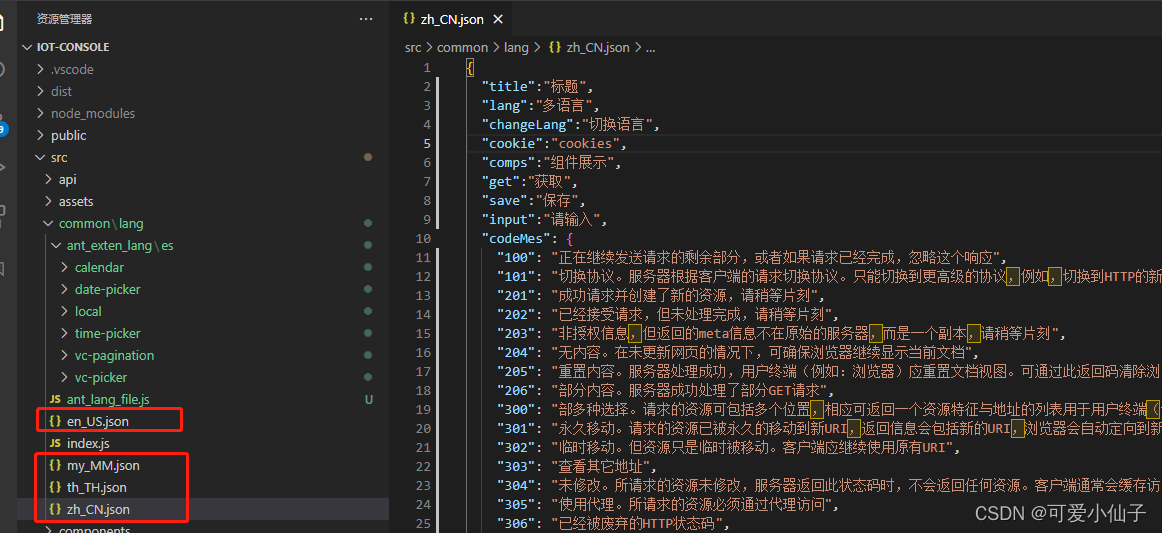

ant_lang_file.js用于翻译ant_design组件的文件,因为缅甸语ant_design组件也不支持,所以得自己跟着node_modules的来写一套缅甸语的组件翻译。
- import antEnLocale from 'ant-design-vue/es/locale/en_US'
- import antZhLocale from 'ant-design-vue/es/locale/zh_CN'
- import antThLocale from 'ant-design-vue/es/locale/th_TH'
- import antMyLocale from './ant_exten_lang/es/local/my_MM'
- export default {
- "en-US": antEnLocale, //英语
- "zh-CN": antZhLocale, //泰语
- "th-TH": antThLocale, //中文
- "my-MM": antMyLocale, //缅甸语言
- }
以中文为准,从node_modules\ant-design-vue\es\locale目录下copy一套中文的改成缅甸语就可以了,路径都改成自己的。
node_modules\ant-design-vue\es\locale\zh_CN.js

copy的zh_CN改成了my_MM缅甸语

弄完这些文件后就OK可以使用了

效果图:


-
相关阅读:
测试平台系列(91) 编写oss管理页面
jenkins拉取git代码 code 128解决方案
【剑指Offer】40.最小的K个数
小程序源码:王者荣耀改名神器-多玩法安装简单
2. 工业大数据的特点
学习分享-FutureTask和消息队列的区别
Golang中gRPC使用及原理探究
【无标题】
[WPF]用HtmlTextBlock实现消息对话框的内容高亮和跳转
go return返回值屏蔽
- 原文地址:https://blog.csdn.net/qq_42661587/article/details/126469073

- 最新文章
-
沪漂五周年了:我越来越迷茫了
Agentic Skill Routing 实战:别再把所有 Skill 塞进 AI Agent 上下文
MySQL-Seconds_behind_master的精度误差
[MAF预定义ChatClient中间件-03]CachingChatClient——利用缓存省钱省时间
AI的至暗历史:从万众期待到被政府撤资,AI的两次死亡徘徊
Agent OS :五种驯服不确定性的范式
PortSwigger SQL注入LAB11
数据库即时编译JIT
[Begin]AI Learn Data Day 0
深度学习进阶(二十七)现代 LLM 的核心架构设计其二:SwiGLU