-
呼叫中心中间件-网关配置
介绍
支持给网关指定变量,设置网关的语音编码编码和主叫号码。网关配置编辑后,不能实时生效 ,需要执行sofia命令才可以生效,具体看SIP设置。有关系统方面问题请找博主,看他名字和他一起技术交流学习
配置
cti_gateway@domain
- key 网关名字
- value 网关配置
{
    "param": {
        "register": "true",
        "caller-id-in-from": "true",
        "realm": "180.76.224.191:35560",
        "from-user": "",
        "destination-prefix": "",
        "username": "mytrunk",
        "password": "mytrunk@ddt"
    },
    "variables": {
        "sip_sticky_contact": "true"
    }
}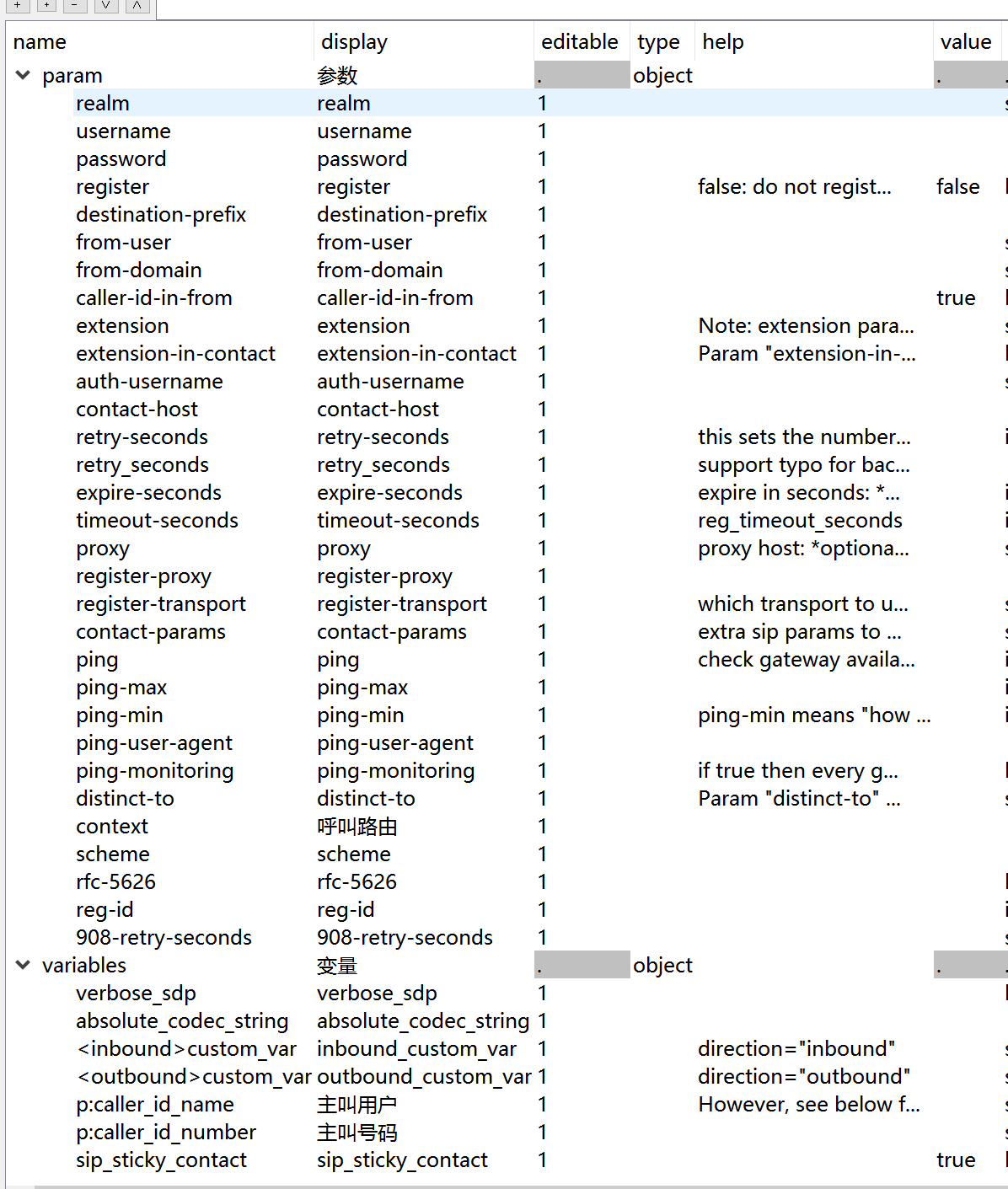
- param 网关参数
- realm 网关服务器IP
- username 网关用户名
- password 网关密码
- register 是否需要注册
- destination-prefix 报号前缀,呼叫时被叫号码之前添加这个前缀
- from-user 对接IMS时需要,根据IMS要求填写,一般和username设置一样
- from-domain 对接IMS时需要,根据IMS要求填写,一般和realm设置一样
- caller-id-in-from sip信令from设置为主叫号码
- extension extension parameter influence the contents of channel variable Caller-Destination-Number and destination_number. If it is blank, Caller-Destination-Number will always be set to gateway’s username. If it has a value, Caller-Destination-Number will always be set to this value. If it has value auto_to_user, Caller-Destination-Number will be populated with value ${sip_to_user} which means the real dialled number in case of an inbound call.
- extension-in-contact Param “extension-in-contact” is used to force what the contact info will be in the registration. If you are having a problem with the default registering as gw+gateway_name@ip you can set this to true to use extension@ip. If extension is blank, it will use username@ip.
- auth-username 认证用户名,如果认证用户名和用户名不一样时需要配置
- retry-seconds this sets the number of seconds to retry the registration
- expire-seconds 注册的过期时间,如果不设置,默认是 3600,建议设置60。
- variables 网关变量
- absolute_codec_string 声音编码
- p:caller_id_number 主叫号码
- sip_sticky_contact 为了防止NAT环境出问题,都设置为true
网关的注册状态写入redis
cti.json
    "gui": {
        /*网关信息推送到redis*/
        "gateway": {
            "hash": "gateways",
            "channel": "",
            "list": ""
        }
    }
`
网关注册信息会记录到哈希表gateways
key:网关名字
value:注册信息
没勾选注册的{ "Event-Name": "CUSTOM", "Core-UUID": "651a086c-4d20-4749-96a4-3eb2cb866ec3", "FreeSWITCH-Hostname": "ai", "FreeSWITCH-Switchname": "ai", "FreeSWITCH-IPv4": "192.168.31.57", "FreeSWITCH-IPv6": "::1", "Event-Date-Local": "2022-04-07 23:19:29", "Event-Date-GMT": "Thu, 07 Apr 2022 15:19:29 GMT", "Event-Date-Timestamp": "1649344769167507", "Event-Calling-File": "sofia_reg.c", "Event-Calling-Function": "sofia_reg_add_gateway", "Event-Calling-Line-Number": "3740", "Event-Sequence": "92", "Event-Subclass": "sofia::gateway_add", "Gateway": "default", "profile-name": "external" } `注册成功的
{ "Event-Name": "CUSTOM", "Core-UUID": "651a086c-4d20-4749-96a4-3eb2cb866ec3", "FreeSWITCH-Hostname": "ai", "FreeSWITCH-Switchname": "ai", "FreeSWITCH-IPv4": "192.168.31.57", "FreeSWITCH-IPv6": "::1", "Event-Date-Local": "2022-04-07 23:23:11", "Event-Date-GMT": "Thu, 07 Apr 2022 15:23:11 GMT", "Event-Date-Timestamp": "1649344991284944", "Event-Calling-File": "sofia_reg.c", "Event-Calling-Function": "sofia_reg_fire_custom_gateway_state_event", "Event-Calling-Line-Number": "156", "Event-Sequence": "680", "Event-Subclass": "sofia::gateway_state", "Gateway": "default", "State": "REGED", "Ping-Status": "UP", "Register-Network-IP": "49.235.127.246", "Register-Network-Port": "39468" } ` -
相关阅读:
Spring-Cloud-Gateway Filter详细配置说明
当Synchronized遇到这玩意儿,有个大坑,要注意!
三类6种地图可视化软件测评,最好用的工具居然是它
Mybatis 动态SQL – 使用trim标签替代where,set标签
刺激的8月!字节三面鞭尸/嘴贱痛失腾讯offer,想要个offer这么难吗
教你怎么把视频转换成gif动图
浅析Java反射机制
lua快速入门~在js基础上,知道Lua 和 Js 的不同即可
微信小程序父组件向子组件传参,子组件样式无效问题处理
【Linux】安装软件与运行程序
- 原文地址:https://blog.csdn.net/weixi_kelaile520/article/details/126461860
