-
MyBatis&Plus笔记
本博客对应B站尚学堂 mybatis&mubatis-plus 学习视频,连接:点我
1. MyBatis入门
MyBatis 本是Apache的一个开源项目iBatis, 2010年这个项目由Apache Software
Foundation 迁移到了Google Code,且改名为MyBatis。2013年11月迁移到GitHub。iBATIS一词来源于"internet"和"abatis"的组合,是一个基于Java的持久层框架。MyBatis 是一款优秀的持久层框架,它支持定制化 SQL、存储过程以及高级映射。MyBatis 避免了几乎所有的 JDBC 代码和手动设置参数以及获取结果集。MyBatis 可以使用简单的 XML 或注解来配置和映射原生信息,将接口和 Java 的 POJOs(Plain Ordinary Java Object,普通的 Java对象)映射成数据库中的记录。
关键字:框架、ORM、持久层
1.1. 认识框架
框架(Framework)是一个框子–指其约束性,也是一个架子–指其支撑性。是一个基本概念上的结构,用于去解决或者处理复杂的问题。框架这个广泛的定义使用的十分流行,尤其在软件概念。
框架( Framework )是构成一类特定软件可复用设计的一组相互协作的类。框架规定了你的应用的体系结构。它定义了整体结构,类和对象的分割,各部分的主要责任,类和对象怎么协作,以及控制流程。框架预定义了这些设计参数,以便于应用设计者或实现者能集中精力于应用本身的特定细节。
在开发过程使用框架,同样可以保证减少开发时间、降低开发难度,并且还保证设计质量。好比和世界上最优秀的软件工程师是一个项目的,并且他们完成的还是基础、全局的工作。
框架还有一个作用是约束。同样的技术解决同样的问题会产生不同流程和风格的解决方案,而采用一种框架其实就是限制用户必须使用其规定的方案来实现,可以降低程序员之间沟通以及日后维护的成本。
常用的基于JavaEE的三大开源框架,已经从SSH、SSH2过渡到了SSM:SpringMVC、Spring、MyBatis。
总之,框架是一个半成品,已经对基础的代码进行了封装并提供相应的API,开发者在使用框架是直接调用封装好的API可以省去很多代码编写,从而提高工作效率和开发速度。
1.2. 认识ORM
JDBC的缺点:需要手动完成面向对象的Java语言、面向关系的数据库之间数据的转换,代码繁琐无技术含量,影响了开发效率。
如下所示,查询需要手动的将结果集的列数据转换为Java对象的属性;而添加操作时需要手动将Java对象的属性转换为数据库表的列字段。
rs = stmt.executeQuery(sql); //5.必理结果(将ResultSet的数据封装到一个List中)while (rs.next ()){ //获取当前行各个字段的值 int empno = rs.getInt(columnLabel:"empno"); String ename = rs.getString(columnLabel:"ename"); String job = rs.getString(columnLabel:"job"); int mgr = rs.getInt(columnLabel:"mgr"); Date hireDate = rs.getDate(columnLabel:"HIREDATE"); double sal = rs.getDouble(columnLabel:"SAL"); double comm = rs.getDouble(columnLabel:"COMM"); int deptno = rs.getInt(columnLabel:"DEPTNO");//将当前行各个字段的值封装到一个Emp对象中 Emp emp = new Emp(empno, ename, job, mgr, hireDate, sal, comm, deptno); //将Emp.对象添加到集合中list.add(emp);- 1
- 2
- 3
- 4
- 5
- 6
- 7
- 8
- 9
- 10
- 11
- 12
- 13
try { //2.建立和数据库的连接 conn = DBUtil.getConnection();//3.创建一个SQL命分发送器 String sql `="insert into emp values(null,?,?,?,?,?,?,?)"; pstmt = conn.prepareStatement(sql); //4.准备好SQL语句,通过SQL命分发送器发运给数据库,并得到结果 pstmt.setString(parameterIndex:1, emp.getEname()); pstmt.setString(parameterIndex:2, emp.getJob()); pstmt.setInt(parameterIndex:3, emp.getMgr()); pstmt.setDate(parameterIndex:4, new Date(emp.getHireDate().getTime())); pstmt.setDouble(parameterlndex:5, emp.getSal()); pstmt.setDouble(parameterIndex:6, emp.getComm()); pstmt.setInt(parameterlndex:7, emp.getDeptno()); n = pstmt.executeUpdate(); } catch (SQLException e) { e.printStackTrace(); } finally { //6.关闭资源 DBUtil.closeAll(rs, pstmt, conn); }- 1
- 2
- 3
- 4
- 5
- 6
- 7
- 8
- 9
- 10
- 11
- 12
- 13
- 14
- 15
- 16
- 17
- 18
- 19
- 20
关于面向对象的Java语言、面向关系的数据库之间数据的转换必须要做,问题在于这个转换是否可以不由开发者来做。
ORM框架就是专门来做这个问题的,相当于在面向对象语言和关系数据库之间搭建了一个桥梁。
ORM,Object-Relationl
Mapping,对象关系映射,它的作用是在关系型数据库和对象之间做一个映射,然后我们在具体操作数据库的时候,只要像平时操作对象一样操作它就可以了,ORM框架会根据映射完成对数据库的操作,就不需要再去和复杂的SQL语句打交道了。
另外学习ORM必须知道两个概念:持久化、持久层
什么是"持久化"
持久化(Persistence),即把数据(如内存中的对象)保存到可永久保存的存储设备中(如磁盘)。持久化的主要应用是将内存中的数据存储在关系型的数据库中,当然也可以存储在磁盘文件中、XML数据文件中等等。
什么是 “持久层”
持久层(Persistence
Layer),即专注于实现数据持久化应用领域的某个特定系统的一个逻辑层面,将数据使用者和数据实体相关联。之前使用JDBC访问数据库的DAO层,后面采用MyBatis访问数据库的mapper层,就是持久层。1.3. 认识MyBatis
MyBatis 是一款优秀的持久层框架,它支持定制化 SQL、存储过程以及高级映射。MyBatis 避免了几乎所有的 JDBC 代码和手动设置参数以及获取结果集。MyBatis 可以使用简单的 XML 或注解来配置和映射原生信息,将接口和 Java 的 POJOs(Plain Ordinary Java Object,普通的 Java对象)映射成数据库中的记录.
精简解释:MyBatis是一个半自动ORM框架,其本质是对JDBC的封装。使用MyBatis重点需要程序员编写SQL命令,不需要写一行JDBC代码。
1.3.1. 1.4 和Hibernate的比较(了解)
Hibernate是一个全自动的ORM框架。因为Hibernate创建了Java对象和数据库表之间的完整映射,可以完全以面向对象的思想来操作数据库,程序员不需要手写SQL语句,而MyBatis中还需要手写SQL语句,所以是半自动化的,工作量要大于Hibernate。
为什么半自动化的MyBatis比自动化的Hibernate受欢迎?
MyBatis需要手写SQL语句,所以工作量要大于Hibernate。但是也正是由于自定义SQL语句,所以其灵活性、可优化性就超过了Hibernate。
Hibernate封装了SQL语句,由开发者对对象操作,Hibernate来生成SQL语句。虽然也可以通过映射配置来控制生成的SQL语句,但是对于要生成复杂的SQL语句,很难实现,或者实现后导致性能的丢失。
而MyBatis将手写SQL语句的工作丢给开发者,可以更加精确的定义SQL,更加灵活,也便于性能优化。完成同样功能的两条SQL语句的性能可能相差十几倍到几十倍,在高并发、快响应要求下的互联网系统中,对性能的影响更明显。
MyBatis对存储过程可提供很好的支持。另外MyBatis的开发工作量大不意味着学习成本大。对于新手,学习Hibernate时间成本比Mybatis大很多,Mybatis很快就上手了。
总之,因为MySQL具有封装少、映射多样化、支持存储过程、可以进行SQL语句优化等特点,符合互联网高并发、大数据、高性能、高响应的要求,使它取代Hibernate成为了Java互联网中首选的持久框架。而对于对性能要求不高的比如内部管理系统、ERP等可以使用Hibernate。
2. MyBatis快速上手
任务:使用MyBatis完成对Emp单表的CRUD操作。准备完毕后项目结构如图所示。

2.1. 搭建MyBatis环境
2.1.1. 加入jar包
MyBatis运行需要其核心包以及依赖包,这些jar包可以从MyBatis官网下载包中找到,同时还要添加JDBC访问数据库的驱动包。
如果需要使用JUnit进行单元测试,还需要加入JUnit的相关jar包。
2.1.2. 准备配置文件
在src下定义MyBatis的配置文件,无固定名称。
mybatis.cfg.xml是官方源码配置文件名称,从框架规范角度上考虑我们也叫这个名字。在配置文件中定义影响
MyBatis 的设置和属性信息。这里先来定义数据库的连接信息和事务管理信息。DOCTYPE configuration PUBLIC "http://mybatis.org//DTD Config 3.0//EN" "http://mybatis.org/dtd/mybatis-3-config.dtd"> <configuration> <environments default="mysql"> <environment id="mysql"> <transactionManager type="JDBC">transactionManager> <dataSource type="POOLED"> <property name="driver" value="com.mysql.cj.jdbc.Driver"/> <property name="url" value="jdbc:mysql://127.0.0.1:3306/mydb?useSSL=false&useUnicode=true&characterEncoding=utf8&serverTimezone=Asia/Shanghai"/> <property name="username" value="root"/> <property name="password" value="root"/> dataSource> environment> environments> configuration>- 1
- 2
- 3
- 4
- 5
- 6
- 7
- 8
- 9
- 10
- 11
- 12
- 13
- 14
- 15
- 16
- 17
- 18
- 19
注意事项:
-
XML文件需要提供dtd或者xsd文件,来定义XML文件的标签结构。
-
数据库四个连接参数的name属性的值来自
org.apache.ibatis.datasource.unpooled包下类UnpooledDataSource。public class UnpooledDataSource implements DataSource { private ClassLoader driverClassLoader; private Properties driverProperties; private static Map<String, Driver> registeredDrivers = new ConcurrentHashMap<>(); private String driver; private String url; private String username; private String password; private Boolean autocommit; private Integer defaultTransactionIsolationLevel; private Integer defaultNetworkTimeout; }- 1
- 2
- 3
- 4
- 5
- 6
- 7
- 8
- 9
- 10
- 11
- 12
- 13
- 14
2.1.3. 准备映射文件
MyBatis的主要工作就是进行映射,甚至可以占到全部工作量的80%以上。MyBatis的映射可以通过XML和注解来实现。面对复杂的SQL语句,注解也会力不从心。所以MyBaits中更多使用XML配置来实现。
此处创建映射文件EmployeeMapper.xml,和实体类Employee对应。
DOCTYPE mapper PUBLIC "http://mybatis.org//DTD Mapper 3.0//EN" "http://mybatis.org/dtd/mybatis-3-mapper.dtd"> <mapper namespace="com.bjsxt.mapper.EmployeeMapper"> mapper>- 1
- 2
- 3
- 4
- 5
- 6
目前对文件名没有要求,建议采用实体名+Mapper的方式命名。
namespace:命名空间。
DOCTYPE mapper PUBLIC "http://mybatis.org//DTD Mapper 3.0//EN" "http://mybatis.org/dtd/mybatis-3-mapper.dtd"> <mapper namespace="com.bjsxt.mapper.EmployeeMapper"> mapper>- 1
- 2
- 3
- 4
- 5
- 6
- 7
定义好映射件后,需要在MyBatis的配置文件指明映射文件的位置,这个位置是相对于项目根目录的位置。
<mappers> <mapper resource="com/bjsxt/mapper/EmployeeMapper.xml"/> mappers>- 1
- 2
- 3
2.1.4. 准备log4j
在mybatis.cfg.xml中配置MyBatis所使用的具体日志实现。如果不指定将自动搜索。可能会搜到log4j,也可能会搜到了其他的日志实现,所以还是设置为好。
<settings> <setting name="logImpl" value="LOG4J"/> settings>- 1
- 2
- 3
将log4j.properties文件放到资源目录下。可以将全局的日志级别调高,避免大量debug信息的干扰。同时将对映射文件的日志级别调低,用来显示SQL语句的调试信息。开发阶段,建议启动控制的日志。
#定义全局日志级别 log4j.rootLogger=error,stdout,logfile #包级别日志 log4j.logger.com.bjsxt.mapper=debug #接口级别日志 #log4j.logger.com.bjsxt.mapper.EmployeeMapper=debug #方法级别日志 #log4j.logger.com.bjsxt.mapper.EmployeeMapper.findBy=debug log4j.appender.stdout=org.apache.log4j.ConsoleAppender log4j.appender.stdout.Target=System.err log4j.appender.stdout.layout=org.apache.log4j.SimpleLayout- 1
- 2
- 3
- 4
- 5
- 6
- 7
- 8
- 9
- 10
- 11
2.2. 完成多个select操作
搭建好MyBatis环境后,完成select操作,只涉及到映射文件和测试类。
在mapper文件中加入以下代码。
<select id="selectAll" resultType="com.bjsxt.entity.Employee"> select * from emp select> <select id="selectById" resultType="com.bjsxt.entity.Employee" parameterType="int"> select * from emp where empno = #{param1} select> <select id="selectEmp" resultType="com.bjsxt.entity.Employee" parameterType="com.bjsxt.entity.Employee"> select * from emp where job = #{job} and deptno = #{deptno} select>- 1
- 2
- 3
- 4
- 5
- 6
- 7
- 8
- 9
- 10
- 11
- 12
- 13
- 14
- 15
在对应的接口中加入以下代码。
public List<Employee> selectAll(); public Employee selectById(Integer id); public List<Employee> selectEmp(Employee employee);- 1
- 2
- 3
如果idea安装了mybatis相关插件的话,可以看到接口和配置文件中方法和sql语句的对应关系。
注意事项:
-
id要求唯一。
-
paramterType参数类型,可以省略。如果提供该参数,必须写正确类型。MyBatis可以通过类型处理器(TypeHandler)推断出具体传入语句的参数。parameterType取值只能是一个类型,相当于方法参数只能是一个参数(类型不限),局限性比较大。后续开发中都省略此参数。
-
resultType 返回值类型。
-
返回值是集合,resultType取值为集合的元素泛型类型的完整路径名。
-
返回值是对象,resultType取值为对应类的完整路径名。
-
-
关于方法参数传递。
-
参数是基本数据类型,使用 #{param1} 来接收数据(其实可以是任意名称)。
-
参数是引用数据类型,使用 $(属性名) 接收数据,底层调用的是其getter方法。如果没有getter方法,就会直接找同名属性。
-
-
初学者最直观感受是mapper.xml是编写SQL命令的文件,实际上这个文件相当分层开发中dao.impl下的数据访问层实现类(也可以说MyBatis一个好处就是不用写DAO实现类了)。也就是说MyBatis会把mapper.xml文件解析成一个类。
测试类中利用SqlSession直接来发送SQL命令给服务器。常用方法有selectList()、selectOne()等。
public class TestEmployee { @Test public void testSelectAll() throws IOException { //创建SqlSessionFactory InputStream is = Resources.getResourceAsStream("mybatis.cfg.xml"); SqlSessionFactory factory = new SqlSessionFactoryBuilder().build(is); //创建SqlSession SqlSession session = factory.openSession(); //调用查询方法 List<Employee> list = session.selectList("com.bjsxt.mapper.EmployeeMapper.selectAll"); //关闭资源 session.close(); //输出结果 list.forEach(System.out::println); } @Test public void testSelectById() throws IOException { Employee emp = session.selectOne("com.bjsxt.mapper.EmployeeMapper.selectById", 7839); } @Test public void testSelectEmp() throws IOException { Employee emp = new Employee(); emp.setJob("CLERK"); emp.setDeptno(20); List<Employee> list = session.selectList("com.bjsxt.mapper.EmployeeMapper.selectEmp", emp); } }- 1
- 2
- 3
- 4
- 5
- 6
- 7
- 8
- 9
- 10
- 11
- 12
- 13
- 14
- 15
- 16
- 17
- 18
- 19
- 20
- 21
- 22
- 23
- 24
- 25
- 26
- 27
- 28
- 29
其中TestSelectById() 、testSelectEmp()只提供了核心代码。
没有进行任何指定,MyBatis是如何把数据库查询结果中字段的值赋给Java中实体类的对应属性呢?这用到了自动映射技术。
Auto Mapping(结果自动映射)是 MyBatis 提供的按照名称自动把结果集中数据映射到对象属性的一种技术。查询到结果集后按照名称去类中找属性的set方法进行赋值。在新版本中如果属性没有提供set方法,则直接找同名属性进行赋值。
在映射过程中 MyBatis 会自动进行类型转换,也就是说即使 varchar 类型 name ,如果可以保证里面值都能被转换为数字,在Java中也可以使用int类型name接收。
在数据库中列名规范是xx_xxx这种形式,中间使用下划线分割。而在Java中属性名按照小驼峰方式进行命名,这就可能导致列名和属性名不一致的问题,针对这种方式最简单的处理办法就是给列起别名,进行auto mapping。
例如:列名 sxt_id 属性名sxtId 利用别名方式的SQL如下:
select sxt_id as sxtid from a_table- 1
此处注意:列名或别名不考虑大小写问题
2.3. 完成DML操作
完成DML操作,在映射文件和接口中加入以下代码。
<insert id="insertEmp" parameterType="com.bjsxt.entity.Employee"> insert into emp values (null, #{ename}, #{job}, #{mgr}, #{hireDate}, #{sal}, #{comm}, #{deptno}) insert> <update id="updateEmp"> update emp set job = #{job}, sal = #{sal} where empno = #{empno} update> <delete id="deleteEmp"> delete from emp where empno = #{param1} delete>- 1
- 2
- 3
- 4
- 5
- 6
- 7
- 8
- 9
- 10
- 11
- 12
- 13
- 14
- 15
int insertEmp(Employee employee); int updateEmp(Employee employee); int deleteEmp(Employee employee);- 1
- 2
- 3
注意事项:
-
DML操作的底层调用 executeUpdate(),返回值都是int类型,不需要提供,也不用 resultType 属性来指定。
-
其实insert、update、delete任何一个元素都可以完成所有DML操作的映射。
在测试类中完成对Emp表的DML操作,涉及事务的手动和自动提交。
public class TestEmployee1 { @Test public void insertEmp() throws IOException { //创建SqlSessionFactory InputStream is = Resources.getResourceAsStream("mybatis.xml"); SqlSessionFactory factory = new SqlSessionFactoryBuilder().build(is); //创建SqlSession,并设置自动提交事务 SqlSession session = factory.openSession(true); //调用方法 Employee emp = new Employee("zhangsan", "clerk", 7839, Date.valueOf("1999-12-23"), 800, 300, 10); emp.setJob("CLERK"); emp.setDeptno(20); int n = session.insert("com.bjsxt.mapper.EmployeeMapper.insertEmp", emp); //关闭资源 session.close(); //输出结果 System.out.println(n); } @Test public void updateEmp() throws IOException { //创建SqlSessionFactory InputStream is = Resources.getResourceAsStream("mybatis.xml"); SqlSessionFactory factory = new SqlSessionFactoryBuilder().build(is); //创建SqlSession,设置不自动提交事务 SqlSession session = factory.openSession(); //调用方法 Employee emp = new Employee(); emp.setJob("Manager"); emp.setSal(3000); emp.setEmpno(7940); int n = session.update("com.bjsxt.mapper.EmployeeMapper.updateEmp", emp); //提交事务 session.commit(); //关闭资源 session.close(); //输出结果 System.out.println(n); } @Test public void deleteEmp() { SqlSession session = null; try { //创建SqlSessionFactory InputStream is = Resources.getResourceAsStream("mybatis.xml"); SqlSessionFactory factory = new SqlSessionFactoryBuilder().build(is); //创建SqlSession,设置不自动提交事务 session = factory.openSession(); //调用方法 int n = session.delete("com.bjsxt.mapper.EmployeeMapper.deleteEmp", 7941); //提交事务 session.commit(); } catch (Exception e) { e.printStackTrace(); //回滚事务 session.rollback(); } finally { //关闭资源 session.close(); } } }- 1
- 2
- 3
- 4
- 5
- 6
- 7
- 8
- 9
- 10
- 11
- 12
- 13
- 14
- 15
- 16
- 17
- 18
- 19
- 20
- 21
- 22
- 23
- 24
- 25
- 26
- 27
- 28
- 29
- 30
- 31
- 32
- 33
- 34
- 35
- 36
- 37
- 38
- 39
- 40
- 41
- 42
- 43
- 44
- 45
- 46
- 47
- 48
- 49
- 50
- 51
- 52
- 53
- 54
- 55
- 56
- 57
- 58
- 59
- 60
- 61
- 62
- 63
注意事项:
-
执行DML操作,默认事务手动提交。此时可以两种方案解决
-
使用自动提交
-
手动执行commit ()或者rollback()结束事务
推荐手动提交事务。因为复杂业务中一个事务会包括多个DML操作,自动提交只能做到一个事务只有一个DML操作。
-
-
其实一个SqlSession的update、delete、insert中任意一个方法均可完成所有DML操作。底层都是调用的update方法,就好比JDBC中的
executeUpdate()可以完成DML操作一样。
3. MyBatis功能详解
3.1. 关于jar包
编号 元素列表 作用 1 mybatis-3.5.2.jar Mybatis核心jar包 2 ant-1.10.3.jar 将软件编译、测试、部署等步骤联系在一起加以自动化的一个软件构建工具 3 ant-launcher-1.10.3.jar 将软件编译、测试、部署等步骤联系在一起加以自动化的一个软件构建工具 4 asm-7.0.jar 代码生成,代码混淆,代码转换等等以字节码为操作目标的工作,一定程度上类似javac的功能 5 cglib-3.2.10.jar 实现动态代理的技术,延迟加载时使用 6 javassist-3.24.1-GA.jar 可用来检查、”动态”修改及创建 Java类。功能与JDK自带反射功能类似,但比反射功能更强大 7 ognl-3.2.10.jar 对象导航图语言的缩写,功能强大的表达式语言工具包。在动态SQL和${param}中使用 8 commons-logging-1.2.jar 日志包 9 slf4j-api-1.7.26.jar 日志包 10 slf4j-log4j12-1.7.26.jar 日志包 11 log4j-1.2.17.jar 日志包 12 log4j-api-2.11.2.jar 日志包 13 log4j-core-2.11.2.jar 日志包 3.2. 关于核心API
SqlSessionFactoryBuilder
根据配置或者代码生成SqlSessionFactory,采用的是分步构建的构建者模式。
SqlSessionFactory
生产SqlSession,使用的是工厂模式。
SqlSession
可获取Mapper的接口,相当于Connection,也可以发送SQL语句并返回结果。
Mapper
映射器。由一个Java接口和XML文件(或者注解构成),需要给出对应的SQL和映射规则,负责发送SQL去执行并返回结果。
生命周期
SqlSessionFactoryBuilder
该类用来创建SqlSessionFactory对象,当SqlSessionFactory对象被创建后,该对象也就没有存在的必要了。
SqlSessionFactory
该对象应该在你的应用执行期间一直存在,由于要从该对象中获取SqlSession对象,这样的操作会相当频繁,同时创建SqlSessionFactory对象是一件一起消耗资源的事,因此,该对象的生命周期当前应用具有相同生命周期。
SqlSession
每个线程都应该有自己的SqlSession实例,SqlSession实例不能被共享,是线程不安全的,因此最佳的范围是请求或方法范围。
Mapper
关闭SqlSessin的时候也就关闭了由其所产生的Mapper。
3.3. 关于配置文件
-
transactionManager
在 MyBatis 中有两种事务管理器类型(也就是
type=“[JDBC|MANAGED]”):-
JDBC – 这个配置直接简单使用了 JDBC
的提交和回滚设置。它依赖于从数据源得到的连接来管理事务范围。 -
MANAGED –
这个配置几乎没做什么。它从来不提交或回滚一个连接。而它会让容器来管理事务的整个生命周期(比如 Spring 或 JEE 应用服务器的上下文) 。在MyBatis核心包中可以看到两种事务管理器类型的相关类。

-
-
dataSource
有三种内建的数据源类型(也就是 type=“???”):
-
UNPOOLED –
这个数据源的实现是每次被请求时简单打开和关闭连接。它有一点慢,
这是对简单应用程序的一个很好的选择,
因为它不需要及时的可用连接。UNPOOLED 类型的数据源仅仅需要配置以下 5 种属性:- driver – 这是 JDBC 驱动的 Java 类的完全限定名。
- url– 这是数据库的 JDBC URL 地址。
- username– 登录数据库的用户名。
- password– 登录数据库的密码。
- defaultTransactionIsolationLevel – 默认的连接事务隔离级别。
-
POOLED – 这是 JDBC
连接对象的数据源连接池的实现,用来减少创建新的连接实例时的初始连接和认证时间。一种当前 Web 应用程序用来快速响应请求很流行的方法。 除了上述提到 UNPOOLED 下的属性外,还有更多属性用来配置 POOLED 的数据源:- poolMaximumActiveConnections – 在任意时间可以存在的活动(也就是正在使用)连接数量,默认值:10。
- poolMaximumIdleConnections – 任意时间可以存在的空闲连接数。
- poolMaximumCheckoutTime – 在被强制返回之前,池中连接被检出(checked out)时间,默认值:20000
毫秒(即 20 秒)。 - poolTimeToWait – 这是一个底层设置,如果获取连接花费了相当长的时间,连接池会打印状态日志并重新尝试获取一个连接(避免在误配置的情况下一直安静的失败),默认值:20000
毫秒(即 20 秒)。 - poolMaximumLocalBadConnectionTolerance --这是一个关于坏连接容忍度的底层设置,作用于每一个尝试从缓存池获取连接的线程。如果这个线程获取到的是一个坏的连接,那么这个数据源允许这个线程尝试重新获取一个新连接,但这个重新尝试次数不应超过 poolMaximumIdleConnections 与 poolMaximumLocalBadConnectionTolerance之和。 默认值:3 (新增于 3.4.5)。
- poolPingQuery – 发送到数据库的侦测查询SQL语句,用来检验连接是否正常工作并准备接受请求。默认是"NO PING QUERY SET",这会导致多数数据库驱动失败时带有一个恰当的错误消息。
- poolPingEnabled --是否启用侦测查询。若开启,需要设置 poolPingQuery属性为一个可执行的 SQL 语句(最好是一个速度非常快的 SQL 语句),默认值:false。
- poolPingConnectionsNotUsedFor – 配置 poolPingQuery 的频率。可以被设置为和数据库连接超时时间一样,来避免不必要的侦测,默认值:0(即所有连接每一时刻都被侦测 — 当然仅当 poolPingEnabled 为 true 时适用)。
-
JNDI – 这个数据源实现是为了使用如 Spring 或应用服务器这类容器,
容器可集中或在外部配置数据源,然后放置一个 JNDI
上下文的引用。这个数据源配置只需要两个属性。-
initial_context – 这个属性用来在 InitialContext 中寻找上下文(即,initialContext.lookup(initial_context))。这是个可选属性,如果忽略,那么将会直接从 InitialContext 中寻找 data_source 属性。
-
data_source– 这是引用数据源实例位置的上下文的路径。提供了 initial_context 配置时会在其返回的上下文中进行查找,没有提供时则直接在 InitialContext 中查找。
在MyBatis核心包中可以看到三种内置数据源类型的相关类。

-
-
-
mappers
告诉了 MyBatis 去哪里找映射文件。<mappers> <mapper resource="org/mybatis/builder/AuthorMapper.xml"/> <mapper resource="org/mybatis/builder/BlogMapper.xml"/> <mapper resource="org/mybatis/builder/PostMapper.xml"/> mappers> <mappers> <mapper url="file:///var/mappers/AuthorMapper.xml"/> <mapper url="file:///var/mappers/BlogMapper.xml"/> <mapper url="file:///var/mappers/PostMapper.xml"/> mappers> <mappers> <mapper class="org.mybatis.builder.AuthorMapper"/> <mapper class="org.mybatis.builder.BlogMapper"/> <mapper class="org.mybatis.builder.PostMapper"/> mappers> <mappers> <package name="org.mybatis.builder"/> mappers>- 1
- 2
- 3
- 4
- 5
- 6
- 7
- 8
- 9
- 10
- 11
- 12
- 13
- 14
- 15
- 16
- 17
- 18
- 19
- 20
- 21
- 22
推荐使用第四种方式,但前提是一定要显式的提供相应的接口定义,且要求接口名和mapper.xml文件名必须完全相同。
3.4. 关于日志管理
Mybatis 的内置日志工厂(LogFactory)提供日志功能,内置日志工厂将日志交给以下其中一种工具作代理:
-
SLF4J
-
Apache Commons Logging
-
Log4j 2
-
Log4j
-
JDK logging
-
NO_LOGGING
MyBatis 内置日志工厂基于运行时自省机制选择合适的日志工具。它会使用第一个查找得到的工具(按上文列举的顺序查找)。如果一个都未找到,日志功能就会被禁用。也就是说在项目中把日志工具环境配置出来后,不用在MyBatis进行配置就可以让日志生效。
LogFactory.java
static { tryImplementation(LogFactory::useSlf4jLogging); tryImplementation(LogFactory::useCommonsLogging); tryImplementation(LogFactory::useLog4J2Logging); tryImplementation(LogFactory::useLog4JLogging); tryImplementation(LogFactory::useJdkLogging); tryImplementation(LogFactory::useNoLogging); }- 1
- 2
- 3
- 4
- 5
- 6
- 7
- 8
不少应用服务器(如 Tomcat 和 WebShpere)的类路径中已经包含 Commons Logging,所以在这种配置环境下的 MyBatis 会把它作为日志工具,记住这点非常重要。这将意味着,在诸如 WebSphere 的环境中,它提供了 Commons Logging 的私有实现,你的 Log4J 配置将被忽略。MyBatis 将你的 Log4J
配置忽略掉是相当令人郁闷的(事实上,正是因为在这种配置环境下,MyBatis 才会选择使用 Commons Logging 而不是 Log4J)。如果你的应用部署在一个类路径已经包含 Commons Logging 的环境中,而你又想使用其它日志工具,你可以通过在 MyBatis 配置文件mybatis-config.xml里面添加一项setting来选择别的日志工具。<settings> <setting name="logImpl" value="LOG4J"/> settings>- 1
- 2
- 3
Configuration.java
public void setLogImpl(Class<? extends Log> logImpl) { if (logImpl != null) { this.logImpl = logImpl; LogFactory.useCustomLogging(this.logImpl); } }- 1
- 2
- 3
- 4
- 5
- 6
无论使用哪种日志工具对于程序员来说目的都是一样:打印运行过程中的日志信息。日志信息中对平时开发最重要的是运行过程中SQL的打印,这也是在开发过程中MyBatis日志的重要性。
4. MyBatis配置完善
4.1. 使用别名alias
类型别名是为 Java 类型命名一个短的名字。它只和 XML 配置有关,只用来减少类完全限定名的多余部分。注意:别名都是不区分大小写的。
在配置文件中为类的完整路径定义别名,可以采用两种方式
-
使用typeAlias指定单个类的别名。
<typeAliases> <typeAlias type="com.bjsxt.entity.Employee" alias="employee">typeAlias> typeAliases>- 1
- 2
- 3
-
使用package指定某个包下所有类的默认别名。
<typeAliases> <package name="com.bjsxt.entity"/> typeAliases>- 1
- 2
- 3
引入别名后的映射文件就可以进行如下配置。
<select id="selectEmp" resultType="employee" parameterType="employee"> select * from emp where job = #{job} and deptno = #{deptno} select>- 1
- 2
- 3
- 4
- 5
- 6
注意:不建议使用类别名,会降低代码的阅读性,增加后期维护成本。
对于普通的 Java 类型,有许多内建的类型别名。
别名 映射的类型 别名 映射的类型 别名 映射的类型 _byte byte string String date Date _long long byte Byte decimal BigDecimal _short short long Long bigdecimal BigDecimal _int int short Short object Object _integer int int Integer map Map _double double integer Integer hashmap HashMap _float float double Double list List _boolean boolean float Float arraylist ArrayList boolean Boolean collection Collection iterator Iterator 其实这些系统内置的别名设置都是在
org.apache.ibatis.type.TypeAliasRegistry类中指定并注册的。TypeAliasRegistry.java
public class TypeAliasRegistry { private final Map<String, Class<?>> typeAliases = new HashMap<>(); public TypeAliasRegistry() { registerAlias("string", String.class); registerAlias("byte", Byte.class); registerAlias("long", Long.class); registerAlias("short", Short.class); registerAlias("int", Integer.class); registerAlias("integer", Integer.class); registerAlias("double", Double.class); registerAlias("float", Float.class); registerAlias("boolean", Boolean.class); registerAlias("byte[]", Byte[].class); registerAlias("long[]", Long[].class); registerAlias("short[]", Short[].class); registerAlias("int[]", Integer[].class); registerAlias("integer[]", Integer[].class); registerAlias("double[]", Double[].class); registerAlias("float[]", Float[].class); registerAlias("boolean[]", Boolean[].class); registerAlias("_byte", byte.class); registerAlias("_long", long.class); registerAlias("_short", short.class); registerAlias("_int", int.class); registerAlias("_integer", int.class); registerAlias("_double", double.class); registerAlias("_float", float.class); registerAlias("_boolean", boolean.class); registerAlias("_byte[]", byte[].class); registerAlias("_long[]", long[].class); registerAlias("_short[]", short[].class); registerAlias("_int[]", int[].class); registerAlias("_integer[]", int[].class); registerAlias("_double[]", double[].class); registerAlias("_float[]", float[].class); registerAlias("_boolean[]", boolean[].class); registerAlias("date", Date.class); registerAlias("decimal", BigDecimal.class); registerAlias("bigdecimal", BigDecimal.class); registerAlias("biginteger", BigInteger.class); registerAlias("object", Object.class); registerAlias("date[]", Date[].class); registerAlias("decimal[]", BigDecimal[].class); registerAlias("bigdecimal[]", BigDecimal[].class); registerAlias("biginteger[]", BigInteger[].class); registerAlias("object[]", Object[].class); registerAlias("map", Map.class); registerAlias("hashmap", HashMap.class); registerAlias("list", List.class); registerAlias("arraylist", ArrayList.class); registerAlias("collection", Collection.class); registerAlias("iterator", Iterator.class); registerAlias("ResultSet", ResultSet.class); }- 1
- 2
- 3
- 4
- 5
- 6
- 7
- 8
- 9
- 10
- 11
- 12
- 13
- 14
- 15
- 16
- 17
- 18
- 19
- 20
- 21
- 22
- 23
- 24
- 25
- 26
- 27
- 28
- 29
- 30
- 31
- 32
- 33
- 34
- 35
- 36
- 37
- 38
- 39
- 40
- 41
- 42
- 43
- 44
- 45
- 46
- 47
- 48
- 49
- 50
- 51
- 52
- 53
- 54
- 55
- 56
- 57
- 58
- 59
- 60
- 61
- 62
- 63
- 64
另外在
org.apache.ibatis.session.Configuration的无参数构造方法中有更多的别名设置,比如JDBC、POOLED、LOG4J。Configuration.java
public Configuration() { typeAliasRegistry.registerAlias("JDBC", JdbcTransactionFactory.class); typeAliasRegistry.registerAlias("MANAGED", ManagedTransactionFactory.class); typeAliasRegistry.registerAlias("JNDI", JndiDataSourceFactory.class); typeAliasRegistry.registerAlias("POOLED", PooledDataSourceFactory.class); typeAliasRegistry.registerAlias("UNPOOLED", UnpooledDataSourceFactory.class); typeAliasRegistry.registerAlias("PERPETUAL", PerpetualCache.class); typeAliasRegistry.registerAlias("FIFO", FifoCache.class); typeAliasRegistry.registerAlias("LRU", LruCache.class); typeAliasRegistry.registerAlias("SOFT", SoftCache.class); typeAliasRegistry.registerAlias("WEAK", WeakCache.class); typeAliasRegistry.registerAlias("DB_VENDOR", VendorDatabaseIdProvider.class); typeAliasRegistry.registerAlias("XML", XMLLanguageDriver.class); typeAliasRegistry.registerAlias("RAW", RawLanguageDriver.class); typeAliasRegistry.registerAlias("SLF4J", Slf4jImpl.class); typeAliasRegistry.registerAlias("COMMONS_LOGGING", JakartaCommonsLoggingImpl.class); typeAliasRegistry.registerAlias("LOG4J", Log4jImpl.class); typeAliasRegistry.registerAlias("LOG4J2", Log4j2Impl.class); typeAliasRegistry.registerAlias("JDK_LOGGING", Jdk14LoggingImpl.class); typeAliasRegistry.registerAlias("STDOUT_LOGGING", StdOutImpl.class); typeAliasRegistry.registerAlias("NO_LOGGING", NoLoggingImpl.class); typeAliasRegistry.registerAlias("CGLIB", CglibProxyFactory.class); typeAliasRegistry.registerAlias("JAVASSIST", JavassistProxyFactory.class); languageRegistry.setDefaultDriverClass(XMLLanguageDriver.class); languageRegistry.register(RawLanguageDriver.class); }- 1
- 2
- 3
- 4
- 5
- 6
- 7
- 8
- 9
- 10
- 11
- 12
- 13
- 14
- 15
- 16
- 17
- 18
- 19
- 20
- 21
- 22
- 23
- 24
- 25
- 26
- 27
- 28
- 29
- 30
- 31
- 32
- 33
4.2. 引入属性文件
将数据库的四个连接参数放入属性文件,更便于修改维护。此时需要在配置文件中指定属性文件的位置,并给四个连接属性赋值。
<properties resource="jdbc.properties">properties> <environments default="mysql"> <environment id="mysql"> <transactionManager type="jdbc">transactionManager> <dataSource type="pooled"> <property name="driver" value="${driver}"/> <property name="url" value="${url}"/> <property name="username" value="${user}"/> <property name="password" value="${pwd}"/> dataSource> environment> environments>- 1
- 2
- 3
- 4
- 5
- 6
- 7
- 8
- 9
- 10
- 11
- 12
4.3. 提供工具类复用代码
定义MyBatisUtil工具类,封装获取SqlSession和关闭SqlSession的操作。
public class DBUtil { private static SqlSessionFactory factory; /* * 获取SqlSession */ static { //创建SqlSessionFactory InputStream is = null; try { is = Resources.getResourceAsStream("mybatis-cfg.xml"); } catch (IOException e) { e.printStackTrace(); } factory = new SqlSessionFactoryBuilder().build(is); } public static SqlSession getSqlSession() { return factory.openSession(); } /** * 关闭SqlSession * */ public static void closeSqlSession(SqlSession sqlSession) { if (sqlSession != null) { //关闭sqlSession sqlSession.close(); } } }- 1
- 2
- 3
- 4
- 5
- 6
- 7
- 8
- 9
- 10
- 11
- 12
- 13
- 14
- 15
- 16
- 17
- 18
- 19
- 20
- 21
- 22
- 23
- 24
- 25
- 26
- 27
- 28
- 29
- 30
- 31
- 32
测试类中使用MyBatisUtil类,可以简化操作。
public class TestEmployee { @Test public void updateEmp3() throws IOException { //创建SqlSession SqlSession session = DBUtil.getSqlSession(); //调用查询方法 Employee emp = new Employee(); emp.setJob("Manager"); emp.setSal(4000); emp.setEmpno(7943); int n = session.update("com.bjsxt.mapper.EmMapper.updateEmp", emp); session.commit(); //关闭资源 DBUtil.closeSqlSession(session); //输出结果 System.out.println(n); } }- 1
- 2
- 3
- 4
- 5
- 6
- 7
- 8
- 9
- 10
- 11
- 12
- 13
- 14
- 15
- 16
- 17
- 18
4.4. idea使用技巧:引入本地DTD文件
在没有联网的情况下,让dtd约束继续起作用,并且出现标签提示,可以通过引入本地dtd文件来实现。
下载dtd:在浏览器中输入dtd的网络地址即可实现下载。比如:http://mybatis.org/dtd/mybatis-3-config.dtd。
将下载的dtd拷贝到本地的一个目录下
Idea操作路径:File—Settings—Languages & Frameworks

其中URI 复制dtd的网络地址即可。File选择dtd文件在本地的地址。OK!
注:在MyBatis的核心jar包中就提供了mybatis-3-config.dtd.
4.5. idea使用技巧:创建文件模板
idea提供了大量的内置文件模板template,可以自定义模板,避免重复,提高效率。
创建入口1:右键----new----Edit file Templates
创建入口2:File–settings—editor—File and Code Templates
使用入口:右键----new---- 选择模板名称

5. Mapper代理
前面已经使用MyBatis完成了对Emp表的CRUD操作,都是由SqlSession调用自身方法发送SQL命令并得到结果的,实现了MyBatis的入门。
但是却存在如下缺点:
-
不管是selectList()、selectOne()、selectMap(),都只能提供一个查询参数。如果要多个参数,需要封装到JavaBean中,并不一是一个好办法。
-
返回值类型较为固定。
-
只提供了映射文件,没有提供数据库操作的接口,不利于后期的维护扩展。
在MyBatis中提供了另外一种成为Mapper代理(或称为接口绑定)的操作方式。在实际开发中推荐使用该方式。
下面使用 Mapper 代理的方式来实现对Emp表的CRUD操作,完成多个参数传递、模糊查询、分页查询、自增主键回填等更多的实现。搭建好的项目框架如图所示,相比而言,增加了接口EmployeeMapper。但是却会引起映射文件和测试类的变化。

5.1. 使用Mapper代理方式实现查询
首先定义接口EmployeeMapper
public interface EmployeeMapper { public List<Employee> findAll(); public Employee findById(int empno); public Employee findById2(int empno); }- 1
- 2
- 3
- 4
- 5
定义映射文件EmployeeMapper.xml,要求映射文件名必须和接口名相同。
在映射文件中进行配置
<mapper namespace="com.bjsxt.mapper.EmployeeMapper"> <select id="findAll" resultType="employee"> select empno,ename,sal,comm,deptno from emp select> <select id="findById" resultType="employee"> select empno,ename,sal,comm,deptno from emp where empno = #{empno} select> <select id="findById2" resultType="employee"> select empno,ename,sal,comm,deptno from emp where empno = ${ename} select> mapper>- 1
- 2
- 3
- 4
- 5
- 6
- 7
- 8
- 9
- 10
- 11
- 12
- 13
注意
-
使用Mapper代理方式,namespace必须是接口的全路径名。
-
使用Mapper代理方式,select等映射标签的id必须是接口中方法的名字。
-
使用**#{},底层使用PreparedStatement**;而使用**${},底层使用Statement**,会有SQL注入风险,不建议使用。
测试类完成对数据库的相关操作
public class TestEmployee { @Test public void testFindAll() throws IOException { //创建SqlSessionFactory InputStream is = Resources.getResourceAsStream("mybatis.xml"); SqlSessionFactory factory = new SqlSessionFactoryBuilder().build(is); //创建SqlSession SqlSession session = factory.openSession(); //创建Mapper(使用代理模式创建一个EmployeeMapper的实现类) EmployeeMapper mapper = session.getMapper(EmployeeMapper.class); //调用方法 List<Employee> list = mapper.findAll(); //关闭资源 session.close(); //输出结果 list.forEach(System.out::println); } @Test public void testFindById() throws IOException { //创建Mapper(使用代理模式创建一个EmployeeMapper的实现类) EmployeeMapper mapper = session.getMapper(EmployeeMapper.class); //调用方法 //Employee emp = mapper.findById(7839); Employee emp = mapper.findById2(7839); } }- 1
- 2
- 3
- 4
- 5
- 6
- 7
- 8
- 9
- 10
- 11
- 12
- 13
- 14
- 15
- 16
- 17
- 18
- 19
- 20
- 21
- 22
- 23
- 24
- 25
- 26
- 27
注意:此时对数据库的操作不是由SqlSession发起,不是调用selectList()、selectOne()等方法,而是由EmployeeMapper接口发起,直接调用接口的方法,更容易理解。
EmployeeMapper mapper = session.getMapper(EmployeeMapper.class);- 1
这条语句的底层使用了动态代理模式,动态创建一个EmployeeMapper的一个代理对象并赋值给接口引用。所以在MyBatis中不需要显式提供Mapper接口的实现类,这也是简单的地方。

5.2. 使用SQL元素重用数据库字段列表
在映射文件中,可以使用SQL标签定义SQL语句的一部分,方便SQL语句来引用。
比如最典型的就是数据库表的列名,通常情况下要在select、insert语句中来反复编写,此时就可以使用SQL元素编写一次,之后就可以多次引用了。
引用时要使用include元素来完成,避免了重复书写,也便于后期修改维护。
<mapper namespace = "com.bjsxt.mapper.EmployeeMapper"> <sql id = "cols1"> empno,ename,sal,comm,deptno sql> <select id = "findAll" resultType = "employee"> select <include refid = "cols1"> include> from emp select> <select id = "findById" resultType = "employee"> select <include refid = "cols1"> include> from emp where empno = #{empno} select> <select id = "findById2" resultType = "employee"> select <include refid = "cols1"> include> from emp where empno = ${ename} select> mapper>- 1
- 2
- 3
- 4
- 5
- 6
- 7
- 8
- 9
- 10
- 11
- 12
- 13
- 14
- 15
- 16
- 17
- 18
- 19
- 20
- 21
- 22
- 23
- 24
- 25
6. 更多的映射
下面继续使用Mapper代理方式完成更多更复杂的数据库操作,涉及多个参数传递、模糊查询、分页查询、自增主键回填等内容。
6.1. 多参数传递
在EmployeeMapper接口中定义方法实现同时按照job、deptno两个字段完成信息查询。可以有四种方式来实现。分别为:
-
直接传递多个参数
映射文件中,参数可以使用param1,param2…表示,或者使用arg0,arg1…表示,但可读性低。
-
使用Param注解传递多个参数
映射文件中参数可以使用Param注解指定的名称来表示,同时保留使用param1,
param2…表示,但是不可以再使用arg0,arg1…表示 -
使用JavaBean传递多个参数
映射文件中的参数直接使用JavaBean的属性来接收,可读性高。底层调用是相应属性的getter方法。
-
使用Map传递多个参数
映射文件中使用相应参数在map中的key来表示。
public interface EmployeeMapper { public List<Employee> findEmp(String job, int deptno); public List<Employee> findEmp2(@Param("job") String job, @Param("deptno") int deptno); public List<Employee> findEmp3(Employee emp); public List<Employee> findEmp4(Map<String, String> map); }- 1
- 2
- 3
- 4
- 5
- 6
因为映射文件元素的id要保持唯一,所以Mapper接口不允许存在重载的方法。
在映射文件完成SQL语句的编写,关键是参数的接收。
<mapper namespace = "com.bjsxt.mapper.EmployeeMapper"> <select id = "findEmp" resultType = "employee"> select * from emp where job = #{param1} and deptno = #{param2} select> <select id = "findEmp2" resultType = "employee"> select * from emp where job = #{job} and deptno = #{deptno} select> <select id = "findEmp3" resultType = "employee"> select * from emp where job = #{job} and deptno = #{deptno} select> <select id = "findEmp4" resultType = "employee"> select * from emp where job = #{job} and deptno = #{deptNo} select> mapper>- 1
- 2
- 3
- 4
- 5
- 6
- 7
- 8
- 9
- 10
- 11
- 12
- 13
- 14
- 15
- 16
- 17
- 18
在测试类中完成SQL语句的调用和结果输出。
public class TestEmployee { @Test public void testFindEmp() throws IOException { //调用方法 Employee emp = new Employee(); emp.setJob("CLERK"); emp.setDeptno(20); List<Employee> list = mapper.findEmp3(emp); list.forEach(System.out::println); Map<String, String> map = new HashMap(); map.put("job", "CLERK"); map.put("deptNo", 20); List<Employee> list2 = mapper.findEmp4(map); list2.forEach(System.out::println); //关闭资源 session.close(); } }- 1
- 2
- 3
- 4
- 5
- 6
- 7
- 8
- 9
- 10
- 11
- 12
- 13
- 14
- 15
- 16
- 17
- 18
总结:
-
使用Map方式导致了业务可读性的丧失,使后续扩展和维护的困难,应该果断放弃使用。
-
直接传递多个参数,会导致映射文件中可读性降低,从可读性考虑,也不推荐使用。
-
如果参数数量<=5个,推荐使用Param注解方式,因为更直观。
-
如果参数数量>5个,推荐使用JavaBean方式。
-
如果涉及到多个JavaBean的参数,可以同时使用Param注解进行标记。
6.2. 模糊查询
在进行模糊查询时,在映射文件中可以使用**concat()**函数来连接参数和通配符。另外注意对于特殊字符,比如
<,不能直接书写,应该使用对应的字符实体替换。public interface EmployeeMapper { public List<Employee> findEmp5(@Param("ename") String ename, @Param("hireDate") Date hireDate); }- 1
- 2
- 3
<mapper namespace = "com.bjsxt.mapper.EmployeeMapper"> <select id = "findEmp5" resultType = "employee"> select * from emp where ename like concat("%",#{ename},"%") and hiredate < #{hireDate} select> mapper>- 1
- 2
- 3
- 4
- 5
- 6
6.3. 分页参数
MyBatis不仅提供分页,还内置了一个专门处理分页的类RowBounds,其实就是一个简单的实体类。其中有两个成员变量:
-
offset:偏移量,从0开始计数。
-
limit:限制条数。
在映射文件中不需要接收RowBounds的任何信息,MyBatis会自动识别并据此完成分页。从控制台显示的SQL日志中发现,SQL语句中也没有引入分页。这说明是MyBatis先查询出所有符合条件的数据,再根据偏移量和限制条数筛选指定内容。所有仅适用小数据量情况,对于大数据的情况,需要自己编写分页类来实现。后续分页专题专门说明。
public interface EmployeeMapper { public List<Employee> findEmp6(@Param("ename") String ename, @Param("hireDate") Date hireDate, RowBounds rowBounds); public List<Employee> findEmp7(@Param("ename") String ename, @Param("hireDate") Date hireDate, @Param("offset") int offset, @Param("limit") int limit); }- 1
- 2
- 3
- 4
<select id = "findEmp6" resultType = "employee"> select * from emp where ename like concat("%",#{ename},"%") and hiredate < #{hireDate} select> <select id = "findEmp7" resultType = "employee"> select * from emp where ename like concat("%",#{ename},"%") and hiredate < #{hireDate} limit #{offset},#{limit} select>- 1
- 2
- 3
- 4
- 5
- 6
- 7
- 8
- 9
- 10
- 11
RowBounds rowBounds = new RowBounds(4, 3); List<Employee> list = mapper.findEmp6("A", Date.valueOf("1987-12-1"), rowBounds); List<Employee> list = mapper.findEmp7("", Date.valueOf("1987-12-23"), 3, 5);- 1
- 2
- 3
6.4. 自增主键回填
MySQL支持主键自增。有时候完成添加后需要立刻获取刚刚自增的主键,由下一个操作来使用。比如结算购物车后,主订单的主键确定后,需要作为后续订单明细项的外键存在。MyBatis提供了支持,可以非常简单的获取。
方式1:通过useGeneratedKeys属性实现
<insert id = "save" useGeneratedKeys = "true" keyProperty = "empno"> insert into emp values(null,#{ename},#{job},#{mgr},#{hireDate},#{sal},#{comm},#{deptno}) insert>- 1
- 2
- 3
- 4
useGeneratedKeys:表示要使用自增的主键。
keyProperty:表示把自增的主键赋给JavaBean的哪个成员变量。
以添加Employee对象为例,添加前Employee对象的empno是空的,添加完毕后可以通过getEmpno() 获取自增的主键。方式2:通过selectKey元素实现
<insert id = "save"> <selectKey order = "AFTER" keyProperty = "empno" resultType = "int"> select @@identity selectKey> insert into emp (empno,ename,sal) values(null,#{ename},#{sal}) insert>- 1
- 2
- 3
- 4
- 5
- 6
order:取值AFTER|BEFORE,表示在新增之后|之前执行
selectKey中的SQL命令keyProperty:执行
select @@identity后结果填充到哪个属性中resultType:结果类型。
技术扩展
在很多应用场景中需要新增数据后获取到新增数据的主键值,针对这样的需求一般由三种解决方式:
-
主键自定义,用户通过UUID或时间戳等方式生成唯一主键,把这个值当做主键值。在分布式场景中应用较多。
-
查询后通过
select max(主键) from表获取主键最大值。这种方式在多线程访问情况下可能出现问题。 -
查询后通过
select @@identity获取最新生成主键。要求这条SQL必须在insert操作之后,且数据库连接没有关闭。
7. 动态SQL
经常遇到很多按照很多查询条件进行查询的情况,比如智联招聘的职位搜索,比如OA系统中的支出查询等。其中经常出现很多条件不取值的情况,在后台应该如何完成最终的SQL语句呢?
如果采用JDBC进行处理,需要根据条件是否取值进行SQL语句的拼接,一般情况下是使用StringBuilder类及其append方法实现,还是有些繁琐的。如果你有使用 JDBC 或其它类似框架的经验,你就能体会到根据不同条件拼接 SQL语句的痛苦。例如拼接时要确保不能忘记添加必要的空格,还要注意去掉列表最后一个列名的逗号。利用动态 SQL 这一特性可以彻底摆脱这种痛苦。
MyBatis在简化操作方法提出了动态SQL功能,将使用Java代码拼接SQL语句,改变为在XML映射文件中借助标签拼接SQL语句。相比而言,大大减少了代码量,更灵活、高度可配置、利于后期维护。
MyBatis中动态SQL是编写在mapper.xml中的,其语法和JSTL类似,但是却是基于强大的OGNL表达式实现的。
MyBatis也可以在注解中配置SQL,但是由于注解功能受限,尤其是对于复杂的SQL语句,可读性很差,所以较少使用。
定义如下接口及其功能来练习动态SQL语句。
public interface EmployeeMapper { public List<Employee> findEmp(@Param("job") String job, @Param("deptno") int deptno, @Param("sal") double sal); public List<Employee> findEmp2(@Param("job") String job, @Param("deptno") int deptno, @Param("sal") double sal); public List<Employee> findEmp3(@Param("ename") String ename, @Param("job") String job); public List<Employee> findEmp4(@Param("ename") String ename, @Param("job") String job); public int updateEmp(String job, double sal, int empno); public List<Employee> findEmp5(List<Integer> deptNoList); public List<Employee> findEmp6(@Param("deptnoList") List<Integer> deptNoList); public List<Employee> findEmp7(int[] arr); }- 1
- 2
- 3
- 4
- 5
- 6
- 7
- 8
- 9
- 10
7.1. if
每一个if相当于一个if单分支语句。一般添加一个 where 1=1 的查询所有数据的条件,作为第一个条件。这样可以让后面每个if语句的SQL语句都以and开始。
<mapper namespace = "com.bjsxt.mapper.EmployeeMapper"> <select id = "findEmp" resultType = "employee"> select * from emp where 1=1 <if test = "job!=null and job !='' "> and job =#{job} if> <if test = "deptno !=0 "> and deptno = #{deptno} if> <if test = "sal>0"> and sal > #{sal} if> select> mapper>- 1
- 2
- 3
- 4
- 5
- 6
- 7
- 8
- 9
- 10
- 11
- 12
- 13
- 14
7.2. where
使用where元素,就不需要提供 where 1=1 这样的条件了。如果标签内容不为空字符串则自动添加where关键字,并且会自动去掉第一个条件前面的and或or。
<mapper namespace = "com.bjsxt.mapper.EmployeeMapper"> <select id = "findEmp2" resultType = "employee"> select * from emp <where> <if test = "job != null and job !=''"> and job =#{job} if> <if test = "deptno > 0"> and deptno = #{deptno} if> <if test = "sal > 0"> and sal > #{sal} if> where> select> mapper>- 1
- 2
- 3
- 4
- 5
- 6
- 7
- 8
- 9
- 10
- 11
- 12
- 13
- 14
- 15
- 16
7.3. bind
bind主要的一个场合是模糊查询,通过bind通配符和查询值,可以避免使用数据库的具体语法来进行拼接。比如MySQL中通过concat来进行拼接,而Oracle中使用||来进行拼接。
<mapper namespace = "com.bjsxt.mapper.EmployeeMapper"> <select id = "findEmp3" resultType = "employee"> select * from emp where ename like concat("%",#{ename},"%" ) and job like concat("%",#{job},"%" ) select> <select id = "findEmp4" resultType = "employee"> <bind name = "cename" value = "'%'+ename+'%'"> bind> <bind name = "cjob" value = "'%'+job+'%'"> bind> select * from emp where ename like #{cename} and job like #{cjob} select> mapper>- 1
- 2
- 3
- 4
- 5
- 6
- 7
- 8
- 9
- 10
- 11
- 12
- 13
7.4. set
set元素用于在
update语句中给字段赋值。借助if的配置,可以只对有具体值的字段进行更新。set元素会自动帮助添加set关键字,自动去掉最后一个if语句多余的逗号。<mapper namespace = "com.bjsxt.mapper.EmployeeMapper"> <update id = "updateEmp"> update emp <set> <if test = "param1!=null and param1 != ''"> job = #{param1}, if> <if test = "param2>0"> sal = #{param2} if> set> where empno = #{param3} update> mapper>- 1
- 2
- 3
- 4
- 5
- 6
- 7
- 8
- 9
- 10
- 11
- 12
- 13
- 14
7.5. foreach
foreach 元素是非常强大的,它允许你指定一个集合或者数组,声明集合项和索引变量。它们可以用在元素体内,也允许你指定开放和关闭的字符串,在迭代之间放置分隔符。这个元素是很智能的,它不会偶然地附加多余的分隔符。
注意,你可以传递一个 List 实例或者数组作为参数对象传给 MyBatis。当你这么做的时候,MyBatis 会自动将它包装在一个 Map 中,用名称在作为键。
List实例将会以list作为键,而数组实例将会以array作为键。<mapper namespace = "com.bjsxt.mapper.EmployeeMapper"> <select id = "findEmp5" resultType = "employee"> select * from emp where deptno in <foreach collection = "collection" item = "deptno" open = "(" separator = "," close = ")"> #{deptno} foreach> select> <select id = "findEmp6" resultType = "employee"> select * from emp where deptno in <foreach collection = "deptnoList" item = "deptno" open = "(" separator = "," close = ")"> #{deptno} foreach> select> <select id = "findEmp7" resultType = "employee"> select * from emp where deptno in <foreach collection = "array" item = "deptno" open = "(" separator = "," close = ")"> #{deptno} foreach> select> mapper>- 1
- 2
- 3
- 4
- 5
- 6
- 7
- 8
- 9
- 10
- 11
- 12
- 13
- 14
- 15
- 16
- 17
- 18
- 19
- 20
- 21
- 22
建议少使用in语句,因为对性能有影响。如果in中元素很多,会对性能有较大影响,此时就不建议使用foreach语句了。
8. 缓存
缓存的重要性是不言而喻的。将相同查询条件的SQL语句执行一遍后所得到的结果存在内存或者某种缓存介质当中,当下次遇到一模一样的查询SQL时不再执行SQL与数据库交互,而是直接从缓存中获取结果,可以减少服务器的压力;尤其是在查询越多、缓存命中率越高的情况下,使用缓存对性能的提高会更明显。
MyBatis允许使用缓存,缓存一般放置在高速读/写的存储器上,比如服务器的内存,能够有效的提供系统性能。MyBatis分为一级缓存和二级缓存,同时也可配置关于缓存设置。
一级存储是SqlSession上的缓存,二级缓存是在SqlSessionFactory上的缓存。默认情况下,MyBatis开启一级缓存,没有开启二级缓存。当数据量大的时候可以借助一些第三方缓存框架或Redis缓存来协助保存Mybatis的二级缓存数据。
8.1. 一级缓存
一级存储是SqlSession上的缓存,默认开启,要求实体类对象实现
Serializable接口。下面在没有任何配置的情况下,测试一级缓存。public class TestCache{ @Test public void testCacheLevel1() throws IOException { //创建SqlSessionFactory InputStream is = Resources.getResourceAsStream("mybatis.cfg.xml"); SqlSessionFactory factory = new SqlSessionFactoryBuilder().build(is); //创建SqlSession SqlSession session = factory.openSession(); //创建Mapper(使用代理模式创建一个EmployeeMapper的实现类) EmployeeMapper mapper = session.getMapper(EmployeeMapper.class); mapper.findEmp3("A", "CLERK"); mapper.findEmp3("C", "CLERK"); mapper.findEmp3("C", "CLERK"); session.close(); } }- 1
- 2
- 3
- 4
- 5
- 6
- 7
- 8
- 9
- 10
- 11
- 12
- 13
- 14
- 15
- 16
- 17
- 18
DEBUG - ==> Preparing: select * from emp where ename like concat("8",?,"8") DEBUG - ==> Parameters: A(String), CLERK(String) DEBUG - <==Total: 6 DEBUG - ==> Preparing: select * from emp where ename like concat("8",?,"8") DEBUG - ==> Parameters:M(String),SALESMAN(String) DEBUG - <==Total: 1- 1
- 2
- 3
- 4
- 5
- 6
从输出结果可以看出,两次执行 mapper.findEmp3(“C”, “CLERK”); 语句,只访问了一次数据库。第一次执行该SQL语句,结果缓存到一级缓存中,后续执行相同语句,会使用缓存中缓存的数据,而不是对数据库再次执行SQL,从而提高了查询效率。
8.2. 二级缓存
二级缓存是SqlSessionFactory上的缓存,可以是由一个SqlSessionFactory创建的SqlSession之间共享缓存数据。默认并不开启。下面的代码中创建了两个SqlSession,执行相同的SQL语句,尝试让第二个SqlSession使用第一个SqlSession查询后缓存的数据。
public class TestCache { @Test public void testCacheLevel2() throws IOException { //创建SqlSessionFactory InputStream is = Resources.getResourceAsStream("mybatis.cfg.xml"); SqlSessionFactory factory = new SqlSessionFactoryBuilder().build(is); //创建SqlSession SqlSession session = factory.openSession(); SqlSession session2 = factory.openSession(); //创建Mapper(使用代理模式创建一个EmployeeMapper的实现类) EmployeeMapper mapper = session.getMapper(EmployeeMapper.class); EmployeeMapper mapper2 = session2.getMapper(EmployeeMapper.class); mapper.findEmp3("A", "CLERK"); session.commit(); mapper2.findEmp3("A", "CLERK"); session2.commit(); session.close(); session2.close(); } }- 1
- 2
- 3
- 4
- 5
- 6
- 7
- 8
- 9
- 10
- 11
- 12
- 13
- 14
- 15
- 16
- 17
- 18
- 19
- 20
- 21
注意其中的commit(),执行该命令后才会将该SqlSession的查询结果从一级缓存中放入二级缓存,供其他SqlSession使用。另外执行SqlSession的**close()**也会将该SqlSession的查询结果从一级缓存中放入二级缓存。两种方式区别在于在当前SqlSession是否关闭了。
DEBUG - ==> Preparing: select * from emp where ename like concat("%",?,"8") DEBUG - ==> Parameters: A(String), CLERK(String) DEBUG - <== Total: 6 DEBUG - ==> Preparing: select * from emp where ename like concat("8",?," ) DEBUG - ==> Parameters: A(String), CLERK(String) DEBUG - <== Total: 6- 1
- 2
- 3
- 4
- 5
- 6
执行结果显示进行了两次对数据库的SQL查询,说明二级缓存并没有开启。需要进行如下步骤完成开启。
-
全局开关:在
mybatis-config.xml文件中的<settings> <setting name = "cacheEnabled" value = "true"/> settings>- 1
- 2
- 3
cacheEnabled的默认值就是true,所以这步的设置可以省略。
-
分开关:在要开启二级缓存的mapper文件中开启缓存
<mapper namespace="com.bjsxt.mapper.EmployeeMapper"> <cache/> mapper>- 1
- 2
- 3
-
缓存中存储的JavaBean对象必须实现序列化接口
public class Employee implements Serializable- 1
经过设置后,查询结果如下所示。发现第一个SqlSession会首先去二级缓存中查找,如果不存在,就查询数据库,在commit()或者close()的时候将数据放入到二级缓存。第二个SqlSession执行相同SQL语句查询时就直接从二级缓存中获取了。
DEBUG - Cache Hit Ratio [com.bjsxt.mapper.EmployeeMapper]:0.0 DEBUG - ==> Preparing: select * from emp where ename like concat("%",?,"%" ) DEBUG - ==> Parameters: A(String),CLERK(String) DEBUG - <== Total: 6 DEBUG - Cache Hit Ratio [com.bjsxt.mapper.EmployeeMapper]:0.5- 1
- 2
- 3
- 4
- 5
注意结果中的第一行和最后一行的数值不一样。
注意:
-
MyBatis的二级缓存的缓存介质有多种多样,而并不一定是在内存中,所以需要对JavaBean对象实现序列化接口。
-
二级缓存是以 namespace 为单位的,不同 namespace 下的操作互不影响。
-
加入Cache元素后,会对相应命名空间所有的select元素查询结果进行缓存,而其中的insert、update、delete在操作会清空整个namespace的缓存。
-
如果在加入Cache元素的前提下让个别 select 元素不使用缓存,可以使用useCache属性,设置为false。
<select id = "findEmp3" resultType = "employee" flushCache = "false" useCache = "false"/>- 1
-
cache 有一些可选的属性 type, eviction, flushInterval,size, readOnly, blocking。
<cache type = "" readOnly = "" eviction = "" flushInterval = "" size = "" blocking = ""/>- 1
属性 含义 默认值 type 自定义缓存类,要求实现 org.apache.ibatis.cache.Cache接口null readOnly 是否只读
true:给所有调用者返回缓存对象的相同实例。因此这些对象不能被修改。这提供了很重要的性能优势。
false:会返回缓存对象的拷贝(通过序列化) 。这会慢一些,但是安全。false eviction 缓存策略
LRU(默认) – 最近最少使用:移除最长时间不被使用的对象。
FIFO – 先进先出:按对象进入缓存的顺序来移除它们。
SOFT – 软引用:基于垃圾回收器状态和软引用规则移除对象。
WEAK – 弱引用:更积极地基于垃圾收集器状态和弱引用规则移除对象。LRU flushInterval 刷新间隔,毫秒为单位。默认为null,也就是没有刷新间隔,只有执行update、insert、delete语句才会刷新。 null size 缓存对象个数。 1024 blocking 是否使用阻塞性缓存BlockingCache
true:在查询缓存时锁住对应的Key,如果缓存命中了则会释放对应的锁,否则会在查询数据库以后再释放锁,保证只有一个线程到数据库中查找指定key对应的数据。
false:不使用阻塞性缓存,性能更好。false -
缓存相关API
-
缓存的功能由根接口
org.apache.ibatis.cache.Cache定义。整个体系采用装饰器设计模式。 -
数据存储和缓存的基本功能由
org.apache.ibatis.cache.impl.PerpetualCache永久缓存实现,其底层采用了HashMap结构来存储缓存信息。 -
通过一系列的装饰器来对
PerpetualCache永久缓存进行缓存策略等方便的控制。
-
-
查询数据顺序
-
二级缓存
-
一级缓存
-
数据库
-
把数据保存到一级
-
当SqlSession关闭或者提交的时候,把数据刷入到二级缓存中
-
9. MyBatis实现多表查询
前面已经使用MyBatis完成了对Emp表的CRUD操作,不管是使用SqlSession直接操作,还是使用Mapper代理方式,都只是完成了对单个数据库表的操作。这肯定是远远不够的。
在实际开发中,经常会将来自多张表的数据在一个位置显示。比如查询并显示的员工信息中会有来自部门表、岗位表的数据,而后台一般是定义一个方法:
List<User> findUser(conditions);- 1
比如查询的考勤信息中会有来自用户表、部门表的数据,而后台一般是定义一个方法:
List<Duty>findDuty(conditions)- 1
这就要求User中要包含部门Dept、岗位Position的信息;而Duty中包含用户User、部门Dept的信息。
在MyBatis中是如何实现对多表的查询并实现数据的组装呢?(此处就没有DML操作什么事了)。
我们依次通过三种方式来实现,以Dept表和Emp为例进行讲解。
-
无级联查询:开发者手动完成多表数据的组装,需要执行多条SQL语句。
-
级联查询:使用MyBatis映射配置自动完成数据的组装,需执行多条SQL语句。
-
连接查询:使用MyBatis映射配置自动完成数据的组装,只需执行一条SQL语句
数据库表之间的关联关系有一对一、一对多、多对多三种方式,其中掌握一对多是关键。一对多关联映射掌握了,就可将相关语法之间应用到一对一、多对多映射中。部门和员工就是一对多关联关系。
功能1:查询所有员工及其部门的信息(多对一关联)
包含字段:编号empno,姓名ename,工资sal,津贴comm,部门编号deptno、部门名称dname。其中deptno是关联字段,dname来自另外的一张表:部门表DEPT。
功能2:查询10号部门及其该部门员工信息。(一对多关联)
包含字段:部门的所有字段 deptno、dname、loc。员工字段显示empno、ename、sal、comm。
注意:为了进行区别,将dept表的deptno列名称修改为deptno1,和emp表的外键不一致,学习中会明白更多的细节。
项目最终结构如图所示。需要定义两个实体类、两个映射接口、两个映射XML文件。

需要在两个实体类之间建立他们之间的关联关系。数据库表之间建立关联通过外键,类之间建立关联可以通过属性。
一个员工只有一个部门,需要一个Dept类的成员变量。
一个部门有多个员工,需要增加一个集合类型的成员变量,比如
List\均需提供setter和getter方法
Dept实体类
@Data public class Dept { private int deptno1; private String dname; private String location; private List<Employee> employeeList = new ArrayList<>(); }- 1
- 2
- 3
- 4
- 5
- 6
- 7
注意:Dept类的属性名location,和数据库表的列loc不一致。
Employee实体类
@Data public class Employee { private int empno; private String ename; private String job; private int mgr; private Date hireDate; private double sal; private double comm; private int deptno; private Dept dept; }- 1
- 2
- 3
- 4
- 5
- 6
- 7
- 8
- 9
- 10
- 11
- 12
9.1. 无级联查询
该方式需要开发者手动完成多表数据的组装,需要执行多条SQL语句。
根据测试类中的查询要求在映射文件定义相关查询元素。
EmployeeMapper.xml
<mapper namespace = "com.bjsxt.mapper.EmployeeMapper"> <select id = "findAll" resultType = "employee"> select * from emp; select> <select id = "findByDeptno" resultType = "employee"> select * from emp where deptno = #{param1} select> mapper>- 1
- 2
- 3
- 4
- 5
- 6
- 7
- 8
DeptMapper.xml
<mapper namespace = "com.bjsxt.mapper.DeptMapper"> <select id = "findById" resultType = "dept"> select * from dept where deptno1 = #{param1} select> mapper>- 1
- 2
- 3
- 4
- 5
功能1:查询所有员工的信息(多对一关联)
public class TestNoCascade { @Test public void testFindAllEmp() throws IOException { //获取SqlSessionFactory InputStream is = Resources.getResourceAsStream("mybatis-cfg.xml"); SqlSessionFactory factory = new SqlSessionFactoryBuilder().build(is); //获取SqlSession SqlSession sqlSession = factory.openSession(); //获取Mapper EmployeeMapper empMapper = sqlSession.getMapper(EmployeeMapper.class); DeptMapper deptMapper = sqlSession.getMapper(DeptMapper.class); //(使用Mapper)访问数据库并获取结果 List<Employee> empList = empMapper.findAll(); for (Employee emp : empList) { //获取员工的部门编号 int deptno = emp.getDeptno(); //按照部门编号查询指定的部门 Dept dept = deptMapper.findById(deptno); //把部门信息组装到员工信息中 emp.setDept(dept); } //关闭SqlSession sqlSession.close(); //输出结果 for (Employee emp : empList) { if (emp.getDept() != null) {//如果有部门 System.out.println(emp.getEmpno() + "\t" + emp.getEname() + "\t" + emp.getSal() + "" + emp.getComm() + "\t" + emp.getDeptno() + "\t" + emp.getDept().getDeptno1() + "\t" + emp.getDept().getDname() + "\t" + emp.getDept().getLocation()); } else { System.out.println(emp.getEmpno() + "\t" + emp.getEname() + "\t" + emp.getSal() + emp.getComm() + "\t" + emp.getDeptno()); } } } }- 1
- 2
- 3
- 4
- 5
- 6
- 7
- 8
- 9
- 10
- 11
- 12
- 13
- 14
- 15
- 16
- 17
- 18
- 19
- 20
- 21
- 22
- 23
- 24
- 25
- 26
- 27
- 28
- 29
- 30
- 31
- 32
- 33
- 34
- 35
- 36
- 37
- 38
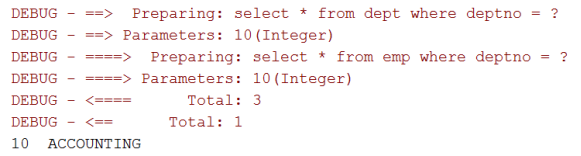
运行的日志结果如下图所示。可以看到有多条SQL语句。第一条语句负责查询所有的员工信息。下面要为每个员工再执行一条SQL语句来获取该员工的部门信息。
为什么获取部门编号的语句和员工的数据不相同呢,并且少于员工数量呢?这是因为用到了一级缓存,对于同一部门员工,只有第一次才执行SQL查询,后面使用缓存数据即可。

功能2:查询10号部门及其该部门员工信息。
public class TestNoCascade { @Test public void testFindDeptByNo() throws IOException { //获取SqlSessionFactory InputStream is = Resources.getResourceAsStream("mybatis-cfg.xml"); SqlSessionFactory factory = new SqlSessionFactoryBuilder().build(is); //获取SqlSession SqlSession sqlSession = factory.openSession(); //获取Mapper EmployeeMapper empMapper = sqlSession.getMapper(EmployeeMapper.class); DeptMapper deptMapper = sqlSession.getMapper(DeptMapper.class); int deptno = 10; //(使用Mapper)访问数据库并获取结果 Dept dept = deptMapper.findById(deptno); //查询该部门的员工信息 List<Employee> empList = empMapper.findByDeptNo(deptno); //将员工信息放入部门 dept.setEmployeeList(empList); //关闭SqlSession sqlSession.close(); //输出结果 System.out.println(dept.getDeptno1() + "\t" + dept.getDname() + "\t" + dept.getLocation()); List<Employee> empList2 = dept.getEmployeeList(); for (Employee emp : empList2) { System.out.println("\t" + emp); } } }- 1
- 2
- 3
- 4
- 5
- 6
- 7
- 8
- 9
- 10
- 11
- 12
- 13
- 14
- 15
- 16
- 17
- 18
- 19
- 20
- 21
- 22
- 23
- 24
- 25
- 26
- 27
- 28
该方式缺点明显,需要开发者手动的进行多次查询并组装数据,繁琐,代码量大。但是毕竟也实现了最终目的,也利于理解多表查询自动组装数据的过程。实际开发中很少使用。
9.2. 级联查询
级联查询,顾名思义,就是利于数据库表间的外键关联关系进行自动的级联查询操作。使用MyBatis实现级联查询,除了实体类增加关联属性外,还需要在映射文件中进行配置。
9.2.1. 立即加载
功能1:查询所有员工的信息(多对一关联)
<mapper namespace = "com.bjsxt.mapper.EmployeeMapper"> <select id = "findAll2" resultMap = "employeeMap"> select * from emp; select> <resultMap id = "employeeMap" type = "employee"> <result property = "deptno" column = "deptno">result> <association property = "dept" javaType = "com.bjsxt.entity.Dept" column = "deptno" jdbcType = "INTEGER" fetchType = "eager" select = "com.bjsxt.mapper.DeptMapper.findById"> association> resultMap> mapper>- 1
- 2
- 3
- 4
- 5
- 6
- 7
- 8
- 9
- 10
- 11
- 12
- 13
- 14
- 15
注意:非关联字段可使用自动映射,关联字段映射(
public class TestCascade { @Test public void testSelect1() throws IOException { //创建SqlSessionFactory InputStream is = Resources.getResourceAsStream("mybatis.xml"); SqlSessionFactory factory = new SqlSessionFactoryBuilder().build(is); //创建SqlSession SqlSession session = factory.openSession(); //创建Mapper(使用代理模式创建一个EmployeeMapper的实现类) EmployeeMapper employeeMapper = session.getMapper(EmployeeMapper.class); //查询员工信息 List<Employee> list = employeeMapper.findAll2(); session.close(); //在前台展示内容 //省略 } }- 1
- 2
- 3
- 4
- 5
- 6
- 7
- 8
- 9
- 10
- 11
- 12
- 13
- 14
- 15
- 16
- 17
经过对比,发现经过在映射文件中配置,测试类的代码大大简化了,无序手动进行关联查询和组装数据了。
功能2:查询10号部门及其该部门员工信息。
<mapper namespace = "com.bjsxt.mapper.DeptMapper"> <select id = "findById2" resultMap = "deptMap"> select * from dept where deptno1 = #{arg0} select> <resultMap id = "deptMap" type = "dept"> <id property = "deptno1" column = "deptno1">id> <result property = "dname" column = "dname">result> <result property = "location" column = "loc">result> <collection property = "employeeList" javaType = "list" column = "deptno1" jdbcType = "INTEGER" select = "com.bjsxt.mapper.EmployeeMapper.findByDeptno" fetchType = "eager"> collection> resultMap> mapper>- 1
- 2
- 3
- 4
- 5
- 6
- 7
- 8
- 9
- 10
- 11
- 12
- 13
- 14
- 15
- 16
- 17
其实 collection 只要提供属性property、column、select配置即可,其他属性会有默认值。
注意:collection的column属性是当前类Dept对应表dept的主键列deptno1。
public class TestCascade { @Test public void testSelect2() throws IOException { //创建SqlSessionFactory InputStream is = Resources.getResourceAsStream("mybatis.xml"); SqlSessionFactory factory = new SqlSessionFactoryBuilder().build(is); //创建SqlSession SqlSession session = factory.openSession(); //创建Mapper DeptMapper deptMapper = session.getMapper(DeptMapper.class); //查询10号部门信息 Dept dept = deptMapper.findById2(10); session.close(); //模拟在前台展示内容 System.out.println(dept.getDeptno1() + "\t" + dept.getDname()); List<Employee> list = dept.getEmployeeList(); for (int i = 0; i < list.size(); i++) { Employee emp = list.get(i); System.out.println("\t" + emp); } } }- 1
- 2
- 3
- 4
- 5
- 6
- 7
- 8
- 9
- 10
- 11
- 12
- 13
- 14
- 15
- 16
- 17
- 18
- 19
- 20
- 21
- 22
9.2.2. 结果映射resultMap
功能1和功能2中都使用了resultMap。在单表情况下,数据库字段名和实体类属性如果一致,还可以自动映射Auto-Mapping。那么在复杂的情况下,比如在进行多表查询时,就需要对查询结果进行手动映射。resultMap就是来完成手动映射的,可实现一次配置多次复用的效果。
语法结构
<resultMap id = "" type = ""> <id property = "" javaType = "" column = "" jdbcType = "" typeHandler = "">id> <result property = "" column = "">result> <association property = "" column = "" fetchType = "" select = "">association> <collection property = "" column = "" fetchType = "" select = "" ofType = "">collection> resultMap>- 1
- 2
- 3
- 4
- 5
- 6
resultMap元素有两个属性
-
id:resultMap的唯一标记,被select元素引用时使用。
-
type:最终形成哪个类的对象。可以是别名或者全限定名。和之前resultType一样,只是显示的是自定义规则映射后形成某个类对象。
resultMap元素有多个子元素
-
id:配置主键列和属性的关系。
-
result:配置非主键列和属性的关系。
-
association:配置多对一、一对一关联字段列和属性关系,对应一个对象属性。
-
collection:配置一对多、多对多的关联字段和属性的关系,对应一个集合属性。
属性 描述 property 需要映射到JavaBean 的属性名称。 javaType property的类型,一个完整的类名,或者是一个类型别名。如果你匹配的是一个JavaBean,那MyBatis 通常会自行检测到。 column 数据表的列名或者列别名。 jdbcType column在数据库表中的类型。这个属性只在insert,update 或delete 的时候针对允许空的列有用。JDBC 需要这项,但 MyBatis 不需要。取值是 JDBCType 枚举的值. typeHandler 使用这个属性可以覆写类型处理器,实现javaType、jdbcType之间的相互转换。一般可以省略,会探测到使用的什么类型的typeHandler进行处理。 fetchType 自动延迟加载策略。 select association、collection的属性,使用哪个查询查询属性的值,要求指定namespace+id的全名称。 ofType collection的属性,指明集合中元素的类型(即泛型类型)。
注意事项:
-
在级联查询时,对于一致的JavaBean属性和数据库表字段,因为可以自动映射,所以id、result元素可以省略。
-
在resultMap手动映射中,一个关联列可能对应多个property(比如dept表的deptno1,emp表的deptno列),建议都进行手动映射,否则会影响查询结果。
-
javaType、jdbcType、typeHandler三个属性能省略则省略。
9.2.3. 延迟加载
认识N+1查询问题(感觉1+N问题才更确切)
示例1:查询所有员工信息(含部门名称)
select * from emp select * from dept where deptno = 20 select * from dept where deptno = 30 select * from dept where deptno = 30- 1
- 2
- 3
- 4
示例2:查询所有部门信息(含每个部门的员工信息)
select * from dept select * from emp where deptno = 10 select * from emp where deptno = 20 select * from emp where deptno = 30 select * from emp where deptno = 40- 1
- 2
- 3
- 4
- 5
如果第一个查询有N条记录,要随后对数据库进行N次查询,共计1+N次查询,对数据库查询次数多,服务器压力大,造成N+1问题。
解决方案:
-
延迟加载。关联表的数据只有等到真正使用的时候才进行查询,不使用不查询。
-
连接查询。一条SQL语句查询到所有的数据。
延迟加载
延迟加载的内容等到真正使用时才去进行加载(查询)。多用在关联对象或集合中。
比如在功能1:查询所有员工的信息中只显示员工信息,而不显示部门信息;那对部门的SQL语句不就白查询了吗,能否默认不查询,等真正使用的时候才查询,延迟一下查询的时间,这就不更灵活了吗?
resultMap可以实现高级映射(使用
association、collection实现一对一及一对多映射),association、collection具备延迟加载设置功能。延迟加载的好处:先从单表查询、需要时再从关联表去关联查询,大大提高数据库性能,因为查询单表要比关联查询多张表速度要快。
延迟加载的设置
第一步,全局开关:在
mybatis-cfg.xml中打开延迟加载的开关。配置完成后所有的association和collection元素都生效。<settings> <setting name = "lazyLoadingEnabled" value = "true"/> <setting name = "aggressiveLazyLoading" value = "true"/> settings>- 1
- 2
- 3
- 4
lazyLoadingEnabled:是否开启延迟加载,是Mybatis是否启用懒加载的全局开关。当开启时,所有关联对象都会延迟加载。特定关联关系中可通过设置fetchType属性来覆盖该项的开关状态。
aggressiveLazyLoading:当开启时,任何方法的调用都会加载懒加载对象的所有属性。否则,每个属性会按需加载。
第二步分开关:指定的association和collection元素中配置fetchType属性。eager:表示立刻加载;lazy:表示延迟加载。将覆盖全局延迟设置。
功能1:fetchType=“eager”

功能1:fetchType=“lazy”

功能2:fetchType=“eager”
功能2:fetchType=“lazy”

10. MyBatis SQL实现多表查询
10.1. 多表连接查询
多表连接查询(join)只需执行一条SQL语句,就可以查询到多张表的数据,效率很高。但是其中会有大量的重复数据。

另外每一条记录中有多个表的字段,一般情况下会转换并组装到一个对象中。如图所示数据可以考虑组装到7个Employee对象中,每个Emp中还包括其所属Dept信息;或者组装到3个Dept对象中,每个Dept对象中有该部门的所有员工信息。
使用MyBatis完成上面两个操作,除了必须提供的多表查询语句外,关键还是需要使用resultMap的进行结果映射。
功能1:查询所有员工的信息(多对一关联)
<mapper namespace = "com.bjsxt.mapper.EmployeeMapper"> <select id = "findAll3" resultMap = "employeeMap2"> select empno,ename,sal,comm, e.deptno,dname from emp e left join dept d on e.deptno = d.deptno select> <resultMap id = "employeeMap2" type = "employee"> <id property = "empno" column = "empno">id> <result property = "ename" column = "ename">result> <result property = "sal" column = "sal">result> <result property = "comm" column = "comm">result> <result property = "deptno" column = "deptno">result> <association property = "dept" column = "deptno"> <id property = "deptno" column = "deptno">id> <result property = "dname" column = "dname">result> association> resultMap> mapper>- 1
- 2
- 3
- 4
- 5
- 6
- 7
- 8
- 9
- 10
- 11
- 12
- 13
- 14
- 15
- 16
- 17
- 18
- 19
功能2:查询10号部门及其该部门员工信息。
<mapper namespace = "com.bjsxt.mapper.DeptMapper"> <select id = "findById3" resultMap = "deptMap2"> select empno,ename,sal,comm, e.deptno,dname from emp e join dept d on e.deptno = d.deptno where d.deptno = ${param1} select> <resultMap id = "deptMap2" type = "dept"> <id property = "deptno" column = "deptno">id> <result property = "dname" column = "dname">result> <collection property = "employeeList" ofType = "employee"> <id property = "empno" column = "empno">id> <result property = "ename" column = "ename">result> <result property = "sal" column = "sal">result> <result property = "comm" column = "comm">result> collection> resultMap> mapper>- 1
- 2
- 3
- 4
- 5
- 6
- 7
- 8
- 9
- 10
- 11
- 12
- 13
- 14
- 15
- 16
- 17
- 18
- 19
注意:
-
多表连接查询只有立即查询,不能配置延迟加载。
-
多表连接查询中ResultMap中各列无法省略、必须配置,省略的不会自动映射。
10.2. 多表查询总结与扩展
-
级联查询和多表连接查询的比较及其选择
级联查询 SQL多表连接查询 SQL语句数量 多条 一条 性能 性能低 性能高 延迟加载 立即加载、延迟加载 只有立即加载 灵活性 更灵活 不灵活 SQL难易度 简单 复杂 选择依据 简单、灵活 高性能 -
ResultType和ResultMap使用场景
-
如果你做的是单表的查询并且封装的实体和数据库的字段一一对应,使用resultType
-
如果实体封装的属性和数据库的字段不一致 resultMap
-
使用N+1级联查询的时候 resultMap
-
使用的是多表的连接查询 resultMap
-
-
一对一关联映射的实现
-
实例:学生和学生证、雇员和工牌
-
数据库层次:主键关联或者外键关联
-
MyBatis层次:在映射文件的设置双方均使用
association即可,用法相同
-
-
多对多映射的实现
-
实例:学生和课程、用户和角色
-
数据库层次:引入一个中间表将一个多对多转为两个一对多
-
MyBatis层次
-
方法1:在映射文件中双方均使用
collection即可,不用引入中间类 -
方法2:引入中间类和中间类的映射文件,按照两个一对多处理
-
-
-
自关联映射
-
实例:Emp表中的员工和上级。一般是一对多关联
-
数据库层次:外键参考当前表的主键(比如mgr参考empno)
-
MyBatis层次:按照一对多处理,但是增加的属性都写到一个实体类中,增加的映射也都写到一个映射文件中
-
11. MyBatis注解开发
MyBatis编写SQL除了使用Mapper.xml外,还可以使用注解完成。当使用Auto Mapping时使用注解非常简单,不需要频繁的在接口和mapper.xml两个文件之间进行切换。但是在必须配置resultMap时使用注解将会变得很麻烦,这种情况下推荐使用mapper.xml进行配置。
MyBatis支持纯注解方式,也支持纯mapper.xml方式,也支持注解和mapper.xml混合形式。当只有接口没有mapper.xml时在mybatis.cfg.xml中可以通过
如果某个功能同时使用两种方式进行配置,XML方式将覆盖注解方式。
下面使用注解完成对Emp的CRUD操作。
public interface EmpMapper { @Select("select * from emp") public List<Employee> findAll(); @Select("select * from emp where empno = #{param1}") public Employee findById(int empno); @Select(value = "select * from emp where job =#{job} and deptno = #{deptno}") public List<Employee> findEmp(String job, int deptno); @Insert("insert into emp values(null,#{ename},#{job}," + "#{mgr},#{hireDate},#{sal},#{comm},#{deptno})") int saveEmp(Employee emp); @Update("update emp set job =#{job},sal =#{sal} where empno =#{empno}") int updateEmp(Employee emp); @Delete("delete from emp where empno = #{param1}") int deleteEmp(Employee emp); }- 1
- 2
- 3
- 4
- 5
- 6
- 7
- 8
- 9
- 10
- 11
- 12
- 13
- 14
- 15
- 16
- 17
- 18
- 19
如果希望通过注解实现和mapper.xml中
@Results注解实现。如果对象中关联了集合类型对象可以通过
@Result - many属性加载集合属性的值。在注解实现中只能通过N+1查询方式,而没有连接查询方式。如果对象中关联了另一个对象,使用
@Result - one属性加载另一个对象。在MyBatis3的注解中包含了
@SelectProvider、@UpdateProvider、@DeleteProvider、@InsertProvider,统称@SqlProvider,这些方法分别对应着查询、修改、删除、新增。当使用这些注解时将不在注解中直接编写SQL,而是调用某个类的特定方法形成的SQL。public class MyProvider { public String selectStudents() { return "select * from student"; } }- 1
- 2
- 3
- 4
- 5
@SelectProvider(type= MyProvider.class,method = "selectStudents") List<Student> selectStudent();- 1
- 2
具体在框架中使用注解还是XML配置方式,要视框架情况而定。Spring、SpringBoot中更推荐注解方式。但是在MyBatis中更推荐使用XML配置方式。原因如下:
-
使用注解没有实现Java代码和SQL语句的解耦。
-
无法实现SQL语句的动态拼接。
-
进行多表的查询时定制ResultMap比较麻烦。
注解和XML的优缺点
XML 注解 优点 1.类和类之间的解耦。
2.利于修改。直接修改XML文件,无需到源代码中修改。
3.配置集中在XML中,对象间关系一目了然,利于快速了解项目和维护
4.容易和其他系统进行数据交换。1.简化配置。
2.使用起来直观且容易,提升开发效率。
3.类型安全,编译器进行校验,不用等到运行期才会发现错误。
4.注解的解析可以不依赖于第三方库,可以之间使用Java自带的反射。12. MyBatis Plus 的简介
12.1. 为什么使用MyBatis Plus
-
在之前学习Mybatis时,我们对单表的增删改查的操作,都是自己在mapper.xml中进行代码的书写,这样一来我们书写的代码比较的麻烦。
-
我们目前封装数据库的实体的时候,每张表都需要自己的书写实体类,这样一来,我们书写的代码也比较麻烦。
12.2. 解决的方案
MyBatis Plus:其实就是对MyBatis的进一步的封装。
12.3. MyBatis Plus 的简介
Mybatis-Plus(简称MP),是一个 Mybatis 增强工具,在 Mybatis 的基础上只做增强不做改变,为简化开发、提高效率而生。官方文档说的愿景是成为 Mybatis 最好的搭档。
特性
-
无侵入∶只做增强不做改变,引入它不会对现有工程产生影响。
-
损耗小∶启动即会自动注入基本 CURD,性能基本无损耗,直接面向对象操作。
-
强大的CRUD 操作∶内置通用
Mapper、通用Service,仅仅通过少量配置即可实现单表大部分CRUD操作,更有强大的条件构造器,满足各类使用需求 -
支持Lambda 形式调用∶通过
Lambda表达式,方便的编写各类查询条件,无需再担心字段写错。 -
支持主键自动生成∶支持多达4种主键策略(内含分布式唯一ID生成器-Sequence),可自由配置,完美解决主键问题。
-
支持ActiveRecord 模式∶支持
ActiveRecord形式调用,实体类只需继承Model类即可进行强大的CRUD 操作。 -
支持自定义全局通用操作∶支持全局通用方法注入(Write once, use anywhere)。
-
内置代码生成器∶采用代码或者 Maven 插件可快速生成 Mapper、Model、Service、Controller
层代码,支持模板引擎,更有超多自定义配置等您来使用。 -
内置分页插件∶基于 MyBatis 物理分页,开发者无需关心具体操作,配置好插件之后,写分页等同于普通List
查询。 -
分页插件支持多种数据库∶支持MySQL、MariaDB、Oracle、DB2、H2、HSQL、SQLite、Postgre、SQLServer等多种数据库。
-
内置性能分析插件∶可输出 Sql 语句以及其执行时间,建议开发测试时启用该功能,能快速揪出慢查询。
-
内置全局拦截插件∶提供全表 delete、 update 操作智能分析阻断,也可自定义拦截规则,预防误操作。
架构原理

13. MyBatis Plus 的框架搭建
13.1. 导包
在原有SSM的jar包的基础上增加MybatisPlus的jar即可。
<dependency> <groupId>com.baomidougroupId> <artifactId>mybatis-plusartifactId> <version>3.5.1version> dependency>- 1
- 2
- 3
- 4
- 5
13.2. 搭建SSM开发环境
-
在Src下创建MVC的包结构。
-
在src下创建和配置SSM相关配置文件。
注意:其他配置和原有SSM流程不变,在applicationcontext.xml文件中,将Mybatis的工厂bean替换为MybatisPlus的工厂bean即可。
<bean id="factory" class="com.baomidou.mybatisplus.extension.spring.MybatisSqlSessionFactoryBean">bean>- 1
- 2
-
在web.xml中配置SSM相关信息
13.3. 建表
创建t_student表并添加测试数据
CREATE TABLE t_student ( `sid` int (10) NOT NULL AUTO INCREMENT, `s_name` varchar(100) NOT NULL, `sage` int(3) DEFAULT NULL, `ssex` char(1) DEFAULT NULL, `sphone` char(11) DEFAULT NULL, PRIMARY KEY (`sid`) ) ENGINE=InnoDB AUTO INCREMENT=4 DEFAULT CHARSET=utf8;- 1
- 2
- 3
- 4
- 5
- 6
- 7
- 8
- 9
13.4. 创建实体类
在pojo层下创建Student表的实体类
@Data @TableName("t_student") public class Student { @TableId("sid") private Integer id; @TableField("s_name") private String sname; private String sage; private String ssex; private String sphone; }- 1
- 2
- 3
- 4
- 5
- 6
- 7
- 8
- 9
- 10
- 11
13.5. 创建mapper接口
在mapper层创建StudentMapper接口并继承BaseMapper接口
public interface StudentMapper extends BaseMapper<Student> { }- 1
- 2
13.6. 使用
创建测试类,并从Spring容器中获取StudentMapper的接口的实例化对象并使用对象完成数据的查询操作,查询所有的学生信息。
public class TestMyBatisPlus { /** * 测试MyBatis的CURD操作
* 测试查询 */ @Test public void testMpSel() { // 获取spring容器对象 ApplicationContext ac = new ClassPathXmlApplicationContext("application.properties"); // 获取mapper对象 StudentMapper sm = (StudentMapper) ac.getBean("studentMapper"); // 查询所有学生信息 List<Student> students = sm.selectList(null); // 输出 System.out.println(students); } }- 1
- 2
- 3
- 4
- 5
- 6
- 7
- 8
- 9
- 10
- 11
- 12
- 13
- 14
- 15
- 16
- 17
- 18
- 19
13.7. MyBatis和Mybatis Plus的使用比较
MybatisPlus包含了Mybatis的所有功能,也就说在MybatisPlus中我们仍然可以按照Mybatis的方式来完成数据库的操作(无侵入)。
MybatisPlus的数据库操作的Mapper层的接口只需要继承BaseMapper接口,就自动的拥有了当前对应的表的基本的CRUE操作,无需声明接口方法及其xml文件,极大的提升了开发效率(MybatisPlus是通过实体类来逆向动态生成对应的表的基本的Sql语句)。
14. MyBatis Plus 中的CRUD
14.1. 添加操作
/*MP的新增 insert方法∶ 说明∶BaseMapper接口中提供了数据新增的insert方法 作用∶完成数据的新增 参数∶封装了要新增的数据的实体类对象 使用∶ 直接调用即可。但是在进行根据实体类动态生成SqL语句时, 会判断实体类中的属性值是否为null,只有非null值才会, 拼接在Sql语句中完成新增. 注意∶ 需要在实体类中使用注解 @TabLeName 指明实体类对应的表名,如果类名和表名一致则省略不写 需要在对应主键的属性上使用注解 @TabLeId 表明该属性是表的主键,并且需要说主键的设置类型,比如∶自增 需要在普通属性上使用注解 @TabLeField 表明该属性对应的字段的名称,如果属性名和字段名一致,则省略不写 */ //1.测试新增一条学生信息(张同学,30,1,15566339966) @Test public void testMpInsert(){ //获取Spring容器对象 ApplicationContext ac=new ClassPathXmlApplicationContext("applicationcontext-mp.xml"); //获取容器中mapper接口对象 StudentMapper studentMapper=(StudentMapper) ac.getBean("studentMapper"); //创建学生实体类存储新增数据 Student student=new Student(); student.setSname("张同学2"); //student.setSage(30); student.setSsex("1"); student.setSphone("15566339966"); //完成新增 int i = studentMapper.insert(student); int i2= studentMapper.insert(student); //打印新增结果 System.out.println("新增结果∶"+i); }- 1
- 2
- 3
- 4
- 5
- 6
- 7
- 8
- 9
- 10
- 11
- 12
- 13
- 14
- 15
- 16
- 17
- 18
- 19
- 20
- 21
- 22
- 23
- 24
- 25
- 26
- 27
- 28
- 29
- 30
- 31
- 32
- 33
- 34
14.2. 修改操作
//2.更新操作--updateById方法 /** updateById方法 作用∶更新数据到数据库中 参数∶存储了要更新的数据的值 注意∶ 将主键ID作为条件来完成更新,并且只更新实体类对象中有值的属性,null值的属性不参与更新 */ @Test public void testMpUpdateById(){ //获取Spring容器对象 ApplicationContext ac=new ClassPathXmlApplicationContext("applicationcontext-mp.xml"); //获取容器中mapper接口对象 StudentMapper studentMapper=(StudentMapper) ac.getBean("studentMapper"); //创建实体类存储要更新的数据 Student student=new Student(); student.setSid(5); student.setSname("李同学"); //完成更新 int i = studentMapper.updateById(student); //打印更新结果 System.out.println("更新结果∶"+i); }- 1
- 2
- 3
- 4
- 5
- 6
- 7
- 8
- 9
- 10
- 11
- 12
- 13
- 14
- 15
- 16
- 17
- 18
- 19
- 20
- 21
- 22
- 23
14.3. 删除操作
/* deleteById方法: 作用∶根据ID删除指定的数据 参数∶要删除的数据的ID值 */ @Test public void testMpDeleteById(){ //获取Spring容器对象 ApplicationContext ac=new ClassPathXmlApplicationContext("applicationcontext-mp.xml"); //获取容器中mapper接口对象 StudentMapper studentMapper=(StudentMapper) ac.getBean( s: "studentMapper");//完成删除 int i = studentMapper.deleteById(5); //打印删除结果 System.out.println("删除结果∶"+i) } /** deleteByMap方法∶ 作用∶根据指定的字段完成数据的删除 参数∶map集合 注意∶ 传入的map集合中存储了要删除的数据的键值对,键名为数据库中的字段的名称,不是实体类的属性名。 */ @Test public void testMpDeleteByMap(){ //获取Spring容器对象 ApplicationContext ac=new ClassPathXmlApplicationContext("applicationcontext-mp.xml"); //获取容器中mapper接口对象 StudentMapper studentMapper=(StudentMapper) ac.getBean("studentMapper"); //创建Map集合 Map<String,Object> map=new HashMap<>(); map.put("s_name","刘同学"); map.put("sage",20); //完成删除 int i = studentMapper.deleteByMap(map); //打印删除结果 System.out.println("删除结果∶"+i); } /** deleteBatchIds方法∶ 作用∶多选删除,将符合ID要求的数据全部删除 参数∶存储了要删除的数据的ID的集合 */ @Test public void testMpDeleteBatchIds(){ //获取Spring容器对象 ApplicationContext ac=new ClassPathXmlApplicationContext("applicationcontext-mp.xml"); //获取容器中mapper接口对象 StudentMapper studentMapper=(StudentMapper) ac.getBean("studentMapper"); //创建List集合 List<Integer> ids=new ArrayList<>(); ids.add(2); ids.add(4); //完成删除 int i = studentMapper.deleteBatchIds(ids); //打印删除结果 System.out.println("删除结果∶"+i); }- 1
- 2
- 3
- 4
- 5
- 6
- 7
- 8
- 9
- 10
- 11
- 12
- 13
- 14
- 15
- 16
- 17
- 18
- 19
- 20
- 21
- 22
- 23
- 24
- 25
- 26
- 27
- 28
- 29
- 30
- 31
- 32
- 33
- 34
- 35
- 36
- 37
- 38
- 39
- 40
- 41
- 42
- 43
- 44
- 45
- 46
- 47
- 48
- 49
- 50
- 51
- 52
- 53
- 54
- 55
- 56
- 57
- 58
- 59
14.4. 查询操作
/* selectById方法∶ 作用∶根据id查询数据 参数∶要查询的数据的ID 返回值∶ 存储了查询结果的实体类对象 */ @Test public void testSelectById(){ //获取Spring容器对象 ApplicationContext ac=new ClassPathXmlApplicationContext("applicationcontext-mp.xml"); //获取容器中mapper接口对象 StudentMapper studentMapper=(StudentMapper) ac.getBean("studentMapper"); //完成查询 Student student = studentMapper.selectById(1); //打印查询结果 System.out.println(student); } /* selectByMap方法∶ 作用∶根据指定的字段查询数据 参数∶存储了指定字段及其字段值的map集合 返回值∶存储了查询结果的list集合 注意: map中的键名为要查询的数据的字段名,不是实体类的属性名 */ @Test public void testSelectByMap(){ //获取Spring容器对象 ApplicationContext ac=new ClassPathXmlApplicationContext("applicationcontext-mp.xml"); //获取容器中mapper接口对象 StudentMapper studentMapper=(StudentMapper) ac.getBean("studentMapper"); //创建Map集合 Map<String,Object> map=new HashMap<>(); map.put("s_name","张同学"); map.put("sage",20); //完成查询 List<Student> students = studentMapper.selectByMap(map); //打印查询结果 System.out.println(students); } /** selectBatchIds方法∶ 作用∶根据id查询数据 参数∶存储了要查询的数据的Id的集合 返回值∶存储了查询结果的list集合 */ @Test public void testSelectBatchIds(){ //获取Spring容器对象 ApplicationContext ac=new ClassPathXmlApplicationCantext("applicationcontext-mp.xml"); //获取容器中mapper接口对象 StudentMapper studentMapper=(StudentMapper) ac.getBean("studentMapper"); //创建List集合 List<Integer> ids=new ArrayList<>(); ids.add(1); ids.add(2); //完成查询 List<Student> students = studentMapper.selectBatchIds(ids); //打印查询结果 System.out.println(students); }- 1
- 2
- 3
- 4
- 5
- 6
- 7
- 8
- 9
- 10
- 11
- 12
- 13
- 14
- 15
- 16
- 17
- 18
- 19
- 20
- 21
- 22
- 23
- 24
- 25
- 26
- 27
- 28
- 29
- 30
- 31
- 32
- 33
- 34
- 35
- 36
- 37
- 38
- 39
- 40
- 41
- 42
- 43
- 44
- 45
- 46
- 47
- 48
- 49
- 50
- 51
- 52
- 53
- 54
- 55
- 56
- 57
- 58
- 59
- 60
- 61
- 62
- 63
- 64
15. 条件构造器Wrapper的使用
15.1. Wrapper条件构造器的介绍
问题:
目前我们可以使用mp完成基本的增删改查操作,但是我们在进行数据操作时,很多时候Sql语句中的筛选条件是非常复杂的,比如
or关键,>,<,模糊查询等,怎么办?解决:
mp提供了功能非常强大的
Wrapper条件构造器。本质:
条件构造器其实就是一个对象,以方法的形式提供了数据库操作的筛选关键字。
我们调用该对象,来拼接我们的筛选条件即可。
实现:
QueryWrapper使用:
创建QueryWrapper对象,使用该对象中提供的对应的数据库操作的方法,来完成条件的拼接,QueryWrapper对象最终存储拼接好的Sql片段,将片段拼接在Sql语句中。
15.2. QueryWrapper常用方法

15.3. 带条件的查询的代码示例
/* * 使用eq和or方法完成条件拼接 */ @Test public void testSelParam(){ //获取Spring容器对象 ApplicationContext ac=new ClassPathXmlApplicationContext("applicationcontext-mp.xml"); //获取容器中mapper接口对象 StudentMapper studentMapper=(StudentMapper) ac.getBean("studentMapper"); //条件查询 List<Student> students = studentMapper.selectList(new Querywrapper<Student>() .eq("sage", 20) .or() .eq("s_name", "张同学")); //输出查询结果 System.out.println(students); } /** 查询名字中包含同学,并且年龄为20的信息 使用Like完成操作 */ @Test public void testSelParam2(){ //获取Spring容器对象 ApplicationContext ac=new ClassPathXmlApplicationContext("applicationcontext-mp.xml"); //获取容器中mapper接口对象 StudentMapper studentMapper=(StudentMapper) ac.getBean("studentMapper"); //条件查询 List<Student> students = studentMapper.selectList(new QueryWrapper<Student>() .like("s_name", "同学") .eq("sage", 20); //输出查询结果 System.out.println(students); }- 1
- 2
- 3
- 4
- 5
- 6
- 7
- 8
- 9
- 10
- 11
- 12
- 13
- 14
- 15
- 16
- 17
- 18
- 19
- 20
- 21
- 22
- 23
- 24
- 25
- 26
- 27
- 28
- 29
- 30
- 31
- 32
- 33
- 34
- 35
- 36
16. MybatisPlus的分页查询
16.1. 介绍
问题:
对于传统的分页Sql语句,需要我们自己在Sql语句中使用limit关键字来实现分页查询。但是呢,在MybatisPlus中,Sql语句是动态生成的,那么如何完成数据的分页查询呢?
解决:
使用分页插件。
使用:
-
在配置文件中配置分页插件。
-
在代码中调用分页效果。
16.2. 配置
<bean id = "factory" class = "com.baomidou.mybatisplus.extension.spring.MybatisSqlSessionFactoryBean"> <property name = "plugins"> <array> <bean class = "com.baomidou.mybatisplus.extension.plugins.PaginationInterceptor"> <property name = "dialectType" value = "mysql">property> bean> array> property> bean>- 1
- 2
- 3
- 4
- 5
- 6
- 7
- 8
- 9
- 10
16.3. 使用
/* 1.创建 Page 对象,在该对象中声明页面数和每页的数量 2.调用 selectPage 方法完成分页查询 参数∶ Page参数∶封装了分页的页码数和每页数量的对象 Wrapper参数∶封装了筛选条件的条件构造器对象。没有筛选条件则传入null值 3.从selectPage方法的返回值对象Page中获取分页数据 */ //测试Mp的分页插件 @Test public void testMpPage(){ //获取Spring容器对象 ApplicationContext ac=new ClassPathXmlApplicationContext("applicationcontext-mp.xml"); //获取Mapper对象 StudentMapper studentMapper=(StudentMapper) ac.getBean("studentMapper"); //分页查询所有的学生信息//创建分页对象 Page<Student>page=new Page<>(2, 2); //分页查询 Page<Student> ps = studentMapper.selectPage(page, null); //输出分页查询结果 System.out.println("获取当前的分页数据∶"+ps.getRecords()); System.out.println("获取当前的页码数∶"+ps.getCurrent()); System.out.println("获取当前的每页显示的数据量∶"+ps.getSize(); System.out.println("总的数据量∶"+ps.getTotal()); System.out.println("总的页码数∶"+ps.getPages()); //分页查询名字中包含"同学"的数据 //创建分页对象 Page<Student>p=new Page<>(1, 2); //分页查询 Page<Student> p2 = studentMapper.selectPage(p, new Querywrapper<Student>() .like("s_name", "同学") .eq("sage", 20); //输出分页查询结果 System.out.println("获取当前的分页数据∶"+p2.getRecords()); System.out.println("获取当前的页码数∶"+p2.getCurrent()); System.out.println("获取当前的每页显示的数据量∶"+p2.getSize()); System.out.println("总的数据量∶"+p2.getTotal()); System.out.println("总的页码数∶"+p2.getPages()); }- 1
- 2
- 3
- 4
- 5
- 6
- 7
- 8
- 9
- 10
- 11
- 12
- 13
- 14
- 15
- 16
- 17
- 18
- 19
- 20
- 21
- 22
- 23
- 24
- 25
- 26
- 27
- 28
- 29
- 30
- 31
- 32
- 33
- 34
- 35
- 36
- 37
- 38
- 39
- 40
17. MybatisPlus的常用注解
17.1. 介绍
问题:
在使用MybatisPlus后,我们不用再声明Sql语句了,只需要我们的Mapper接口继承BaseMapper接口即可拥有对应的CRUD操作。通过我们之前的学习我们发现,MyBatisPlus其实在根据我们的实体类来动态的生成对象的Sql语句,默认会按照类名即是对应的表的表名,属性名即是对应的表的字段名。但是如果实体类名和表名不一致,或者属性名和字段名不一致怎么办?
解决:
在实体类上使用注解表名对应的映射关系。
注意:
建议大家在开发时尽量保证实体类和表之间的字段名称是相同的,这样就不用声明注解了。
17.2. 常用注解及其作用
17.2.1. @TableName注解
作用:表明实体类对应的数据库表。
使用:在类名上使用,值为对应的表的表名。
示例:
@TableName("t_student") public class Student { ... }- 1
- 2
- 3
- 4
官方说明:

17.2.2. @TableId
作用:表明类中的某个属性为主键字段对应的属性。
使用:在类中为主键的字段上使用。
示例:
@TableName("t_student") public class Student { @TableId(type = IdType.AUTO) private Integer sid; @TableField("s_name") private String sname; private Integer sage; private String ssex; private String sphone; }- 1
- 2
- 3
- 4
- 5
- 6
- 7
- 8
- 9
- 10
官方说明:

17.2.3. @TableField
作用:表明普通属性映射的表中的字段,值为字段名。
使用:在普通属性上使用。
示例:
@TableName("t_student") public class Student { @TableId(type = IdType.AUTO) private Integer sid; @TableField("s_name") private String sname; private Integer sage; private String ssex; private String sphone; //在实体类中定义的非数据库字段的属性,需要设置 @TableField(exist = false) private String fav; }- 1
- 2
- 3
- 4
- 5
- 6
- 7
- 8
- 9
- 10
- 11
- 12
- 13
官方说明:

17.3. 获取自增的主键值
在Mybatis中需要使用 useGeneratedKeys,keyProperty,keyColumn 设置自增主键值的回返,然后在实体类对象中获取即可。在MybatisPlus中在进行数据新增时,在新增成功后,会自动的将自增的主键值返回到实体类对象中,前提是需要在实体类中使用
@TableId表明主键字段,并且为自增类型。/** * 测试MybatisPlus获取自增主键 */ @Test public void testGetId(){ //获取Spring容器对象 ApplicationContext ac=new ClassPathXmlApplicationContext("applicationcontext-mp.xml"); //获取Mapper对象 StudentMapper studentMapper=(StudentMapper) ac.getBean("studentMapper"); //创建学生信息 Student student=new Student(); student.setSname("王兀"); student.setSsex("1"); student.setSage(40); student.setSphone("16633669988"); //完成新增 int i = studentMapper.insert(student); //输出新增数据的主键值 System.out.println("主键∶"+student.getSid()); //输出新增结果 System.out.println("新增结果∶"+i); }- 1
- 2
- 3
- 4
- 5
- 6
- 7
- 8
- 9
- 10
- 11
- 12
- 13
- 14
- 15
- 16
- 17
- 18
- 19
- 20
- 21
- 22
18. MybatisPlus的全局配置策略
18.1. 介绍
问题:
假如我们每个实体类和数据库中的表名都不一致,表名都以
t_开头,类名没有t_字符,比如t_student表和Student类。这样每个实体类上我们都要使用@TableName注解来表名类和表的映射关系,过于麻烦怎么办?解决:
使用MP的全局配置策略:
GlobalConfig作用:
-
配置表和类名映射关系的前缀。
-
配置全局主键自增。
18.2. 示例
<bean id="factory" class="com.baomidou.mybatisplus.extension.spring.MybatisSqlSessionFactoryBean"> <property name="globalConfig" ref="globalConfig">property> <---配置分页插件--> <property name="plugins"> <array> <bean class="com.baomidou.mybatisplus.extension.plugins.PaginationInterceptor"> <!--设置当前数据库的类型-> <property name="dialeetType" value="mysql">property> bean> array> property> bean> <bean id="globalConfig" class-"com.baomidou.mybatisplus.core,config.GlobalConfig"> <property name="dbConfig"> <bean id="db" class="com.baomidou.mybatisplus.core.config.GlobalConfig$DbConfig"> <property name="tablePrefix" value="t_">property> <property name="idType" value="AUTO">property> bean> property> bean>- 1
- 2
- 3
- 4
- 5
- 6
- 7
- 8
- 9
- 10
- 11
- 12
- 13
- 14
- 15
- 16
- 17
- 18
- 19
- 20
- 21
- 22
- 23
- 24
- 25
- 26
19. Active Record
ActiveRecord 形式调用,实体类只需继承 Model 类即可进行强大的 CRUD 操作。
19.1. AR模式和MP的Mapper模式的比较
-
原有MP的Mapper模式。
-
创建项目完成Spring和MP的集成。
-
创建数据库表对应的实体类。
-
创建mapper接口并继承BaseMapper接口。
-
从Spring容器中获取Mapper接口的实例化对象完成数据库操作。
描述:
通过以上流程,MP的操作模式较优于原有Mybatis的数据库操作流程。
没有任何变化,只是我们在编写代码的时候不用在mapper层声明,
Sql语句或者XML文件了,提升了开发效率。
-
-
MP的AR模式
-
创建项目完成Spring和MP的集成。
-
创建数据库表对应的实体类,继续Model类。
-
在实体类中覆写pkVal方法。
-
创建Mapper接口并继承BaseMapper接口。
-
创建Spring对象,让Spring容器完成对Mapper层的实例化扫描。
-
创建实体类对象,直接调用实体类从Model中继承的数据库方法完成数据库操作。
-
-
流程比较分析
MP的AR模式其实底层仍然使用的是Mapper层在完成数据库操作。
只不过由我们自己调用Mapper对象操作数据库,变成了通过实体类对象来调用Mapper完成数据库操作。
从代码的物理视图上我们是看不到实体类调用Mapper的过程的。也就说,本质上仍然是Mapper层在操作数据库。
19.2. AR模式的特点
AR模式较于传统的MP模式操作数据库,在代码体系中,我们不用再获取Mapper对象,然后再将实体类传入给mapper层完成数据库操作,直接使用实体类即可完成操作,提升了开发效率。
19.3. AR模式的使用代码示例
-
创建一个集成了MP的SSM项目。
-
在pojo层创建实体类,并继承Model类,覆写pkVal的方法。
public class Student extends Model<Student> { @TableId(type = IdType.AUTO) private Integer sid; @TableField("s_name") private String sname; private String ssex; private Integer sage; private String sphone; //覆写方法,指明主键,返回主键字段对应的属性@0verride protected Serializable pkVal() { return sid; } }- 1
- 2
- 3
- 4
- 5
- 6
- 7
- 8
- 9
- 10
- 11
- 12
- 13
-
使用AR模式完成数据库操作。
/** 测试插入 */ @Test public void testMpARIns(){ //创建spring容器 ApplicationContext ac=new ClassPathXmlApplicationContext("applicationcontext-mp.xml"); //创建实体类 Student student=new Student(); student.setSname("腾同学"); student.setSsex("1"); student.setSage(20); student.setSphone("16699887766"); //完成增加 boolean flag = student.insert(); System.out.println(flag); } //测试MP的AR模式的查询 /** 注意使用AR的查询是需要在实体类属性上使用 @TableId 注解表明该属性为主键属性 */ @Test public void testMpARSel(){ //创建spring容器 ApplicationContext ac=new ClassPathXmlApplicationContext("applicationcontext-mp.xml"); //创建实体类 Student student=new Student(); student.setSid(2); Student student1 = student.selectById(); //完成查询 System.out.println(student1); } //测试MP的AR模式的更新 @Test public void testMpARUp(){ //创建spring容器 ApplicationContext ac=new ClassPathXmlApplicationCcntext("applicationcontext-mp.xml"); //创建实体类 Student student=new Student(); student.setSid(3); student.setSsex("0"); student.setSage(25); //测试更新 boolean b = student.updateById(); System.out.println(b); } //测试MP的AR模式的删除@Test public void testMpARDel(){ //创建spring容器 ApplicationContext ac=new ClassPathXmlApplicationContext("applicationcontext-mp.xml"); //创建实体类 Student student=new Student(); student.setSid(9); //测试删除 boolean b = student.deleteById(); System.out.println(b); }- 1
- 2
- 3
- 4
- 5
- 6
- 7
- 8
- 9
- 10
- 11
- 12
- 13
- 14
- 15
- 16
- 17
- 18
- 19
- 20
- 21
- 22
- 23
- 24
- 25
- 26
- 27
- 28
- 29
- 30
- 31
- 32
- 33
- 34
- 35
- 36
- 37
- 38
- 39
- 40
- 41
- 42
- 43
- 44
- 45
- 46
- 47
- 48
- 49
- 50
- 51
- 52
- 53
- 54
- 55
- 56
- 57
- 58
- 59
- 60
20. AutoGenerator代码生成器
20.1. 介绍
问题:
目前我们在开发SSM项目的时候,会先搭建一个SSM的开发环境。
我们会根据数据库的表在pojo包中创建对应的实体类,而且在不关心项目功能的同时,在mapper层对数据库的表的基础增删改查功能提前实现,同理,在service层可以将基础的业务代码提前声明。
然后再根据项目功能完成对应的复杂操作。而整个过程需要程序员手动完成搭建,效率低下。
解决:
创建一个代码生成类,调用该类的对象,并将对应的数据库表作为参数传递进入以及一些生成代码的其他要求也传递给该对象,让该对象帮助我们生成基础的开发代码。
实现:
MP的代码生成器。
作用:
根据数据库中的表动态的生成表对应的mapper,service,pojo,controller层的基础代码,提升开发效率。
20.2. 使用
推荐查看官网新版实现方式。
https://baomidou.com/pages/779a6e/
-
相关阅读:
【Docker】 07-安装ElasticSearch、Kibana
如何在 R 中计算调整后的 R 平方
groovy:调用jenkins任务时的请求失败问题
Java面对对象的特征之二:继承性 :why?
[C]二叉树的实现——喵喵成长记
Docker镜像的拉取和推送(阿里云镜像仓库)
vscode快捷键
H5链接分享到微信中形成小卡片(后端代码签名实现(超详细))
Java编码
【Java】JVM字节码分析
- 原文地址:https://blog.csdn.net/u012443641/article/details/126424383

- 最新文章
-
沪漂五周年了:我越来越迷茫了
Agentic Skill Routing 实战:别再把所有 Skill 塞进 AI Agent 上下文
MySQL-Seconds_behind_master的精度误差
[MAF预定义ChatClient中间件-03]CachingChatClient——利用缓存省钱省时间
AI的至暗历史:从万众期待到被政府撤资,AI的两次死亡徘徊
Agent OS :五种驯服不确定性的范式
PortSwigger SQL注入LAB11
数据库即时编译JIT
[Begin]AI Learn Data Day 0
深度学习进阶(二十七)现代 LLM 的核心架构设计其二:SwiGLU