-
【VUE】vue网站设计-----字节招聘网站设计
1、引言
设计结课作业,课程设计无处下手,网页要求的总数量太多?没有合适的模板?数据库,java,python,vue,html作业复杂工程量过大?毕设毫无头绪等等一系列问题。你想要解决的问题,在微信公众号“coding加油站”中全部会得到解决
2、作品介绍
字节招聘网站系统采用vue,node技术来实现,符合所学知识体系,适用于常见的作业以及课程设计,需要获取更多的作品,请关注微信公众号:coding加油站,获取,如需更多资料,可在微信后台留言。欢迎大家来提问,交流学习。
2.1、作品简介方面
字节招聘网站系统采用常规方式来实现,符合绝大部分的要求。代码配置有相关文档讲解,如需从代码中学到知识点,那么这个作品将是你的不二之选
2.2、作品二次开发工具
此作品代码相对简单,基本使用课堂中所学知识点来完成,只需要修改相关的介绍文字,一些图片,就可以改为自己独一无二的代码,网页作品下载后可使用任意编辑软件(例如:DW、HBuilder、NotePAD 、Vscode 、Sublime 、Webstorm 所有编辑器均可使用)。
2.3、作品技术介绍
html网页作品技术方面:使用CSS制作了网页背景图、鼠标经过及选中导航变色效果、下划线等相关技术来美化相关界面,部分采用了javascript来做校验。 使用html5,以及css3等相关技术完成技术的布局,在本作品中,会使用常见的布局,常见的浮动布局,flex布局都会有使用到哦。同时在操作方面上运用了html5和css3,采用了div+css结构、表单、超链接、浮动、绝对定位、相对定位、字体样式、引用视频等基础知识,同时使用了一些js的相关知识。例如使用到了dom,和bom来获取浏览器的相关api,同时使用css对样式进行相关的美化,使得界面更加符合网页设计
vue作品技术方面:使用vue技术开发的网站,涉及常见的vue指令,如v-for,v-if,v-show,v-html等的使用,包含watch,计算属性等常见功能的开发,以及组件的使用,使用vue相关全家桶的使用,运用了v-router来作为路由,完全符合常见的网站开发技术。同时也会使用html5,以及css3等相关技术完成技术的布局,在本作品中,会使用常见的布局,常见的浮动布局,flex布局都会有使用到哦。
3、作品演示
【coding加油站】vue网站设计---模仿字节招聘网站设计
3.1、首页

相关代码:
- <div class="main">
- <div ref="product" class="product content-item-block">
- <h1 class="title">Inspire creativity, enrich lifeh1>
- <div class="desc">截至目前,字节跳动产品已覆盖超过 150 个国家和地区,75 个语种div>
- <ul class="product-list">
- <li
- class="product-item"
- v-for="(item, key) in products"
- :key="key"
- @click="jumpToDetail(item)"
- >
- <img :src="item.logo" alt />
- <div>{{ item.title }}div>
- li>
- ul>
- <router-link to="/products">
- <div class="more">
- <bytedance-button size="large">了解更多bytedance-button>
- div>
- router-link>
- div>
- <div class="job-category content-item-block">
- <h2 class="job-category-title title">探索你感兴趣的职位h2>
- <ul class="job-category-list clearfix">
- <li v-for="item in jobCategories" :key="item.id" class="job-category-item">
- <router-link :to="{ name: 'jobs', params: { job_category_id: item.id } }">
- <div class="image" :style="`backgroundImage:url(${item.image})`">
- <span class="overlay" v-if="!item.id">{{ item.zh_name }}span>
- div>
- <div v-if="item.id" class="name">{{ item.zh_name }}div>
- router-link>
- li>
- ul>
- div>
- <div class="byteStandard content-item-block">
- <h1 class="title">字节范h1>
- <div class="desc">字节范是字节跳动企业文化的重要组成部分,是我们共同认可的行为准则div>
- <div class="content">
- <div class="image">
- <span
- v-show="productLayerVisible"
- class="layer"
- @animationend="onScrollRightAnimationEnd"
- >span>
- <img
- v-if="byteStandards[byteStandardActiveIndex]"
- width="100%"
- height="100%"
- :src="byteStandards[byteStandardActiveIndex].image"
- alt
- />
- div>
- <div class="indicator">
- <ul>
- <li class="indicator-item" v-for="(item, index) in byteStandards" :key="index">
- <h3
- :class="{ active: byteStandardActiveIndex === index }"
- @click="
- () => {
- byteStandardActiveIndex = index;
- productLayerVisible = true;
- }
- "
- >{{ item.title }}h3>
- <p v-html="item.content" v-show="byteStandardActiveIndex === index">p>
- li>
- ul>
- div>
- div>
- div>
- <div class="byteLife content-item-block">
- <h1 class="byteLife-title">字节生活h1>
- <div class="block-item block-item-one">
- <div class="block-item-column block-item-column-text">
- <h2 class="block-item-column-title">在扁平开放的氛围 里工作h2>
- <div class="content">
- <div class="content-item">
- <h2 class="content-item-title">务实扁平的工作氛围h2>
- <p class="content-item-desc">不讲 title 和层级,敢于授权新人,专注完成业务目标,没有领地意识p>
- div>
- <div class="content-item">
- <h2 class="content-item-title">务实扁平的工作氛围h2>
- <p class="content-item-desc">不讲 title 和层级,敢于授权新人,专注完成业务目标,没有领地意识p>
- div>
- <div class="content-item">
- <h2 class="content-item-title">务实扁平的工作氛围h2>
- <p class="content-item-desc">不讲 title 和层级,敢于授权新人,专注完成业务目标,没有领地意识p>
- div>
- div>
- div>
- <div class="block-item-column block-item-column-image">
- <img src="https://sf3-ttcdn-tos.pstatp.com/obj/ttfe/ATSX/mainland/life_1.png" alt />
- div>
- div>
- <div class="block-item block-item-one">
- <div class="block-item-column block-item-column-text">
- <h2 class="block-item-column-title">在扁平开放的氛围 里工作h2>
- <div class="content">
- <div class="content-item">
- <h2 class="content-item-title">务实扁平的工作氛围h2>
- <p class="content-item-desc">不讲 title 和层级,敢于授权新人,专注完成业务目标,没有领地意识p>
- div>
- <div class="content-item">
- <h2 class="content-item-title">务实扁平的工作氛围h2>
- <p class="content-item-desc">不讲 title 和层级,敢于授权新人,专注完成业务目标,没有领地意识p>
- div>
- <div class="content-item">
- <h2 class="content-item-title">务实扁平的工作氛围h2>
- <p class="content-item-desc">不讲 title 和层级,敢于授权新人,专注完成业务目标,没有领地意识p>
- div>
- div>
- div>
- <div class="block-item-column block-item-column-image">
- <img src="https://sf3-ttcdn-tos.pstatp.com/obj/ttfe/ATSX/mainland/life_1.png" alt />
- div>
- div>
- div>
- <div class="staffStory content-item-block">
- <h2 class="title">员工故事h2>
- <ul class="staffStory-list clearfix">
- <router-link
- tag="li"
- :to="`/staff-stories/${item.id}`"
- v-for="item in staffStories"
- :key="item.id"
- class="staffStory-item"
- >
- <div class="avatar">
- <img width="100%" :src="item.avatar" alt srcset />
- div>
- <div class="text">
- <h2 class="title">{{ item.title }}h2>
- <div class="desc">{{ item.name }} | {{ item.department }}div>
- <p class="remark">{{ item.remark }}p>
- div>
- <div class="circular-button">→div>
- router-link>
- ul>
- div>
- div>
3.2、职位列表页

相关代码:
- <template>
- <div class="jobs">
- <div class="banner">和优秀的人,做有挑战的事div>
- <div ref="searchBar" :class="{ fixedTop: searchBarFixedTop }" class="search-wrapper">
- <input-search
- :size="searchBarFixedTop ? 'small' : 'medium'"
- placeholder="搜索职位"
- v-model="searchKeyword"
- >input-search>
- div>
- <div class="main clearfix">
- <div class="clearfix aside-filter">
- <div class="header">
- <span>选择span>
- <span :class="{ clearable }" class="clear" @click="clearFilter">清空span>
- div>
- <div class="job-category job-filter-block">
- <div class="title">div>
- <checkbox-transfer
- title="职位"
- ref="jobCategory"
- v-model="job_category_id_list"
- :props="{ key: 'id', label: 'name' }"
- :data="jobCategories"
- >checkbox-transfer>
- div>
- <div class="job-city job-filter-block">
- <div class="title">div>
- <checkbox-transfer
- title="城市"
- ref="location"
- v-model="location_code_list"
- :props="{ key: 'code', label: 'name' }"
- :data="jobCities"
- >checkbox-transfer>
- div>
- div>
- <div class="content" v-loading:#ffffff7d.scrollFixed="loading">
- <h2 class="content-title">开启新的职位 ({{ results.count }})h2>
- <ul class="content-list">
- <li class="content-item" v-for="item in results.job_post_list" :key="item.id">
- <router-link :to="`/jobs/${item.id}`">
- <h3 class="title">{{ item.title }}h3>
- <div class="subTitle">
- <span class="city">{{ item.city_info.name }}span> |
- <span class="job_category">{{ item.job_category.name }}span> |
- <span class="recruitment_channel">社招span>
- div>
- <p class="desc">{{ item.description }}p>
- router-link>
- li>
- ul>
- <div v-show="!loading" class="pagination-wrapper">
- <pagination :current-page.sync="currentPage" :total="results.count">pagination>
- div>
- div>
- div>
- div>
- template>
- <script>
- import { getOffsetTop } from "@/helper/utilities";
- let positionY = 0;
- let searchBarClientHeight = 0;
- export default {
- name: "job",
- data() {
- const { keyword, job_category_id } = this.$route.params;
- return {
- searchKeyword: keyword || "",
- currentPage: 1,
- job_category_id_list: job_category_id ? [job_category_id] : [],
- jobCategories: [],
- jobCities: [],
- location_code_list: [],
- cityList: [],
- cities: [],
- results: [],
- searchBarFixedTop: false,
- loading: false
- };
- },
- created() {
- const jobConfigRequest = this.request
- .get("/job-filters")
- .then(response => {
- this.jobCities = response.city_list;
- this.jobCategories = response.job_type_list;
- })
- .catch();
- const dataRequest = this.fetchList();
- this.loadingIns = this.$loading();
- Promise.all([jobConfigRequest, dataRequest]).then(() => {
- this.loadingIns.close();
- });
- },
- mounted() {
- this.$nextTick(() => {
- positionY = getOffsetTop(document.body, this.$refs.searchBar);
- searchBarClientHeight = this.$refs.searchBar.clientHeight;
- });
- const onPageScroll = () => {
- const top = this.$refs.searchBar.getBoundingClientRect().top;
- this.searchBarFixedTop =
- window.scrollY > positionY - searchBarClientHeight / 2;
- };
- window.addEventListener("scroll", onPageScroll);
- this.$on("hook:destroyed", () => {
- window.removeEventListener("scroll", onPageScroll);
- });
- },
- computed: {
- queryFilter() {
- return {
- job_category_id_list: this.job_category_id_list,
- location_code_list: this.location_code_list,
- keyword: this.searchKeyword,
- offset: Math.max(0, this.currentPage - 1) * 10
- };
- },
- clearable() {
- return (
- this.job_category_id_list.length !== 0 ||
- this.location_code_list.length !== 0
- );
- }
- },
- watch: {
- queryFilter: function(newVal, oldVal) {
- this.searchBarFixedTop && window.scrollTo(0, positionY);
- this.fetchList();
- }
- },
- methods: {
- clearFilter() {
- if (this.job_category_id_list.length) {
- this.job_category_id_list = [];
- }
- if (this.location_code_list.length) {
- this.location_code_list = [];
- }
- },
- fetchList() {
- this.loading = true;
- return this.request
- .post("/jobs", this.queryFilter)
- .then(response => {
- if (this.results.count !== response.count) {
- this.currentPage = 1;
- }
- this.results = response;
- this.loading = false;
- })
- .catch(() => {
- this.loading = false;
- });
- }
- }
- };
- script>
3.3、职位详情

相关代码:
- <template>
- <div class="product">
- <ul class="product-fullpage-indicator">
- <li
- v-for="(item, index) in products"
- :key="item.id"
- class="product-fullpage-indicator-item"
- :class="{ active: activeIndex === index }"
- @click="activeIndex = index"
- >
- <img :src="item.logo" alt />
- li>
- ul>
- <transition :duration="duration" :name="transitionName">
- <div
- :key="activeIndex"
- class="view-wrapper"
- v-if="!loading"
- :style="`backgroundImage:url(${item.cover})`"
- >
- <div class="content">
- <div class="logo">
- <img :src="item.logo" width="100%" height="100%" alt />
- div>
- <h2>{{ item.title }}h2>
- <div class="description">{{ item.description }}div>
- <div class="subDescription">{{ item.subDescription }}div>
- <div class="link">
- 更多信息,请访问:
- <br />
- <span>{{ item.link }}span>
- div>
- div>
- div>
- transition>
- div>
- template>
- <script>
- export default {
- name: "product",
- data() {
- return {
- products: [],
- activeIndex: 0,
- transitionName: "",
- scrolling: false,
- duration: 1000,
- loading: false
- };
- },
- watch: {
- activeIndex(newIndex, oldIndex) {
- if (this.scrolling) {
- return;
- }
- if (this.$route.params.id) {
- delete this.$route.params.id;
- return;
- }
- this.transitionName = newIndex < oldIndex ? "move-down" : "move-up";
- }
- },
- created() {
- this.loading = true;
- const loading = this.$loading({
- position: { top: 60 }
- });
- this.request
- .get("/products")
- .then(response => {
- this.products = response;
- this.loading = false;
- loading.close();
- if (this.$route.params.id) {
- this.activeIndex = this.products.findIndex(
- item => item.id === this.$route.params.id
- );
- }
- })
- .catch();
- },
- mounted() {
- window.addEventListener("mousewheel", this.mousewheelHandler);
- },
- destroyed() {
- window.removeEventListener("mousewheel", this.mousewheelHandler);
- },
- computed: {
- item() {
- return this.products[this.activeIndex] || {};
- }
- },
- methods: {
- mousewheelHandler(e) {
- if (this.scrolling) {
- return;
- }
- this.scrolling = true;
- if (e.wheelDelta > 0) {
- this.transitionName = "move-down";
- this.activeIndex =
- this.activeIndex === 0
- ? this.products.length - 1
- : this.activeIndex - 1;
- } else {
- this.transitionName = "move-up";
- this.activeIndex = (this.activeIndex + 1) % this.products.length;
- }
- setTimeout(() => {
- this.scrolling = false;
- }, this.duration);
- }
- }
- };
- script>
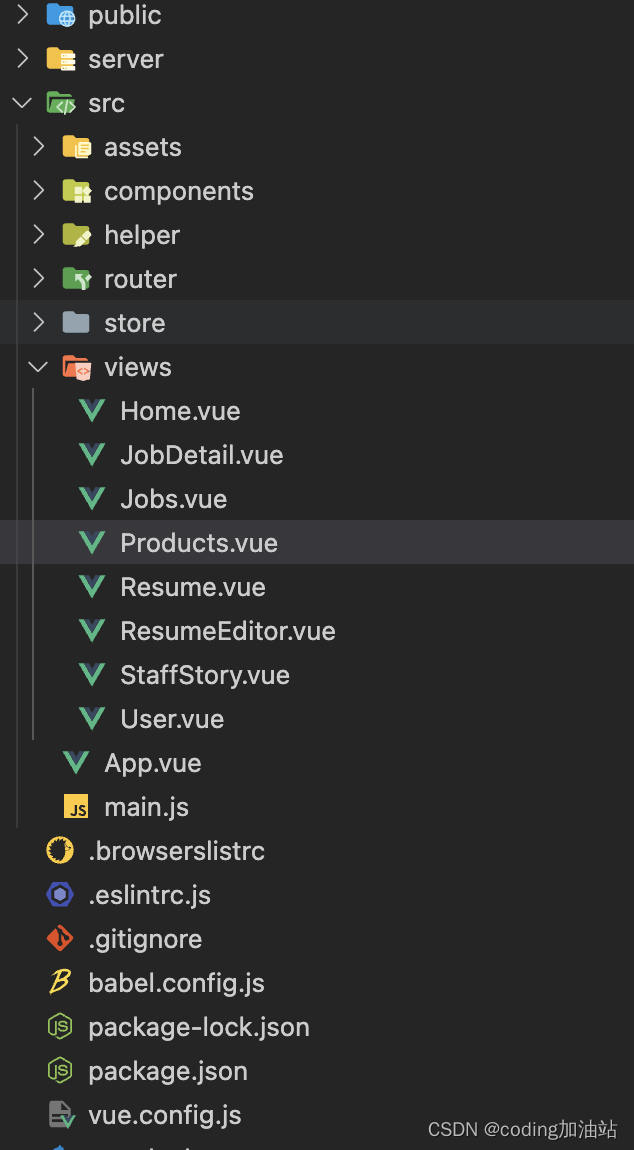
4、代码结构图
总结
以上就是本次项目的全部内容,需要交流或者获取代码请关注微信公众号:coding加油站获取
-
相关阅读:
Redis常见题型
Cheat Engine 修改器获取内存数据心路历程, THREADSTACK0 C# .NET VB 获取基址 CE修改器
【ArcGIS绘图系列1】在ArcGIS中制作柱状图与饼状图
NiFi中缓存组件的运行机制及增删改缓存数据
网络和Linux网络_2(套接字编程)socket+UDP网络通信代码
vim常用命令
JS 错误捕获
InnoDB和MyISAM区别
深入理解 Java 对象的内存布局
数据库 PolarDB 开源之路该如何走?听听他们怎么说
- 原文地址:https://blog.csdn.net/pandas23/article/details/126436651
