-
音频存储格式wav介绍与解析
音频格式
音频格式中 规定了使用多少 bits 来对信号进行编码。
- 无压缩的格式
- 无损压缩
- 有损压缩
1. wav 音频格式介绍
微软 和 IBM 于 1991 年 提出的资源交换的文件格式 RIFF( resource interchange File Format);
wav 是 属于RIFF 中的一个应用实例;
1.1 RIFF 的组成
RIFF的其他实例还包含了其他的音视频格式 AVI, 图像动画ANI;
RIFF 文件由一个表头 header, 多个区块 chunk 组成;1.2 wav 的组成
打开该网址:
http://soundfile.sapp.org/doc/WaveFormat/
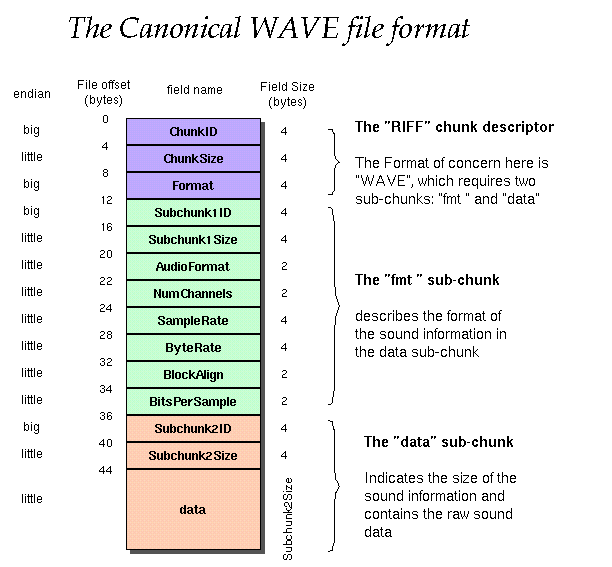
wav 的 Header : 使用 32 位正整数表示整个文件的大小, 故wav 大小不超过 4 GB;
第一个区块,格式子块,Format chunk: 记录了音频的相关格式信息包括如下:
编码格式, 通道数,采样率,Byte Rate 传输速率(字节每秒), 块对齐,第二个区块,数据子块,data chunk :开始存储音频的数据,
注意到在数据块中,左通道和右通道的数据有依次间隔存放的,按照
左通道1,右通道1,左通道2, 右通道2 这样的顺序依次交替存放;
2. python 读取 wav 文件,
调用
structmodule,https://docs.python.org/3/library/struct.html?highlight=struct#struct.unpack_from
注意,使用 struct.unpack(),
其中,关键点:
- 字节顺序 byte order : 区分高位在前还是低位在前;
<表示, 低位在前;
>表示,高位在前;- 数据类型:
H unsigned short integer 2- 1
H 表示无符号的短整形, integer, 占2 个字节;
I unsigned int integer 4- 1
I: 表示无符号的整形, integer占4 个字节;
2.1 struct.unpack() 的使用
注意到根据字节序来判断使用的场景,
byteorder 是
big: 即高位在前时, 使用f.read()直接打开;byteorder 是
little: 即低位在前时, 使用struct.unpack()函数打开;import struct f = open("./male_audio.wav", mode = "rb") # 以二进制的只读模式打开该文件; chunk_id = f.read(4) # 文件的前4byte 字节代表 RIFF; print("the chunk id:", chunk_id) # < 代表 低位在前, I:代表无符号的整数, 4byte; chunk_size = struct.unpack('- 1
- 2
- 3
- 4
- 5
- 6
- 7
- 8
- 9
- 10
- 11
- 12
- 13
- 14
- 15
- 16
- 17
- 18
- 19
- 20
- 21
- 22
- 23
- 24
- 25
- 26
- 27
- 28
- 29
- 30
- 31
- 32
- 33
- 34
- 35
- 36
- 37
- 38
- 39
- 40
- 41
- 42
- 43
- 44
- 45
- 46
- 47
- 48
- 49
- 50
- 51
- 52
- 53
- 54
- 55
- 56
- 57
- 58
- 59
- 60
- 61
- 62
- 63
- 64
- 65
- 66
- 67
- 68
- 69
- 70
- 71
- 72
- 73
2.2
f.read()函数的使用:# ”读“的细节操作 # 1. # f.read(字节数):读取的是字节 # 字节数默认是文件长度;下标会自动后移 # f = open('test.txt','r') # print(f.read()) # f.close() # 2.f.readline([limit]) # 读取一行数据 # limit # 限制的最大字节数 # f = open('test.txt', 'r') # # content = f.readline()#只读取一行 # print(content) # # content = f.readline()#只读取一行 # print(content) # f.close() # 3.f.readlines() # 会自动的将文件按照换行符进行处理 # 将处理好的每一行组成一个列表返回 f = open('test.txt', 'r') cn = f.readlines() for line in cn: print(line, end='') f.close()- 1
- 2
- 3
- 4
- 5
- 6
- 7
- 8
- 9
- 10
- 11
- 12
- 13
- 14
- 15
- 16
- 17
- 18
- 19
- 20
- 21
- 22
- 23
- 24
- 25
- 26
- 27
- 28
3. 其他存储格式
RIFF: 由微软和IBM提出;
AIFF : 苹果公司提出;-
无损格式: FLAC
free lossless audio codec; -
lossy : 有损格式
MP3, mostly for music, based on: • Modified discrete cosine transform (MDCT) • Sub-band coding • Advanced Audio Coding (AAC) • OPUS • Speex- 1
- 2
- 3
- 4
- 5
- 6
-
相关阅读:
【车间调度】基于改进帝国企鹅算法求解车间调度问题附matlab代码
【Vue】vue使用server酱发送微信通知实战案例,axios发送server酱通知信息实战,js发送server酱教程
Python数据类型底层、推导、生成器、迭代器、装饰器
Python下载及环境的安装
2022年PMP考试应该注意些什么?
Packet Tracer - 研究 DUAL FSM
python如何进行量化交易api?
【C++初阶7-string】真方便,真舒服
线性代数 | 最小二乘法的直观理解
计算机毕业设计Java综合众筹网站(源码+系统+mysql数据库+lw文档)
- 原文地址:https://blog.csdn.net/chumingqian/article/details/126401499

- 最新文章
-
沪漂五周年了:我越来越迷茫了
Agentic Skill Routing 实战:别再把所有 Skill 塞进 AI Agent 上下文
MySQL-Seconds_behind_master的精度误差
[MAF预定义ChatClient中间件-03]CachingChatClient——利用缓存省钱省时间
AI的至暗历史:从万众期待到被政府撤资,AI的两次死亡徘徊
Agent OS :五种驯服不确定性的范式
PortSwigger SQL注入LAB11
数据库即时编译JIT
[Begin]AI Learn Data Day 0
深度学习进阶(二十七)现代 LLM 的核心架构设计其二:SwiGLU