-
Android应用内设置多语言
1、项目简介
最近项目中要加入多语言需求,涉及到的有中文简体,中文繁体,英语,西班牙语,泰语,印尼语,葡萄牙语。参考了Android应用内设置多语言,可随系统语言改变而改变,在此基础上做了修改,选择为跟随系统时不再粗暴调用 此方法。android.os.Process.killProcess(android.os.Process.myPid());
直接杀死会有一个类似于崩溃的效果,产品上难以接受。所以跟随系统时查看系统语言单独调用,如果本地string中不存在系统语言对应的语言,那么默认为英语。下面看一下效果图:
因为目前只有一个MainActivity页面,选择语言后切换跳转有闪动,大家可以切换语言后回到首页,就像微信切换语言一样。
2、实现原理
首先在res下创建对应的string对应语言文件
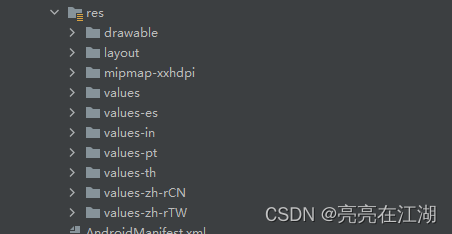
在Application中调用attachBaseContext方法中的初始化,如果本地有sp保存的语言,显示此语言,如果没有就显示系统语言。
- protected void attachBaseContext(Context base) {
- //系统语言等设置发生改变时会调用此方法,需要要重置app语言
- super.attachBaseContext(MultiLanguageUtil.attachBaseContext(base));
- }
- @TargetApi(Build.VERSION_CODES.N)
- private static Context createConfigurationResources(Context context) {
- Resources resources = context.getResources();
- Configuration configuration = resources.getConfiguration();
- Locale appLocale = getAppLocale(context);
- Log.i("language0", appLocale.getLanguage() + "--------" + appLocale.getCountry() + "--------" + appLocale.toLanguageTag());
- Constants.SYSTEM_LANGUAGE = appLocale.getLanguage();
- Constants.SYSTEM_COUNTRY = appLocale.getCountry();
- Constants.SYSTEM_TOLANGUAGETAG = appLocale.toLanguageTag();
- //如果本地有语言信息,以本地为主,如果本地没有使用默认Locale
- Locale locale = null;
- String spLanguage = SPUtils.getLanguageString(context, Constants.LOCALE_LANGUAGE);
- String spCountry = SPUtils.getLanguageString(context, Constants.LOCALE_COUNTRY);
- if (!TextUtils.isEmpty(spLanguage) && !TextUtils.isEmpty(spCountry)) {
- if (isSameLocal(appLocale, spLanguage, spCountry)) {
- locale = appLocale;
- } else {
- locale = new Locale(spLanguage, spCountry);
- }
- } else {
- if (Constants.SYSTEM_TOLANGUAGETAG.contains("zh-Hant")) {
- locale = new Locale(Constants.SYSTEM_LANGUAGE, "TW");
- } else if (Constants.SYSTEM_TOLANGUAGETAG.contains("zh-Hans") || Constants.SYSTEM_TOLANGUAGETAG.equals("zh-CN")) {
- locale = new Locale(Constants.SYSTEM_LANGUAGE, "CN");
- } else {
- locale = appLocale;
- }
- }
- configuration.setLocale(locale);
- configuration.setLocales(new LocaleList(locale));
- return context.createConfigurationContext(configuration);
- }
在MainActivity主页面initData()方法中显示sp存储过对应的语言,如果为空,那么就选中系统语言
- if (!TextUtils.isEmpty(spLanguage) && !TextUtils.isEmpty(spCountry)) {
- if(spLanguage.equals("zh") && spCountry.equals("CN")){
- rbgroup.check(rb1.getId());
- } else if(spLanguage.equals("zh") && spCountry.equals("TW")){
- rbgroup.check(rb2.getId());
- }else if(spLanguage.equals("en") && spCountry.equals("US")){
- rbgroup.check(rb3.getId());
- }else if(spLanguage.equals("es") && spCountry.equals("ES")){
- rbgroup.check(rb4.getId());
- }else if(spLanguage.equals("th") && spCountry.equals("TH")){
- rbgroup.check(rb5.getId());
- }else if(spLanguage.equals("in") && spCountry.equals("ID")){
- rbgroup.check(rb6.getId());
- }else if(spLanguage.equals("pt") && spCountry.equals("PT")){
- rbgroup.check(rb7.getId());
- }
- } else {
- rbgroup.check(rb0.getId());
- }
然后选中语言和取消选中采用的是RadioGroup和RadioButton,选中一种语言设置与之对应的语言和地区
- rbgroup.setOnCheckedChangeListener(new RadioGroup.OnCheckedChangeListener() {
- @Override
- public void onCheckedChanged(RadioGroup radioGroup, int checkId) {
- if (checkId == rb0.getId()) {
- String language = Constants.SYSTEM_LANGUAGE;
- if (language.equals("zh") && (Constants.SYSTEM_TOLANGUAGETAG.contains("zh-Hans") || Constants.SYSTEM_TOLANGUAGETAG.equals("zh-CN"))) {
- changeLanguage("zh", "CN",false); //中文简体
- } else if (language.equals("zh") && Constants.SYSTEM_TOLANGUAGETAG.contains("zh-Hant")) {
- changeLanguage("zh", "TW",false);//中文繁体
- } else if (language.equals("en")) {
- changeLanguage("en", "US",false); //英语---默认系统语言
- } else if (language.equals("es")) {
- changeLanguage("es", "ES",false); //西班牙
- } else if (language.equals("th")) {
- changeLanguage("th", "TH",false);// 泰语
- } else if (language.equals("in")) {
- changeLanguage("in", "ID",false);// 印度尼西亚语
- } else if (language.equals("pt")) {
- changeLanguage("pt", "PT",false);// 葡萄牙
- } else {
- changeLanguage("en", "US",false); //英语---默认系统语言
- }
- } else if (checkId == rb1.getId()) {
- changeLanguage("zh", "CN",true); //中文简体
- } else if (checkId == rb2.getId()) {
- changeLanguage("zh", "TW",true);//中文繁体
- } else if (checkId == rb3.getId()) {
- changeLanguage("en", "US",true); //英语---默认系统语言
- } else if (checkId == rb4.getId()) {
- changeLanguage("es", "ES",true); //西班牙
- } else if (checkId == rb5.getId()) {
- changeLanguage("th", "TH",true);// 泰语
- } else if (checkId == rb6.getId()) {
- changeLanguage("in", "ID",true);// 印度尼西亚语
- } else if (checkId == rb7.getId()) {
- changeLanguage("pt", "PT",true);// 葡萄牙
- }
- }
- });
在此处我做的改进是当选中的是系统语言时,判断此时的系统语言是哪种,然后设置与之对应的方法,英语为默认语言。
- //修改应用内语言设置
- private void changeLanguage(String language, String area,boolean noSystemLanguage) {
- if(!noSystemLanguage){
- SPUtils.saveLanguageString(MainActivity.this,Constants.LOCALE_LANGUAGE, "");
- SPUtils.saveLanguageString(MainActivity.this,Constants.LOCALE_COUNTRY, "");
- }
- //不为空,那么修改app语言,并true是把语言信息保存到sp中,false是不保存到sp中
- Locale newLocale = new Locale(language, area);
- MultiLanguageUtil.changeAppLanguage(MainActivity.this, newLocale, noSystemLanguage);
- //重启app,这一步一定要加上,如果不重启app,可能打开新的页面显示的语言会不正确
- Intent intent = new Intent(MainActivity.this, MainActivity.class);
- intent.addFlags(Intent.FLAG_ACTIVITY_CLEAR_TOP | Intent.FLAG_ACTIVITY_CLEAR_TASK);
- startActivity(intent);
- finish();
- }
如果为系统语言,sp不再存储数据,反之存储对应的语言数据,如果选择为英语,默认设置为Locale.ENGLISH
- public static void changeAppLanguage(Context context, Locale locale, boolean persistence) {
- Resources resources = context.getResources();
- DisplayMetrics metrics = resources.getDisplayMetrics();
- Configuration configuration = resources.getConfiguration();
- if (Build.VERSION.SDK_INT >= Build.VERSION_CODES.N) {
- if (locale.getLanguage().equals("en")) {
- configuration.setLocale(Locale.getDefault());
- configuration.setLocale(Locale.ENGLISH);
- } else {
- configuration.setLocale(locale);
- configuration.setLocales(new LocaleList(locale));
- }
- context.createConfigurationContext(configuration);
- } else if (Build.VERSION.SDK_INT >= Build.VERSION_CODES.JELLY_BEAN_MR1) {
- configuration.setLocale(locale);
- } else {
- configuration.locale = locale;
- }
- resources.updateConfiguration(configuration, metrics);
- if (persistence) {
- SPUtils.saveLanguageString(context, Constants.LOCALE_LANGUAGE, locale.getLanguage());
- SPUtils.saveLanguageString(context, Constants.LOCALE_COUNTRY, locale.getCountry());
- }
- }
到此处多语言中主要方法已经介绍完了,希望给予有需要的同学一些帮助,如果有什么疑问欢迎评论留言。最后附上多语言demo 点击下载
最全的android各国语言对照表
在线翻译--多语言
多语言适配遇到问题以及解决1、切换本地语言后杀死 app 重新进入,查看帖子详情以及发帖等页面某些数据 无法正确对应本地设置的语言。原因在于项目升级到 AndroidX 版本,Appcompat1.2+版本导致多语言切换失败,Androidx(appcompat:1.2.0) 中包装了一层ContextThemeWrapper,但就是因为给包的这一层逻辑有问题,导致了多语言切换时效。该包装方法实现了两套逻辑:1、传入的 context 是经过 ContextThemeWrapper 封装的,则直接使用该context 配置(包含语言)进行覆盖2、传入的 context 未经过 ContextThemeWrapper 封装,则从PackageManger 中获取配置(包含语言),然后和传入的 context 配置(包含语言)进行对比,并新创建了一个 configration 对象,如果两者有对比不同的配置则赋值给这个 configration,如果相同则跳过,最后将这个新建的 configration作为最终配置结果进行覆盖。而多语言问题就出现在 [2] 这套逻辑上,如果 PackageManager 与 传入的context 某个配置项一致时就不会给新建的 configration 赋值该配置项。这就会导致当这一次切换成功后,杀死进程下次启动时,由于 packageManager 配置的语言 与 context 配置的语言一致,而直接跳过,并没有给新建的configration 进行赋值,最终表现就是多语言失效。所以需要在 BaseActivity 手动再给包一层 ContextThemeWrapper:
- protected void attachBaseContext(Context newBase) {
- //切换多语言,然后将新生成的 context 覆盖给 attachBaseContext()
- Context context = MultiLanguageUtils.changeContextLocale(newBase);
- //兼容 appcompat 1.2.0 后切换语言失效问题
- final Configuration configuration = context.getResources().getConfiguration();
- final ContextThemeWrapper wrappedContext = new ContextThemeWrapper(context,
- R.style.Base_Theme_AppCompat_Empty) {
- public void applyOverrideConfiguration(Configuration overrideConfiguration) {
- if (overrideConfiguration != null) {
- overrideConfiguration.setTo(configuration);
- }
- super.applyOverrideConfiguration(overrideConfiguration);
- }
- };
- super.attachBaseContext(wrappedContext);
- }
这样就很好的解决了整个应用切换语言后重新进入某些数据多语言失效的问题。 -
相关阅读:
【C语言】每日一题(半月斩)——day1
Django(三)接口自动化平台HttpRunnerManager本地部署
知识点终结
小程序门店自提功能,提高线上线下销售量
[极致用户体验] 为什么建议2022年不用“等比设计稿“+rem,而用“灵活设计稿“+px
速盾网络:CDN用几天关了可以吗?安全吗?
(免费分享)基于springboot论坛bbs系统
字节跳动基于ClickHouse优化实践之“多表关联查询”
【计算机视觉 05】YOLO论文讲解:V1-V7
python中的Frame对象初探
- 原文地址:https://blog.csdn.net/lou_liang/article/details/126390461
