-
kong安装与配置
一、kong的安装和配置
- kong官方地址:https://github.com/Kong/kong
- kong中文翻译文档:https://github.com/qianyugang/kong-docs-cn
- 知乎上关于kong的集合:https://www.zhihu.com/topic/20174970/hot
1 - docker安装postgresql
- POSTGRES安装:
docker run -d --name kong-database -p 5432:5432 -e "POSTGRES_USER=kong" -e "POSTGRES_DB=kong" -e "POSTGRES_PASSWORD=kong" -e "POSTGRES_DB=kong" postgres:12

- 验证POSTGRES安装:使用Navicat连接POSTGRES数据库


- 初始化POSTGRES:【注意这里的ip地址要自行修改】 ->
docker run --rm -e "KONG_DATABASE=postgres" -e "KONG_PG_HOST=192.168.124.51" -e "KONG_PG_PASSWORD=kong" -e "POSTGRES_USER=kong" -e "KONG_CASSANDRA_CONTACT_POINTS=kong-database" kong kong migrations bootstrap
2 - kong安装
这里不使用docker安装,因为docker连接注册中心等很容易出错,不会排查的话会产生很多问题
- yum安装:这个也可以到https://docs.konghq.com/install/centos找其他版本
curl $(rpm --eval "https://download.konghq.com/gateway-2.x-centos-%{centos_ver}/config.repo") | sudo tee /etc/yum.repos.d/kong.reposudo yum install kong-enterprise-edition-2.8.1.3

- 关闭防火墙
systemctl stop firewalld.service- 重启docker:
systemctl restart docker
- 复制配置文件:
cp /etc/kong/kong.conf.default /etc/kong/kong.conf - 修改配置信息:
vim /etc/kong/kong.conf- 输入
:/postgres开始修改配置

- 输入
:/dns开始修改配置注册中心consul

- 输入
:/admin_listen = 127
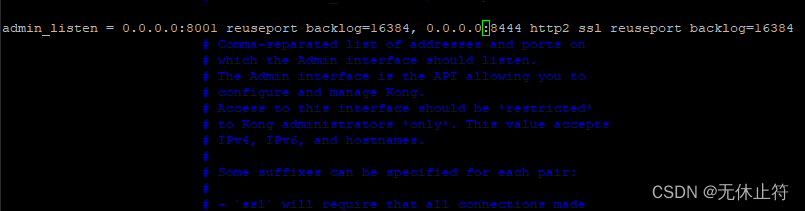
- 输入
:/proxy_listen =

- 输入
- 最后保存退出
- 初始化kong的数据库并启动
kong migrations upkong migrations finishkong migrations bootstrap up -c /etc/kong/kong.conf这里是初始化生成数据库,这个之前docker运行过了这里可以不用运行kong start -c /etc/kong/kong.conf

- 防火墙:如果之前已经关闭防火墙了,可以不用以下设置
firewall -cmd --zone=public --add-port=8001/tcp --premanentfirewall -cmd --zone=public --add-port=8000/tcp --premanentsudo firewall -cmd --reload
- 访问:http://192.168.124.51:8001/

- 访问:http://192.168.124.51:8000/

3 - konga安装
- 什么是konga:可以理解成是Navicat,图形化的操作界面
- konga安装:
docker run -d -p 1337:1337 --name konga pantsel/konga - konga访问:http://192.168.124.51:1337/

4 - konga使用
- 注册页面
- Username:admin(自己填写)
- Email:admin@123.com(自己填写)
- Password:admin123(自己填写)


- DEFAULT配置


- dns_resolver配置查看

-
相关阅读:
LinkedList 对比 ArrayList
KingbaseES V8R3集群运维案例之---主库系统down failover切换过程分析
小红书KOC获得“官方认可”丨价值评估模型
为github项目提交贡献步骤
【数学与算法】跟踪、预测、单目标、多目标、匈牙利匹配之间的关系
AI 应用的全流程存储加速方案技术解析和实践分享
5 包含多个段的程序
探索以太坊 Layer 2 解决方案的后起之秀——Starknet
【文献】TOF标定 Time-of-Flight Sensor Calibration for a Color and Depth Camera Pair
这套笔记可以解决90%以上的Java面试
- 原文地址:https://blog.csdn.net/qq23001186/article/details/126357870
- 最新文章
-
沪漂五周年了:我越来越迷茫了
Agentic Skill Routing 实战:别再把所有 Skill 塞进 AI Agent 上下文
MySQL-Seconds_behind_master的精度误差
[MAF预定义ChatClient中间件-03]CachingChatClient——利用缓存省钱省时间
AI的至暗历史:从万众期待到被政府撤资,AI的两次死亡徘徊
Agent OS :五种驯服不确定性的范式
PortSwigger SQL注入LAB11
数据库即时编译JIT
[Begin]AI Learn Data Day 0
深度学习进阶(二十七)现代 LLM 的核心架构设计其二:SwiGLU