-
SpringCloud 学习笔记总结 (八)
文章目录
1. Spring Cloud Alibaba 之 Sentinel(哨兵)概述


2. Sentinel 之 下载安装
去官方下载:https://github.com/alibaba/Sentinel/releases

本次下载的是1.7.0版本。
运行jar包:java -jar sentinel-dashboard-1.7.0.jar。(nohup)
用户名和密码默认都是sentinel。

3. Sentinel 之 初始化监控
第一步:创建项目,导入依赖。
<dependency> <groupId>com.alibaba.cloudgroupId> <artifactId>spring-cloud-starter-alibaba-nacos-discoveryartifactId> dependency> <dependency> <groupId>com.alibaba.cspgroupId> <artifactId>sentinel-datasource-nacosartifactId> dependency> <dependency> <groupId>com.alibaba.cloudgroupId> <artifactId>spring-cloud-starter-alibaba-sentinelartifactId> dependency> <dependency> <groupId>org.springframework.cloudgroupId> <artifactId>spring-cloud-starter-openfeignartifactId> dependency>- 1
- 2
- 3
- 4
- 5
- 6
- 7
- 8
- 9
- 10
- 11
- 12
- 13
- 14
- 15
- 16
- 17
- 18
- 19
- 20
第二步:配置application.yml文件。
server: port: 8401 spring: application: name: cloudalibaba-sentinel-service cloud: nacos: discovery: server-addr: localhost:8848 # Nacos服务注册中心地址 sentinel: transport: # 配置Sentinel dashboard地址 dashboard: localhost:8080 # 默认8719端口,假如被占用从8719开始依次+1扫描,直至找到未被占用的端口 port: 8719 management: endpoint: web: exposure: include: '*'- 1
- 2
- 3
- 4
- 5
- 6
- 7
- 8
- 9
- 10
- 11
- 12
- 13
- 14
- 15
- 16
- 17
- 18
- 19
- 20
- 21
- 22
第三步:创建启动类。
package com.itholmes.springcloud; import org.springframework.boot.SpringApplication; import org.springframework.boot.autoconfigure.SpringBootApplication; import org.springframework.cloud.client.discovery.EnableDiscoveryClient; /** * @description: TODO * @date: 2022/8/8 21:26 */ @EnableDiscoveryClient @SpringBootApplication public class MainApp8401 { public static void main(String[] args) { SpringApplication.run(MainApp8401.class,args); } }- 1
- 2
- 3
- 4
- 5
- 6
- 7
- 8
- 9
- 10
- 11
- 12
- 13
- 14
- 15
- 16
- 17
第四步:创建controller,测试。
package com.itholmes.springcloud.controller; import org.springframework.web.bind.annotation.GetMapping; import org.springframework.web.bind.annotation.RestController; /** * @description: TODO * @date: 2022/8/8 21:28 */ @RestController public class FlowLimitController { @GetMapping("/testA") public String testA(){ return "----testA"; } @GetMapping("/testB") public String testB(){ return "----testB"; } }- 1
- 2
- 3
- 4
- 5
- 6
- 7
- 8
- 9
- 10
- 11
- 12
- 13
- 14
- 15
- 16
- 17
- 18
- 19
- 20
- 21
- 22
- 23
第五步:启动Sentinel 和 创建的启动类。
- 注意:Sentinel默认是懒加载模式。
所以启动开始并没有检测什么东西。

发起请求后,就有东西了。

4. Sentinel 之 流控限流
4.1 流控规则 名词解释
实时监控的效果:
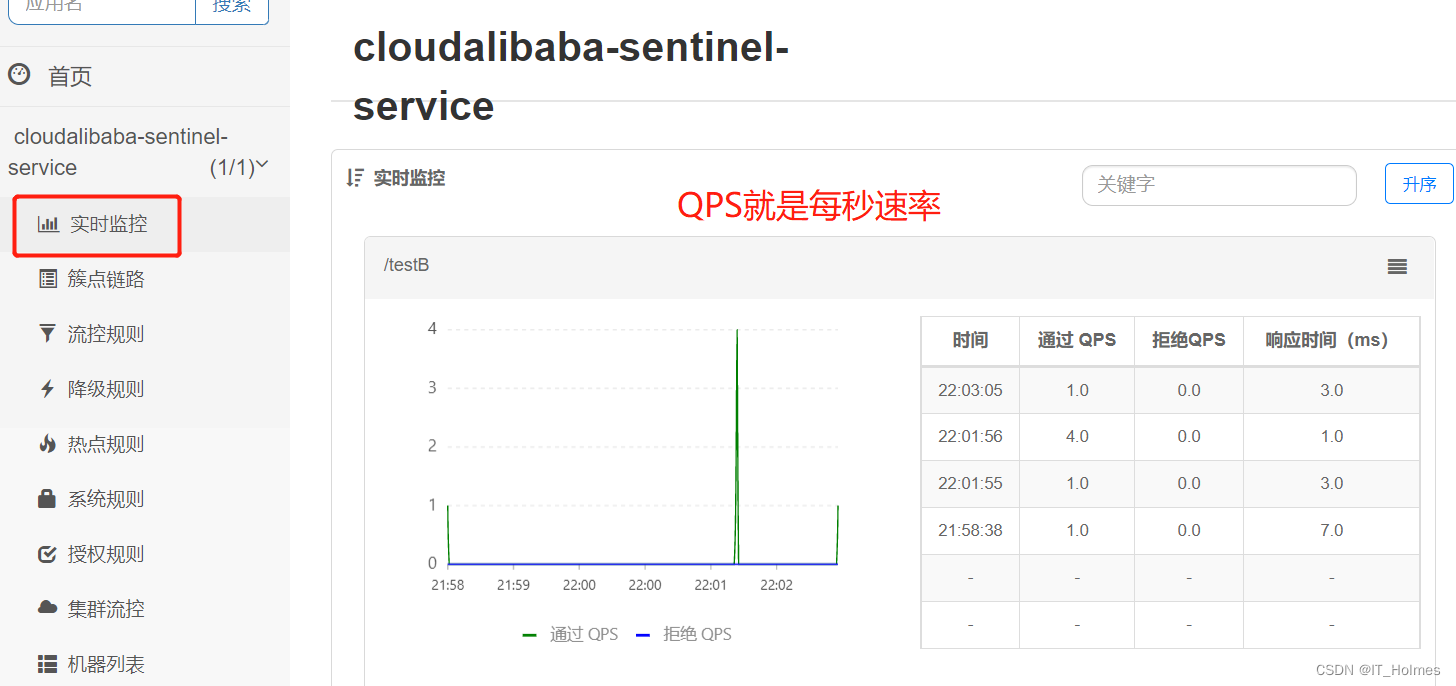


4.2 流控 QPS直接失败
阈值类型:QPS(每秒的请求数量) 、线程数。
QPS:当调用该api的QPS达到阈值的时候,进行限流。
新增流控规则:
- 可以在簇点链路的流控新增


- 还可以在流控规则里面的新增流控规则添加。

一旦访问超过阈值就会直接限流(这里设置的是快速失败):
- 上面设置QPS阈值为1,就是1秒钟超过1个访问量就会限流。

直接失败的源码,见:

4.3 流控 线程数直接失败
阈值类型:QPS(每秒的请求数量) 、线程数。
线程数:当调用该api的线程数达到阈值的时候,进行限流。


4.4 流控 关联
流控关联就是当关联的资源达到阈值时,就限流自己。

就是B导致A限流了。
4.5 流控 预热
Warm Up方式,即预热/冷启动方式。
Warm Up:根据codeFactor(冷加载因子,默认3)的值,从阈值/codeFactor,经过预热时长,才达到设置的QPS阈值。

就是突然请求量增多,通过冷启动,让通过的流量缓慢增加,在一定时间内逐渐增加到阈值上线,给冷系统一个预热的时间,避免冷系统被压垮。


Warm Up详细解释:
- 效果就是开始访问达到了 阈值/3(默认) = 3(10/3=3) ,就会限流;慢慢的阈值会达到

4.6 流控 排队等待
超过设置阈值就等待,可能设置等待超时时间。

详细介绍如下:

5. Sentinel 之 熔断降级
5.1 降级 简介
新增降级规则:

三个名词解释:

详细解释:

Sentinel的断路器是没有半开状态的,要么开启,要么断开。

5.2 降级 之 RT
RT(平均响应时间):例如:当1s内持续进入5个请求,对应时刻的平均响应时间(秒级) 均超过阈值(count,以ms为单位),那么在接下的时间窗口(DegradeRule 中的timeWindow,以s为单位)之内,对这个方法的调用都会自动地熔断(抛出DegradeException)。
注意:Sentinel默认统计的RT上限是4900ms,超出此阈值的都会算作4900ms,若需要变更此上限可以通过启动配置项 -Dcsp.sentinel.statistic.max.rt=xxx来配置。
流程如下:


5.3 降级 之 异常比例
异常比例(DEGRADE_GRADE_EXCEPTION_RATIO):当资源的每秒请求量 >= 5 ,并且每秒异常总数占通过量的比值超过阈值(DegradeRule中的count)之后,资源进入降级状态,即在接下的时间窗口(DegradeRule中的timeWindow,以s为单位)之内,对这个方法的调用都会自动地返回。异常比率的阈值范围是[0.0 , 1.0],代表0% ~ 100%。
流程如下:

就是我们访问接口,当资源每秒请求量超过了规定次数,并且异常数/总数 超过了规定的阈值,就会熔断降级。
一定要注意是每秒请求量超过了一定次数!!!

5.4 降级 之 异常数
异常数:就是当资源近1分钟的异常数目超过阈值之后就会进行熔断降级。
一定理解好,时间窗口的概念!!!

流程如下:

6. Sentinel 之 热点key
6.1 热点规则 之 参数索引 + @SentinelResource
热点key就可以理解为针对
请求参数key的限流。代码路径:


代码如下:
- 两个关键,一个是@SentinelResource注解的使用,一个是添加热点规则。
@GetMapping(value = "/testHotKey") //@SentinelResource的value一般设置为上面路径名一样。添加热点的资源名就是该value值。 @SentinelResource(value = "testHotKey_SentinelResource",blockHandler = "deal_testHotKey") public String testHotKey( @RequestParam(value = "p1",required = false) String p1, @RequestParam(value = "p2",required = false) String p2 ){ return "----testHotKey"; } public String deal_testHotKey(String p1, String p2, BlockException exception){ return "---------deal_testHotKey"; }- 1
- 2
- 3
- 4
- 5
- 6
- 7
- 8
- 9
- 10
- 11
- 12
- 13


注意:如果blockHandler没有设置,那么就会将限流的异常页面返回给前端。因此,必须要配置blockHandler!!

6.2 热点规则 之 参数例外项
6.1目录下面只是普通情况,针对某个参数索引熔断限流。
但是,我们能期望某个参数当它是某个特殊值时,它的限流值和平时不一样。
例如:p1参数,阈值为1;但是当p1的值等于5时,它的阈值可以达到200。
新增页面如下:

注意点:

7. Sentinel 之 系统规则
Sentinel 系统自适应限流:是从整体维度对应用入口流量进行控制。

系统规则支持以下的模式:

页面新增如下:

就是个总入口,在总入口处进行限流。
8. Sentinel 之 SentinelResource配置
8.1 URL限流 和 资源名限流

也就是限流方式有两种:- URL限流:会返回Sentinel自带默认的限流处理信息。
- 资源名限流:@SentinelResource的value资源名的方式,可以通过blockHandler指定兜底方法。
8.2 blockHandlerClass属性 指定全局统一的处理类
在@SentinelResource属性中:
- 限流后,由blockHandlerClass来指定哪个类。
- blockHandler就指定这个类下面的哪个方法。
(上面没有指定blockHandlerClass,写了blockHandler走的就是当前类的方法)
@GetMapping(value = "/rateLimit/customerBlockHandler") @SentinelResource( value = "customerBlockHandler", blockHandlerClass = CustomerBlockHandler.class, //指定好哪个类(一般是统一异常处理类) blockHandler = "handlerException2" //类下面的哪个方法。 ) public CommonResult customerBlockHandler(){ return new CommonResult(200,"按客户自定义",new Payment(2020L,"serial003")); }- 1
- 2
- 3
- 4
- 5
- 6
- 7
- 8
- 9
统一返回类:
package com.itholmes.springcloud.myhandler; import com.alibaba.csp.sentinel.slots.block.BlockException; import com.itholmes.springcloud.entities.CommonResult; /** * @description: TODO * @date: 2022/8/11 21:22 */ public class CustomerBlockHandler { public static CommonResult handlerException(BlockException exception){ return new CommonResult(200,"按客户自定定义--global"); } public static CommonResult handlerException2(BlockException exception){ return new CommonResult(200,"按客户自定定义--global2"); } }- 1
- 2
- 3
- 4
- 5
- 6
- 7
- 8
- 9
- 10
- 11
- 12
- 13
- 14
- 15
- 16
8.3 @SentinelResource 其他
@SentinelResource注解,注解方式不支持private的方法。
其实他的效果就是通过try-catch-finally来解决:

8. Sentinel 之 服务熔断功能
8.1 服务熔断 之 ribbon
ribbon是用来做负载均衡的,如下:

@LoadBalanced注解做负载均衡:
package com.itholmes.springcloud.config; import org.springframework.cloud.client.loadbalancer.LoadBalanced; import org.springframework.context.annotation.Bean; import org.springframework.context.annotation.Configuration; import org.springframework.web.client.RestTemplate; @Configuration public class ApplicationContextConfig { @Bean @LoadBalanced // @LoadBalanced负载均衡注解很重要,不要忘记配置,,没有它启动不起来项目 public RestTemplate getRestTemplate(){ return new RestTemplate(); } }- 1
- 2
- 3
- 4
- 5
- 6
- 7
- 8
- 9
- 10
- 11
- 12
- 13
- 14
- 15
- 16
- 17
使用配合nacos如下使用访问:
package com.itholmes.springcloud.controller; import com.alibaba.csp.sentinel.annotation.SentinelResource; import com.itholmes.springcloud.entities.CommonResult; import com.itholmes.springcloud.entities.Payment; import lombok.extern.slf4j.Slf4j; import org.springframework.web.bind.annotation.PathVariable; import org.springframework.web.bind.annotation.RequestMapping; import org.springframework.web.bind.annotation.RestController; import org.springframework.web.client.RestTemplate; import javax.annotation.Resource; /** * @description: TODO * @date: 2022/8/12 20:38 */ @RestController @Slf4j public class CircleBreakerController { public static final String SERVICE_URL = "http://nacos-payment-provider"; @Resource private RestTemplate restTemplate; @RequestMapping("/consumer/fallback/{id}") @SentinelResource(value = "fallback") public CommonResult<Payment> fallback(@PathVariable Long id){ CommonResult<Payment> result = restTemplate.getForObject(SERVICE_URL + "/paymentSQL/" + id, CommonResult.class, id); if (id == 4){ throw new IllegalArgumentException("IllegalArgument"); }else if (result.getData() == null){ throw new NullPointerException("NullPointException"); } return result; } }- 1
- 2
- 3
- 4
- 5
- 6
- 7
- 8
- 9
- 10
- 11
- 12
- 13
- 14
- 15
- 16
- 17
- 18
- 19
- 20
- 21
- 22
- 23
- 24
- 25
- 26
- 27
- 28
- 29
- 30
- 31
- 32
- 33
- 34
- 35
- 36
- 37
- 38
- 39
8.2 服务熔断 之 只配置fallback属性
只配置fallback属性,程序只要碰到异常,注意这里指的是java代码里面的异常,并不是sentinel那一套的限流,就会走兜底的方法:
package com.itholmes.springcloud.controller; import com.alibaba.csp.sentinel.annotation.SentinelResource; import com.itholmes.springcloud.entities.CommonResult; import com.itholmes.springcloud.entities.Payment; import lombok.extern.slf4j.Slf4j; import org.springframework.web.bind.annotation.PathVariable; import org.springframework.web.bind.annotation.RequestMapping; import org.springframework.web.bind.annotation.RestController; import org.springframework.web.client.RestTemplate; import javax.annotation.Resource; /** * @description: TODO * @date: 2022/8/12 20:38 */ @RestController @Slf4j public class CircleBreakerController { public static final String SERVICE_URL = "http://nacos-payment-provider"; @Resource private RestTemplate restTemplate; @RequestMapping("/consumer/fallback/{id}") @SentinelResource( value = "fallback", fallback = "handlerFallback" ) public CommonResult<Payment> fallback(@PathVariable Long id){ CommonResult<Payment> result = restTemplate.getForObject(SERVICE_URL + "/paymentSQL/" + id, CommonResult.class, id); if (id == 4){ throw new IllegalArgumentException("IllegalArgument非法参数异常"); }else if (result.getData() == null){ throw new NullPointerException("NullPointException空指针异常"); } return result; } public CommonResult handlerFallback(@PathVariable Long id,Throwable e){ Payment payment = new Payment(id, "null"); return new CommonResult(444,"兜底异常handlerFallback,异常信息" + e.getMessage(),payment); } }- 1
- 2
- 3
- 4
- 5
- 6
- 7
- 8
- 9
- 10
- 11
- 12
- 13
- 14
- 15
- 16
- 17
- 18
- 19
- 20
- 21
- 22
- 23
- 24
- 25
- 26
- 27
- 28
- 29
- 30
- 31
- 32
- 33
- 34
- 35
- 36
- 37
- 38
- 39
- 40
- 41
- 42
- 43
- 44
- 45
- 46
- 47

8.3 服务熔断 之 只配置blockHandler
blockHandler需要注意的是,只要有达到流控/降级/热点等等设置的条件才会走对应兜底的方法,只要不违背配置规则,还会将异常信息抛给前台的。

package com.itholmes.springcloud.controller; import com.alibaba.csp.sentinel.annotation.SentinelResource; import com.itholmes.springcloud.entities.CommonResult; import com.itholmes.springcloud.entities.Payment; import lombok.extern.slf4j.Slf4j; import org.springframework.web.bind.annotation.PathVariable; import org.springframework.web.bind.annotation.RequestMapping; import org.springframework.web.bind.annotation.RestController; import org.springframework.web.client.RestTemplate; import javax.annotation.Resource; /** * @description: TODO * @date: 2022/8/12 20:38 */ @RestController @Slf4j public class CircleBreakerController { public static final String SERVICE_URL = "http://nacos-payment-provider"; @Resource private RestTemplate restTemplate; @RequestMapping("/consumer/fallback/{id}") @SentinelResource( value = "fallback", blockHandler = "blockHandler" ) public CommonResult<Payment> fallback(@PathVariable Long id){ CommonResult<Payment> result = restTemplate.getForObject(SERVICE_URL + "/paymentSQL/" + id, CommonResult.class, id); if (id == 4){ throw new IllegalArgumentException("IllegalArgument非法参数异常"); }else if (result.getData() == null){ throw new NullPointerException("NullPointException空指针异常"); } return result; } public CommonResult blockHandler(@PathVariable Long id,Throwable e){ Payment payment = new Payment(id, "null"); return new CommonResult(444,"触发限流规则blockHandler,异常信息" + e.getMessage(),payment); } }- 1
- 2
- 3
- 4
- 5
- 6
- 7
- 8
- 9
- 10
- 11
- 12
- 13
- 14
- 15
- 16
- 17
- 18
- 19
- 20
- 21
- 22
- 23
- 24
- 25
- 26
- 27
- 28
- 29
- 30
- 31
- 32
- 33
- 34
- 35
- 36
- 37
- 38
- 39
- 40
- 41
- 42
- 43
- 44
- 45
- 46
- 47
8.4 服务熔断 之 fallback和blockHandler都配置
fallback和blockHandler都配置,在不触发sentinel阈值配置规则的情况下的java异常走fallback,一旦触发配置规则,就走blockHandler。
package com.itholmes.springcloud.controller; import com.alibaba.csp.sentinel.annotation.SentinelResource; import com.itholmes.springcloud.entities.CommonResult; import com.itholmes.springcloud.entities.Payment; import lombok.extern.slf4j.Slf4j; import org.springframework.web.bind.annotation.PathVariable; import org.springframework.web.bind.annotation.RequestMapping; import org.springframework.web.bind.annotation.RestController; import org.springframework.web.client.RestTemplate; import javax.annotation.Resource; /** * @description: TODO * @date: 2022/8/12 20:38 */ @RestController @Slf4j public class CircleBreakerController { public static final String SERVICE_URL = "http://nacos-payment-provider"; @Resource private RestTemplate restTemplate; @RequestMapping("/consumer/fallback/{id}") @SentinelResource( value = "fallback", fallback = "handlerFallback", blockHandler = "blockHandler" ) public CommonResult<Payment> fallback(@PathVariable Long id){ CommonResult<Payment> result = restTemplate.getForObject(SERVICE_URL + "/paymentSQL/" + id, CommonResult.class, id); if (id == 4){ throw new IllegalArgumentException("IllegalArgument非法参数异常"); }else if (result.getData() == null){ throw new NullPointerException("NullPointException空指针异常"); } return result; } public CommonResult handlerFallback(@PathVariable Long id,Throwable e){ Payment payment = new Payment(id, "null"); return new CommonResult(444,"兜底异常handlerFallback,异常信息" + e.getMessage(),payment); } public CommonResult blockHandler(@PathVariable Long id,Throwable e){ Payment payment = new Payment(id, "null"); return new CommonResult(445,"触发限流规则blockHandler,异常信息" + e.getMessage(),payment); } }- 1
- 2
- 3
- 4
- 5
- 6
- 7
- 8
- 9
- 10
- 11
- 12
- 13
- 14
- 15
- 16
- 17
- 18
- 19
- 20
- 21
- 22
- 23
- 24
- 25
- 26
- 27
- 28
- 29
- 30
- 31
- 32
- 33
- 34
- 35
- 36
- 37
- 38
- 39
- 40
- 41
- 42
- 43
- 44
- 45
- 46
- 47
- 48
- 49
- 50
- 51
- 52
- 53
8.5 服务熔断 之 exceptionsToIgnore异常忽略
异常忽略就是可以指定忽略的异常,这里的忽略指的是sentinel服务熔断降级忽略该异常!还是会走fallback的!

9. Sentinel 之 服务熔断OpenFeign
第一步:要激活Sentinel对Feign的支持!!
# 激活Sentinel对Feign的支持 feign: sentinel: enabled: true- 1
- 2
- 3
- 4
第二步:添加启动注解@EnableFeignClients。
package com.itholmes.springcloud; import org.springframework.boot.SpringApplication; import org.springframework.boot.autoconfigure.SpringBootApplication; import org.springframework.cloud.client.discovery.EnableDiscoveryClient; import org.springframework.cloud.openfeign.EnableFeignClients; /** * @description: TODO * @date: 2022/8/12 20:36 */ @SpringBootApplication @EnableDiscoveryClient @EnableFeignClients public class MainOrder84 { public static void main(String[] args) { SpringApplication.run(MainOrder84.class,args); } }- 1
- 2
- 3
- 4
- 5
- 6
- 7
- 8
- 9
- 10
- 11
- 12
- 13
- 14
- 15
- 16
- 17
- 18
- 19
第三步:配置OpenFeign的业务类,步骤如下图:

业务接口:
package com.itholmes.springcloud.service; import com.itholmes.springcloud.entities.CommonResult; import com.itholmes.springcloud.entities.Payment; import org.springframework.cloud.openfeign.FeignClient; import org.springframework.web.bind.annotation.GetMapping; import org.springframework.web.bind.annotation.PathVariable; /** * value指定微服务名称。 * * 只要访问的接口出现问题,就会走服务降级,走fallback指定对应的接口实现类方法。 * fallback会走对应实现该接口的实现类对应重写的该方法。 */ @FeignClient(value = "nacos-payment-provider",fallback = PaymentFallbackService.class) public interface PaymentService { @GetMapping(value = "/paymentSQL/{id}") public CommonResult<Payment> paymentSQL(@PathVariable("id") Long id); }- 1
- 2
- 3
- 4
- 5
- 6
- 7
- 8
- 9
- 10
- 11
- 12
- 13
- 14
- 15
- 16
- 17
- 18
- 19
(这里踩坑,注意@PathVariable一定要指定value值,在OpenFeign中,不指定就会报错!!!)
业务实现类:
package com.itholmes.springcloud.service; import com.itholmes.springcloud.entities.CommonResult; import com.itholmes.springcloud.entities.Payment; import org.springframework.stereotype.Component; @Component public class PaymentFallbackService implements PaymentService{ /** * 上面请求没有成功就会触发服务降级,走对应实现类的方法。 */ @Override public CommonResult<Payment> paymentSQL(Long id) { return new CommonResult<>(444,"服务降级返回,--PaymentFallbackService",new Payment(id,"errorSerial")); } }- 1
- 2
- 3
- 4
- 5
- 6
- 7
- 8
- 9
- 10
- 11
- 12
- 13
- 14
- 15
- 16
对应测试的controller接口:
package com.itholmes.springcloud.controller; import com.alibaba.csp.sentinel.annotation.SentinelResource; import com.itholmes.springcloud.entities.CommonResult; import com.itholmes.springcloud.entities.Payment; import com.itholmes.springcloud.service.PaymentService; import lombok.extern.slf4j.Slf4j; import org.springframework.web.bind.annotation.GetMapping; import org.springframework.web.bind.annotation.PathVariable; import org.springframework.web.bind.annotation.RequestMapping; import org.springframework.web.bind.annotation.RestController; import org.springframework.web.client.RestTemplate; import javax.annotation.Resource; /** * @description: TODO * @date: 2022/8/12 20:38 */ @RestController @Slf4j public class CircleBreakerController { @Resource private PaymentService paymentService; @GetMapping(value = "/consumer/paymentSQL/{id}") public CommonResult<Payment> paymentSQL(@PathVariable("id") Long id ){ return paymentService.paymentSQL(id); } }- 1
- 2
- 3
- 4
- 5
- 6
- 7
- 8
- 9
- 10
- 11
- 12
- 13
- 14
- 15
- 16
- 17
- 18
- 19
- 20
- 21
- 22
- 23
- 24
- 25
- 26
- 27
- 28
- 29
- 30
- 31
这样只要接口访问不成功就会走fallback那一套。
其他的几个熔断框架:
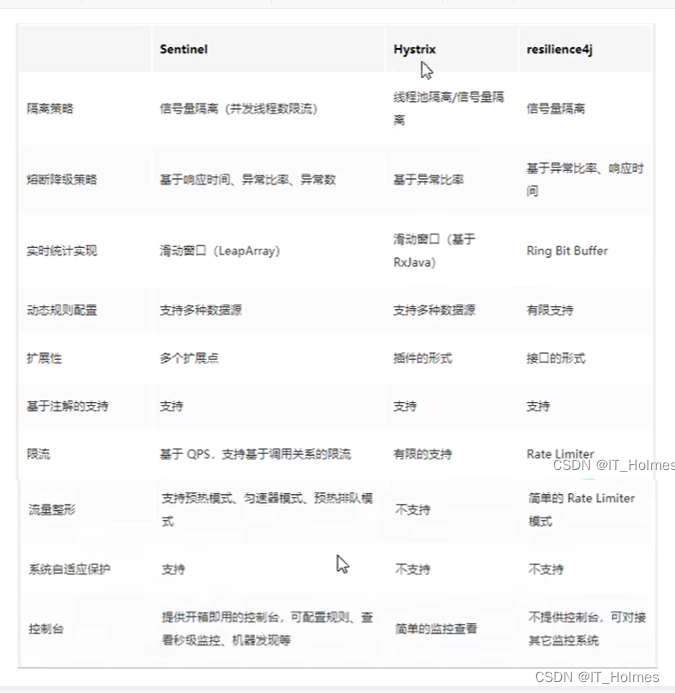
10. Sentinel 之 持久化规则
一般一旦重启应用,sentinel规则将消失,生产环境需要将配置规则进行持久化。
原理就是
将规则持久进Nacos进行保存。将限流配置规则持久化进Nacos保存,只要刷新8401某个rest地址,sentinel控制台的流控规则就能看到,只要Nacos里面的配置不上出,针对8401上sentinel上的流控规则持续有效。
第一步:导入依赖 sentinel-datasource-nacos ,该依赖为了解决持久化问题。
<dependency> <groupId>com.alibaba.cspgroupId> <artifactId>sentinel-datasource-nacosartifactId> dependency> <dependency> <groupId>com.alibaba.cloudgroupId> <artifactId>spring-cloud-starter-alibaba-sentinelartifactId> dependency>- 1
- 2
- 3
- 4
- 5
- 6
- 7
- 8
- 9
- 10
第二步:配置yml文件,从nacos中获取sentinel的配置。
server: port: 8401 spring: application: name: cloudalibaba-sentinel-service cloud: nacos: discovery: server-addr: 150.158.199.52:8848 # Nacos服务注册中心地址 sentinel: transport: # 配置Sentinel dashboard地址 dashboard: localhost:8080 # 默认8719端口,假如被占用从8719开始依次+1扫描,直至找到未被占用的端口 port: 8719 # 以下就是sentinel从nacos中获取的配置 datasource: ds1: nacos: server-addr: localhost:8848 # 配置nacos服务器地址 dataId: ${spring.application.name} groupId: DEFAULT_GROUP data-type: json rule-type: flow management: endpoint: web: exposure: include: '*'- 1
- 2
- 3
- 4
- 5
- 6
- 7
- 8
- 9
- 10
- 11
- 12
- 13
- 14
- 15
- 16
- 17
- 18
- 19
- 20
- 21
- 22
- 23
- 24
- 25
- 26
- 27
- 28
- 29
- 30
- 31
第三步:进入nacos网页,配置sentinle规则。+

配置如下:
[ { "resource":"/rateLimit/byUrl", "limitApp":"default", "grade":1, "count":1, "strategy":0, "controlBehavior":0, "clusterMode":false } ]- 1
- 2
- 3
- 4
- 5
- 6
- 7
- 8
- 9
- 10
- 11

第四步:这样sentinel持久化就完成!

-
相关阅读:
数据结构之队列详解(C语言手撕)
汇编语言实验5:循环结构程序设计
springmvc入门
本地Image Registry Harbor安装
电脑显示屏哪些材料需要做防火测试?做哪些测试?
Python 打印文本进度条
中高级前端面试题总结第一期
【微服务36】分布式事务Seata源码解析四:图解Seata Client 如何与Seata Server建立连接、通信【云原生】
Element-ui 动态tabs实战
Spring之AOP入门篇
- 原文地址:https://blog.csdn.net/IT_Holmes/article/details/126225666

- 最新文章
-
沪漂五周年了:我越来越迷茫了
Agentic Skill Routing 实战:别再把所有 Skill 塞进 AI Agent 上下文
MySQL-Seconds_behind_master的精度误差
[MAF预定义ChatClient中间件-03]CachingChatClient——利用缓存省钱省时间
AI的至暗历史:从万众期待到被政府撤资,AI的两次死亡徘徊
Agent OS :五种驯服不确定性的范式
PortSwigger SQL注入LAB11
数据库即时编译JIT
[Begin]AI Learn Data Day 0
深度学习进阶(二十七)现代 LLM 的核心架构设计其二:SwiGLU