• 3.容器的学习(2/2)


    33容器_ 单例集合案例_List类型容器

    需求:

    产生1-10之间的随机数([1,10]闭区间),将不重复的10个随机数放到容器中。

    使用List类型容器实现

    public class ListDemo {
        public static void main(String[] args) {
            List list = new ArrayList<>();
           while(true){
               //产生随机数
               int num = (int)(Math.random()*10+1);
                //判断当前元素在容器中是否存在
               if(!list.contains(num)){
                    list.add(num);
               }
               //结束循环
               if(list.size() == 10){
                   break;
               }
           }
           for(Integer i:list){
               System.out.println(i);
           }
        }
    }
    
    
    • 1
    • 2
    • 3
    • 4
    • 5
    • 6
    • 7
    • 8
    • 9
    • 10
    • 11
    • 12
    • 13
    • 14
    • 15
    • 16
    • 17
    • 18
    • 19
    • 20
    • 21

    34.容器_ 单例集合案例_Set类型容器

    public class SetDemo {
        public static void main(String[] args) {
            Set set = new HashSet<>();
            while(true){
                int num = (int)(Math.random()*10+1);
                //将元素添加容器中,由于Set类型容器是不允许有重复元素的,所以不需要判断。
                set.add(num);
                //结束循环
                if(set.size() == 10){
                    break;
                }
            }
            for(Integer i:set){
                System.out.println(i);
            }
        }
    }
    
    • 1
    • 2
    • 3
    • 4
    • 5
    • 6
    • 7
    • 8
    • 9
    • 10
    • 11
    • 12
    • 13
    • 14
    • 15
    • 16
    • 17

    35容器_Map_Map接口介绍

    Map接口定义了双例集合的存储特征,它并不是Collection接口的子接口。双例集合的存储特征是以key与value结构为单位进行存储。体现的是数学中的函数 y=f(x)感念。

    Map与Collecton的区别:

    • Collection中的容器,元素是孤立存在的(理解为单身),向集合中存储元素采用一个个元素的方式存储。
    • Map中的容器,元素是成对存在的(理解为现代社会的夫妻)。每个元素由键与值两部分组成,通过键可以找对所对应的值。
    • Collection中的容器称为单列集合,Map中的容器称为双列集合。
    • Map中的集合不能包含重复的键,值可以重复;每个键只能对应一个值。
    • Map中常用的容器为HashMap,TreeMap等。

    Map接口中常用的方法表

    方法说明
    V put (K key,V value)把key与value添加到Map集合中
    void putAll(Map m)从指定Map中将所有映射关系复制到此Map中
    V remove (Object key)删除key对应的value
    V get(Object key)根据指定的key,获取对应的value
    boolean containsKey(Object key)判断容器中是否包含指定的key
    boolean containsValue(Object value)判断容器中是否包含指定的value
    Set keySet()获取Map集合中所有的key,存储到Set集合中
    Set> entrySet()返回一个Set基于Map.Entry类型包含Map中所有映射。
    void clear()删除Map中所有的映射

    36容器_Map_HashMap容器的使用

    HashMap采用哈希算法实现,是Map接口最常用的实现类。 由于底层采用了哈希表存储数据,我们要求键不能重复,如果发生重复,新的键值对会替换旧的键值对。 HashMap在查找、删除、修改方面都有非常高的效率。

    public class HashMapTest {
        public static void main(String[] args) {
            //实例化HashMap容器
            Map map = new HashMap<>();
    
    
            //添加元素
            map.put("a","A");
            map.put("b","B");
            map.put("c","C");
            map.put("a","D");
    
    
            //获取容器中元素数量
            int size = map.size();
            System.out.println(size);
            System.out.println("---------------");
    
    
            //获取元素
            //方式一
            String v = map.get("a");
            System.out.println(v);
            System.out.println("---------------");
    
    
            //方式二
            Set keys = map.keySet();
            for(String key:keys){
                String v1 = map.get(key);
                System.out.println(key+" ---- "+v1);
            }
            System.out.println("-------------------");
    
    
            //方式三
            //Map.Entry就是一个键值对 对象
            Set> entrySet = map.entrySet();
            for(Map.Entry entry:entrySet){
                String key = entry.getKey();
                String v2 = entry.getValue();
                System.out.println(key+" ---------- "+v2);
            }
    
    
            System.out.println("--------------------");
            //Map容器的并集操作
            Map map2 = new HashMap<>();
            map2.put("f","F");
            map2.put("c","CC");
            map.putAll(map2);
            Set keys2 = map.keySet();
            for(String key:keys2){
                System.out.println("key: "+key+" Value: "+map.get(key));
            }
    
    
            System.out.println("---------------");
            //删除元素
            String v3 = map.remove("a");
            System.out.println(v3);
            Set keys3 = map.keySet();
            for(String key:keys3){
                System.out.println("key: "+key+" Value: "+map.get(key));
            }
    
    
            System.out.println("-------------------");
            //判断Key是否存在
            boolean b = map.containsKey("b");
            System.out.println(b);
            //判断Value是否存在
            boolean cc = map.containsValue("CC");
            System.out.println(cc);
    
    
        }
    }
    
    
    • 1
    • 2
    • 3
    • 4
    • 5
    • 6
    • 7
    • 8
    • 9
    • 10
    • 11
    • 12
    • 13
    • 14
    • 15
    • 16
    • 17
    • 18
    • 19
    • 20
    • 21
    • 22
    • 23
    • 24
    • 25
    • 26
    • 27
    • 28
    • 29
    • 30
    • 31
    • 32
    • 33
    • 34
    • 35
    • 36
    • 37
    • 38
    • 39
    • 40
    • 41
    • 42
    • 43
    • 44
    • 45
    • 46
    • 47
    • 48
    • 49
    • 50
    • 51
    • 52
    • 53
    • 54
    • 55
    • 56
    • 57
    • 58
    • 59
    • 60
    • 61
    • 62
    • 63
    • 64
    • 65
    • 66
    • 67
    • 68
    • 69
    • 70
    • 71
    • 72
    • 73
    • 74
    • 75
    • 76
    • 77
    • 78
    • 79

    HashTable类和HashMap用法几乎一样,底层实现几乎一样,只不过HashTable的方法添加了synchronized关键字确保线程同步检查,效率较低。

    HashMap与HashTable的区别

    1. HashMap: 线程不安全,效率高。允许key或value为null
    2. HashTable: 线程安全,效率低。不允许key或value为null

    37容器_ HashMap_ 底层分析_底层存储介绍

    底层存储介绍

    HashMap底层实现采用了哈希表,这是一种非常重要的数据结构。对于我们以后理解很多技术都非常有帮助。

    数据结构中由数组和链表来实现对数据的存储,他们各有特点。

    (1) 数组:占用空间连续。 寻址容易,查询速度快。但是,增加和删除效率非常低。

    (2) 链表:占用空间不连续。 寻址困难,查询速度慢。但是,增加和删除效率非常高。

    那么,我们能不能结合数组和链表的优点(即查询快,增删效率也高)呢? 答案就是“哈希表”。 哈希表的本质就是“数组+链表”。
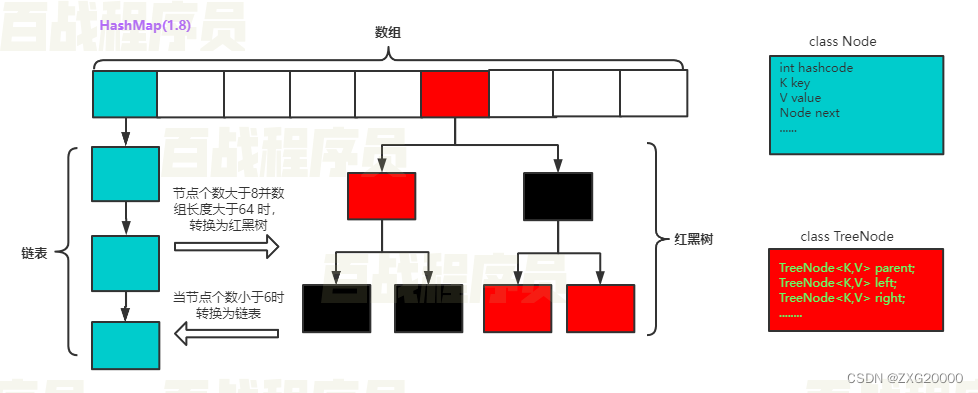
    在这里插入图片描述

    Oldlu建议

    对于本章中频繁出现的“底层实现”讲解,建议学有余力的童鞋将它搞通。刚入门的童鞋如果觉得有难度,可以暂时跳过。入门期间,掌握如何使用即可,底层原理是扎实内功,便于大家应对一些大型企业的笔试面试。

    jdk1.7和1.8的区别

    第一个不同点
      1.7链表头部添加元素 1.8链表尾部添加元素
    第二个不同点
      1.8会做链表到红黑树的转换,数组大于64,链表节点大于8转为红黑树
      链表小于6,转为链表
    
    • 1
    • 2
    • 3
    • 4
    • 5

    38容器_ HashMap_ 底层分析_成员变量介绍

    /**
     * The default initial capacity - MUST be a power of two.
     */
    static final int DEFAULT_INITIAL_CAPACITY = 1 << 4; // aka 16
    
    
    /**
     * The maximum capacity, used if a higher value is implicitly specified
     * by either of the constructors with arguments.
     * MUST be a power of two <= 1<<30.
     */
    static final int MAXIMUM_CAPACITY = 1 << 30;
    
    
    /**
     * The load factor used when none specified in constructor.
     */
    static final float DEFAULT_LOAD_FACTOR = 0.75f;
    
    
    /**
     * The bin count threshold for using a tree rather than list for a
     * bin.  Bins are converted to trees when adding an element to a
     * bin with at least this many nodes. The value must be greater
     * than 2 and should be at least 8 to mesh with assumptions in
     * tree removal about conversion back to plain bins upon
     * shrinkage.
     */
    static final int TREEIFY_THRESHOLD = 8;
    
    
    /**
     * The bin count threshold for untreeifying a (split) bin during a
     * resize operation. Should be less than TREEIFY_THRESHOLD, and at
     * most 6 to mesh with shrinkage detection under removal.
     */
    static final int UNTREEIFY_THRESHOLD = 6;
    
    
    /**
     * The smallest table capacity for which bins may be treeified.
     * (Otherwise the table is resized if too many nodes in a bin.)
     * Should be at least 4 * TREEIFY_THRESHOLD to avoid conflicts
     * between resizing and treeification thresholds.
     */
    static final int MIN_TREEIFY_CAPACITY = 64;
    /**
     * The number of key-value mappings contained in this map.
     */
    transient int size;
    
    
    /**
     * The table, initialized on first use, and resized as
     * necessary. When allocated, length is always a power of two.
     * (We also tolerate length zero in some operations to allow
     * bootstrapping mechanics that are currently not needed.)
     */
    transient Node[] table;
    
    
    • 1
    • 2
    • 3
    • 4
    • 5
    • 6
    • 7
    • 8
    • 9
    • 10
    • 11
    • 12
    • 13
    • 14
    • 15
    • 16
    • 17
    • 18
    • 19
    • 20
    • 21
    • 22
    • 23
    • 24
    • 25
    • 26
    • 27
    • 28
    • 29
    • 30
    • 31
    • 32
    • 33
    • 34
    • 35
    • 36
    • 37
    • 38
    • 39
    • 40
    • 41
    • 42
    • 43
    • 44
    • 45
    • 46
    • 47
    • 48
    • 49
    • 50
    • 51
    • 52
    • 53
    • 54
    • 55
    • 56
    • 57
    • 58
    • 59
    • 60

    39容器 _ HashMap _ 底层分析_存储元素节点类型介绍

    Node类

    static class Node implements Map.Entry {
        final int hash;
        final K key;
        V value;
        Node next;
    
    
        Node(int hash, K key, V value, Node next) {
            this.hash = hash;
            this.key = key;
            this.value = value;
            this.next = next;
        }
    
    
        public final K getKey()        { return key; }
        public final V getValue()      { return value; }
        public final String toString() { return key + "=" + value; }
    
    
        public final int hashCode() {
            return Objects.hashCode(key) ^ Objects.hashCode(value);
        }
    
    
        public final V setValue(V newValue) {
            V oldValue = value;
            value = newValue;
            return oldValue;
        }
    
    
        public final boolean equals(Object o) {
            if (o == this)
                return true;
            if (o instanceof Map.Entry) {
                Map.Entry e = (Map.Entry)o;
                if (Objects.equals(key, e.getKey()) &&
                    Objects.equals(value, e.getValue()))
                    return true;
            }
            return false;
        }
    }
    
    
    • 1
    • 2
    • 3
    • 4
    • 5
    • 6
    • 7
    • 8
    • 9
    • 10
    • 11
    • 12
    • 13
    • 14
    • 15
    • 16
    • 17
    • 18
    • 19
    • 20
    • 21
    • 22
    • 23
    • 24
    • 25
    • 26
    • 27
    • 28
    • 29
    • 30
    • 31
    • 32
    • 33
    • 34
    • 35
    • 36
    • 37
    • 38
    • 39
    • 40
    • 41
    • 42
    • 43
    • 44
    • 45

    40容器_ HashMap_ 底层分析_ 数组初始化

    在JDK1.8的HashMap中对于数组的初始化采用的是延迟初始化方式。通过resize方法实现初始化处理。resize方法既实现数组初始化,也实现数组扩容处理。

    /**
     * Initializes or doubles table size.  If null, allocates in
     * accord with initial capacity target held in field threshold.
     * Otherwise, because we are using power-of-two expansion, the
     * elements from each bin must either stay at same index, or move
     * with a power of two offset in the new table.
     *
     * @return the table
     */
    final Node[] resize() {
        Node[] oldTab = table;
        int oldCap = (oldTab == null) ? 0 : oldTab.length;
        int oldThr = threshold;
        int newCap, newThr = 0;
        if (oldCap > 0) {
            if (oldCap >= MAXIMUM_CAPACITY) {
                threshold = Integer.MAX_VALUE;
                return oldTab;
            }
            else if ((newCap = oldCap << 1) < MAXIMUM_CAPACITY &&
                     oldCap >= DEFAULT_INITIAL_CAPACITY)
                newThr = oldThr << 1; // double threshold
        }
        else if (oldThr > 0) // initial capacity was placed in threshold
            newCap = oldThr;
        else {               // zero initial threshold signifies using defaults
            newCap = DEFAULT_INITIAL_CAPACITY;
            newThr = (int)(DEFAULT_LOAD_FACTOR * DEFAULT_INITIAL_CAPACITY);
        }
        if (newThr == 0) {
            float ft = (float)newCap * loadFactor;
            newThr = (newCap < MAXIMUM_CAPACITY && ft < (float)MAXIMUM_CAPACITY ?
                      (int)ft : Integer.MAX_VALUE);
        }
        threshold = newThr;
        @SuppressWarnings({"rawtypes","unchecked"})
            Node[] newTab = (Node[])new Node[newCap];
        table = newTab;
        if (oldTab != null) {
            for (int j = 0; j < oldCap; ++j) {
                Node e;
                if ((e = oldTab[j]) != null) {
                    oldTab[j] = null;
                    if (e.next == null)
                        newTab[e.hash & (newCap - 1)] = e;
                    else if (e instanceof TreeNode)
                        ((TreeNode)e).split(this, newTab, j, oldCap);
                    else { // preserve order
                        Node loHead = null, loTail = null;
                        Node hiHead = null, hiTail = null;
                        Node next;
                        do {
                            next = e.next;
                            if ((e.hash & oldCap) == 0) {
                                if (loTail == null)
                                    loHead = e;
                                else
                                    loTail.next = e;
                                loTail = e;
                            }
                            else {
                                if (hiTail == null)
                                    hiHead = e;
                                else
                                    hiTail.next = e;
                                hiTail = e;
                            }
                        } while ((e = next) != null);
                        if (loTail != null) {
                            loTail.next = null;
                            newTab[j] = loHead;
                        }
                        if (hiTail != null) {
                            hiTail.next = null;
                            newTab[j + oldCap] = hiHead;
                        }
                    }
                }
            }
        }
        return newTab;
    }
    
    
    • 1
    • 2
    • 3
    • 4
    • 5
    • 6
    • 7
    • 8
    • 9
    • 10
    • 11
    • 12
    • 13
    • 14
    • 15
    • 16
    • 17
    • 18
    • 19
    • 20
    • 21
    • 22
    • 23
    • 24
    • 25
    • 26
    • 27
    • 28
    • 29
    • 30
    • 31
    • 32
    • 33
    • 34
    • 35
    • 36
    • 37
    • 38
    • 39
    • 40
    • 41
    • 42
    • 43
    • 44
    • 45
    • 46
    • 47
    • 48
    • 49
    • 50
    • 51
    • 52
    • 53
    • 54
    • 55
    • 56
    • 57
    • 58
    • 59
    • 60
    • 61
    • 62
    • 63
    • 64
    • 65
    • 66
    • 67
    • 68
    • 69
    • 70
    • 71
    • 72
    • 73
    • 74
    • 75
    • 76
    • 77
    • 78
    • 79
    • 80
    • 81
    • 82
    • 83

    41.容器_ HashMap_ 底层分析_ 计算hash

    1. 获得key对象的hashcode

      首先调用key对象的hashcode()方法,获得key的hashcode值。

    2. 根据hashcode计算出hash值(要求在[0, 数组长度-1]区间)hashcode是一个整数,我们需要将它转化成[0, 数组长度-1]的范围。我们要求转化后的hash值尽量均匀地分布在[0,数组长度-1]这个区间,减少“hash冲突”

      • 一种极端简单和低下的算法是:

        hash值 = hashcode/hashcode;

        也就是说,hash值总是1。意味着,键值对对象都会存储到数组索引1位置,这样就形成一个非常长的链表。相当于每存储一个对象都会发生“hash冲突”,HashMap也退化成了一个“链表”。

      • 一种简单和常用的算法是(相除取余算法):

        hash值 = hashcode%数组长度;

        这种算法可以让hash值均匀的分布在[0,数组长度-1]的区间。但是,这种算法由于使用了“除法”,效率低下。JDK后来改进了算法。首先约定数组长度必须为2的整数幂,这样采用位运算即可实现取余的效果:hash值 = hashcode&(数组长度-1)。

    /**
     * Associates the specified value with the specified key in this map.
     * If the map previously contained a mapping for the key, the old
     * value is replaced.
     *
     * @param key key with which the specified value is to be associated
     * @param value value to be associated with the specified key
     * @return the previous value associated with key, or
     *         null if there was no mapping for key.
     *         (A null return can also indicate that the map
     *         previously associated null with key.)
     */
    public V put(K key, V value) {
        return putVal(hash(key), key, value, false, true);
    }
    
    
    • 1
    • 2
    • 3
    • 4
    • 5
    • 6
    • 7
    • 8
    • 9
    • 10
    • 11
    • 12
    • 13
    • 14
    • 15
    • 16
    static final int hash(Object key) {
        int h;
        return (key == null) ? 0 : (h = key.hashCode()) ^ (h >>> 16);
    }
    
    
    • 1
    • 2
    • 3
    • 4
    • 5
    /**
     * Implements Map.put and related methods
     *
     * @param hash hash for key
     * @param key the key
     * @param value the value to put
     * @param onlyIfAbsent if true, don't change existing value
     * @param evict if false, the table is in creation mode.
     * @return previous value, or null if none
     */
    final V putVal(int hash, K key, V value, boolean onlyIfAbsent,
                   boolean evict) {
        Node[] tab; Node p; int n, i;
        if ((tab = table) == null || (n = tab.length) == 0)
            n = (tab = resize()).length;
        if ((p = tab[i = (n - 1) & hash]) == null)
            tab[i] = newNode(hash, key, value, null);
        else {
            Node e; K k;
            if (p.hash == hash &&
                ((k = p.key) == key || (key != null && key.equals(k))))
                e = p;
            else if (p instanceof TreeNode)
                e = ((TreeNode)p).putTreeVal(this, tab, hash, key, value);
            else {
                for (int binCount = 0; ; ++binCount) {
                    if ((e = p.next) == null) {
                        p.next = newNode(hash, key, value, null);
                        if (binCount >= TREEIFY_THRESHOLD - 1) // -1 for 1st
                            treeifyBin(tab, hash);
                        break;
                    }
                    if (e.hash == hash &&
                        ((k = e.key) == key || (key != null && key.equals(k))))
                        break;
                    p = e;
                }
            }
            if (e != null) { // existing mapping for key
                V oldValue = e.value;
                if (!onlyIfAbsent || oldValue == null)
                    e.value = value;
                afterNodeAccess(e);
                return oldValue;
            }
        }
        ++modCount;
        if (++size > threshold)
            resize();
        afterNodeInsertion(evict);
        return null;
    }
    
    
    • 1
    • 2
    • 3
    • 4
    • 5
    • 6
    • 7
    • 8
    • 9
    • 10
    • 11
    • 12
    • 13
    • 14
    • 15
    • 16
    • 17
    • 18
    • 19
    • 20
    • 21
    • 22
    • 23
    • 24
    • 25
    • 26
    • 27
    • 28
    • 29
    • 30
    • 31
    • 32
    • 33
    • 34
    • 35
    • 36
    • 37
    • 38
    • 39
    • 40
    • 41
    • 42
    • 43
    • 44
    • 45
    • 46
    • 47
    • 48
    • 49
    • 50
    • 51
    • 52
    • 53

    42.容器_ HashMap_ 底层分析_ 添加元素

    /**
     * Associates the specified value with the specified key in this map.
     * If the map previously contained a mapping for the key, the old
     * value is replaced.
     *
     * @param key key with which the specified value is to be associated
     * @param value value to be associated with the specified key
     * @return the previous value associated with key, or
     *         null if there was no mapping for key.
     *         (A null return can also indicate that the map
     *         previously associated null with key.)
     */
    public V put(K key, V value) {
        return putVal(hash(key), key, value, false, true);
    }
    
    
    • 1
    • 2
    • 3
    • 4
    • 5
    • 6
    • 7
    • 8
    • 9
    • 10
    • 11
    • 12
    • 13
    • 14
    • 15
    • 16

    43.容器_ HashMap_ 底层分析_ 数组扩容

    /**
     * Implements Map.put and related methods
     *
     * @param hash hash for key
     * @param key the key
     * @param value the value to put
     * @param onlyIfAbsent if true, don't change existing value
     * @param evict if false, the table is in creation mode.
     * @return previous value, or null if none
     */
    final V putVal(int hash, K key, V value, boolean onlyIfAbsent,
                   boolean evict) {
        Node[] tab; Node p; int n, i;
        if ((tab = table) == null || (n = tab.length) == 0)
            n = (tab = resize()).length;
        if ((p = tab[i = (n - 1) & hash]) == null)
            tab[i] = newNode(hash, key, value, null);
        else {
            Node e; K k;
            if (p.hash == hash &&
                ((k = p.key) == key || (key != null && key.equals(k))))
                e = p;
            else if (p instanceof TreeNode)
                e = ((TreeNode)p).putTreeVal(this, tab, hash, key, value);
            else {
                for (int binCount = 0; ; ++binCount) {
                    if ((e = p.next) == null) {
                        p.next = newNode(hash, key, value, null);
                        if (binCount >= TREEIFY_THRESHOLD - 1) // -1 for 1st
                            treeifyBin(tab, hash);
                        break;
                    }
                    if (e.hash == hash &&
                        ((k = e.key) == key || (key != null && key.equals(k))))
                        break;
                    p = e;
                }
            }
            if (e != null) { // existing mapping for key
                V oldValue = e.value;
                if (!onlyIfAbsent || oldValue == null)
                    e.value = value;
                afterNodeAccess(e);
                return oldValue;
            }
        }
        ++modCount;
        if (++size > threshold)
            resize();
        afterNodeInsertion(evict);
        return null;
    }
    
    
    • 1
    • 2
    • 3
    • 4
    • 5
    • 6
    • 7
    • 8
    • 9
    • 10
    • 11
    • 12
    • 13
    • 14
    • 15
    • 16
    • 17
    • 18
    • 19
    • 20
    • 21
    • 22
    • 23
    • 24
    • 25
    • 26
    • 27
    • 28
    • 29
    • 30
    • 31
    • 32
    • 33
    • 34
    • 35
    • 36
    • 37
    • 38
    • 39
    • 40
    • 41
    • 42
    • 43
    • 44
    • 45
    • 46
    • 47
    • 48
    • 49
    • 50
    • 51
    • 52
    • 53
    /**
     * Initializes or doubles table size.  If null, allocates in
     * accord with initial capacity target held in field threshold.
     * Otherwise, because we are using power-of-two expansion, the
     * elements from each bin must either stay at same index, or move
     * with a power of two offset in the new table.
     *
     * @return the table
     */
    final Node[] resize() {
        Node[] oldTab = table;
        int oldCap = (oldTab == null) ? 0 : oldTab.length;
        int oldThr = threshold;
        int newCap, newThr = 0;
        if (oldCap > 0) {
            if (oldCap >= MAXIMUM_CAPACITY) {
                threshold = Integer.MAX_VALUE;
                return oldTab;
            }
            else if ((newCap = oldCap << 1) < MAXIMUM_CAPACITY &&
                     oldCap >= DEFAULT_INITIAL_CAPACITY)
                newThr = oldThr << 1; // double threshold
        }
        else if (oldThr > 0) // initial capacity was placed in threshold
            newCap = oldThr;
        else {               // zero initial threshold signifies using defaults
            newCap = DEFAULT_INITIAL_CAPACITY;
            newThr = (int)(DEFAULT_LOAD_FACTOR * DEFAULT_INITIAL_CAPACITY);
        }
        if (newThr == 0) {
            float ft = (float)newCap * loadFactor;
            newThr = (newCap < MAXIMUM_CAPACITY && ft < (float)MAXIMUM_CAPACITY ?
                      (int)ft : Integer.MAX_VALUE);
        }
        threshold = newThr;
        @SuppressWarnings({"rawtypes","unchecked"})
            Node[] newTab = (Node[])new Node[newCap];
        table = newTab;
        if (oldTab != null) {
            for (int j = 0; j < oldCap; ++j) {
                Node e;
                if ((e = oldTab[j]) != null) {
                    oldTab[j] = null;
                    if (e.next == null)
                        newTab[e.hash & (newCap - 1)] = e;
                    else if (e instanceof TreeNode)
                        ((TreeNode)e).split(this, newTab, j, oldCap);
                    else { // preserve order
                        Node loHead = null, loTail = null;
                        Node hiHead = null, hiTail = null;
                        Node next;
                        do {
                            next = e.next;
                            if ((e.hash & oldCap) == 0) {
                                if (loTail == null)
                                    loHead = e;
                                else
                                    loTail.next = e;
                                loTail = e;
                            }
                            else {
                                if (hiTail == null)
                                    hiHead = e;
                                else
                                    hiTail.next = e;
                                hiTail = e;
                            }
                        } while ((e = next) != null);
                        if (loTail != null) {
                            loTail.next = null;
                            newTab[j] = loHead;
                        }
                        if (hiTail != null) {
                            hiTail.next = null;
                            newTab[j + oldCap] = hiHead;
                        }
                    }
                }
            }
        }
        return newTab;
    }
    
    
    • 1
    • 2
    • 3
    • 4
    • 5
    • 6
    • 7
    • 8
    • 9
    • 10
    • 11
    • 12
    • 13
    • 14
    • 15
    • 16
    • 17
    • 18
    • 19
    • 20
    • 21
    • 22
    • 23
    • 24
    • 25
    • 26
    • 27
    • 28
    • 29
    • 30
    • 31
    • 32
    • 33
    • 34
    • 35
    • 36
    • 37
    • 38
    • 39
    • 40
    • 41
    • 42
    • 43
    • 44
    • 45
    • 46
    • 47
    • 48
    • 49
    • 50
    • 51
    • 52
    • 53
    • 54
    • 55
    • 56
    • 57
    • 58
    • 59
    • 60
    • 61
    • 62
    • 63
    • 64
    • 65
    • 66
    • 67
    • 68
    • 69
    • 70
    • 71
    • 72
    • 73
    • 74
    • 75
    • 76
    • 77
    • 78
    • 79
    • 80
    • 81
    • 82
    • 83

    44容器_TreeMap容器的使用

    TreeMap和HashMap同样实现了Map接口,所以,对于API的用法来说是没有区别的。HashMap效率高于TreeMap;TreeMap是可以对键进行排序的一种容器,在需要对键排序时可选用TreeMap。TreeMap底层是基于红黑树实现的。

    在使用TreeMap时需要给定排序规则:

    • 元素自身实现比较规则
    • 通过比较器实现比较规则

    元素自身实现比较规则

    public class Users implements Comparable{
        private String username;
        private int userage;
    
    
        public Users(String username, int userage) {
            this.username = username;
            this.userage = userage;
        }
    
    
        public Users() {
        }
    
    
        @Override
        public boolean equals(Object o) {
            System.out.println("equals...");
            if (this == o) return true;
            if (o == null || getClass() != o.getClass()) return false;
    
    
            Users users = (Users) o;
    
    
            if (userage != users.userage) return false;
            return username != null ? username.equals(users.username) : users.username == null;
        }
    
    
        @Override
        public int hashCode() {
            int result = username != null ? username.hashCode() : 0;
            result = 31 * result + userage;
            return result;
        }
    
    
        public String getUsername() {
            return username;
        }
    
    
        public void setUsername(String username) {
            this.username = username;
        }
    
    
        public int getUserage() {
            return userage;
        }
    
    
        public void setUserage(int userage) {
            this.userage = userage;
        }
    
    
        @Override
        public String toString() {
            return "Users{" +
                    "username='" + username + '\'' +
                    ", userage=" + userage +
                    '}';
        }
    
    
        //定义比较规则
        //正数:大,负数:小,0:相等
        @Override
        public int compareTo(Users o) {
            if(this.userage < o.getUserage()){
                return 1;
            }
            if(this.userage == o.getUserage()){
               return this.username.compareTo(o.getUsername());
            }
            return -1;
        }
    }
    
    
    • 1
    • 2
    • 3
    • 4
    • 5
    • 6
    • 7
    • 8
    • 9
    • 10
    • 11
    • 12
    • 13
    • 14
    • 15
    • 16
    • 17
    • 18
    • 19
    • 20
    • 21
    • 22
    • 23
    • 24
    • 25
    • 26
    • 27
    • 28
    • 29
    • 30
    • 31
    • 32
    • 33
    • 34
    • 35
    • 36
    • 37
    • 38
    • 39
    • 40
    • 41
    • 42
    • 43
    • 44
    • 45
    • 46
    • 47
    • 48
    • 49
    • 50
    • 51
    • 52
    • 53
    • 54
    • 55
    • 56
    • 57
    • 58
    • 59
    • 60
    • 61
    • 62
    • 63
    • 64
    • 65
    • 66
    • 67
    • 68
    • 69
    • 70
    • 71
    • 72
    • 73
    • 74
    • 75
    • 76
    • 77
    • 78
    • 79
    • 80
    • 81
    public class TreeMapTest {
        public static void main(String[] args) {
            //实例化TreeMap
            Map map = new TreeMap<>();
            Users u1 = new Users("oldlu",18);
            Users u2 = new Users("admin",22);
            Users u3 = new Users("sxt",22);
            map.put(u1,"oldlu");
            map.put(u2,"admin");
            map.put(u3,"sxt");
            Set keys = map.keySet();
            for(Users key :keys){
                System.out.println(key+" --------- "+map.get(key));
            }
        }
    }
    
    
    • 1
    • 2
    • 3
    • 4
    • 5
    • 6
    • 7
    • 8
    • 9
    • 10
    • 11
    • 12
    • 13
    • 14
    • 15
    • 16
    • 17

    通过比较器实现比较规则

    public class Student {
        private String name;
        private int age;
    
    
        public Student(String name, int age) {
            this.name = name;
            this.age = age;
        }
    
    
        public Student() {
        }
    
    
        @Override
        public String toString() {
            return "Student{" +
                    "name='" + name + '\'' +
                    ", age=" + age +
                    '}';
        }
    
    
        public String getName() {
            return name;
        }
    
    
        public void setName(String name) {
            this.name = name;
        }
    
    
        public int getAge() {
            return age;
        }
    
    
        public void setAge(int age) {
            this.age = age;
        }
    
    
        @Override
        public boolean equals(Object o) {
            if (this == o) return true;
            if (o == null || getClass() != o.getClass()) return false;
    
    
            Student student = (Student) o;
    
    
            if (age != student.age) return false;
            return name != null ? name.equals(student.name) : student.name == null;
        }
    
    
        @Override
        public int hashCode() {
            int result = name != null ? name.hashCode() : 0;
            result = 31 * result + age;
            return result;
        }
    }
    
    
    • 1
    • 2
    • 3
    • 4
    • 5
    • 6
    • 7
    • 8
    • 9
    • 10
    • 11
    • 12
    • 13
    • 14
    • 15
    • 16
    • 17
    • 18
    • 19
    • 20
    • 21
    • 22
    • 23
    • 24
    • 25
    • 26
    • 27
    • 28
    • 29
    • 30
    • 31
    • 32
    • 33
    • 34
    • 35
    • 36
    • 37
    • 38
    • 39
    • 40
    • 41
    • 42
    • 43
    • 44
    • 45
    • 46
    • 47
    • 48
    • 49
    • 50
    • 51
    • 52
    • 53
    • 54
    • 55
    • 56
    • 57
    • 58
    • 59
    • 60
    • 61
    • 62
    • 63
    • 64
    • 65
    • 66
    public class StudentComparator implements Comparator {
    
    
        //定义比较规则
        @Override
        public int compare(Student o1, Student o2) {
            if(o1.getAge() > o2.getAge()){
                return 1;
            }
            if(o1.getAge() == o2.getAge()){
                return o1.getName().compareTo(o2.getName());
            }
            return -1;
        }
    }
    
    
    • 1
    • 2
    • 3
    • 4
    • 5
    • 6
    • 7
    • 8
    • 9
    • 10
    • 11
    • 12
    • 13
    • 14
    • 15
    • 16
    public class TreeMapTest {
        public static void main(String[] args) {
              Map treeMap = new TreeMap<>(new StudentComparator());
        Student s1 = new Student("oldlu",18);
        Student s2 = new Student("admin",22);
        Student s3 = new Student("sxt",22);
        treeMap.put(s1,"oldlu");
        treeMap.put(s2,"admin");
        treeMap.put(s3,"sxt");
        Set keys1 = treeMap.keySet();
        for(Student key :keys1){
            System.out.println(key+" ---- "+treeMap.get(key));
          }
        }
    }
    
    
    • 1
    • 2
    • 3
    • 4
    • 5
    • 6
    • 7
    • 8
    • 9
    • 10
    • 11
    • 12
    • 13
    • 14
    • 15
    • 16

    45容器_ TreeMap_ 底层源码分析

    TreeMap的底层源码分析

    TreeMap是红黑二叉树的典型实现。我们打开TreeMap的源码,发现里面有一行核心代码:

    private transient Entry root = null;
    
    • 1

    root用来存储整个树的根节点。我们继续跟踪Entry(是TreeMap的内部类)的代码:
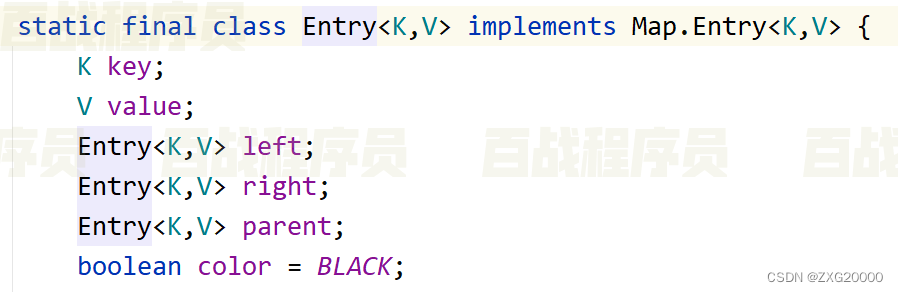
    在这里插入图片描述

    可以看到里面存储了本身数据、左节点、右节点、父节点、以及节点颜色。 TreeMap的put()/remove()方法大量使用了红黑树的理论。在本节课中,不再展开。需要了解更深入的,可以参考专门的数据结构书籍。

    TreeMap和HashMap实现了同样的接口Map,因此,用法对于调用者来说没有区别。HashMap效率高于TreeMap;在需要排序的Map时才选用TreeMap。

    46容器_ 迭代器_ Iterator迭代器介绍

    Iterator迭代器接口介绍

    Collection接口继承了Iterable接口,在该接口中包含一个名为iterator的抽象方法,所有实现了Collection接口的容器类对该方法做了具体实现。iterator方法会返回一个Iterator接口类型的迭代器对象,在该对象中包含了三个方法用于实现对单例容器的迭代处理。

    Iterator对象的工作原理:
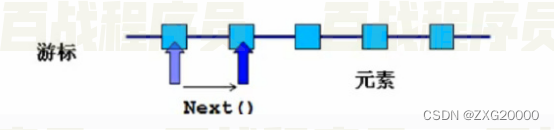
    在这里插入图片描述

    Iterator接口定义了如下方法:

    1. boolean hasNext(); //判断游标当前位置的下一个位置是否还有元素没有被遍历;
    2. Object next(); //返回游标当前位置的下一个元素并将游标移动到下一个位置;
    3. void remove(); //删除游标当前位置的元素,在执行完next后该操作只能执行一次;

    47.容器_ 迭代器_ Iterator迭代器的使用

    Iterator迭代器的使用

    迭代List接口类型容器

    public class IteratorListTest {
        public static void main(String[] args) {
            //实例化容器
            List list  = new ArrayList<>();
            list.add("a");
            list.add("b");
            list.add("c");
            //获取元素
            //获取迭代器对象
            Iterator iterator = list.iterator();
            //方式一:在迭代器中,通过while循环获取元素
            while(iterator.hasNext()){
                String value = iterator.next();
                System.out.println(value);
            }
            System.out.println("-------------------------------");
            //方法二:在迭代器中,通过for循环获取元素
            for(Iterator it = list.iterator();it.hasNext();){
                String value = it.next();
                System.out.println(value);
            }
    
    
        }
    }
    
    
    • 1
    • 2
    • 3
    • 4
    • 5
    • 6
    • 7
    • 8
    • 9
    • 10
    • 11
    • 12
    • 13
    • 14
    • 15
    • 16
    • 17
    • 18
    • 19
    • 20
    • 21
    • 22
    • 23
    • 24
    • 25
    • 26

    迭代Set接口类型容器

    public class IteratorSetTest {
        public static void main(String[] args) {
            //实例化Set类型的容器
            Set set  = new HashSet<>();
            set.add("a");
            set.add("b");
            set.add("c");
            //方式一:通过while循环
            //获取迭代器对象
            Iterator iterator = set.iterator();
            while(iterator.hasNext()){
                String value = iterator.next();
                System.out.println(value);
            }
            System.out.println("-------------------------");
            //方式二:通过for循环
            for(Iterator it = set.iterator();it.hasNext();){
                String value = it.next();
                System.out.println(value);
            }
        }
    }
    
    
    • 1
    • 2
    • 3
    • 4
    • 5
    • 6
    • 7
    • 8
    • 9
    • 10
    • 11
    • 12
    • 13
    • 14
    • 15
    • 16
    • 17
    • 18
    • 19
    • 20
    • 21
    • 22
    • 23

    48容器_ 迭代器_ Iterator迭代器删除元素

    public class IteratorRemoveTest {
        public static void main(String[] args) {
            List list = new ArrayList<>();
            list.add("a");
            list.add("b");
            list.add("c");
            list.add("d");
            Iterator iterator = list.iterator();
            while(iterator.hasNext()){
                //不要在一次循环中多次调用next方法。
                String value = iterator.next();
                iterator.remove();
            }
            System.out.println("----------------");
            for(Iterator it = list.iterator();it.hasNext();){
                System.out.println(it.next());
                list.add("dddd");
            }
        }
    }
    
    
    • 1
    • 2
    • 3
    • 4
    • 5
    • 6
    • 7
    • 8
    • 9
    • 10
    • 11
    • 12
    • 13
    • 14
    • 15
    • 16
    • 17
    • 18
    • 19
    • 20
    • 21

    49容器_ 迭代器_ 遍历集合的方法总结

    遍历List方法一:普通for循环

    for(int i=0;i
    • 1
    • 2
    • 3
    • 4
    • 5

    遍历List方法二:增强for循环(使用泛型!)

    for (String temp : list) {
        System.out.println(temp);
    }
    
    
    • 1
    • 2
    • 3
    • 4

    遍历List方法三:使用Iterator迭代器(1)

    for(Iterator iter= list.iterator();iter.hasNext();){
        String temp = (String)iter.next();
        System.out.println(temp);
    }
    
    
    • 1
    • 2
    • 3
    • 4
    • 5

    遍历List方法四:使用Iterator迭代器(2)

    Iterator  iter =list.iterator();
    while(iter.hasNext()){
        Object  obj =  iter.next();
        iter.remove();//如果要遍历时,删除集合中的元素,建议使用这种方式!
        System.out.println(obj);
    }


    • 1
    • 2
    • 3
    • 4
    • 5
    • 6
    • 7
    • 8

    遍历Set方法一:增强for循环

    for(String temp:set){
        System.out.println(temp);
    }
    
    
    • 1
    • 2
    • 3
    • 4

    遍历Set方法二:使用Iterator迭代器

    for(Iterator iter = set.iterator();iter.hasNext();){
        String temp = (String)iter.next();
        System.out.println(temp);
    }
    
    
    • 1
    • 2
    • 3
    • 4
    • 5

    遍历Map方法一:根据key获取value

    Map maps = new HashMap();
    Set  keySet =  maps.keySet();
    for(Integer id : keySet){
        System.out.println(maps.get(id).name);
    }
    
    
    • 1
    • 2
    • 3
    • 4
    • 5
    • 6

    遍历Map方法二:使用entrySet

    Set>  ss = maps.entrySet();
    for (Iterator> iterator = ss.iterator(); iterator.hasNext();) {
        Map.Entry e =  iterator.next(); 
        System.out.println(e.getKey()+"--"+e.getValue()); 
    }
    
    
    • 1
    • 2
    • 3
    • 4
    • 5
    • 6

    50.容器_Collections工具类的使用

    类 java.util.Collections 提供了对Set、List、Map进行排序、填充、查找元素的辅助方法。

    方法名说明
    void sort(List)对List容器内的元素排序,排序规则是升序。
    void shuffle(List)对List容器内的元素进行随机排列
    void reverse(List)对List容器内的元素进行逆续排列
    void fill(List, Object)用一个特定的对象重写整个List容器
    int binarySearch(List, Object)对于顺序的List容器,折半查找查找特定对象

    Collections工具类的常用方法

    public class CollectionsTest {
        public static void main(String[] args) {
            List list = new ArrayList<>();
            list.add("c");
            list.add("b");
            list.add("a");
            //对元素排序
            Collections.sort(list);
            for(String str:list){
                System.out.println(str);
            }
            System.out.println("-------------------");
    
    
            List list2 = new ArrayList<>();
            Users u = new Users("oldlu",18);
            Users u2 = new Users("sxt",22);
            Users u3 = new Users("admin",22);
            list2.add(u);
            list2.add(u2);
            list2.add(u3);
            //对元素排序
            Collections.sort(list2);
            for(Users user:list2){
                System.out.println(user);
            }
            System.out.println("-------------------");
    
    
            List list3 = new ArrayList<>();
            Student s = new Student("oldlu",18);
            Student s1 = new Student("sxt",20);
            Student s2 = new Student("admin",20);
            
            list3.add(s);
            list3.add(s1);
            list3.add(s2);
            
            Collections.sort(list3,new StudentComparator());
            for(Student student:list3){
                System.out.println(student);
            }
            System.out.println("-------------------");
    
    
            List list4 = new ArrayList<>();
            list4.add("a");
            list4.add("b");
            list4.add("c");
            list4.add("d");
    
    
            //洗牌
            Collections.shuffle(list4);
            for(String str:list4){
                System.out.println(str);
            }
        }
    }
    
    
    • 1
    • 2
    • 3
    • 4
    • 5
    • 6
    • 7
    • 8
    • 9
    • 10
    • 11
    • 12
    • 13
    • 14
    • 15
    • 16
    • 17
    • 18
    • 19
    • 20
    • 21
    • 22
    • 23
    • 24
    • 25
    • 26
    • 27
    • 28
    • 29
    • 30
    • 31
    • 32
    • 33
    • 34
    • 35
    • 36
    • 37
    • 38
    • 39
    • 40
    • 41
    • 42
    • 43
    • 44
    • 45
    • 46
    • 47
    • 48
    • 49
    • 50
    • 51
    • 52
    • 53
    • 54
    • 55
    • 56
    • 57
    • 58
    • 59
    • 60
  • 相关阅读:
    Python3 错误和异常一篇就够了
    echarts+DateV.GeoAtlas 绘制地图
    DNSPod十问党霏霏:充电桩是披着高科技外皮的传统基建?
    【Http】大文件传输 | 与tcp的关系
    62进制在短链接场景的妙用
    如何根据纬度和经度获取城市名称
    esp8266-01固件信息
    排序算法:快速排序(三种排序方式、递归和非递归)
    计算机网络 —— 应用层(DNS域名系统)
    Go 编译移动端程序
  • 原文地址:https://blog.csdn.net/ZXG20000/article/details/126322682