-
消息队列延时聚合通知的重要性
前言
从第一次使用消息队列开始,业务背景是报名系统通知到我们的系统。正常流量下数据都能正常通知过来,但遇到导入报名人时,采用了Task异步通知,数据量一大,队列就死了。当时是尽量采用同步方式,减少并发量。

后来业务上有了专门的营销系统,各种数据的增删改都要进营销系统,我采用的方式在仓储层对需要通知的表的任何更新都通知到队列,这样的方式几乎对其他业务无侵犯。
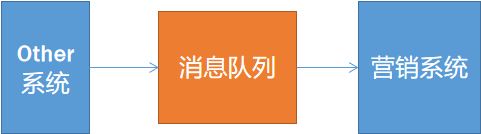
好处有,坏处也有。很多批量任务的更新如果采用同步方式频繁通知是十分浪费速度的,既影响数据的更新速度,也对队列带来了挑战。我曾经专门拉了个分支来优化批量任务,但由于需要涉及很多批量任务最后不了了之。
更合理的推送模型应该是这样,更新消息先到内存队列,积累一段时间(5秒或30秒)后,聚合到一起推送到消息队列,如下图:

挑战过去
其实也说不上是问题,原因知道,解决方法也知道。只是现状还能支撑,就没有去解决,但这些事情总要面对的。挑战过去的糟糕代码,优化提升性能,本身就是一个技术成长的过程。
迈出第一步
第一步当然是Demo,先列出代码。先贴上一个基于Rabbitmq.Client的客户端帮助代码,用于推送单条数据和多条数据。
"box-sizing: border-box; font-family: monospace; font-size: 18px; margin: 20px 0px; padding: 15px; border: 0px; background-color: rgb(244, 245, 246); white-space: pre-wrap; word-break: break-all; color: rgb(34, 34, 34); font-style: normal; font-variant-ligatures: normal; font-variant-caps: normal; font-weight: 400; letter-spacing: normal; orphans: 2; text-align: justify; text-indent: 0px; text-transform: none; widows: 2; word-spacing: 0px; -webkit-text-stroke-width: 0px; text-decoration-style: initial; text-decoration-color: initial;">public class RabbitProvider
- {
- public const string RABBITMQURL = "amqp://test:test@rabbitmq.login1.com:5672/test";
- private static IConnection conn;
- ///
- /// 获取连接。
- ///
- ///
- ///
- public static IConnection CreateConnection(string url)
- {
- ConnectionFactory factory = new ConnectionFactory();
- factory.Uri = new Uri(url);
- factory.AutomaticRecoveryEnabled = true;
- IConnection conn = factory.CreateConnection();
- return conn;
- }
- ///
- /// 单个
- ///
- ///
- public static void Publish<T>(string exchange, string queue, string route, T data)
- {
- if (conn == null || !conn.IsOpen)
- {
- conn = CreateConnection(RABBITMQURL);
- }
- using (IModel model = conn.CreateModel())
- {
- model.ExchangeDeclare(exchange, ExchangeType.Direct);
- model.QueueDeclare(queue, false, false, false, null);
- model.QueueBind(queue, exchange, route, null);
- //IBasicProperties props = ch.CreateBasicProperties();
- //FillInHeaders(props); // or similar
- // byte[] body = ComputeBody(props); // or similar
- model.BasicPublish(exchange, route, null, System.Text.Encoding.Default.GetBytes(data.ToString()));
- }
- }
- ///
- /// 多条数据
- ///
- ///
- public static void Publish<T>(string exchange, string queue, string route, List
data ) - {
- if (conn == null || !conn.IsOpen)
- {
- conn = CreateConnection(RABBITMQURL);
- }
- using (IModel model = conn.CreateModel())
- {
- model.ExchangeDeclare(exchange, ExchangeType.Direct);
- model.QueueDeclare(queue, false, false, false, null);
- model.QueueBind(queue, exchange, route, null);
- //IBasicProperties props = ch.CreateBasicProperties();
- //FillInHeaders(props); // or similar
- // byte[] body = ComputeBody(props); // or similar
- foreach (var item in data)
- {
- model.BasicPublish(exchange, route, null, System.Text.Encoding.Default.GetBytes(item.ToString()));
- }
- }
- }
- }
也许在部分人眼里能提供支持单条和多条推送的方式已经能解决绝大多数问题,看起来确实如此。但单纯的推送批量数据是有业务方发起,是对每个批量任务都有较大侵入的,虽然它很好,但不够好。接下来我们贴上基于BlockingCollection
提供的线程安全集合来完成的队列代码。 "box-sizing: border-box; font-family: monospace; font-size: 18px; margin: 20px 0px; padding: 15px; border: 0px; background-color: rgb(244, 245, 246); white-space: pre-wrap; word-break: break-all; color: rgb(34, 34, 34); font-style: normal; font-variant-ligatures: normal; font-variant-caps: normal; font-weight: 400; letter-spacing: normal; orphans: 2; text-align: justify; text-indent: 0px; text-transform: none; widows: 2; word-spacing: 0px; -webkit-text-stroke-width: 0px; text-decoration-style: initial; text-decoration-color: initial;">public class DANQueue<T> : IDANQueue<T>
- {
- private static BlockingCollection
- static DANQueue()
- {
- GlobalCollection = new BlockingCollection
- }
- ///
- /// 添加
- ///
- ///
- ///
- public static bool TryAdd(DANMessage
item ) - {
- return GlobalCollection.TryAdd(item);
- }
- ///
- /// 获取一个
- ///
- ///
- public static DANMessage
TryTake() - {
- var msg = new DANMessage
(); - if (GlobalCollection.TryTake(out msg))
- {
- return msg;
- }
- return null;
- }
- ///
- /// 获取所有
- ///
- ///
- public static List
- {
- var list = new List
- while (true)
- {
- var q = TryTake();
- if (q == null)
- {
- return list;
- }
- list.Add(q);
- }
- }
- ///
- /// 统计
- ///
- public static int Count()
- {
- return GlobalCollection.Count;
- }
- }
测试业务Demo
"box-sizing: border-box; font-family: monospace; font-size: 18px; margin: 20px 0px; padding: 15px; border: 0px; background-color: rgb(244, 245, 246); white-space: pre-wrap; word-break: break-all; color: rgb(34, 34, 34); font-style: normal; font-variant-ligatures: normal; font-variant-caps: normal; font-weight: 400; letter-spacing: normal; orphans: 2; text-align: justify; text-indent: 0px; text-transform: none; widows: 2; word-spacing: 0px; -webkit-text-stroke-width: 0px; text-decoration-style: initial; text-decoration-color: initial;">///- /// 用户
- ///
- public class User
- {
- public string Mobile { get; set; }
- public long CompanyId { get; set; }
- }
- ///
- /// 仓储
- ///
- public class Repository<TDocument> : IRepository<TDocument>
- {
- public bool Update(User user)
- {
- DANQueue
.TryAdd(new DANMessage () { Body = user, Key = user.CompanyId + user.Mobile, Type = typeof(User).Name, TimeStamp = DateTime.Now.Ticks }); - return true;
- }
- }
分别测试批量更新数据下循环通知和只通知一次耗时,代码如下:
"box-sizing: border-box; font-family: monospace; font-size: 18px; margin: 20px 0px; padding: 15px; border: 0px; background-color: rgb(244, 245, 246); white-space: pre-wrap; word-break: break-all; color: rgb(34, 34, 34); font-style: normal; font-variant-ligatures: normal; font-variant-caps: normal; font-weight: 400; letter-spacing: normal; orphans: 2; text-align: justify; text-indent: 0px; text-transform: none; widows: 2; word-spacing: 0px; -webkit-text-stroke-width: 0px; text-decoration-style: initial; text-decoration-color: initial;">public const string ExchangeStr = "fanTest";
- public const string QueueStr = "fanQueueTest";
- private static string TypeUserName = typeof(User).Name;
- static void Main(string[] args)
- {
- //这里就不引入依赖注入了。
- Repository
repository = new Repository (); - Stopwatch stopwatch = new Stopwatch();
- stopwatch.Start();
- for (var i = 0; i <= 1000; i++)
- {
- var user = new User()
- {
- CompanyId = 13232,
- Mobile = "11111" + i
- };
- repository.Update(user);
- RabbitProvider.Publish(ExchangeStr, QueueStr, TypeUserName, DANQueue
.TryTake()); - }
- stopwatch.Stop();
- Console.WriteLine($"100000UpdateWithPush-Time:" + stopwatch.ElapsedMilliseconds);
- //批量测试。
- stopwatch.Restart();
- for (var i = 0; i <= 1000; i++)
- {
- var user = new User()
- {
- CompanyId = 13232,
- Mobile = "11111" + i
- };
- repository.Update(user);
- }
- RabbitProvider.Publish(ExchangeStr, QueueStr, TypeUserName, DANQueue
.TryTakeAll()); - stopwatch.Stop();
- Console.WriteLine($"100000UpdateDelayPush-Time:" + stopwatch.ElapsedMilliseconds);
- Console.ReadLine();
- }
- }
结果如下:
- <pre style="box-sizing: border-box; font-family: monospace; font-size: 18px; margin: 20px 0px; padding: 15px; border: 0px; background-color: rgb(244, 245, 246); white-space: pre-wrap; word-break: break-all; color: rgb(34, 34, 34); font-style: normal; font-variant-ligatures: normal; font-variant-caps: normal; font-weight: 400; letter-spacing: normal; orphans: 2; text-align: justify; text-indent: 0px; text-transform: none; widows: 2; word-spacing: 0px; -webkit-text-stroke-width: 0px; text-decoration-style: initial; text-decoration-color: initial;">UpdateWithPush-Time:4103
- UpdateDelayPush-Time:73
这里列举的只是1000条,当我改成1万条的时候,队列挂了!这充分说明了延时聚合通知的重要性。相同的环境下,循环通知支撑不了1万,但聚合后只通知一次的情况下,10万数据也花了9秒。双方性能对比结果是指数级的。
<pre style="box-sizing: border-box; font-family: monospace; font-size: 18px; margin: 20px 0px; padding: 15px; border: 0px; background-color: rgb(244, 245, 246); white-space: pre-wrap; word-break: break-all; color: rgb(34, 34, 34); font-style: normal; font-variant-ligatures: normal; font-variant-caps: normal; font-weight: 400; letter-spacing: normal; orphans: 2; text-align: justify; text-indent: 0px; text-transform: none; widows: 2; word-spacing: 0px; -webkit-text-stroke-width: 0px; text-decoration-style: initial; text-decoration-color: initial;">UpdateDelayPush-Time:9671引入定时机制
上面已经对比了循环通知和聚合通知的性能,但普通的聚合十分侵入业务。每种类型的业务都需要引入代码,使用不方便,而且维护起来也麻烦。这时候可以考虑引入定时任务来处理聚合通知。先来个1百万的更新。
"box-sizing: border-box; font-family: monospace; font-size: 18px; margin: 20px 0px; padding: 15px; border: 0px; background-color: rgb(244, 245, 246); white-space: pre-wrap; word-break: break-all; color: rgb(34, 34, 34); font-style: normal; font-variant-ligatures: normal; font-variant-caps: normal; font-weight: 400; letter-spacing: normal; orphans: 2; text-align: justify; text-indent: 0px; text-transform: none; widows: 2; word-spacing: 0px; -webkit-text-stroke-width: 0px; text-decoration-style: initial; text-decoration-color: initial;">System.Timers.Timer timer = new System.Timers.Timer(5000);
- timer.Elapsed += Timer_Elapsed;
- timer.Start();
- //批量测试大量数据
- for (var i = 0; i <= 1000000; i++)
- {
- var user = new User()
- {
- CompanyId = 13232,
- Mobile = "11111" + i
- };
- repository.Update(user);
- }
定时触发的方法如下:
"box-sizing: border-box; font-family: monospace; font-size: 18px; margin: 20px 0px; padding: 15px; border: 0px; background-color: rgb(244, 245, 246); white-space: pre-wrap; word-break: break-all; color: rgb(34, 34, 34); font-style: normal; font-variant-ligatures: normal; font-variant-caps: normal; font-weight: 400; letter-spacing: normal; orphans: 2; text-align: justify; text-indent: 0px; text-transform: none; widows: 2; word-spacing: 0px; -webkit-text-stroke-width: 0px; text-decoration-style: initial; text-decoration-color: initial;">private static void Timer_Elapsed(object sender, System.Timers.ElapsedEventArgs e)- {
- var list = DANQueue
.TryTakeAll(); - if (list.Count > 0)
- {
- RabbitProvider.Publish(ExchangeStr, QueueStr, TypeUserName, list);
- }
- }
运行Debug测试,为方便显示,我减少了一些列,只显示queue名和发布速度,能达到每秒1万左右的量。
"box-sizing: border-box; font-family: monospace; font-size: 18px; margin: 20px 0px; padding: 15px; border: 0px; background-color: rgb(244, 245, 246); white-space: pre-wrap; word-break: break-all; color: rgb(34, 34, 34); font-style: normal; font-variant-ligatures: normal; font-variant-caps: normal; font-weight: 400; letter-spacing: normal; orphans: 2; text-align: justify; text-indent: 0px; text-transform: none; widows: 2; word-spacing: 0px; -webkit-text-stroke-width: 0px; text-decoration-style: initial; text-decoration-color: initial;">| test | [fanQueueTest](/#/queues/test/fanQueueTest) | 10,569/s |
- | test | [fanQueueTest](/#/queues/test/fanQueueTest) | 12,336/s |
谈到此时的推送速度,再来回顾下刚开始循环通知的速度,每秒250左右,可见速度提升了50倍!
"box-sizing: border-box; font-family: monospace; font-size: 18px; margin: 20px 0px; padding: 15px; border: 0px; background-color: rgb(244, 245, 246); white-space: pre-wrap; word-break: break-all; color: rgb(34, 34, 34); font-style: normal; font-variant-ligatures: normal; font-variant-caps: normal; font-weight: 400; letter-spacing: normal; orphans: 2; text-align: justify; text-indent: 0px; text-transform: none; widows: 2; word-spacing: 0px; -webkit-text-stroke-width: 0px; text-decoration-style: initial; text-decoration-color: initial;">| test | [fanQueueTest](/#/queues/test/fanQueueTest) | 249/s |
源码
DAN : DelayAggregationNotice 延时聚合通知组件
总结
经过以上对比,性能从几千就挂到支撑到每秒上万的推送量,并且支撑百万(更高级别没测试)以上级更新依然健壮运行。
结果如此明显,如果还没有动力改变,那还有什么能拯救你呢?
这里的Timer以后可以替换成hangfire,因为hangfire有UI监控,可以查看状态。hangfire貌似不推荐大数据量的参数,这些细节问题以后可以根据测试情况去取舍。
以上仅为了测试,如果要变成通用可复用,还有更长的路需要走,但比起分布式追踪简单多了,一步一步来,用目标约束自己慢慢实现。
-
相关阅读:
ffmpeg把RTSP流分段录制成MP4,如果能把ffmpeg.exe改成ffmpeg.dll用,那音视频开发的难度直接就降一个维度啊
老杨说运维 | 直播回顾(二):以数据治理为基础的建设实践分享
风控规则引擎(一):Java 动态脚本
GLTF编辑器如何合并相同材质的Mesh
C++标准模板(STL)- 类型支持 (属性查询,获取类型的对齐要求)
Linux的ssh服务远程管理主机
MySQL 内部组件结构以及SQL执行逻辑
使用 mapstructure 解析 json
安防视频监控/视频集中存储EasyCVR平台级联时,下级平台未发流是什么原因?
css相关知识整理
- 原文地址:https://blog.csdn.net/Java_ttcd/article/details/126316497
