-
html + css + js 怎么实现主题样式的切换?
需求
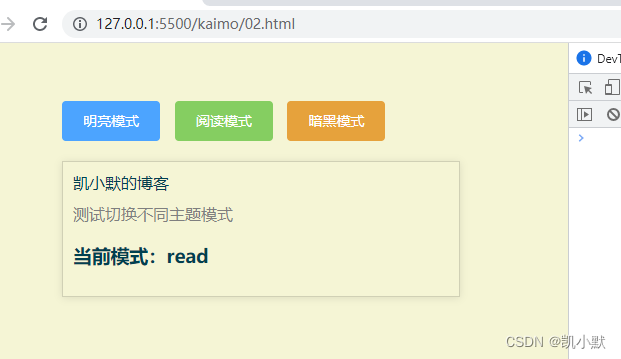
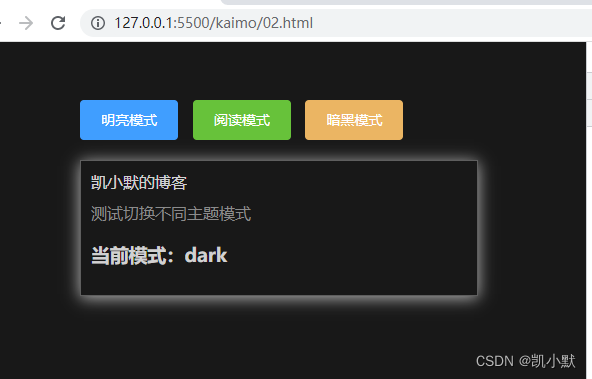
需要实现下面点击不同按钮进行主题样式的切换。

代码实现
DOCTYPE html> <html lang="en"> <head> <meta charset="UTF-8"> <meta http-equiv="X-UA-Compatible" content="IE=edge"> <meta name="viewport" content="width=device-width, initial-scale=1.0"> <title>Documenttitle> <link rel="stylesheet" href="https://cdn.bootcdn.net/ajax/libs/element-ui/2.15.9/theme-chalk/index.css"> <style> body { padding: 50px 100px; background-color: var(--background-color); } .box { margin-top: 20px; padding: 10px; border: 1px solid var(--border-color); box-shadow: var(--box-shadow) } .box:hover { box-shadow: var(--box-shadow-hover) } .box .text { color: var(--text-color); } .box .text-sub { margin-top: 10px; color: var(--text-color-sub); } style> head> <body> <div class="btn"> <button mode="light" class="el-button el-button--primary">明亮模式button> <button mode="read" class="el-button el-button--success">阅读模式button> <button mode="dark" class="el-button el-button--warning">暗黑模式button> div> <div class="box"> <div class="text">凯小默的博客div> <div class="text-sub">测试切换不同主题模式div> <h3 class="text">当前模式:<span class="cur-mode">span>h3> div> <script> // 模式配置 const modeOptions = { light: { '--background-color': '#fff', '--box-shadow': '0 1px 8px 0 rgba(0, 0, 0, 0.1)', '--box-shadow-hover': '0 2px 16px 0 rgba(0, 0, 0, 0.2)', '--text-color': '#242424', '--text-color-sub': '#7F7F7F', '--border-color': '#eaecef', }, read: { '--background-color': '#f5f5d5', '--box-shadow': '0 1px 8px 0 rgba(0, 0, 0, 0.1)', '--box-shadow-hover': '0 2px 16px 0 rgba(0, 0, 0, 0.2)', '--text-color': '#004050', '--text-color-sub': '#7F7F7F', '--border-color': 'rgba(0, 0, 0, 0.15)', }, dark: { '--background-color': '#181818', '--box-shadow': '0 1px 8px 0 rgba(255, 255, 255, .6)', '--box-shadow-hover': '0 2px 16px 0 rgba(255, 255, 255, .7)', '--text-color': 'rgba(255, 255, 255, .8)', '--text-color-sub': '#8B8B8B', '--border-color': 'rgba(255, 255, 255, .3)', } } // 设置模式 function setMode(mode) { const rootElement = document.querySelector(':root'); const options = modeOptions[mode]; // 遍历设置 for (const k in options) { rootElement.style.setProperty(k, options[k]); } rootElement.setAttribute("data-theme", mode); // 当前模式 const curMode = document.querySelector('.cur-mode'); curMode.innerHTML = mode; } // 初始设置为明亮模式 setMode("light"); document.querySelector(".btn").addEventListener("click", (e) => { setMode(e.target.getAttribute("mode")); }) script> body> html>- 1
- 2
- 3
- 4
- 5
- 6
- 7
- 8
- 9
- 10
- 11
- 12
- 13
- 14
- 15
- 16
- 17
- 18
- 19
- 20
- 21
- 22
- 23
- 24
- 25
- 26
- 27
- 28
- 29
- 30
- 31
- 32
- 33
- 34
- 35
- 36
- 37
- 38
- 39
- 40
- 41
- 42
- 43
- 44
- 45
- 46
- 47
- 48
- 49
- 50
- 51
- 52
- 53
- 54
- 55
- 56
- 57
- 58
- 59
- 60
- 61
- 62
- 63
- 64
- 65
- 66
- 67
- 68
- 69
- 70
- 71
- 72
- 73
- 74
- 75
- 76
- 77
- 78
- 79
- 80
- 81
- 82
- 83
- 84
- 85
- 86
- 87
- 88
- 89
- 90
- 91
- 92
效果
切换阅读模式如下:
切换暗黑模式如下:
注意:该方案不支持 ie 浏览器。
-
相关阅读:
你不知道的Linux shell操作
【温故而知新】构建高可用Linux服务器(二)
在Linux上实现ECAT主站
域名的理解
liunx的三个时间atime,mtime,ctime详细说明与使用场景
万字详解Spring相关组件配置原理
基于Springboot的超市管理系统毕业设计-附源码
Pytorch的variable和tensor区别
笔记/日记应用 memos
javascript:图片懒加载
- 原文地址:https://blog.csdn.net/kaimo313/article/details/126292798
