-
22-08-12 西安 尚医通(05) JWT令牌、阿里云发送短信验证码
JWT令牌
1、传统的用户身份验证
1、tomcat为客户端创建session.
2、客户端存储jsessionId的cookie
3、登录后把userinfo存储到session中,以后就能根据这个来判断当前用户有没有登录
缺点:分布式场景下,session不一致问题
2种解决方式
解决:引入redis,redis存储session,tomcat不再存储session。缺点使用了额外的技术
解决:使用jwt令牌机制,户端自己存储身份信息,服务器不再保存会话数据。
jwt令牌使用原理
客户端每次发请求,都需要携带该令牌,服务端就会校验令牌,从中提取想要的用户信息(用户名、用户id...)
2、JWT介绍
JWT:Json Web Token,是基于Json的一个公开规范,这个规范允许我们使用JWT在用户和服务器之间传递安全可靠的信息。
使用场景:认证
使用起来就是,由服务端根据规范生成一个jwt令牌(token),并且发放给客户端。此时客户端请求服务端的时候就可以携带着令牌,以令牌来证明自己的身份信息。
JWT令牌的组成部分:
(1)头部 header
一个json字符串,存储当前令牌名称,以及加密算法,
{"typ":"JWT","alg":"HS256"}
经过Base64编码,得到如下值
eyJ0eXAiOiJKV1QiLCJhbGciOiJIUzI1NiJ9
(2)载荷 payload
一个json字符串,存储一些自定义的信息
{"sub":"1234567890","name":"John Doe","admin":true}
经过Base64编码,得到如下值
eyJzdWIiOiIxMjM0NTY3ODkwIiwibmFtZSI6IkpvaG4gRG9lIiwiYWRtaW4iOnRydWV9
(3)签名
这个部分需要base64编码后的header和base64编码后的payload使用.(点)连接组成的字符串,然后通过header中声明的加密方式进行加盐secret组合加密,然后就构成了jwt的第三部分。
来自老师的灵魂画作:
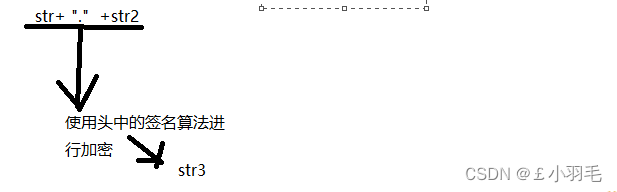
将这三部分用.(点)连接成一个完整的字符串,构成了最终的jwt令牌。
老师的灵魂画作:

注:base64编码,并不是加密,只是把明文信息变成了不可见的字符串。但是其实只要用一些工具就可以把base64编码解成明文,所以不要在JWT中放入涉及私密的信息
3、JWT的入门使用
1.引入依赖
- <dependency>
- <groupId>io.jsonwebtokengroupId>
- <artifactId>jjwtartifactId>
- dependency>
2.在util包下添加一个JWT工具类
- public class JwtHelper {
- //令牌过期时间
- private static long tokenExpiration = 24*60*60*1000;
- private static String tokenSignKey = "123456";
- public static String createToken(Long userId, String userName) {
- String token = Jwts.builder()
- .setSubject("YYGH-USER")
- .setExpiration(new Date(System.currentTimeMillis() + tokenExpiration))
- .claim("userId", userId)
- .claim("userName", userName)
- .signWith(SignatureAlgorithm.HS512, tokenSignKey)
- .compressWith(CompressionCodecs.GZIP)
- .compact();
- return token;
- }
- public static Long getUserId(String token) {
- if(StringUtils.isEmpty(token)) return null;
- Jws
claimsJws = Jwts.parser().setSigningKey(tokenSignKey).parseClaimsJws(token); - Claims claims = claimsJws.getBody();
- Integer userId = (Integer)claims.get("userId");
- return userId.longValue();
- }
- public static String getUserName(String token) {
- if(StringUtils.isEmpty(token)) return "";
- Jws
claimsJws - = Jwts.parser().setSigningKey(tokenSignKey).parseClaimsJws(token);
- Claims claims = claimsJws.getBody();
- return (String)claims.get("userName");
- }
- public static void main(String[] args) {
- String token = JwtHelper.createToken(1L, "55");
- System.out.println(token);
- System.out.println(JwtHelper.getUserId(token));
- System.out.println(JwtHelper.getUserName(token));
- }
- }
你可以用我写在工具类里的main方法,也可以自己去自定义测试
运行该main方法,主要就是使用这三个方法。

控制台打印结果如下:

阿里云短信验证码
【官方106三网短信】短信平台/短信免费试用/短信验证码/短信通知/短信群发推广—短信API接口对接【最新版】_数据API_最新活动_API-云市场-阿里云
1、阿里云购买短信服务和API调试
1、扫码登录(用支付宝)、亏快速的实名认证
2、在在阿里云云市场搜索''短信API'',
使用官方推荐的短信平台:鼎信,第一次可以免费领取5条短信

3、在云市场中可以查看已购买的短信服务

4、网页调试
这部分我没找到,,服了。不管是官方文档还是老师笔记,怎么都写的不清不楚的,这也是我最痛恨的地方了
 在加载出来的页面中的中部,选择去调试
只需要在这里配置一下红色框圈住的这俩个参数
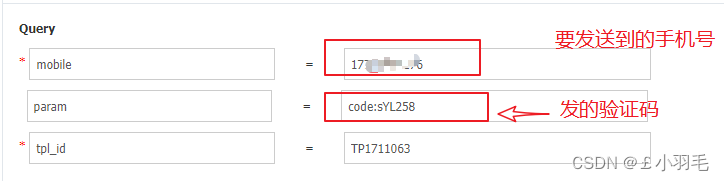
接着在手机上就能收到这样的短信了

2、用java代码实现发送短信验证码
1、在网站是能看到示例代码的。直接复制走,稍微改一下就能用了

2、引入依赖
- <dependencies>
- <dependency>
- <groupId>org.apache.httpcomponentsgroupId>
- <artifactId>httpclientartifactId>
- dependency>
- <dependency>
- <groupId>org.apache.httpcomponentsgroupId>
- <artifactId>httpcoreartifactId>
- dependency>
- <dependency>
- <groupId>org.springframework.bootgroupId>
- <artifactId>spring-boot-starter-data-redisartifactId>
- dependency>
- dependencies>
3、util包下添加工具类 HttpUtils
- package com.atguigu.yygh.msm.util;
- import org.apache.commons.lang.StringUtils;
- import org.apache.http.HttpResponse;
- import org.apache.http.NameValuePair;
- import org.apache.http.client.HttpClient;
- import org.apache.http.client.entity.UrlEncodedFormEntity;
- import org.apache.http.client.methods.HttpDelete;
- import org.apache.http.client.methods.HttpGet;
- import org.apache.http.client.methods.HttpPost;
- import org.apache.http.client.methods.HttpPut;
- import org.apache.http.conn.ClientConnectionManager;
- import org.apache.http.conn.scheme.Scheme;
- import org.apache.http.conn.scheme.SchemeRegistry;
- import org.apache.http.conn.ssl.SSLSocketFactory;
- import org.apache.http.entity.ByteArrayEntity;
- import org.apache.http.entity.StringEntity;
- import org.apache.http.impl.client.DefaultHttpClient;
- import org.apache.http.message.BasicNameValuePair;
- import javax.net.ssl.SSLContext;
- import javax.net.ssl.TrustManager;
- import javax.net.ssl.X509TrustManager;
- import java.io.UnsupportedEncodingException;
- import java.net.URLEncoder;
- import java.security.KeyManagementException;
- import java.security.NoSuchAlgorithmException;
- import java.security.cert.X509Certificate;
- import java.util.ArrayList;
- import java.util.List;
- import java.util.Map;
- public class HttpUtils {
- /**
- * get
- *
- * @param host
- * @param path
- * @param method
- * @param headers
- * @param querys
- * @return
- * @throws Exception
- */
- public static HttpResponse doGet(String host, String path, String method,
- Map
- Map
- throws Exception {
- HttpClient httpClient = wrapClient(host);
- HttpGet request = new HttpGet(buildUrl(host, path, querys));
- for (Map.Entry
- request.addHeader(e.getKey(), e.getValue());
- }
- return httpClient.execute(request);
- }
- /**
- * post form
- *
- * @param host
- * @param path
- * @param method
- * @param headers
- * @param querys
- * @param bodys
- * @return
- * @throws Exception
- */
- public static HttpResponse doPost(String host, String path, String method,
- Map
- Map
- Map
- throws Exception {
- HttpClient httpClient = wrapClient(host);
- HttpPost request = new HttpPost(buildUrl(host, path, querys));
- for (Map.Entry
- request.addHeader(e.getKey(), e.getValue());
- }
- if (bodys != null) {
- List
nameValuePairList = new ArrayList (); - for (String key : bodys.keySet()) {
- nameValuePairList.add(new BasicNameValuePair(key, bodys.get(key)));
- }
- UrlEncodedFormEntity formEntity = new UrlEncodedFormEntity(nameValuePairList, "utf-8");
- formEntity.setContentType("application/x-www-form-urlencoded; charset=UTF-8");
- request.setEntity(formEntity);
- }
- return httpClient.execute(request);
- }
- /**
- * Post String
- *
- * @param host
- * @param path
- * @param method
- * @param headers
- * @param querys
- * @param body
- * @return
- * @throws Exception
- */
- public static HttpResponse doPost(String host, String path, String method,
- Map
- Map
- String body)
- throws Exception {
- HttpClient httpClient = wrapClient(host);
- HttpPost request = new HttpPost(buildUrl(host, path, querys));
- for (Map.Entry
- request.addHeader(e.getKey(), e.getValue());
- }
- if (StringUtils.isNotBlank(body)) {
- request.setEntity(new StringEntity(body, "utf-8"));
- }
- return httpClient.execute(request);
- }
- /**
- * Post stream
- *
- * @param host
- * @param path
- * @param method
- * @param headers
- * @param querys
- * @param body
- * @return
- * @throws Exception
- */
- public static HttpResponse doPost(String host, String path, String method,
- Map
- Map
- byte[] body)
- throws Exception {
- HttpClient httpClient = wrapClient(host);
- HttpPost request = new HttpPost(buildUrl(host, path, querys));
- for (Map.Entry
- request.addHeader(e.getKey(), e.getValue());
- }
- if (body != null) {
- request.setEntity(new ByteArrayEntity(body));
- }
- return httpClient.execute(request);
- }
- /**
- * Put String
- * @param host
- * @param path
- * @param method
- * @param headers
- * @param querys
- * @param body
- * @return
- * @throws Exception
- */
- public static HttpResponse doPut(String host, String path, String method,
- Map
- Map
- String body)
- throws Exception {
- HttpClient httpClient = wrapClient(host);
- HttpPut request = new HttpPut(buildUrl(host, path, querys));
- for (Map.Entry
- request.addHeader(e.getKey(), e.getValue());
- }
- if (StringUtils.isNotBlank(body)) {
- request.setEntity(new StringEntity(body, "utf-8"));
- }
- return httpClient.execute(request);
- }
- /**
- * Put stream
- * @param host
- * @param path
- * @param method
- * @param headers
- * @param querys
- * @param body
- * @return
- * @throws Exception
- */
- public static HttpResponse doPut(String host, String path, String method,
- Map
- Map
- byte[] body)
- throws Exception {
- HttpClient httpClient = wrapClient(host);
- HttpPut request = new HttpPut(buildUrl(host, path, querys));
- for (Map.Entry
- request.addHeader(e.getKey(), e.getValue());
- }
- if (body != null) {
- request.setEntity(new ByteArrayEntity(body));
- }
- return httpClient.execute(request);
- }
- /**
- * Delete
- *
- * @param host
- * @param path
- * @param method
- * @param headers
- * @param querys
- * @return
- * @throws Exception
- */
- public static HttpResponse doDelete(String host, String path, String method,
- Map
- Map
- throws Exception {
- HttpClient httpClient = wrapClient(host);
- HttpDelete request = new HttpDelete(buildUrl(host, path, querys));
- for (Map.Entry
- request.addHeader(e.getKey(), e.getValue());
- }
- return httpClient.execute(request);
- }
- private static String buildUrl(String host, String path, Map
- StringBuilder sbUrl = new StringBuilder();
- sbUrl.append(host);
- if (!StringUtils.isBlank(path)) {
- sbUrl.append(path);
- }
- if (null != querys) {
- StringBuilder sbQuery = new StringBuilder();
- for (Map.Entry
- if (0 < sbQuery.length()) {
- sbQuery.append("&");
- }
- if (StringUtils.isBlank(query.getKey()) && !StringUtils.isBlank(query.getValue())) {
- sbQuery.append(query.getValue());
- }
- if (!StringUtils.isBlank(query.getKey())) {
- sbQuery.append(query.getKey());
- if (!StringUtils.isBlank(query.getValue())) {
- sbQuery.append("=");
- sbQuery.append(URLEncoder.encode(query.getValue(), "utf-8"));
- }
- }
- }
- if (0 < sbQuery.length()) {
- sbUrl.append("?").append(sbQuery);
- }
- }
- return sbUrl.toString();
- }
- private static HttpClient wrapClient(String host) {
- HttpClient httpClient = new DefaultHttpClient();
- if (host.startsWith("https://")) {
- sslClient(httpClient);
- }
- return httpClient;
- }
- private static void sslClient(HttpClient httpClient) {
- try {
- SSLContext ctx = SSLContext.getInstance("TLS");
- X509TrustManager tm = new X509TrustManager() {
- public X509Certificate[] getAcceptedIssuers() {
- return null;
- }
- public void checkClientTrusted(X509Certificate[] xcs, String str) {
- }
- public void checkServerTrusted(X509Certificate[] xcs, String str) {
- }
- };
- ctx.init(null, new TrustManager[] { tm }, null);
- SSLSocketFactory ssf = new SSLSocketFactory(ctx);
- ssf.setHostnameVerifier(SSLSocketFactory.ALLOW_ALL_HOSTNAME_VERIFIER);
- ClientConnectionManager ccm = httpClient.getConnectionManager();
- SchemeRegistry registry = ccm.getSchemeRegistry();
- registry.register(new Scheme("https", 443, ssf));
- } catch (KeyManagementException ex) {
- throw new RuntimeException(ex);
- } catch (NoSuchAlgorithmException ex) {
- throw new RuntimeException(ex);
- }
- }
- }
4、写一个main方法测试一下短信服务
- public static void main(String[] args) {
- String host = "http://dingxin.market.alicloudapi.com";
- String path = "/dx/sendSms";
- String method = "POST";
- //只需要改你自己的appcode,我这里也随便写了
- String appcode = "f346ae38f2b84f6498XXXXXXXXXXX";
- Map
- //最后在header中的格式(中间是英文空格)为Authorization:APPCODE 83359fd73fe94948385f570e3c139105
- headers.put("Authorization", "APPCODE " + appcode);
- Map
- //写你自己的手机号,我这里就随便写了
- querys.put("mobile", "1839XXXXXX");
- querys.put("param", "code:1234");
- querys.put("tpl_id", "TP1711063");
- Map
- try {
- /**
- * 重要提示如下:
- * HttpUtils请从
- * https://github.com/aliyun/api-gateway-demo-sign-java/blob/master/src/main/java/com/aliyun/api/gateway/demo/util/HttpUtils.java
- * 下载
- *
- * 相应的依赖请参照
- * https://github.com/aliyun/api-gateway-demo-sign-java/blob/master/pom.xml
- */
- HttpResponse response = HttpUtils.doPost(host, path, method, headers, querys, bodys);
- System.out.println(response.toString());
- //获取response的body
- //System.out.println(EntityUtils.toString(response.getEntity()));
- } catch (Exception e) {
- e.printStackTrace();
- }
- }
3、实现完整的登录功能
该部分,我们将使用JWT和阿里云短信验证完整登录过程的短信验证和返给前端token,实现用户登录认证
关于redis的配置文件啥的就不多讲了

整体思路:
我们调用阿里云服务发送短信验证码,发送成功的话把验证码保存到redis中没设置5分钟的有效期。
在这个页面中:点击获取验证码

点击“获取验证码”完,按钮文字会变为“马上登录” ,输入框的提示也变为“请输入验证码”
“获取验证码”过程会调用如下接口: @GetMapping(value = "/send/{phone}")
把验证码存储到redis中一份,供一会做登录时的“验证码校验”。这里有个细节,RedisTemplate是有泛型的
- @Autowired
- private MsmService msmService;
- @Autowired
- private RedisTemplate
- @GetMapping(value = "/send/{phone}")
- public R code(@PathVariable String phone) {
- //在有效期内,验证码不能重复发送
- String code = redisTemplate.opsForValue().get(phone);
- if(!StringUtils.isEmpty(code)) return R.ok();
- //生成验证码
- code = (long) (new Random().nextDouble() * 10000) +"";
- //调用方法发送
- boolean isSend = msmService.send(phone, code);
- if(isSend) {
- //发送成功,验证码放到redis,设置有效时间
- redisTemplate.opsForValue().set(phone, code,5, TimeUnit.MINUTES);
- return R.ok();
- } else {
- return R.error().message("发送短信失败");
- }
- }
在service中实现了阿里云短信发送,实际上跟我们刚刚测试的短信发送一毛一样
- //发送验证码
- @Override
- public boolean send(String phone, String code) {
- String host = "http://dingxin.market.alicloudapi.com";
- String path = "/dx/sendSms";
- String method = "POST";
- String appcode = "f346ae38f2b84f649858630e32a79280";
- Map
- //Authorization:APPCODE 83359fd73fe94948385f570e3c139105
- headers.put("Authorization", "APPCODE " + appcode);
- Map
- querys.put("mobile", phone);
- querys.put("param", "code:" + code);
- querys.put("tpl_id", "TP1711063");
- Map
- try {
- HttpResponse response = HttpUtils.doPost(host, path, method, headers,
- querys, bodys);
- System.out.println(response.toString());
- return true;
- } catch (Exception e) {
- e.printStackTrace();
- return false;
- }
- }
2、接着输入完验证码,点击马上登录,按钮文字会变为“正在提交”,
“马上登录”调用的接口是 @PostMapping("login")
controller层
- @ApiOperation(value = "会员登录")
- @PostMapping("login")
- public R login(@RequestBody LoginVo loginVo) {
- Map
- return R.ok().data(info);
- }
service实现类层,校验验证码以及生成JWT令牌返回给前端
- @Service
- public class UserInfoServiceImpl extends ServiceImpl
- @Autowired
- private RedisTemplate
- @Override
- public Map
- //1.校验手机号和验证码不能为空
- String phone = loginVo.getPhone();
- String code = loginVo.getCode();
- //校验参数
- if(StringUtils.isEmpty(phone) ||
- StringUtils.isEmpty(code)) {
- throw new YyghException("数据为空",20001);
- }
- //2.从redis中获取验证码,校验验证码
- String mobileCode = redisTemplate.opsForValue().get(phone);
- if(!code.equals(mobileCode)) {
- throw new YyghException("验证码失败",20001);
- }
- //3.用手机号去查询这个用户
- QueryWrapper
queryWrapper = new QueryWrapper<>(); - queryWrapper.eq("phone",phone);
- UserInfo userInfo = baseMapper.selectOne(queryWrapper);
- //4.判断是注册还是登录
- if (userInfo==null) {
- //注册
- userInfo = new UserInfo();
- userInfo.setPhone(loginVo.getPhone());
- userInfo.setName("");//用户真实姓名
- userInfo.setStatus(1);//这行很有必要,只有主键才自动回填
- this.save(userInfo);
- }
- //5.校验是否被禁用
- if(userInfo.getStatus() == 0) {
- throw new YyghException("用户已经禁用",20001);
- }
- //6.给前端返回一个map,包含name和token令牌
- Map
- String name=userInfo.getName();
- if (StringUtils.isEmpty(name)) {
- name=userInfo.getNickName();
- if(StringUtils.isEmpty(name)){
- name=userInfo.getPhone();
- }
- }
- String token = JwtHelper.createToken(userInfo.getId(), userInfo.getName());
- // JwtHelper.createToken(userInfo.getId(),name);
- map.put("name",name);
- map.put("token",token);
- return map;
- }
- }
一会就会重新加载页面,并把后端返回的name和token放在cookie中。

如果使用postman测试,参考如下
1.先调用发送验证码的服务,此时就会在redis中存储键为手机号码,值为验证码的k-v键值对

2.再调用登录的空接口
1.发送错误的验证码,返回验证码失败

2、发送正确的验证码,拿到令牌

-
相关阅读:
【STL***vector容器一】
玄机-第二章日志分析-apache日志分析
代码随想录训练营第35天|LeetCode 860.柠檬水找零、406.根据身高重建队列、452. 用最少数量的箭引爆气球
当我们在谈论构造函数注入的时候我们在谈论什么
「技术」智能温室可升降吊挂式草莓立体无土栽培技术分析
算法训练营day49|动态规划 part10:(LeetCode 121. 买卖股票的最佳时机、122.买卖股票的最佳时机II)
MFC Windows 程序设计[338]之调用系统绘图程序(附源码)
报错 - 找不到模块“@/...“或其相应的类型声明
【QT】QT 按钮保持按下时的样式
Quartus乒乓球游戏控制器VHDL
- 原文地址:https://blog.csdn.net/m0_56799642/article/details/126309118

- 最新文章
-
沪漂五周年了:我越来越迷茫了
Agentic Skill Routing 实战:别再把所有 Skill 塞进 AI Agent 上下文
MySQL-Seconds_behind_master的精度误差
[MAF预定义ChatClient中间件-03]CachingChatClient——利用缓存省钱省时间
AI的至暗历史:从万众期待到被政府撤资,AI的两次死亡徘徊
Agent OS :五种驯服不确定性的范式
PortSwigger SQL注入LAB11
数据库即时编译JIT
[Begin]AI Learn Data Day 0
深度学习进阶(二十七)现代 LLM 的核心架构设计其二:SwiGLU