-
Android学习笔记 41. Gson
Android学习笔记
Android常用框架——Json解析框架
41. Gson
41.1 Gson简介
JSON是一种轻量级的数据交换格式。易于人阅读和编写,同时也易于机器解析和生成。
Gson是Google提供的用来在Java对象和JSON数据之间进行映射的Java类库,可以将一个JSON字符串转成一个Java对象(反序列化),或者反过来(序列化)。
官方地址:https://github.com/google/gson

最新版本

引入依赖
dependencies { implementation 'com.google.code.gson:gson:2.9.1' }- 1
- 2
- 3

同步
41.2 Java对象序列化与反序列化
定义一个user类
package com.dingjiaxiong.mygson.bean; import com.google.gson.annotations.Expose; import com.google.gson.annotations.SerializedName; public class User { @Expose private String userName; @Expose private String password; @Expose private int age; @Expose private boolean isStudent; @Expose private Job job; //serialize是否参与序列化, deserialize是否参与反序列化 @Expose(serialize = false,deserialize = false) private int test1; private transient int test2; //无法以class作为字段名 @SerializedName("class") private int cls; public User(String userName, String password, int age, boolean isStudent) { this.userName = userName; this.password = password; this.age = age; this.isStudent = isStudent; } }- 1
- 2
- 3
- 4
- 5
- 6
- 7
- 8
- 9
- 10
- 11
- 12
- 13
- 14
- 15
- 16
- 17
- 18
- 19
- 20
- 21
- 22
- 23
- 24
- 25
- 26
- 27
- 28
- 29
- 30
- 31
- 32
- 33
- 34
- 35
测试
package com.dingjiaxiong.mygson; import com.dingjiaxiong.mygson.bean.User; import com.google.gson.Gson; import org.junit.Test; public class AnnotationUnitTest { @Test public void testObject() { //java对象 User u1 = new User("dingjiaxiong","123",22,true); //Gson提供的Gson对象 Gson gson = new Gson(); //序列化: 对象 → json String json = gson.toJson(u1); System.out.println("序列化:" + json); //反序列化 : json → 对象 User u2 = gson.fromJson(json,User.class); System.out.println("反序列化:" + u2); } }- 1
- 2
- 3
- 4
- 5
- 6
- 7
- 8
- 9
- 10
- 11
- 12
- 13
- 14
- 15
- 16
- 17
- 18
- 19
- 20
- 21
- 22
- 23
- 24
运行
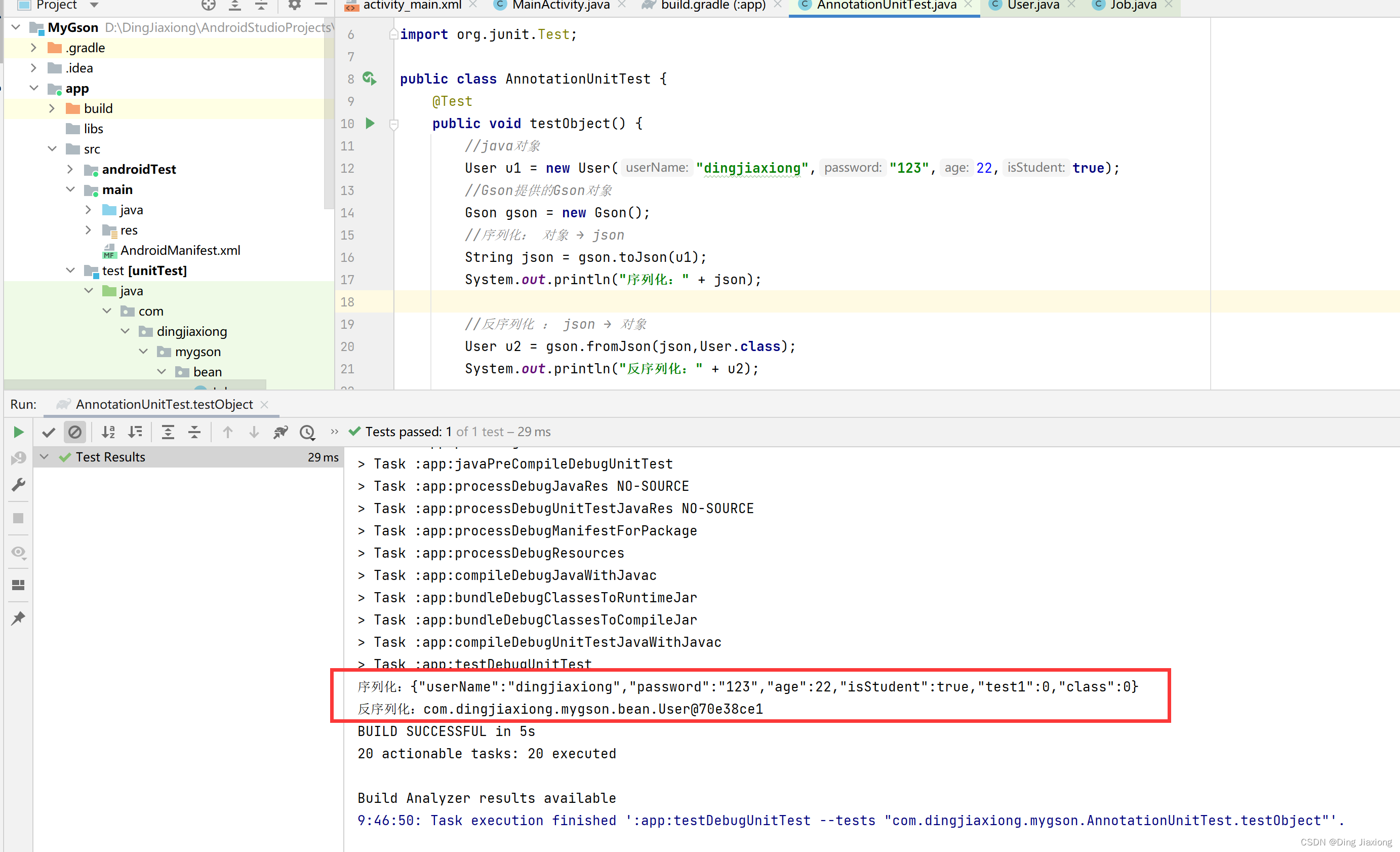
41.3 Java嵌套对象序列化与反序列化
往User类中增加字段,Job(工作name,薪资salary),再次对User类型对象进行序列化与反序列化。
Job类
package com.dingjiaxiong.mygson.bean; public class Job { private String name; private int salary; public Job(String name, int salary) { this.name = name; this.salary = salary; } @Override public String toString() { return "Job{" + "name='" + name + '\'' + ", salary=" + salary + '}'; } }- 1
- 2
- 3
- 4
- 5
- 6
- 7
- 8
- 9
- 10
- 11
- 12
- 13
- 14
- 15
- 16
- 17
- 18
- 19
- 20

User类
package com.dingjiaxiong.mygson.bean; import com.google.gson.annotations.Expose; import com.google.gson.annotations.SerializedName; public class User { @Expose private String userName; @Expose private String password; @Expose private int age; @Expose private boolean isStudent; @Expose private Job job; //serialize是否参与序列化, deserialize是否参与反序列化 @Expose(serialize = false,deserialize = false) private int test1; private transient int test2; //无法以class作为字段名 @SerializedName("class") private int cls; public User(String userName, String password, int age, boolean isStudent) { this.userName = userName; this.password = password; this.age = age; this.isStudent = isStudent; } public void setJob(Job job) { this.job = job; } }- 1
- 2
- 3
- 4
- 5
- 6
- 7
- 8
- 9
- 10
- 11
- 12
- 13
- 14
- 15
- 16
- 17
- 18
- 19
- 20
- 21
- 22
- 23
- 24
- 25
- 26
- 27
- 28
- 29
- 30
- 31
- 32
- 33
- 34
- 35
- 36
- 37
- 38
- 39
测试
@Test public void testNestedObject() { //java对象 User u1 = new User("dingjiaxiong","123",22,true); Job job = new Job("打工人",20000); u1.setJob(job); //Gson对象 Gson gson = new Gson(); //序列化 String json = gson.toJson(u1); System.out.println("序列化:" + json); //反序列化 User u2 = gson.fromJson(json,User.class); System.out.println("反序列化:" + u2); }- 1
- 2
- 3
- 4
- 5
- 6
- 7
- 8
- 9
- 10
- 11
- 12
- 13
- 14
- 15
- 16
- 17
运行

41.4 Array数组的序列化与反序列化
数组类型对象和普通对象一样,直接使用toJson和fromJson即可完成。
测试
package com.dingjiaxiong.mygson; import com.dingjiaxiong.mygson.bean.User; import com.google.gson.Gson; import org.junit.Test; public class ArrayUnitTest { @Test public void testArray() { User[] users1 = new User[3]; //java对象 users1[0] = new User("丁家雄","123",22,true); users1[1] = new User("凤凤","520",22,true); // Gson对象 Gson gson = new Gson(); //序列化 String json = gson.toJson(users1); System.out.println("序列化:" + json); //反序列化 User[] users2 = gson.fromJson(json,User[].class); System.out.println(users2[0]); System.out.println(users2[1]); System.out.println(users2[2]); } }- 1
- 2
- 3
- 4
- 5
- 6
- 7
- 8
- 9
- 10
- 11
- 12
- 13
- 14
- 15
- 16
- 17
- 18
- 19
- 20
- 21
- 22
- 23
- 24
- 25
- 26
- 27
- 28
- 29
- 30
- 31
运行

41.5 List集合的序列化与反序列化
List集合类型对象需要注意的是,在反序列化时因为Java是伪泛型。
导致无法反序列化为List
,需要使用TypeToken完成反序列化。 测试
@Test public void testListObject() { List<User> list1 = new ArrayList<>(); list1.add(new User("丁家雄","123",22,true)); list1.add(new User("凤凤","520",18,true)); list1.add(null); //Gson对象 Gson gson = new Gson(); //序列化 String json = gson.toJson(list1); System.out.println("序列化:" + json); //反序列化 Type type = new TypeToken<List<User>>() { }.getType(); List<User> list2 = gson.fromJson(json , type); System.out.println(list2.get(0)); System.out.println(list2.get(1)); System.out.println(list2.get(2)); }- 1
- 2
- 3
- 4
- 5
- 6
- 7
- 8
- 9
- 10
- 11
- 12
- 13
- 14
- 15
- 16
- 17
- 18
- 19
- 20
- 21
- 22
- 23
- 24

41.6 Map和Set的序列化与反序列化
Map集合类型对象在反序列化时与List一样,需要使用TypeToken完成反序列化。
测试
package com.dingjiaxiong.mygson; import com.dingjiaxiong.mygson.bean.User; import com.google.gson.Gson; import com.google.gson.reflect.TypeToken; import org.junit.Test; import java.lang.reflect.Type; import java.util.HashMap; import java.util.Map; public class MapSetUnitTest { @Test public void MapTest() { Map<String , User> map1 = new HashMap<>(); //java对象 map1.put("1",new User("丁家雄","123",22,true)); map1.put("2",new User("凤凤","520",18,true)); map1.put("3",null); map1.put(null,null); //Gson对象 Gson gson = new Gson(); //序列化 String json = gson.toJson(map1); System.out.println("序列化:" + json); //反序列化 Type type = new TypeToken<Map<String, User>>() { }.getType(); Map<String , User> map2 = gson.fromJson(json , type); System.out.println(map2.get("1")); System.out.println(map2.get("2")); } }- 1
- 2
- 3
- 4
- 5
- 6
- 7
- 8
- 9
- 10
- 11
- 12
- 13
- 14
- 15
- 16
- 17
- 18
- 19
- 20
- 21
- 22
- 23
- 24
- 25
- 26
- 27
- 28
- 29
- 30
- 31
- 32
- 33
- 34
- 35
- 36
- 37
- 38
- 39

这里在类中加上了tostring方法,让输出更明了。

Set在反序列化时同样需要使用TypeToken完成反序列化。
测试
@Test public void SetTest() { Set<User> set1 = new HashSet<>(); set1.add(new User("丁家雄","123",22,true)); set1.add(new User("凤凤","520",18,true)); set1.add(null); //Gson对象 Gson gson = new Gson(); //序列化 String json = gson.toJson(set1); System.out.println("序列化:" + json); //反序列化 Type type = new TypeToken<List<User>>(){}.getType(); List<User> set2 = gson.fromJson(json,type); System.out.println(set2.get(0)); System.out.println(set2.get(1)); System.out.println(set2.get(2)); }- 1
- 2
- 3
- 4
- 5
- 6
- 7
- 8
- 9
- 10
- 11
- 12
- 13
- 14
- 15
- 16
- 17
- 18
- 19
- 20
- 21
- 22
运行

反序列化为set集合
@Test public void SetTest() { Set<User> set1 = new HashSet<>(); set1.add(new User("丁家雄","123",22,true)); set1.add(new User("凤凤","520",18,true)); set1.add(null); //Gson对象 Gson gson = new Gson(); //序列化 String json = gson.toJson(set1); System.out.println("序列化:" + json); //反序列化 Type type = new TypeToken<Set<User>>(){}.getType(); Set<User> set2 = gson.fromJson(json,type); Iterator<User> iterator = set2.iterator(); while (iterator.hasNext()){ User next = iterator.next(); System.out.println("反序列化:" + next); } }- 1
- 2
- 3
- 4
- 5
- 6
- 7
- 8
- 9
- 10
- 11
- 12
- 13
- 14
- 15
- 16
- 17
- 18
- 19
- 20
- 21
- 22
- 23
- 24

41.7 Null的序列化与反序列化
如果一个变量为Null,按照Gson默认的处理会忽略这个字段。
package com.dingjiaxiong.mygson.bean; import com.google.gson.Gson; import org.junit.Test; public class NullUnitTest { @Test public void testNull() { User u1 = new User("丁家雄","123",22,true); //Gson对象 Gson gson = new Gson(); //序列化 String json = gson.toJson(u1); System.out.println(json); //反序列化 User u2 = gson.fromJson(json,User.class); System.out.println(u2); } }- 1
- 2
- 3
- 4
- 5
- 6
- 7
- 8
- 9
- 10
- 11
- 12
- 13
- 14
- 15
- 16
- 17
- 18
- 19
- 20
- 21
- 22
运行

【集合以及数组中的元素为null,Gson是不会忽略的】
41.8 控制序列化与反序列化的变量名称
希望JSON字符串字段名不以变量名【类的属性名】作为key,比如JSON字符串中的key存在java中的关键字时,可以借助@SerializedName注解控制JSON字段中key的命令。


希望指定Gson对某些字段配置是否参与序列化与反序列化,可以使用@EXPOSE注解控制,同时使用GsonBuilder创建Gson对象。

原本EXPOSE加不加是没有区别的,加了之后可以指定某个属性是否参与序列化与反序列化。
如果想要@EXPOSE生效,就需要使用GsonBuilder创建Gson对象。
测试
User类
package com.dingjiaxiong.mygson.bean; import com.google.gson.annotations.Expose; import com.google.gson.annotations.SerializedName; public class User { @Expose private String userName; @Expose private String password; @Expose private int age; @Expose private boolean isStudent; @Expose private Job job; //serialize是否参与序列化, deserialize是否参与反序列化 @Expose(serialize = false,deserialize = false) private int test1; private transient int test2; //无法以class作为字段名 @Expose @SerializedName("class") private int cls; public User(String userName, String password, int age, boolean isStudent) { this.userName = userName; this.password = password; this.age = age; this.isStudent = isStudent; } public void setJob(Job job) { this.job = job; } @Override public String toString() { return "User{" + "userName='" + userName + '\'' + ", password='" + password + '\'' + ", age=" + age + ", isStudent=" + isStudent + ", job=" + job + ", test1=" + test1 + ", test2=" + test2 + ", cls=" + cls + '}'; } public String getUserName() { return userName; } public void setUserName(String userName) { this.userName = userName; } public String getPassword() { return password; } public void setPassword(String password) { this.password = password; } public int getAge() { return age; } public void setAge(int age) { this.age = age; } public boolean isStudent() { return isStudent; } public void setStudent(boolean student) { isStudent = student; } public Job getJob() { return job; } public int getTest1() { return test1; } public void setTest1(int test1) { this.test1 = test1; } public int getTest2() { return test2; } public void setTest2(int test2) { this.test2 = test2; } public int getCls() { return cls; } public void setCls(int cls) { this.cls = cls; } }- 1
- 2
- 3
- 4
- 5
- 6
- 7
- 8
- 9
- 10
- 11
- 12
- 13
- 14
- 15
- 16
- 17
- 18
- 19
- 20
- 21
- 22
- 23
- 24
- 25
- 26
- 27
- 28
- 29
- 30
- 31
- 32
- 33
- 34
- 35
- 36
- 37
- 38
- 39
- 40
- 41
- 42
- 43
- 44
- 45
- 46
- 47
- 48
- 49
- 50
- 51
- 52
- 53
- 54
- 55
- 56
- 57
- 58
- 59
- 60
- 61
- 62
- 63
- 64
- 65
- 66
- 67
- 68
- 69
- 70
- 71
- 72
- 73
- 74
- 75
- 76
- 77
- 78
- 79
- 80
- 81
- 82
- 83
- 84
- 85
- 86
- 87
- 88
- 89
- 90
- 91
- 92
- 93
- 94
- 95
- 96
- 97
- 98
- 99
- 100
- 101
- 102
- 103
- 104
- 105
- 106
- 107
- 108
- 109
- 110
- 111
- 112
- 113
- 114
- 115
也可以直接通过transient关键字指定属性不参与任何的序列化与反序列化。

@Test public void testExpose() { //java对象 User u1 = new User("丁家雄","123",22,true); u1.setTest1(1); u1.setTest2(2); //Gson对象 Gson gson = new GsonBuilder().excludeFieldsWithoutExposeAnnotation().create(); //序列化 String json = gson.toJson(u1); System.out.println("序列化:" + json); //反序列化 User u2 = gson.fromJson(json , User.class); System.out.println("反序列化:" + u2); }- 1
- 2
- 3
- 4
- 5
- 6
- 7
- 8
- 9
- 10
- 11
- 12
- 13
- 14
- 15
- 16
- 17
- 18

-
相关阅读:
2023年危险化学品经营单位主要负责人证考试题库及危险化学品经营单位主要负责人试题解析
如何动态实现搜索框下方展示历史搜索记录?
Meta元宇宙副总裁离职了...『Go语言圣经』终于汉化啦;德云社失业警告!AI要说相声了;一键就能AI绘图的网站;前沿论文 | ShowMeAI资讯日报
mysql MVCC(多版本并发控制)理解
数字货币swap交易所逻辑系统开发分析方案
MyBatis(中)
UNIX、LINUX、GNU的故事
【第39篇】RepLKNet将内核扩展到 31x31:重新审视 CNN 中的大型内核设计
Biotin-PEG4-IC(TFP ester/amine/NHS Ester/azide)特性分享
Node.js【模块化的基本概念、Node.js 中的模块化、npm与包】
- 原文地址:https://blog.csdn.net/weixin_44226181/article/details/126296699
