-
Word控件Spire.Doc 【加密解密】教程(二):在 C#、VB.NET 中锁定 Word 文档的指定部分
部分保护允许用户只能编辑表单(如果有)而不是其中的任何其他内容。当我们保护文档时,我们可以指定文档的特定部分受到保护。如果我们想要保护 Word 文档的某些部分,这很有用。
以下代码片段演示了相同的内容。
第 1 步:初始化 Document 类的一个实例。
Document doc = new Document();
第 2 步:在文档中添加两个部分。
Section s1 = doc.AddSection();
Section s2 = doc.AddSection();
第 3 步:将一些文本附加到第 1 节和第 2 节。
s1.AddParagraph().AppendText("section 1");
s2.AddParagraph().AppendText("section 2");
第 4 步:使用 AllowOnlyFormFields 保护类型保护文档。
doc.Protect(ProtectionType.AllowOnlyFormFields, "123");
第 5 步:取消保护第 2 部分。
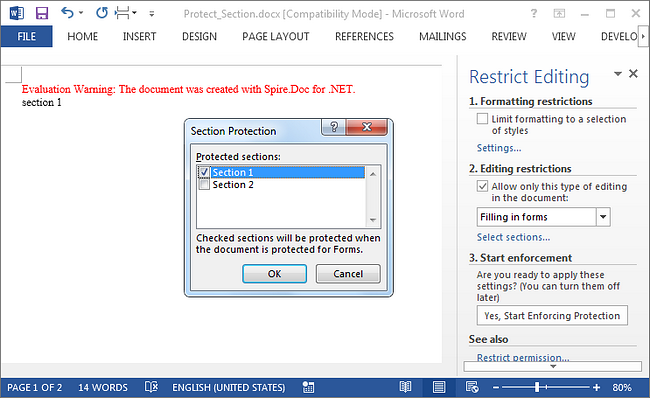
s2.ProtectForm = false;
第 6 步:保存文档。
doc.SaveToFile("Protect_Section.docx");结果:运行程序,我们应该得到第1节被保护的文件,只允许在表单域中编辑,而第2节可以自由编辑。
完整代码:
[C#]
using Spire.Doc;
namespace LockSection
{
class Program
{
static void Main(string[] args)
{
Document doc = new Document();
Section s1 = doc.AddSection();
Section s2 = doc.AddSection();

s1.AddParagraph().AppendText("section 1");
s2.AddParagraph().AppendText("section 2");

//protect all sections
doc.Protect(ProtectionType.AllowOnlyFormFields, "123");
//unprotect section 2
s2.ProtectForm = false;

doc.SaveToFile("Protect_Section.docx");
}
}
}
[VB.NET]
Imports Spire.Doc Namespace LockSection Class Program Private Shared Sub Main(args As String()) Dim doc As New Document() Dim s1 As Section = doc.AddSection() Dim s2 As Section = doc.AddSection() s1.AddParagraph().AppendText("section 1") s2.AddParagraph().AppendText("section 2") 'protect all sections doc.Protect(ProtectionType.AllowOnlyFormFields, "123") 'unprotect section 2 s2.ProtectForm = False doc.SaveToFile("Protect_Section.docx") End Sub End Class End Namespace欢迎下载|体验更多E-iceblue产品 技术交流Q群(767755948)
-
相关阅读:
MySQL(4)
Nginx编译安装+监控模块vts
《深入浅出图神经网络--GNN原理解析》一些概念【待整理完】
古代汉语(王力版)笔记
【强化学习论文合集】ICRA-2022 强化学习论文 | 2022年合集(六)
[附源码]计算机毕业设计JAVAjsp零食销售系统
【日更】Consumer<T>和BiConsumer<T,U>
web入门---tomcat&请求响应
华为机试 - 德州扑克
std::function
- 原文地址:https://blog.csdn.net/m0_67129275/article/details/126267878
