-
SpringCloud - Spring Cloud Alibaba 之 Seata分布式事务服务;Seata TC Server集群部署(二十二)
阅读本文前可先参考:
SpringCloud - Spring Cloud Alibaba 之 Seata分布式事务服务详解;部署(十八)_MinggeQingchun的博客-CSDN博客
SpringCloud - Spring Cloud Alibaba 之 Seata分布式事务服务;集成Nacos配置中心(十九)_MinggeQingchun的博客-CSDN博客
SpringCloud - Spring Cloud Alibaba 之 Seata分布式事务服务;AT事务模式(二十)_MinggeQingchun的博客-CSDN博客
https://blog.csdn.net/MinggeQingchun/article/details/126199942
Seata TC Server集群部署
生产环境下,我们需要部署集群 Seata TC Server,实现高可用。
集群时,多个 Seata TC Server 通过 db 数据库或者redis实现全局事务会话信息的共享
每个Seata TC Server注册自己到注册中心上,应用从注册中心获得Seata TC Server实例

Seata TC Server 集群搭建具体步骤(采用Nacos注册中心):
1、下载并解压两份 seata-server-1.4.2.tar.gz
2、初始化 Seata TC Server 的 db 数据库,在 MySQL 中,创建 seata 数据库,并在该库下执行如下SQL脚本:
通过Seata官网下载1.4.2版本的 source

使用seata-1.4.2\script\server\db脚本(MySQL)
- -- -------------------------------- The script used when storeMode is 'db' --------------------------------
- -- the table to store GlobalSession data
- CREATE TABLE IF NOT EXISTS `global_table`
- (
- `xid` VARCHAR(128) NOT NULL,
- `transaction_id` BIGINT,
- `status` TINYINT NOT NULL,
- `application_id` VARCHAR(32),
- `transaction_service_group` VARCHAR(32),
- `transaction_name` VARCHAR(128),
- `timeout` INT,
- `begin_time` BIGINT,
- `application_data` VARCHAR(2000),
- `gmt_create` DATETIME,
- `gmt_modified` DATETIME,
- PRIMARY KEY (`xid`),
- KEY `idx_gmt_modified_status` (`gmt_modified`, `status`),
- KEY `idx_transaction_id` (`transaction_id`)
- ) ENGINE = InnoDB
- DEFAULT CHARSET = utf8;
- -- the table to store BranchSession data
- CREATE TABLE IF NOT EXISTS `branch_table`
- (
- `branch_id` BIGINT NOT NULL,
- `xid` VARCHAR(128) NOT NULL,
- `transaction_id` BIGINT,
- `resource_group_id` VARCHAR(32),
- `resource_id` VARCHAR(256),
- `branch_type` VARCHAR(8),
- `status` TINYINT,
- `client_id` VARCHAR(64),
- `application_data` VARCHAR(2000),
- `gmt_create` DATETIME(6),
- `gmt_modified` DATETIME(6),
- PRIMARY KEY (`branch_id`),
- KEY `idx_xid` (`xid`)
- ) ENGINE = InnoDB
- DEFAULT CHARSET = utf8;
- -- the table to store lock data
- CREATE TABLE IF NOT EXISTS `lock_table`
- (
- `row_key` VARCHAR(128) NOT NULL,
- `xid` VARCHAR(128),
- `transaction_id` BIGINT,
- `branch_id` BIGINT NOT NULL,
- `resource_id` VARCHAR(256),
- `table_name` VARCHAR(32),
- `pk` VARCHAR(36),
- `gmt_create` DATETIME,
- `gmt_modified` DATETIME,
- PRIMARY KEY (`row_key`),
- KEY `idx_branch_id` (`branch_id`)
- ) ENGINE = InnoDB
- DEFAULT CHARSET = utf8;
3、修改 seata/conf/file.conf 配置文件,修改使用 db 数据库,实现 Seata TC Server 的全局事务会话信息的共享;
(1)mode = "db"
(2)数据库的连接信息
driverClassName = "com.mysql.cj.jdbc.Driver"
url = "jdbc:mysql://IP:3306/seata"
user = "root"
password = "123456"

4、设置使用 Nacos 注册中心;
修改 seata/conf/registry.conf 配置文件,设置使用 Nacos 注册中心;
(1)type = "nacos"
(2)Nacos连接信息:
nacos {
application = "seata-server"
serverAddr = "127.0.0.1:8848"
group = "SEATA_GROUP"
namespace = ""
cluster = "default"
username = "nacos"
password = "nacos"
}5、启动MySQL数据库和Nacos注册中心
6、启动两个 TC Server
执行 ./seata-server.sh -p 18091 -n 1 命令,启动第一个TC Server;
-p:Seata TC Server 监听的端口;
-n:Server node,在多个 TC Server 时,需区分各自节点,用于生成不同区间的 transactionId 事务编号,以免冲突;
执行 ./seata-server.sh -p 28091 -n 2 命令,启动第二个TC Server
注:
如果使用虚拟机,最好修改内存为256MB

7、打开Nacos注册中心控制台,可以看到有两个Seata TC Server 实例


8、应用测试
一、AT事务模式:单体应用SpringBoot多数据源分布式事务
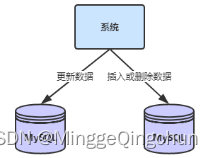
在Spring Boot单体项目中,使用了多数据源,就要保证多个数据源的数据一致性,即产生了分布式事务的问题,采用Seata的AT事务模式来解决该分布式事务问题
以下图购物下单为例
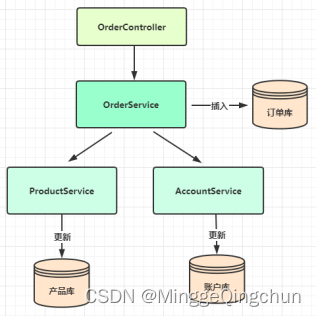
1、创建数据库、表、插入数据等
(1)accountdb账户库、account账户表
- SET NAMES utf8mb4;
- SET FOREIGN_KEY_CHECKS = 0;
- -- ----------------------------
- -- Table structure for account
- -- ----------------------------
- DROP TABLE IF EXISTS `account`;
- CREATE TABLE `account` (
- `id` int(20) NOT NULL AUTO_INCREMENT,
- `user_id` int(20) NULL DEFAULT NULL,
- `balance` decimal(20, 0) NULL DEFAULT NULL,
- `update_time` datetime(6) NULL DEFAULT NULL,
- PRIMARY KEY (`id`) USING BTREE
- ) ENGINE = InnoDB AUTO_INCREMENT = 2 CHARACTER SET = utf8 COLLATE = utf8_general_ci ROW_FORMAT = Dynamic;
- SET FOREIGN_KEY_CHECKS = 1;
(2)productdb产品库、product产品表
- SET NAMES utf8mb4;
- SET FOREIGN_KEY_CHECKS = 0;
- -- ----------------------------
- -- Table structure for product
- -- ----------------------------
- DROP TABLE IF EXISTS `product`;
- CREATE TABLE `product` (
- `id` int(20) NOT NULL AUTO_INCREMENT,
- `name` varchar(255) CHARACTER SET utf8 COLLATE utf8_general_ci NULL DEFAULT NULL,
- `price` decimal(10, 2) NULL DEFAULT NULL,
- `stock` varchar(255) CHARACTER SET utf8 COLLATE utf8_general_ci NULL DEFAULT NULL,
- `add_time` datetime(6) NULL DEFAULT NULL,
- `update_time` datetime(6) NULL DEFAULT NULL,
- PRIMARY KEY (`id`) USING BTREE
- ) ENGINE = InnoDB AUTO_INCREMENT = 2 CHARACTER SET = utf8 COLLATE = utf8_general_ci ROW_FORMAT = Dynamic;
- SET FOREIGN_KEY_CHECKS = 1;
(3)orderdb订单库、orders 订单表
- SET NAMES utf8mb4;
- SET FOREIGN_KEY_CHECKS = 0;
- -- ----------------------------
- -- Table structure for orders
- -- ----------------------------
- DROP TABLE IF EXISTS `orders`;
- CREATE TABLE `orders` (
- `id` int(20) NOT NULL AUTO_INCREMENT,
- `user_id` int(20) NULL DEFAULT NULL,
- `product_id` int(20) NULL DEFAULT NULL,
- `pay_amount` decimal(20, 0) NULL DEFAULT NULL,
- `add_time` datetime(6) NULL DEFAULT NULL,
- `update_time` datetime(6) NULL DEFAULT NULL,
- PRIMARY KEY (`id`) USING BTREE
- ) ENGINE = InnoDB AUTO_INCREMENT = 6 CHARACTER SET = utf8 COLLATE = utf8_general_ci ROW_FORMAT = Dynamic;
- SET FOREIGN_KEY_CHECKS = 1;
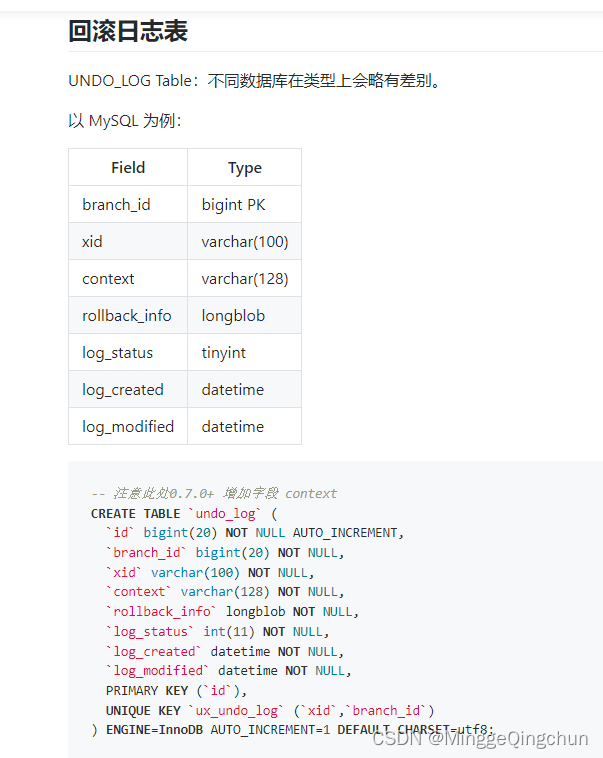
(4)undo_log表
Seata AT 模式
- -- 注意此处0.7.0+ 增加字段 context
- CREATE TABLE `undo_log` (
- `id` bigint(20) NOT NULL AUTO_INCREMENT,
- `branch_id` bigint(20) NOT NULL,
- `xid` varchar(100) NOT NULL,
- `context` varchar(128) NOT NULL,
- `rollback_info` longblob NOT NULL,
- `log_status` int(11) NOT NULL,
- `log_created` datetime NOT NULL,
- `log_modified` datetime NOT NULL,
- PRIMARY KEY (`id`),
- UNIQUE KEY `ux_undo_log` (`xid`,`branch_id`)
- ) ENGINE=InnoDB AUTO_INCREMENT=1 DEFAULT CHARSET=utf8;
注:
每个库必须创建 undo_log 表,是 Seata AT模式必须创建的表,主要用于分支事务的回滚
2、创建 SpringBoot单体应用
1、创建一个 springboot应用,命名 springcloud-alibaba-2-seata-distributed-transaction
2、添加依赖(非Spring CLoud 微服务项目,没有Spring CLoud依赖)
主要添加 Nacos-client依赖
- <dependency>
- <groupId>com.alibaba.nacosgroupId>
- <artifactId>nacos-clientartifactId>
- <version>2.1.0version>
- dependency>
- <groupId>com.companygroupId>
- <artifactId>springcloud-alibaba-2-seata-distributed-transactionartifactId>
- <version>1.0.0version>
- <name>springcloud-alibaba-2-seata-distributed-transactionname>
- <description>Demo project for Spring Bootdescription>
- <properties>
- <java.version>1.8java.version>
- <project.build.sourceEncoding>UTF-8project.build.sourceEncoding>
- <project.reporting.outputEncoding>UTF-8project.reporting.outputEncoding>
- <spring-boot.version>2.3.12.RELEASEspring-boot.version>
- <spring-cloud-alibaba.version>2.2.7.RELEASEspring-cloud-alibaba.version>
- properties>
- <dependencies>
- <dependency>
- <groupId>org.springframework.bootgroupId>
- <artifactId>spring-boot-starter-webartifactId>
- dependency>
- <dependency>
- <groupId>org.springframework.bootgroupId>
- <artifactId>spring-boot-starter-actuatorartifactId>
- dependency>
- <dependency>
- <groupId>org.springframework.bootgroupId>
- <artifactId>spring-boot-starter-testartifactId>
- <scope>testscope>
- <exclusions>
- <exclusion>
- <groupId>org.junit.vintagegroupId>
- <artifactId>junit-vintage-engineartifactId>
- exclusion>
- exclusions>
- dependency>
- <dependency>
- <groupId>org.projectlombokgroupId>
- <artifactId>lombokartifactId>
- dependency>
- <dependency>
- <groupId>mysqlgroupId>
- <artifactId>mysql-connector-javaartifactId>
- dependency>
- <dependency>
- <groupId>org.mybatis.spring.bootgroupId>
- <artifactId>mybatis-spring-boot-starterartifactId>
- <version>2.1.3version>
- dependency>
- <dependency>
- <groupId>io.seatagroupId>
- <artifactId>seata-spring-boot-starterartifactId>
- <version>1.3.0version>
- dependency>
- <dependency>
- <groupId>com.baomidougroupId>
- <artifactId>dynamic-datasource-spring-boot-starterartifactId>
- <version>3.2.0version>
- dependency>
- <dependency>
- <groupId>com.alibaba.nacosgroupId>
- <artifactId>nacos-clientartifactId>
- <version>2.1.0version>
- dependency>
- dependencies>
- <dependencyManagement>
- <dependencies>
- <dependency>
- <groupId>com.alibaba.cloudgroupId>
- <artifactId>spring-cloud-alibaba-dependenciesartifactId>
- <version>${spring-cloud-alibaba.version}version>
- <type>pomtype>
- <scope>importscope>
- dependency>
- <dependency>
- <groupId>org.springframework.cloudgroupId>
- <artifactId>spring-cloud-dependenciesartifactId>
- <version>Hoxton.SR12version>
- <type>pomtype>
- <scope>importscope>
- dependency>
- <dependency>
- <groupId>org.springframework.bootgroupId>
- <artifactId>spring-boot-dependenciesartifactId>
- <version>${spring-boot.version}version>
- <type>pomtype>
- <scope>importscope>
- dependency>
- dependencies>
- dependencyManagement>
- <build>
- <plugins>
- <plugin>
- <groupId>org.apache.maven.pluginsgroupId>
- <artifactId>maven-compiler-pluginartifactId>
- <configuration>
- <source>1.8source>
- <target>1.8target>
- <encoding>UTF-8encoding>
- configuration>
- plugin>
- <plugin>
- <groupId>org.springframework.bootgroupId>
- <artifactId>spring-boot-maven-pluginartifactId>
- plugin>
- <plugin>
- <groupId>org.mybatis.generatorgroupId>
- <artifactId>mybatis-generator-maven-pluginartifactId>
- <version>1.4.0version>
- <configuration>
- <configurationFile>src/main/resources/generatorConfig.xmlconfigurationFile>
- <verbose>trueverbose>
- <overwrite>trueoverwrite>
- configuration>
- plugin>
- plugins>
- <resources>
- <resource>
- <directory>src/main/javadirectory>
- <includes>
- <include>**/*.xmlinclude>
- includes>
- resource>
- <resource>
- <directory>src/main/resourcesdirectory>
- <includes>
- <include>**/*.*include>
- includes>
- resource>
- resources>
- build>
3、application.properties配置文件
- #内嵌服务器端口
- server.port=8081
- #应用服务名称
- spring.application.name=springcloud-alibaba-2-seata-distributed-transaction
- # 设置默认的数据源或者数据源组,默认值即为master
- spring.datasource.dynamic.primary=order-ds
- # 订单order数据源配置
- spring.datasource.dynamic.datasource.order-ds.url=jdbc:mysql://localhost:3306/orderdb?serverTimezone=GMT%2B8&useUnicode=true&characterEncoding=utf8&rewriteBatchedStatements=true&useSSL=false
- spring.datasource.dynamic.datasource.order-ds.driver-class-name=com.mysql.cj.jdbc.Driver
- spring.datasource.dynamic.datasource.order-ds.username=root
- spring.datasource.dynamic.datasource.order-ds.password=admin123456
- # 商品product数据源配置
- spring.datasource.dynamic.datasource.product-ds.url=jdbc:mysql://localhost:3306/productdb?serverTimezone=GMT%2B8&useUnicode=true&characterEncoding=utf8&rewriteBatchedStatements=true&useSSL=false
- spring.datasource.dynamic.datasource.product-ds.driver-class-name=com.mysql.cj.jdbc.Driver
- spring.datasource.dynamic.datasource.product-ds.username=root
- spring.datasource.dynamic.datasource.product-ds.password=admin123456
- # 账户account数据源配置
- spring.datasource.dynamic.datasource.account-ds.url=jdbc:mysql://localhost:3306/accountdb?serverTimezone=GMT%2B8&useUnicode=true&characterEncoding=utf8&rewriteBatchedStatements=true&useSSL=false
- spring.datasource.dynamic.datasource.account-ds.driver-class-name=com.mysql.cj.jdbc.Driver
- spring.datasource.dynamic.datasource.account-ds.username=root
- spring.datasource.dynamic.datasource.account-ds.password=admin123456
- # 是否启动对Seata的集成
- spring.datasource.dynamic.seata=true
- #-----------------------------------------------------------
- ##单机版 tc server 配置
- ## Seata应用编号,默认为 ${spring.application.name}
- #seata.application-id=springboot-seata
- ## Seata事务组编号,用于TC集群名,一般格式为:${spring.application.name}-group
- #seata.tx-service-group=springboot-seata-group
- ## 虚拟组和分组的映射 seata.service.vgroup-mapping.${seata.tx-service-group}=default
- #seata.service.vgroup-mapping.springboot-seata-group=default
- ## 分组和Seata服务的映射,此处default指上面 seata.service.vgroup-mapping.springboot-seata-group 的值 default
- #seata.service.grouplist.default=192.168.133.129:8091
- ## 存储模式 默认 file模式
- #seata.config.type=file
- ## 默认为 file
- #seata.registry.type=file
- #------------------------------------------------------------
- #------------------------------------------------------------
- #集群版 tc server 配置
- # Seata应用编号,默认为 ${spring.application.name}
- seata.application-id=springboot-seata
- # Seata事务组编号,用于TC集群名,一般格式为:${spring.application.name}-group
- seata.tx-service-group=springboot-seata-group
- # 虚拟组和分组的映射 seata.service.vgroup-mapping.${seata.tx-service-group}=default
- seata.service.vgroup-mapping.springboot-seata-group=default
- #------------------------------------------------------------
- #设置使用注册中心
- seata.registry.type=nacos
- seata.registry.nacos.cluster=default
- seata.registry.nacos.application=seata-server
- seata.registry.nacos.group=SEATA_GROUP
- seata.registry.nacos.server-addr=192.168.133.129:8848
- seata.enable-auto-data-source-proxy=false
- seata.client.rm.lock.retry-policy-branch-rollback-on-conflict=false
4、编写相应的 controller、model、mapper、service类,这里只给出调用顺序相关的类
controller测试类
- @Slf4j //lombok
- @RestController
- public class OrderController {
- @Autowired
- private OrderService orderService;
- @RequestMapping("/order")
- public Integer createOrder(@RequestParam("userId") Integer userId,
- @RequestParam("productId") Integer productId) throws Exception {
- log.info("请求下单, 用户:{}, 商品:{}", userId, productId);
- return orderService.createOrder(userId, productId);
- }
- }
order逻辑类
注:
(1)@DS注解;多数据源切换
(2)@GlobalTransactional注解;seata全局事务注解
主服务加上@GlobalTransactional注解即可,被调用服务不用加@GlobalTransactional和@Transactional
- @Slf4j
- @Service
- public class OrderServiceImpl implements OrderService {
- @Autowired
- private OrdersMapper ordersMapper;
- @Autowired
- private AccountService accountService;
- @Autowired
- private ProductService productService;
- @Override
- /**
- * MyBatis-Plus 使用 @DS注解 做多数据源切换
- * 语法:@DS(value = "数据源名称")
- * 1、依赖:
- *
- *
com.baomidou - *
dynamic-datasource-spring-boot-starter - *
3.0.0 - *
- * 2、yml 或 properties 配置
- * # 设置默认的数据源或者数据源组,默认值即为master
- * spring.datasource.dynamic.primary=order-ds
- *
- * # 订单order数据源配置
- * spring.datasource.dynamic.datasource.order-ds.url=jdbc:mysql://localhost:3306/orderdb?serverTimezone=GMT%2B8&useUnicode=true&characterEncoding=utf8&rewriteBatchedStatements=true&useSSL=false
- * spring.datasource.dynamic.datasource.order-ds.driver-class-name=com.mysql.cj.jdbc.Driver
- * spring.datasource.dynamic.datasource.order-ds.username=root
- * spring.datasource.dynamic.datasource.order-ds.password=admin123456
- *
- * # 商品product数据源配置
- * spring.datasource.dynamic.datasource.product-ds.url=jdbc:mysql://localhost:3306/productdb?serverTimezone=GMT%2B8&useUnicode=true&characterEncoding=utf8&rewriteBatchedStatements=true&useSSL=false
- * spring.datasource.dynamic.datasource.product-ds.driver-class-name=com.mysql.cj.jdbc.Driver
- * spring.datasource.dynamic.datasource.product-ds.username=root
- * spring.datasource.dynamic.datasource.product-ds.password=admin123456
- * 3、@DS注解到实现类或者实现类的方法上才可以
- * 当注解添加到类上,意味着此类里的方法都使用此数据源;
- * 当注解添加到方法上时,意味着此方法上使用的数据源优先级高于其他一切配置
- * 注:
- * (1)注解添加在dao.mapper上无效
- * (2)注解添加到interface Service类上无效
- * (3)注解添加到interface Service方法上无效
- */
- @DS(value = "order-ds")
- @GlobalTransactional //seata全局事务注解
- public Integer createOrder(Integer userId, Integer productId) throws Exception {
- Integer amount = 1; // 购买数量暂时设置为 1
- log.info("当前 XID: {}", RootContext.getXID());
- //1、减库存
- Product product = productService.reduceStock(productId, amount);
- //2、减余额
- accountService.reduceBalance(userId, product.getPrice());
- //3、下订单
- Orders order = new Orders();
- order.setUserId(userId);
- order.setProductId(productId);
- order.setPayAmount(product.getPrice().multiply(new BigDecimal(amount)));
- order.setAddTime(new Date());
- ordersMapper.insertSelective(order);
- //造成异常,测试是否回滚
- //int a = 10/0;
- log.info("下订单: {}", order.getId());
- // 返回订单编号
- return order.getId();
- }
- }
- product逻辑类
product逻辑类
- @Slf4j
- @Service
- public class ProductServiceImpl implements ProductService {
- @Autowired
- private ProductMapper productMapper;
- @Override
- @DS(value = "product-ds")
- public Product reduceStock(Integer productId, Integer amount) throws Exception {
- log.info("当前 XID: {}", RootContext.getXID());
- // 检查库存
- Product product = productMapper.selectByPrimaryKey(productId);
- if (product.getStock() < amount) {
- throw new Exception("库存不足");
- }
- // 扣减库存
- int updateCount = productMapper.reduceStock(productId, amount);
- // 扣除成功
- if (updateCount == 0) {
- throw new Exception("库存不足");
- }
- //造成异常,测试是否回滚
- //int a = 10/0;
- // 扣除成功
- log.info("扣除 {} 库存成功", productId);
- return product;
- }
- }
account逻辑类
- @Slf4j
- @Service
- public class AccountServiceImpl implements AccountService {
- @Autowired
- private AccountMapper accountMapper;
- @Override
- @DS(value = "account-ds")
- public void reduceBalance(Integer userId, BigDecimal money) throws Exception {
- log.info("当前 XID: {}", RootContext.getXID());
- // 检查余额
- Account account = accountMapper.selectAccountByUserId(userId);
- if (account.getBalance().doubleValue() < money.doubleValue()) {
- throw new Exception("余额不足");
- }
- // 扣除余额
- int updateCount = accountMapper.reduceBalance(userId, money);
- // 扣除成功
- if (updateCount == 0) {
- throw new Exception("余额不足");
- }
- //造成异常,测试是否回滚
- //int a = 10/0;
- log.info("扣除用户 {} 余额成功", userId);
- }
- }
5、启动seata-server;浏览器输入访问 http://localhost:8081/order?userId=1&productId=1
可分别在 OrderServiceImpl、ProductServiceImpl、AccountServiceImpl 实现类中 写入如下代码进行事务回滚测试
- //造成异常,测试是否回滚
- int a = 10/0;
二、AT事务模式:微服务SpringCloud的分布式事务
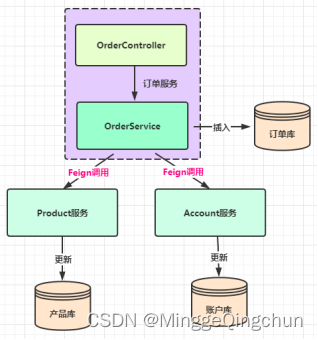
1、创建 4 个SpringBoot 模块
(1)springcloud-alibaba-2-seata-distributed-commons
- <dependencies>
- <dependency>
- <groupId>org.projectlombokgroupId>
- <artifactId>lombokartifactId>
- <version>1.18.16version>
- dependency>
- <dependency>
- <groupId>org.springframework.cloudgroupId>
- <artifactId>spring-cloud-starter-openfeignartifactId>
- <version>3.0.0version>
- dependency>
- dependencies>
- @FeignClient(name = "springcloud-alibaba-2-seata-distributed-account")
- public interface FeignAccountService {
- /**
- * 扣除余额
- *
- * @param userId 用户ID
- * @param money 扣减金额
- * @throws Exception 失败时抛出异常
- */
- @PostMapping("/account/reduceBalance")
- void reduceBalance(@RequestParam("userId") Integer userId, @RequestParam("money") BigDecimal money);
- }
- @FeignClient(name = "springcloud-alibaba-2-seata-distributed-order")
- public interface FeignOrderService {
- /**
- * 创建订单
- *
- * @param userId 用户ID
- * @param productId 产品ID
- * @return 订单编号
- * @throws Exception 创建订单失败,抛出异常
- */
- Integer createOrder(Integer userId, Integer productId) throws Exception;
- }
- @FeignClient(name = "springcloud-alibaba-2-seata-distributed-product")
- public interface FeignProductService {
- /**
- * 减库存
- *
- * @param productId 商品ID
- * @param amount 扣减数量
- * @throws Exception 扣减失败时抛出异常
- */
- @PostMapping("/product/reduceStock")
- Product reduceStock(@RequestParam("productId") Integer productId, @RequestParam("amount") Integer amount);
- }
(2)springcloud-alibaba-2-seata-distributed-order
注意:
1、异常需要层层往上抛,如果你在子服务将异常处理的话(比如全局异常处理GlobalExceptionHandler),seata会认为你已经手动处理了异常
2、出现事务失效的情况下,优先检查 RootContext.getXID() ,xid是否传递且一致
3、主服务加上@GlobalTransactional注解即可,被调用服务不用加@GlobalTransactional和@Transactional
4、@GlobalTransactional(rollbackFor = Exception.class)最好加上rollbackFor = Exception.class,表示遇到Exception都回滚,不然遇到有些异常(如自定义异常)则不会回滚
依赖注意如下:
(1)本身有 spring-cloud-starter-alibaba-nacos-discovery 依赖,不再需要额外添加 nacos-client 依赖
(2)spring-cloud-starter-alibaba-seata 包含 seata-spring-boot-starter 依赖,但是有些配置有问题,需要自己导入和Seata Server 版本相同的依赖
- <dependency>
- <groupId>com.alibaba.cloudgroupId>
- <artifactId>spring-cloud-starter-alibaba-seataartifactId>
- <exclusions>
- <exclusion>
- <groupId>io.seatagroupId>
- <artifactId>seata-spring-boot-starterartifactId>
- exclusion>
- exclusions>
- dependency>
- <dependency>
- <groupId>io.seatagroupId>
- <artifactId>seata-spring-boot-starterartifactId>
- <version>1.4.2version>
- dependency>
- <groupId>com.companygroupId>
- <artifactId>springcloud-alibaba-2-seata-distributed-orderartifactId>
- <version>1.0.0version>
- <name>springcloud-alibaba-2-seata-distributed-ordername>
- <description>Demo project for Spring Bootdescription>
- <properties>
- <java.version>1.8java.version>
- <project.build.sourceEncoding>UTF-8project.build.sourceEncoding>
- <project.reporting.outputEncoding>UTF-8project.reporting.outputEncoding>
- <spring-boot.version>2.3.12.RELEASEspring-boot.version>
- <spring-cloud-alibaba.version>2.2.7.RELEASEspring-cloud-alibaba.version>
- properties>
- <dependencies>
- <dependency>
- <groupId>org.springframework.bootgroupId>
- <artifactId>spring-boot-starter-webartifactId>
- dependency>
- <dependency>
- <groupId>com.alibaba.cloudgroupId>
- <artifactId>spring-cloud-starter-alibaba-nacos-discoveryartifactId>
- dependency>
- <dependency>
- <groupId>org.springframework.bootgroupId>
- <artifactId>spring-boot-starter-testartifactId>
- <scope>testscope>
- <exclusions>
- <exclusion>
- <groupId>org.junit.vintagegroupId>
- <artifactId>junit-vintage-engineartifactId>
- exclusion>
- exclusions>
- dependency>
- <dependency>
- <groupId>org.projectlombokgroupId>
- <artifactId>lombokartifactId>
- dependency>
- <dependency>
- <groupId>mysqlgroupId>
- <artifactId>mysql-connector-javaartifactId>
- dependency>
- <dependency>
- <groupId>org.mybatis.spring.bootgroupId>
- <artifactId>mybatis-spring-boot-starterartifactId>
- <version>2.1.3version>
- dependency>
- <dependency>
- <groupId>com.alibaba.cloudgroupId>
- <artifactId>spring-cloud-starter-alibaba-seataartifactId>
- <exclusions>
- <exclusion>
- <groupId>io.seatagroupId>
- <artifactId>seata-spring-boot-starterartifactId>
- exclusion>
- exclusions>
- dependency>
- <dependency>
- <groupId>io.seatagroupId>
- <artifactId>seata-spring-boot-starterartifactId>
- <version>1.4.2version>
- dependency>
- <dependency>
- <groupId>com.companygroupId>
- <artifactId>springcloud-alibaba-2-seata-distributed-commonsartifactId>
- <version>1.0.0version>
- dependency>
- dependencies>
- <dependencyManagement>
- <dependencies>
- <dependency>
- <groupId>com.alibaba.cloudgroupId>
- <artifactId>spring-cloud-alibaba-dependenciesartifactId>
- <version>${spring-cloud-alibaba.version}version>
- <type>pomtype>
- <scope>importscope>
- dependency>
- <dependency>
- <groupId>org.springframework.cloudgroupId>
- <artifactId>spring-cloud-dependenciesartifactId>
- <version>Hoxton.SR12version>
- <type>pomtype>
- <scope>importscope>
- dependency>
- <dependency>
- <groupId>org.springframework.bootgroupId>
- <artifactId>spring-boot-dependenciesartifactId>
- <version>${spring-boot.version}version>
- <type>pomtype>
- <scope>importscope>
- dependency>
- dependencies>
- dependencyManagement>
- <build>
- <plugins>
- <plugin>
- <groupId>org.apache.maven.pluginsgroupId>
- <artifactId>maven-compiler-pluginartifactId>
- <version>3.8.1version>
- <configuration>
- <source>1.8source>
- <target>1.8target>
- <encoding>UTF-8encoding>
- configuration>
- plugin>
- <plugin>
- <groupId>org.springframework.bootgroupId>
- <artifactId>spring-boot-maven-pluginartifactId>
- plugin>
- plugins>
- <resources>
- <resource>
- <directory>src/main/javadirectory>
- <includes>
- <include>**/*.xmlinclude>
- includes>
- resource>
- <resource>
- <directory>src/main/resourcesdirectory>
- <includes>
- <include>**/*.*include>
- includes>
- resource>
- resources>
- build>
- @Slf4j //lombok
- @RestController
- public class OrderController {
- @Autowired
- private OrderService orderService;
- @RequestMapping("/order")
- public Integer createOrder(@RequestParam("userId") Integer userId,
- @RequestParam("productId") Integer productId) throws Exception {
- log.info("请求下单, 用户:{}, 商品:{}", userId, productId);
- return orderService.createOrder(userId, productId);
- }
- }
- @Slf4j
- @Service
- public class OrderServiceImpl implements OrderService {
- @Autowired
- private OrdersMapper ordersMapper;
- @Autowired
- private FeignAccountService accountService;
- @Autowired
- private FeignProductService productService;
- @Override
- //seata全局事务注解;name要唯一
- @GlobalTransactional//(name = "seata-order-GlobalTransactional",rollbackFor = Exception.class)
- public Integer createOrder(Integer userId, Integer productId) {
- Integer amount = 1; // 购买数量暂时设置为 1
- log.info("当前 XID: {}", RootContext.getXID());
- //1、减库存
- Product product = productService.reduceStock(productId, amount);
- //2、减余额
- accountService.reduceBalance(userId, product.getPrice());
- //3、下订单
- Orders order = new Orders();
- order.setUserId(userId);
- order.setProductId(productId);
- order.setPayAmount(product.getPrice().multiply(new BigDecimal(amount)));
- order.setAddTime(new Date());
- ordersMapper.insertSelective(order);
- //造成异常,测试是否回滚
- int a = 10/0;
- log.info("下订单: {}", order.getId());
- // 返回订单编号
- return order.getId();
- }
- }
-
相关阅读:
海上生明月,天涯共此时 ------#征文|程序员过中秋的一百种方式#
Hive概念及Hive,MySQL安装、配置
torch.optim 之 Algorithms (Implementation: for-loop, foreach, fused)
python基础-1(开发环境安装及配置anaconda 5.3.1+py3.7)
Elasticsearch实战(七)---BestFields MostFields CrossFields 多字段搜索策略
Java版企业电子招标采购系统源码Spring Cloud + Spring Boot +二次开发+ MybatisPlus + Redis
Kafka简单入门01
CMS之织梦导航二级下拉菜单
每日优鲜深陷“破产风波”,生鲜电商路在何方?
微服务之SpringCloud AlibabaNacos服务注册和配置中心
- 原文地址:https://blog.csdn.net/MinggeQingchun/article/details/126225632
