-
Fiori 动态磁贴示例
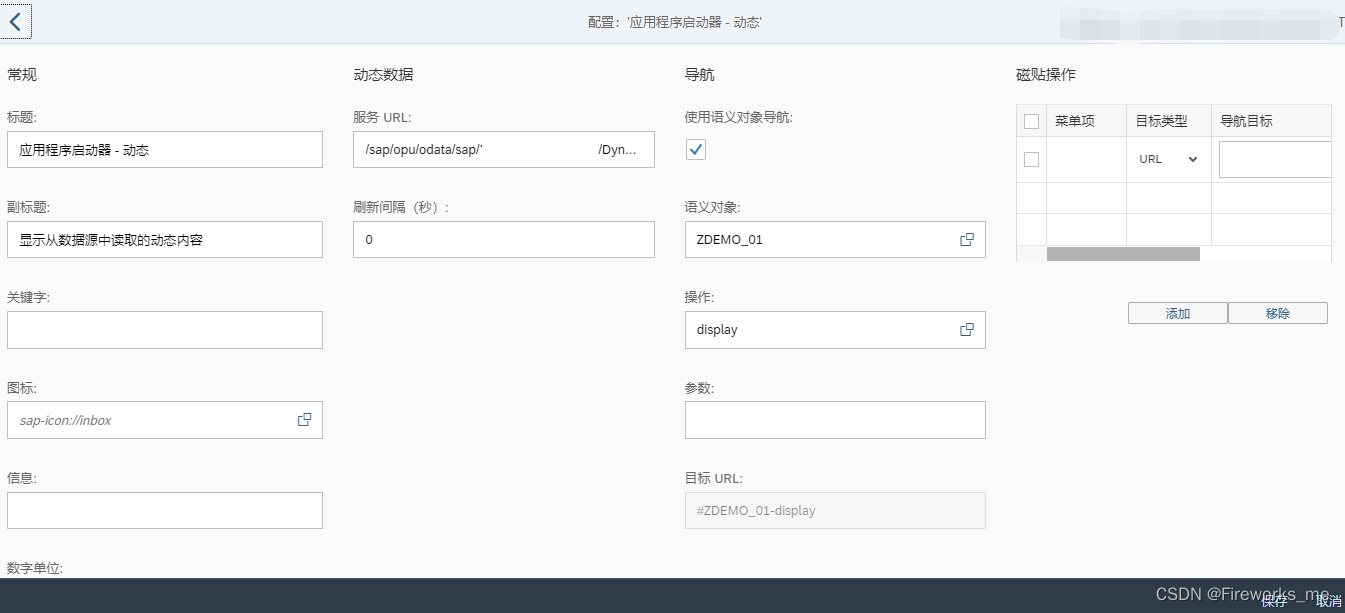
1. 动态磁贴配置页面
2. 服务URL
2.1 服务URL示例(ODATA GetEntity (Read)方法)
/sap/opu/odata/sap/ZODATA/GetEntity(par='XXX')/sap/opu/odata/sap/YTEST_ODATA_SRV/DynamictileSet(type='1')2.2 服务URL接口参数参考
- {
- “d”: {
- “icon”: “sap-icon://travel-expense”,
- “info”: “Quarter Ends!”,
- “infoState”: “Critical”,
- “number”: 43.333,
- “numberDigits”: 1
- “numberFactor”: “k”,
- “numberState”: “Positive”,
- “numberUnit”: “EUR”,
- “stateArrow”: “Up”,
- “subtitle”: “Quarterly overview”,
- “title”: “Travel Expenses”,
- }
- }
Parameter
Description
icon
Enter an sap-icon:// URL, for example sap-icon://cart.
You can look up the names of the available icons in tile configuration.
For more information, see Static App Launcher Tiles.
info
Text to be displayed at the bottom of the tile.
infoState
The color of the tile is adapted according to the value of this property. The precise color depends on the theme that you have selected in UI theme designer.
Allowed values: Negative, Neutral, Positive, Critical
number
Number to be displayed in the top right corner of the tile.
numberDigits
Number of digits to be displayed following the decimal separator (decimal point or decimal comma, depending on the language settings).
numberFactor
A factor for scaling numbers, for example, for displaying large numbers like 1.000.000 (-> number = 1 and numberFactor=”M”) or for percentages (number = 22.2 and numberFactor = “%”). The scaling is not done by the front end but has to be provided by the app developer.
numberState
The color of the number is adapted according to the value of this property. The precise color depends on the theme that you have selected in UI theme designer.
Allowed values: Negative, Neutral, Positive, Critical
numberUnit
Unit to be displayed below the number, for example, USD.
stateArrow
Displays an arrow indicating a trend.
Allowed values: None, Up, Down
subtitle
Subtitle to be displayed below the tile title.
targetParams
List of key-value-pairs separated by ampersands.
When the application is lauched (by clicking on it), these parameters are passed to the application as business parameters (if semantic object-based navigation is used) or as URL parameters (if URL-based navigation is used).
If any parameters have been entered in the Parametersfield in the tile configuration, the parameters passed by the OData service are appended to the list of parameters to be passed to the application.
title
Title to be displayed in the tile.
- type 1 Edm.String
- icon 0 Edm.String
- info 0 Edm.String
- infoState 0 Edm.String
- number 0 Edm.String
- numberDigits 0 Edm.String
- numberFactor 0 Edm.String
- numberState 0 Edm.String
- numberUnit 0 Edm.String
- stateArrow 0 Edm.String
- subtitle 0 Edm.String
- targetParams 0 Edm.String
- title 0 Edm.String
2.3 服务URL接口代码示例
- METHOD xxx_get_entity.
- DATA: ls_entity_data TYPE xxxxxxodata_mpc=>ts_xxxxxx.
- DATA: ls_key TYPE /iwbep/s_mgw_name_value_pair.
- TRY.
- ls_entity_data-icon = 'sap-icon://Fiori2/F0003'.
- ls_entity_data-info = 'Demo Info'.
- ls_entity_data-infostate = 'Positive'."Negative, Neutral, Positive, Critical
- ls_entity_data-number = 200.
- ls_entity_data-numberdigits = 0.
- ls_entity_data-numberfactor = ''.
- ls_entity_data-numberstate = ''.
- ls_entity_data-numberunit = 'USD'.
- ls_entity_data-statearrow = 'Up'."None, Up, Down
- ls_entity_data-subtitle = 'Sub title'.
- ls_entity_data-targetparams = ''.
- ls_entity_data-title = 'Title'.
- CATCH /iwbep/cx_mgw_busi_exception .
- CATCH /iwbep/cx_mgw_tech_exception .
- ENDTRY.
- er_entity = ls_entity_data.
- ENDMETHOD.
3. 效果
-
相关阅读:
如何压缩jpg图片的大小
汽车服务门店小程序模板制作指南
httpx+nuclei实战 | 大华智慧园区综合管理平台任意密码读取漏洞
超越NumPy和Pandas的Python库
fmllr--学习笔记
Java类成员和函数的执行顺序(static、非static、代码块、构造函数)
spring框架限制接口是否要登录过才能访问
Mysql序列
Spark读取文件性能优化
NFTScan 正式上线 TON NFTScan 浏览器!
- 原文地址:https://blog.csdn.net/xiefireworks/article/details/126111956


- 最新文章
-
沪漂五周年了:我越来越迷茫了
Agentic Skill Routing 实战:别再把所有 Skill 塞进 AI Agent 上下文
MySQL-Seconds_behind_master的精度误差
[MAF预定义ChatClient中间件-03]CachingChatClient——利用缓存省钱省时间
AI的至暗历史:从万众期待到被政府撤资,AI的两次死亡徘徊
Agent OS :五种驯服不确定性的范式
PortSwigger SQL注入LAB11
数据库即时编译JIT
[Begin]AI Learn Data Day 0
深度学习进阶(二十七)现代 LLM 的核心架构设计其二:SwiGLU