-
Day25-线程简介
Day25
线程简介
多任务
- 吃饭的时候看手机
- 边开车边打电话
- 边上厕所不边玩手机
…
看起来是多个任务都在做,其实本质上我们的大脑在同一时间只做了一件事。
多线程
为了不堵车,而增加了多个车道。为实现程序的高效性,也需要多条路同时执行。

程序、进程、线程
一个进程可以有多个线程,如视频中可以同时听到声音,看到图像,看弹幕…

总结
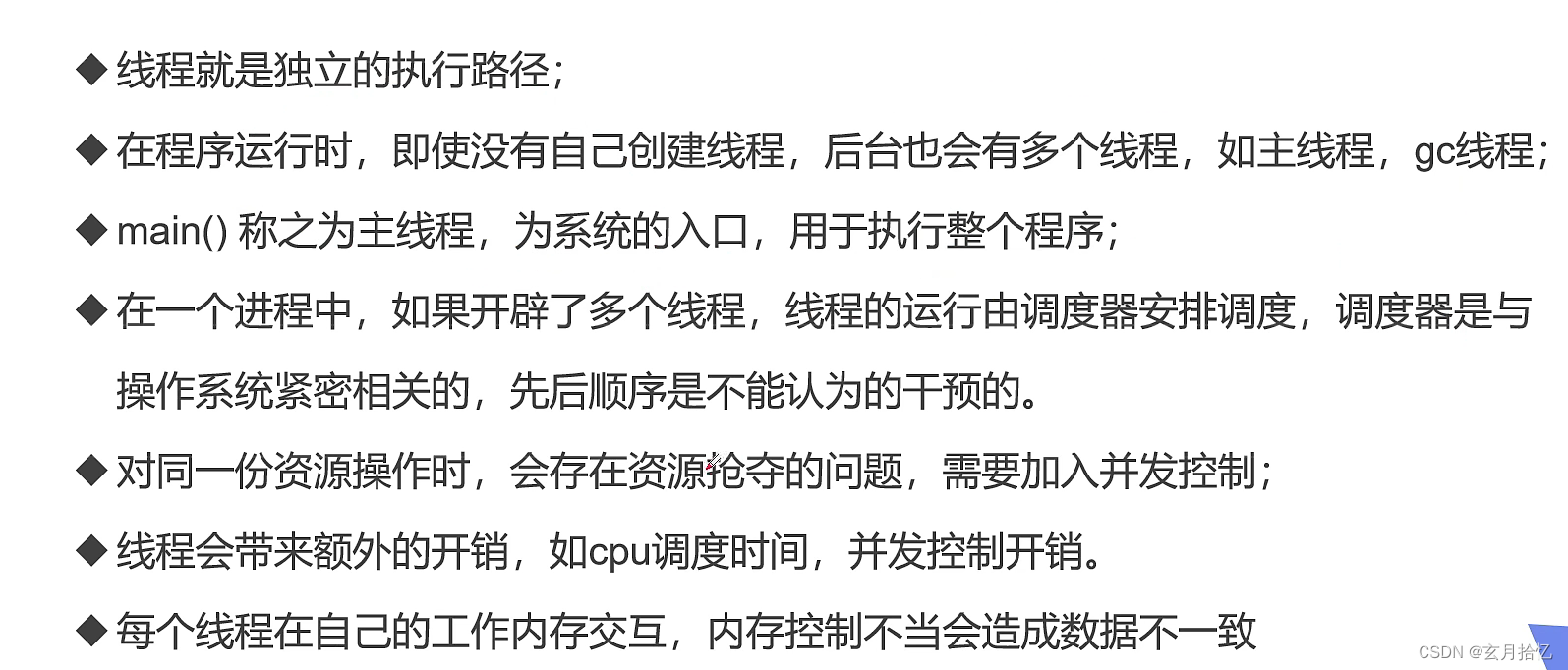
线程的创建
三种创建方式
- Thread class :继承Thread类(重点)
- Runnable接口:实现Runnable接口(重点)
- Callable接口:实现Callable接口(了解)
Tread类

- 调用run()
package com.ghy.demo01; //创建线程方式:继承Thread类,重写run()方法,调用start开启线程 public class TestThread1 extends Thread{ @Override public void run() { //run()方法线程体 for (int i = 0; i < 5; i++) { System.out.println("我在看小赵--"+i); } } public static void main(String[] args) { //main方法 //创建对象 TestThread1 testThread1 = new TestThread1(); //调用方法 testThread1.run(); for (int i = 0; i < 5; i++) { System.out.println("小赵在学习--"+i); } } }- 1
- 2
- 3
- 4
- 5
- 6
- 7
- 8
- 9
- 10
- 11
- 12
- 13
- 14
- 15
- 16
- 17
- 18
- 19
- 20
- 21
- 22
- 23
输出
我在看小赵--0 我在看小赵--1 我在看小赵--2 我在看小赵--3 我在看小赵--4 小赵在学习--0 小赵在学习--1 小赵在学习--2 小赵在学习--3 小赵在学习--4- 1
- 2
- 3
- 4
- 5
- 6
- 7
- 8
- 9
- 10
只有主线程一条执行路径,执行了run方法后,继续执行性后面的
- 调用start()
package com.ghy.demo01; //创建线程方式:继承Thread类,重写run()方法,调用start开启线程 public class TestThread2 extends Thread{ @Override public void run() { //run()方法线程体 for (int i = 0; i < 5; i++) { System.out.println("我在看小赵--"+i); } } public static void main(String[] args) { //main方法 //创建对象 TestThread2 testThread1 = new TestThread2(); //调用方法 testThread1.start(); for (int i = 0; i < 5; i++) { System.out.println("小赵在学习--"+i); } } }- 1
- 2
- 3
- 4
- 5
- 6
- 7
- 8
- 9
- 10
- 11
- 12
- 13
- 14
- 15
- 16
- 17
- 18
- 19
- 20
- 21
- 22
- 23
- 24
输出
小赵在学习--0 小赵在学习--1 我在看小赵--0 我在看小赵--1 我在看小赵--2 我在看小赵--3 我在看小赵--4 小赵在学习--2 小赵在学习--3 小赵在学习--4- 1
- 2
- 3
- 4
- 5
- 6
- 7
- 8
- 9
- 10
多条执行路径,主线程和子线程并行交替执行
线程开启后不一定立即执行,由CPU调度执行
案列:下载图片
需要的jar包
[commons-io-2.6](Maven Repository: commons-io » commons-io » 2.6 (mvnrepository.com))
package com.ghy.demo01; import org.apache.commons.io.FileUtils; import java.io.File; import java.io.IOException; import java.net.URL; //练习Thread,实现多线程同步下载图片 public class TestThread3 extends Thread{ private String url;//网络图片地址 private String name;//保存的文件名 public TestThread3(String url,String name){ this.url =url; this.name =name; } //重写run()方法,下载图片的执行体 @Override public void run() { WebDownloader webDownloader =new WebDownloader(); webDownloader.downloader(url,name);//调用下载方法,需要传入url和name System.out.println("下载的图片名为:"+name); } //main方法 public static void main(String[] args) { //创建线程对象 TestThread3 t1 =new TestThread3("https://img.zcool.cn/community/01029d5a4d960da801206ed375eaa8.jpg@1280w_1l_2o_100sh.jpg","可爱的小赵1.jpg"); TestThread3 t2 =new TestThread3("https://img.zcool.cn/community/01029d5a4d960da801206ed375eaa8.jpg@1280w_1l_2o_100sh.jpg","可爱的小赵2.jpg"); TestThread3 t3 =new TestThread3("https://img.zcool.cn/community/01029d5a4d960da801206ed375eaa8.jpg@1280w_1l_2o_100sh.jpg","可爱的小赵3.jpg"); //start方法 t1.start(); t2.start(); t3.start(); } }- 1
- 2
- 3
- 4
- 5
- 6
- 7
- 8
- 9
- 10
- 11
- 12
- 13
- 14
- 15
- 16
- 17
- 18
- 19
- 20
- 21
- 22
- 23
- 24
- 25
- 26
- 27
- 28
- 29
- 30
- 31
- 32
- 33
- 34
- 35
- 36
输出
下载的图片名为:可爱的小赵1.jpg 下载的图片名为:可爱的小赵2.jpg 下载的图片名为:可爱的小赵3.jpg- 1
- 2
- 3
查看

实现Runnablejiekou接口

package com.ghy.demo01; //创建线程方式2:实现Runnable接口 public class TestThread4 implements Runnable{ //重写run方法 @Override public void run() { for (int i = 0; i < 5; i++) { System.out.println("我在看小赵-"+i); } } public static void main(String[] args) { //创建runnable接口实现类对象 TestThread4 testThread4 =new TestThread4(); //创建线程对象,通过线程对象来开启我们的线程(代理) /**Thread thread =new Thread(testThread4); thread.start();*/ //上面两行可以简化为 new Thread(testThread4).start(); for (int i = 0; i < 5; i++) { System.out.println("小赵在看书-"+i); } } }- 1
- 2
- 3
- 4
- 5
- 6
- 7
- 8
- 9
- 10
- 11
- 12
- 13
- 14
- 15
- 16
- 17
- 18
- 19
- 20
- 21
- 22
- 23
- 24
- 25
输出
小赵在看书-0 小赵在看书-1 我在看小赵-0 小赵在看书-2 我在看小赵-1 小赵在看书-3 小赵在看书-4 我在看小赵-2 我在看小赵-3 我在看小赵-4- 1
- 2
- 3
- 4
- 5
- 6
- 7
- 8
- 9
- 10
案列:Runable接口实现下载图片
package com.ghy.demo01; import org.apache.commons.io.FileUtils; import java.io.File; import java.io.IOException; import java.net.URL; //练习Thread,实现多线程同步下载图片 public class TestThread3 implements Runnable{ private String url;//网络图片地址 private String name;//保存的文件名 public TestThread3(String url,String name){ this.url =url; this.name =name; } //重写run()方法,下载图片的执行体 @Override public void run() { WebDownloader webDownloader =new WebDownloader(); webDownloader.downloader(url,name);//调用下载方法,需要传入url和name System.out.println("下载的图片名为:"+name); } //main方法 public static void main(String[] args) { //创建线程对象 TestThread3 t1 =new TestThread3("https://img.zcool.cn/community/01029d5a4d960da801206ed375eaa8.jpg@1280w_1l_2o_100sh.jpg","可爱的小赵1.jpg"); TestThread3 t2 =new TestThread3("https://img.zcool.cn/community/01029d5a4d960da801206ed375eaa8.jpg@1280w_1l_2o_100sh.jpg","可爱的小赵2.jpg"); TestThread3 t3 =new TestThread3("https://img.zcool.cn/community/01029d5a4d960da801206ed375eaa8.jpg@1280w_1l_2o_100sh.jpg","可爱的小赵3.jpg"); new Thread(t1).start(); new Thread(t2).start(); new Thread(t3).start(); } }- 1
- 2
- 3
- 4
- 5
- 6
- 7
- 8
- 9
- 10
- 11
- 12
- 13
- 14
- 15
- 16
- 17
- 18
- 19
- 20
- 21
- 22
- 23
- 24
- 25
- 26
- 27
- 28
- 29
- 30
- 31
- 32
- 33
- 34
- 35
- 36
发现并发问题
package com.ghy.demo01; //多个线程,同时操作同一个对象 //买火车票 public class TestThread5 implements Runnable{ //票数 private int ticketNums = 10; @Override public void run() { while(true){ if(ticketNums<=0){ break; } //模拟延时,需要捕获异常 try { Thread.sleep(200); } catch (InterruptedException e) { e.printStackTrace(); } //Thread.currentThread().getName() 获取当前线程的名字 System.out.println(Thread.currentThread().getName()+"---拿到了第"+ticketNums--+"张票"); } } public static void main(String[] args) { TestThread5 testThread5 = new TestThread5(); new Thread(testThread5,"赵学生").start(); new Thread(testThread5,"赵老师").start(); new Thread(testThread5,"赵黄牛").start(); } }- 1
- 2
- 3
- 4
- 5
- 6
- 7
- 8
- 9
- 10
- 11
- 12
- 13
- 14
- 15
- 16
- 17
- 18
- 19
- 20
- 21
- 22
- 23
- 24
- 25
- 26
- 27
- 28
- 29
- 30
- 31
- 32
输出
赵黄牛---拿到了第10张票 赵学生---拿到了第9张票 赵老师---拿到了第10张票 赵黄牛---拿到了第8张票 赵老师---拿到了第8张票 赵学生---拿到了第8张票 赵学生---拿到了第6张票 赵黄牛---拿到了第7张票 赵老师---拿到了第5张票 赵老师---拿到了第4张票 赵黄牛---拿到了第4张票 赵学生---拿到了第3张票 赵老师---拿到了第2张票 赵黄牛---拿到了第2张票 赵学生---拿到了第2张票 赵老师---拿到了第0张票 赵学生---拿到了第-1张票 赵黄牛---拿到了第1张票- 1
- 2
- 3
- 4
- 5
- 6
- 7
- 8
- 9
- 10
- 11
- 12
- 13
- 14
- 15
- 16
- 17
- 18
发现问题:
多个线程操作同样一个资源的情况下,线程不安全,数据紊乱。
-
相关阅读:
SpringBoot整合Mybatis
kafka 消费者 API 使用总结
通用串行总线USB接口——基础总结(USB版本演进、接口类型、电气特性、拓扑结构、USB硬件接口实现)
在自己电脑上的idea运行java web项目 如何用外网访问
【剑指offer】二进制中1的个数&&2的幂
Compose的一些小Tips - 可组合项的绘制
稳了,我用 Python 可视化分析和预测了 2022 年 FIFA 世界杯
Linux系统安全
HDLbits刷题总结
环境影响评价期末考试题库
- 原文地址:https://blog.csdn.net/GHY0911/article/details/126219604