-
Config 分布式配置中心
代码:config-parent_IJ_soft_backup
Config 简介:

Spring CloudConfig 解决了在分布式场景下多环境配置文件的管理和维护
好处:
- 集中管理配置文件
- 不同环境不同配置,动态化的配置更新
- 配置信息改变时不需要重启客户端 即可更新配置信息到服务
流程
config server:
- 使用创建远程仓库,上传配置文件
- 搭建config server模块
- 导入config-server依赖
- 编写配置,设置gitee远程仓库地址
- 测试访问远程配置文件
config server
目的: 编写config server功能,使其可以访问到外部配置文件,之后编写config client通过configserver访问外部文件
使用创建远程仓库,上传配置文件
在gitee上创建仓库

学这个单分支简单

创建文件夹git-repository克隆远程仓库
期望把远程仓库克隆到本地,做一些文件添加,再添加到远程仓库
这里使用到git小乌龟使用 汉化及安装方法
使用参考https://www.cnblogs.com/xuanwotianming153/p/8504762.html
在gitrepository右键选择clone,

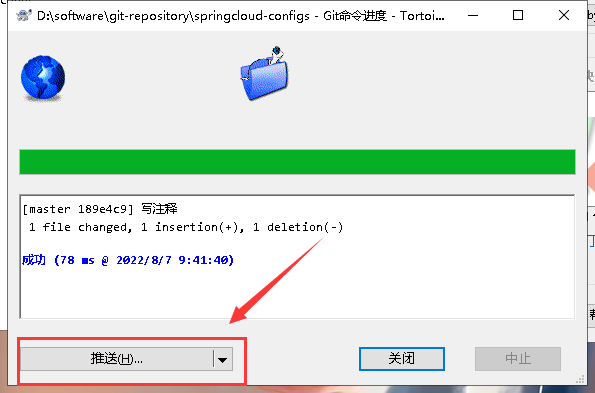
在本地添加配置文件上传
添加config-dev.yml配置文件

搭建consumer provider和server
consumer provider参考下面文章的consumer provider
修改maven仓库和编码UTF-8
sever搭建:

pom.xml
- <dependencies>
- <dependency>
- <groupId>org.springframework.cloudgroupId>
- <artifactId>spring-cloud-config-serverartifactId>
- dependency>
- dependencies>
configServerApp:
- package com.gao.config;
- import org.springframework.boot.SpringApplication;
- import org.springframework.boot.autoconfigure.SpringBootApplication;
- import org.springframework.cloud.config.server.EnableConfigServer;
- @SpringBootApplication
- //启用 EurekaServer
- @EnableConfigServer
- public class ConfigServerApp {
- public static void main(String[] args){
- SpringApplication.run(ConfigServerApp.class,args);
- }
- }
application.yml
- server:
- port: 9527
- spring:
- application:
- name: config-provider
- cloud:
- config:
- server:
- git:
- uri: https://gitee.com/GXQ205153964/springcloud-configs.git #远程仓库的地址
- label: master
测试访问远程配置文件:
localhost:9527/master/config-dev.yml

config client
- 导入starter-config依赖
- 配置config server 地址,读取配置文件名称信息
- 获取配置值
- 启动测试
config client:
目的: 完成config client 并测试client是否可以通过server访问到gitee上的外部文件

pom.xml
- <dependencies>
- <dependency>
- <groupId>org.springframework.cloudgroupId>
- <artifactId>spring-cloud-config-serverartifactId>
- dependency>
- dependencies>
ConfigServerApp;
- @SpringBootApplication
- //启用 EurekaServer
- @EnableConfigServer
- public class ConfigServerApp {
- public static void main(String[] args){
- SpringApplication.run(ConfigServerApp.class,args);
- }
- }
application.yml
- server:
- port: 9527
- spring:
- application:
- name: config-provider
- cloud:
- config:
- server:
- git:
- uri: https://gitee.com/GXQ205153964/springcloud-configs.git #远程仓库的地址
- label: master

pom.xml
- <dependencies>
- <dependency>
- <groupId>org.springframework.bootgroupId>
- <artifactId>spring-boot-starter-webartifactId>
- dependency>
- <dependency>
- <groupId>org.springframework.cloudgroupId>
- <artifactId>spring-cloud-starter-netflix-eureka-clientartifactId>
- dependency>
- <dependency>
- <groupId>org.springframework.cloudgroupId>
- <artifactId>spring-cloud-starter-netflix-hystrixartifactId>
- dependency>
- <dependency>
- <groupId>org.springframework.cloudgroupId>
- <artifactId>spring-cloud-starter-configartifactId>
- dependency>
- dependencies>
GoodsController
- //注入 从gitee上的配置文件config-dev.yml获取键值对
- @Value("${gao}")
- private String key1;
- //结果显示到web
- goods.setTitle(goods.getTitle()+":" + key1);
application.yml
- server:
- port: 8000
- eureka:
- client:
- service-url:
- defaultZone: http://localhost:8761/eureka # 注册
- spring:
- application:
- name: config-provider #设置当前应用的名称。将来会在eureka中application显示,将来需要使用该名称来获取路径
bootstrap.yml
- #bootstrap优先级更高
- #配置config-server地址
- #配置获取配置文件的名称等信息
- spring:
- cloud:
- config:
- #配置config-server地址
- uri: http://localhost:9527
- name: config #文件名
- profile: dev #开发环境
- label: master #分支
开启config-provider和config-server服务

当外部配置文件修改后, config-server是可以刷新更新数据,但config-server不能
Config 客户端刷新
目的: client可以通过server访问到外部文件后,当外部文件修改后client需要重启才能获取到新的外部文件,非常不方便,这里配置后可以通过刷新获取到新的外部文件
流程:
- 在config客户端引入actuator依赖
- 获取配置信息类上,添加@RefreshScope注解
- 添加配置 management.endpoints.web.exposure.include:refresh
- 使用curl工具发送post请求curl -X POST http://localhost:8001/actuator/refresh
在config客户端引入actuator依赖
在bootstrap.yml中
- <dependencies>
- <dependency>
- <groupId>org.springframework.bootgroupId>
- <artifactId>spring-boot-starter-webartifactId>
- dependency>
- <dependency>
- <groupId>org.springframework.bootgroupId>
- <artifactId>spring-boot-starter-actuatorartifactId>
- dependency>
- <dependency>
- <groupId>org.springframework.cloudgroupId>
- <artifactId>spring-cloud-starter-netflix-hystrixartifactId>
- dependency>
- <dependency>
- <groupId>org.springframework.cloudgroupId>
- <artifactId>spring-cloud-starter-configartifactId>
- dependency>
- dependencies>

获取配置信息类上,添加@RefreshScope注解
在哪个地方获取外部配置文件就在哪个地方加

添加配置
bootstrap.yml
- #暴露端点
- management:
- endpoints:
- web:
- exposure:
- include: 'refresh' # 或者 * 也可以代替,表示全部暴露不安全
使用curl工具发送post请求
在启动config-server和config-provider后,cmd发送这个post请求

测试:
- 启动config-server和config-provider
- 修改外置文件
- 发现config-provider无法通过刷新获取到更改后的配置文件
- 发送post请求

- 刷新config-provider,获取到最新配置文件

Config 集成 Eureka
目的: 当config server地址发生变化后ABC所存的固定地址都需要修改,非常麻烦,这里加入Eureka服务注册中心,让ABC客户端通过Eureka去获取config server的地址,当server地址发生变化后只需要修改Eureka的注册地址即可非常方便。
原来:
现在:

当config server地址发生改变时ABC内的uri地址都需要修改,加入Eureka后,动态获取Config地址,ConfigServer地址发生改变,只需要在注册中心修改一下即可。eureka会自动分发给ABC最新地址
修改config-Server
pom.xml添加坐标
org.springframework.cloud spring-cloud-starter-netflix-eureka-client
application.xml添加eureka配置
- eureka:
- client:
- service-url:
- defaultZone: http://localhost:8761/eureka # 注册
启动类上添加注解,标注自己 是Eureka的客户端
@EnableEurekaClient修改config-provider
bootstrap.yml
- #bootstrap优先级更高
- #配置config-server地址
- #配置获取配置文件的名称等信息
- spring:
- cloud:
- config:
- #配置config-server地址
- #uri: http://localhost:9527
- name: config #文件名
- profile: dev #开发环境
- label: master #分支
- #从注册中心去寻找config-server地址
- discovery:
- enabled: true
- serice-id: CONFIG-SERVER
- #暴露端点
- management:
- endpoints:
- web:
- exposure:
- include: refresh # 或者 * 也可以代替,表示全部暴露不安全
新建Eureka服务模块eureka-server-config

代码 配置和依赖:
- //启动类
- @SpringBootApplication
- //启用 EurekaServer
- @EnableEurekaServer
- public class EurekaApp {
- public static void main(String[] args){
- SpringApplication.run(EurekaApp.class,args);
- }
- }
- //application.yml
- server:
- port: 8761
- # 默认8761
- eureka:
- instance:
- hostname: localhost
- client:
- service-url:
- defaultZone: http://${eureka.instance.hostname}:${server.port}/eureka #eureka服务端地址,将客户端使用该地址和eureka
- register-with-eureka: false #是否将自己的路径注册到eureka上,eureka server不需要,eureak client需要
- fetch-registry: false #是否需要从eureka中抓取路径 eureka server不需要,eureak consumer client需要
- //pom.xml
- <dependencies>
- <dependency>
- <groupId>org.springframework.bootgroupId>
- <artifactId>spring-boot-starter-webartifactId>
- dependency>
- <dependency>
- <groupId>org.springframework.cloudgroupId>
- <artifactId>spring-cloud-starter-netflix-eureka-serverartifactId>
- dependency>
- dependencies>
结果测试:
- 启动后Eureka web注册到config-server和config-provider

- 修改外部配置文件

- cmd发送post请求

- config-provider得到修改后的数据

当客户端多的时候需要一个一个的发送post请求才能让各个客户端收到最先的外部配置文件。不方便,需要引入bus消息总线。一次post请求所有客户端更新。
-
相关阅读:
pcd和ply方式存储点云简单介绍,以及ply格式转换为pcd格式点云方法
HTML+CSS+JS实现仿QQ个人资料卡(思路+源码)
【Harmony OS】【FAQ】鸿蒙问题合集2
Flink SQL Over 聚合详解
企业网络系统工程
月薪10k,20k,40k的Java工程师,差别到底在哪?
一个 不用充钱 也能让你变强的 VSCode 插件
Redis为什么变慢了?如何排查Redis性能问题
49 多个 classloader 加载的同类限定名的Class 在 jhat 中显示不全
深入理解java设计模式之单例模式
- 原文地址:https://blog.csdn.net/qq_51497041/article/details/126205872
- 最新文章
-
沪漂五周年了:我越来越迷茫了
Agentic Skill Routing 实战:别再把所有 Skill 塞进 AI Agent 上下文
MySQL-Seconds_behind_master的精度误差
[MAF预定义ChatClient中间件-03]CachingChatClient——利用缓存省钱省时间
AI的至暗历史:从万众期待到被政府撤资,AI的两次死亡徘徊
Agent OS :五种驯服不确定性的范式
PortSwigger SQL注入LAB11
数据库即时编译JIT
[Begin]AI Learn Data Day 0
深度学习进阶(二十七)现代 LLM 的核心架构设计其二:SwiGLU