-
webpack简介
环境
- Ubuntu 22.04
- VSCode 1.69.2
- npm 8.11.0
- webpack 5.74.0
- Chrome 104.0.5112.79 (Official Build) (64-bit)
简介
webpack的官网(
https://www.webpackjs.com/concepts/)对其定义如下:本质上,webpack是一个现代JavaScript应用程序的静态模块打包器(module bundler)。当webpack处理应用程序时,它会递归地构建一个依赖关系图(dependency graph),其中包含应用程序需要的每个模块,然后将所有这些模块打包成一个或多个bundle。通俗的理解,webpack是一个前端项目工程化的具体解决方案。它提供了友好的前端模块化开发支持,以及代码压缩混淆、处理浏览器端JavaScript的兼容性、性能优化等强大的功能。
我们来通过一个实际的简单项目,了解一下webpack的功能和用法。
准备
新建文件夹
temp0806,并运行npm init -y初始化项目,生成package.json文件:➜ temp0806 npm init -y Wrote to /home/ding/temp/temp0806/package.json: { "name": "temp0806", "version": "1.0.0", "description": "", "main": "index.js", "scripts": { "test": "echo \"Error: no test specified\" && exit 1" }, "keywords": [], "author": "", "license": "ISC" }- 1
- 2
- 3
- 4
- 5
- 6
- 7
- 8
- 9
- 10
- 11
- 12
- 13
- 14
- 15
项目里会用到jQuery,所以先安装一下:
➜ temp0806 npm install jquery -S added 1 package, and audited 2 packages in 2s found 0 vulnerabilities- 1
- 2
- 3
- 4
- 5
新建
src目录,并在其中创建index.html和index.js文件:index.html:
DOCTYPE html> <html lang="en"> <head> <meta charset="UTF-8"> <meta http-equiv="X-UA-Compatible" content="IE=edge"> <meta name="viewport" content="width=device-width, initial-scale=1.0"> <title>Documenttitle> <script src="../node_modules/jquery/dist/jquery.min.js">script> <script src="index.js">script> head> <body> <ul> <li>No. 1li> <li>No. 2li> <li>No. 3li> <li>No. 4li> <li>No. 5li> <li>No. 6li> <li>No. 7li> <li>No. 8li> ul> body> html>- 1
- 2
- 3
- 4
- 5
- 6
- 7
- 8
- 9
- 10
- 11
- 12
- 13
- 14
- 15
- 16
- 17
- 18
- 19
- 20
- 21
- 22
- 23
- 24
- 25
- 26
index.js:
$(function() { $('li:odd').css('background-color', 'red') $('li:even').css('background-color', 'yellow') })- 1
- 2
- 3
- 4
打开浏览器,访问
index.html:
本例中,没有借助任何工具,使用了最原始的
来导入jQuery。问题
现在,我们把
index.html中关于jQuery的部分去掉,改在index.js中导入jQuery:- 1
import $ from 'jquery'- 1
刷新浏览器,报错了:

当然,这个错误是意料之中的,因为
import $ from 'jquery'没有正确识别。安装运行webpack
这时就该webpack出场了。
首先要安装
webpack和webpack-cli:➜ temp0806 npm install webpack webpack-cli -D added 117 packages, and audited 119 packages in 16s 15 packages are looking for funding run `npm fund` for details found 0 vulnerabilities- 1
- 2
- 3
- 4
- 5
- 6
- 7
- 8
修改
package.json文件,在scripts处添加配置"dev": "webpack"(注意它的上一行末尾要添加,):"scripts": { "test": "echo \"Error: no test specified\" && exit 1", "dev": "webpack" },- 1
- 2
- 3
- 4
其中
dev是任意命名的,接下来就可以运行dev:➜ temp0806 npm run dev > temp0806@1.0.0 dev > webpack asset main.js 88.3 KiB [emitted] [minimized] (name: main) 1 related asset runtime modules 663 bytes 3 modules cacheable modules 282 KiB ./src/index.js 139 bytes [built] [code generated] ./node_modules/jquery/dist/jquery.js 282 KiB [built] [code generated] WARNING in configuration The 'mode' option has not been set, webpack will fallback to 'production' for this value. Set 'mode' option to 'development' or 'production' to enable defaults for each environment. You can also set it to 'none' to disable any default behavior. Learn more: https://webpack.js.org/configuration/mode/ webpack 5.74.0 compiled with 1 warning in 2013 ms- 1
- 2
- 3
- 4
- 5
- 6
- 7
- 8
- 9
- 10
- 11
- 12
- 13
- 14
- 15
- 16
- 17
运行结束后,可见在项目里生成了
dist目录:
dist目录里的main.js就是打包生成的文件。接下来我们要修改
index.html,把换成。然后刷新页面,可见隔行变色的效果成功了,也没有报错了。配置
配置mode选项
刚才打包时,输出结果里有一个warning,说没有配置
mode选项,使用了默认的production选项。若要消除此warning,需要配置webpack。在项目根目录下创建文件
webpack.config.js:module.exports = { mode: 'development' }- 1
- 2
- 3
再次运行
npm run dev:➜ temp0806 npm run dev > temp0806@1.0.0 dev > webpack asset main.js 323 KiB [emitted] (name: main) runtime modules 937 bytes 4 modules cacheable modules 282 KiB ./src/index.js 139 bytes [built] [code generated] ./node_modules/jquery/dist/jquery.js 282 KiB [built] [code generated] webpack 5.74.0 compiled successfully in 361 ms- 1
- 2
- 3
- 4
- 5
- 6
- 7
- 8
- 9
- 10
- 11
可见,没有warning信息了。
另外,对比
production和development,可见前者生成的main.js文件较小,而打包花费的时间较长。顾名思义,在开发环境下,更在意打包速度,而在生产环境下,更在意文件大小。配置entry和output
在webpack中,可以配置打包的入口文件以及输出文件。
- 默认的打包入口文件为
src -> index.js - 默认的输出文件路径为
dist -> main.js
自定义打包的入口文件以及输出文件:
const path = require('path') module.exports = { mode: 'development', entry: path.join(__dirname, './src/index.js'), output: { path: path.join(__dirname, 'dist'), filename: 'bundle.js' } }- 1
- 2
- 3
- 4
- 5
- 6
- 7
- 8
- 9
- 10
删掉
dist文件夹,重新运行npm run dev,这回生成的就是bundle.js了。
别忘了
index.html文件也得修改一下,把使用index.js改为使用bundle.js。插件
webpack-dev-server
如果修改的是
index.html,则直接刷新浏览器就行。如果修改的是index.js,则直接刷新浏览器无效,因为使用的是打包后的bundle.js。使用
webpack-dev-server插件,可以让webpack监听项目源代码的变化,并自动打包构建。注意:如果修改的是
webpack.config.js,还是需要重新运行打包命令。首先安装
webpack-dev-server:➜ temp0806 npm install webpack-dev-server -D added 187 packages, and audited 306 packages in 3s 37 packages are looking for funding run `npm fund` for details found 0 vulnerabilities- 1
- 2
- 3
- 4
- 5
- 6
- 7
- 8
接下来把
package.json里的"dev": "webpack"改为"dev": "webpack serve"。现在删掉
dist目录,重新运行npm run dev:➜ temp0806 npm run dev > temp0806@1.0.0 dev > webpack serve [webpack-dev-server] Project is running at: [webpack-dev-server] Loopback: http://localhost:8080/ [webpack-dev-server] On Your Network (IPv4): http://192.168.1.88:8080/ [webpack-dev-server] On Your Network (IPv6): http://[fe80::d0a4:4257:eda6:5aaf]:8080/ [webpack-dev-server] Content not from webpack is served from '/home/ding/temp/temp0806/public' directory asset bundle.js 560 KiB [emitted] (name: main) runtime modules 27.3 KiB 12 modules modules by path ./node_modules/ 440 KiB modules by path ./node_modules/webpack-dev-server/client/ 53.5 KiB 12 modules modules by path ./node_modules/webpack/hot/*.js 4.3 KiB ./node_modules/webpack/hot/dev-server.js 1.59 KiB [built] [code generated] ./node_modules/webpack/hot/log.js 1.34 KiB [built] [code generated] + 2 modules modules by path ./node_modules/html-entities/lib/*.js 81.3 KiB ./node_modules/html-entities/lib/index.js 7.74 KiB [built] [code generated] ./node_modules/html-entities/lib/named-references.js 72.7 KiB [built] [code generated] + 2 modules ./node_modules/jquery/dist/jquery.js 282 KiB [built] [code generated] ./node_modules/ansi-html-community/index.js 4.16 KiB [built] [code generated] ./node_modules/events/events.js 14.5 KiB [built] [code generated] ./src/index.js 139 bytes [built] [code generated] webpack 5.74.0 compiled successfully in 517 ms- 1
- 2
- 3
- 4
- 5
- 6
- 7
- 8
- 9
- 10
- 11
- 12
- 13
- 14
- 15
- 16
- 17
- 18
- 19
- 20
- 21
- 22
- 23
- 24
- 25
- 26
- 27
注意命令并没有结束,会一直运行,并且启动了一个HTTP server:
http://localhost:8080/。注意:这回并没有生成
dist目录,它是在内存里的项目根目录下生成了bundle.js文件。- 如果访问
http://localhost:8080/bundle.js则会显示其内容。 - 如果访问
http://localhost:8080/会报错Cannot GET /。
查看
webpack-dev-server的版本:➜ temp0806 npm list temp0806@1.0.0 /home/ding/temp/temp0806 ├── jquery@3.6.0 ├── webpack-cli@4.10.0 ├── webpack-dev-server@4.9.3 └── webpack@5.74.0- 1
- 2
- 3
- 4
- 5
- 6
此处涉及
webpack-dev-server不同版本的不同配置下的不同行为,为了简单起见,我们使用npm uninstall webpack-dev-server卸载当前版本,而指定其版本3.11.2:➜ temp0806 npm install webpack-dev-server@3.11.2 -D npm WARN deprecated source-map-url@0.4.1: See https://github.com/lydell/source-map-url#deprecated npm WARN deprecated urix@0.1.0: Please see https://github.com/lydell/urix#deprecated npm WARN deprecated resolve-url@0.2.1: https://github.com/lydell/resolve-url#deprecated npm WARN deprecated source-map-resolve@0.5.3: See https://github.com/lydell/source-map-resolve#deprecated npm WARN deprecated chokidar@2.1.8: Chokidar 2 does not receive security updates since 2019. Upgrade to chokidar 3 with 15x fewer dependencies npm WARN deprecated querystring@0.2.0: The querystring API is considered Legacy. new code should use the URLSearchParams API instead. npm WARN deprecated uuid@3.4.0: Please upgrade to version 7 or higher. Older versions may use Math.random() in certain circumstances, which is known to be problematic. See https://v8.dev/blog/math-random for details. added 392 packages, and audited 511 packages in 26s 35 packages are looking for funding run `npm fund` for details 6 vulnerabilities (1 moderate, 5 high) To address all issues, run: npm audit fix --force Run `npm audit` for details.- 1
- 2
- 3
- 4
- 5
- 6
- 7
- 8
- 9
- 10
- 11
- 12
- 13
- 14
- 15
- 16
- 17
- 18
- 19
- 20
再次运行
npm run dev:➜ temp0806 npm run dev > temp0806@1.0.0 dev > webpack serve ℹ 「wds」: Project is running at http://localhost:8080/ ℹ 「wds」: webpack output is served from / ℹ 「wds」: Content not from webpack is served from /home/ding/temp/temp0806 ℹ 「wdm」: asset bundle.js 649 KiB [emitted] (name: main) runtime modules 1.25 KiB 6 modules cacheable modules 580 KiB modules by path ./node_modules/webpack-dev-server/client/ 20.9 KiB 10 modules modules by path ./node_modules/html-entities/lib/*.js 61 KiB 5 modules modules by path ./node_modules/url/ 37.4 KiB ./node_modules/url/url.js 22.8 KiB [built] [code generated] + 2 modules modules by path ./node_modules/querystring/*.js 4.51 KiB ./node_modules/querystring/index.js 127 bytes [built] [code generated] + 2 modules modules by path ./node_modules/webpack/hot/ 1.42 KiB ./node_modules/webpack/hot/emitter.js 75 bytes [built] [code generated] ./node_modules/webpack/hot/log.js 1.34 KiB [built] [code generated] + 8 modules ./node_modules/webpack/hot/ sync nonrecursive ^\.\/log$ 170 bytes [built] [code generated] webpack 5.74.0 compiled successfully in 671 ms ℹ 「wdm」: Compiled successfully.- 1
- 2
- 3
- 4
- 5
- 6
- 7
- 8
- 9
- 10
- 11
- 12
- 13
- 14
- 15
- 16
- 17
- 18
- 19
- 20
- 21
- 22
- 23
- 24
- 25
- 26
访问
http://localhost:8080/:
点击src目录:
这是因为index.html是默认页面,访问http://localhost:8080/src/时会自动查找该页面,等同于http://localhost:8080/src/index.html。但是由于没有生成
dist目录,所以报错了。前面提到,是在内存里的项目根目录下生成了bundle.js文件。所以修改index.html,把替换为。注意,
/不能省略,表示项目根目录,否则就成了当前(src)目录了。刷新页面,可见效果出来了。
修改
index.js,把yellow改成blue,保存。在保存的同时,webpack会自动重新打包,甚至会自动刷新浏览器页面:
html-webpack-plugin
源代码是在
src目录下,所以地址栏中包含了src的字样,如果想要在地址栏省略src,则可以使用html-webpack-plugin插件。安装
html-webpack-plugin:➜ temp0806 npm install html-webpack-plugin -D added 30 packages, and audited 541 packages in 8s 45 packages are looking for funding run `npm fund` for details 6 vulnerabilities (1 moderate, 5 high) To address all issues, run: npm audit fix Run `npm audit` for details.- 1
- 2
- 3
- 4
- 5
- 6
- 7
- 8
- 9
- 10
- 11
- 12
- 13
配置
html-webpack-plugin:const path = require('path') const HtmlPlugin = require('html-webpack-plugin') const htmlPlugin = new HtmlPlugin({ template: './src/index.html', filename: './index.html' }) module.exports = { mode: 'development', entry: path.join(__dirname, './src/index.js'), output: { path: path.join(__dirname, 'dist'), filename: 'bundle.js' }, plugins: [htmlPlugin] }- 1
- 2
- 3
- 4
- 5
- 6
- 7
- 8
- 9
- 10
- 11
- 12
- 13
- 14
- 15
- 16
- 17
- 18
- 19
重新运行打包命令
npm run dev,现在,直接访问http://localhost:8080就可以打开index.html页面: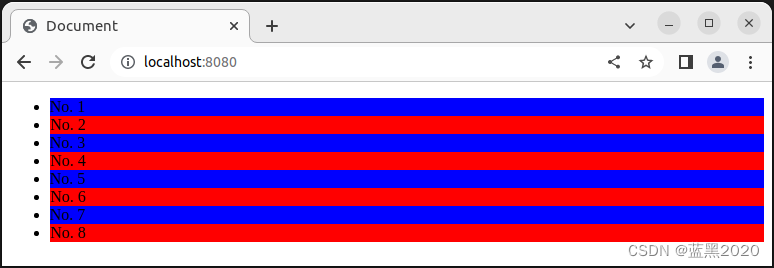 当然,仍然可以用
 http://localhost:8080/src访问,效果是一样的。但是,二者有一个不同之处:我们把
indext.html中的删掉。http://localhost:8080/src:隔行变色的效果没有了,这是期望的结果;http://localhost:8080:隔行变色的效果仍然存在,这是因为html-webpack-plugin在生成index.html时,会自动注入bundle.js文件;

这里没加/,因为index.html本来就在项目根目录下。配置webpack-dev-server
可以通过
devServer对webpack-dev-server插件进行配置,例如:module.exports = { ...... devServer: { open: true, host: '127.0.0.1', port: '9090' }, ......- 1
- 2
- 3
- 4
- 5
- 6
- 7
- 8
重新运行打包命令
npm run dev,会自动打开浏览器窗口:
loader
webpack默认只能打包处理
.js文件,对于其它文件,需要调用loader加载器才可以正常打包。比如:css-loader:打包处理.css文件less-loader:打包处理.less文件babel-loader:打包处理webpack无法处理的高级JS语法
css-loader
在
src目录下创建css目录,然后在css目录下创建index.css文件:li { list-style: none; }- 1
- 2
- 3
在
index.js中引入index.css:import './css/index.css'- 1
运行打包命令
npm run dev,报错如下:➜ temp0806 npm run dev > temp0806@1.0.0 dev > webpack serve ℹ 「wds」: Project is running at http://127.0.0.1:9090/ ℹ 「wds」: webpack output is served from / ℹ 「wds」: Content not from webpack is served from /home/ding/temp/temp0806 ℹ 「wdm」: wait until bundle finished: / ✖ 「wdm」: asset bundle.js 649 KiB [emitted] (name: main) asset ./index.html 731 bytes [emitted] runtime modules 1.25 KiB 6 modules modules by path ./node_modules/ 580 KiB modules by path ./node_modules/webpack-dev-server/client/ 20.9 KiB 10 modules modules by path ./node_modules/html-entities/lib/*.js 61 KiB 5 modules modules by path ./node_modules/webpack/hot/ 1.58 KiB 3 modules modules by path ./node_modules/url/ 37.4 KiB ./node_modules/url/url.js 22.8 KiB [built] [code generated] + 2 modules modules by path ./node_modules/querystring/*.js 4.51 KiB ./node_modules/querystring/index.js 127 bytes [built] [code generated] + 2 modules + 7 modules modules by path ./src/ 222 bytes ./src/index.js 192 bytes [built] [code generated] ./src/css/index.css 30 bytes [built] [code generated] [1 error] ERROR in ./src/css/index.css 1:3 Module parse failed: Unexpected token (1:3) You may need an appropriate loader to handle this file type, currently no loaders are configured to process this file. See https://webpack.js.org/concepts#loaders > li { | list-style: none; | } @ ./src/index.js 4:0-24 webpack 5.74.0 compiled with 1 error in 878 ms ℹ 「wdm」: Failed to compile.- 1
- 2
- 3
- 4
- 5
- 6
- 7
- 8
- 9
- 10
- 11
- 12
- 13
- 14
- 15
- 16
- 17
- 18
- 19
- 20
- 21
- 22
- 23
- 24
- 25
- 26
- 27
- 28
- 29
- 30
- 31
- 32
- 33
- 34
- 35
- 36
- 37
错误消息告诉我们,需要合适的loader来处理
.css文件。安装
style-loader和css-loader:➜ temp0806 npm i style-loader css-loader -D added 16 packages, and audited 557 packages in 6s 48 packages are looking for funding run `npm fund` for details 6 vulnerabilities (1 moderate, 5 high) To address all issues, run: npm audit fix Run `npm audit` for details.- 1
- 2
- 3
- 4
- 5
- 6
- 7
- 8
- 9
- 10
- 11
- 12
- 13
添加配置:
module: { rules: [ { test: /\.css$/, use: ['style-loader', 'css-loader'] } ] }- 1
- 2
- 3
- 4
- 5
test:匹配的文件类型。/\.css$/是正则表达式,其中\表示转义,$表示结尾,所以合起来就表示.css结尾的文件;use:调用的loader,调用顺序是从右向左;
重新运行打包命令
npm run dev:➜ temp0806 npm run dev > temp0806@1.0.0 dev > webpack serve ℹ 「wds」: Project is running at http://127.0.0.1:9090/ ℹ 「wds」: webpack output is served from / ℹ 「wds」: Content not from webpack is served from /home/ding/temp/temp0806 ℹ 「wdm」: wait until bundle finished: / ℹ 「wdm」: asset bundle.js 668 KiB [emitted] (name: main) asset ./index.html 731 bytes [emitted] runtime modules 1.29 KiB 7 modules modules by path ./node_modules/ 588 KiB modules by path ./node_modules/webpack-dev-server/client/ 20.9 KiB 10 modules modules by path ./node_modules/style-loader/dist/runtime/*.js 5.75 KiB 6 modules modules by path ./node_modules/html-entities/lib/*.js 61 KiB 5 modules modules by path ./node_modules/webpack/hot/ 1.58 KiB 3 modules modules by path ./node_modules/url/ 37.4 KiB 3 modules modules by path ./node_modules/querystring/*.js 4.51 KiB 3 modules modules by path ./node_modules/css-loader/dist/runtime/*.js 2.33 KiB 2 modules + 7 modules modules by path ./src/ 1.78 KiB ./src/index.js 192 bytes [built] [code generated] ./src/css/index.css 1.14 KiB [built] [code generated] ./node_modules/css-loader/dist/cjs.js!./src/css/index.css 464 bytes [built] [code generated] webpack 5.74.0 compiled successfully in 973 ms ℹ 「wdm」: Compiled successfully.- 1
- 2
- 3
- 4
- 5
- 6
- 7
- 8
- 9
- 10
- 11
- 12
- 13
- 14
- 15
- 16
- 17
- 18
- 19
- 20
- 21
- 22
- 23
- 24
- 25
- 26
- 27
在浏览器中可见CSS的效果(小圆点不见了)。

url-loader
在
src目录下创建images目录,并在images目录下复制一个图片smile.jpeg。在
index.html中添加该图片:<img src="" class="box">- 1
当然,现在看不到效果:

修改
index.js文件,添加代码如下:import logo from './images/smile.jpeg' $('.box').attr('src', logo) $('.box').attr('width', 200)- 1
- 2
- 3
- 4
保存文件,这时报错如下:
ℹ 「wdm」: Compiling... ✖ 「wdm」: asset bundle.js 669 KiB [emitted] (name: main) asset ./index.html 778 bytes [emitted] cached modules 590 KiB [cached] 41 modules runtime modules 1.29 KiB 7 modules cacheable modules 25.4 KiB ./src/index.js 261 bytes [built] [code generated] ./src/images/smile.jpeg 25.1 KiB [built] [code generated] [1 error] ERROR in ./src/images/smile.jpeg 1:0 Module parse failed: Unexpected character '�' (1:0) You may need an appropriate loader to handle this file type, currently no loaders are configured to process this file. See https://webpack.js.org/concepts#loaders (Source code omitted for this binary file) @ ./src/index.js 6:0-38 8:22-26 webpack 5.74.0 compiled with 1 error in 68 ms ℹ 「wdm」: Failed to compile.- 1
- 2
- 3
- 4
- 5
- 6
- 7
- 8
- 9
- 10
- 11
- 12
- 13
- 14
- 15
- 16
- 17
同样,还是提示需要合适的loader来处理
.jpeg文件。安装
url-loader和file-loader:➜ temp0806 npm i url-loader file-loader -D added 6 packages, and audited 563 packages in 5s 50 packages are looking for funding run `npm fund` for details 6 vulnerabilities (1 moderate, 5 high) To address all issues, run: npm audit fix Run `npm audit` for details.- 1
- 2
- 3
- 4
- 5
- 6
- 7
- 8
- 9
- 10
- 11
- 12
- 13
添加规则如下:
{ test: /\.jpg|jpeg|png|gif$/, use: ['url-loader?limit=10000']}- 1
重新运行打包命令
npm run dev,就可以看到图片了:
注意:limit设置为10000,其单位是byte,也就是10KB。它的含义是:如果图片大小不超过limit,就会转为base64方式,否则就用图片文件的方式。本例中,
smile.jpeg文件大小为15KB,超出了limit设置,所以是图片的方式。把limit改为20000,然后重新运行打包命令
npm run dev:
可见,这次使用了base64的方式。注:较小的图片,使用base64方式,可以减少网络开销。
babel-loader
webpack只能打包处理一部分高级的JavaScript语法。对于其它无法处理的高级语法,需要借助于
babel-loader进行打包处理。在
index.js中添加代码如下:function info(target) { target.info = 'Person info.' } @info class Person { } console.log(Person.info)- 1
- 2
- 3
- 4
- 5
- 6
- 7
- 8
保存文件,这时报错如下:
ℹ 「wdm」: Compiling... ✖ 「wdm」: assets by status 328 KiB [cached] 1 asset asset ./index.html 778 bytes [emitted] cached modules 298 KiB (javascript) 432 bytes (runtime) [cached] 33 modules ./src/index.js 401 bytes [built] [1 error] ERROR in ./src/index.js 20:0 Module parse failed: Unexpected character '@' (20:0) You may need an appropriate loader to handle this file type, currently no loaders are configured to process this file. See https://webpack.js.org/concepts#loaders | } | > @info | class Person { } | webpack 5.74.0 compiled with 1 error in 38 ms ℹ 「wdm」: Failed to compile.- 1
- 2
- 3
- 4
- 5
- 6
- 7
- 8
- 9
- 10
- 11
- 12
- 13
- 14
- 15
- 16
- 17
同样,还是提示需要合适的loader来处理
.js文件。安装
babel-loader、@babel/core和@babel/plugin-proposal-decorators:➜ temp0806 npm i babel-loader @babel/core @babel/plugin-proposal-decorators -D added 47 packages, and audited 610 packages in 11s 54 packages are looking for funding run `npm fund` for details 6 vulnerabilities (1 moderate, 5 high) To address all issues, run: npm audit fix Run `npm audit` for details.- 1
- 2
- 3
- 4
- 5
- 6
- 7
- 8
- 9
- 10
- 11
- 12
- 13
添加规则如下:
{ test: /\.js$/, use: 'babel-loader', exclude: /node_modules/ }- 1
注:
node_modules无需webpack处理,所以将其排除在外。在项目根目录下创建文件
babel.config.js:module.exports = { plugins: [['@babel/plugin-proposal-decorators', { legacy: true }]] }- 1
- 2
- 3
重新运行打包命令
npm run dev:temp0806 npm run dev > temp0806@1.0.0 dev > webpack serve ℹ 「wds」: Project is running at http://127.0.0.1:9090/ ℹ 「wds」: webpack output is served from / ℹ 「wds」: Content not from webpack is served from /home/ding/temp/temp0806 ℹ 「wdm」: wait until bundle finished: / ℹ 「wdm」: asset bundle.js 689 KiB [emitted] (name: main) asset ./index.html 778 bytes [emitted] runtime modules 1.29 KiB 7 modules modules by path ./node_modules/ 588 KiB 39 modules modules by path ./src/ 21.7 KiB modules by path ./src/css/*.css 1.59 KiB ./src/css/index.css 1.14 KiB [built] [code generated] ./node_modules/css-loader/dist/cjs.js!./src/css/index.css 462 bytes [built] [code generated] ./src/index.js 447 bytes [built] [code generated] ./src/images/smile.jpeg 19.7 KiB [built] [code generated] webpack 5.74.0 compiled successfully in 1282 ms ℹ 「wdm」: Compiled successfully.- 1
- 2
- 3
- 4
- 5
- 6
- 7
- 8
- 9
- 10
- 11
- 12
- 13
- 14
- 15
- 16
- 17
- 18
- 19
- 20
- 21
页面效果如下:

打包发布
build
假设项目开发完成了,现在要做build。前面介绍中,使用了
webpack-dev-server,所生成的东西都在内存里(注意并没有生成dist文件夹),而且没有经过压缩和优化。在
package.json文件的scripts中,添加build命令:"scripts": { "test": "echo \"Error: no test specified\" && exit 1", "dev": "webpack serve", "build": "webpack --mode production" },- 1
- 2
- 3
- 4
- 5
注意:前面提到过
mode选项,这里是通过命令行来覆盖webpack.config.js中的mode选项。在发布之前,再稍微调整一下目录结构。
- 把
bundle.js生成到dist/js目录下:
output: { path: path.join(__dirname, 'dist'), filename: 'js/bundle.js' },- 1
- 2
- 3
- 4
- 配置
url-loader,新增outputPath参数,指定图片文件的输出路径(否则会生成在dist目录下)。
{ test: /\.jpg|jpeg|png|gif$/, use: ['url-loader?limit=10000&outputPath=images']},- 1
注:
limit要改回成10000,否则使用的是base64方式,就不会生成图片了。运行
npm run build命令:➜ temp0806 npm run build > temp0806@1.0.0 build > webpack --mode production asset js/bundle.js 92.8 KiB [emitted] [minimized] (name: main) 1 related asset asset images/be0dcd475ffeb448fd2470bd1aa41ee4.jpeg 14.7 KiB [emitted] [immutable] [from: src/images/smile.jpeg] (auxiliary name: main) asset ./index.html 424 bytes [emitted] runtime modules 1.75 KiB 6 modules orphan modules 1.22 KiB [orphan] 2 modules cacheable modules 292 KiB modules by path ./node_modules/ 290 KiB modules by path ./node_modules/style-loader/dist/runtime/*.js 5.75 KiB ./node_modules/style-loader/dist/runtime/injectStylesIntoStyleTag.js 2.44 KiB [built] [code generated] ./node_modules/style-loader/dist/runtime/styleDomAPI.js 1.38 KiB [built] [code generated] + 4 modules modules by path ./node_modules/css-loader/dist/runtime/*.js 2.33 KiB ./node_modules/css-loader/dist/runtime/noSourceMaps.js 64 bytes [built] [code generated] ./node_modules/css-loader/dist/runtime/api.js 2.26 KiB [built] [code generated] ./node_modules/jquery/dist/jquery.js 282 KiB [built] [code generated] modules by path ./src/ 2.11 KiB ./src/index.js + 2 modules 1.66 KiB [built] [code generated] ./node_modules/css-loader/dist/cjs.js!./src/css/index.css 462 bytes [built] [code generated] webpack 5.74.0 compiled successfully in 2668 ms- 1
- 2
- 3
- 4
- 5
- 6
- 7
- 8
- 9
- 10
- 11
- 12
- 13
- 14
- 15
- 16
- 17
- 18
- 19
- 20
- 21
- 22
- 23
- 24
现在就生成了
dist目录:
注意:修改了
bundle.js和图片生成的目录,并不需要调整index.html相应的代码。即使在打包后也OK,因为bundle.js会自动注入到index.html里,而图片的src属性是在webpack里配置的,bundle.js也是webpack生成的,所以它知道图片的位置。clean-webpack-plugin插件
当webpack生成
dist目录和其中的文件时,并不会删除其中原有的内容。如果想要在每次打包发布时,自动清理掉dist目录中的旧文件,可以使用clean-webpack-plugin插件。安装
clean-webpack-plugin插件:➜ temp0806 npm i clean-webpack-plugin -D added 1 package, and audited 611 packages in 3s 54 packages are looking for funding run `npm fund` for details 6 vulnerabilities (1 moderate, 5 high) To address all issues, run: npm audit fix Run `npm audit` for details.- 1
- 2
- 3
- 4
- 5
- 6
- 7
- 8
- 9
- 10
- 11
- 12
- 13
修改
webpack.config.js,添加如下代码:const { CleanWebpackPlugin } = require('clean-webpack-plugin')- 1
修改如下代码:
module.exports = { ...... plugins: [htmlPlugin, new CleanWebpackPlugin()], ......- 1
- 2
- 3
- 4
现在,每次重新运行
npm run build命令,都会先清理dist目录,再生成新的内容。Source Map
修改
index.js中第23行代码:console.loga(Person.info)- 1
这里故意把
log写错。开发环境
运行打包命令
npm run dev,在浏览器的console中报错如下:
可见,虽然生成了bundel.js,仍然能定位到是index.js出错。但是报错的位置信息不正确,报错说是第25行,而实际是第23行出错。解决办法,添加如下配置:
module.exports = { ...... devtool: 'eval-source-map', ......- 1
- 2
- 3
- 4
重新运行打包命令
npm run dev:
现在,报错信息定位到了正确的文件和行号。build环境
删掉刚才添加的配置。运行
npm run build命令,打开dist目录下生成的index.html文件: 这是因为生产环境下默认不包含source map,这也是出于安全性考虑。
如果配置了
devtool: 'eval-source-map',则与开发环境下该配置的效果相同:
点击右上角的index.js,可以看到其源码,这是不安全的。另一种解决办法是,在生产环境下,只定位出错的行号,而不暴露源码,可用如下设置:
module.exports = { ...... devtool: 'nosources-source-map', ......- 1
- 2
- 3
- 4
重新运行打包命令
npm run build命令,报错信息不变,但是点击右上角index.js时,不会暴露源码:
总结
- 开发环境:设置为
eval-source-map; - 生产环境:关闭(不设置),或者设置为
nosources-source-map;
npm list总结
安装的模块清单如下:
➜ temp0806 npm list temp0806@1.0.0 /home/ding/temp/temp0806 ├── @babel/core@7.18.10 ├── @babel/plugin-proposal-decorators@7.18.10 ├── babel-loader@8.2.5 ├── clean-webpack-plugin@4.0.0 ├── css-loader@6.7.1 ├── file-loader@6.2.0 ├── html-webpack-plugin@5.5.0 ├── jquery@3.6.0 ├── style-loader@3.3.1 ├── url-loader@4.1.1 ├── webpack-cli@4.10.0 ├── webpack-dev-server@3.11.2 └── webpack@5.74.0- 1
- 2
- 3
- 4
- 5
- 6
- 7
- 8
- 9
- 10
- 11
- 12
- 13
- 14
- 15
注意版本信息,不同的版本可能配置和行为都各有不同,而且各模块之间可能会有兼容性问题。
安装包时,我们使用了
-D或者-S选项:-D:即--save-dev,表示开发阶段使用的包,其信息会出现在package.json的devDependencies下;-S:即--save,表示开发和生产环境都使用的包,其信息会出现在package.json的dependencies下;
本文中,只有
jquery使用了-S,其它包都是开发包,使用了-D。参考
https://www.bilibili.com/video/BV1zq4y1p7gahttps://www.webpackjs.comhttps://www.npmjs.comhttps://babeljs.io
-
相关阅读:
CSS笔记——盒模型及外边距合并解决
Linux高性能服务器编程 学习笔记 第四章 TCP/IP通信案例:访问Internet上的Web服务器
Android学习笔记 66. Android Studio 和 Hello World
Pytest----当fixture重名时如何调用
Unix 操作系统背后的女程序员 Lorinda Cherry 去世,享年 78 岁
Linux目录结构和VI/VIM 编辑器
【汇编语言实战】一元二次方程ax2+bx+c=0求解(含源码与过程截屏,可修改参数)
面试算法28:展平多级双向链表
C# WPF入门学习番外篇(二) —— C# WPF使用数据库创建注册登录界面
知识图谱(Knowledge Graph)- Neo4j 5.10.0 使用 - Python 操作
- 原文地址:https://blog.csdn.net/duke_ding2/article/details/126189851
