-
Spring更简单的读取和存储对象
在Spring 中想要更简单的存储和读取对象的核心是使用注解,也就是我们接下来要学习Spring 中的相关注解,来存储和读取 Bean对象。
一.存储Bean对象
之前我们存储Bean时,需要在
spring-config中添加一行bean注册内容才行,如下图所示:

而现在我们只需要一个注解就可以替代之前要写一行配置的尴尬了,不过在开始存储对象之前,我们先要来点准备工作。1.1 前置工作:配置扫描路径(重要)
注意∶想要将对象成功的存储到Spring 中,我们需要配置一下存储对象的扫描包路径,只有被配置的包下的所有类,添加了注解才能被正确的识别并保存到Spring中。
在
spring-config.xml添加如下配置∶<?xml version="1.0" encoding="UTF-8"?> <beans xmlns="http://www.springframework.org/schema/beans" xmlns:xsi="http://www.w3.org/2001/XMLSchema-instance" xmlns:content="http://www.springframework.org/schema/context" xsi:schemaLocation="http://www.springframework.org/schema/beans http://www.springframework.org/schema/beans/spring-beans.xsd http://www.springframework.org/schema/context https://www.springframework.org/schema/context/spring-context.xsd"> <!-- 配置spring扫描的根路径(此根路径下的所有spring存对象的注解才能生效)--> <content:component-scan base-package="这里写自己的包名,如:com.bit"> </content:component-scan> </beans>- 1
- 2
- 3
- 4
- 5
- 6
- 7
- 8
- 9
- 10
- 11
- 12
1.2 添加注解存储 Bean对象
想要将对象存储在Spring中,有两种注解类型可以实现:
- 类注解
:@Controller、@Service、@Repository、@Component、@Configuration。 - 方法注解:
@Bean.
@Controller(控制器存储)
使用@Controller存储bean的代码如下所示:
import org.springframework.stereotype.Controller; @Controller //表示将当前的类注册到Spring当中 public class UserController { /** * 对象中的测试方法 * @param name */ public void sayHi(String name){ System.out.println("Hi,Controller:" +name); } }- 1
- 2
- 3
- 4
- 5
- 6
- 7
- 8
- 9
- 10
- 11
- 12
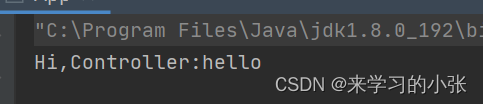
使用之前读取对象的方式来读取上面的
UserController对象,如下代码所示:import com.bit.Controller.UserController; import org.springframework.context.ApplicationContext; import org.springframework.context.support.ClassPathXmlApplicationContext; /** * Spring 启动类(为了方便演示Spring的功能而创建) */ public class App { public static void main(String[] args) { //1.先获取对象的上下文 ApplicationContext context = new ClassPathXmlApplicationContext("spring-config.xml"); //2.从Spring中获得存入的对象(id默认的规则是将存入的类的首字母小写) UserController userController = context.getBean("userController",UserController.class); userController.sayHi("hello"); } }- 1
- 2
- 3
- 4
- 5
- 6
- 7
- 8
- 9
- 10
- 11
- 12
- 13
- 14
- 15
- 16
@Service(服务存储)
@Service public class UserService { public void sayHi(String name) { System.out.println("Hi,Service" + name); } }- 1
- 2
- 3
- 4
- 5
- 6
- 7
读取 bean 的代码:
import com.bit.service.UserService; import org.springframework.context.ApplicationContext; import org.springframework.context.support.ClassPathXmlApplicationContext; public class App { public static void main(String[] args) { //1.先获取对象的上下文 ApplicationContext context = new ClassPathXmlApplicationContext("spring-config.xml"); //得到Service UserService userService = context.getBean("userService",UserService.class); userService.sayHi("world"); } }- 1
- 2
- 3
- 4
- 5
- 6
- 7
- 8
- 9
- 10
- 11
- 12

@Repository(仓库存储)
使用@Repository存储bean 的代码如下所示:
import org.springframework.stereotype.Repository; @Repository public class UserRepository { public void sayHi(String name){ System.out.println("Hi UserRepository:" + name); } }- 1
- 2
- 3
- 4
- 5
- 6
- 7
- 8
读取 bean 的代码:
import com.bit.dao.UserRepository; import org.springframework.context.ApplicationContext; import org.springframework.context.support.ClassPathXmlApplicationContext; /** * Spring 启动类(为了方便演示Spring的功能而创建) */ public class App { public static void main(String[] args) { //1.先获取对象的上下文 ApplicationContext context = new ClassPathXmlApplicationContext("spring-config.xml"); //得到Repository UserRepository userRepository = context.getBean("userRepository",UserRepository.class); userRepository.sayHi("MySql"); } }- 1
- 2
- 3
- 4
- 5
- 6
- 7
- 8
- 9
- 10
- 11
- 12
- 13
- 14
- 15
- 16

@Component(组件存储)
使用@Component存储bean 的代码如下所示:
import org.springframework.stereotype.Component; @Component public class UserComponent { public void sayHi(String name){ System.out.println("Hi UserComponent:" + name); } }- 1
- 2
- 3
- 4
- 5
- 6
- 7
读取 bean 的代码:
import com.bit.util.UserComponent; import org.springframework.context.ApplicationContext; import org.springframework.context.support.ClassPathXmlApplicationContext; public class App { public static void main(String[] args) { //1.先获取对象的上下文 ApplicationContext context = new ClassPathXmlApplicationContext("spring-config.xml"); //得到 Component UserComponent userComponent = context.getBean("UserComponent",UserComponent.class); userComponent.sayHi("user"); } }- 1
- 2
- 3
- 4
- 5
- 6
- 7
- 8
- 9
- 10
- 11
- 12

@Configuration (配置存储)
使用@Configuration存储bean 的代码如下所示:
import org.springframework.context.annotation.Configuration; @Configuration public class UserConfiguration { public void sayHi(String name){ System.out.println("Hi,Configuration:" + name); } }- 1
- 2
- 3
- 4
- 5
- 6
- 7
读取 bean 的代码:
import com.bit.config.UserConfiguration; import org.springframework.context.ApplicationContext; import org.springframework.context.support.ClassPathXmlApplicationContext; public class App { public static void main(String[] args) { //1.先获取对象的上下文 ApplicationContext context = new ClassPathXmlApplicationContext("spring-config.xml"); //得到Configuration UserConfiguration userConfiguration = context.getBean("userConfiguration",UserConfiguration.class); userConfiguration.sayHi("Spring"); } }- 1
- 2
- 3
- 4
- 5
- 6
- 7
- 8
- 9
- 10
- 11
- 12

为什么要这么多类注解?
这么多的类注解,就是让程序员看到类注解之后,就能直接了解当前类的用途,比如:
@Controller:表示的是业务逻辑层;@Servie:服务层;@Repository:持久层;@Configuration:配置层。
程序的工程分层,调用流程如下:

类注解之间的关系
查看
@Controller /@Service /@Repository /@Configuration等注解的源码发现:
其实这些注解里面都有一个注解@Component,说明它们本身就是属于@Component的“子类”。Bean的命名规则
通过上面示例,我们可以看出,通常我们
bean使用的都是标准的大驼峰命名,而读取的时候首字母小写就可以获取到 bean 了;
但是当首字母和第二个字母都是大写时,上面的命名规则就不能正常读取到 bean 了,这时就需要直接用类名命名就可以获取到bean了。1.3方法注解@Bean
类注解是添加到某个类上的,而方法注解是放到某个方法上的,在Spring框架的设计中,方法注解
@Bean要配合类注解才能将对象正常的存储到Spring容器中。如以下代码的实现:
首先需要创建一个User类,并重写里面的toString方法:public class User { private int id; private String name; private int age; @Override public String toString() { return "User{" + "id=" + id + ", name='" + name + '\'' + ", age=" + age + '}'; } public int getId() { return id; } public void setId(int id) { this.id = id; } public String getName() { return name; } public void setName(String name) { this.name = name; } public int getAge() { return age; } public void setAge(int age) { this.age = age; } }- 1
- 2
- 3
- 4
- 5
- 6
- 7
- 8
- 9
- 10
- 11
- 12
- 13
- 14
- 15
- 16
- 17
- 18
- 19
- 20
- 21
- 22
- 23
- 24
- 25
- 26
- 27
- 28
- 29
- 30
- 31
- 32
- 33
- 34
- 35
- 36
- 37
- 38
再写UserBean 类:方法注解
@Bean要配合类注解(@Component)才能将对象正常的存储到Spring容器中package com.bit.util; import com.bit.Model.User; import org.springframework.context.annotation.Bean; import org.springframework.stereotype.Component; @Component public class UserBean { //Bean可以有多个别名,但是使用了别名之后,就不能使用方法名获取到对象了 @Bean(name = {"u1","userInfo"}) public User user1(){ //伪代码来构建对象 User user = new User(); user.setId(1); user.setAge(15); user.setName("zhangsan"); return user; } @Bean(name = "u2") public User user2(){ //伪代码来构建对象 User user = new User(); user.setId(2); user.setAge(18); user.setName("lisi"); return user; } }- 1
- 2
- 3
- 4
- 5
- 6
- 7
- 8
- 9
- 10
- 11
- 12
- 13
- 14
- 15
- 16
- 17
- 18
- 19
- 20
- 21
- 22
- 23
- 24
- 25
- 26
- 27
- 28
- 29
可以通过设置name属性给Bean对象进行重命名操作:
这个重命名的 name 其实是⼀个数组,一个 bean 可以有多个名字。重命名之后,只能使用重命名之后的名字来获取到bean对象,不能使用方法名获取到对象了。当没有设置name属性时,那么bean默认的名称就是方法名,当设置了name属性之后,只能通过重命名的name属性对应的值来获取;重命名之后再使用方法名就获取不到bean对象了。
获取bean对象:
public class Application { public static void main(String[] args) { ApplicationContext context = new ClassPathXmlApplicationContext("spring-config.xml"); //未重命名之前用方法名就可以获取bean User user = context.getBean("u1",User.class); System.out.println(user); } }- 1
- 2
- 3
- 4
- 5
- 6
- 7
- 8
- 9
二、获取Bean对象(对象装配)
获取 bean对象也叫做对象装配,是把对象取出来放到某个类中,有时候也叫对象注入。
从容器中将对象读取出来。对象装配(对象注入)的实现方法以下3种:
- 属性注入(字段注入)
- 构造方法注入
- Setter注入
2.1属性注入
属性注入是使用
@Autowired实现的,将Service类注入到Controller类中。Service类的实现代码如下:package com.bit.service; import com.bit.Model.User; import org.springframework.stereotype.Service; @Service public class UserService { public User findUserById(int id){ User user = new User(); if(id == 1){ user.setId(1); user.setName("张三"); user.setAge(10); }else{ user.setId(2); user.setName("李四"); user.setAge(20); } return user; }- 1
- 2
- 3
- 4
- 5
- 6
- 7
- 8
- 9
- 10
- 11
- 12
- 13
- 14
- 15
- 16
- 17
- 18
- 19
UserController实现代码如下:package com.bit.Controller; import com.bit.Model.User; import com.bit.service.UserService; import org.springframework.beans.factory.annotation.Autowired; import org.springframework.stereotype.Controller; @Controller //表示将当前的类注册到Spring当中 public class UserController { //1.属性注册 从Spring中获取一个对象,并注入到当前类 @Autowired private UserService userService; /** * 根据用户id查询用户对象 * @param id * @return */ public User findUserById(Integer id){ if(null == id){ //无效参数 return new User(); } return userService.findUserById(id); } }- 1
- 2
- 3
- 4
- 5
- 6
- 7
- 8
- 9
- 10
- 11
- 12
- 13
- 14
- 15
- 16
- 17
- 18
- 19
- 20
- 21
- 22
- 23
- 24
- 25
- 26
获取controller中的findUserById()方法:
public class App { public static void main(String[] args) { //1.先获取对象的上下文 ApplicationContext context = new ClassPathXmlApplicationContext("spring-config.xml"); //方式一 UserController controller = context.getBean("userController", UserController.class); User user = controller.findUserById(1); //打印user对象 System.out.println(user); } }- 1
- 2
- 3
- 4
- 5
- 6
- 7
- 8
- 9
- 10
- 11

2.2 构造方法注入
构造方法注入是在类的构造方法中实现注入,如下代码所示:
package com.bit.Controller; import com.bit.Model.User; import com.bit.service.UserService; import org.springframework.beans.factory.annotation.Autowired; import org.springframework.stereotype.Controller; @Controller public class UserController2 { //1.将UserService注入到当前类(使用set注入的方式) //定义属性 private UserService userService; @Autowired //生成属性的set方法,给属性添加Autowired注解 public UserController2(UserService userService) { this.userService = userService; } //2.在方法里面调用UserService的查询方法,返回用户对象 public User findUserById(Integer id){ return userService.findUserById(id); } }- 1
- 2
- 3
- 4
- 5
- 6
- 7
- 8
- 9
- 10
- 11
- 12
- 13
- 14
- 15
- 16
- 17
- 18
- 19
- 20
- 21
- 22
- 23
获取controller中的findUserById()方法:
import com.bit.Controller.UserController2; import com.bit.Model.User; import org.springframework.context.ApplicationContext; import org.springframework.context.support.ClassPathXmlApplicationContext; public class App { public static void main(String[] args) { //1.先获取对象的上下文 ApplicationContext context = new ClassPathXmlApplicationContext("spring-config.xml"); //方式二 UserController2 controller2 = (UserController2)context.getBean("UserController2"); User user = controller2.findUserById(2); System.out.println(user); } }- 1
- 2
- 3
- 4
- 5
- 6
- 7
- 8
- 9
- 10
- 11
- 12
- 13
- 14
- 15

2.3 Setter注入
Setter注入和属性的Setter方法实现类似,只不过在设置set方法的时候需要加上@Autowired注解,如下代码所示:
package com.bit.Controller; import com.bit.Model.User; import com.bit.service.UserService; import org.springframework.beans.factory.annotation.Autowired; import org.springframework.stereotype.Controller; @Controller public class UserController3 { //方式三: //3.1定义一个私有对象 private UserService userService; @Autowired //3.2 生成属性的set方法,给属性添加Autowired注解 public void setUserService(UserService userService) { this.userService = userService; } /** * 查询用户对象的方法 * @param id * @return */ public User finUserByiD(Integer id){ return this.userService.findUserById(id); } }- 1
- 2
- 3
- 4
- 5
- 6
- 7
- 8
- 9
- 10
- 11
- 12
- 13
- 14
- 15
- 16
- 17
- 18
- 19
- 20
- 21
- 22
- 23
- 24
- 25
- 26
- 27
- 28
- 29
获取controller3 :
public class App { public static void main(String[] args) { //1.先获取对象的上下文 ApplicationContext context = new ClassPathXmlApplicationContext("spring-config.xml"); //方式三 UserController3 controller3 = context.getBean("userController3", UserController3.class); User user = controller3.finUserByiD(2); System.out.println(user); } }- 1
- 2
- 3
- 4
- 5
- 6
- 7
- 8
- 9
- 10

2.4 三种注入优缺点分析
- 属性注入的优点是简洁,使用方便;缺点是只能用于loC容器,如果是非loC容器不可用,并且只有在使用的时候才会出现NPE(空指针异常)。
- 构造方法注入是Spring推荐的注入方式,它的缺点是如果有多个注入会显得比较臃肿,但出现这种情况你应该考虑一下当前类是否符合程序的单一职责的设计模式了,它的优点是通用性更好,它能保证在使用注入对象之前,此注入对象一定是初始化过了的。
- Setter方式是Spring 早期版本推荐的注入方式,但通用性不如构造方法,所有Spring现版本已经推荐使用构造方法注入的方式来进行类注入了。
2.5 @Resource:另一种注入关键字
在进行类注入时,除了可以使用
@Autowired关键字之外,我们还可以使用@Resource进行注入。注意:
@Resource支持属性注入和Setter注入,但不支持构造方法注入。@Autowired和@Resource的区别
- 出身不同:
@Autowired来自于Spring,而@Resource来自于JDK的注解; - 使用时设置的参数不同︰相比于
@Autowired来说,@Resource支持更多的参数设置,例如name、type设置,根据名称获取 Bean。而@Autowired只支持required参数设置。 - 用法不同:
@Autowired支持属性注入、构造方法注入和Setter注入,而@Resource不支持构造方法注入。
2.6 同一类型多个@Bean报错
当出现以下多个Bean,返回同一对象类型时程序会报错,如下代码所示:
@Bean将一个类型的对象注入多次的问题:
解决方案:- 精确的描述bean的名称(将注入的名称写对)
@Controller //表示将当前的类注册到Spring当中 public class UserController { @Autowired private User user1; /** * 对象中的测试方法 * @param name */ public void sayHi(String name){ System.out.println("User :" + user1); } }- 1
- 2
- 3
- 4
- 5
- 6
- 7
- 8
- 9
- 10
- 11
- 12
- 13
- 使用@Resource设置name的方式来重命名注入对象。
@Controller //表示将当前的类注册到Spring当中 public class UserController { @Resource(name = "user1") private User user; /** * 对象中的测试方法 * @param name */ public void sayHi(String name){ System.out.println("User :" + user); } }- 1
- 2
- 3
- 4
- 5
- 6
- 7
- 8
- 9
- 10
- 11
- 12
- 13
- 使⽤
@Autowired+@Qualifier来筛选bean对象
@Controller //表示将当前的类注册到Spring当中 public class UserController { @Autowired @Qualifier(value="user1") private User user; /** * 对象中的测试方法 * @param name */ public void sayHi(String name){ System.out.println("User :" + user); } }- 1
- 2
- 3
- 4
- 5
- 6
- 7
- 8
- 9
- 10
- 11
- 12
- 13
- 14
以上。
-
相关阅读:
Linux查看磁盘、文件系统、文件夹、文件大小的命令(lsblk、df、du、ll)
火山引擎VeDI:如何高效使用A/B实验,优化APP推荐系统
【MySQL架构篇】SQL执行流程与缓冲池
sublime怎么创建java页面
Lattice Crosslink-NX器件(LIFCL-40-7MG121I)用作视频输入桥接时支持的CMOS型号及可达性能汇总
期货交易需要多大的本钱?仓位怎么分配?
PhotoshopCS6视频教程学习笔记-基础部分之一
Java 筆記
14 bs对象.节点名称.name attrs string 获取节点名称 属性 内容
esp32和ros2基础篇草稿-micro-ros-
- 原文地址:https://blog.csdn.net/dddddrrrzz/article/details/125751674

- 最新文章
-
沪漂五周年了:我越来越迷茫了
Agentic Skill Routing 实战:别再把所有 Skill 塞进 AI Agent 上下文
MySQL-Seconds_behind_master的精度误差
[MAF预定义ChatClient中间件-03]CachingChatClient——利用缓存省钱省时间
AI的至暗历史:从万众期待到被政府撤资,AI的两次死亡徘徊
Agent OS :五种驯服不确定性的范式
PortSwigger SQL注入LAB11
数据库即时编译JIT
[Begin]AI Learn Data Day 0
深度学习进阶(二十七)现代 LLM 的核心架构设计其二:SwiGLU