-
MAUI Blazor 权限经验分享 (定位,使用相机)
🚀 优质资源分享 🚀
学习路线指引(点击解锁) 知识定位 人群定位 🧡 Python实战微信订餐小程序 🧡 进阶级 本课程是python flask+微信小程序的完美结合,从项目搭建到腾讯云部署上线,打造一个全栈订餐系统。 💛Python量化交易实战💛 入门级 手把手带你打造一个易扩展、更安全、效率更高的量化交易系统 入门文章
Blazor Hybrid / MAUI 简介和实战
https://blog.csdn.net/densen2014/p/16240966.html在 Mac 上开发 .NET MAUI
https://blog.csdn.net/densen2014/p/16057571.html在 Windows 上开发 .NET MAUI
https://docs.microsoft.com/zh-cn/dotnet/maui/get-started/installation之前的工程已经能正常使用blazor的webview下获取定位,使用相机等功能,新版释出后反而权限获取不到了,定位页面出现如下错误
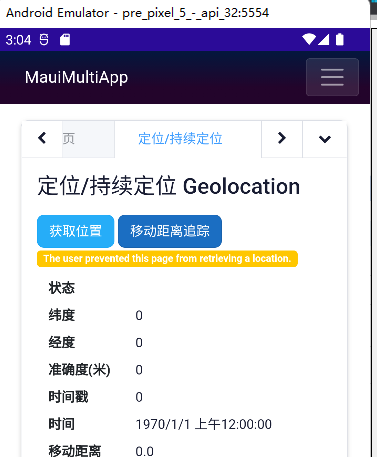
由于这个问题主要出现在安卓系统,下面只选了安卓的步骤分享
Android
应用所需的权限和功能在
AndroidManifest.xml中定义。请参阅 官方文档 了解 Android App Manifest。某些 Android 设备权限需要在运行时显示提示,以便用户可以授予或拒绝该权限。 Android 有一个推荐的 workflow 用于在运行时请求权限,此工作流必须由应用手动实现。 WebView 的
WebChromeClient负责对权限请求做出反应,因此该项目提供了一个PermissionManagingBlazorWebChromeClient将 Webkit 资源映射到 Android 权限并执行推荐的权限请求工作流。在向
AndroidManifest.xml添加其他权限后,请务必更新PermissionManagingBlazorWebChromeClient.cs以包含该权限的“基本原理字符串”,解释应用程序需要它的原因。可能还需要在 权限请求类型 和 Android Manifest 权限之间定义其他映射。1. 应用所需的权限
Platforms/Android/AndroidManifest.xml以下是我所有的测试权限列表,各位看官按需自由组合.
xml version="1.0" encoding="utf-8"?- 1
- 2
- 3
- 4
- 5
- 6
- 7
- 8
- 9
- 10
- 11
- 12
- 13
- 14
- 15
- 16
- 17
- 18
- 19
- 20
- 21
- 22
- 23
- 24
- 25
- 26
- 27
- 28
- 29
- 30
- 31
- 32
- 33
- 34
- 35
- 36
- 37
- 38
2. 添加文件
Platforms/Android/PermissionManagingBlazorWebChromeClient.csusing Android; using Android.App; using Android.Content.PM; using Android.Graphics; using Android.OS; using Android.Views; using Android.Webkit; using AndroidX.Activity; using AndroidX.Activity.Result; using AndroidX.Activity.Result.Contract; using AndroidX.Core.Content; using Java.Interop; using System; using System.Collections.Generic; using View = Android.Views.View; using WebView = Android.Webkit.WebView; namespace BlazorMaui; internal class PermissionManagingBlazorWebChromeClient : WebChromeClient, IActivityResultCallback { // This class implements a permission requesting workflow that matches workflow recommended // by the official Android developer documentation. // See: https://developer.android.com/training/permissions/requesting#workflow_for_requesting_permissions // The current implementation supports location, camera, and microphone permissions. To add your own, // update the s_rationalesByPermission dictionary to include your rationale for requiring the permission. // If necessary, you may need to also update s_requiredPermissionsByWebkitResource to define how a specific // Webkit resource maps to an Android permission. // In a real app, you would probably use more convincing rationales tailored toward what your app does. private const string CameraAccessRationale = "This app requires access to your camera. Please grant access to your camera when requested."; private const string LocationAccessRationale = "This app requires access to your location. Please grant access to your precise location when requested."; private const string MicrophoneAccessRationale = "This app requires access to your microphone. Please grant access to your microphone when requested."; private static readonly Dictionary s\_rationalesByPermission = new() { [Manifest.Permission.Camera] = CameraAccessRationale, [Manifest.Permission.AccessFineLocation] = LocationAccessRationale, [Manifest.Permission.RecordAudio] = MicrophoneAccessRationale, // Add more rationales as you add more supported permissions. }; private static readonly Dictionary s\_requiredPermissionsByWebkitResource = new() { [PermissionRequest.ResourceVideoCapture] = new[] { Manifest.Permission.Camera }, [PermissionRequest.ResourceAudioCapture] = new[] { Manifest.Permission.ModifyAudioSettings, Manifest.Permission.RecordAudio }, // Add more Webkit resource -> Android permission mappings as needed. }; private readonly WebChromeClient \_blazorWebChromeClient; private readonly ComponentActivity \_activity; private readonly ActivityResultLauncher \_requestPermissionLauncher; private Action? \_pendingPermissionRequestCallback; public PermissionManagingBlazorWebChromeClient(WebChromeClient blazorWebChromeClient, ComponentActivity activity) { \_blazorWebChromeClient = blazorWebChromeClient; \_activity = activity; \_requestPermissionLauncher = \_activity.RegisterForActivityResult(new ActivityResultContracts.RequestPermission(), this); } public override void OnCloseWindow(Android.Webkit.WebView? window) { \_blazorWebChromeClient.OnCloseWindow(window); \_requestPermissionLauncher.Unregister(); } public override void OnGeolocationPermissionsShowPrompt(string? origin, GeolocationPermissions.ICallback? callback) { ArgumentNullException.ThrowIfNull(callback, nameof(callback)); RequestPermission(Manifest.Permission.AccessFineLocation, isGranted => callback.Invoke(origin, isGranted, false)); } public override void OnPermissionRequest(PermissionRequest? request) { ArgumentNullException.ThrowIfNull(request, nameof(request)); if (request.GetResources() is not { } requestedResources) { request.Deny(); return; } RequestAllResources(requestedResources, grantedResources => { if (grantedResources.Count == 0) { request.Deny(); } else { request.Grant(grantedResources.ToArray()); } }); } private void RequestAllResources(Memory requestedResources, Action> callback) { if (requestedResources.Length == 0) { // No resources to request - invoke the callback with an empty list. callback(new()); return; } var currentResource = requestedResources.Span[0]; var requiredPermissions = s\_requiredPermissionsByWebkitResource.GetValueOrDefault(currentResource, Array.Empty()); RequestAllPermissions(requiredPermissions, isGranted => { // Recurse with the remaining resources. If the first resource was granted, use a modified callback // that adds the first resource to the granted resources list. RequestAllResources(requestedResources[1..], !isGranted ? callback : grantedResources => { grantedResources.Add(currentResource); callback(grantedResources); }); }); } private void RequestAllPermissions(Memory requiredPermissions, Action callback) { if (requiredPermissions.Length == 0) { // No permissions left to request - success! callback(true); return; } RequestPermission(requiredPermissions.Span[0], isGranted => { if (isGranted) { // Recurse with the remaining permissions. RequestAllPermissions(requiredPermissions[1..], callback); } else { // The first required permission was not granted. Fail now and don't attempt to grant // the remaining permissions. callback(false); } }); } private void RequestPermission(string permission, Action callback) { // This method implements the workflow described here: // https://developer.android.com/training/permissions/requesting#workflow\_for\_requesting\_permissions if (ContextCompat.CheckSelfPermission(\_activity, permission) == Permission.Granted) { callback.Invoke(true); } else if (\_activity.ShouldShowRequestPermissionRationale(permission) && s\_rationalesByPermission.TryGetValue(permission, out var rationale)) { new AlertDialog.Builder(\_activity) .SetTitle("Enable app permissions")! .SetMessage(rationale)! .SetNegativeButton("No thanks", (\_, \_) => callback(false))! .SetPositiveButton("Continue", (\_, \_) => LaunchPermissionRequestActivity(permission, callback))! .Show(); } else { LaunchPermissionRequestActivity(permission, callback); } } private void LaunchPermissionRequestActivity(string permission, Action callback) { if (\_pendingPermissionRequestCallback is not null) { throw new InvalidOperationException("Cannot perform multiple permission requests simultaneously."); } \_pendingPermissionRequestCallback = callback; \_requestPermissionLauncher.Launch(permission); } void IActivityResultCallback.OnActivityResult(Java.Lang.Object isGranted) { var callback = \_pendingPermissionRequestCallback; \_pendingPermissionRequestCallback = null; callback?.Invoke((bool)isGranted); } #region Unremarkable overrides // See: https://github.com/dotnet/maui/issues/6565 public override JniPeerMembers JniPeerMembers => \_blazorWebChromeClient.JniPeerMembers; public override Bitmap? DefaultVideoPoster => \_blazorWebChromeClient.DefaultVideoPoster; public override Android.Views.View? VideoLoadingProgressView => \_blazorWebChromeClient.VideoLoadingProgressView; public override void GetVisitedHistory(IValueCallback? callback) => \_blazorWebChromeClient.GetVisitedHistory(callback); public override bool OnConsoleMessage(ConsoleMessage? consoleMessage) => \_blazorWebChromeClient.OnConsoleMessage(consoleMessage); public override bool OnCreateWindow(WebView? view, bool isDialog, bool isUserGesture, Message? resultMsg) => \_blazorWebChromeClient.OnCreateWindow(view, isDialog, isUserGesture, resultMsg); public override void OnGeolocationPermissionsHidePrompt() => \_blazorWebChromeClient.OnGeolocationPermissionsHidePrompt(); public override void OnHideCustomView() => \_blazorWebChromeClient.OnHideCustomView(); public override bool OnJsAlert(WebView? view, string? url, string? message, JsResult? result) => \_blazorWebChromeClient.OnJsAlert(view, url, message, result); public override bool OnJsBeforeUnload(WebView? view, string? url, string? message, JsResult? result) => \_blazorWebChromeClient.OnJsBeforeUnload(view, url, message, result); public override bool OnJsConfirm(WebView? view, string? url, string? message, JsResult? result) => \_blazorWebChromeClient.OnJsConfirm(view, url, message, result); public override bool OnJsPrompt(WebView? view, string? url, string? message, string? defaultValue, JsPromptResult? result) => \_blazorWebChromeClient.OnJsPrompt(view, url, message, defaultValue, result); public override void OnPermissionRequestCanceled(PermissionRequest? request) => \_blazorWebChromeClient.OnPermissionRequestCanceled(request); public override void OnProgressChanged(WebView? view, int newProgress) => \_blazorWebChromeClient.OnProgressChanged(view, newProgress); public override void OnReceivedIcon(WebView? view, Bitmap? icon) => \_blazorWebChromeClient.OnReceivedIcon(view, icon); public override void OnReceivedTitle(WebView? view, string? title) => \_blazorWebChromeClient.OnReceivedTitle(view, title); public override void OnReceivedTouchIconUrl(WebView? view, string? url, bool precomposed) => \_blazorWebChromeClient.OnReceivedTouchIconUrl(view, url, precomposed); public override void OnRequestFocus(WebView? view) => \_blazorWebChromeClient.OnRequestFocus(view); public override void OnShowCustomView(View? view, ICustomViewCallback? callback) => \_blazorWebChromeClient.OnShowCustomView(view, callback); public override bool OnShowFileChooser(WebView? webView, IValueCallback? filePathCallback, FileChooserParams? fileChooserParams) => \_blazorWebChromeClient.OnShowFileChooser(webView, filePathCallback, fileChooserParams); #endregion }- 1
- 2
- 3
- 4
- 5
- 6
- 7
- 8
- 9
- 10
- 11
- 12
- 13
- 14
- 15
- 16
- 17
- 18
- 19
- 20
- 21
- 22
- 23
- 24
- 25
- 26
- 27
- 28
- 29
- 30
- 31
- 32
- 33
- 34
- 35
- 36
- 37
- 38
- 39
- 40
- 41
- 42
- 43
- 44
- 45
- 46
- 47
- 48
- 49
- 50
- 51
- 52
- 53
- 54
- 55
- 56
- 57
- 58
- 59
- 60
- 61
- 62
- 63
- 64
- 65
- 66
- 67
- 68
- 69
- 70
- 71
- 72
- 73
- 74
- 75
- 76
- 77
- 78
- 79
- 80
- 81
- 82
- 83
- 84
- 85
- 86
- 87
- 88
- 89
- 90
- 91
- 92
- 93
- 94
- 95
- 96
- 97
- 98
- 99
- 100
- 101
- 102
- 103
- 104
- 105
- 106
- 107
- 108
- 109
- 110
- 111
- 112
- 113
- 114
- 115
- 116
- 117
- 118
- 119
- 120
- 121
- 122
- 123
- 124
- 125
- 126
- 127
- 128
- 129
- 130
- 131
- 132
- 133
- 134
- 135
- 136
- 137
- 138
- 139
- 140
- 141
- 142
- 143
- 144
- 145
- 146
- 147
- 148
- 149
- 150
- 151
- 152
- 153
- 154
- 155
- 156
- 157
- 158
- 159
- 160
- 161
- 162
- 163
- 164
- 165
- 166
- 167
- 168
- 169
- 170
- 171
- 172
- 173
- 174
- 175
- 176
- 177
- 178
- 179
- 180
- 181
- 182
- 183
- 184
- 185
- 186
- 187
- 188
- 189
- 190
- 191
- 192
- 193
- 194
- 195
- 196
- 197
- 198
- 199
- 200
- 201
- 202
- 203
- 204
- 205
- 206
- 207
- 208
- 209
- 210
- 211
- 212
- 213
- 214
- 215
- 216
- 217
- 218
- 219
- 220
- 221
- 222
- 223
- 224
- 225
- 226
- 227
- 228
- 229
- 230
- 231
3. 文件
MainPage.xaml添加
x:Name="_blazorWebView"- 1
- 2
- 3
- 4
- 5
- 6
- 7
4. 文件
MainPage.xaml.cs添加
_blazorWebView.BlazorWebViewInitialized += BlazorWebViewInitialized; _blazorWebView.BlazorWebViewInitializing += BlazorWebViewInitializing;完整代码:
using LibraryShared; using Microsoft.AspNetCore.Components.WebView; using Microsoft.Maui.Controls; using Microsoft.Maui.Platform; using System; using static Microsoft.Maui.ApplicationModel.Permissions; #if ANDROID using AndroidX.Activity; #endif namespace BlazorMaui { public partial class MainPage : ContentPage { public MainPage() { InitializeComponent(); _blazorWebView.BlazorWebViewInitialized += BlazorWebViewInitialized; _blazorWebView.BlazorWebViewInitializing += BlazorWebViewInitializing; } private void BlazorWebViewInitialized(object? sender, BlazorWebViewInitializedEventArgs e) { #if ANDROID if (e.WebView.Context?.GetActivity() is not ComponentActivity activity) { throw new InvalidOperationException($"The permission-managing WebChromeClient requires that the current activity be a '{nameof(ComponentActivity)}'."); } e.WebView.Settings.JavaScriptEnabled = true; e.WebView.Settings.AllowFileAccess = true; e.WebView.Settings.MediaPlaybackRequiresUserGesture = false; e.WebView.Settings.SetGeolocationEnabled(true); e.WebView.Settings.SetGeolocationDatabasePath(e.WebView.Context?.FilesDir?.Path); e.WebView.SetWebChromeClient(new PermissionManagingBlazorWebChromeClient(e.WebView.WebChromeClient!, activity)); #endif } private void BlazorWebViewInitializing(object? sender, BlazorWebViewInitializingEventArgs e) { #if IOS || MACCATALYST e.Configuration.AllowsInlineMediaPlayback = true; e.Configuration.MediaTypesRequiringUserActionForPlayback = WebKit.WKAudiovisualMediaTypes.None; #endif } } }- 1
- 2
- 3
- 4
- 5
- 6
- 7
- 8
- 9
- 10
- 11
- 12
- 13
- 14
- 15
- 16
- 17
- 18
- 19
- 20
- 21
- 22
- 23
- 24
- 25
- 26
- 27
- 28
- 29
- 30
- 31
- 32
- 33
- 34
- 35
- 36
- 37
- 38
- 39
- 40
- 41
- 42
- 43
- 44
- 45
- 46
- 47
- 48
- 49
- 50
4. 其他更改
由于工程是一个共享库给多端用,先定义了一个接口用于注入服务到页面调用演示功能
public interface ITools { Task CheckPermissionsCamera(); Task TakePhoto(); Task CheckPermissionsLocation(); Task GetCachedLocation(); Task GetCurrentLocation(); Task CheckMock(); double DistanceBetweenTwoLocations(); void ShowSettingsUI(); string GetAppInfo(); }- 1
- 2
- 3
- 4
- 5
- 6
- 7
- 8
- 9
- 10
- 11
- 12
- 13
- 14
- 15
- 16
- 17
- 18
调用MAUI的API功能
BlazorMaui/Services/TestService.cs#if WINDOWS using Windows.Storage; #endif #if ANDROID using Android.Webkit; #endif using BlazorShared.Services; using System.Security.Permissions; namespace LibraryShared { public class TestService : ITools { public string GetAppInfo() { //读取应用信息 string name = AppInfo.Current.Name; string package = AppInfo.Current.PackageName; string version = AppInfo.Current.VersionString; string build = AppInfo.Current.BuildString; return $"{name},{version}.{build}"; } public void ShowSettingsUI() { //显示应用设置 AppInfo.Current.ShowSettingsUI(); } public async Task CheckPermissionsCamera() { //检查权限的当前状态 PermissionStatus status = await Permissions.CheckStatusAsync(); //请求权限 if (status != PermissionStatus.Granted) { status = await Permissions.RequestAsync(); } return status.ToString(); } public async Task CheckPermissionsLocation() { //检查权限的当前状态 PermissionStatus status = await Permissions.CheckStatusAsync(); //请求权限 if (status != PermissionStatus.Granted) { status = await Permissions.RequestAsync(); } return status.ToString(); } /// /// 拍照 /// CapturePhotoAsync调用该方法以打开相机,让用户拍照。 如果用户拍照,该方法的返回值将是非 null 值。 /// 以下代码示例使用媒体选取器拍摄照片并将其保存到缓存目录: /// public async Task TakePhoto() { await CheckPermissionsCamera(); if (MediaPicker.Default.IsCaptureSupported) { FileResult photo = await MediaPicker.Default.CapturePhotoAsync(); if (photo != null) { // save the file into local storage string localFilePath = Path.Combine(FileSystem.CacheDirectory, photo.FileName); using Stream sourceStream = await photo.OpenReadAsync(); using FileStream localFileStream = File.OpenWrite(localFilePath); await sourceStream.CopyToAsync(localFileStream); return localFilePath; } return "photo null"; } return null; } /// /// 获取最后一个已知位置, 设备可能已缓存设备的最新位置。 /// 使用此方法 GetLastKnownLocationAsync 访问缓存的位置(如果可用)。 /// 这通常比执行完整位置查询更快,但可能不太准确。 /// 如果不存在缓存位置,此方法将 null返回 。 /// /// public async Task GetCachedLocation() { await CheckPermissionsLocation(); string result = null; try { Location location = await Geolocation.Default.GetLastKnownLocationAsync(); if (location != null) { result = $"Latitude: {location.Latitude}, Longitude: {location.Longitude}, Altitude: {location.Altitude}"; Console.WriteLine(result); return result; } } catch (FeatureNotSupportedException fnsEx) { // Handle not supported on device exception result = $"not supported on device, {fnsEx.Message}"; } catch (FeatureNotEnabledException fneEx) { // Handle not enabled on device exception result = $"not enabled on device, {fneEx.Message}"; } catch (PermissionException pEx) { // Handle permission exception result = $"permission, {pEx.Message}"; } catch (Exception ex) { // Unable to get location result = $"Unable to get location, {ex.Message}"; } return result ?? "None"; } private CancellationTokenSource \_cancelTokenSource; private bool \_isCheckingLocation; /// /// 获取当前位置 /// 虽然检查设备 的最后已知位置 可能更快,但它可能不准确。 /// 使用该方法 GetLocationAsync 查询设备的当前位置。 /// 可以配置查询的准确性和超时。 /// 最好是使用 GeolocationRequest 和 CancellationToken 参数的方法重载, /// 因为可能需要一些时间才能获取设备的位置。 /// /// public async Task GetCurrentLocation() { await CheckPermissionsLocation(); string result = null; try { \_isCheckingLocation = true; GeolocationRequest request = new GeolocationRequest(GeolocationAccuracy.Medium, TimeSpan.FromSeconds(10)); \_cancelTokenSource = new CancellationTokenSource(); #if IOS //从 iOS 14 开始,用户可能会限制应用检测完全准确的位置。 //该 Location.ReducedAccuracy 属性指示位置是否使用降低的准确性。 //若要请求完全准确性,请将 GeolocationRequest.RequestFullAccuracy 属性设置为 true request.RequestFullAccuracy = true; #endif Location location = await Geolocation.Default.GetLocationAsync(request, \_cancelTokenSource.Token); if (location != null) { result = $"Latitude: {location.Latitude}, Longitude: {location.Longitude}, Altitude: {location.Altitude}"; Console.WriteLine(result); return result; } } catch (FeatureNotSupportedException fnsEx) { // Handle not supported on device exception result = $"not supported on device, {fnsEx.Message}"; } catch (FeatureNotEnabledException fneEx) { // Handle not enabled on device exception result = $"not enabled on device, {fneEx.Message}"; } catch (PermissionException pEx) { // Handle permission exception result = $"permission, {pEx.Message}"; } catch (Exception ex) { // Unable to get location result = $"Unable to get location, {ex.Message}"; } finally { \_isCheckingLocation = false; } return result ?? "None"; } } }- 1
- 2
- 3
- 4
- 5
- 6
- 7
- 8
- 9
- 10
- 11
- 12
- 13
- 14
- 15
- 16
- 17
- 18
- 19
- 20
- 21
- 22
- 23
- 24
- 25
- 26
- 27
- 28
- 29
- 30
- 31
- 32
- 33
- 34
- 35
- 36
- 37
- 38
- 39
- 40
- 41
- 42
- 43
- 44
- 45
- 46
- 47
- 48
- 49
- 50
- 51
- 52
- 53
- 54
- 55
- 56
- 57
- 58
- 59
- 60
- 61
- 62
- 63
- 64
- 65
- 66
- 67
- 68
- 69
- 70
- 71
- 72
- 73
- 74
- 75
- 76
- 77
- 78
- 79
- 80
- 81
- 82
- 83
- 84
- 85
- 86
- 87
- 88
- 89
- 90
- 91
- 92
- 93
- 94
- 95
- 96
- 97
- 98
- 99
- 100
- 101
- 102
- 103
- 104
- 105
- 106
- 107
- 108
- 109
- 110
- 111
- 112
- 113
- 114
- 115
- 116
- 117
- 118
- 119
- 120
- 121
- 122
- 123
- 124
- 125
- 126
- 127
- 128
- 129
- 130
- 131
- 132
- 133
- 134
- 135
- 136
- 137
- 138
- 139
- 140
- 141
- 142
- 143
- 144
- 145
- 146
- 147
- 148
- 149
- 150
- 151
- 152
- 153
- 154
- 155
- 156
- 157
- 158
- 159
- 160
- 161
- 162
- 163
- 164
- 165
- 166
- 167
- 168
- 169
- 170
- 171
- 172
- 173
- 174
- 175
- 176
- 177
- 178
- 179
- 180
- 181
- 182
- 183
- 184
- 185
- 186
- 187
- 188
- 189
- 190
- 191
- 192
- 193
- 194
- 195
- 196
- 197
- 198
- 199
- 200
- 201
在
MauiProgram.cs文件注入builder.Services.AddSingleton();- 1
- 2
razor@定位权限 @摄像机权限 @Locations @PhotoFilename @version @code{ [Inject] protected ITools Tools { get; set; } private string Locations; private string PhotoFilename; private string version; private string 定位权限; private string 摄像机权限; async Task 获取定位() => Locations = await Tools.GetCurrentLocation(); async Task TakePhoto() => PhotoFilename = await Tools.TakePhoto(); async Task 检查定位权限() => 定位权限 = await Tools.CheckPermissionsLocation(); async Task 检查摄像机权限() => 摄像机权限 = await Tools.CheckPermissionsCamera(); void ShowSettingsUI() => Tools.ShowSettingsUI(); }- 1
- 2
- 3
- 4
- 5
- 6
- 7
- 8
- 9
- 10
- 11
- 12
- 13
- 14
- 15
- 16
- 17
- 18
- 19
- 20
- 21
- 22
- 23
- 24
- 25
- 26
- 27
最终效果
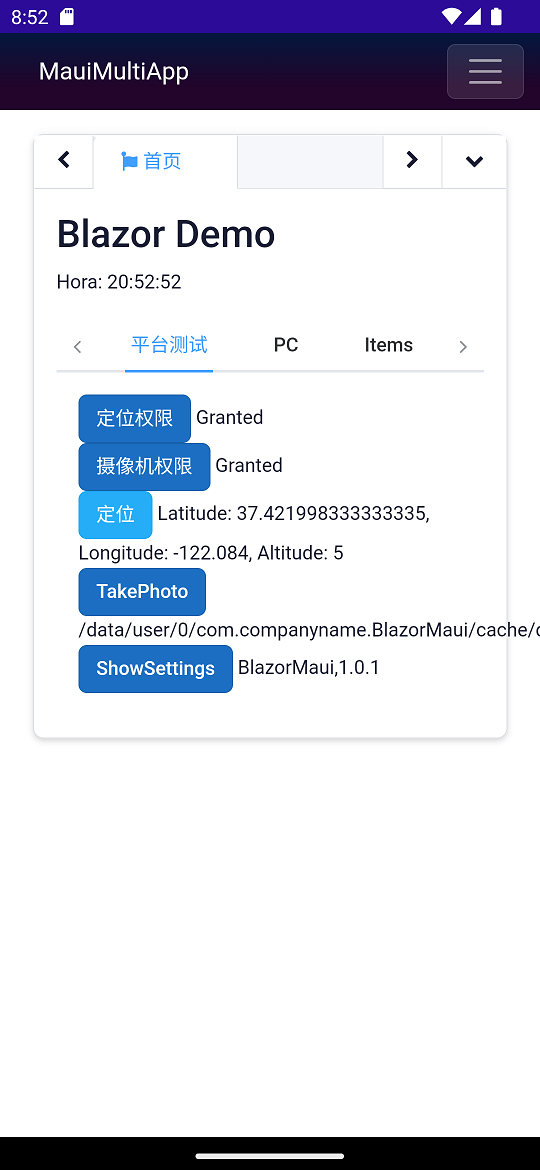
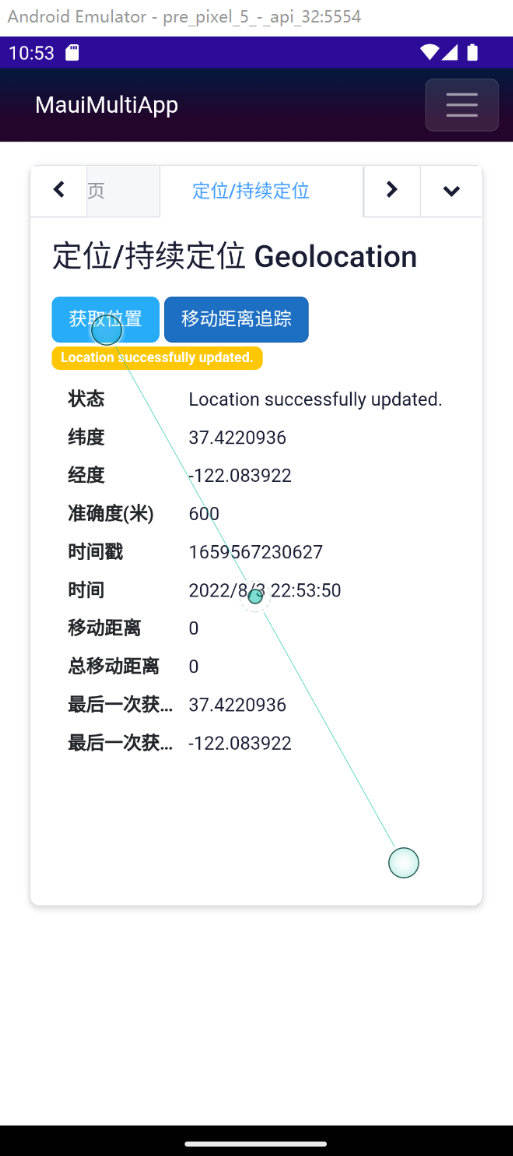
项目地址
https://github.com/densen2014/BlazorMaui
https://gitee.com/densen2014/BlazorMaui
参考资料
Permissions
https://docs.microsoft.com/en-us/dotnet/maui/platform-integration/appmodel/permissions?tabs=androidGeolocation
https://docs.microsoft.com/en-us/dotnet/maui/platform-integration/device/geolocation?tabs=windowsMauiBlazorPermissionsExample
https://github.com/MackinnonBuck/MauiBlazorPermissionsExample关联项目
FreeSql QQ群:4336577、8578575、52508226
BA & Blazor QQ群:795206915、675147445
知识共享许可协议
本作品采用 知识共享署名-非商业性使用-相同方式共享 4.0 国际许可协议 进行许可。欢迎转载、使用、重新发布,但务必保留文章署名AlexChow(包含链接: https://github.com/densen2014 ),不得用于商业目的,基于本文修改后的作品务必以相同的许可发布。如有任何疑问,请与我联系 。
AlexChow
-
相关阅读:
使用iframe预览pdf;
文本摘要简介
vue3使用知识点总结
太赞了! 菜鸟利用Python实现网站自动签到
C#中HashMap和HashTable有什么区别
事务死锁排查
快速排序 — — 递归、非递归实现【十大经典排序算法】
运算放大器实现多路同向反向加减运算电路公式推导(二)
IDEA部署SSM项目mysql数据库MAVEN项目部署教程
嵌入式驱动学习第一周——定时器与延时函数
- 原文地址:https://blog.csdn.net/m0_56069948/article/details/126175496
