-
【Log4cpp】项目日志Log4cpp的简单使用
项目日志——Log4cpp
- 开源的C++类库Log4cpp提供了很多功能,帮助我们的应用程序更方便地记录日志。
安装与构建
- Log4cpp官网——http://log4cpp.sourceforge.net/
wget https://nchc.dl.sourceforge.net/project/log4cpp/log4cpp1.1.x%20%28new%29/log4cpp-1.1/log4cpp-1.1.3.tar.gz- 1
tar zxvf log4cpp-1.1.3.tar.gz cd log4cpp # root用户 ./configure --prefix=执行路径 # 示例 # ./configure --prefix=/home/xuanxuan/share_bike/third/lib/log4cpp make make install- 1
- 2
- 3
- 4
- 5
- 6
- 7
- 8
使用
- 包含头文件
#include#include #include #include - 1
- 2
- 3
- 4
- 初始化日志输出的目的地
示例1:输出到标准输出std::cout
log4cpp::Appender *appender = new log4cpp::OstreamAppender("root", &std::cout);- 1
示例2:输出到log文件
log4cpp::Appender *appender = new log4cpp::FileAppender("root", "test.log");- 1
输出方式如下:
log4cpp::FileAppender // 输出到文件 log4cpp::RollingFileAppender // 输出到回卷文件,即当文件到达某个大小后回卷 log4cpp::OstreamAppender // 输出到一个ostream类 log4cpp::RemoteSyslogAppender // 输出到远程syslog服务器 log4cpp::StringQueueAppender // 内存队列 log4cpp::SyslogAppender // 本地syslog log4cpp::Win32DebugAppender // 发送到缺省系统调试器 log4cpp::NTEventLogAppender // 发送到win 事件日志- 1
- 2
- 3
- 4
- 5
- 6
- 7
- 8
注意:
实际上日志输出到终端或文件中是很慢的,可能会引起IO中断,所以我们可以先输出到内存中(StringQueueAppender),然后在输出到其它地方,这样效率较高。
- 设置日志输出格式
log4cpp::PatternLayout *patternLayout = new log4cpp::PatternLayout(); patternLayout->setConversionPattern("%d [%p] - %m%n"); appender->setLayout(patternLayout);- 1
- 2
- 3
日志输出格式控制如下:
%%%% - a single percent sign %c - the category %d - the date Date format: The date format character may be followed by a date format specifier enclosed between braces. For example, %d{%H:%M:%S,%l} or %d{%d %m %Y %H:%M:%S,%l}. If no date format specifier is given then the following format is used: "Wed Jan 02 02:03:55 1980". The date format specifier admits the same syntax as the ANSI C function strftime, with 1 addition. The addition is the specifier %l for milliseconds, padded with zeros to make 3 digits. %m - the message %n - the platform specific line separator %p - the priority %r - milliseconds since this layout was created. %R - seconds since Jan 1, 1970 %u - clock ticks since process start %x - the NDC- 1
- 2
- 3
- 4
- 5
- 6
- 7
- 8
- 9
- 10
- 11
- 设置输出类别和日志优先级
log4cpp::Category &root = log4cpp::Category::getRoot(); root.setPriority(log4cpp::Priority::NOTICE); root.addAppender(appender);- 1
- 2
- 3
日志的级别如下:
NOTSET < DEBUG < INFO < NOTICE < WARN < ERROR < CRIT < ALERT < FATAL = EMERG。
低于该级别的日志不会被记录。- 定义宏来减少代码量
#define LOG(__level) log4cpp::Category::getRoot() << log4cpp::Priority::__level << __FILE__ << " " << __LINE__ << ": "- 1
使用:
LOG(DEBUG)<<"DEBUG.";- 1
测试
什么是单例?
- 程序中仅有一个的对象。
配置文件:log.conf
#定义Root category的属性 log4cpp.rootCategory=DEBUG, RootLog #定义RootLog属性 log4cpp.appender.RootLog=RollingFileAppender log4cpp.appender.RootLog.layout=PatternLayout log4cpp.appender.RootLog.layout.ConversionPattern=%d{%m-%d %H:%M:%S %l} [%t][%p]%m%n log4cpp.appender.RootLog.fileName=/var/log/share_bike.log log4cpp.appender.RootLog.maxFileSize=268435456 #256MB log4cpp.appender.RootLog.fileNamePattern=share_bike_%i.log log4cpp.appender.RootLog.maxBackupIndex=256- 1
- 2
- 3
- 4
- 5
- 6
- 7
- 8
- 9
- 10
- 11
- 12
- 封装为一个类
Logger.h
#ifndef DISTRIBUTED_LOGGER_H_ #define DISTRIBUTED_LOGGER_H_ #include#include class Logger{ public: bool init(const std::string& log_conf_file); static Logger* instance(){//返回单例——全局唯一对象 return &instance_; } log4cpp::Category* GetHandle(){ return category_; } protected: static Logger instance_; log4cpp::Category* category_; }; #define LOG_INFO Logger::instance()->GetHandle()->info #define LOG_DEBUG Logger::instance()->GetHandle()->debug #define LOG_ERROR Logger::instance()->GetHandle()->error #define LOG_WARN Logger::instance()->GetHandle()->warn #endif - 1
- 2
- 3
- 4
- 5
- 6
- 7
- 8
- 9
- 10
- 11
- 12
- 13
- 14
- 15
- 16
- 17
- 18
- 19
- 20
- 21
- 22
- 23
- 24
- 25
- 26
- 27
- 28
- 29
- 30
Logger.cpp
#include "Logger.h" #include#include #include #include #include #include Logger Logger::instance_; bool Logger::init(const std::string& log_conf_file){ try{ log4cpp::PropertyConfigurator::configure(log_conf_file); }catch(log4cpp::ConfigureFailure& f){ std::cerr << " load log config file " << log_conf_file.c_str() << " failed with result : " << f.what()<< std::endl; return false; } category_ = &log4cpp::Category::getRoot(); return true; } - 1
- 2
- 3
- 4
- 5
- 6
- 7
- 8
- 9
- 10
- 11
- 12
- 13
- 14
- 15
- 16
- 17
- 18
- 19
- 20
- 21
- 22
- 测试
main.cpp
#include "iniconfig.h" //注意路径,会在CMake中进行调整 #include "configdef.h" #include "Logger.h" int main(int argc,char** argv){ if(argc != 3){//缺少参数 printf("Please input shbk!\n"); return -1; } if(!Logger::instance()->init(std::string(argv[2]))){ fprintf(stderr,"init log module failed.\n"); return -2; } Iniconfig config; if(!config.loadfile(std::string(argv[1]))){ //printf("load %s failed.\n",argv[1]); LOG_ERROR("load %s failed.",argv[1]); return -3; } //测试是否读取成功 st_env_config conf_args = config.getconfig(); LOG_INFO("[database]ip:%s\n [database]port:%d\n [database]user:%s\n [database]pwd:%s\n [database]db:%s\n [server]port:%d\n ", conf_args.db_ip.c_str(), conf_args.db_port, conf_args.db_user.c_str(), conf_args.db_pwd.c_str(), conf_args.db_name.c_str(), conf_args.svr_port); return 0; } - 1
- 2
- 3
- 4
- 5
- 6
- 7
- 8
- 9
- 10
- 11
- 12
- 13
- 14
- 15
- 16
- 17
- 18
- 19
- 20
- 21
- 22
- 23
- 24
- 25
- 26
- 27
- 28
- 29
- 30
- 31
- 32
- 33
- 34
- 35
**注意链接库:**下面为示例,请根据自身情况调整。
TARGET_LINK_LIBRARIES(common log4cpp)- 1
TARGET_LINK_LIBRARIES(share_bike pthread) TARGET_LINK_LIBRARIES(${PROJECT_NAME} liblog4cpp.a)- 1
- 2
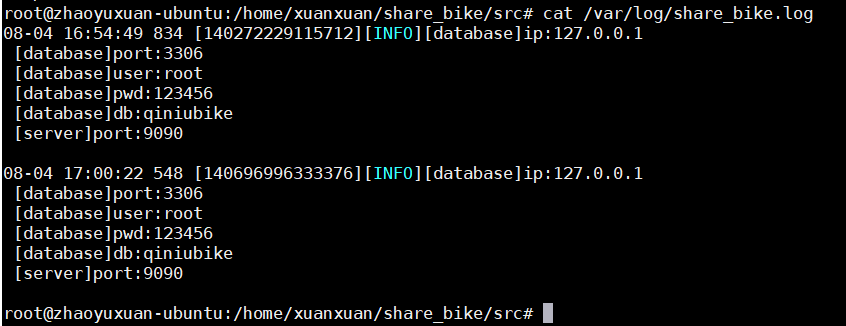
执行:
./share_bike ../conf/share_bike.ini ../conf/log.conf- 1
查看:
在log.conf中。/var/log/share_bike.log为保存路径。
log4cpp.appender.RootLog.fileName=/var/log/share_bike.log- 1
-
相关阅读:
哔哩哔哩的盈利梦
Kubernetes-01-基础概念篇 基础组件&搭建一个K8S集群
Python中print()打印如何不换行?
RedisInsight :Redis 官方可视化工具使用入门
开发一个跨平台网格 EA
Vulhub 刷题(一)
vue3.0 如何自定义指令
基于蒙特卡洛的大规模电动汽车充电行为分析(Matlab代码实现)
Golang源码:singleflight分析(二)
javaee SpringMVC文件上传 项目结构
- 原文地址:https://blog.csdn.net/qq_51604330/article/details/126163310
