-
【数据集转换】VOC数据集转COCO数据集·代码实现+操作步骤
在自己的数据集上实验时,往往需要将VOC数据集转化为coco数据集,因为这种需求所以才记录这篇文章,代码出处未知,感谢开源。
在远程服务器上测试目标检测算法需要用到测试集,最常用的是coco2014/2017和voc07/12数据集。
coco数据集的地址为http://cocodataset.org/#download
voc和coco的镜像为https://pjreddie.com/projects/pascal-voc-dataset-mirror/一、数据集格式对比
1.1 VOC数据集
- VOC_ROOT #根目录
- ├── JPEGImages # 存放源图,(当然图片并不一定要是**.jpg格式的,只是规定文件夹名字叫JPEGImages**);
- │ ├── aaaa.jpg
- │ ├── bbbb.jpg
- │ └── cccc.jpg
- ├── Annotations # 存放xml文件,VOC的标注是xml格式,与JPEGImages中的图片一一对应
- │ ├── aaaa.xml
- │ ├── bbbb.xml
- │ └── cccc.xml
- └── ImageSets
- └── Main
- ├── train.txt # txt文件中每一行包含一个图片的名称
- └── val.txt
1.2 COCO数据集
- COCO_ROOT #根目录
- ├── annotations # 存放json格式的标注
- │ ├── instances_train2017.json
- │ └── instances_val2017.json
- └── train2017 # 存放图片文件
- │ ├── 000000000001.jpg
- │ ├── 000000000002.jpg
- │ └── 000000000003.jpg
- └── val2017
- ├── 000000000004.jpg
- └── 000000000005.jpg
1.2.3 json标注格式
与VOC一个文件一个xml标注不同,COCO所有的目标框标注都是放在一个json文件中的。
这个json文件解析出来是一个字典,格式如下:- {
- "info": info,
- "images": [image],
- "annotations": [annotation],
- "categories": [categories],
- "licenses": [license],
- }
二、转换步骤
2.1 程序总体目录
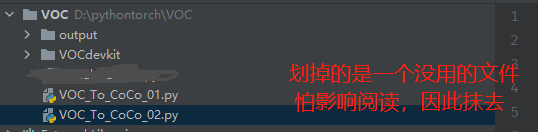
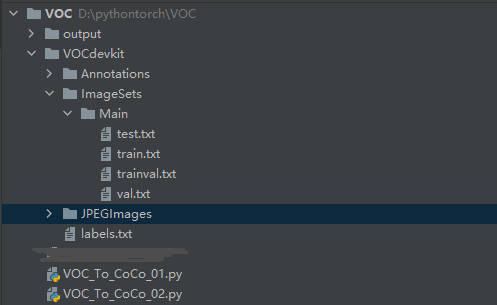
2.2 标签文件转换代码实现(xml文件转json格式)VOC_To_CoCo_01.py
这里需要运行三次,因为train.txt val.txt test.txt是三个文件,具体看注释
- # VOC_To_CoCo_01.py
- import os
- import argparse
- import json
- import xml.etree.ElementTree as ET
- from typing import Dict, List
- import re
- def get_label2id(labels_path: str) -> Dict[str, int]:
- """id is 1 start"""
- with open(labels_path, 'r') as f:
- labels_str = f.read().split()
- labels_ids = list(range(1, len(labels_str) + 1))
- return dict(zip(labels_str, labels_ids))
- def get_annpaths(ann_dir_path: str = None,
- ann_ids_path: str = None,
- ext: str = '',
- annpaths_list_path: str = None) -> List[str]:
- # If use annotation paths list
- if annpaths_list_path is not None:
- with open(annpaths_list_path, 'r') as f:
- ann_paths = f.read().split()
- return ann_paths
- # If use annotaion ids list
- ext_with_dot = '.' + ext if ext != '' else ''
- with open(ann_ids_path, 'r') as f:
- ann_ids = f.read().split()
- ann_paths = [os.path.join(ann_dir_path, aid + ext_with_dot) for aid in ann_ids]
- return ann_paths
- def get_image_info(annotation_root, extract_num_from_imgid=True):
- path = annotation_root.findtext('path')
- if path is None:
- filename = annotation_root.findtext('filename')
- else:
- filename = os.path.basename(path)
- img_name = os.path.basename(filename)
- img_id = os.path.splitext(img_name)[0]
- if extract_num_from_imgid and isinstance(img_id, str):
- img_id = int(re.findall(r'\d+', img_id)[0])
- size = annotation_root.find('size')
- width = int(size.findtext('width'))
- height = int(size.findtext('height'))
- image_info = {
- 'file_name': filename,
- 'height': height,
- 'width': width,
- 'id': img_id
- }
- return image_info
- def get_coco_annotation_from_obj(obj, label2id):
- label = obj.findtext('name')
- assert label in label2id, f"Error: {label} is not in label2id !"
- category_id = label2id[label]
- bndbox = obj.find('bndbox')
- xmin = int(bndbox.findtext('xmin')) - 1
- ymin = int(bndbox.findtext('ymin')) - 1
- xmax = int(bndbox.findtext('xmax'))
- ymax = int(bndbox.findtext('ymax'))
- assert xmax > xmin and ymax > ymin, f"Box size error !: (xmin, ymin, xmax, ymax): {xmin, ymin, xmax, ymax}"
- o_width = xmax - xmin
- o_height = ymax - ymin
- ann = {
- 'area': o_width * o_height,
- 'iscrowd': 0,
- 'bbox': [xmin, ymin, o_width, o_height],
- 'category_id': category_id,
- 'ignore': 0,
- 'segmentation': [] # This script is not for segmentation
- }
- return ann
- def convert_xmls_to_cocojson(annotation_paths: List[str],
- label2id: Dict[str, int],
- output_jsonpath: str,
- extract_num_from_imgid: bool = True):
- output_json_dict = {
- "images": [],
- "type": "instances",
- "annotations": [],
- "categories": []
- }
- bnd_id = 1 # START_BOUNDING_BOX_ID, TODO input as args ?
- for a_path in annotation_paths:
- # Read annotation xml
- ann_tree = ET.parse(a_path)
- ann_root = ann_tree.getroot()
- img_info = get_image_info(annotation_root=ann_root,
- extract_num_from_imgid=extract_num_from_imgid)
- img_id = img_info['id']
- output_json_dict['images'].append(img_info)
- for obj in ann_root.findall('object'):
- ann = get_coco_annotation_from_obj(obj=obj, label2id=label2id)
- ann.update({'image_id': img_id, 'id': bnd_id})
- output_json_dict['annotations'].append(ann)
- bnd_id = bnd_id + 1
- for label, label_id in label2id.items():
- category_info = {'supercategory': 'none', 'id': label_id, 'name': label}
- output_json_dict['categories'].append(category_info)
- with open(output_jsonpath, 'w') as f:
- output_json = json.dumps(output_json_dict)
- f.write(output_json)
- print('Convert successfully !')
- def main():
- parser = argparse.ArgumentParser(
- description='This script support converting voc format xmls to coco format json')
- parser.add_argument('--ann_dir', type=str, default='./VOCdevkit/Annotations')
- parser.add_argument('--ann_ids', type=str, default='./VOCdevkit/ImageSets/Main/val.txt') # 这里修改 train val test 一共修改三次
- #parser.add_argument('--ann_ids', type=str, default='./VOCdevkit/ImageSets/Main/train.txt')
- #parser.add_argument('--ann_ids', type=str, default='./VOCdevkit/ImageSets/Main/test.txt')
- parser.add_argument('--ann_paths_list', type=str, default=None)
- parser.add_argument('--labels', type=str, default='./VOCdevkit/labels.txt')
- parser.add_argument('--output', type=str, default='./output/annotations/val.json') # 这里修改 train val test 一共修改三次
- #parser.add_argument('--output', type=str, default='./output/annotations/train.json')
- #parser.add_argument('--output', type=str, default='./output/annotations/test.json')
- parser.add_argument('--ext', type=str, default='xml')
- args = parser.parse_args()
- label2id = get_label2id(labels_path=args.labels)
- ann_paths = get_annpaths(
- ann_dir_path=args.ann_dir,
- ann_ids_path=args.ann_ids,
- ext=args.ext,
- annpaths_list_path=args.ann_paths_list
- )
- convert_xmls_to_cocojson(
- annotation_paths=ann_paths,
- label2id=label2id,
- output_jsonpath=args.output,
- extract_num_from_imgid=True
- )
- if __name__ == '__main__':
- if not os.path.exists('./output/annotations'):
- os.makedirs('./output/annotations')
- main()
2.3 数据集图像文件copy代码实现(复制图片数据集到coco中)VOC_To_CoCo_02.py
- # VOC_To_CoCo_02.py
- import os
- import shutil
- images_file_path = './VOCdevkit/JPEGImages/'
- split_data_file_path = './VOCdevkit/ImageSets/Main/'
- new_images_file_path = './output/'
- if not os.path.exists(new_images_file_path + 'train'):
- os.makedirs(new_images_file_path + 'train')
- if not os.path.exists(new_images_file_path + 'val'):
- os.makedirs(new_images_file_path + 'val')
- if not os.path.exists(new_images_file_path + 'test'):
- os.makedirs(new_images_file_path + 'test')
- dst_train_Image = new_images_file_path + 'train/'
- dst_val_Image = new_images_file_path + 'val/'
- dst_test_Image = new_images_file_path + 'test/'
- total_txt = os.listdir(split_data_file_path)
- for i in total_txt:
- name = i[:-4]
- if name == 'train':
- txt_file = open(split_data_file_path + i, 'r')
- for line in txt_file:
- line = line.strip('\n')
- line = line.strip('\r')
- srcImage = images_file_path + line + '.jpg'
- dstImage = dst_train_Image + line + '.jpg'
- shutil.copyfile(srcImage, dstImage)
- txt_file.close()
- elif name == 'val':
- txt_file = open(split_data_file_path + i, 'r')
- for line in txt_file:
- line = line.strip('\n')
- line = line.strip('\r')
- srcImage = images_file_path + line + '.jpg'
- dstImage = dst_val_Image + line + '.jpg'
- shutil.copyfile(srcImage, dstImage)
- txt_file.close()
- elif name == 'test':
- txt_file = open(split_data_file_path + i, 'r')
- for line in txt_file:
- line = line.strip('\n')
- line = line.strip('\r')
- srcImage = images_file_path + line + '.jpg'
- dstImage = dst_test_Image + line + '.jpg'
- shutil.copyfile(srcImage, dstImage)
- txt_file.close()
- else:
- print("Error, Please check the file name of folder")
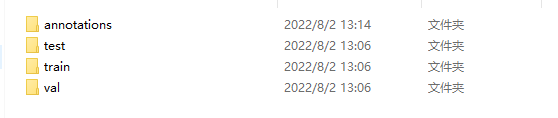
三、效果展示
-
相关阅读:
4.1.3 vivado中AXI写DDR说明
bug:Junit5报错,@SpringBootTest没有运行
goland的Markdown拖动插入链接编码有问题
跨境电商如何减少客户流失率:成功的5种保留策略
做产品经理需要很高的学历吗?真相来咯!
2023人工智能全景报告《State of AI Report》出炉!AI未来一年的10大预测:GPT-4仍是全球最强,GenAI 大爆发,...
IDEA2022用maven创建的Servlet项目
无人机镜头稳定的原理和相关算法
Ubuntu镜像设置及docker安装
TscanCode的安装与基本使用
- 原文地址:https://blog.csdn.net/qq_39237205/article/details/126120347