-
[spring]spring的使用笔记大全
spring
1.spring简介
-
Spring框架是一个开源的应用程序框架,是针对bean的生命周期进行管理的轻量级容器。
-
Spring解决了开发者在J2EE开发中遇到的许多常见的问题,提供了功能强大IOC、AOP及Web MVC等功能。
-
Spring可以单独应用于构筑应用程序,也可以和Struts、Webwork、Tapestry等众多Web框架组合使用,并且可以与 Swing等桌面应用程序AP组合。
-
Spring不仅仅能应用于J2EE应用程序之中,也可以应用于桌面应用程序以及小应用程序之中。
-
Spring框架主要由七部分组成,分别是 Spring Core、 Spring AOP、 Spring ORM、 Spring DAO、Spring Context、 Spring Web和 Spring Web MVC。
官方文档地址:
https://docs.spring.io/spring-framework/docs/4.3.9.RELEASE/spring-framework-reference/
https://docs.spring.io/spring-framework/docs/5.2.0.RELEASE/spring-framework-reference/core.html#spring-core
中文
https://www.docs4dev.com/docs/zh/spring-framework/5.1.3.RELEASE/reference/
优点:
- 开源免费
- 轻量级的非入侵式的
- 控制反转(IOC),面向切面编程(aop)
- 支持事务处理
使用spring的jar包支持:
<dependency> <groupId>org.springframeworkgroupId> <artifactId>spring-webartifactId> <version>5.3.22version> dependency>- 1
- 2
- 3
- 4
- 5
- 6
七大模块:

弊端:发展了太久后,配置越来越多,人称“配置地狱”
2.IOC理论推导
在我们之前的业务中,用户的需求可能会影响程序的代码,可能需要修改代码,如果程序的代码量十分大,修改一次的成本十分的昂贵!
原来的方式:
private UserMapper usermapper=new UserMapperImpl();- 1
现在将对象的传递由new变成set动态注入
private UserMapper userMapper; public void setUserMapper(UserMapper userMapper){ this.userMapper=userMapper; }- 1
- 2
- 3
- 4
原来是程序控制的,现在变成用户控制了。
3.一个spring项目的快速搭建
(1)写一个实体类
package com.pojo; /** * @author panglili * @create 2022-07-23-21:40 */ public class HelloSpring { private String name; public void setName(String name) { this.name = name; } public String getName() { return name; } @Override public String toString() { return name; } }- 1
- 2
- 3
- 4
- 5
- 6
- 7
- 8
- 9
- 10
- 11
- 12
- 13
- 14
- 15
- 16
- 17
- 18
- 19
- 20
- 21
- 22
(2)将实体类配置在spring容器
<beans xmlns = "http://www.springframework.org/schema/beans" xmlns:xsi = "http://www.w3.org/2001/XMLSchema-instance" xsi:schemaLocation = "http://www.springframework.org/schema/beans http://www.springframework.org/schema/beans/spring-beans.xsd" > <bean id="helloSpring" class="com.pojo.HelloSpring"> <property name="name" value="spring">property> bean> beans>- 1
- 2
- 3
- 4
- 5
- 6
- 7
- 8
- 9
- 10
- 11
- 12
- 13
- 14
- 15
- 16
(3)测试
import com.pojo.HelloSpring; import org.springframework.context.ApplicationContext; import org.springframework.context.support.ClassPathXmlApplicationContext; /** * @author panglili * @create 2022-07-23-21:43 */ public class MyTest { public static void main(String[] args) { ApplicationContext context = new ClassPathXmlApplicationContext( "application.xml"); HelloSpring hello =(HelloSpring) context.getBean("helloSpring"); System.out.println(hello.toString()); } }- 1
- 2
- 3
- 4
- 5
- 6
- 7
- 8
- 9
- 10
- 11
- 12
- 13
- 14
- 15
- 16
4.IOC创建对象的过程
- 使用无参构造创造


设定为有参后,就会报错!
对象在被注册进去的时候,就被实例化了,直接使用就好。
5.IO注入
(1)前面的构造器注入
(2)set注入
<beans xmlns="http://www.springframework.org/schema/beans" xmlns:xsi="http://www.w3.org/2001/XMLSchema-instance" xsi:schemaLocation="http://www.springframework.org/schema/beans https://www.springframework.org/schema/beans/spring-beans.xsd"> <bean id="user" class="cn.itnanls.User"> bean> beans>- 1
- 2
- 3
- 4
- 5
- 6
- 7
- 8
- 9
- 10
- 11
- 12
- 13
- 14
- 15
- 16
- 17
- 18
- 19
- 20
- 21
- 22
- 23
- 24
构造注入对象之间的关系为组合
set注入的对象之间的关系为聚合
(3)p命名空间注入
- 使用set方式注入
<beans xmlns = "http://www.springframework.org/schema/beans" xmlns:xsi = "http://www.w3.org/2001/XMLSchema-instance" xmlns:p = "http://www.springframework.org/schema/p" xsi:schemaLocation = "http://www.springframework.org/schema/beans http://www.springframework.org/schema/beans/spring-beans.xsd" > <bean id="helloSpring" class="com.pojo.HelloSpring"> <property name="name" value="spring">property> bean> <bean id="p-name" class="com.pojo.HelloSpring" p:name="ss"> beans>- 1
- 2
- 3
- 4
- 5
- 6
- 7
- 8
- 9
- 10
- 11
- 12
- 13
(4)c命名空间注入
- 使用构造器方式注入,开启构造器才能用
HelloSpring(String name){ this.name=name; } HelloSpring(){ }- 1
- 2
- 3
- 4
- 5
- 6
<bean id="c-name" class="com.pojo.HelloSpring" c:name="cName"/>- 1
注意导入头文件
xmlns:p = "http://www.springframework.org/schema/p" xmlns:c="http://www.springframework.org/schema/c"- 1
- 2
6.作用域
ScopeDescription
(Default) Scopes a single bean definition to a single object instance for each Spring IoC container.
Scopes a single bean definition to any number of object instances.
Scopes a single bean definition to the lifecycle of a single HTTP request. That is, each HTTP request has its own instance of a bean created off the back of a single bean definition. Only valid in the context of a web-aware Spring
ApplicationContext.Scopes a single bean definition to the lifecycle of an HTTP
Session. Only valid in the context of a web-aware SpringApplicationContext.Scopes a single bean definition to the lifecycle of a
ServletContext. Only valid in the context of a web-aware SpringApplicationContext.Scopes a single bean definition to the lifecycle of a
WebSocket. Only valid in the context of a web-aware SpringApplicationContext.- 单例
<bean id="accountService" class="com.DefaultAccountService"/> ** <bean id="accountService" class="com.DefaultAccountService" scope="singleton"/>- 1
- 2
- 3
- 原型
<bean id="accountService" class="com.something.DefaultAccountService" scope="prototype"/>- 1
7.bean的自动装配
- 是spring满足bean依赖的一种方式
- spring会在上下文中自动寻找,并自动给bean装配属性
spring的装配方式:
(1)手动装配
- 在people类中依赖了cat和dog对象,所以属性中手动装配他们的属性
<beans xmlns = "http://www.springframework.org/schema/beans" xmlns:xsi = "http://www.w3.org/2001/XMLSchema-instance" xsi:schemaLocation = "http://www.springframework.org/schema/beans http://www.springframework.org/schema/beans/spring-beans.xsd" > <bean id="cat" class="pojo.Cat"> <property name="voice" value="mom~"/> bean> <bean id="dog" class="pojo.Dog"> <property name="voice" value="wow~"/> bean> <bean id="people" class="pojo.People"> <property name="name" value="tata"/> <property name="dog" ref="dog"/> <property name="cat" ref="cat"/> bean> beans>- 1
- 2
- 3
- 4
- 5
- 6
- 7
- 8
- 9
- 10
- 11
- 12
- 13
- 14
- 15
- 16
- 17
- 18
- 19
(2)自动装配
通过byName自动装配
- spring会自动去找people中的set后面相对应的cat和dog与bean中id对应
<bean id="people" class="pojo.People" autowire="byName"> <property name="name" value="tata"/> bean>- 1
- 2
- 3
- 4
- 5
通过byType自动装配
- spring会自动去找people中的对象依赖和bean中class类相同的对应
<bean id="people" class="pojo.People" autowire="byType"> <property name="name" value="tata"/> bean>- 1
- 2
- 3
- 4
(3)使用注解实现自动装配
使用之前导入注解依赖的配置和支持
<beans xmlns="http://www.springframework.org/schema/beans" xmlns:xsi="http://www.w3.org/2001/XMLSchema-instance" xmlns:context="http://www.springframework.org/schema/context" xsi:schemaLocation="http://www.springframework.org/schema/beans https://www.springframework.org/schema/beans/spring-beans.xsd http://www.springframework.org/schema/context https://www.springframework.org/schema/context/spring-context.xsd"> <context:annotation-config/> beans>- 1
- 2
- 3
- 4
- 5
- 6
- 7
- 8
- 9
- 10
- 11
- 12
不再使用显示引用对象依赖的其他属性
<bean id="cat" class="pojo.Cat"/> <bean id="dog" class="pojo.Dog"/> <bean id="people" class="pojo.People"/>- 1
- 2
- 3
@Autowired
直接在对象上面使用@Autowired注解
private String name; @Autowired private Dog dog; @Autowired private Cat cat;- 1
- 2
- 3
- 4
- 5
如果装配环境复杂的话,可以通过@Qualifier(value = “cat”)指定bean注入
例如多个cat对象bean,属性值不同的时候
<bean id="cat" class="pojo.Cat"> <property name="eat" value="fish"/> bean> <bean id="cat11" class="pojo.Cat"> <property name="eat" value="cookie"/> bean>- 1
- 2
- 3
- 4
- 5
- 6
就需要
@Qualifier
否则,只会spring会走第一个bean
@Autowired @Qualifier(value = "cat11") private Cat cat;- 1
- 2
- 3
- 4
Resource
- 这个注解跟上面的@Autowired功能相似,但是它可以通过名字再通过类型装配,都没有才会报错,要比@Autowired智能一点,但使用较少。
@Resource(name="cat") private Cat cat;- 1
- 2
8.使用注解开发
1.bean
spring4以后,注解依赖于aop包,确保你的lib中有它

确保开启了使用注解
<context:annotation-config/>- 1
2.组件代替bean实现自动注入
在配置文件中自动扫描包下的所有类为bean
<context:component-scan base-package="pojo"/>- 1
在类对象上加上注解@Component可以被扫描
- @component (把普通pojo实例化到spring容器中,相当于配置文件中的 )
@Component- 1
使用注解给属性注入值
package pojo; import org.springframework.beans.factory.annotation.Autowired; import org.springframework.beans.factory.annotation.Qualifier; import org.springframework.beans.factory.annotation.Value; import org.springframework.stereotype.Component; import javax.annotation.Resource; /** * @author panglili * @create 2022-07-24-9:52 */ @Component public class People { private String name; @Value("123") public int age; private Dog dog; private Cat cat; } }- 1
- 2
- 3
- 4
- 5
- 6
- 7
- 8
- 9
- 10
- 11
- 12
- 13
- 14
- 15
- 16
- 17
- 18
- 19
- 20
- 21
- 22
- 但是复杂的属性配置还是建议使用xml统一管理注入
3.component衍生的注解
dao:@repository
service:@service
controller:@controller
跟component功能相同只是能够使得分工更加的明确
小结:
xml与注解:
- xml更加万能,适用于各种场合!维护简单方便
- 注解 不是自己类使用不了,维护相对复杂
最佳实践:
- xml用来管理bean
- 注解只负责属性的注入
9.使用javaconfig实现代替xml配置
The central artifacts in Spring’s new Java-configuration support are
@Configuration-annotated classes and@Bean-annotated methods.根据官方文档的说明,创建一个java—configuration的配置类,使用@configuration注解,再使用@Bean在方法上面就可以实现xml中的功能。
(1)创建一个java—configuration
package config; import org.springframework.context.annotation.Bean; import org.springframework.context.annotation.Configuration; import pojo.User; /** * @author panglili * @create 2022-07-24-11:24 */ @Configuration public class Java_config { @Bean public User getUser(){ return new User(); } }- 1
- 2
- 3
- 4
- 5
- 6
- 7
- 8
- 9
- 10
- 11
- 12
- 13
- 14
- 15
- 16
- 17
- 18
(2)实体类
package pojo; import org.springframework.beans.factory.annotation.Autowired; import org.springframework.beans.factory.annotation.Value; import org.springframework.context.annotation.Bean; import org.springframework.stereotype.Component; /** * @author panglili * @create 2022-07-24-11:24 */ @Component public class User { @Value("tata") private String name; public String getName() { return name; } public void setName(String name) { this.name = name; } }- 1
- 2
- 3
- 4
- 5
- 6
- 7
- 8
- 9
- 10
- 11
- 12
- 13
- 14
- 15
- 16
- 17
- 18
- 19
- 20
- 21
- 22
- 23
- 24
(3)测试
现在也可以拿到值
import config.Java_config; import org.springframework.context.annotation.AnnotationConfigApplicationContext; import pojo.User; /** * @author panglili * @create 2022-07-24-11:28 */ public class MyTest { public static void main(String[] args) { AnnotationConfigApplicationContext context = new AnnotationConfigApplicationContext(Java_config.class); User user =(User) context.getBean("getUser"); System.out.println(user.getName()); } }- 1
- 2
- 3
- 4
- 5
- 6
- 7
- 8
- 9
- 10
- 11
- 12
- 13
- 14
- 15
- 16
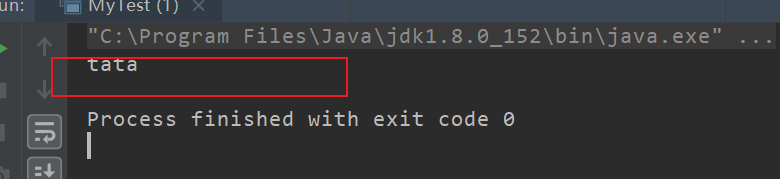
这种java代替xml的实现方式,在springboot中大量使用。
10.代理模式
代理模式的分类:
- 静态代理
- 动态代理
关系分析

抽象角色:一般会使用接口或者抽象类
真实角色:被代理的角色
代理角色:代理真实的角色,做一些附属的操作
客户:访问代理对象的人
静态代理
步骤:
抽象角色:
/** * @author panglili * @create 2022-07-24-15:00 */ public interface Rent { public void rent(); }- 1
- 2
- 3
- 4
- 5
- 6
- 7
真实角色:
/** * @author panglili * @create 2022-07-24-15:01 */ public class Host implements Rent { public void rent() { System.out.println("host would rent house"); } }- 1
- 2
- 3
- 4
- 5
- 6
- 7
- 8
- 9
- 10
代理角色:
/** * @author panglili * @create 2022-07-24-15:02 */ public class Proxy implements Rent { private Host host; public Proxy(){ } public Proxy(Host host){ this.host=host; } public void rent() { host.rent(); seeHouse(); } //look house public void seeHouse(){ System.out.println("look House"); } }- 1
- 2
- 3
- 4
- 5
- 6
- 7
- 8
- 9
- 10
- 11
- 12
- 13
- 14
- 15
- 16
- 17
- 18
- 19
- 20
- 21
- 22
- 23
- 24
- 25
客户:
/** * @author panglili * @create 2022-07-24-15:02 */ public class Client { public static void main(String[] args) { Host host = new Host(); Proxy proxy = new Proxy(host); proxy .rent(); } }- 1
- 2
- 3
- 4
- 5
- 6
- 7
- 8
- 9
- 10
- 11
动态代理
- 和静态代理的角色一样
- 动态生成,不是我们直接写好了的
- 动态代理分为两大类:基于接口的动态代理和基于类的动态代理
- 基于接口——jdbc
- 基于类——cglib
- 基于字节码
11.AOP切面编程
使用aop植入,需要导入一个依赖包
<dependency> <groupId>org.aspectjgroupId> <artifactId>aspectjweaverartifactId> <version>1.9.7version> dependency>- 1
- 2
- 3
- 4
- 5
- 横切关注点
- 切面
- 通知
- 目标
- 代理
- 切入点
- 连接点
在执行的方法前动态的添加一个日志输出
方法一使用spring类实现
(1)接口
package service; /** * @author panglili * @create 2022-07-24-16:09 */ public interface Service { public void add(); public void delete(); public void update(); public void select(); }- 1
- 2
- 3
- 4
- 5
- 6
- 7
- 8
- 9
- 10
- 11
- 12
(2)要代理的实现类
package service; /** * @author panglili * @create 2022-07-24-16:09 */ public class ServiceImpl implements Service { public void add() { System.out.println("add"); } public void delete() { System.out.println("delete"); } public void update() { System.out.println("update"); } public void select() { System.out.println("select"); } }- 1
- 2
- 3
- 4
- 5
- 6
- 7
- 8
- 9
- 10
- 11
- 12
- 13
- 14
- 15
- 16
- 17
- 18
- 19
- 20
- 21
- 22
- 23
(3)代理商
package log; import org.springframework.aop.MethodBeforeAdvice; import java.lang.reflect.Method; /** * @author panglili * @create 2022-07-24-16:11 */ public class Log implements MethodBeforeAdvice { public void before(Method method, Object[] args, Object target) throws Throwable { System.out.println("excutor"+method.getName()+target); } }- 1
- 2
- 3
- 4
- 5
- 6
- 7
- 8
- 9
- 10
- 11
- 12
- 13
- 14
- 15
<bean id="userSer" class="service.ServiceImpl"/> <bean id="log" class="log.Log"/> <aop:config> <aop:pointcut id="pointcut" expression="execution(* service.ServiceImpl.*(..))"/> <aop:advisor advice-ref="log" pointcut-ref="pointcut"/> aop:config>- 1
- 2
- 3
- 4
- 5
- 6
- 7
- 8
- 9
- 10
- 11
- 12
- 13
(4)客户调用
import org.springframework.context.ApplicationContext; import org.springframework.context.support.ClassPathXmlApplicationContext; import service.Service; /** * @author panglili * @create 2022-07-24-16:28 */ public class MyTest { public static void main(String[] args) { ApplicationContext context = new ClassPathXmlApplicationContext("application.xml"); //注意,代理的是接口类型 Service ser = (Service) context.getBean("userSer"); ser.add(); } }- 1
- 2
- 3
- 4
- 5
- 6
- 7
- 8
- 9
- 10
- 11
- 12
- 13
- 14
- 15
- 16
- 17
方法二 使用自定义类实现
(1)自定义一个类,是被横切进去的内容
package dir; /** * @author panglili * @create 2022-07-24-17:00 */ public class PointMethod { public void after(){ System.out.println("执行方法之后切入……"); } public void before(){ System.out.println("执行方法之前切入……"); } }- 1
- 2
- 3
- 4
- 5
- 6
- 7
- 8
- 9
- 10
- 11
- 12
- 13
- 14
(2)在配置文件中使用aop切入
<bean id="in" class="dir.PointMethod"/> <aop:config> <aop:aspect ref="in"> <aop:pointcut id="point" expression="execution(* service.ServiceImpl.*(..))"/> <aop:after method="after" pointcut-ref="point"/> <aop:before method="before" pointcut-ref="point"/> aop:aspect> aop:config>- 1
- 2
- 3
- 4
- 5
- 6
- 7
- 8
- 9
- 10
(3)测试
import org.springframework.context.ApplicationContext; import org.springframework.context.support.ClassPathXmlApplicationContext; import service.Service; /** * @author panglili * @create 2022-07-24-16:28 */ public class MyTest { public static void main(String[] args) { ApplicationContext context = new ClassPathXmlApplicationContext("application.xml"); //注意,代理的是接口类型 Service ser = (Service) context.getBean("userSer"); ser.add(); } }- 1
- 2
- 3
- 4
- 5
- 6
- 7
- 8
- 9
- 10
- 11
- 12
- 13
- 14
- 15
- 16
- 17

方式三 使用注解实现aop
(1)在要被切入的地方使用@Aspect和@After等注解标识切面和切点等
package dir; import org.aspectj.lang.annotation.After; import org.aspectj.lang.annotation.Aspect; import org.aspectj.lang.annotation.Before; /** * @author panglili * @create 2022-07-24-17:00 */ @Aspect public class PointMethod { @After("execution(* service.ServiceImpl.*(..))") public void after(){ System.out.println("执行方法之后切入……"); } @Before("execution(* service.ServiceImpl.*(..))") public void before(){ System.out.println("执行方法之前切入……"); } }- 1
- 2
- 3
- 4
- 5
- 6
- 7
- 8
- 9
- 10
- 11
- 12
- 13
- 14
- 15
- 16
- 17
- 18
- 19
- 20
- 21
(2)将此类配置到spring中,别忘了开启注解支持
<bean id="in1" class="dir.PointMethod"/> <aop:aspectj-autoproxy/>- 1
- 2
- 3
- 4
(3)测试
同上面一样的测试,不再赘述
12.spring和mybatis整合
1.导包
<dependencies> <dependency> <groupId>junitgroupId> <artifactId>junitartifactId> <version>4.13.1version> dependency> <dependency> <groupId>mysqlgroupId> <artifactId>mysql-connector-javaartifactId> <version>8.0.29version> dependency> <dependency> <groupId>org.mybatisgroupId> <artifactId>mybatisartifactId> <version>3.5.3version> dependency> <dependency> <groupId>org.springframeworkgroupId> <artifactId>spring-webmvcartifactId> <version>5.3.19version> dependency> <dependency> <groupId>org.springframeworkgroupId> <artifactId>spring-jdbcartifactId> <version>5.3.18version> dependency> <dependency> <groupId>org.aspectjgroupId> <artifactId>aspectjweaverartifactId> <version>1.9.7version> dependency> <dependency> <groupId>org.mybatisgroupId> <artifactId>mybatis-springartifactId> <version>2.0.2version> dependency> dependencies>- 1
- 2
- 3
- 4
- 5
- 6
- 7
- 8
- 9
- 10
- 11
- 12
- 13
- 14
- 15
- 16
- 17
- 18
- 19
- 20
- 21
- 22
- 23
- 24
- 25
- 26
- 27
- 28
- 29
- 30
- 31
- 32
- 33
- 34
- 35
- 36
- 37
- 38
- 39
2.将mybatis中的配置到spring中
mybatis被spring接管后,他自己的配置文件只需要写别名和日志,事务和数据库连接交给spring
DOCTYPE configuration PUBLIC "-//mybatis.org//DTD Config 3.0//EN" "http://mybatis.org/dtd/mybatis-3-config.dtd"> <configuration> <settings> <setting name="logImpl" value="STDOUT_LOGGING"/> settings> <typeAliases> <package name="com.pang.pojo"/> typeAliases> configuration>- 1
- 2
- 3
- 4
- 5
- 6
- 7
- 8
- 9
- 10
- 11
- 12
- 13
<beans xmlns="http://www.springframework.org/schema/beans" xmlns:xsi="http://www.w3.org/2001/XMLSchema-instance" xmlns:context="http://www.springframework.org/schema/context" xmlns:aop="http://www.springframework.org/schema/aop" xsi:schemaLocation="http://www.springframework.org/schema/beans https://www.springframework.org/schema/beans/spring-beans.xsd http://www.springframework.org/schema/context https://www.springframework.org/schema/context/spring-context.xsd http://www.springframework.org/schema/aop https://www.springframework.org/schema/aop/spring-aop.xsd"> <bean id="dataSource" class="org.springframework.jdbc.datasource.DriverManagerDataSource"> <property name="driverClassName" value="com.mysql.cj.jdbc.Driver"/> <property name="url" value="jdbc:mysql://localhost:3306/jdbc?useSSL=false&useUnicode=true&characterEncoding=utf-8"/> <property name="username" value="root"/> <property name="password" value="123123"/> bean> <bean id="sqlSessionFactory" class="org.mybatis.spring.SqlSessionFactoryBean"> <property name="dataSource" ref="dataSource"/> <property name="configLocation" value="classpath:mybatis_config.xml"/> <property name="mapperLocations" value="classpath:mapper/*.xml"/> bean> <bean id="sqlSession" class="org.mybatis.spring.SqlSessionTemplate"> <constructor-arg index="0" ref="sqlSessionFactory"/> bean> <bean id="user" class="mapper.UserMapperImpl"> <property name="session" ref="sqlSession"/> bean> beans>- 1
- 2
- 3
- 4
- 5
- 6
- 7
- 8
- 9
- 10
- 11
- 12
- 13
- 14
- 15
- 16
- 17
- 18
- 19
- 20
- 21
- 22
- 23
- 24
- 25
- 26
- 27
- 28
- 29
- 30
- 31
- 32
- 33
- 34
- 35
3.接口实现类
package mapper; import org.mybatis.spring.SqlSessionTemplate; import pojo.User; import java.util.List; /** * @author panglili * @create 2022-07-24-18:42 */ public class UserMapperImpl implements UserMapper { private SqlSessionTemplate sqlSession; public void setSession(SqlSessionTemplate session) { this.sqlSession = session; } public List<User> user() { UserMapper mapper = sqlSession.getMapper(UserMapper.class); return mapper.user(); } }- 1
- 2
- 3
- 4
- 5
- 6
- 7
- 8
- 9
- 10
- 11
- 12
- 13
- 14
- 15
- 16
- 17
- 18
- 19
- 20
- 21
- 22
- 23
- 24
测试
import mapper.UserMapper; import org.junit.Test; import org.springframework.context.ApplicationContext; import org.springframework.context.support.ClassPathXmlApplicationContext; import pojo.User; import java.util.List; /** * @author panglili * @create 2022-07-24-18:01 */ public class MyTest { @Test public void Test(){ ApplicationContext context = new ClassPathXmlApplicationContext("application.xml"); UserMapper user1 = context.getBean("user", UserMapper.class); List<User> list = user1.user(); for(User u :list){ System.out.println(u); } } }- 1
- 2
- 3
- 4
- 5
- 6
- 7
- 8
- 9
- 10
- 11
- 12
- 13
- 14
- 15
- 16
- 17
- 18
- 19
- 20
- 21
- 22
- 23
- 24
13.事务支持
只需要在spring中简单的配置两点就可以实现
<tx:advice id="txAdvice"> <tx:attributes> <tx:method name="get*" read-only="true"/> <tx:method name="*"/> tx:attributes> tx:advice>- 1
- 2
- 3
- 4
- 5
- 6
注意代理的是接口不是类!!!
<aop:config> <aop:pointcut id="serviceOperation" expression="execution(* service..*Service.*(..))"/> <aop:advisor pointcut-ref="serviceOperation" advice-ref="txAdvice"/> aop:config>- 1
- 2
- 3
- 4
- 5
- 6
- 7
- 8
-
-
相关阅读:
CSS中常用的选择器,附上案例!
计算机毕业设计Python毕业论文总结基于Python实现的仓库库存管理系统[包运行成功]
一次logstash的实践解锁了如此多的玩法....
“碳”零排放是什么意思
nodejs事件循环
面试 Python 基础八股文十问十答第七期
C++模板编程(23)---模板实例化小结summary
android windows管理(一)
备战旺季,赛盈分销解析2023年美国人爱买的年终爆款!
【爬虫】get 和 post 的区别
- 原文地址:https://blog.csdn.net/weixin_48595687/article/details/126126412
- 最新文章
-
沪漂五周年了:我越来越迷茫了
Agentic Skill Routing 实战:别再把所有 Skill 塞进 AI Agent 上下文
MySQL-Seconds_behind_master的精度误差
[MAF预定义ChatClient中间件-03]CachingChatClient——利用缓存省钱省时间
AI的至暗历史:从万众期待到被政府撤资,AI的两次死亡徘徊
Agent OS :五种驯服不确定性的范式
PortSwigger SQL注入LAB11
数据库即时编译JIT
[Begin]AI Learn Data Day 0
深度学习进阶(二十七)现代 LLM 的核心架构设计其二:SwiGLU