-
2.2 IOC之基于XML管理bean
2.2、基于XML管理bean
2.2.1、实验一:入门案例
①创建Maven Module
②引入依赖
<dependencies> <!-- 基于Maven依赖传递性,导入spring-context依赖即可导入当前所需所有jar包 --> <dependency> <groupId>org.springframework</groupId> <artifactId>spring-context</artifactId> <version>5.3.1</version> </dependency> <!-- junit测试 --> <dependency> <groupId>junit</groupId> <artifactId>junit</artifactId> <version>4.12</version> <scope>test</scope> </dependency> </dependencies>- 1
- 2
- 3
- 4
- 5
- 6
- 7
- 8
- 9
- 10
- 11
- 12
- 13
- 14
- 15
③创建类HelloWorld
public class HelloWorld { public void sayHello(){ System.out.println("hello,spring"); } }- 1
- 2
- 3
- 4
- 5
- 6
- 7
④创建Spring的配置文件

⑤在Spring的配置文件中配置bean
<!-- bean:配置一个bean对象,将对象交给IOC容器管理 属性: id:bean的唯一标识,不能重复 class:设置bean对象所对应的类型 --> <bean id="helloworld" class="com.gao.spring.pojo.HelloWorld"></bean>- 1
- 2
- 3
- 4
- 5
- 6
- 7
测试:
@Test public void test(){ //获取IOC容器 ApplicationContext ioc = new ClassPathXmlApplicationContext("applcationContext.xml"); //获取IOC容器中的bean HelloWorld helloworld = (HelloWorld) ioc.getBean("helloworld"); helloworld.sayHello(); }- 1
- 2
- 3
- 4
- 5
- 6
- 7
- 8
⑦思路
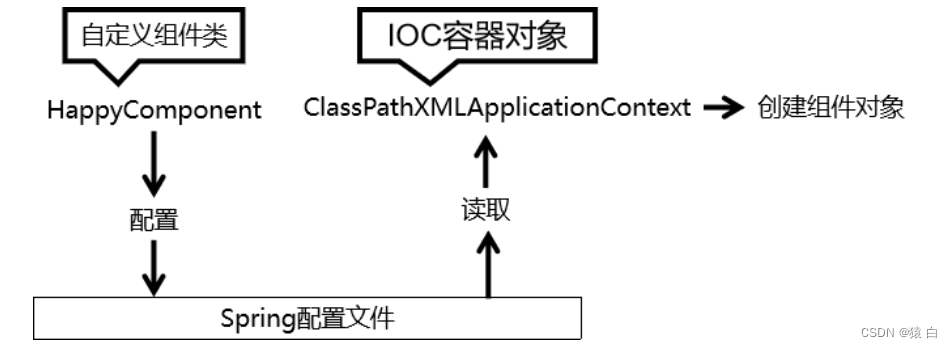
⑧注意
Spring 底层默认通过反射技术调用组件类的无参构造器来创建组件对象,这一点需要注意。如果在需要无参构造器时,没有无参构造器,则会抛出下面的异常:
org.springframework.beans.factory.BeanCreationException: Error creating bean with name 'helloworld' defined in class path resource [applicationContext.xml]: Instantiation of bean failed; nested exception is org.springframework.beans.BeanInstantiationException: Failed to instantiate [com.atguigu.spring.bean.HelloWorld]: No default constructor found; nested exception is java.lang.NoSuchMethodException: com.atguigu.spring.bean.HelloWorld.<init> ()- 1
- 2
- 3
- 4
- 5
- 6
2.2.2、实验二:获取bean
①方式一:根据id获取
由于 id 属性指定了 bean 的唯一标识,所以根据 bean 标签的 id 属性可以精确获取到一个组件对象。上个实验中我们使用的就是这种方式。
②方式二:根据类型获取
@Test public void testIOC(){ //获取IOC容器 ApplicationContext ioc = new ClassPathXmlApplicationContext("spring-ioc.xml"); //1.获取bean // Student studentOne = (Student) ioc.getBean("studentOne"); // System.out.println(studentOne); // 2.获取bean Student bean = ioc.getBean(Student.class); System.out.println(bean); }- 1
- 2
- 3
- 4
- 5
- 6
- 7
- 8
- 9
- 10
- 11
- 12
如果有两个及以上会报错:
<bean id="studentOne" class="com.gao.spring.pojo.Student"></bean> <bean id="studentTwo" class="com.gao.spring.pojo.Student"></bean>- 1
- 2
- 3
报错:
org.springframework.beans.factory.NoUniqueBeanDefinitionException: No qualifying bean of type 'com.gao.spring.pojo.Student' available: expected single matching bean but found 2: studentOne,studentTwo- 1
③方式三:根据id和类型
@Test public void testIOC(){ //获取IOC容器 ApplicationContext ioc = new ClassPathXmlApplicationContext("spring-ioc.xml"); //1.获取bean // Student studentOne = (Student) ioc.getBean("studentOne"); // System.out.println(studentOne); // 2.获取bean // Student bean = ioc.getBean(Student.class); // System.out.println(bean); // 3.根据id和bean Student studentOne = ioc.getBean("studentOne", Student.class); System.out.println(studentOne); }- 1
- 2
- 3
- 4
- 5
- 6
- 7
- 8
- 9
- 10
- 11
- 12
- 13
- 14
- 15
④注意
当根据类型获取bean时,要求IOC容器中指定类型的bean有且只能有一个
当IOC容器中一共配置了两个:<bean id="studentOne" class="com.gao.spring.pojo.Student"></bean> <bean id="studentTwo" class="com.gao.spring.pojo.Student"></bean>- 1
- 2
- 3
根据类型获取时会抛出异常:
org.springframework.beans.factory.NoUniqueBeanDefinitionException: No qualifying bean of type 'com.atguigu.spring.bean.HelloWorld' available: expected single matching bean but found 2: helloworldOne,helloworldTwo- 1
- 2
- 3
⑤扩展
如果组件类实现了接口,根据接口类型可以获取 bean 吗?
可以,前提是bean唯一
如果一个接口有多个实现类,这些实现类都配置了 bean,根据接口类型可以获取 bean 吗?
不行,因为bean不唯一
⑥结论
根据类型来获取bean时,在满足bean唯一性的前提下,其实只是看:『对象 instanceof 指定的类型』的返回结果,只要返回的是true就可以认定为和类型匹配,能够获取到。
//获取bean的三种方式 // 1.根据id获取 // 2.根据bean类型获取(常用ss) // 注意:根据类型获取bean时候,要求IOC容器中有且只有一个类型匹配的bean // 若有多个类型匹配:NoUniqueBeanDefinitionException // 若没有匹配的类型:NoSuchBeanDefinitionException // 3.根据bean的id和类型- 1
- 2
- 3
- 4
- 5
- 6
- 7
2.2.3、实验三:依赖注入之setter注入
①创建学生类Student
public class Student implements Person{ private Integer sid; private String sname; private Integer age; private String gender; public Student(Integer sid, String sname, Integer age, String gender) { this.sid = sid; this.sname = sname; this.age = age; this.gender = gender; } public Student() { } public Integer getSid() { return sid; } public void setSid(Integer sid) { this.sid = sid; } public String getSname() { return sname; } public void setSname(String sname) { this.sname = sname; } public Integer getAge() { return age; } public void setAge(Integer age) { this.age = age; } public String getGender() { return gender; } public void setGender(String gender) { this.gender = gender; } @Override public String toString() { return "Student{" + "sid=" + sid + ", sname='" + sname + '\'' + ", age=" + age + ", gender='" + gender + '\'' + '}'; } }- 1
- 2
- 3
- 4
- 5
- 6
- 7
- 8
- 9
- 10
- 11
- 12
- 13
- 14
- 15
- 16
- 17
- 18
- 19
- 20
- 21
- 22
- 23
- 24
- 25
- 26
- 27
- 28
- 29
- 30
- 31
- 32
- 33
- 34
- 35
- 36
- 37
- 38
- 39
- 40
- 41
- 42
- 43
- 44
- 45
- 46
- 47
- 48
- 49
- 50
- 51
- 52
- 53
- 54
- 55
- 56
- 57
- 58
- 59
- 60
- 61
②配置bean时为属性赋值
<bean id="studentTwo" class="com.gao.spring.pojo.Student"> <!-- property:通过成员变量的set方法进行赋值 name:设置需要赋值的属性名(和set方法有关) value:设置为属性赋值 --> <property name="sid" value="1001"></property> <property name="sname" value="张三"></property> <property name="age" value="18"></property> <property name="gender" value="男"></property> </bean>- 1
- 2
- 3
- 4
- 5
- 6
- 7
- 8
- 9
- 10
- 11
③测试
@Test public void testDI(){ ApplicationContext ioc = new ClassPathXmlApplicationContext("spring-ioc.xml"); Student studentTwo = ioc.getBean("studentTwo", Student.class); System.out.println(studentTwo); }- 1
- 2
- 3
- 4
- 5
- 6
2.2.4、实验四:依赖注入之构造器注入
①在Student类中添加有参构造
public Student(Integer sid, String sname, Integer age, String gender) { this.sid = sid; this.sname = sname; this.age = age; this.gender = gender; }- 1
- 2
- 3
- 4
- 5
- 6
②配置bean
<bean id="studentThree" class="com.gao.spring.pojo.Student"> <constructor-arg value="1002"></constructor-arg> <constructor-arg value="李四"></constructor-arg> <constructor-arg value="24"></constructor-arg> <constructor-arg value="男"></constructor-arg> </bean>- 1
- 2
- 3
- 4
- 5
- 6
注意:
constructor-arg标签还有两个属性可以进一步描述构造器参数:
index属性:指定参数所在位置的索引(从0开始)
name属性:指定参数名③测试
@Test public void testDI(){ ApplicationContext ioc = new ClassPathXmlApplicationContext("spring-ioc.xml"); // Student studentTwo = ioc.getBean("studentTwo", Student.class); // System.out.println(studentTwo); Student bean = ioc.getBean("studentThree", Student.class); System.out.println(bean); }- 1
- 2
- 3
- 4
- 5
- 6
- 7
- 8
- 9
如果有两个构造器:
public Student(Integer sid, String sname, String gender,Integer age) { this.sid = sid; this.sname = sname; this.age = age; this.gender = gender; } public Student(Integer sid, String sname, String gender, Double score) { this.sid = sid; this.sname = sname; this.gender = gender; this.score = score; }- 1
- 2
- 3
- 4
- 5
- 6
- 7
- 8
- 9
- 10
- 11
- 12
- 13
- 14
<bean id="studentThree" class="com.gao.spring.pojo.Student"> <constructor-arg value="1002"></constructor-arg> <constructor-arg value="李四"></constructor-arg> <constructor-arg value="男"></constructor-arg> <constructor-arg value="24"></constructor-arg> </bean>- 1
- 2
- 3
- 4
- 5
- 6
输结果:
Student{sid=1002, sname='李四', age=null, gender='男', score=24.0}- 1
修改:
<bean id="studentThree" class="com.gao.spring.pojo.Student"> <constructor-arg value="1002"></constructor-arg> <constructor-arg value="李四"></constructor-arg> <constructor-arg value="男"></constructor-arg> <constructor-arg value="24" name="age"></constructor-arg> </bean>- 1
- 2
- 3
- 4
- 5
- 6
输出结果:
Student{sid=1002, sname='李四', age=24, gender='男', score=null}- 1
2.2.5、实验五:特殊值处理
①字面量赋值
什么是字面量?
int a = 10;
声明一个变量a,初始化为10,此时a就不代表字母a了,而是作为一个变量的名字。当我们引用a的时候,我们实际上拿到的值是10。
而如果a是带引号的:‘a’,那么它现在不是一个变量,它就是代表a这个字母本身,这就是字面量。所以字面量没有引申含义,就是我们看到的这个数据本身。<!-- 使用value属性给bean的属性赋值时,Spring会把value属性的值看做字面量 --> <property name="name" value="张三"/>- 1
- 2
②null值
<property name="name"> <null /> </property>- 1
- 2
- 3
注意:
以上写法,为name所赋的值是字符串null③xml实体
<!-- 小于号在XML文档中用来定义标签的开始,不能随便使用 --> <!-- 解决方案一:使用XML实体来代替 --> <property name="expression" value="a < b"/>- 1
- 2
- 3
④CDATA节
<property name="expression"> <!-- 解决方案二:使用CDATA节 --> <!-- CDATA中的C代表Character,是文本、字符的含义,CDATA就表示纯文本数据 --> <!-- XML解析器看到CDATA节就知道这里是纯文本,就不会当作XML标签或属性来解析 --> <!-- 所以CDATA节中写什么符号都随意 --> <value><![CDATA[a < b]]></value> </property>- 1
- 2
- 3
- 4
- 5
- 6
- 7
完整代码:
<bean id="studentFour" class="com.gao.spring.pojo.Student"> <property name="sid" value="1003"></property> <!-- <: < >: > CDATA节其中的内容会原样解析<![CDATA[····]]> CDATA节是xml其中的一个是特殊的标签,不能写在一个属性中 --> <!-- <property name="sname" value="<王五>"></property>--> <property name="sname"> <!-- 快捷键:CD(大写) + 回车 --> <value><![CDATA[<王五>]]></value> </property> <property name="gender"> <null></null> </property> </bean>- 1
- 2
- 3
- 4
- 5
- 6
- 7
- 8
- 9
- 10
- 11
- 12
- 13
- 14
- 15
- 16
- 17
2.2.6、实验六:为类类型属性赋值
①创建班级类Clazz
public class Clazz { private Integer cid; private String cname; public Clazz(Integer cid, String cname) { this.cid = cid; this.cname = cname; } public Clazz() { } public Integer getCid() { return cid; } public void setCid(Integer cid) { this.cid = cid; } public String getCname() { return cname; } public void setCname(String cname) { this.cname = cname; } @Override public String toString() { return "Clazz{" + "cid=" + cid + ", cname='" + cname + '\'' + '}'; } }- 1
- 2
- 3
- 4
- 5
- 6
- 7
- 8
- 9
- 10
- 11
- 12
- 13
- 14
- 15
- 16
- 17
- 18
- 19
- 20
- 21
- 22
- 23
- 24
- 25
- 26
- 27
- 28
- 29
- 30
- 31
- 32
- 33
- 34
- 35
- 36
- 37
- 38
- 39
②修改Student类
在Student类中添加以下代码:
private Clazz clazz; public Clazz getClazz() { return clazz; } public void setClazz(Clazz clazz) { this.clazz = clazz; }- 1
- 2
- 3
- 4
- 5
- 6
- 7
③方式一:引用外部已声明的bean
配置Clazz类型的bean:
<bean id="clazzOne" class="com.gao.spring.pojo.Clazz"> <property name="cid" value="1111"></property> <property name="cname" value="终极一班"></property> </bean>- 1
- 2
- 3
- 4
为Student中的clazz属性赋值:
<bean id="studentFive" class="com.gao.spring.pojo.Student"> <property name="sid" value="1004"></property> <property name="sname" value="赵四"></property> <property name="age" value="18"></property> <property name="gender" value="男"></property> <!--ref:引用IOC容器中的某个bean的id--> <property name="clazz" ref="clazzOne"></property> </bean>- 1
- 2
- 3
- 4
- 5
- 6
- 7
- 8
错误演示:
<bean id="studentFive" class="com.gao.spring.pojo.Student"> <property name="sid" value="1004"></property> <property name="sname" value="赵四"></property> <property name="age" value="18"></property> <property name="gender" value="男"></property> <!--ref:引用IOC容器中的某个bean的id--> <property name="clazz" value="clazzOne"></property> </bean>- 1
- 2
- 3
- 4
- 5
- 6
- 7
- 8
如果错把ref属性写成了value属性,会抛出异常: Caused by: java.lang.IllegalStateException:
Cannot convert value of type ‘java.lang.String’ to required type
‘com.atguigu.spring.bean.Clazz’ for property ‘clazz’: no matching editors or conversionstrategy found
意思是不能把String类型转换成我们要的Clazz类型,说明我们使用value属性时,Spring只把这个属性看做一个普通的字符串,不会认为这是一个bean的id,更不会根据它去找到bean来赋值④方式二:内部bean
<bean id="studentFive" class="com.gao.spring.pojo.Student"> <property name="sid" value="1004"></property> <property name="sname" value="赵四"></property> <property name="age" value="18"></property> <property name="gender" value="男"></property> <!--ref:引用IOC容器中的某个bean的id--> <!-- <property name="clazz" ref="clazzOne"></property>--> <!--级联的方式,要保证前为clazz属性赋值或者实例化--> <!-- <property name="clazz.cid" value="1111"></property>--> <!-- <property name="clazz.cname" value="远大前程班"></property>--> <property name="clazz"> <!--内部bean,只能当前bean内部使用,不能直接通过IOC容器获取--> <bean id="clazzInner" class="com.gao.spring.pojo.Clazz"> <property name="cid" value="1111"></property> <property name="cname" value="终极一班"></property> </bean> </property> </bean>- 1
- 2
- 3
- 4
- 5
- 6
- 7
- 8
- 9
- 10
- 11
- 12
- 13
- 14
- 15
- 16
- 17
- 18
- 19
测试
public void testDI(){ ApplicationContext ioc = new ClassPathXmlApplicationContext("spring-ioc.xml"); // Student studentTwo = ioc.getBean("studentTwo", Student.class); // System.out.println(studentTwo); // Student bean = ioc.getBean("studentFive", Student.class); // System.out.println(bean); Clazz clazzInner = ioc.getBean("clazzInner", Clazz.class); System.out.println(clazzInner); }- 1
- 2
- 3
- 4
- 5
- 6
- 7
- 8
- 9
- 10
- 11
- 12
org.springframework.beans.factory.NoSuchBeanDefinitionException: No bean named 'clazzInner' available- 1
⑤方式三:级联属性赋值
<bean id="studentFive" class="com.gao.spring.pojo.Student"> <property name="sid" value="1004"></property> <property name="sname" value="赵四"></property> <property name="age" value="18"></property> <property name="gender" value="男"></property> <!--ref:引用IOC容器中的某个bean的id--> <property name="clazz" ref="clazzOne"></property> <property name="clazz.cid" value="1111"></property> <property name="clazz.cname" value="远大前程班"></property> </bean>- 1
- 2
- 3
- 4
- 5
- 6
- 7
- 8
- 9
- 10
2.2.7、实验七:为数组类型属性赋值
①修改Student类
student类中添加属性:
private String[] hobby;- 1
②配置bean
<bean id="studentFive" class="com.gao.spring.pojo.Student"> <property name="sid" value="1004"></property> <property name="sname" value="赵四"></property> <property name="age" value="18"></property> <property name="gender" value="男"></property> <!--ref:引用IOC容器中的某个bean的id--> <!-- <property name="clazz" ref="clazzOne"></property>--> <!--级联的方式,要保证前为clazz属性赋值或者实例化--> <!-- <property name="clazz.cid" value="1111"></property>--> <!-- <property name="clazz.cname" value="远大前程班"></property>--> <property name="clazz"> <!--内部bean,只能当前bean内部使用,不能直接通过IOC容器获取--> <bean id="clazzInner" class="com.gao.spring.pojo.Clazz"> <property name="cid" value="1111"></property> <property name="cname" value="终极一班"></property> </bean> </property> <property name="hobby"> <array> <!--<ref bean="````"></ref>--> <value>羽毛球</value> <value>篮球</value> <value>足球</value> </array> </property> </bean>- 1
- 2
- 3
- 4
- 5
- 6
- 7
- 8
- 9
- 10
- 11
- 12
- 13
- 14
- 15
- 16
- 17
- 18
- 19
- 20
- 21
- 22
- 23
- 24
- 25
- 26
- 27
- 28
2.2.8、实验八:为集合类型属性赋值
①为List集合类型属性赋值
在Clazz类中添加以下代码:重写tostring
private List<Student> students; public List<Student> getStudents() { return students; } public void setStudents(List<Student> students) { this.students = students; }- 1
- 2
- 3
- 4
- 5
- 6
- 7
- 8
- 9
配置bean:
<bean id="clazzOne" class="com.gao.spring.pojo.Clazz"> <property name="cid" value="1111"></property> <property name="cname" value="终极一班"></property> <property name="students"> <list> <ref bean="studentOne"></ref> <ref bean="studentTwo"></ref> <ref bean="studentThree"></ref> </list> </property> </bean>- 1
- 2
- 3
- 4
- 5
- 6
- 7
- 8
- 9
- 10
- 11
改进:
<bean id="clazzOne" class="com.gao.spring.pojo.Clazz"> <property name="cid" value="1111"></property> <property name="cname" value="终极一班"></property> <property name="students" ref="studentList"></property> <!-- <property name="students">--> <!-- <list>--> <!-- <ref bean="studentOne"></ref>--> <!-- <ref bean="studentTwo"></ref>--> <!-- <ref bean="studentThree"></ref>--> <!-- </list>--> <!-- </property>--> </bean> <!--配置一个集合类型的bean,使用util约束--> <util:list id="studentList"> <ref bean="studentOne"></ref> <ref bean="studentTwo"></ref> <ref bean="studentThree"></ref> </util:list>- 1
- 2
- 3
- 4
- 5
- 6
- 7
- 8
- 9
- 10
- 11
- 12
- 13
- 14
- 15
- 16
- 17
- 18
- 19
xmlns:xsi=“http://www.w3.org/2001/XMLSchema-instance” xmlns:util=“http://www.springframework.org/schema/util”
若为Set集合类型属性赋值,只需要将其中的list标签改为set标签即可
②为Map集合类型属性赋值
创建教师类Teacher:
public class Teacher { private Integer tid; private String tname; public Teacher(Integer tid, String tname) { this.tid = tid; this.tname = tname; } public Teacher() { } public Integer getTid() { return tid; } public void setTid(Integer tid) { this.tid = tid; } public String getTname() { return tname; } public void setTname(String tname) { this.tname = tname; } @Override public String toString() { return "Teacher{" + "tid=" + tid + ", tname='" + tname + '\'' + '}'; } }- 1
- 2
- 3
- 4
- 5
- 6
- 7
- 8
- 9
- 10
- 11
- 12
- 13
- 14
- 15
- 16
- 17
- 18
- 19
- 20
- 21
- 22
- 23
- 24
- 25
- 26
- 27
- 28
- 29
- 30
- 31
- 32
- 33
- 34
- 35
- 36
- 37
- 38
- 39
student增加属性:重写toString
private Map<String,Teacher> teachermap; public Map<String, Teacher> getTeachermap() { return teachermap; } public void setTeachermap(Map<String, Teacher> teachermap) { this.teachermap = teachermap; }- 1
- 2
- 3
- 4
- 5
- 6
- 7
- 8
- 9
配置bean:
<property name="teachermap"> <map> <entry key="10086" value-ref="teacherOne"></entry> <entry key="10089" value-ref="teacherTwo"></entry> </map> </property>- 1
- 2
- 3
- 4
- 5
- 6
配置teacherbean:
<bean id="teacherOne" class="com.gao.spring.pojo.Teacher"> <property name="tid" value="10086"></property> <property name="tname" value="高老师"></property> </bean> <bean id="teacherTwo" class="com.gao.spring.pojo.Teacher"> <property name="tid" value="10089"></property> <property name="tname" value="王老师"></property> </bean>- 1
- 2
- 3
- 4
- 5
- 6
- 7
- 8
- 9
- 10
改进:
<util:map id="studentMap"> <entry key="10086" value-ref="teacherOne"></entry> <entry key="10089" value-ref="teacherTwo"></entry> </util:map>- 1
- 2
- 3
- 4
<property name="teachermap" ref="studentMap"></property>- 1
③引用集合类型的bean
<bean id="clazzOne" class="com.gao.spring.pojo.Clazz"> <property name="cid" value="1111"></property> <property name="cname" value="终极一班"></property> <property name="students" ref="studentList"></property> <!-- <property name="students">--> <!-- <list>--> <!-- <ref bean="studentOne"></ref>--> <!-- <ref bean="studentTwo"></ref>--> <!-- <ref bean="studentThree"></ref>--> <!-- </list>--> <!-- </property>--> </bean>- 1
- 2
- 3
- 4
- 5
- 6
- 7
- 8
- 9
- 10
- 11
- 12
<!--配置一个集合类型的bean,使用util约束--> <util:list id="studentList"> <ref bean="studentOne"></ref> <ref bean="studentTwo"></ref> <ref bean="studentThree"></ref> </util:list>- 1
- 2
- 3
- 4
- 5
- 6
<property name="teachermap" ref="studentMap"></property>- 1
<util:map id="studentMap"> <entry key="10086" value-ref="teacherOne"></entry> <entry key="10089" value-ref="teacherTwo"></entry> </util:map>- 1
- 2
- 3
- 4
使用
util:list、util:map标签必须引入相应的命名空间,可以通过idea的提示功能选择
2.2.9、实验九:p命名空间
引入p命名空间后,可以通过以下方式为bean的各个属性赋值
xmlns:p="http://www.springframework.org/schema/p"- 1
<bean id="studentSix" class="com.gao.spring.pojo.Student" p:sid="1005" p:sname="小明" p:teachermap-ref="studentMap"> </bean>- 1
- 2
- 3
- 4
2.2.10、实验十:引入外部属性文件
不引用外部文件:(加入依赖)
<bean id="dataSource" class="com.alibaba.druid.pool.DruidDataSource"> <property name="driverClassName" value="com.mysql.cj.jdbc.Driver"></property> <property name="url" value="jdbc:mysql://localhost:3306/ssm?serverTimezone=UTC"></property> <property name="username" value="root"></property> <property name="password" value="root"></property> <!-- <property name="maxActive" value="8"></property>--> </bean>- 1
- 2
- 3
- 4
- 5
- 6
- 7
测试:
@Test public void testDataSouerce() throws SQLException { ClassPathXmlApplicationContext ioc = new ClassPathXmlApplicationContext("spring-datasource.xml"); DruidDataSource dataSource = ioc.getBean(DruidDataSource.class); System.out.println(dataSource.getConnection()); }- 1
- 2
- 3
- 4
- 5
- 6
- 7
①加入依赖
<!-- MySQL驱动 --> <dependency> <groupId>mysql</groupId> <artifactId>mysql-connector-java</artifactId> <version>8.0.29</version> </dependency> <!-- 数据源 --> <dependency> <groupId>com.alibaba</groupId> <artifactId>druid</artifactId> <version>1.0.31</version> </dependency>- 1
- 2
- 3
- 4
- 5
- 6
- 7
- 8
- 9
- 10
- 11
- 12
②创建外部属性文件
jdbc.properties
jdbc.driver=com.mysql.cj.jdbc.Driver jdbc.url=jdbc:mysql://localhost:3306/ssm?serverTimezone=UTC jdbc.username=root jdbc.password=root- 1
- 2
- 3
- 4
③引入属性文件
<context:property-placeholder location="jdbc.properties"></context:property-placeholder>- 1
④配置bean
<?xml version="1.0" encoding="UTF-8"?> <beans xmlns="http://www.springframework.org/schema/beans" xmlns:xsi="http://www.w3.org/2001/XMLSchema-instance" xmlns:context="http://www.springframework.org/schema/context" xsi:schemaLocation="http://www.springframework.org/schema/beans http://www.springframework.org/schema/beans/spring-beans.xsd http://www.springframework.org/schema/util https://www.springframework.org/schema/util/spring-util.xsd http://www.springframework.org/schema/context https://www.springframework.org/schema/context/spring-context.xsd"> <!--引入jdbc.properties,之后可以通过${}的方式访问value--> <context:property-placeholder location="jdbc.properties"></context:property-placeholder> <bean id="dataSource" class="com.alibaba.druid.pool.DruidDataSource"> <property name="driverClassName" value="${jdbc.driver}"></property> <property name="url" value="${jdbc.url}"></property> <property name="username" value="${jdbc.username}"></property> <property name="password" value="${jdbc.password}"></property> </bean> </beans>- 1
- 2
- 3
- 4
- 5
- 6
- 7
- 8
- 9
- 10
- 11
- 12
- 13
- 14
- 15
- 16
- 17
⑤测试
@Test public void testDataSouerce() throws SQLException { ClassPathXmlApplicationContext ioc = new ClassPathXmlApplicationContext("spring-datasource.xml"); DruidDataSource dataSource = ioc.getBean(DruidDataSource.class); System.out.println(dataSource.getConnection()); }- 1
- 2
- 3
- 4
- 5
- 6
- 7
2.2.11、实验十一:bean的作用域
①概念
在Spring中可以通过配置bean标签的scope属性来指定bean的作用域范围,各取值含义参加下表:
取值 含义 ** 创建对象的时机** singleton(默认) 在IOC容器中,这个bean的对象始终为单实例 IOC容器初始化时 prototype 这个bean在IOC容器中有多个实例 获取bean时 如果是在WebApplicationContext环境下还会有另外两个作用域(但不常用):
取值 含义 request 在一个请求范围内有效 session 在一个会话范围内有效 <bean id="student" class="com.gao.spring.pojo.Student"> <property name="sid" value="1001"></property> <property name="sname" value="张三"></property> </bean>- 1
- 2
- 3
- 4
@Test public void testScope(){ ClassPathXmlApplicationContext ioc = new ClassPathXmlApplicationContext("spring-scope.xml"); Student bean = ioc.getBean(Student.class); Student bean2 = ioc.getBean(Student.class); System.out.println(bean == bean2);//true }- 1
- 2
- 3
- 4
- 5
- 6
- 7
- 8
- 9
单例改多例:
<bean id="student" class="com.gao.spring.pojo.Student" scope="prototype"> <property name="sid" value="1001"></property> <property name="sname" value="张三"></property> </bean>- 1
- 2
- 3
- 4
<!-- scope:设置bean的作用域 scope="singleton|prototype" singleton(单例):表示获取该bean所对应的对象是同一个 prototype(多例);表示获取该bean所对应的对象都不是同一个 -->- 1
- 2
- 3
- 4
- 5
- 6
2.2.12、实验十二:bean的生命周期
①具体的生命周期过程
- bean对象创建(调用无参构造器)
- 给bean对象设置属性
- bean对象初始化之前操作(由bean的后置处理器负责)
- bean对象初始化(需在配置bean时指定初始化方法)
- bean对象初始化之后操作(由bean的后置处理器负责)
- bean对象就绪可以使用
- bean对象销毁(需在配置bean时指定销毁方法)
- IOC容器关闭
②修改类User
public class User { private Integer id; private String username; private String password; private Integer age; public User() { System.out.println("生命周期:1、创建对象(实例化)"); } public User(Integer id, String username, String password, Integer age) { this.id = id; this.username = username; this.password = password; this.age = age; } public Integer getId() { return id; } public void setId(Integer id) { System.out.println("生命周期:2、依赖注入"); this.id = id; } public String getUsername() { return username; } public void setUsername(String username) { this.username = username; } public String getPassword() { return password; } public void setPassword(String password) { this.password = password; } public Integer getAge() { return age; } public void setAge(Integer age) { this.age = age; } public void initMethod(){ System.out.println("生命周期:3、初始化"); } //生命周期:4、使用 public void destroyMethod(){ System.out.println("生命周期:5、销毁"); } @Override public String toString() { return "User{" + "id=" + id + ", username='" + username + '\'' + ", password='" + password + '\'' + ", age=" + age + '}'; } }- 1
- 2
- 3
- 4
- 5
- 6
- 7
- 8
- 9
- 10
- 11
- 12
- 13
- 14
- 15
- 16
- 17
- 18
- 19
- 20
- 21
- 22
- 23
- 24
- 25
- 26
- 27
- 28
- 29
- 30
- 31
- 32
- 33
- 34
- 35
- 36
- 37
- 38
- 39
- 40
- 41
- 42
- 43
- 44
- 45
- 46
- 47
- 48
- 49
- 50
- 51
- 52
- 53
- 54
- 55
- 56
- 57
注意其中的initMethod()和destroyMethod(),可以通过配置bean指定为初始化和销毁的方法
③配置bean
<bean id="user" class="com.gao.spring.pojo.User" init-method="initMethod" destroy-method="destroyMethod"> <property name="id" value="4"></property> <property name="username" value="admin"></property> <property name="password" value="11111"></property> <property name="age" value="22"></property> </bean>- 1
- 2
- 3
- 4
- 5
- 6
④测试:
@Test public void test(){ // ConfigurableApplicationContext是ApplicationContext的子接口,其中扩展了刷新和关闭容器的方法 ConfigurableApplicationContext ioc = new ClassPathXmlApplicationContext("spring-lifecycle.xml"); User bean = ioc.getBean(User.class); System.out.println(bean); System.out.println("生命周期:4、通过IOC容器获取bean并使用"); ioc.close(); }- 1
- 2
- 3
- 4
- 5
- 6
- 7
- 8
- 9
输出结果:
生命周期:1、创建对象(实例化) 生命周期:2、依赖注入 生命周期:3、初始化 User{id=4, username='admin', password='11111', age=22} 生命周期:4、通过IOC容器获取bean并使用 生命周期:5、销毁- 1
- 2
- 3
- 4
- 5
- 6
bean的作用域对生命周期的影响
@Test public void test1(){ // ConfigurableApplicationContext是ApplicationContext的子接口,其中扩展了刷新和关闭容器的方法 ConfigurableApplicationContext ioc = new ClassPathXmlApplicationContext("spring-lifecycle.xml"); // User bean = ioc.getBean(User.class); // System.out.println(bean); // System.out.println("生命周期:4、通过IOC容器获取bean并使用"); // ioc.close(); }- 1
- 2
- 3
- 4
- 5
- 6
- 7
- 8
- 9
输出:
生命周期:1、创建对象(实例化) 生命周期:2、依赖注入 生命周期:3、初始化- 1
- 2
- 3
修改:
scope="prototype"- 1
输出结果为空吗,没有执行操作。
@Test public void test1(){ // ConfigurableApplicationContext是ApplicationContext的子接口,其中扩展了刷新和关闭容器的方法 ConfigurableApplicationContext ioc = new ClassPathXmlApplicationContext("spring-lifecycle.xml"); User bean = ioc.getBean(User.class); System.out.println(bean); System.out.println("生命周期:4、通过IOC容器获取bean并使用"); ioc.close(); }- 1
- 2
- 3
- 4
- 5
- 6
- 7
- 8
- 9
输出:(没有销毁)
生命周期:1、创建对象(实例化) 生命周期:2、依赖注入 生命周期:3、初始化 User{id=4, username='admin', password='11111', age=22} 生命周期:4、通过IOC容器获取bean并使用- 1
- 2
- 3
- 4
- 5
⑤bean的后置处理器
bean的后置处理器会在生命周期的初始化前后添加额外的操作,需要
实现BeanPostProcessor接口,且配置到IOC容器中,需要注意的是,bean后置处理器不是单独针对某一个bean生效,而是针对IOC容器中所有bean都会执行。创建bean的后置处理器:
public class MyBeanPostProcesssor implements BeanPostProcessor { @Override public Object postProcessBeforeInitialization(Object bean, String beanName) throws BeansException { //此方法在bean的生命周期初始化之前执行 System.out.println("MyBeanPostProcesssor--->后置处理器postProcessBeforeInitialization"); return BeanPostProcessor.super.postProcessBeforeInitialization(bean, beanName); } @Override public Object postProcessAfterInitialization(Object bean, String beanName) throws BeansException { //此方法在bean的生命周期初始化之后执行 System.out.println("MyBeanPostProcesssor--->后置处理器postProcessAfterInitialization"); return BeanPostProcessor.super.postProcessAfterInitialization(bean, beanName); } }- 1
- 2
- 3
- 4
- 5
- 6
- 7
- 8
- 9
- 10
- 11
- 12
- 13
- 14
- 15
- 16
配置bean:
<bean id="mybeanpostprocessor" class="com.gao.spring.process.MyBeanPostProcesssor"> </bean>- 1
- 2
- 3
测试
@Test public void test1(){ // ConfigurableApplicationContext是ApplicationContext的子接口,其中扩展了刷新和关闭容器的方法 ConfigurableApplicationContext ioc = new ClassPathXmlApplicationContext("spring-lifecycle.xml"); User bean = ioc.getBean(User.class); System.out.println(bean); System.out.println("生命周期:4、通过IOC容器获取bean并使用"); ioc.close(); }- 1
- 2
- 3
- 4
- 5
- 6
- 7
- 8
- 9
输出结果:
生命周期:1、创建对象(实例化) 生命周期:2、依赖注入 MyBeanPostProcesssor--->后置处理器postProcessBeforeInitialization 生命周期:3、初始化 MyBeanPostProcesssor--->后置处理器postProcessAfterInitialization User{id=4, username='admin', password='11111', age=22} 生命周期:4、通过IOC容器获取bean并使用 生命周期:5、销毁- 1
- 2
- 3
- 4
- 5
- 6
- 7
- 8
总结
/* * 1.实例化 * 2.依赖注入 * 3.后置处理器的postProcessBeforeInitialization方法 * 4.初始化,需要通过bean的init-method属性来制定初始化的方法 * 5.后置处理器的postProcessAfterInitialization方法 * 6.使用 * 7.IOC容器关闭时销毁,需要通过beean的destory-method属性指定销毁的方法 * * * bean的后置处理器会在生命周期的初始化前后添加额外的操作,需要实现BeanPostProcessor接口, 且配置到IOC容器中,需要注意的是,bean后置处理器不是单独针对某一个bean生效,而是针对IOC容 器中所有bean都会执行 * 注意: * 若bean的作用域为单例的时候,生命周期的前三个步骤会在获取IOC容器时执行 * 若bean的作用域为多例的时候,生命周期的前三个步骤会在获取bean时执行 * */- 1
- 2
- 3
- 4
- 5
- 6
- 7
- 8
- 9
- 10
- 11
- 12
- 13
- 14
- 15
- 16
- 17
2.2.13、实验十三:FactoryBean
①简介
FactoryBean是Spring提供的一种整合第三方框架的常用机制。和普通的bean不同,配置一个FactoryBean类型的bean,在获取bean的时候得到的并不是class属性中配置的这个类的对象,而是getObject()方法的返回值。通过这种机制,Spring可以帮我们把复杂组件创建的详细过程和繁琐细节都屏蔽起来,只把最简洁的使用界面展示给我们。
将来我们整合Mybatis时,Spring就是通过FactoryBean机制来帮我们创建SqlSessionFactory对象的。/* * Copyright 2002-2020 the original author or authors. * * Licensed under the Apache License, Version 2.0 (the "License"); * you may not use this file except in compliance with the License. * You may obtain a copy of the License at * * https://www.apache.org/licenses/LICENSE-2.0 * * Unless required by applicable law or agreed to in writing, software * distributed under the License is distributed on an "AS IS" BASIS, * WITHOUT WARRANTIES OR CONDITIONS OF ANY KIND, either express or implied. * See the License for the specific language governing permissions and * limitations under the License. */ package org.springframework.beans.factory; import org.springframework.lang.Nullable; /** * Interface to be implemented by objects used within a {@link BeanFactory} which * are themselves factories for individual objects. If a bean implements this * interface, it is used as a factory for an object to expose, not directly as a * bean instance that will be exposed itself. * *NB: A bean that implements this interface cannot be used as a normal bean. * A FactoryBean is defined in a bean style, but the object exposed for bean * references ({@link #getObject()}) is always the object that it creates. * *
FactoryBeans can support singletons and prototypes, and can either create * objects lazily on demand or eagerly on startup. The {@link SmartFactoryBean} * interface allows for exposing more fine-grained behavioral metadata. * *
This interface is heavily used within the framework itself, for example for * the AOP {@link org.springframework.aop.framework.ProxyFactoryBean} or the * {@link org.springframework.jndi.JndiObjectFactoryBean}. It can be used for * custom components as well; however, this is only common for infrastructure code. * *
{@code FactoryBean} is a programmatic contract. Implementations are not * supposed to rely on annotation-driven injection or other reflective facilities. * {@link #getObjectType()} {@link #getObject()} invocations may arrive early in the * bootstrap process, even ahead of any post-processor setup. If you need access to * other beans, implement {@link BeanFactoryAware} and obtain them programmatically. * *
The container is only responsible for managing the lifecycle of the FactoryBean * instance, not the lifecycle of the objects created by the FactoryBean. Therefore, * a destroy method on an exposed bean object (such as {@link java.io.Closeable#close()} * will not be called automatically. Instead, a FactoryBean should implement * {@link DisposableBean} and delegate any such close call to the underlying object. * *
Finally, FactoryBean objects participate in the containing BeanFactory's * synchronization of bean creation. There is usually no need for internal * synchronization other than for purposes of lazy initialization within the * FactoryBean itself (or the like). * * @author Rod Johnson * @author Juergen Hoeller * @since 08.03.2003 * @param
public interface FactoryBean<T> { /** * The name of an attribute that can be * {@link org.springframework.core.AttributeAccessor#setAttribute set} on a * {@link org.springframework.beans.factory.config.BeanDefinition} so that * factory beans can signal their object type when it can't be deduced from * the factory bean class. * @since 5.2 */ String OBJECT_TYPE_ATTRIBUTE = "factoryBeanObjectType"; /** * Return an instance (possibly shared or independent) of the object * managed by this factory. *the bean type * @see org.springframework.beans.factory.BeanFactory * @see org.springframework.aop.framework.ProxyFactoryBean * @see org.springframework.jndi.JndiObjectFactoryBean */ As with a {@link BeanFactory}, this allows support for both the * Singleton and Prototype design pattern. *
If this FactoryBean is not fully initialized yet at the time of * the call (for example because it is involved in a circular reference), * throw a corresponding {@link FactoryBeanNotInitializedException}. *
As of Spring 2.0, FactoryBeans are allowed to return {@code null} * objects. The factory will consider this as normal value to be used; it * will not throw a FactoryBeanNotInitializedException in this case anymore. * FactoryBean implementations are encouraged to throw * FactoryBeanNotInitializedException themselves now, as appropriate. * @return an instance of the bean (can be {@code null}) * @throws Exception in case of creation errors * @see FactoryBeanNotInitializedException */
@Nullable T getObject() throws Exception; /** * Return the type of object that this FactoryBean creates, * or {@code null} if not known in advance. *This allows one to check for specific types of beans without * instantiating objects, for example on autowiring. *
In the case of implementations that are creating a singleton object, * this method should try to avoid singleton creation as far as possible; * it should rather estimate the type in advance. * * For prototypes, returning a meaningful type here is advisable too. *
This method can be called before this FactoryBean has * been fully initialized. It must not rely on state created during * initialization; of course, it can still use such state if available. *
NOTE: Autowiring will simply ignore FactoryBeans that return * {@code null} here. Therefore it is highly recommended to implement * this method properly, using the current state of the FactoryBean. * @return the type of object that this FactoryBean creates, * or {@code null} if not known at the time of the call * @see ListableBeanFactory#getBeansOfType */
@Nullable Class<?> getObjectType(); /** * Is the object managed by this factory a singleton? That is, * will {@link #getObject()} always return the same object * (a reference that can be cached)? *NOTE: If a FactoryBean indicates to hold a singleton object, * the object returned from {@code getObject()} might get cached * by the owning BeanFactory. Hence, do not return {@code true} * unless the FactoryBean always exposes the same reference. *
The singleton status of the FactoryBean itself will generally * be provided by the owning BeanFactory; usually, it has to be * defined as singleton there. *
NOTE: This method returning {@code false} does not * necessarily indicate that returned objects are independent instances. * An implementation of the extended {@link SmartFactoryBean} interface * may explicitly indicate independent instances through its * {@link SmartFactoryBean#isPrototype()} method. Plain {@link FactoryBean} * implementations which do not implement this extended interface are * simply assumed to always return independent instances if the * {@code isSingleton()} implementation returns {@code false}. *
The default implementation returns {@code true}, since a * {@code FactoryBean} typically manages a singleton instance. * @return whether the exposed object is a singleton * @see #getObject() * @see SmartFactoryBean#isPrototype() */
default boolean isSingleton() { return true; } }- 1
- 2
- 3
- 4
- 5
- 6
- 7
- 8
- 9
- 10
- 11
- 12
- 13
- 14
- 15
- 16
- 17
- 18
- 19
- 20
- 21
- 22
- 23
- 24
- 25
- 26
- 27
- 28
- 29
- 30
- 31
- 32
- 33
- 34
- 35
- 36
- 37
- 38
- 39
- 40
- 41
- 42
- 43
- 44
- 45
- 46
- 47
- 48
- 49
- 50
- 51
- 52
- 53
- 54
- 55
- 56
- 57
- 58
- 59
- 60
- 61
- 62
- 63
- 64
- 65
- 66
- 67
- 68
- 69
- 70
- 71
- 72
- 73
- 74
- 75
- 76
- 77
- 78
- 79
- 80
- 81
- 82
- 83
- 84
- 85
- 86
- 87
- 88
- 89
- 90
- 91
- 92
- 93
- 94
- 95
- 96
- 97
- 98
- 99
- 100
- 101
- 102
- 103
- 104
- 105
- 106
- 107
- 108
- 109
- 110
- 111
- 112
- 113
- 114
- 115
- 116
- 117
- 118
- 119
- 120
- 121
- 122
- 123
- 124
- 125
- 126
- 127
- 128
- 129
- 130
- 131
- 132
- 133
- 134
- 135
- 136
- 137
- 138
- 139
- 140
- 141
- 142
- 143
- 144
- 145
- 146
- 147
- 148
- 149
- 150
- 151
- 152
- 153
②创建类UserFactoryBean
/* * FactoryBean 是一个接口,需要创建一个类实现接口 * 其中有三个方法: * getObject() :提供一个对象交个ioc管理 * getObjectType():设置所提供的对象的类型 * isSingleon() :所提供的的对象是否单例 * * 当把FactoryBean的实现类裴志伟bean的时候,会将当前类中的getObject()返回的对象交给ioc容器管理 * */ public class UserFActoryBean implements FactoryBean<User> { @Override public User getObject() throws Exception { return new User(); } @Override public Class<?> getObjectType() { return User.class; } }- 1
- 2
- 3
- 4
- 5
- 6
- 7
- 8
- 9
- 10
- 11
- 12
- 13
- 14
- 15
- 16
- 17
- 18
- 19
- 20
- 21
③配置bean
<bean id="factory" class="com.gao.spring.factory.UserFActoryBean"> </bean>- 1
- 2
- 3
- 4
④测试
@Test public void test(){ ClassPathXmlApplicationContext ioc = new ClassPathXmlApplicationContext("spring-factory.xml"); User bean = ioc.getBean(User.class); System.out.println(bean); }- 1
- 2
- 3
- 4
- 5
- 6
2.2.14、实验十四:基于xml的自动装配
自动装配:
根据指定的策略,在IOC容器中匹配某一个bean,自动为指定的bean中所依赖的类类型或接口类型属性赋值①场景模拟
创建类UserController
public class UserController { private UserService userService; public void setUserService(UserService userService) { this.userService = userService; } public void saveUser(){ userService.saveUser(); } }- 1
- 2
- 3
- 4
- 5
- 6
- 7
- 8
- 9
创建接口UserService
public interface UserService { void saveUser(); }- 1
- 2
- 3
创建类UserServiceImpl实现接口UserService
public class UserServiceImpl implements UserService { private UserDao userDao; public void setUserDao(UserDao userDao) { this.userDao = userDao; } @Override public void saveUser() { userDao.saveUser(); } }- 1
- 2
- 3
- 4
- 5
- 6
- 7
- 8
- 9
- 10
创建接口UserDao
public interface UserDao { void saveUser(); }- 1
- 2
- 3
创建类UserDaoImpl实现接口UserDao
public class UserDaoImpl implements UserDao { @Override public void saveUser() { System.out.println("保存成功"); } }- 1
- 2
- 3
- 4
- 5
- 6
不使用自动装配
配置bean
<bean id="userController" class="com.gao.spring.controller.UserController"> <property name="userService" ref="userService"></property> </bean> <bean id="userService" class="com.gao.spring.service.impl.UserServiceImpl"> <property name="userDao" ref="userDap"></property> </bean> <bean id="userDap" class="com.gao.spring.dao.impl.UserDaoImpl"></bean>- 1
- 2
- 3
- 4
- 5
- 6
- 7
- 8
- 9
测试
@Test public void testAutowire(){ ClassPathXmlApplicationContext ioc = new ClassPathXmlApplicationContext("spring-autowire-xml.xml"); UserController bean = ioc.getBean(UserController.class); bean.saveUser(); }- 1
- 2
- 3
- 4
- 5
- 6
②配置bean
<bean id="userController" class="com.gao.spring.controller.UserController" autowire="byType"> <!-- <property name="userService" ref="userService"></property>--> </bean> <bean id="userService" class="com.gao.spring.service.impl.UserServiceImpl" autowire="byType"> <!-- <property name="userDao" ref="userDap"></property>--> </bean> <bean id="userDap" class="com.gao.spring.dao.impl.UserDaoImpl"></bean>- 1
- 2
- 3
- 4
- 5
- 6
- 7
- 8
- 9
- 10
- 11
总结:
/* * 自动装配: * 根据指定的策略,在ioc容器中匹配某个bean,自动为bean中的类类型的属性或接口类型的属性赋值 * 可以通过bean标签中的autowire属性设置自动转配的策略 * 自动装配的策略: * 1、no,default:表示不装配,即bean中的属性不会自动匹配某个bean为属性赋值,此时属性使用默认值 * 2、byType:根据需要赋值的属性的类型,在ioc容器中去匹配某个bean,为属性赋值 * * 注意: * 1.若通过类型没有找到任何类型匹配的bean,此时不装配,属性使用默认值 * 2.若通过类型找到多个类型匹配的bean,异常NoUniqueBeanDefinitionException * 总结:当使用byType实现自动装配的时候,ioc容器有且只有一个类型匹配的bean能够为属性赋值 * * * 3、byName:将要赋值的属性的属性名作为bean的id在ioc容器中匹配某个bean,为属性赋值 * 总结:当类型匹配的bean有多个时候,此时可以使用byName实现自动装配 * */- 1
- 2
- 3
- 4
- 5
- 6
- 7
- 8
- 9
- 10
- 11
- 12
- 13
- 14
- 15
- 16
- 17
-
相关阅读:
[Spring MVC 8]高并发实战小Demo
傻白入门芯片设计,三大基本定律(十)
java计算机毕业设计家电仓储管理系统源码+mysql数据库+系统+lw文档+部署
“低代码技术:数字化工厂的加速器与智能制造的桥梁“
【每日一句】只出现一次的数
LeetCode 1465. 切割后面积最大的蛋糕:纵横分别处理
学完就干的Linux常用命令
神经网络参数量和计算量,神经网络参数个数计算
面试突击72:输入URL之后会执行什么流程?
Java——数据类型转换:自动类型转换&强制类型转换
- 原文地址:https://blog.csdn.net/qq_44774198/article/details/126088858
