-
Django-图书管理系统(含源码)
前段时间翻文件发现了以前学习python和django时做的一个系统,当时的想法是将这玩意做出来应付web开发大作业、课程设计作业甚至是毕设用的,实际上也确实应付了课程设计,功能虽然不算多,但是应付课程设计或者大作业绰绰有余了。
项目使用python开发,采用Django框架,数据库采用MySQL,根据用户人员的不同分成两套系统,分别是学生系统和管理员系统,功能模块具体分成四个,分别是用户管理模块、图书管理模块、数据管理模块、前端模块。
1、用户管理模块
用户管理模块实现的功能包括用户注册(分为学生注册和管理员注册)、用户信息修改、用户登录和判定
用户注册和登录

views.py中用户注册及登陆判定代码段
def login(request):#登录 return render(request, 'login.html') def student_register(request): # 学生注册 name = request.POST.get("student_name") # 获取学生输入的姓名 id = request.POST.get("student_id") # 获取学生输入的学号 major = request.POST.get("student_major") # 获取学生输入的学院 email = request.POST.get("student_email") # 获取学生输入的邮箱 telephone = request.POST.get("student_telephone") password = request.POST.get("student_password") result1 = User.objects.filter(account=telephone) # 在用户表中搜索该用户名的记录 result2 = Student.objects.filter(student_id=id) # 在学生表中搜索该学号的记录 context = {} if len(result1) == 1: # 判断该账户是否存在(即判断是否注册过),如果后台存在记录,则返回相应的提示语句 context["info"] = "该账户已注册!!!" context["status"] = 0 #零表示注册失败 return render(request, 'login.html', context=context) else: #该账户是新用户 if len(result2) == 1:#判断该学号是否有学生已使用 context["info"] = "该学号已占用!!!" context["status"] = 4 return render(request, 'login.html', context=context) else: User.objects.create(account=telephone, user_password=password,user_identity='学生')#用create为user表添加一条记录 Student.objects.create(student_name=name,student_id=id,student_major=major,student_tel=telephone,student_email=email)#用create为student表添加一条记录 context["info"] = "注册成功!" context["status"] = 1 #1表示注册成功 return render(request, 'login.html', context=context) def manager_register(request): # 管理员注册 name = request.POST.get("manager_name") # 获取管理员输入的姓名 id = request.POST.get("manager_id") # 获取管理员输入的工号 stack = request.POST.get("manager_stack") # 获取管理员输入的书库 email = request.POST.get("manager_email") # 获取管理员输入的邮箱 telephone = request.POST.get("manager_telephone") password = request.POST.get("manager_password") result1 = User.objects.filter(account=telephone) # 在用户表中搜索该用户名的记录 result2 = Manager.objects.filter(manager_id=id) # 在管理员表中搜索该工号的使用记录 context = {} if len(result1) == 1: # 判断该账户是否存在(即判断是否注册过),如果后台存在记录,则返回相应的提示语句 context["info"] = "该账户已注册!!!" context["status"] = 0 #零表示注册失败 return render(request, 'login.html', context=context) else: #该账户是新用户 if len(result2) == 1:#判断该工号号是否有管理员已使用 context["info"] = "该工号已占用!!!" context["status"] = 5 return render(request, 'login.html', context=context) else: User.objects.create(account=telephone, user_password=password,user_identity='管理员')#用create为user表添加一条记录 Manager.objects.create(manager_name=name, manager_id=id, manager_stack=stack, manager_tel=telephone,manager_email=email)#用create为manager表添加一条记录 context["info"] = "注册成功!" context["status"] = 1 #1表示注册成功 return render(request, 'login.html', context=context) def login_judge(request):#登入判定 global account ,global_sname,global_mname #定义全局变量account,存储该用户的账户,global_sname保存一下该学生的姓名,global_mname保存一下该学生的姓名 account = request.POST.get("telephone")#获取前端输入的账户(手机号) user_password = request.POST.get("password") result1 = User.objects.filter(account=account)#在user表里检索是否存在该账户 if len(result1) == 1: # 判断后台是否存在该用户,有则进一步判断密码是否正确 password = result1[0].user_password # 获取后台的密码 identity = result1[0].user_identity # 获取该账户的身份信息 if user_password == password: # 将用户输入的密码和后台密码进行比对,如何正确,判断该账户身份 if identity == '学生': result2 = Student.objects.filter(student_tel=account) global_sname = result2[0].student_name # 用全局变量保存一下该学生的姓名 context={ "name":result2[0].student_name, "id":result2[0].student_id, "major":result2[0].student_major, "telephone":result2[0].student_tel, "email":result2[0].student_email, } return render(request, 'student/student_information.html',context) # 跳转到学生主页界面 else: result = Manager.objects.filter(manager_tel=account) # account为全局变量 global_mname = result[0].manager_name # 用全局变量保存一下该管理员的姓名 context = { "name": result[0].manager_name, "id": result[0].manager_id, "stack": result[0].manager_stack, "telephone": result[0].manager_tel, "email": result[0].manager_email, } return render(request, 'manager/manager_information.html',context) # 跳转到管理员主页界面 else: # 如果不一致则返回相应提示语句 context = { "info": "密码错误!!!", "status": 2 } return render(request, 'login.html', context=context) # 密码错误回到登入界面 else: # 如果不存在该用户则返回相应的提示语句 context = { "info": "该账户不存在!!!", "status": 3 } return render(request, 'login.html', context=context) # 账户不存在则继续回到登入界面- 1
- 2
- 3
- 4
- 5
- 6
- 7
- 8
- 9
- 10
- 11
- 12
- 13
- 14
- 15
- 16
- 17
- 18
- 19
- 20
- 21
- 22
- 23
- 24
- 25
- 26
- 27
- 28
- 29
- 30
- 31
- 32
- 33
- 34
- 35
- 36
- 37
- 38
- 39
- 40
- 41
- 42
- 43
- 44
- 45
- 46
- 47
- 48
- 49
- 50
- 51
- 52
- 53
- 54
- 55
- 56
- 57
- 58
- 59
- 60
- 61
- 62
- 63
- 64
- 65
- 66
- 67
- 68
- 69
- 70
- 71
- 72
- 73
- 74
- 75
- 76
- 77
- 78
- 79
- 80
- 81
- 82
- 83
- 84
- 85
- 86
- 87
- 88
- 89
- 90
- 91
- 92
- 93
- 94
- 95
- 96
- 97
- 98
- 99
- 100
- 101
用户信息管理

views.py中用户信息管理代码段
def student_information(request):#个人信息 if request.method == "GET": #此部分是当每次点击侧边导航栏的“个人信息”选项时,都重新显示该用户的个人资料 result = Student.objects.filter(student_tel=account) #account为全局变量 context = { "name": result[0].student_name, "id": result[0].student_id, "major": result[0].student_major, "telephone": result[0].student_tel, "email": result[0].student_email, } return render(request, 'student/student_information.html', context)#将该用户的个人信息再次传到前端页面 else: #在student_information.html页面的第44行中通过post方式的“保存”按钮跳转到此处,即完成更新数据操作(保存) email = request.POST.get("email") # 获取邮箱 Student.objects.filter(student_tel=account).update(student_email=email)#更新数据 result = Student.objects.filter(student_tel=account) # account为全局变量 此处再次传值到前端 context = { "name": result[0].student_name, "id": result[0].student_id, "major": result[0].student_major, "telephone": result[0].student_tel, "email": result[0].student_email, } return render(request, 'student/student_information.html', context) # 将该用户的个人信息再次传到前端页面 def manager_information(request):#个人信息 if request.method == "GET": #此部分是当每次点击侧边导航栏的“个人信息”选项时,都重新显示该管理员的个人资料 result = Manager.objects.filter(manager_tel=account) #account为全局变量 context = { "name": result[0].manager_name, "id": result[0].manager_id, "stack": result[0].manager_stack, "telephone": result[0].manager_tel, "email": result[0].manager_email, } return render(request, 'manager/manager_information.html', context)#将该用户的个人信息再次传到前端页面 else: #在manager_information.html页面的第44行中通过post方式的“保存”按钮跳转到此处,即完成更新数据操作(保存) stack = request.POST.get("stack") # 获取书库信息 email = request.POST.get("email") # 获取邮箱 Manager.objects.filter(manager_tel=account).update(manager_email=email,manager_stack=stack)#更新数据 result = Manager.objects.filter(manager_tel=account) # account为全局变量 此处再次传值到前端 context = { "name": result[0].manager_name, "id": result[0].manager_id, "stack": result[0].manager_stack, "telephone": result[0].manager_tel, "email": result[0].manager_email, } return render(request, 'manager/manager_information.html', context) # 将该用户的个人信息再次传到前端页面- 1
- 2
- 3
- 4
- 5
- 6
- 7
- 8
- 9
- 10
- 11
- 12
- 13
- 14
- 15
- 16
- 17
- 18
- 19
- 20
- 21
- 22
- 23
- 24
- 25
- 26
- 27
- 28
- 29
- 30
- 31
- 32
- 33
- 34
- 35
- 36
- 37
- 38
- 39
- 40
- 41
- 42
- 43
- 44
- 45
- 46
- 47
- 48
- 49
用户密码修改

views.py中用户密码修改代码段
def change_password(request):#修改密码 result = User.objects.filter(account=account).first() password = result.user_password if request.method == "GET": #此部分是当每次点击侧边导航栏的“修改密码”选项时,显示该界面 return render(request,'student/change_password.html',context={"password":password,"name":global_sname}) else:#此部分是在change_password.html页面中点击保存按钮时完成修改密码的操作 oldPassword = request.POST.get("oldPassword") newPassword = request.POST.get("newPassword") reNewPassword = request.POST.get("reNewPassword")#以下是先判断输入的旧密码是否正确,并且两次输入的密码是否一致且都不为空 if password == oldPassword and newPassword == reNewPassword and newPassword and reNewPassword: User.objects.filter(account=account).update(user_password = newPassword)#更新该用户的密码 password = newPassword return render(request, 'student/change_password.html', context={"password": password, "name": global_sname}) def change_manager_password(request):#修改管理员的密码 result = User.objects.filter(account=account).first() password = result.user_password if request.method == "GET":#此部分是当每次点击侧边导航栏的“修改密码”选项时,显示该界面 return render(request,'manager/change_manager_password.html',context={"password":password,"name":global_mname}) else:#此部分是在change_manager_password.html页面中点击保存按钮时完成修改密码的操作 oldPassword = request.POST.get("oldPassword") newPassword = request.POST.get("newPassword") reNewPassword = request.POST.get("reNewPassword")#以下是先判断输入的旧密码是否正确,并且两次输入的密码是否一致且都不为空 if password == oldPassword and newPassword == reNewPassword and newPassword and reNewPassword: User.objects.filter(account=account).update(user_password = newPassword)#更新该用户的密码 password = newPassword return render(request, 'manager/change_manager_password.html', context={"password": password, "name": global_mname})- 1
- 2
- 3
- 4
- 5
- 6
- 7
- 8
- 9
- 10
- 11
- 12
- 13
- 14
- 15
- 16
- 17
- 18
- 19
- 20
- 21
- 22
- 23
- 24
- 25
- 26
- 27
- 28
2、图书管理模块
图书馆里模块实现的功能与我们日常图书馆的借阅系统相似,学生端包括书籍查询、书籍借阅、书记归还;管理员端包括书籍采购、书籍信息修改等更多扩展功能
书籍查询及借阅归还,可选择按书籍名或类型查找

views代码段
def search_book(request):#查找书籍 if request.method == "GET":#此部分是当用户每次点击侧边导航栏的“查找书籍”选项时,都要显示出所有书籍资料 books = Book.objects.all() types = Type.objects.all() return render(request, 'student/search_book.html',context={"books": books,"types":types,"name":global_sname }) # 向前端传递所有查找到的书籍信息的集合 else:#student/search_book.html页面的第56行中通过post方式的“搜索”按钮跳转到此处,即完成搜索操作 book_name = request.POST.get("book_name") type_id = request.POST.get("type_id") types = Type.objects.all() if book_name:#如果书名非空,则按书名查找 book_result = Book.objects.filter(book_name=book_name) if book_result:#如果找到的结果集非空,则输出 return render(request,'student/search_book.html',context={"books":book_result,"types":types,"name":global_sname}) else:#若搜索的结果集为0,那么输出未找到该本书! book_result = Book.objects.all() return render(request, 'student/search_book.html',context={"books": book_result, "types": types, "name": global_sname, "status": 0}) else: if type_id:#如果获取的类型输入框内容不为空,则按类型查找 book_result = Book.objects.filter(book_type=type_id) if book_result:#如果找到的结果集非空,则输出 return render(request, 'student/search_book.html', context={"books": book_result,"types":types,"name":global_sname}) else:#若搜索的结果集为0,那么输出未找到类型的书! book_result = Book.objects.all() return render(request, 'student/search_book.html',context={"books": book_result, "types": types, "name": global_sname,"status":1}) else:#都为空,则显示空列表 return render(request, 'student/search_book.html') def borrow_book(request): book_ISBN = request.GET.get("book_ISBN") result = Book.objects.filter(ISBN=book_ISBN).first() books = Book.objects.all() types = Type.objects.all() if result.book_rest:#如果可借数不为0,则进行book_rest-- rest = result.book_rest-1 Book.objects.filter(ISBN=book_ISBN).update(book_rest=rest) now_time = datetime.datetime.now().strftime("%Y-%m-%d %H:%M")#获取当前借书的系统时间 student = Student.objects.filter(student_tel=account).first() Borrow.objects.create(student_id=student.student_id,student_name=student.student_name,student_tel=account,book_id=book_ISBN,book_name=result.book_name,borrow_time=now_time,rest_time=60) return render(request, 'student/search_book.html',context={"books": books, "types": types, "name": global_sname}) # 向前端传递所有查找到的书籍信息的集合 else:#可借数为0,则不予借出 return render(request, 'student/search_book.html',context={"books": books, "types": types, "name": global_sname}) # 向前端传递所有查找到的书籍信息的集合 def borrow_record(request):#借书记录 if request.method == "GET": records = Borrow.objects.filter(student_tel=account)#把当前用户的借阅记录搜索出来 #计算剩余天数 for record in records: borrow_t = record.borrow_time #获取借阅时间如:2019-11-1 11:40 print(borrow_t) str1 = borrow_t.split(' ') # 先用空格分割该时间字符串,并保存到列表,str1[0]='2019-11-1' ,str1[1]='11:40' str2 = str1[0].split('-') #再讲时间按'-'分割开,得到str2,str2[0]='2019',str2[1]='11',str2[2]='1' borrow_time = datetime.date(int(str2[0]), int(str2[1]), int(str2[2]))#利用date函数得到相对应的借阅时间 now_time = datetime.date(datetime.datetime.now().year, datetime.datetime.now().month, datetime.datetime.now().day) # 获取当前日期 rest_day = 60 - (now_time - borrow_time).days #最多借阅60天 print(rest_day) if rest_day>=0: Borrow.objects.filter(borrow_time = record.borrow_time).update(rest_time = rest_day) else: Borrow.objects.filter(borrow_time = record.borrow_time).update(rest_time = 0) return render(request,'student/borrow_record.html',context={"records":records,"name":global_sname}) def return_book(request):#还书操作,在borrow_record.html页面中点击还书按钮后跳转到此处 borrow_id = request.GET.get("borrow_id") result1 = Borrow.objects.filter(id = borrow_id).first() result2 = Book.objects.filter(ISBN = result1.book_id).first() rest = result2.book_rest+1 #还书后库存+1 Book.objects.filter(ISBN = result2.ISBN).update(book_rest = rest) Borrow.objects.filter(id=borrow_id).delete() # 当点击还书按钮后,删除该用户的借阅记录 records = Borrow.objects.filter(student_tel=account) # 把当前用户的借阅记录搜索出来 return render(request, 'student/borrow_record.html', context={"records": records, "name": global_sname})- 1
- 2
- 3
- 4
- 5
- 6
- 7
- 8
- 9
- 10
- 11
- 12
- 13
- 14
- 15
- 16
- 17
- 18
- 19
- 20
- 21
- 22
- 23
- 24
- 25
- 26
- 27
- 28
- 29
- 30
- 31
- 32
- 33
- 34
- 35
- 36
- 37
- 38
- 39
- 40
- 41
- 42
- 43
- 44
- 45
- 46
- 47
- 48
- 49
- 50
- 51
- 52
- 53
- 54
- 55
- 56
- 57
- 58
- 59
- 60
- 61
- 62
- 63
- 64
- 65
- 66
- 67
- 68
- 69
- 70
- 71
- 72
- 73
- 74
书籍采购(既书籍入库)以及书籍信息修改等
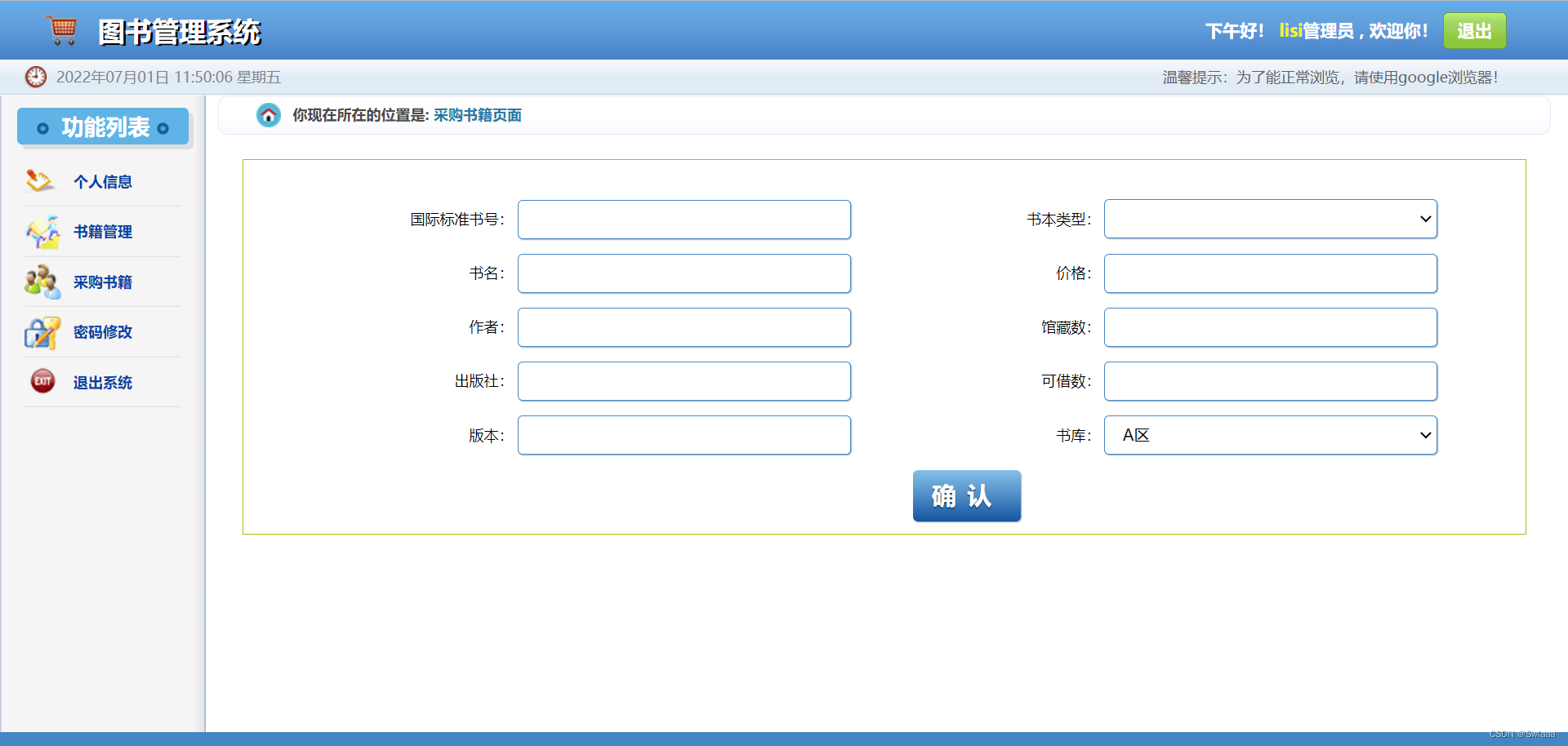

views代码段
def manage_book(request):#管理书籍 if request.method == "GET": # 此部分是当用户每次点击侧边导航栏的“管理书籍”选项时,都要显示出所有书籍资料 books = Book.objects.all() types = Type.objects.all() return render(request, 'manager/manage_book.html',context={"books": books, "types": types, "name": global_mname}) # 向前端传递所有查找到的书籍信息的集合 else: # 在manager/manage_bok.html页面中通过post方式的“搜索”按钮跳转到此处,即完成搜索操作 book_name = request.POST.get("book_name") type_id = request.POST.get("type_id") types = Type.objects.all() if book_name: # 如果书名非空,则按书名查找 book_result = Book.objects.filter(book_name=book_name) if book_result: # 如果找到的结果集非空,则输出 return render(request, 'manager/manage_book.html',context={"books": book_result, "types": types, "name": global_mname}) else: # 若搜索的结果集为0,那么输出未找到该本书! book_result = Book.objects.all() return render(request, 'manager/manage_book.html', context={"books": book_result, "types": types, "name": global_mname, "status": 0}) else: if type_id: # 如果获取的类型输入框内容不为空,则按类型查找 book_result = Book.objects.filter(book_type=type_id) if book_result: # 如果找到的结果集非空,则输出 return render(request, 'manager/manage_book.html', context={"books": book_result, "types": types, "name": global_mname}) else: # 若搜索的结果集为0,那么输出未找到类型的书! book_result = Book.objects.all() return render(request, 'manager/manage_book.html', context={"books": book_result, "types": types, "name": global_mname, "status": 1}) else: # 都为空,则显示空列表 return render(request, 'manager/manage_book.html') def add_book(request):#增加书籍的馆藏数量 if request.method == "GET": ISBN = request.GET.get("book_ISBN1") result = Book.objects.filter(ISBN=ISBN).first() number = result.book_number+1 #让该书本的馆藏数量和可借数++ rest = result.book_rest+1 Book.objects.filter(ISBN=ISBN).update(book_number = number,book_rest = rest) books = Book.objects.all() types = Type.objects.all() return render(request, 'manager/manage_book.html',context={"books": books, "types": types, "name": global_mname}) # 向前端传递所有查找到的书籍信息的集合 def reduce_book(request):#减少书籍的馆藏数量 if request.method == "GET": ISBN = request.GET.get("book_ISBN2") result = Book.objects.filter(ISBN=ISBN).first() number = result.book_number - 1 #让该书本的馆藏数量和可借数-- rest = result.book_rest -1 Book.objects.filter(ISBN=ISBN).update(book_number = number,book_rest = rest) books = Book.objects.all() types = Type.objects.all() return render(request, 'manager/manage_book.html',context={"books": books, "types": types, "name": global_mname}) # 向前端传递所有查找到的书籍信息的集合 def delete_book(request):#清空该书籍 if request.method == "GET": ISBN = request.GET.get("ISBN") print(ISBN) Book.objects.filter(ISBN = ISBN).delete()#在book表里删除该条记录 books = Book.objects.all() types = Type.objects.all() return render(request, 'manager/manage_book.html',context={"books": books, "types": types, "name": global_mname}) # 向前端传递所有查找到的书籍信息的集合 def alter_book(request):#修改书本详情 types = Type.objects.all() if request.method == "GET":#此部分是当用户在manage_book.html页面中点击修改书籍是执行,目的是显示当前书本的信息 ISBN = request.GET.get("book_ISBN3") result = Book.objects.filter(ISBN=ISBN).first() context={ "ISBN": result.ISBN, "book_name": result.book_name, "book_author": result.book_author, "book_publisher": result.book_publisher, "book_version": result.book_version, "book_price": result.book_price, "book_number": result.book_number, "book_rest": result.book_rest, "book_place": result.book_place, "type_name": result.book_type.type_name, "name": global_sname, "types": types } return render(request, 'manager/alter_book.html',context) # 向前端传递该书籍的所有信息 else:#此部分是当用户在alter_book.html页面中点击保存按钮后重新更新用户修改后的信息 ISBN = request.POST.get("ISBN") book_name = request.POST.get("book_name") book_author = request.POST.get("book_author") book_publisher = request.POST.get("book_publisher") book_version = request.POST.get("book_version") book_price = request.POST.get("book_price") book_number = request.POST.get("book_number") book_rest = request.POST.get("book_rest") book_place = request.POST.get("book_place") type_name = request.POST.get("type_name") if book_number.isdigit() and book_rest.isdigit(): # 判断输入的馆藏数和可借数是否为数字 type = Type.objects.filter(type_name=type_name).first() # 书籍类型是外键 Book.objects.filter(ISBN=ISBN).update( book_name=book_name, book_author=book_author, book_publisher=book_publisher, book_version = book_version, book_price = book_price, book_number=book_number, book_rest=book_rest, book_place = book_place, book_type=type) # 在book表里更新刚才修改的书本信息 context = { #把修改后的内容显示出来 "ISBN": ISBN, "book_name": book_name, "book_author": book_author, "book_publisher": book_publisher, "book_version": book_version, "book_price": book_price, "book_number": book_number, "book_rest": book_rest, "book_place": book_place, "type_name": type_name, "name": global_sname, "types": types } return render(request, 'manager/alter_book.html',context) # 重新向前端传递该书籍的所有信息 else: result = Book.objects.filter(ISBN=ISBN).first() context = { "ISBN": result.ISBN, "book_name": result.book_name, "book_author": result.book_author, "book_publisher": result.book_publisher, "book_version": result.book_version, "book_price": result.book_price, "book_number": result.book_number, "book_rest": result.book_rest, "book_place": result.book_place, "type_name": result.book_type.type_name, "name": global_sname, "types": types } return render(request, 'manager/alter_book.html', context) # 向前端传递该书籍的所有信息 def add_new_book(request):#添加新书籍 types = Type.objects.all() if request.method == "GET":#此部分是当每次点击侧边导航栏的“采购书籍”选项时,显示该界面 return render(request, 'manager/add_new_book.html', context={ "name": global_mname,"types":types}) else:#此部分是在add_new_book.html页面中点击确认按钮后完成的添加书籍操作 ISBN = request.POST.get("ISBN")#获取用户在前端输入框中的数据 book_name = request.POST.get("book_name") book_author = request.POST.get("book_author") book_publisher = request.POST.get("book_publisher") book_version = request.POST.get("book_version") book_price = request.POST.get("book_price") book_number = request.POST.get("book_number") book_rest = request.POST.get("book_rest") book_place = request.POST.get("book_place") type_name = request.POST.get("type_name") if book_number.isdigit() and book_rest.isdigit():#判断输入的馆藏数和可借数是否为数字 type = Type.objects.filter(type_name = type_name).first()#书籍类型是外键 Book.objects.create(ISBN=ISBN,book_name=book_name,book_author=book_author,book_publisher=book_publisher,book_version=book_version, book_price=book_price,book_number=book_number,book_rest=book_rest,book_place=book_place,book_type=type)#在book表里添加新记录 return render(request, 'manager/add_new_book.html', context={ "name": global_mname,"types":types}) else: return render(request, 'manager/add_new_book.html', context={ "name": global_mname,"types":types})- 1
- 2
- 3
- 4
- 5
- 6
- 7
- 8
- 9
- 10
- 11
- 12
- 13
- 14
- 15
- 16
- 17
- 18
- 19
- 20
- 21
- 22
- 23
- 24
- 25
- 26
- 27
- 28
- 29
- 30
- 31
- 32
- 33
- 34
- 35
- 36
- 37
- 38
- 39
- 40
- 41
- 42
- 43
- 44
- 45
- 46
- 47
- 48
- 49
- 50
- 51
- 52
- 53
- 54
- 55
- 56
- 57
- 58
- 59
- 60
- 61
- 62
- 63
- 64
- 65
- 66
- 67
- 68
- 69
- 70
- 71
- 72
- 73
- 74
- 75
- 76
- 77
- 78
- 79
- 80
- 81
- 82
- 83
- 84
- 85
- 86
- 87
- 88
- 89
- 90
- 91
- 92
- 93
- 94
- 95
- 96
- 97
- 98
- 99
- 100
- 101
- 102
- 103
- 104
- 105
- 106
- 107
- 108
- 109
- 110
- 111
- 112
- 113
- 114
- 115
- 116
- 117
- 118
- 119
- 120
- 121
- 122
- 123
- 124
- 125
- 126
- 127
- 128
- 129
- 130
- 131
- 132
- 133
- 134
- 135
- 136
- 137
- 138
- 139
- 140
- 141
- 142
- 143
- 144
- 145
- 146
- 147
- 148
- 149
- 150
- 151
- 152
- 153
- 154
- 155
- 156
- 157
- 158
3、数据管理模块
数据管理模块主要是设计数据库的存储和操作,django的ROM机制可以让用户在models上面编写要创建的数据表类型,通过执行迁移,直接在数据库创建数据库表
models.py代码段
from django.db import models class User(models.Model): #用户表 account=models.CharField(max_length = 20,primary_key=True)#账号 user_password=models.CharField(max_length = 20)#用户密码 user_identity=models.CharField(max_length = 20)#用户身份 class Student(models.Model): #学生信息表 student_id=models.CharField(max_length = 20,primary_key=True)#学号 主键 student_name=models.CharField(max_length=20)#姓名 student_tel=models.CharField(max_length = 20)#电话 student_major=models.CharField(max_length = 20)#院系 student_email=models.CharField(max_length = 50)#邮箱 class Manager(models.Model): #图书管理员信息表 manager_id=models.CharField(max_length = 20,primary_key=True)#工号 主键 manager_name=models.CharField(max_length=20)#姓名 manager_tel=models.CharField(max_length = 20)#电话 manager_email=models.CharField(max_length = 50)#邮箱 manager_stack=models.CharField(max_length = 20)#管理书库 class Type(models.Model):#书籍类型表 type_id= models.CharField(max_length=20,primary_key=True) # 类型编号,主键 type_name = models.CharField(max_length=20) # 类型名称 class Book(models.Model):#书本信息表 ISBN= models.CharField(max_length = 20,primary_key=True) # 国际标准书号 主键 book_name = models.CharField(max_length=20) # 书名 book_author = models.CharField(max_length=20) # 作者 book_publisher = models.CharField(max_length=20) # 出版社 book_version = models.CharField(max_length=20) # 版本 book_price = models.CharField(max_length=20) # 价格 book_number = models.IntegerField() # 总库存数(馆藏数) book_rest = models.IntegerField() # 可借数 book_place = models.CharField(max_length=20) # 所属书库 book_type = models.ForeignKey(Type, on_delete=models.CASCADE)#书籍类型 class Borrow(models.Model):#借阅表 student_id= models.CharField(max_length=20) # 借书人学号 student_name = models.CharField(max_length=20) # 借书人姓名 student_tel = models.CharField(max_length=20) # 借书人联系方式 book_id = models.CharField(max_length=20) # 书籍编号 book_name = models.CharField(max_length=20) # 书名 borrow_time = models.CharField(max_length=20) # 借书时间 rest_time = models.IntegerField() # 剩余天数- 1
- 2
- 3
- 4
- 5
- 6
- 7
- 8
- 9
- 10
- 11
- 12
- 13
- 14
- 15
- 16
- 17
- 18
- 19
- 20
- 21
- 22
- 23
- 24
- 25
- 26
- 27
- 28
- 29
- 30
- 31
- 32
- 33
- 34
- 35
- 36
- 37
- 38
- 39
- 40
- 41
- 42
- 43
- 44
- 45
- 46
- 47
- 48
- 49
- 50
settings.py关于数据库的相关设定
DATABASES = { 'default': { 'ENGINE': 'django.db.backends.mysql', 'NAME': 'Library', #数据库名字 'USER': 'xxxx', #用户名 'PASSWORD': 'xxxx',#密码 'HOST': 'localhost', #本地主机 'PORT': '3306' #端口号 } }- 1
- 2
- 3
- 4
- 5
- 6
- 7
- 8
- 9
- 10
4、前端模块
前端模块是向用户展示的用户界面,通常保存在templates文件夹下,后端通过与前端的数据进行交互,通过路由返回具体的页面实现渲染。
templates文件夹目录
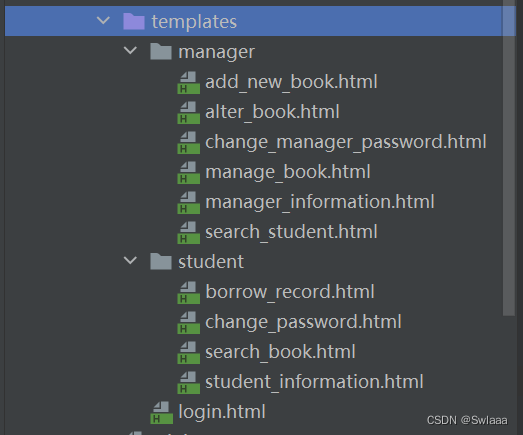
urls.py路由路径
from django.contrib import admin from django.urls import path,include from MyApp import views as App_views urlpatterns = [ path('admin/', admin.site.urls), path('MyApp/',include('MyApp.urls')), path('login/',App_views.login), path('student_register/',App_views.student_register), path('manager_register/',App_views.manager_register), path('login_judge/', App_views.login_judge), path('student_information/',App_views.student_information), path('search_book/',App_views.search_book), path('borrow_record/',App_views.borrow_record), path('change_password/',App_views.change_password), path('borrow_book/',App_views.borrow_book), path('return_book/',App_views.return_book), path('manager_information/', App_views.manager_information), path('manage_book/', App_views.manage_book), path('delete_book/', App_views.delete_book), path('add_book/', App_views.add_book), path('reduce_book/', App_views.reduce_book), path('change_manager_password/', App_views.change_manager_password), path('add_new_book/', App_views.add_new_book), path('alter_book/', App_views.alter_book), path('',App_views.login), ]- 1
- 2
- 3
- 4
- 5
- 6
- 7
- 8
- 9
- 10
- 11
- 12
- 13
- 14
- 15
- 16
- 17
- 18
- 19
- 20
- 21
- 22
- 23
- 24
- 25
- 26
通过django创建的数据库表
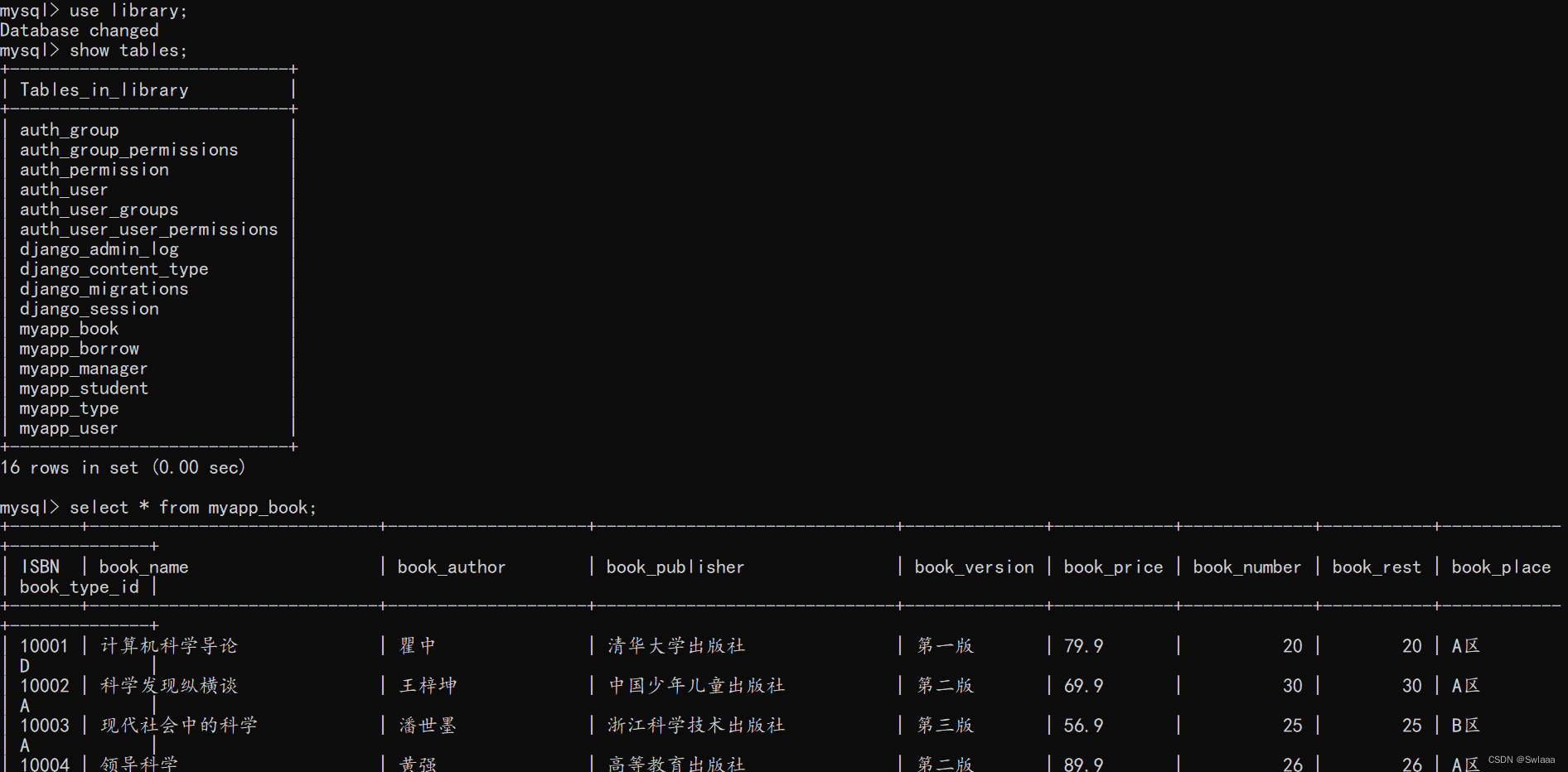
视频演示链接:
源代码获取可私信或+QQ:1834661953
先自我介绍一下,小编13年上师交大毕业,曾经在小公司待过,去过华为OPPO等大厂,18年进入阿里,直到现在。深知大多数初中级java工程师,想要升技能,往往是需要自己摸索成长或是报班学习,但对于培训机构动则近万元的学费,着实压力不小。自己不成体系的自学效率很低又漫长,而且容易碰到天花板技术停止不前。因此我收集了一份《java开发全套学习资料》送给大家,初衷也很简单,就是希望帮助到想自学又不知道该从何学起的朋友,同时减轻大家的负担。添加下方名片,即可获取全套学习资料哦
-
相关阅读:
Revit中阀门倒置怎么调整?设备如何快速连接
LeetCode(力扣)216. 组合总和 IIIPython
c++编程(15)——list的模拟实现
儿童台灯哪个品牌更护眼推荐?2022年最新护眼台灯十大品牌排行榜
java验证码的实现
C++:deque的概念以及stack和queue的模拟实现
【AI学习笔记】TensorFlow GPU版本的安装(超详细)
【Spring MVC 源码】Spring MVC 如何解析请求
Java多态详解
最长回文子串&最长子串&第K大的数字&atoi
- 原文地址:https://blog.csdn.net/m0_59092234/article/details/126056269

- 最新文章
-
沪漂五周年了:我越来越迷茫了
Agentic Skill Routing 实战:别再把所有 Skill 塞进 AI Agent 上下文
MySQL-Seconds_behind_master的精度误差
[MAF预定义ChatClient中间件-03]CachingChatClient——利用缓存省钱省时间
AI的至暗历史:从万众期待到被政府撤资,AI的两次死亡徘徊
Agent OS :五种驯服不确定性的范式
PortSwigger SQL注入LAB11
数据库即时编译JIT
[Begin]AI Learn Data Day 0
深度学习进阶(二十七)现代 LLM 的核心架构设计其二:SwiGLU