-
Typora设置标题自动标号
Typora由于默认标题无法自动标号,每次编辑时需要手动处理。为实现标题自动编号,需要进行相关操作。
一 官方说明
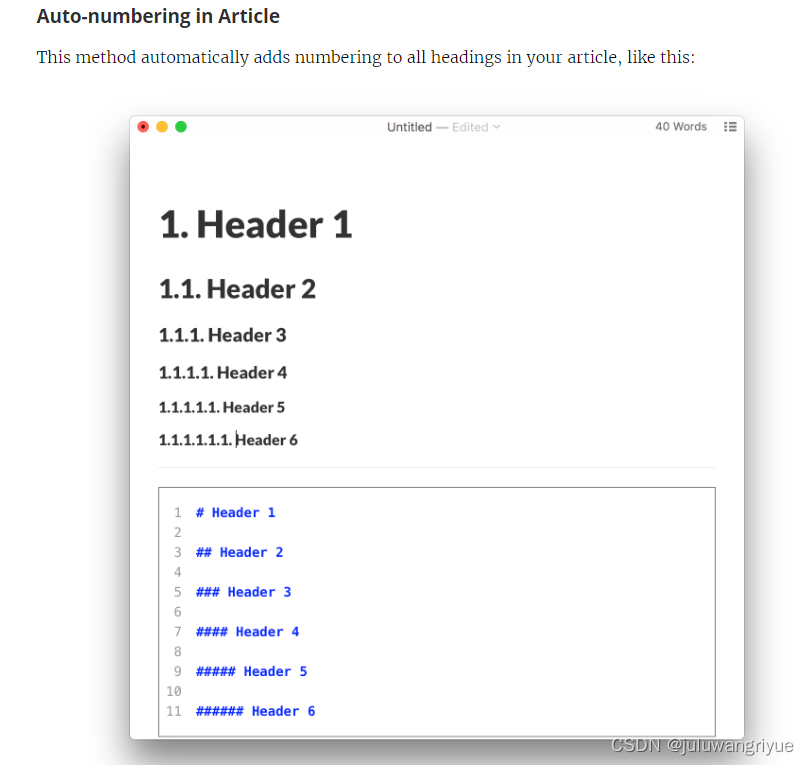
To achieve this, add the following to your base.user.css or [theme].user.css in the theme folder.
- /** initialize css counter */
- #write {
- counter-reset: h1
- }
- h1 {
- counter-reset: h2
- }
- h2 {
- counter-reset: h3
- }
- h3 {
- counter-reset: h4
- }
- h4 {
- counter-reset: h5
- }
- h5 {
- counter-reset: h6
- }
- /** put counter result into headings */
- #write h1:before {
- counter-increment: h1;
- content: counter(h1) ". "
- }
- #write h2:before {
- counter-increment: h2;
- content: counter(h1) "." counter(h2) ". "
- }
- #write h3:before,
- h3.md-focus.md-heading:before /** override the default style for focused headings */ {
- counter-increment: h3;
- content: counter(h1) "." counter(h2) "." counter(h3) ". "
- }
- #write h4:before,
- h4.md-focus.md-heading:before {
- counter-increment: h4;
- content: counter(h1) "." counter(h2) "." counter(h3) "." counter(h4) ". "
- }
- #write h5:before,
- h5.md-focus.md-heading:before {
- counter-increment: h5;
- content: counter(h1) "." counter(h2) "." counter(h3) "." counter(h4) "." counter(h5) ". "
- }
- #write h6:before,
- h6.md-focus.md-heading:before {
- counter-increment: h6;
- content: counter(h1) "." counter(h2) "." counter(h3) "." counter(h4) "." counter(h5) "." counter(h6) ". "
- }
- /** override the default style for focused headings */
- #write>h3.md-focus:before,
- #write>h4.md-focus:before,
- #write>h5.md-focus:before,
- #write>h6.md-focus:before,
- h3.md-focus:before,
- h4.md-focus:before,
- h5.md-focus:before,
- h6.md-focus:before {
- color: inherit;
- border: inherit;
- border-radius: inherit;
- position: inherit;
- left:initial;
- float: none;
- top:initial;
- font-size: inherit;
- padding-left: inherit;
- padding-right: inherit;
- vertical-align: inherit;
- font-weight: inherit;
- line-height: inherit;
- }
4.1、Auto-Numbering in TOC
If you want TOC entities to be displayed auto-numbered, you could try http://pastebin.com/NYugSbXk posted by a Typora user.
- /**************************************
- * Header Counters in TOC
- **************************************/
- /* No link underlines in TOC */
- .md-toc-inner {
- text-decoration: none;
- }
- .md-toc-content {
- counter-reset: h1toc
- }
- .md-toc-h1 {
- margin-left: 0;
- font-size: 1.5rem;
- counter-reset: h2toc
- }
- .md-toc-h2 {
- font-size: 1.1rem;
- margin-left: 2rem;
- counter-reset: h3toc
- }
- .md-toc-h3 {
- margin-left: 3rem;
- font-size: .9rem;
- counter-reset: h4toc
- }
- .md-toc-h4 {
- margin-left: 4rem;
- font-size: .85rem;
- counter-reset: h5toc
- }
- .md-toc-h5 {
- margin-left: 5rem;
- font-size: .8rem;
- counter-reset: h6toc
- }
- .md-toc-h6 {
- margin-left: 6rem;
- font-size: .75rem;
- }
- .md-toc-h1:before {
- color: black;
- counter-increment: h1toc;
- content: counter(h1toc) ". "
- }
- .md-toc-h1 .md-toc-inner {
- margin-left: 0;
- }
- .md-toc-h2:before {
- color: black;
- counter-increment: h2toc;
- content: counter(h1toc) ". " counter(h2toc) ". "
- }
- .md-toc-h2 .md-toc-inner {
- margin-left: 0;
- }
- .md-toc-h3:before {
- color: black;
- counter-increment: h3toc;
- content: counter(h1toc) ". " counter(h2toc) ". " counter(h3toc) ". "
- }
- .md-toc-h3 .md-toc-inner {
- margin-left: 0;
- }
- .md-toc-h4:before {
- color: black;
- counter-increment: h4toc;
- content: counter(h1toc) ". " counter(h2toc) ". " counter(h3toc) ". " counter(h4toc) ". "
- }
- .md-toc-h4 .md-toc-inner {
- margin-left: 0;
- }
- .md-toc-h5:before {
- color: black;
- counter-increment: h5toc;
- content: counter(h1toc) ". " counter(h2toc) ". " counter(h3toc) ". " counter(h4toc) ". " counter(h5toc) ". "
- }
- .md-toc-h5 .md-toc-inner {
- margin-left: 0;
- }
- .md-toc-h6:before {
- color: black;
- counter-increment: h6toc;
- content: counter(h1toc) ". " counter(h2toc) ". " counter(h3toc) ". " counter(h4toc) ". " counter(h5toc) ". " counter(h6toc) ". "
- }
- .md-toc-h6 .md-toc-inner {
- margin-left: 0;
- }
- /**************************************
- * Header Counters in Content
- **************************************/
- /** initialize css counter */
- #write {
- counter-reset: h1
- }
- h1 {
- counter-reset: h2
- }
- h2 {
- counter-reset: h3
- }
- h3 {
- counter-reset: h4
- }
- h4 {
- counter-reset: h5
- }
- h5 {
- counter-reset: h6
- }
- /** put counter result into headings */
- #write h1:before {
- counter-increment: h1;
- content: counter(h1) ". "
- }
- #write h2:before {
- counter-increment: h2;
- content: counter(h1) "." counter(h2) ". "
- }
- #write h3:before, h3.md-focus.md-heading:before { /*override the default style for focused headings */
- counter-increment: h3;
- content: counter(h1) "." counter(h2) "." counter(h3) ". "
- }
- #write h4:before, h4.md-focus.md-heading:before {
- counter-increment: h4;
- content: counter(h1) "." counter(h2) "." counter(h3) "." counter(h4) ". "
- }
- #write h5:before, h5.md-focus.md-heading:before {
- counter-increment: h5;
- content: counter(h1) "." counter(h2) "." counter(h3) "." counter(h4) "." counter(h5) ". "
- }
- #write h6:before, h6.md-focus.md-heading:before {
- counter-increment: h6;
- content: counter(h1) "." counter(h2) "." counter(h3) "." counter(h4) "." counter(h5) "." counter(h6) ". "
- }
- /** override the default style for focused headings */
- #write>h3.md-focus:before, #write>h4.md-focus:before, #write>h5.md-focus:before, #write>h6.md-focus:before, h3.md-focus:before, h4.md-focus:before, h5.md-focus:before, h6.md-focus:before {
- color: inherit;
- border: inherit;
- border-radius: inherit;
- position: inherit;
- left: initial;
- float: none;
- top: initial;
- font-size: inherit;
- padding-left: inherit;
- padding-right: inherit;
- vertical-align: inherit;
- font-weight: inherit;
- line-height: inherit;
- }
4.2、Auto-Numbering Outline panel
To show auto-numbering in Typora’s Outline panel, disable the collapsable outline panel in the preferences panel and then try https://pastebin.com/XmYgBbaz.
- .sidebar-content {
- counter-reset: h1
- }
- .outline-h1 {
- counter-reset: h2
- }
- .outline-h2 {
- counter-reset: h3
- }
- .outline-h3 {
- counter-reset: h4
- }
- .outline-h4 {
- counter-reset: h5
- }
- .outline-h5 {
- counter-reset: h6
- }
- .outline-h1>.outline-item>.outline-label:before {
- counter-increment: h1;
- content: counter(h1) ". "
- }
- .outline-h2>.outline-item>.outline-label:before {
- counter-increment: h2;
- content: counter(h1) "." counter(h2) ". "
- }
- .outline-h3>.outline-item>.outline-label:before {
- counter-increment: h3;
- content: counter(h1) "." counter(h2) "." counter(h3) ". "
- }
- .outline-h4>.outline-item>.outline-label:before {
- counter-increment: h4;
- content: counter(h1) "." counter(h2) "." counter(h3) "." counter(h4) ". "
- }
- .outline-h5>.outline-item>.outline-label:before {
- counter-increment: h5;
- content: counter(h1) "." counter(h2) "." counter(h3) "." counter(h4) "." counter(h5) ". "
- }
- .outline-h6>.outline-item>.outline-label:before {
- counter-increment: h6;
- content: counter(h1) "." counter(h2) "." counter(h3) "." counter(h4) "." counter(h5) "." counter(h6) ". "
- }
二 具体操作
1 打开主题文件夹
打开typora,先点击“文件”,再点击“偏好设置”,再点击“外观”,最后点击“打开主题文件”来到如下界面。

2 修改主题文件
- 在此路径下新建“base.user.css”,将上面三份代码复制到到文档里面,保存后退出。
3 重启Typora
三 注意
1. 开始编号标题必须是一级标题格式。否则编号出错
2. 有几个数字代表几级标题。如1.代表一级标题。1.1.1代表三级标题
3. 设置为标题格式后输入内容即可对标题编辑
参考链接
-
相关阅读:
【节能学院】Acrel5000web能耗系统在某学院的应用
中学生作文指导杂志中学生作文指导杂志社中学生作文指导编辑部2022年第22期目录
JAVA 实用开源工具集持续梳理中......
CSC青年骨干教师项目教师节当天开始申报
忽视日志吃大亏,手把手教你玩转 SpringBoot 日志
五、java版 SpringCloud分布式微服务云架构之Java 基本数据类型
【王道计算机组成原理】第三章 存储系统
基于ChatGPT用AI实现自然对话
jsp高校学生资助管理系统myeclipse开发mysql数据库serlvet技术BS模式java编程网页结构
Clickhouse数据库部署、Python3压测实践
- 原文地址:https://blog.csdn.net/m0_49448331/article/details/126074664

- 最新文章
-
【FHE】我们如何实现同态加密推理(八):SiLU 的密文化——两条路径,和一个 8 字节的开关
SQLcl 中 c/old/new 替换变量为何失效?先定位再替换
不让模型写作文,直接从它脑子里读答案:Jev 决策在 .NET 的两条路线
Halo插件:支持GitHub的图床附件策略
电视投屏界的“一股清流”!SimpleTVCast 6.0.0-beta 抢先体验:无需TV端App,界面大换血!✨
华三VXLAN集中式网关实战指南:Spine多活网关 + 双活接入(M-LAG)
软件更好写之后口碑会更重要
大 O、大 Omega、大 Theta 的区别,O(n) 复杂度是什么意思
Java标签跳转:一个鲜为人知但却很实用的小技巧
多智能体系统论文速读