-
input输入框超出部分用省略号表示以及判断内容是否有超出(PC端)
注意:下面代码是在PC的Web端跑的喔,移动端等其他环境我还没试过…
input输入框超出部分用省略号表示
这部分用css样式设置
overflow: hidden和text-overflow: ellipsis实现就可以,找到其他答案是要设置width和white-space: nowrap,尝试了一下,这两个不设置也是可以实现。如果不行那就都加上试试。下面的代码可以复制到菜鸟教程在线编辑器上运行看看。
DOCTYPE html> <html> <head> <meta charset="utf-8"> <title>菜鸟教程(runoob.com)title> <style> .wrap { width: 300px; padding: 10px; border: 1px solid #ccc; } .inputClass { /* width:150px; */ /* white-space: nowrap; */ text-overflow: ellipsis; overflow: hidden; } style> head> <body> <div class="wrap"> <input class="inputClass" type="text" name="FirstName" value="MickeyMickeyMickeyMickeyMickey"> <p>提示信息p> div> body> html>- 1
- 2
- 3
- 4
- 5
- 6
- 7
- 8
- 9
- 10
- 11
- 12
- 13
- 14
- 15
- 16
- 17
- 18
- 19
- 20
- 21
- 22
- 23
- 24
- 25
- 26
- 27
- 28
效果:

input输入框判断文本内容是否有超出
根据内容是否有超出,可以判断是否需要展示气泡提示框(比如Element的Tooltip组件)来提示文本
当然,鼠标点击进去就可以左右移动看到全部内容,但是需求嘛…你懂的主要代码(
const isEllipsis = input.offsetWidth < input.scrollWidth):DOCTYPE html> <html> <head> <meta charset="utf-8"> <title>菜鸟教程(runoob.com)title> <style> .wrap { width: 300px; padding: 10px; border: 1px solid #ccc; } .inputClass { /* width:150px; */ /* white-space: nowrap; */ text-overflow: ellipsis; overflow: hidden; } style> <script type="text/javascript"> function determineTheOverflow(input){ var isEllipsis = input.offsetWidth < input.scrollWidth; input.title = isEllipsis? input.value : ''; } script> head> <body> <div class="wrap"> <input class="inputClass" type="text" name="FirstName" value="MickeyMickeyMickeyMickeyMickey" onblur="determineTheOverflow(this)"> <p>提示信息p> div> body> html>- 1
- 2
- 3
- 4
- 5
- 6
- 7
- 8
- 9
- 10
- 11
- 12
- 13
- 14
- 15
- 16
- 17
- 18
- 19
- 20
- 21
- 22
- 23
- 24
- 25
- 26
- 27
- 28
- 29
- 30
- 31
- 32
- 33
- 34
效果:

input输入框超出省略部分鼠标按下会移位的问题
当在 外层wrap边框元素的里面, “提示信息” 文本的右边,按下鼠标左键不放,然后往左上输入框的位置移动,接着往右移动,然后放掉鼠标左键,会出现 input 内容跟随的移动的问题。内容还是有省略且不会复原。如下图:
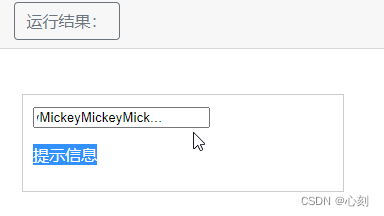
解决方法1:
不要留有空位;因为鼠标按下左键时的位置,是 p元素的内容区,是一个可选中文本的范围。把 p元素改用span,或者让内容区的宽度与文本内容的宽度刚好包裹,应该就不会有这种问题出现。解决方法2:
监听mousedown事件,阻止默认行为,但是会导致被阻止的这个元素里面的文本内容无法选中。如果是一个icon图标,不需要有选中效果的话,可以使用这种方式。DOCTYPE html> <html> <head> <meta charset="utf-8"> <title>菜鸟教程(runoob.com)title> <style> .wrap { width: 300px; padding: 10px; border: 1px solid #ccc; } .inputClass { /* width:150px; */ /* white-space: nowrap; */ text-overflow: ellipsis; overflow: hidden; } style> <script type="text/javascript"> function determineTheOverflow(input){ var isEllipsis = input.offsetWidth < input.scrollWidth; input.title = isEllipsis? input.value : ''; } function preventDefault(event) { event.preventDefault(); } script> head> <body> <div class="wrap"> <input class="inputClass" type="text" name="FirstName" value="MickeyMickeyMickeyMickeyMickey" onblur="determineTheOverflow(this)"> <span onmousedown="preventDefault(event)">提示信息span> div> body> html>- 1
- 2
- 3
- 4
- 5
- 6
- 7
- 8
- 9
- 10
- 11
- 12
- 13
- 14
- 15
- 16
- 17
- 18
- 19
- 20
- 21
- 22
- 23
- 24
- 25
- 26
- 27
- 28
- 29
- 30
- 31
- 32
- 33
- 34
- 35
- 36
- 37
- 38
-
相关阅读:
MongoDB基础
python数据分析——NumPy基础
sCrypt 现在支持 Ordinals 了
火车票管理系统c++
Github Copilot连接不上服务器
QT笔记——QMetaEnum类
网络安全笔记 win/mac 进程相关
Direct LiDAR-Inertial Odometry
思维模型 秩序
【HUST】网安纳米|2023年研究生纳米技术考试参考
- 原文地址:https://blog.csdn.net/weixin_44679078/article/details/126067530

- 最新文章
-
沪漂五周年了:我越来越迷茫了
Agentic Skill Routing 实战:别再把所有 Skill 塞进 AI Agent 上下文
MySQL-Seconds_behind_master的精度误差
[MAF预定义ChatClient中间件-03]CachingChatClient——利用缓存省钱省时间
AI的至暗历史:从万众期待到被政府撤资,AI的两次死亡徘徊
Agent OS :五种驯服不确定性的范式
PortSwigger SQL注入LAB11
数据库即时编译JIT
[Begin]AI Learn Data Day 0
深度学习进阶(二十七)现代 LLM 的核心架构设计其二:SwiGLU